
Macro For Creating a dwStyle for a window without a menu bar and title bar
Introduce For CreateWindowEx
Creates an overlapped, pop-up, or child window with an extended window style; otherwise, this function is identical to the CreateWindow function. For more information about creating a window and for full descriptions of the other parameters of CreateWindowEx, see CreateWindow.
CreateWindowEx Syntax
Copy

HWND CreateWindowExA(

  DWORD     dwExStyle,

  LPCSTR    lpClassName,

  LPCSTR    lpWindowName,

  DWORD     dwStyle,

  int       X,

  int       Y,

  int       nWidth,

  int       nHeight,

  HWND      hWndParent,

  HMENU     hMenu,

  HINSTANCE hInstance,

  LPVOID    lpParam

);
The forth argument dwStyle indicated the style of the window being created. This parameter can be a combination of the window style values.
window style values
Macro Explanation:
WS_CLIPSIBLINGS
0x04000000L
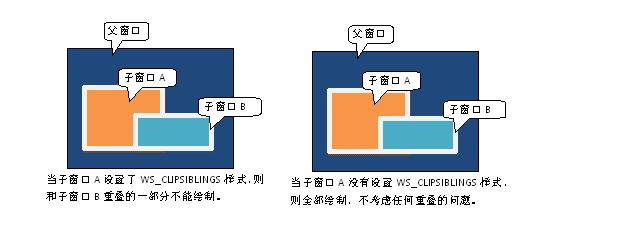
Clips child windows relative to each other; that is, when a particular child window receives a WM_PAINT message, the WS_CLIPSIBLINGS style clips all other overlapping child windows out of the region of the child window to be updated. If WS_CLIPSIBLINGS is not specified and child windows overlap, it is possible, when drawing within the client area of a child window, to draw within the client area of a neighboring child window.
WS_CLIPCHILDREN
0x02000000L
Excludes the area occupied by child windows when drawing occurs within the parent window. This style is used when creating the parent window.
WS_POPUP
0x80000000L
The windows is a pop-up window. This style cannot be used with the WS_CHILD style.
Addition:In SCDN's win32 tutorial, this style was used to create a window with standard styles, including menu bars, maximize, minimize, close, etc.
WS_OVERLAPPEDWINDOW
(WS_OVERLAPPED | WS_CAPTION | WS_SYSMENU | WS_THICKFRAME | WS_MINIMIZEBOX | WS_MAXIMIZEBOX)
The window is an overlapped window. Same as the WS_TILEDWINDOW style.
Macro For Creating a dwStyle for a window without a menu bar and title bar的更多相关文章
- [UE4]Window Title Bar Area
一.Window Title Bar Area.windows窗口拖拽控件 二.window Buttons Enabled,在控件的右上角显示:最小化.最大化,关闭按钮; Toggle Fullsc ...
- [Mac] How do I move a window whose title bar is off-screen?
有时窗口一不小心拖出视野外了,此时无法移动窗口.如何还原? 有人遇到相似问题,已有解决方法: 方法就是,菜单 Windows - Zoom 这时窗口会还原.
- Tools (StExBar vs Cmder)which can switch to command line window on context menu in windows OS
https://tools.stefankueng.com/StExBar.html https://github.com/cmderdev/cmder
- Directshow 通过 put_Owner 指定显示窗口后,自动刷新问题
在Directshow中,我们可以对render指定显示窗口,在写程序的过程中, 发现通过put_Owner设置的显示窗口存在自动刷新问题,譬如窗口被遮挡然后再次露出时,被遮挡部分不能自动刷新,需要拖 ...
- Windoows窗口程序二
WNDCLASS属性style取值: CS_GLOBALCLASS--应用程序全局窗口类 CS_BYTEALIGNCLIENT--窗口客户区的水平位置8倍数对齐 CS_BYTEALIGNWINDOW- ...
- CreateWindow创建无边框 可拉伸窗体
createwindow 定义 HWND WINAPI CreateWindow( _In_opt_ LPCTSTR lpClassName, _In_opt_ LPCTSTR lpWindowNam ...
- Qt Creator调试
与调试器交互的几种方法: 1.单行运行或者单指令运行 2.中断程序运行 3.设置断点 4.检查调用栈空间的内容 5.检查并修改局部或者全局变量 6.检查并修改被调试程序的寄存器和内存内容 7.检查装载 ...
- QWidget 实现 打破布局 或者 当前窗体内的 弹窗 (借助伪造实现)
but = QtWidgets.QToolButton(Dialog2) but.setText('**') but.setAutoRaise(True) layout.addWidget(but) ...
- 第一篇 入门必备 (Android学习笔记)
第一篇 入门必备 第1章 初识Android 第2章 搭建你的开发环境 第3章 创建第一个程序--HelloWorld 第4章 使用Android工具 ●Android之父 Android安迪·罗 ...
随机推荐
- 大规模使用 Apache Kafka 的20个最佳实践
必读 | 大规模使用 Apache Kafka 的20个最佳实践 配图来源:书籍<深入理解Kafka> Apache Kafka是一款流行的分布式数据流平台,它已经广泛地被诸如New Re ...
- (八)控件介绍,QLable
Radio单选框 默认互斥,加GroupBox进行分组可以解决这个 checkBox复选 ListWidget TableWIdget:有表头 #include "widget.h" ...
- Redis的删除机制、持久化 主从
转: Redis的删除机制.持久化 主从 Redis的使用分两点: 性能如下图所示,我们在碰到需要执行耗时特别久,且结果不频繁变动的SQL,就特别适合将运行结果放入缓存.这样,后面的请求就去缓存中读取 ...
- Axure8.0 如何在函数里直接更改文本颜色?
在用Axure8.0做中继器一个练习时,有个文本标签想改变颜色,没有找到地方,不经意间在某吧里面看到了帖子,非常感谢,赶紧记下来! 好了 大功告成!再也不会为这个小细节烦恼了!
- 升级AndroidStudio3.4问题汇总
1.Could not get unknown property 'bootClasspath' for object of type org.gradle.api.tasks.compile.Com ...
- Luogu P4716 【模板】最小树形图
题目链接\(Click\) \(Here\) 不知道有什么用的一个东西.本来不打算再大量扩知识点了但还是学一下好了,反正也不难. 原理:树上父亲唯一,每次选最短的父边. 此时会有两类情况: 就这样正常 ...
- 一、docker的原理
一.docker解决什么问题: 高效的利用资源 应用之间相互隔离 应用之间不能发生资源抢占,每个应用只能使用事先注册申请的资源. 环境封装,利于迁移 二.docker的原理: 1.Namespaces ...
- kubernetes 核心技术概念(二)之 volume namespace annoation
volume k8s通过数据卷来提供pod数据的持久化,k8s的数据卷是对docker数据卷的扩展,k8s的数据卷是pod级别的,用来实现pod中容器的文件共享 volume是pod中能被多个容器访问 ...
- hbase-default.xml(Hbase 默认参数翻译)
hbase.tmp.dir \({java.io.tmpdir}/hbase-\){user.name} 本地文件系统上的临时目录.将'/tmp'改为其他可以持久保存文件的位置,通常能够解决java. ...
- STM32的内存管理
ref:https://www.cnblogs.com/leo0621/p/9977932.html 这里针对STM32F407芯片+1M外部内存的内存管理!(全篇是个人愚见,如果错误,请不吝指出!) ...