
Fluentd直接传输日志给Elasticsearch
官方文档地址:https://docs.fluentd.org/output/elasticsearch
td-agent的v3.0.1版本以后自带包含out_elasticsearch插件,不用再安装了,可以直接使用。
若是使用的是Fluentd,则需要安装这个插件:
$ fluent-gem install fluent-plugin-elasticsearch
配置示例
<match my.logs>

  @type elasticsearch

  host localhost

  port 9200

  logstash_format true

</match>
参数说明
- @type:必填,elasticsearch
- host:可选,elasticsearch连接地址,默认是localhost
- port:可选,elasticsearch使用的端口,默认是9200
- hosts:可选,连接多个elasticsearch时使用,若是使用这个,host和port配置的则会被忽略,则用法如下:
hosts host1:port1,host2:port2,host3:port3

# or

hosts https://customhost.com:443/path,https://username:password@host-failover.com:443
- user:可选,默认nil
- password:可选,默认nil
- scheme:可选,连接协议,默认http
- path: 可选,Elasticsearch的REST API端点,用于发布写请求,默认nil
- index_name,可选,索引名称,默认fluentd,用法示例:
# index by tags

index_name fluentd.${tag}

# by tags and timestamps

# 这种形式的还需要在chunk_keys中设置tag和time,如下所示:

index_name fluentd.${tag}.%Y%m%d
<match my.logs>

  @type elasticsearch

  host localhost

  port 9200

  index_name fluentd.${tag}.%Y%m%d => fluentd.my.logs.20201105

  <buffer tag,time>

    timekey 1m

  </buffer>

</match>
- logstash_format:可选,默认false,若为true,则索引名称格式是logstash-%Y.%m.%d,比index_name优先级高
- logstash_prefix:可选,logstash前缀索引名,用于在logstash_format为true时,默认logstash
- @log_level:可选,日志等级,参数有fatal, error, warn, info, debug, trace
其他
可以使用%{}样式占位符来转义URL编码所需的字符
比如:
# 有效配置

user %{demo+}

password %{@secret}

hosts https://%{j+hn}:%{passw@rd}@host1:443/elastic/,http://host2

# 无效配置

user demo+

password @secret
实际使用案例
收集openresty(nginx)日志
# cat /etc/td-agent/td-agent.conf

<source>

  @type tail

  @id input_tail

  <parse>

    @type nginx

  </parse>

  path /usr/local/openresty/nginx/logs/host.access.log

  tag td.nginx.access

</source>

<match td.nginx.access>

  @type elasticsearch

  host localhost

  port 9200

  index_name fluentd.${tag}.%Y%m%d

  <buffer tag,time>

    timekey 1m

  </buffer>

</match>
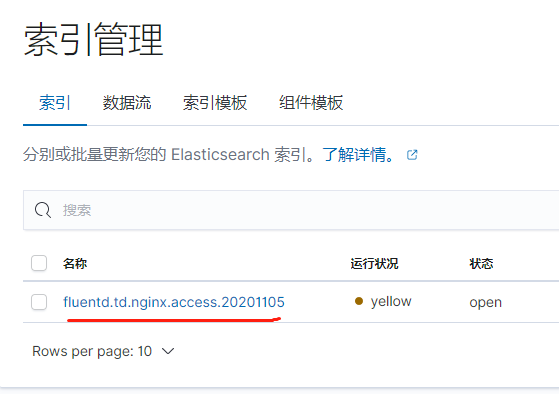

关于@type nginx日志过滤的内容
官方文档地址:https://docs.fluentd.org/parser/nginx
使用的正则表达式:
expression /^(?<remote>[^ ]*) (?<host>[^ ]*) (?<user>[^ ]*) \[(?<time>[^\]]*)\] "(?<method>\S+)(?: +(?<path>[^\"]*?)(?: +\S*)?)?" (?<code>[^ ]*) (?<size>[^ ]*)(?: "(?<referer>[^\"]*)" "(?<agent>[^\"]*)"(?:\s+(?<http_x_forwarded_for>[^ ]+))?)?$/

time_format %d/%b/%Y:%H:%M:%S %z
remote, user, method, path, code, size, referer, agent and http_x_forwarded_for 都包含在record中,时间用于事件时间
# 日志内容

127.0.0.1 192.168.0.1 - [28/Feb/2013:12:00:00 +0900] "GET / HTTP/1.1" 200 777 "-" "Opera/12.0" -

# 过滤后的结果

time:

1362020400 (28/Feb/2013:12:00:00 +0900)

record:

{

  "remote"              : "127.0.0.1",

  "host"                : "192.168.0.1",

  "user"                : "-",

  "method"              : "GET",

  "path"                : "/",

  "code"                : "200",

  "size"                : "777",

  "referer"             : "-",

  "agent"               : "Opera/12.0",

  "http_x_forwarded_for": "-"

}
假设不用这个参数的话,假若删除
<parse>

  @type nginx

</parse>
启动后则会报错:
<parse> section is required
只得使用none替换:
<parse>

  @type none

</parse>

Fluentd直接传输日志给Elasticsearch的更多相关文章
- Fluentd直接传输日志给kafka
官方文档地址:https://docs.fluentd.org/output/kafka td-agent版本自带包含out_kafka2插件,不用再安装了,可以直接使用. 若是使用的是Fluentd ...
- Fluentd直接传输日志给MongoDB副本集 (replset)
官方文档地址:https://docs.fluentd.org/output/mongo_replset td-agent版本默认没有包含out_mongo插件,需要安装这个插件才能使用 使用的是td ...
- Fluentd直接传输日志给MongoDB (standalone)
官方文档地址:https://docs.fluentd.org/output/mongo td-agent版本默认没有包含out_mongo插件,需要安装这个插件才能使用 使用的是td-agent,安 ...
- 记一次logback传输日志到logstash根据自定义设置动态创建ElasticSearch索引
先说背景,由于本人工作需要创建很多小应用程序,而且在微服务的大环境下,服务越来越多,然后就导致日志四分五裂,到处都有,然后就有的elk,那么问题来了 不能每个小应用都配置一个 logstash 服务来 ...
- ELK系列~Fluentd对大日志的处理过程~16K
Fluentd是一个日志收集工具,有输入端和输出端的概念,前者主要是日志的来源,你可以走多种来源方式,http,forward,tcp都可以,后者输出端主要指把日志进行持久化的过程,你可以直接把它持久 ...
- log4net将日志写入ElasticSearch
log4net将日志写入ElasticSearch https://www.cnblogs.com/huangxincheng/p/9120028.html 很多小步快跑的公司,开发人员多则3-4个, ...
- 9. Fluentd部署:日志
Fluentd是用来处理其他系统产生的日志的,它本身也会产生一些运行时日志.Fluentd包含两个日志层:全局日志和插件级日志.每个层次的日志都可以进行单独配置. 日志级别 Fluentd的日志包含6 ...
- Kubernetes 集群日志管理 Elasticsearch + fluentd(二十)
目录 一.安装部署 Kubernetes 开发了一个 Elasticsearch 附加组件来实现集群的日志管理.这是一个 Elasticsearch.Fluentd 和 Kibana 的组合.Elas ...
- 关于” 记一次logback传输日志到logstash根据自定义设置动态创建ElasticSearch索引” 这篇博客相关的优化采坑记录
之前写过一篇博客是关于记录日志的简单方式的 主要就是 应用->redis->logstash->elasticsearch 整个流程的配置方法和过程的 虽然我们部分线上应用使用 ...
随机推荐
- 2022-07-21 第四组 java之继承
目录 一.继承 1.概念 2.语法 3.父类成员访问 3.1 子类访问父类的成员变量 3.1.1 子类和父类中不存在同名的成员变量 3.1.2 子类和父类中不存在同名的成员变量 3.2 子类中访问父类 ...
- java发送http请求get/post
1,导入依赖 <dependency> <groupId>org.apache.httpcomponents</groupId> <artifactId> ...
- Sharding-jdbc + Seata + Nacos整合
前置条件 先了解Sharding-jdbc.Seata.Nacos这三样东西各自的作用以及单独使用时的配置. 整合代码已放在github,详细步骤章节请搭配此项目看,欢迎start 思路 如果已经做过 ...
- Vue 父组件传递给子组件,设置默认值为数组或者对象时
在vue 父子组件传参过程中,传递对象或者数组时,设置默认值为{}或者[] 错误写法: props: { pos: { type: [Object, Array], default: []//这是错误 ...
- npm、cnpm与package-lock.json的操作
来源:npm.cnpm与package-lock.json的操作_IT码农-爱吃辣条的博客-CSDN博客_cnpm lock package.json文件只能锁定大版本,也就是版本号的第一位,并不能锁 ...
- Python3的单元测试模块Mock与性能测试模块CProfile
原文转载自「刘悦的技术博客」https://v3u.cn/a_id_92 我们知道写完了代码需要自己跑一跑进行测试,一个写好的程序如果连测试都没有就上到生产环境是不敢想象的,这么做的人不是太自信就是太 ...
- 在docker中出现的僵尸进程怎么处理
GreatSQL社区原创内容未经授权不得随意使用,转载请联系小编并注明来源. 一.发现问题 小玲是一名数据库测试人员,这一天她尝试在docker环境中部署GreatDB集群,结果在对greatsqld ...
- C++ 练气期之函数探幽
1. 函数基础 一个C++程序中,往往需要包含若干个函数,可以说函数是C++程序的基础组成元件,是程序中的头等公民. 如果要理解程序中使用函数的具体意义,则需要了解语言发展过程中致力要解决的 2 问题 ...
- POJ2559/HDU1506 Largest Rectangle in a Histogram (cartesian tree)
Die datenstruktur ist erataunlich! #include <iostream> #include <cstdio> #include <cs ...
- CLIP:多模态领域革命者
CLIP:多模态领域革命者 当前的内容是梳理<Transformer视觉系列遨游>系列过程中引申出来的.目前最近在AI作画这个领域 Transformer 火的一塌糊涂,AI画画效果从18 ...