
GeoServer在Linux上源码安装、启动、发布地图服务
1. 环境准备
笔者此次使用的Linux系统是CentOS 8 ,没错,目前已经停止维护,但就操作而言,和其他Linux发行版大同小异
目前的GeoServer版本是2.21
1.1 Git环境
yum install git
Git用来获取GitHub上的源代码
1.2 Maven环境
yum install maven
Maven是GeoServer使用的管理工具
同时,Maven依赖于Java,yum在安装Maven时也下载好了Java 1.8
[root@3a310ba0df96 /]# java -version

openjdk version "1.8.0_312"

OpenJDK Runtime Environment (build 1.8.0_312-b07)

OpenJDK 64-Bit Server VM (build 25.312-b07, mixed mode)
1.3 拉取GeoServer源代码
GeoServer源代码:https://github.com/geoserver/geoserver
git clone https://github.com/geoserver/geoserver.git
1.4 使用Maven构建
参考官方手册:https://docs.geoserver.org/latest/en/developer/quickstart/maven.html
官方Github构建指南:https://github.com/geoserver/geoserver#building
cd geoserver/src
mvn install -D skipTests -T 2C
等待Maven下载jar包,直到构建完成:
[INFO] ------------------------------------------------------------------------

[INFO] Reactor Summary:

[INFO]

[INFO] GeoServer 2.21-SNAPSHOT ............................ SUCCESS [  8.281 s]

[INFO] Core Platform Module ............................... SUCCESS [  3.460 s]

[INFO] Open Web Service Module ............................ SUCCESS [  0.684 s]

[INFO] Main Module ........................................ SUCCESS [04:19 min]

[INFO] GeoServer Security Modules ......................... SUCCESS [  3.105 s]

[INFO] GeoServer Security Tests Module .................... SUCCESS [  4.552 s]

[INFO] GeoServer JDBC Security Module ..................... SUCCESS [ 45.418 s]

[INFO] GeoServer LDAP Security Module ..................... SUCCESS [ 49.383 s]

[INFO] Web Coverage Service Module ........................ SUCCESS [  3.819 s]

[INFO] Web Coverage Service 1.0 Module .................... SUCCESS [ 47.645 s]

[INFO] Web Coverage Service 1.1 Module .................... SUCCESS [ 50.148 s]

[INFO] Web Coverage Service 2.0 Module .................... SUCCESS [  8.879 s]

[INFO] Web Feature Service Module ......................... SUCCESS [01:00 min]

[INFO] Web Map Service Module ............................. SUCCESS [01:43 min]

[INFO] KML support for GeoServer .......................... SUCCESS [  7.563 s]

[INFO] gs-rest ............................................ SUCCESS [  6.339 s]

[INFO] GeoWebCache (GWC) Module ........................... SUCCESS [ 46.647 s]

[INFO] gs-restconfig ...................................... SUCCESS [ 53.957 s]

[INFO] gs-restconfig-wcs .................................. SUCCESS [  1.968 s]

[INFO] gs-restconfig-wfs .................................. SUCCESS [  2.216 s]

[INFO] gs-restconfig-wms .................................. SUCCESS [  1.335 s]

[INFO] WMTS REST configuration ............................ SUCCESS [  1.512 s]

[INFO] GeoServer Web Modules .............................. SUCCESS [  0.159 s]

[INFO] Core UI Module ..................................... SUCCESS [01:07 min]

[INFO] WMS UI Module ...................................... SUCCESS [  3.021 s]

[INFO] GWC UI Module ...................................... SUCCESS [  3.348 s]

[INFO] WFS UI Module ...................................... SUCCESS [  1.546 s]

[INFO] Demos Module ....................................... SUCCESS [  8.639 s]

[INFO] WCS UI Module ...................................... SUCCESS [  1.684 s]

[INFO] Security UI Modules ................................ SUCCESS [  0.108 s]

[INFO] Security UI Core Module ............................ SUCCESS [  4.154 s]

[INFO] Security UI JDBC Module ............................ SUCCESS [  1.378 s]

[INFO] Security UI LDAP Module ............................ SUCCESS [  4.270 s]

[INFO] REST UI Module ..................................... SUCCESS [  1.372 s]

[INFO] GeoServer Web Application .......................... SUCCESS [01:15 min]

[INFO] Community Space .................................... SUCCESS [  0.161 s]

[INFO] GeoServer Extensions 2.21-SNAPSHOT ................. SUCCESS [  0.133 s]

[INFO] ------------------------------------------------------------------------

[INFO] BUILD SUCCESS

[INFO] ------------------------------------------------------------------------

[INFO] Total time: 09:22 min (Wall Clock)

[INFO] Finished at: 2022-04-23T03:56:07Z

[INFO] ------------------------------------------------------------------------
BTW:GeoServer是基于Spring框架构建的,目前Spring cloud如火如荼,GeoServer也在往这方面发展,详见:Cloud Native GeoServer, 不过,截至目前,该项目还未正式完成
1.5 运行GeoServer
切换目录:
cd web/app
运行GeoServer:
mvn jetty:run
等待Jetty启动完成,使用浏览器输入网址:http://localhost:8080/geoserver/
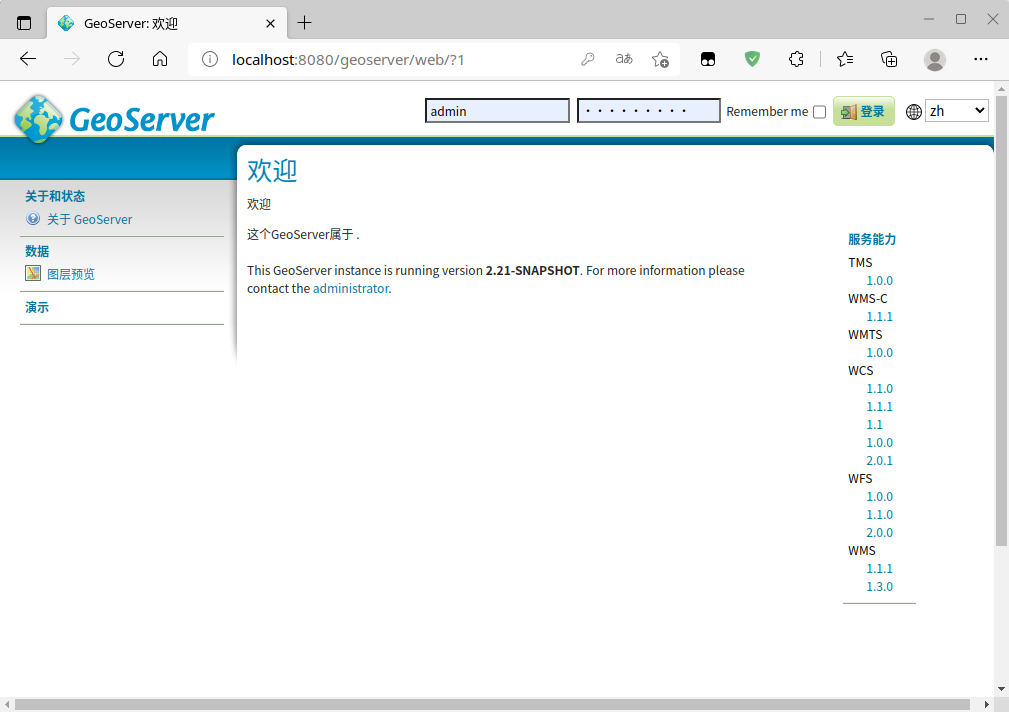
点击 图层预览,发现一个图层也没有哇:
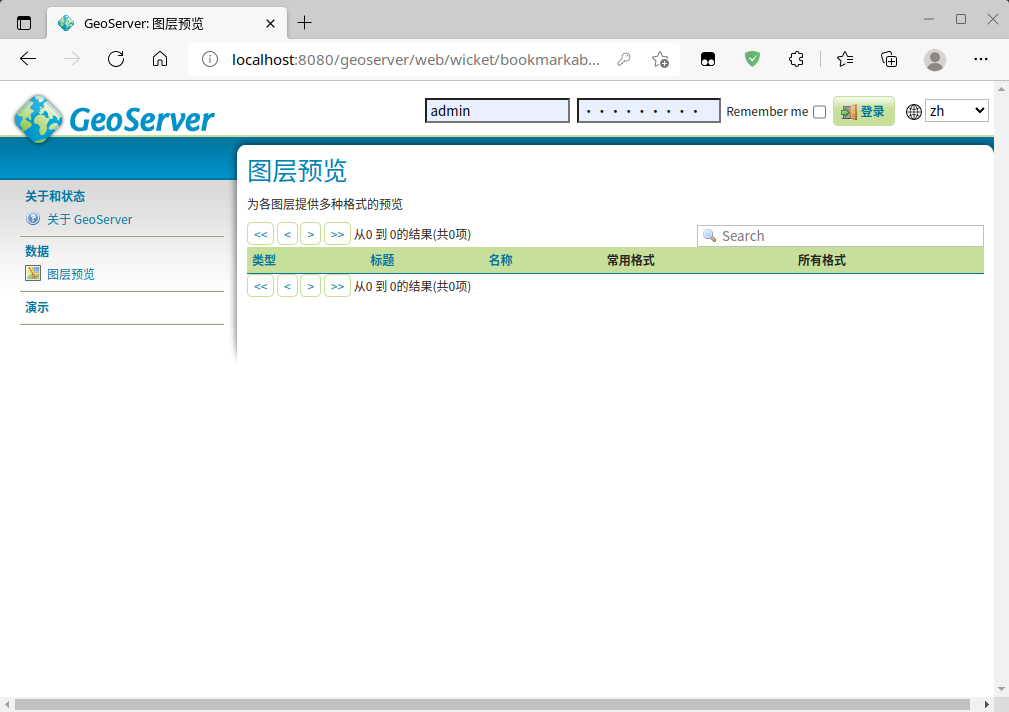
2. 发布地图服务
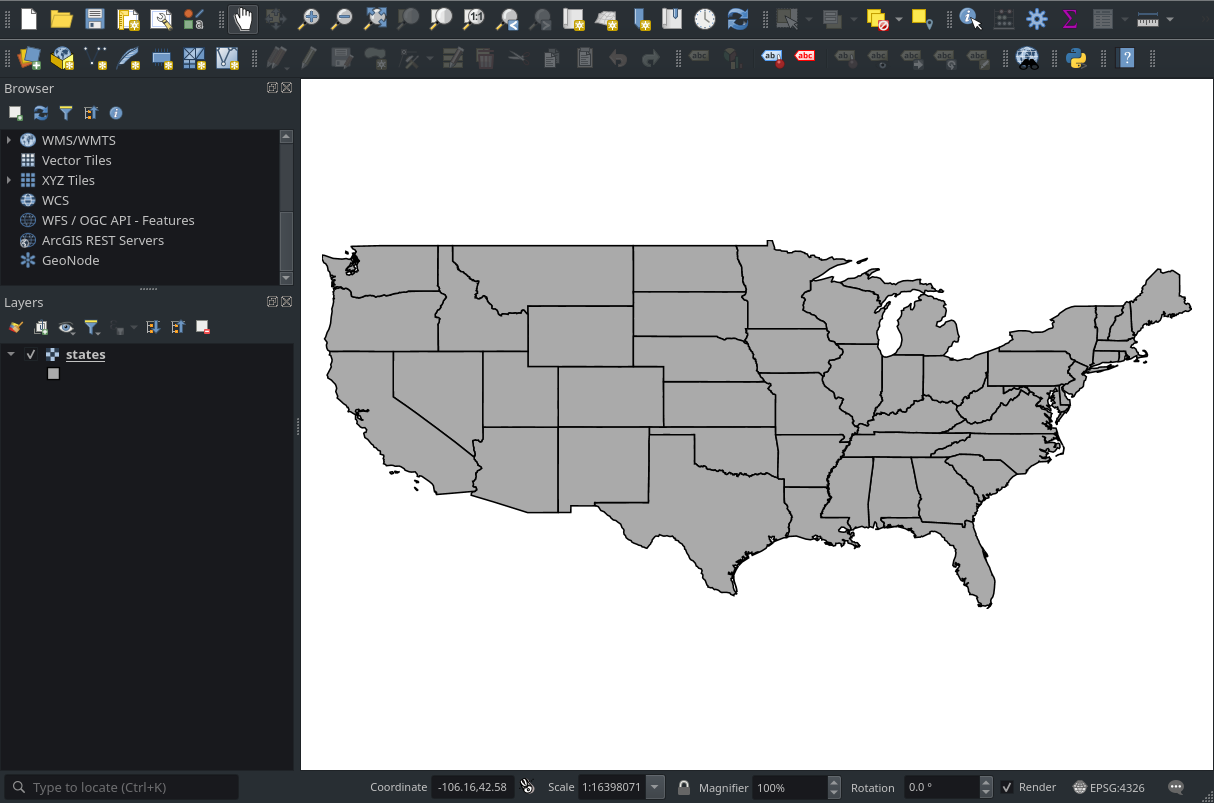
此处笔者使用的是一个shapefile的线状矢量图层,数据来源于官方自带的示例数据,位于geoserver/data/release/data/shapefiles/states.shp
2.1 图层预览
在QGIS里,图层看起来是这样的:
2.2 登陆GeoServer
默认账户和密码:
- 账户:admin
- 密码:geoserver
2.3 创建一个新的工作空间
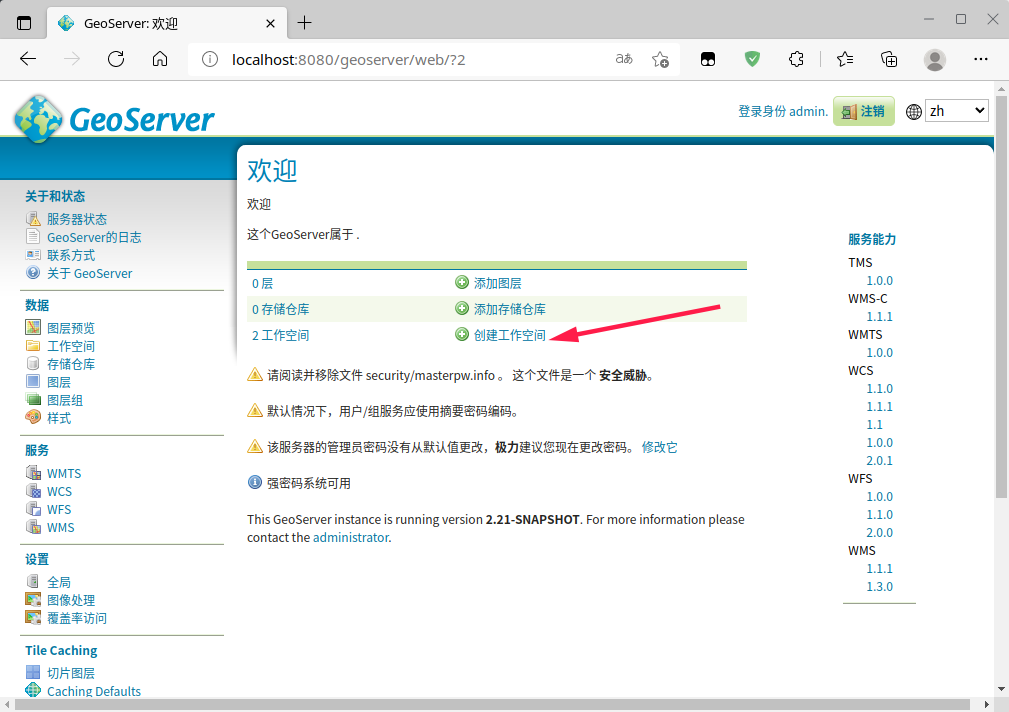
官方文档:工作区由名称和命名空间URI(统一资源标识符)定义。工作区名称限制为10个字符,不能包含空格。URI类似于URL,只是URI不需要指向web上的实际位置,只需要是唯一的标识符。对于工作区URI,我们建议使用与项目关联的URL,可能使用不同的尾随标识符。例如, http://www.openplans.org/topp 是“topp”工作区的URI
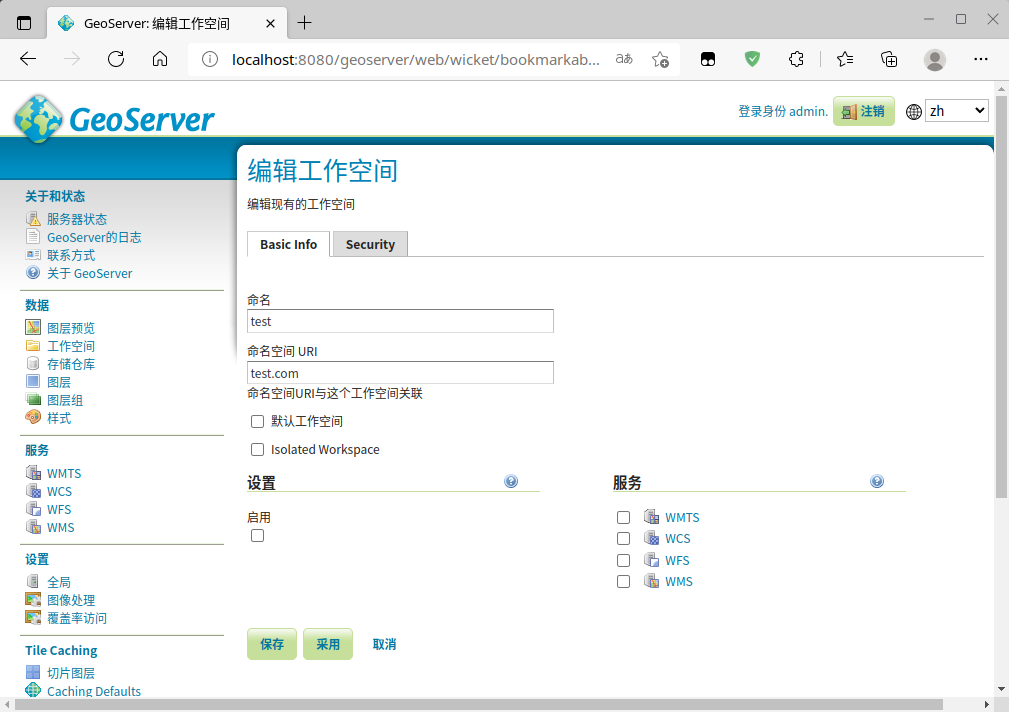
勾选授权所有人:
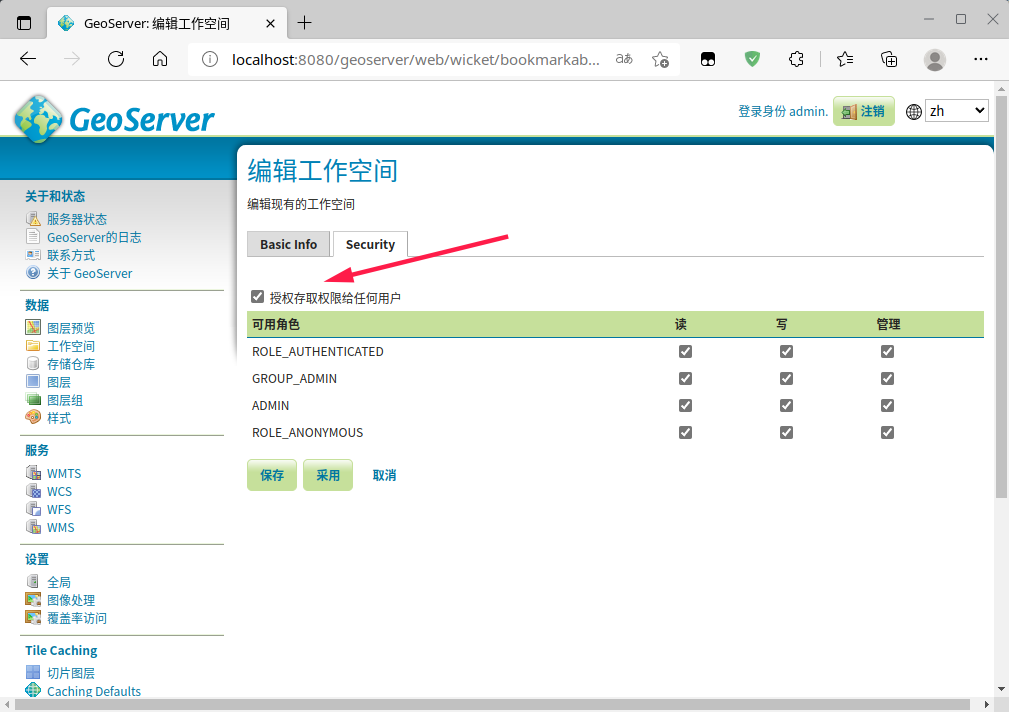
点击保存
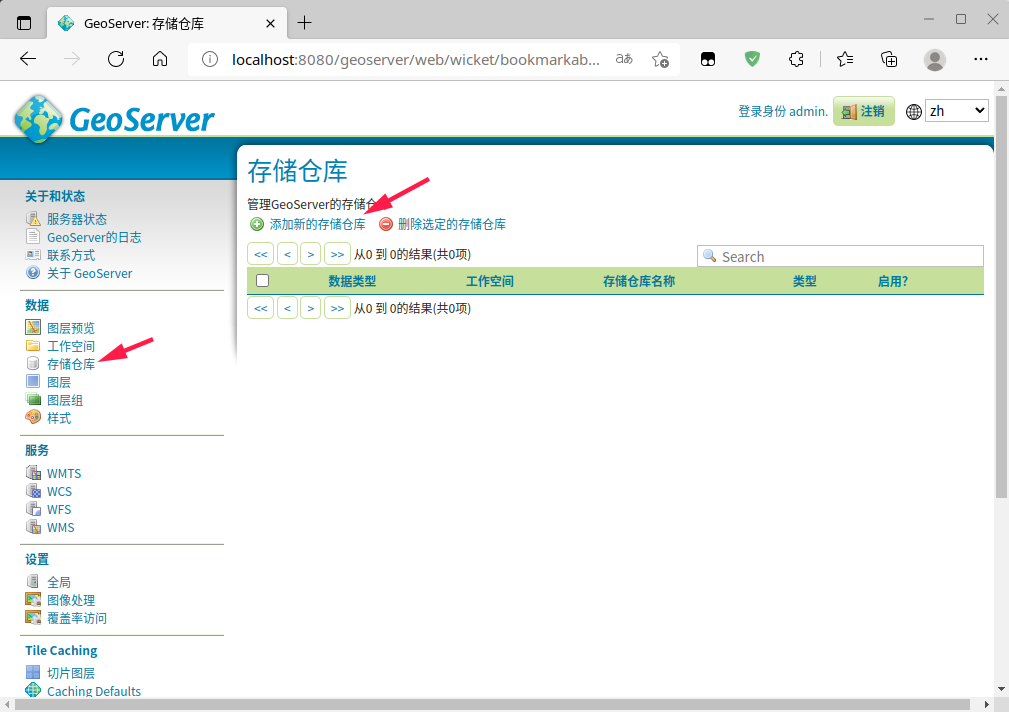
2.4 添加存储数据
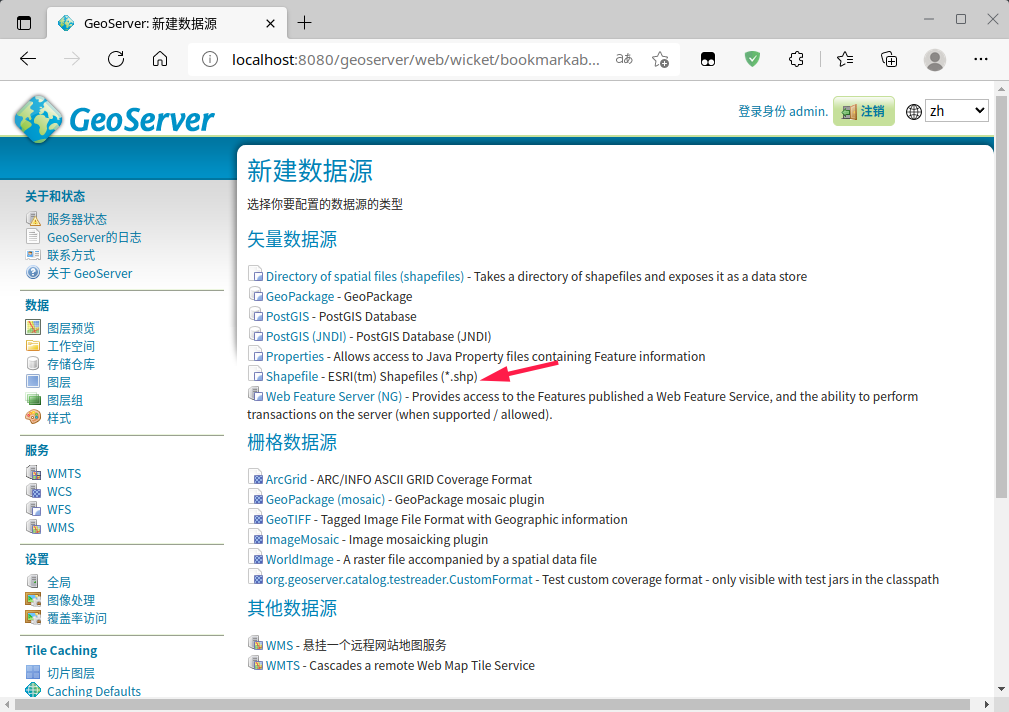
此处选择Shapefile:
选择或填写相应的数据:
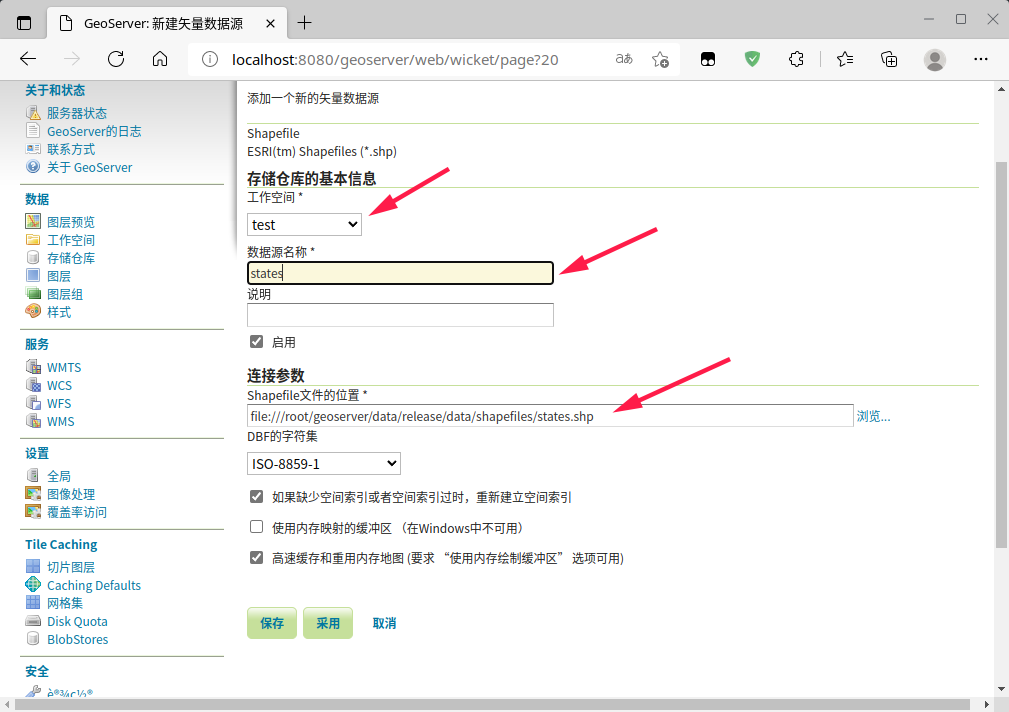
点击保存
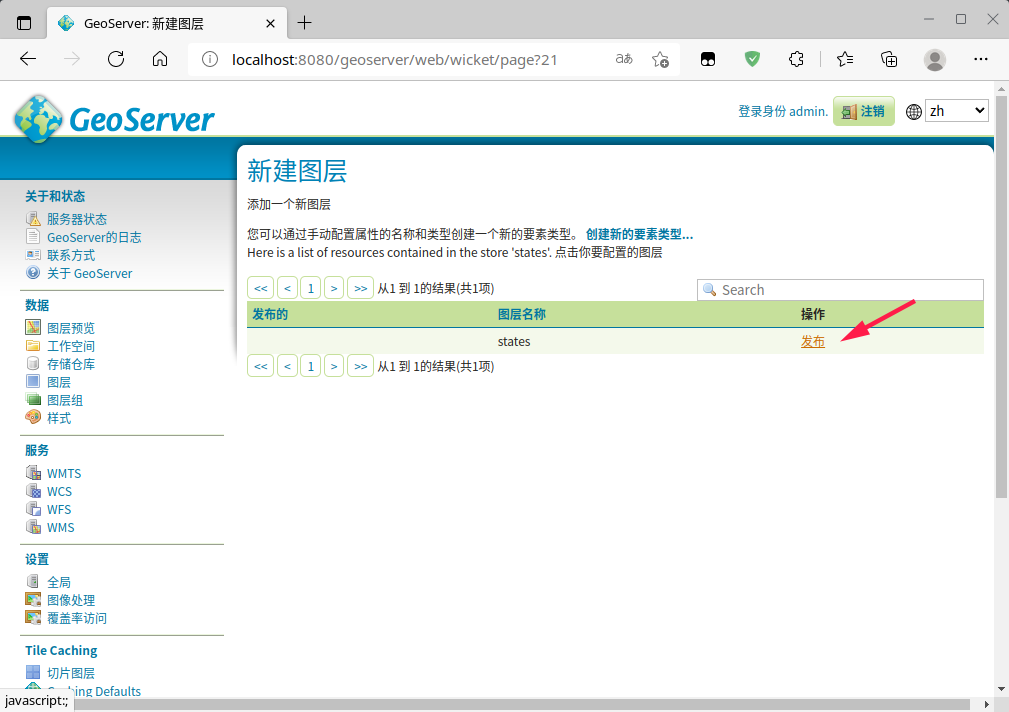
2.5 发布地图
点击发布:
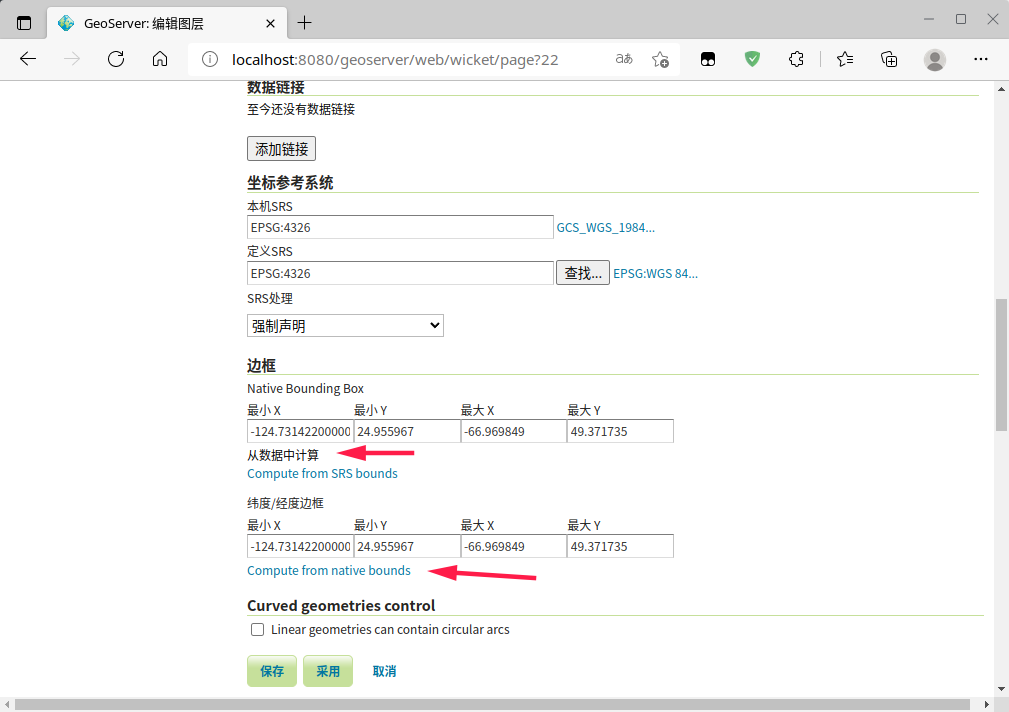
边框部分可以从数据中计算,其他默认即可:
2.6 图层预览
点击图层预览:
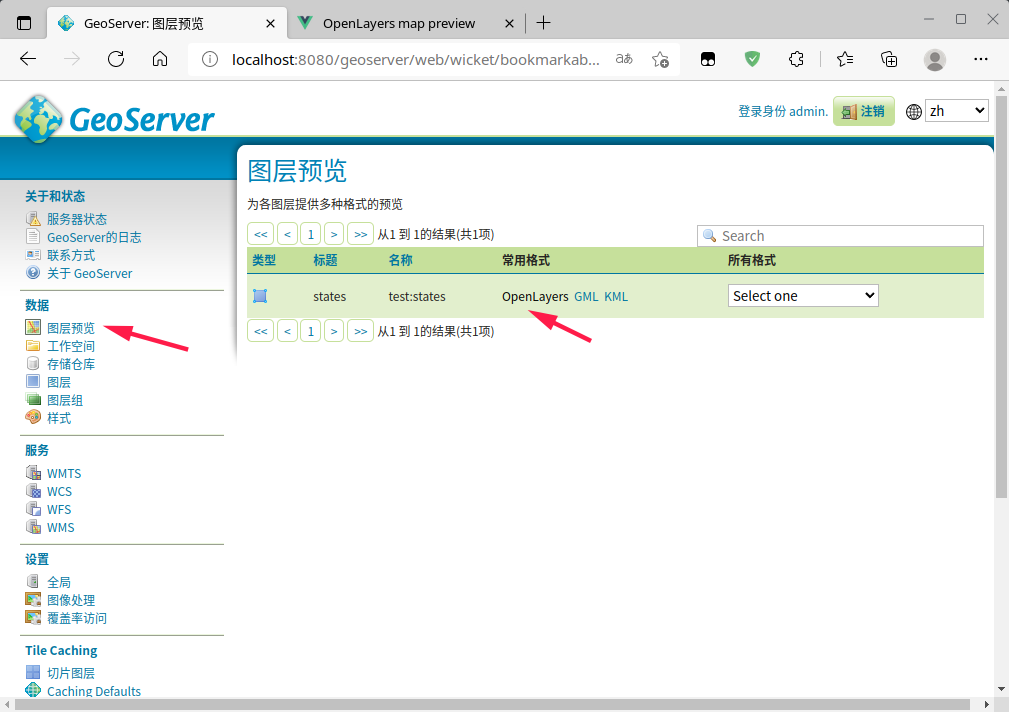
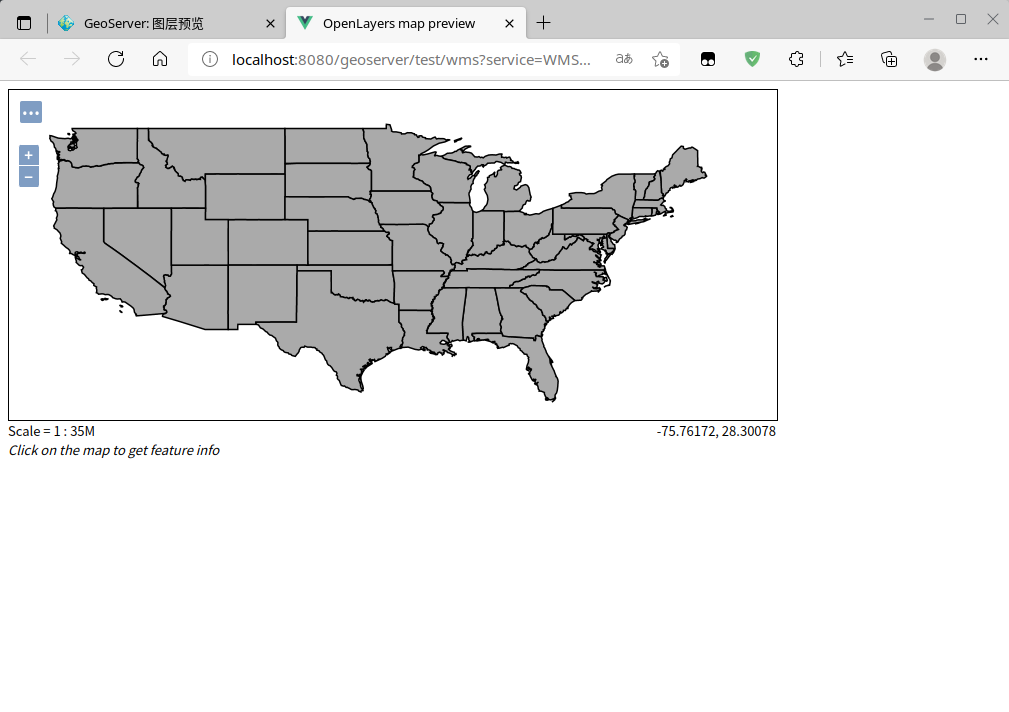
在openlayers中预览地图:
3. 参考资料
GeoServer在Linux上源码安装、启动、发布地图服务的更多相关文章
- linux上源码安装python
Linux安装Python2.7 以下例子基于python 2.7.9,其他版本同理.# 1.下载python# wget https://www.python.org/ftp/python/2.7. ...
- CentOS7(Linux)源码安装Redis
介绍 项目中经常需要用到Redis做缓存数据库,可是还有小伙伴不会在Linux上安装Redis,毕竟我们开发的项目都是要在服务器上运行的,今天就来讲讲如何在CentOS7环境使用源码进行安装Redis ...
- Linux中源码安装编译Vim
Linux中源码安装编译Vim Linux下学习工作少不了编辑器,Vim能使你的工作效率成倍的提高.在Ubuntu上安装vim使用命令直接安装很简单.但有时还是需要自己手动编译安装.例如: vim中的 ...
- linux 手动源码安装lnmp(亲测)
linux 手动源码安装lnmp笔记(亲测)<pre>先安装这2个yum install gccyum install g++</pre><pre>先在linux ...
- linux下源码安装netcat
linux下源码安装netcat http://blog.chinaunix.net/uid-20783755-id-4211230.html 1,下载netcat源码,netcat-0.7.1-13 ...
- [原创]在Centos7.2上源码安装PHP、Nginx、Zentao禅道
版本 操作系统:CentOS Linux release 7.2.1511 (Core) PHP:5.6.33 Nginx:1.12.2 MySQL:5.6.38(192.168.1.103的Wind ...
- CentOS7(Linux)源码安装MySQL5.7.X
介绍 软件应用最重要的就是数据库了,可是还有小伙伴不会在Linux上安装MySQL数据库,今天就来讲讲如何在CentOS7环境使用源码进行安装MySQL5.7.X. MySQL官网下载链接:https ...
- Linux下源码安装方式安装MySQL
1.下载安装包:https://downloads.mysql.com/archives/community/ 2.安装开发工具和安装包 因为要把源码编译成二进制数据,所以必须要有编译器和解释器 g ...
- Linux MySQL源码安装缺少ncurses-devel包
在Red Hat Enterprise Linux Server release 5.7 上用源码安装MySQL-5.6.23时,遇到了" remove CMakeCache.txt and ...
- linux(centos)源码安装git
最近使用一个开源库,部署的的时候需要用git克隆依赖库.刚好系统没安装git.就尝试了源码安装git. 源码下载地址:http://codemonkey.org.uk/projects/git-sna ...
随机推荐
- org.springframework.jdbc.BadSqlGrammarException: ### Error querying database. Cause: org.postgresql.util.PSQLException: ERROR: operator does not exist: bigint = character varying
1.报错信息 org.springframework.jdbc.BadSqlGrammarException: ### Error querying database. Cause: org.post ...
- bug处理记录:java.util.UnknownFormatConversionException: Conversion = 'Y'
1. 报错: java.util.UnknownFormatConversionException: Conversion = 'Y' at java.util.Formatter$FormatSpe ...
- MassTransit 知多少 | 基于MassTransit Courier实现Saga 编排式分布式事务
Saga 模式 Saga 最初出现在1987年Hector Garcaa-Molrna & Kenneth Salem发表的一篇名为<Sagas>的论文里.其核心思想是将长事务拆分 ...
- keepalived 主备使用
keepalived 主备使用 本篇主要介绍一下 keepalived 的基本的 主备使用 1.概述 什么是 keepalived呢,它是一个集群管理中 保证集群高可用的软件,防止单点故障,keepa ...
- 【FAQ】申请Health Kit权限的常见问题及解答
华为运动健康服务(HUAWEI Health Kit)提供原子化数据开放,用户数据被授权获取后,应用可通过接口访问运动健康数据,对相关数据进行增.删.改.查等操作.这篇文章汇总了申请开通Health ...
- C++进阶(map+set容器模拟实现)
关联式容器 关联式容器也是用来存储数据的,与序列式容器(如vector.list等)不同的是,其里面存储的是<key,value>结构的键值对,在数据检索时比序列式容器效率更高.今天要介绍 ...
- Python 跨模块使用全局变量(自定义类型)
gol.py def _init():#初始化 global _global_dict _global_dict = {} def set_value(key,value): "" ...
- Educational Codeforces Round 142 (Rated for Div. 2) A-D
比赛链接 A 题解 知识点:贪心. 代码 #include <bits/stdc++.h> using namespace std; using ll = long long; bool ...
- 今日实际操作----Dart Mac开发与运行环境配置 配置.bash_profile
Mac 打开.编辑 .bash_profile 文件 一般在Mac上配置环境变量时经常要创建.编辑 .bash_profile文件.创建该文件时一般都会选择在当前用户目录下,即Mac下的.bash_p ...
- 《HelloGitHub》第 82 期
兴趣是最好的老师,HelloGitHub 让你对编程感兴趣! 简介 HelloGitHub 分享 GitHub 上有趣.入门级的开源项目. https://github.com/521xueweiha ...