
SpringCloud 服务治理
1. Eureka
1.1 Eureka 介绍
Eureka 是 Netflix 公司开源的一个服务注册与发现的组件。
• Eureka 和其他 Netflix 公司的服务组件(例如负载均衡、熔断器、网关等) 一起,被 SpringCloud 社区整合为 Spring-Cloud-Netflix 模块。
• Eureka 包含两个组件:Eureka Server(注册中心)和 Eureka Client(服务提供者、服务消费者)。

1.2 Eureka 快速入门
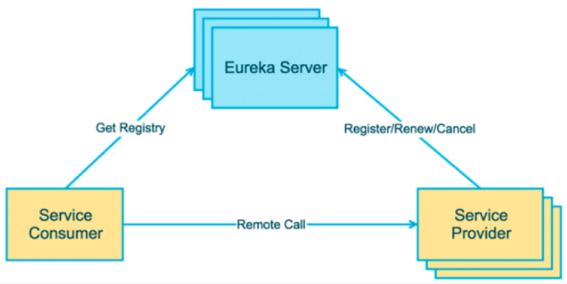
搭建步骤:
- 搭建 Provider 和 Consumer 服务。
- 使用 RestTemplate 完成远程调用。
- 搭建 Eureka Server 服务。
- 改造 Provider 和 Consumer,成为 Eureka Client。
- Consumer 服务通过从 Eureka Server 中抓取 Provider 地址,完成远程调用。
父工程
<?xml version="1.0" encoding="UTF-8"?>

<project xmlns="http://maven.apache.org/POM/4.0.0"

         xmlns:xsi="http://www.w3.org/2001/XMLSchema-instance"

         xsi:schemaLocation="http://maven.apache.org/POM/4.0.0 http://maven.apache.org/xsd/maven-4.0.0.xsd">

    <modelVersion>4.0.0</modelVersion>

    <groupId>org.example</groupId>

    <artifactId>eureka-parent</artifactId>

    <packaging>pom</packaging>

    <version>1.0-SNAPSHOT</version>

    <modules>

        <module>eureka-provider</module>

        <module>eureka-consumer</module>

        <module>eureka-server</module>

    </modules>

    <parent>

        <!-- spring boot 环境 -->

        <groupId>org.springframework.boot</groupId>

        <artifactId>spring-boot-starter-parent</artifactId>

        <version>2.1.0.RELEASE</version>

    </parent>

    <dependencies>

        <!-- 简化POJO -->

        <dependency>

            <groupId>org.projectlombok</groupId>

            <artifactId>lombok</artifactId>

            <optional>true</optional>

        </dependency>

    </dependencies>

    <!-- Spring Cloud 依赖管理 -->

    <dependencyManagement>

        <dependencies>

            <dependency>

                <groupId>org.springframework.cloud</groupId>

                <artifactId>spring-cloud-dependencies</artifactId>

                <version>${spring-cloud.version}</version>

                <type>pom</type>

                <scope>import</scope>

            </dependency>

        </dependencies>

    </dependencyManagement>

    <properties>

        <project.build.sourceEncoding>UTF-8</project.build.sourceEncoding>

        <project.reporting.outputEncoding>UTF-8</project.reporting.outputEncoding>

        <java.version>1.8</java.version>

        <!--spring cloud 版本-->

        <spring-cloud.version>Greenwich.RELEASE</spring-cloud.version>

    </properties>

</project>
Eureka Server(子工程)
pom.xml
<?xml version="1.0" encoding="UTF-8"?>

<project xmlns="http://maven.apache.org/POM/4.0.0"

         xmlns:xsi="http://www.w3.org/2001/XMLSchema-instance"

         xsi:schemaLocation="http://maven.apache.org/POM/4.0.0 http://maven.apache.org/xsd/maven-4.0.0.xsd">

    <parent>

        <artifactId>eureka-parent</artifactId>

        <groupId>org.example</groupId>

        <version>1.0-SNAPSHOT</version>

    </parent>

    <modelVersion>4.0.0</modelVersion>

    <artifactId>eureka-server</artifactId>

    <dependencies>

        <dependency>

            <groupId>org.springframework.boot</groupId>

            <artifactId>spring-boot-starter-web</artifactId>

        </dependency>

        <!-- eureka-server -->

        <dependency>

            <groupId>org.springframework.cloud</groupId>

            <artifactId>spring-cloud-starter-netflix-eureka-server</artifactId>

        </dependency>

    </dependencies>

    <properties>

        <maven.compiler.source>8</maven.compiler.source>

        <maven.compiler.target>8</maven.compiler.target>

    </properties>

</project>
启动类
package com;

import org.springframework.boot.SpringApplication;

import org.springframework.boot.autoconfigure.SpringBootApplication;

import org.springframework.cloud.netflix.eureka.server.EnableEurekaServer;

@SpringBootApplication

@EnableEurekaServer  // 启用 EurekaServer(不声明也是默认启动)

public class EurekaApp {

    public static void main(String[] args) {

        SpringApplication.run(EurekaApp.class, args);

    }

}
application.yml
server:

  port: 8761

# eureka 配置:共分为四部分配置

# 1. dashboard: eureka 的 web 控制台配置

# 2. server:    eureka 的服务端配置

# 3. client:    eureka 的客户端配置

# 4. instance:  eureka 的实例配置

eureka:

  instance:

    hostname: localhost # 主机名

  client:

    service-url:

      defaultZone: http://${eureka.instance.hostname}:${server.port}/eureka  # eureka 服务端地址,将来客户端使用该地址和 eureka 进行通信

    register-with-eureka: false  # 是否将自己的路径注册到 eureka 上(eureka server 需要;eureka provider client 不需要)。默认:true

    fetch-registry: false  # 是否需要从 eureka 中抓取路径(eureka server 不需要;eureka consumer client 需要)。默认:true
Eureka 控制台
运行启动类后,访问 localhost:8761 即可进入Eureka 控制台:
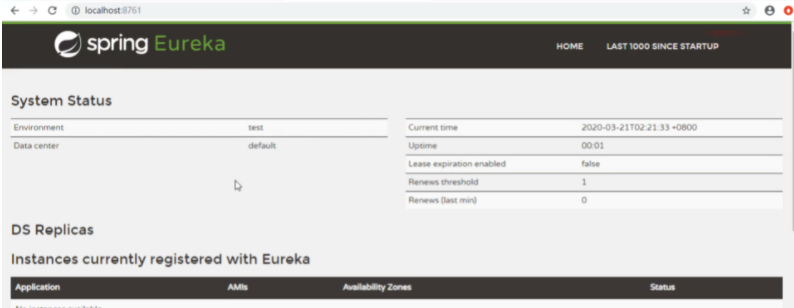
- System status:系统状态信息
- DS Replicas:集群信息
- tance currently registered with Eureka:实例注册信息
- General Info:通用信息
- Instance Info:实例信息
服务提供者(子工程)
pom.xml
<?xml version="1.0" encoding="UTF-8"?>

<project xmlns="http://maven.apache.org/POM/4.0.0"

         xmlns:xsi="http://www.w3.org/2001/XMLSchema-instance"

         xsi:schemaLocation="http://maven.apache.org/POM/4.0.0 http://maven.apache.org/xsd/maven-4.0.0.xsd">

    <parent>

        <artifactId>eureka-parent</artifactId>

        <groupId>org.example</groupId>

        <version>1.0-SNAPSHOT</version>

    </parent>

    <modelVersion>4.0.0</modelVersion>

    <artifactId>eureka-provider</artifactId>

    <dependencies>

        <!-- spring boot web -->

        <dependency>

            <groupId>org.springframework.boot</groupId>

            <artifactId>spring-boot-starter-web</artifactId>

        </dependency>

        <!-- eureka-client -->

        <dependency>

            <groupId>org.springframework.cloud</groupId>

            <artifactId>spring-cloud-starter-netflix-eureka-client</artifactId>

        </dependency>

    </dependencies>

</project>
启动类
package com;

import org.springframework.boot.SpringApplication;

import org.springframework.boot.autoconfigure.SpringBootApplication;

import org.springframework.cloud.netflix.eureka.EnableEurekaClient;

/**

 * 启动类

 */

@EnableEurekaClient  // 该注解在SpringCloud新版本中可以省略

@SpringBootApplication

public class ProviderApp {

    public static void main(String[] args) {

        SpringApplication.run(ProviderApp.class, args);

    }

}
application.yml
server:

  port: 8000

eureka:

  instance:

    hostname: localhost  # 主机名

  client:

    service-url:

      defaultZone: http://localhost:8761/eureka  # eureka服务端地址,将来客户端使用该地址和eureka进行通信

spring:

  application:

    name: eureka-provider  # 设置当前应用的名称。这会在eureka中Application显示,且需要使用该名称来获取路径
domain
package com.domain;

import lombok.AllArgsConstructor;

import lombok.Data;

import lombok.NoArgsConstructor;

@Data

@AllArgsConstructor

@NoArgsConstructor

public class Goods {

    private int id;

    private String name;

    private double price;

    private int skuNum;

    @Override

    public String toString() {

        return "Goods{" +

                "id=" + id +

                ", name='" + name + '\'' +

                ", price=" + price +

                ", skuNum=" + skuNum +

                '}';

    }

}
controller
package com.controller;

import com.domain.Goods;

import com.service.GoodsService;

import org.springframework.beans.factory.annotation.Autowired;

import org.springframework.web.bind.annotation.GetMapping;

import org.springframework.web.bind.annotation.PathVariable;

import org.springframework.web.bind.annotation.RequestMapping;

import org.springframework.web.bind.annotation.RestController;

@RestController

@RequestMapping("/goods")

public class GoodsController {

    @Autowired

    private GoodsService goodsService;

    @GetMapping("findOne/{id}")

    public Goods findGoods(@PathVariable("id") int id){

        return goodsService.findOne(id);

    }

}
service
package com.service;

import com.dao.GoodsDao;

import com.domain.Goods;

import org.springframework.beans.factory.annotation.Autowired;

import org.springframework.stereotype.Service;

@Service

public class GoodsService {

    @Autowired

    private GoodsDao goodsDao;

    public Goods findOne(int id){

        return goodsDao.findOne(id);

    }

}
dao
package com.dao;

import com.domain.Goods;

import org.springframework.stereotype.Repository;

@Repository

public class GoodsDao {

    public static Goods findOne(int id){

        Goods phone = new Goods(1, "华为P10", 6999.00, 20);

        return phone;

    }

}
服务调用者(子工程)
pom.xml
<?xml version="1.0" encoding="UTF-8"?>

<project xmlns="http://maven.apache.org/POM/4.0.0"

         xmlns:xsi="http://www.w3.org/2001/XMLSchema-instance"

         xsi:schemaLocation="http://maven.apache.org/POM/4.0.0 http://maven.apache.org/xsd/maven-4.0.0.xsd">

    <parent>

        <artifactId>eureka-parent</artifactId>

        <groupId>org.example</groupId>

        <version>1.0-SNAPSHOT</version>

    </parent>

    <modelVersion>4.0.0</modelVersion>

    <artifactId>eureka-consumer</artifactId>

    <dependencies>

        <!-- spring boot web -->

        <dependency>

            <groupId>org.springframework.boot</groupId>

            <artifactId>spring-boot-starter-web</artifactId>

        </dependency>

        <!-- eureka-client -->

        <dependency>

            <groupId>org.springframework.cloud</groupId>

            <artifactId>spring-cloud-starter-netflix-eureka-client</artifactId>

        </dependency>

    </dependencies>

</project>
启动类
package com;

import org.springframework.boot.SpringApplication;

import org.springframework.boot.autoconfigure.SpringBootApplication;

import org.springframework.cloud.client.discovery.EnableDiscoveryClient;

import org.springframework.cloud.netflix.eureka.EnableEurekaClient;

@EnableDiscoveryClient  // 激活DiscoveryClient

@EnableEurekaClient

@SpringBootApplication

public class ConsumerApp {

    public static void main(String[] args) {

        SpringApplication.run(ConsumerApp.class, args);

    }

}
application.yml
server:

  port: 8001

eureka:

  instance:

    hostname: localhost  # 主机名

  client:

    service-url:

      defaultZone: http://localhost:8761/eureka  # eureka服务端地址,将来客户端使用该地址和eureka进行通信

spring:

  application:

    name: eureka-consumer  # 设置当前应用的名称。这会在eureka中Application显示,且需要使用该名称来获取路径
RestTemplateConfig
- RestTemplateConfig 是 Spring 提供的一种简单便捷的模板类,用于在 java 代码里访问 restful 服务。
• 其功能与 HttpClient 类似,但是 RestTemplate 实现更优雅,使用更方便。
package com.config;

import org.springframework.context.annotation.Bean;

import org.springframework.context.annotation.Configuration;

import org.springframework.web.client.RestTemplate;

@Configuration

public class RestTemplateConfig {

    @Bean

    public RestTemplate restTemplate() {

        return new RestTemplate();

    }

}
domain
package com.domain;

import lombok.AllArgsConstructor;

import lombok.Data;

import lombok.NoArgsConstructor;

@Data

@AllArgsConstructor

@NoArgsConstructor

public class Goods {

    private int id;

    private String name;

    private double price;

    private int skuNum;

    @Override

    public String toString() {

        return "Goods{" +

                "id=" + id +

                ", name='" + name + '\'' +

                ", price=" + price +

                ", skuNum=" + skuNum +

                '}';

    }

}
controller
package com.controller;

import com.domain.Goods;

import org.springframework.beans.factory.annotation.Autowired;

import org.springframework.cloud.client.ServiceInstance;

import org.springframework.cloud.client.discovery.DiscoveryClient;

import org.springframework.web.bind.annotation.GetMapping;

import org.springframework.web.bind.annotation.PathVariable;

import org.springframework.web.bind.annotation.RequestMapping;

import org.springframework.web.bind.annotation.RestController;

import org.springframework.web.client.RestTemplate;

import java.util.List;

/**

 * 服务调用方

 */

@RestController

@RequestMapping("/order")

public class OrderController {

    @Autowired

    private RestTemplate restTemplate;

    @Autowired

    private DiscoveryClient discoveryClient;

    @GetMapping("/goods/{id}")

    public Goods findOrderByGoodsId(@PathVariable("id") int id) {

        /*

            动态从 Eureka Server 中获取 provider 的 ip 和端口

             1. 注入 DiscoveryClient 对象.激活

             2. 调用方法

         */

        // 演示 discoveryClient 使用

        List<ServiceInstance> instances = discoveryClient.getInstances("EUREKA-PROVIDER");

        // 判断集合是否有数据

        if(instances == null || instances.size() == 0){

            // 集合没有数据

            return null;

        }

        ServiceInstance instance = instances.get(0);

        String host = instance.getHost();  // 获取ip

        int port = instance.getPort();  // 获取端口

        /*

            远程调用Goods服务中的findOne接口:使用RestTemplate

            1. 定义Bean  restTemplate

            2. 注入Bean

            3. 调用方法

         */

        String url = String.format("http://%s:%d/goods/findOne/%d", host, port, id);

        Goods goods = restTemplate.getForObject(url, Goods.class);

        return goods;

    }

}
运行效果:
访问 http://localhost:8001/order/goods/1 ,返回:{"id":1,"name":"华为P10","price":6999.0,"skuNum":20}
1.3 Eureka 相关配置及特性
instance 相关属性
Eureka Instance 的配置信息全部保存在org.springframework.cloud.netflix.eureka.EurekaInstanceConfigBean 配置类里,实际上它是 com.netflix.appinfo.EurekaInstanceConfig 的实现类,替代了 netflix 的 com.netflix.appinfo.CloudInstanceConfig 的默认实现。
Eureka Instance 的配置信息全部以
eureka.instance.xxx的格式配置。
常用配置:

server 相关属性
Eureka Server 注册中心端的配置是对注册中心的特性配置。Eureka Server 的配置全部在 org.springframework.cloud.netflix.eureka.server.EurekaServerConfigBean 里,实际上它是 com.netflix.eureka.EurekaServerConfig 的实现类,替代了 netflix 的默认实现。
Eureka Server 的配置全部以
eureka.server.xxx的格式进行配置。
常用配置:
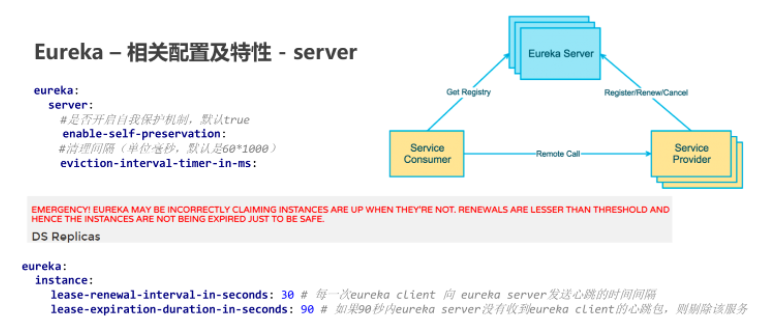
注意:上述配置一般在生产环境保持默认即可(生产环境配置原则是尽量减少环境变化),在开发或测试则可以为了方便而修改配置。
1.4 Eureka 高可用
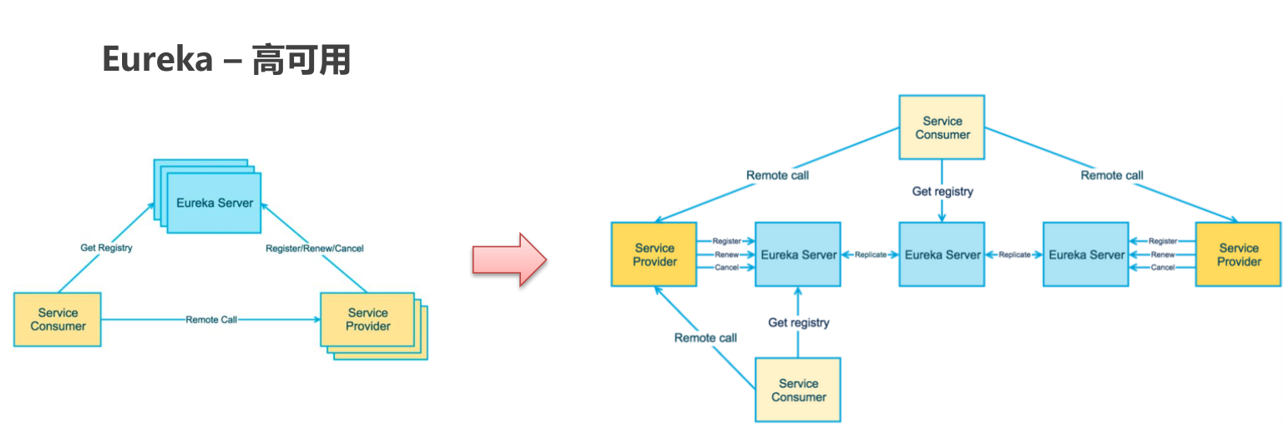
搭建示例:
- 搭建两个 Eureka Server
- 分别进行配置:相互注册
- Eureka Client 分别注册到这两个 Eureka Server 中
Eureka Server 搭建
修改本地 host 文件:
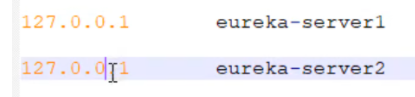
eureka-server-1
application.yml:
server:

  port: 8761

eureka:

  instance:

    hostname: eureka-server1  # 主机名

  client:

    service-url:

      defaultZone: http://eureka-server2:8762/eureka

    register-with-eureka: true  # 是否将自己的路径 注册到eureka上。eureka server 不需要的,eureka provider client 需要

    fetch-registry: true  # 是否需要从eureka中抓取路径。eureka server 不需要的,eureka consumer client 需要

spring:

  application:

    name: eureka-server-ha
eureka-server-2
application.yml:
server:

  port: 8762

eureka:

  instance:

    hostname: eureka-server2  # 主机名

  client:

    service-url:

      defaultZone: http://eureka-server1:8761/eureka

    register-with-eureka: true  # 是否将自己的路径 注册到eureka上。eureka server 不需要的,eureka provider client 需要

    fetch-registry: true  # 是否需要从eureka中抓取路径。eureka server 不需要的,eureka consumer client 需要

spring:

  application:

    name: eureka-server-ha
Eureka Client 配置
分别修改服务提供者和服务消费者配置文件中的注册服务地址:
...

eureka:

  client:

    service-url:

      defaultZone: http://eureka-server1:8761/eureka,http://eureka-server2:8762/eureka  # eureka 服务端地址

...
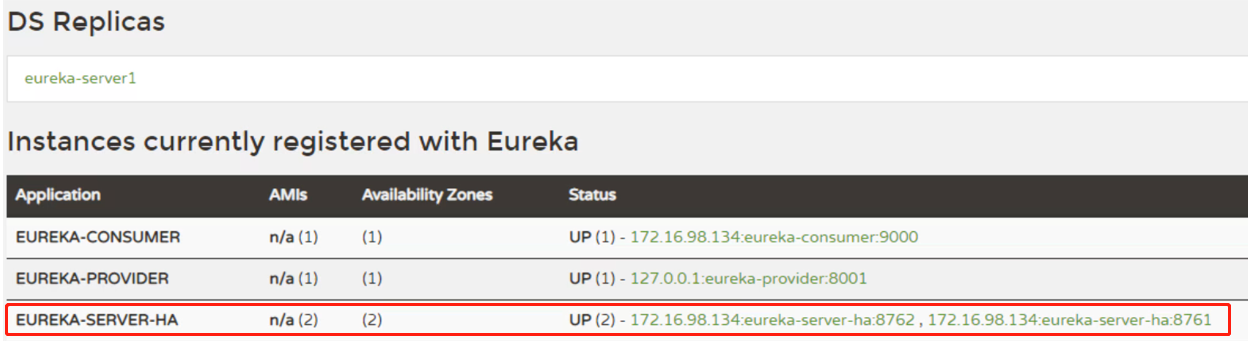
干掉其中一台 server,验证 client 仍能正常访问。
2. Consul
2.1 Consul 介绍
Consul 是由 HashiCorp 基于 Go 语言开发的,支持多数据中心、分布式、高可用的服务发布和注册服务软件。
- 用于实现分布式系统的服务发现与配置。
- 使用起来也较为简单,具有天然可移植性(支持 Linux、windows 和 Mac OS);安装包仅包含一个可执行文件,方便部署。
- 官网:https://www.consul.io
启动 consul:
启动命令:
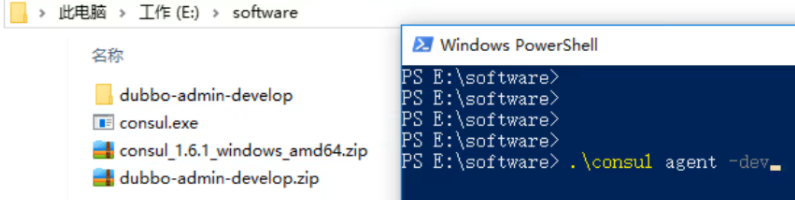
dev 模式:不会持久化数据
控制台:
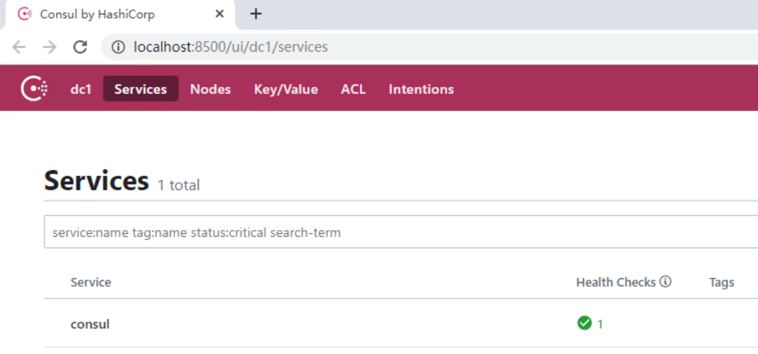
2.2 入门案例
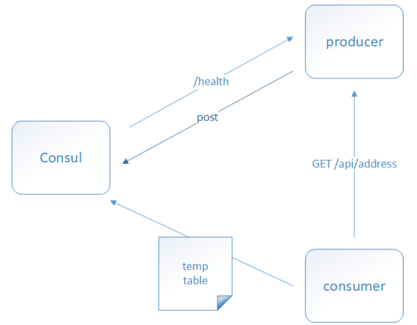
- 搭建 Provider 和 Consumer 服务。
- 使用 RestTemplate 完成远程调用。
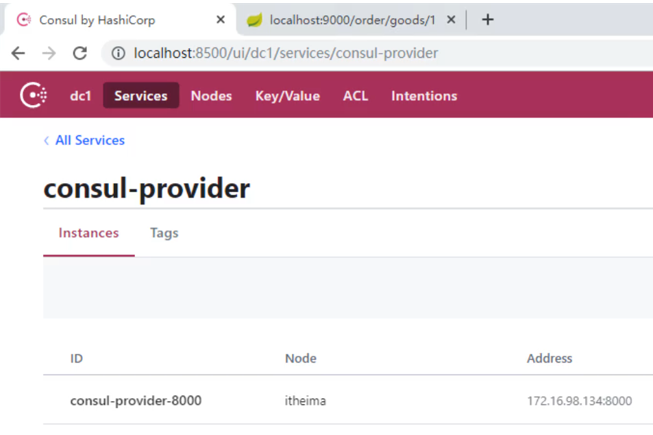
- 将 Provider 服务注册到 Consul 中。
- Consumer 服务 通过从 Consul 中抓取 Provider 地址完成远程调用。
Provider
- pom.xml:
<dependencies>

        <!--consul 客户端-->

        <dependency>

            <groupId>org.springframework.cloud</groupId>

            <artifactId>spring-cloud-starter-consul-discovery</artifactId>

        </dependency>

        <dependency>

            <groupId>org.springframework.boot</groupId>

            <artifactId>spring-boot-starter-web</artifactId>

        </dependency>

        <dependency>

            <groupId>org.springframework.boot</groupId>

            <artifactId>spring-boot-starter-test</artifactId>

            <scope>test</scope>

        </dependency>

        <dependency>

            <groupId>org.springframework.boot</groupId>

            <artifactId>spring-boot-starter-actuator</artifactId>

        </dependency>

    </dependencies>
- application.yml:
server:

  port: 8000

spring:

  cloud:

    consul:

      host: localhost  # consul 服务端的 ip

      port: 8500  # consul 服务端的端口 默认8500

      discovery:

        service-name: ${spring.application.name}  # 当前应用注册到consul的名称

        prefer-ip-address: true  # 注册ip

  application:

    name: consul-provider  # 应用名称
consumer
- pom.xml:
<dependencies>

        <!--consul 客户端-->

        <dependency>

            <groupId>org.springframework.cloud</groupId>

            <artifactId>spring-cloud-starter-consul-discovery</artifactId>

        </dependency>

        <dependency>

            <groupId>org.springframework.boot</groupId>

            <artifactId>spring-boot-starter-web</artifactId>

        </dependency>

        <dependency>

            <groupId>org.springframework.boot</groupId>

            <artifactId>spring-boot-starter-test</artifactId>

            <scope>test</scope>

        </dependency>

        <dependency>

            <groupId>org.springframework.boot</groupId>

            <artifactId>spring-boot-starter-actuator</artifactId>

        </dependency>

    </dependencies>
- application.yml:
server:

  port: 9000

spring:

  cloud:

    consul:

      host: localhost  # consul 服务端的 ip

      port: 8500  # consul 服务端的端口 默认8500

      discovery:

        service-name: ${spring.application.name}  # 当前应用注册到consul的名称

        prefer-ip-address: true  # 注册ip

  application:

    name: consul-consumer  # 应用名称
- OrderController:
package com.consul.controller;

import com.consul.domain.Goods;

import org.springframework.beans.factory.annotation.Autowired;

import org.springframework.cloud.client.ServiceInstance;

import org.springframework.cloud.client.discovery.DiscoveryClient;

import org.springframework.web.bind.annotation.GetMapping;

import org.springframework.web.bind.annotation.PathVariable;

import org.springframework.web.bind.annotation.RequestMapping;

import org.springframework.web.bind.annotation.RestController;

import org.springframework.web.client.RestTemplate;

import java.util.List;

/**

 * 服务的调用方

 */

@RestController

@RequestMapping("/order")

public class OrderController {

    @Autowired

    private RestTemplate restTemplate;

    @Autowired

    private DiscoveryClient discoveryClient;

    @GetMapping("/goods/{id}")

    public Goods findGoodsById(@PathVariable("id") int id){

        // 演示discoveryClient 使用

        List<ServiceInstance> instances = discoveryClient.getInstances("consul-PROVIDER");

        // 判断集合是否有数据

        if(instances == null || instances.size() == 0){

            // 集合没有数据

            return null;

        }

        ServiceInstance instance = instances.get(0);

        String host = instance.getHost();  // 获取ip

        int port = instance.getPort();  // 获取端口

        System.out.println(host);

        System.out.println(port);

        String url = "http://"+host+":"+port+"/goods/findOne/"+id;

        // 3. 调用方法

        Goods goods = restTemplate.getForObject(url, Goods.class);

        return goods;

    }

}
3. Nacos
3.1 Nacos 介绍
Nacos(Dynamic Naming and Configuration Service) 是阿里巴巴 2018 年 7 月开源的项目。
它专注于服务发现和配置管理领域,致力于帮你发现、配置和管理微服务。Nacos 支持几乎所有主流类型的“服务”的发现、配置和管理。
一句话概括就是 Nacos = SpringCloud 注册中心 + SpringCloud 配置中心。
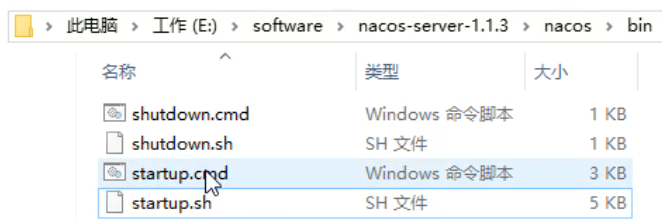
启动:
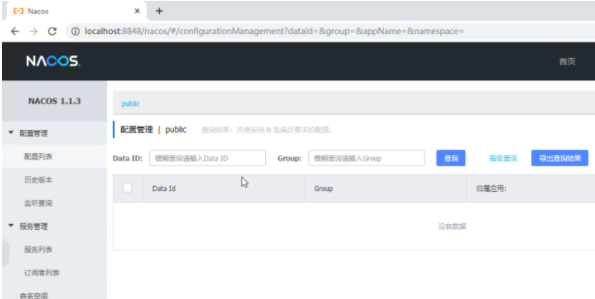
控制台登录:账号/密码均为:nacos
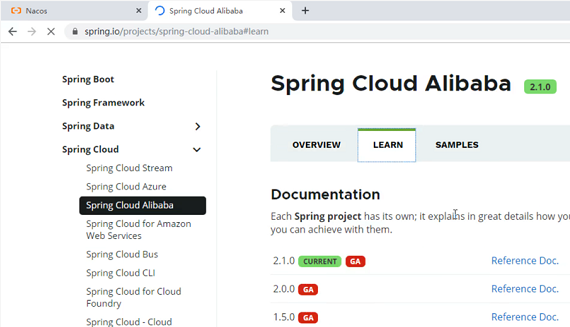
Spring cloud Alibaba 组件:
3.2 入门案例
provider
- pom.xml:
<dependencies>

        <!-- nacos -->

        <dependency>

            <groupId>org.springframework.cloud</groupId>

            <artifactId>spring-cloud-starter-alibaba-nacos-discovery</artifactId>

            <version>0.2.2.RELEASE</version>

        </dependency>

        <dependency>

            <groupId>com.alibaba.nacos</groupId>

            <artifactId>nacos-client</artifactId>

            <version>1.1.0</version>

        </dependency>

        <dependency>

            <groupId>org.springframework.boot</groupId>

            <artifactId>spring-boot-starter-web</artifactId>

        </dependency>

        <dependency>

            <groupId>org.springframework.boot</groupId>

            <artifactId>spring-boot-starter-test</artifactId>

            <scope>test</scope>

        </dependency>

        <dependency>

            <groupId>org.springframework.boot</groupId>

            <artifactId>spring-boot-starter-actuator</artifactId>

        </dependency>

    </dependencies>
- application.yml:
server:

  port: 8000

spring:

  cloud:

    nacos:

      discovery:

        server-addr:  127.0.0.1:8848  # 配置nacos 服务端地址

  application:

    name: nacos-provider  # 服务名称
consumer
- pom.xml:
<dependencies>

        <!-- nacos -->

        <dependency>

            <groupId>org.springframework.cloud</groupId>

            <artifactId>spring-cloud-starter-alibaba-nacos-discovery</artifactId>

            <version>0.2.2.RELEASE</version>

        </dependency>

        <dependency>

            <groupId>com.alibaba.nacos</groupId>

            <artifactId>nacos-client</artifactId>

            <version>1.1.0</version>

        </dependency>

        <dependency>

            <groupId>org.springframework.boot</groupId>

            <artifactId>spring-boot-starter-web</artifactId>

        </dependency>

        <dependency>

            <groupId>org.springframework.boot</groupId>

            <artifactId>spring-boot-starter-test</artifactId>

            <scope>test</scope>

        </dependency>

        <dependency>

            <groupId>org.springframework.boot</groupId>

            <artifactId>spring-boot-starter-actuator</artifactId>

        </dependency>

    </dependencies>
- application.yml:
server:

  port: 9000

spring:

  cloud:

    nacos:

      discovery:

        server-addr:  127.0.0.1:8848  # 配置 nacos 服务端地址

  application:

    name: nacos-consumer  # 服务名称
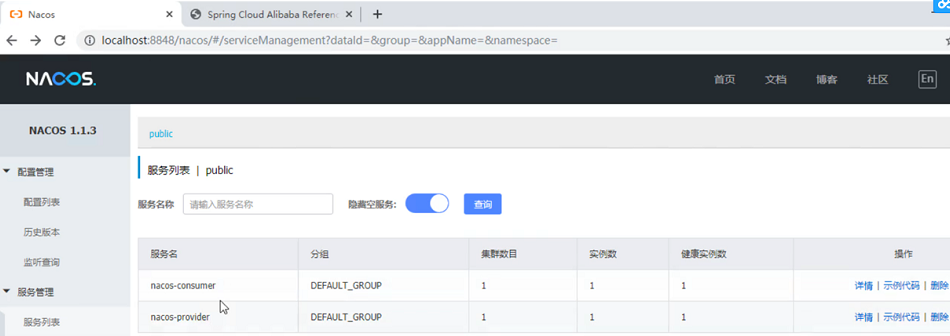
- 控制台显示:
SpringCloud 服务治理的更多相关文章
- 微服务之SpringCloud实战(二):SpringCloud Eureka服务治理
服务治理 SpringCloud Eureka是SpringCloud Netflix微服务套件的一部分,它基于Netflix Eureka做了二次封装,主要完成微服务的服务治理功能,SpringCl ...
- springCloud 之 Eureka服务治理
服务治理是微服务架构中最核心和基础的模块 首先我们创建一个springCloud eureka service的springboot 工程,该工程提供一个服务中心,用来注册服务,第二个工程是clien ...
- springCloud eureka服务治理集群增加安全认证
做为SpringCloud Netflix服务套件中的一部分,springCloud eureka基于Netflix Eureka做了二次封装,默认提供WEB管理页面及服务治理. 为了确保在生产环境中 ...
- SpringCloud系列使用Eureka进行服务治理
1. 什么是微服务? "微服务"一词来自国外的一篇博文,网站:https://martinfowler.com/articles/microservices.html 如果您不能看 ...
- SpringCloud微服务治理技术入门(SCN)
1.集群.分布式.微服务 首先先理解三个感念 什么是集群?: 同一个业务,部署在多个服务器上,目的是实现高可用,保证节点可用! 什么是分布式?: 一个业务分拆成多个子业务,部署在不同的服务器上,每个子 ...
- 【SpringCloud微服务实战学习系列】服务治理Spring Cloud Eureka
Spring Cloud Eureka是Spring Cloud Netflix微服务中的一部分,它基于NetFlix Sureka做了二次封装,主要负责完成微服务架构中的服务治理功能. 一.服务治理 ...
- SpringCloud微服务实战——第三章服务治理
Spring Cloud Eureka 服务治理 是微服务架构中最核心最基本的模块.用于实现各个微服务实例的自动化注册与发现. 服务注册: 在服务治理框架中,都会构建一个注册中心,每个服务单元向注册中 ...
- SpringCloud开发学习总结(三)—— 服务治理Eureka
在最初开始构建微服务系统的时候可能服务并不多,我们可以通过做一些静态配置来完成服务的调用.比如,有两个服务A和B,其中服务A需要调用服务B来完成一个业务操作时,为了实现服务B的高可用,不论采用服务端负 ...
- springcloud超简单的入门2--Eureka服务治理
Eureka服务治理 下面请听第一个话题,母...咳咳,拿错书了. Eureka简介 eureka是什么呢? 简单来说呢,当我的微服务应用多了起来,一个一个写死再程序里是件很不优雅的事情,而且同一服务 ...
随机推荐
- QT 如何让release生成的EXE可在他人电脑上运行(尝试了全网的方法后,这应该能帮你解决)
这两天,迅速上手了QT并用其基于C++编写了一个含UI的小程序 跳过中间的开发阶段 当我兴致满满的要将程序打包时,却是费尽周折,搜尽全网的关于QT的打包教程,最后都不顶用. 后面自己和队友的共同发现, ...
- 什么是机器学习的分类算法?【K-近邻算法(KNN)、交叉验证、朴素贝叶斯算法、决策树、随机森林】
1.K-近邻算法(KNN) 1.1 定义 (KNN,K-NearestNeighbor) 如果一个样本在特征空间中的k个最相似(即特征空间中最邻近)的样本中的大多数属于某一个类别,则该样本也属于这个类 ...
- Spring5-IOC底层原理
1.什么是IOC (1)控制反转,把对象创建和对象之间的调用过程,交给Spring进行管理 (2)使用IOC目的:为了降低耦合度 2.IOC底层原理 (1)xml解析.工厂模式.反射
- Element instanceof Node
今天看到一个问题,问 Element instance Node 为什么是 false. 首先,我们知道 Element 是 Node 的子类,那么为什么 Element instanceof Nod ...
- toggleClass() 把本来的有的类名去掉 本来没有的 加上
连续点击按钮可以交替颜色,就是改变class
- 1903021116—吉琛—Java第三周作业—eclipse创建Java程序
项目 内容 课程班级博客链接 19级信计班 这个作业要求链接 eclipse如何创建java程序 java语言基础(上) 我的课程学习目标 1. 学习博客园更多使用技巧 2. 通过作业实践熟练与熟悉掌 ...
- 1903021116-吉琛- JAVA第二周作业—Java程序编写
项目 内容 课程班级博客链接 19级信计班 这个作业要求链接 https://www.cnblogs.com/thelovelybugfly/p/9641367.html 我的课程学习目标 1. 学习 ...
- SpringCloud入门简述
1.微服务简述 微服务,是一个小型的服务,也是一种设计理念,将一个大型繁杂的系统拆分为多个小型的服务,进行独立部署,这些服务在独立进程中运行,通过特定的协议进行通信 优点: 轻量化:一个服务不 ...
- JS的URIencode方式
BEGIN; 对需要传递的URL参数进行URLencode编码 刚开始浪费了很多时间都没搞出来,不知道怎么用.后面google到了不少解决方案,最终解决.转载下面内容: js对文字进行编码涉及3个函数 ...
- 小米电视去广告之adb实战
近日闲来无事,对小米电视的开机广告.系统内置应用决定进行一波优化 安卓系统大部分都有一个"开发者模式", 在这个模式下可以放开手脚对系统进行一系列操作 此次要针对小米电视的UI使用 ...