
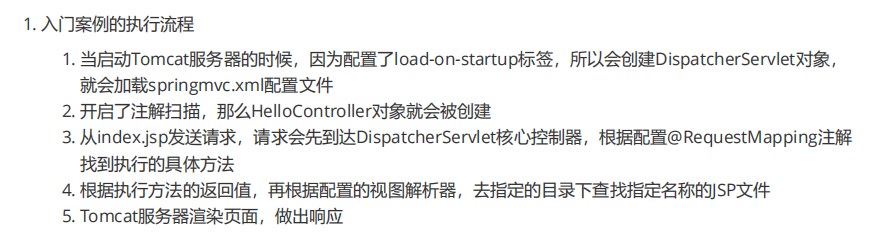
SpringMVC01:入门、请求参数绑定、自定义类型转换器、常见注解
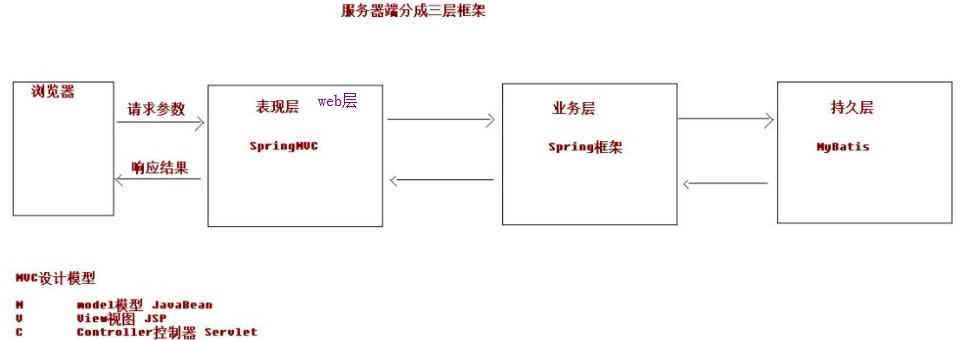
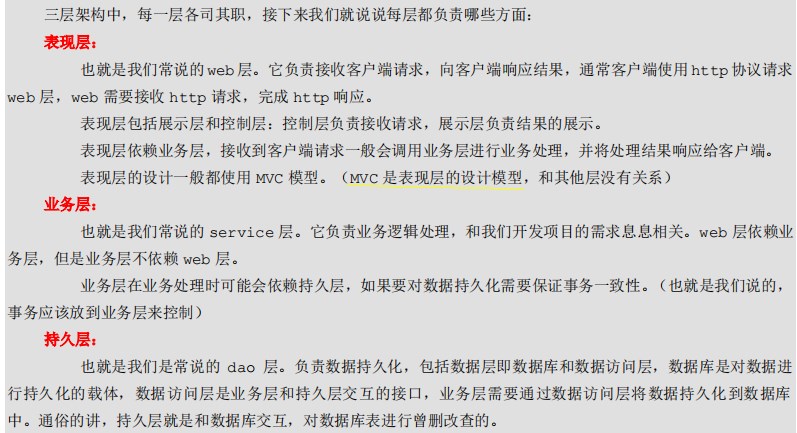
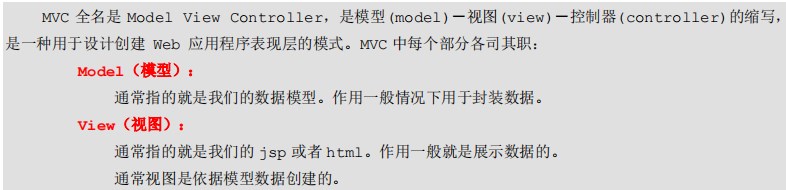

- 易于整合其他框架
- 无须实现任何接口
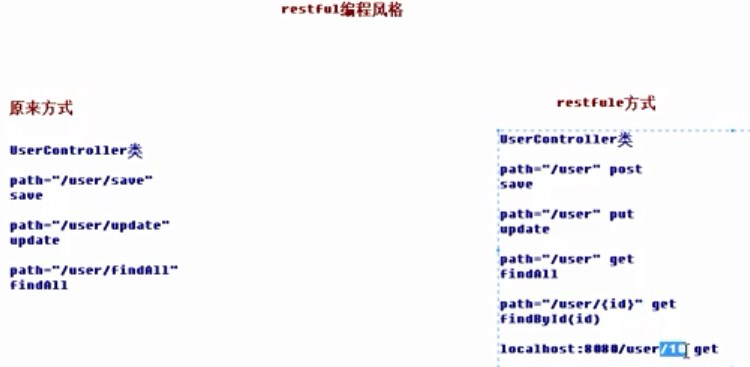
- 支持RESTful 编程风格
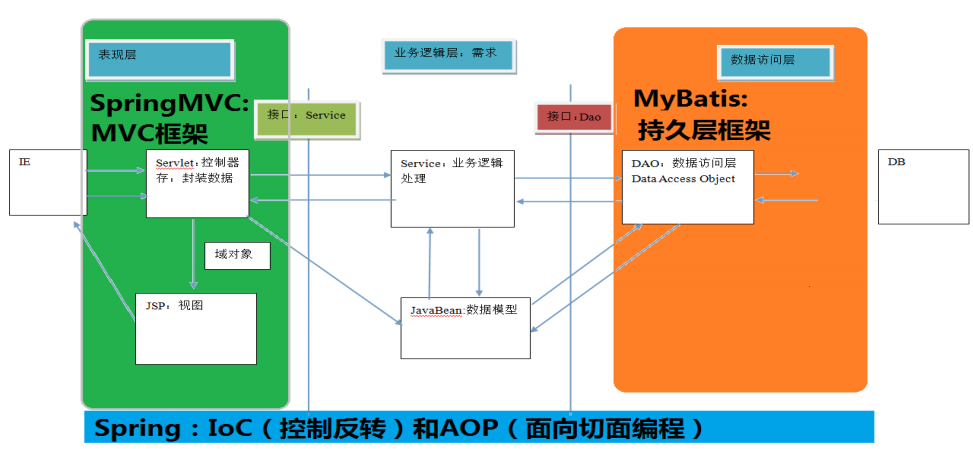
- 清晰的角色划分
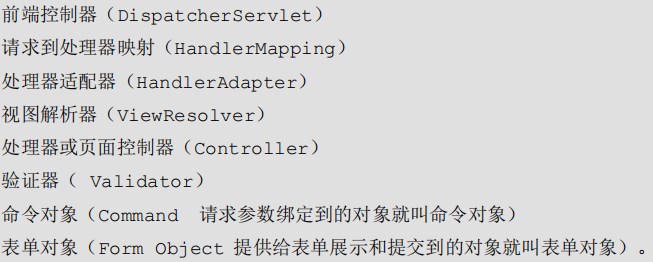
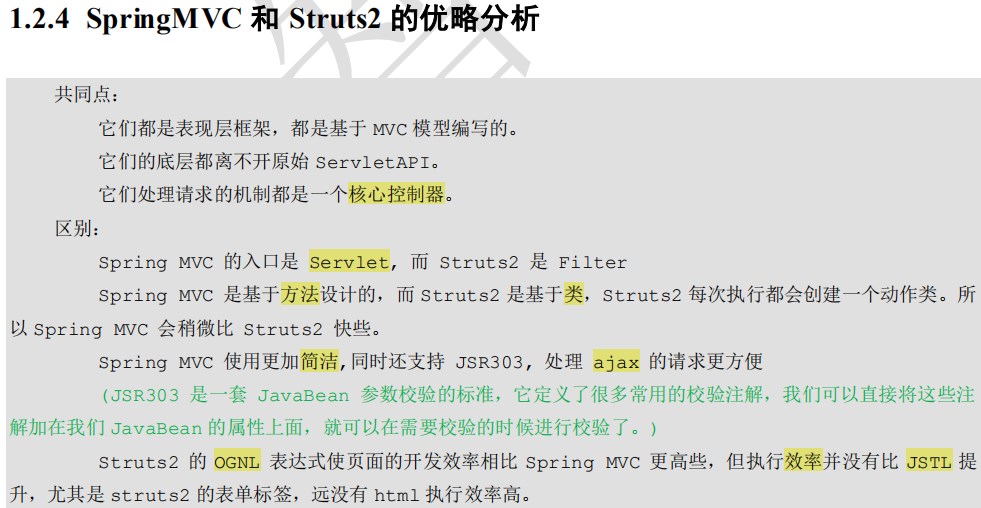

<!DOCTYPE web-app PUBLIC

 "-//Sun Microsystems, Inc.//DTD Web Application 2.3//EN"

 "http://java.sun.com/dtd/web-app_2_3.dtd" >

<web-app>

  <display-name>Archetype Created Web Application</display-name>

  <servlet>

    <servlet-name>dispatcherServlet</servlet-name>

    <servlet-class>org.springframework.web.servlet.DispatcherServlet</servlet-class>

  </servlet>

  <servlet-mapping>

    <servlet-name>dispatcherServlet</servlet-name>

    <!--任何请求都会经过servlet-->

    <url-pattern>/</url-pattern>

  </servlet-mapping>

</web-app>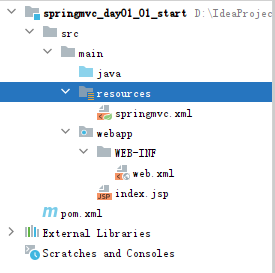
<%@ page contentType="text/html;charset=UTF-8" language="java" %>

<html>

<head>

    <title>Title</title>

</head>

<body>

<h3>入门程序</h3>

<a href="hello">入门程序</a>

</body>

</html>
<?xml version="1.0" encoding="UTF-8"?>
<beans xmlns="http://www.springframework.org/schema/beans"
xmlns:mvc="http://www.springframework.org/schema/mvc"
xmlns:context="http://www.springframework.org/schema/context"
xmlns:xsi="http://www.w3.org/2001/XMLSchema-instance"
xsi:schemaLocation=" http://www.springframework.org/schema/beans
http://www.springframework.org/schema/beans/spring-beans.xsd
http://www.springframework.org/schema/mvc
http://www.springframework.org/schema/mvc/spring-mvc.xsd
http://www.springframework.org/schema/context
http://www.springframework.org/schema/context/spring-context.xsd">
<!--开启注解的扫描,需要有context支持注解-->
<context:component-scan base-package="cn.itcast"></context:component-scan>
<!--配置视图解析器对象,访问WEB-INF下的文件-->
<bean id="internalResourceViewResolver" class="org.springframework.web.servlet.view.InternalResourceViewResolver">
<!--配置访问路径的前缀和后缀-->
<property name="prefix" value="/WEB-INF/pages"></property>
<property name="suffix" value=".jsp"></property>
</bean>
<!--开启SpringMVC框架注解的支持-->
<mvc:annotation-driven/>
</beans><!DOCTYPE web-app PUBLIC
"-//Sun Microsystems, Inc.//DTD Web Application 2.3//EN"
"http://java.sun.com/dtd/web-app_2_3.dtd" >
<web-app>
<display-name>Archetype Created Web Application</display-name>
<servlet>
<servlet-name>dispatcherServlet</servlet-name>
<servlet-class>org.springframework.web.servlet.DispatcherServlet</servlet-class>
<init-param>
<param-name>contextConfigLocationn</param-name>
<param-value>classpath:springmvc.xml</param-value>
</init-param>
<load-on-startup>1</load-on-startup>
</servlet>
<servlet-mapping>
<servlet-name>dispatcherServlet</servlet-name>
<!--任何请求都会经过servlet-->
<url-pattern>/</url-pattern>
</servlet-mapping>
</web-app>package cn.itcast.controller;
import org.springframework.stereotype.Controller;
import org.springframework.web.bind.annotation.RequestMapping;
/**
* 控制器类
*/
@Controller
public class HelloController {
@RequestMapping(path="hello")
public String sayHello(){
System.out.println("hello SpringMVC");
return "success";
}
}<%@ page contentType="text/html;charset=UTF-8" language="java" %>
<html>
<head>
<title>Title</title>
</head>
<body>
<h3>入门成功</h3>
</body>
</html>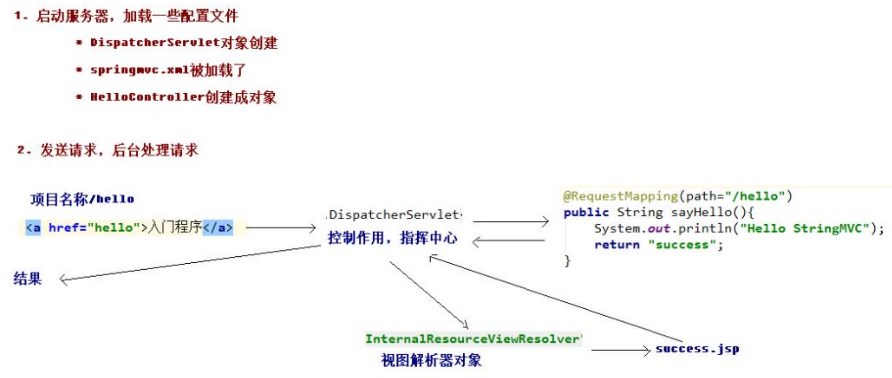


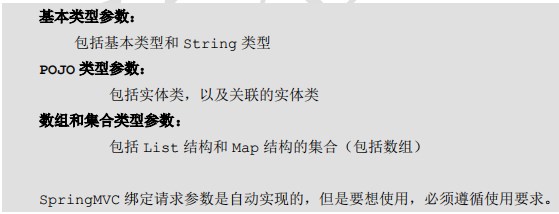
- path和value相同,value可以省略
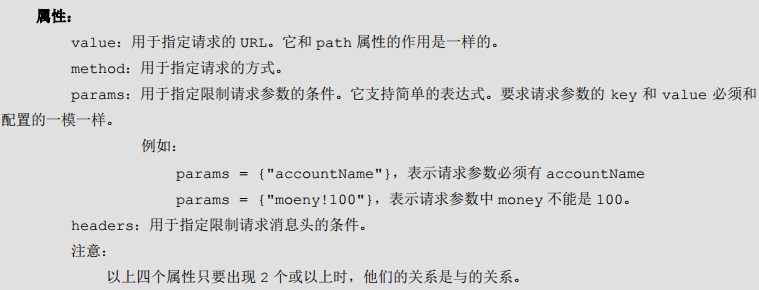
- method[]表示可以请求的方式,GET, HEAD, POST, PUT, PATCH, DELETE, OPTIONS, TRACE
- 用于指定限制请求参数的条件。它支持简单的表达式。要求请求参数的 key 和 value 必须和配置的一模一样。= 和 !分别表示等于或不等于
- headers:用于指定限制请求消息头的条件。
package cn.itcast.controller;

import org.springframework.stereotype.Controller;

import org.springframework.web.bind.annotation.RequestMapping;

import org.springframework.web.bind.annotation.RequestMethod;

/**

 * 控制器类

 * /user/hello:放在类上或方法上代表一级/二级目录

 */

@Controller

@RequestMapping(path = "/user")

public class HelloController {

    @RequestMapping(path="/hello")

    public String sayHello(){

        System.out.println("hello SpringMVC");

        return "success";

    }

    /**

     * 测试RequestMapping注解

     * @return

     */

    @RequestMapping(path = "/testRequestMapping",method = {RequestMethod.GET,RequestMethod.POST}

    ,params = {"username=heihei"},headers = {"Accept"})

    public String testRequestMapping(){

        System.out.println("测试RequestMapping...");

        return "success";

    }

}
<%@ page contentType="text/html;charset=UTF-8" language="java" %>
<html>
<head>
<title>Title</title>
</head>
<body>
<h3>入门程序</h3>
<%--<a href="hello">入门程序</a>--%>
<a href="/user/testRequestMapping?username=heihei">RequestMapping注解</a>
</body>
</html>
<%@ page contentType="text/html;charset=UTF-8" language="java" %>

<html>

<head>

    <title>Title</title>

</head>

<body>

    <%--请求参数的绑定(写相对路径)

        请求参数多时,可以使用JavaBean进行封装

    --%>

    <a href="param/testParam?username=liujinhui&password=qaz123">请求参数绑定</a>

</body>

</html>
package cn.itcast.controller;
import org.springframework.stereotype.Controller;
import org.springframework.web.bind.annotation.RequestMapping;
/**
* 请求参数的绑定
*/
@Controller
@RequestMapping("/param")
public class ParamController {
/**
* 请求参数绑定的入门
* @return
*/
@RequestMapping("/testParam")
public String testParam(String username,String password){
System.out.println("执行了..."+username+password);
return "success";
}
}<%@ page contentType="text/html;charset=UTF-8" language="java" %>
<html>
<head>
<title>Title</title>
</head>
<body>
<%--请求参数的绑定(写相对路径)
请求参数多时,可以使用JavaBean进行封装
--%>
<%--<a href="param/testParam?username=liujinhui&password=qaz123">请求参数绑定</a>--%>
<form action="/param/saveAccount" method="post">
姓名:<input type="text" name="username" /><br>
密码:<input type="text" name="password" /><br>
金额:<input type="text" name="money" /><br>
用户姓名:<input type="text" name="user.uname" /><br>
用户年龄:<input type="text" name="user.age" /><br>
<input type="submit" value="提交now" /><br>
</form>
</body>
</html>package cn.itcast.controller;
import cn.itcast.domain.Account;
import org.springframework.stereotype.Controller;
import org.springframework.web.bind.annotation.RequestMapping;
/**
* 请求参数的绑定
*/
@Controller
@RequestMapping("/param")
public class ParamController {
/**
* 请求参数绑定的入门
* @return
*/
@RequestMapping("/testParam")
public String testParam(String username,String password){
System.out.println("执行了..."+username+password);
return "success";
}
/**
* 把请求参数绑定,将数据封装到Java Bean的类中
* @param username
* @param password
* @return
*/
@RequestMapping("/saveAccount")
public String saveAccount(Account account){
System.out.println(account);
return "success";
}
}<!DOCTYPE web-app PUBLIC
"-//Sun Microsystems, Inc.//DTD Web Application 2.3//EN"
"http://java.sun.com/dtd/web-app_2_3.dtd" >
<web-app>
<display-name>Archetype Created Web Application</display-name>
<!--配置前端控制器-->
<servlet>
<servlet-name>dispatcherServlet</servlet-name>
<servlet-class>org.springframework.web.servlet.DispatcherServlet</servlet-class>
<init-param>
<param-name>contextConfigLocation</param-name>
<param-value>classpath:springmvc.xml</param-value>
</init-param>
<!--启动服务器时servlet就会创建dispatcherServlet对象-->
<load-on-startup>1</load-on-startup>
</servlet>
<servlet-mapping>
<servlet-name>dispatcherServlet</servlet-name>
<!--任何请求都会经过servlet-->
<url-pattern>/</url-pattern>
</servlet-mapping>
<!--配置解决中文乱码的过滤器-->
<filter>
<filter-name>characterEncodingFilter</filter-name>
<filter-class>org.springframework.web.filter.CharacterEncodingFilter</filter-class>
</filter>
<filter-mapping>
<filter-name>characterEncodingFilter</filter-name>
<url-pattern>/*</url-pattern>
</filter-mapping>
</web-app><%@ page contentType="text/html;charset=UTF-8" language="java" %>
<html>
<head>
<title>Title</title>
</head>
<body>
<%--把数据封装到Account类中,类中存在List和Map的集合--%>
<form action="/param/saveAccount" method="post">
姓名:<input type="text" name="username" /><br>
密码:<input type="text" name="password" /><br>
金额:<input type="text" name="money" /><br>
用户姓名:<input type="text" name="list[0].uname" /><br>
用户年龄:<input type="text" name="list[0].age" /><br>
用户姓名:<input type="text" name="map['one'].uname" /><br>
用户年龄:<input type="text" name="map['one'].age" /><br>
<input type="submit" value="提交now" /><br>
</form>
</body>
</html>
public class Account implements Serializable {

    private String username;

    private String password;

    private Double money;

    private List<User> list;

    private Map<String,User> map;

    public List<User> getList() {

        return list;

    }

    public void setList(List<User> list) {

        this.list = list;

    }

    public Map<String, User> getMap() {

        return map;

    }

    public void setMap(Map<String, User> map) {

        this.map = map;

}<%@ page contentType="text/html;charset=UTF-8" language="java" %>
<html>
<head>
<title>Title</title>
</head>
<body>
<%--自定义类型转换器--%>
<form action="/param/saveUser" method="post">
用户姓名:<input type="text" name="uname" /><br>
用户年龄:<input type="text" name="age" /><br>
用户生日:<input type="text" name="date" /><br>
<input type="submit" value="提交now" /><br>
</form>
</body>
</html><?xml version="1.0" encoding="UTF-8"?>
<beans xmlns="http://www.springframework.org/schema/beans"
xmlns:mvc="http://www.springframework.org/schema/mvc"
xmlns:context="http://www.springframework.org/schema/context"
xmlns:xsi="http://www.w3.org/2001/XMLSchema-instance"
xsi:schemaLocation=" http://www.springframework.org/schema/beans
http://www.springframework.org/schema/beans/spring-beans.xsd
http://www.springframework.org/schema/mvc
http://www.springframework.org/schema/mvc/spring-mvc.xsd
http://www.springframework.org/schema/context
http://www.springframework.org/schema/context/spring-context.xsd">
<!--开启注解的扫描,需要有context支持注解-->
<context:component-scan base-package="cn.itcast"></context:component-scan>
<!--配置视图解析器对象,访问WEB-INF下的文件-->
<bean id="internalResourceViewResolver" class="org.springframework.web.servlet.view.InternalResourceViewResolver">
<!--配置访问路径的前缀和后缀-->
<property name="prefix" value="/WEB-INF/pages/"></property>
<property name="suffix" value=".jsp"></property>
</bean>
<!--配置自定义类型转换器-->
<bean id="conversionService" class="org.springframework.context.support.ConversionServiceFactoryBean">
<property name="converters">
<set>
<bean class="cn.itcast.utils.StringToDataConverter"/>
</set>
</property>
</bean>
<!--开启SpringMVC框架注解的支持-->
<mvc:annotation-driven conversion-service="conversionService"/>
</beans>package cn.itcast.utils;
import org.springframework.core.convert.converter.Converter;
import java.text.DateFormat;
import java.text.SimpleDateFormat;
import java.util.Date;
/**
* 把字符串转换成日期
*/
public class StringToDataConverter implements Converter<String, Date> {
/**
*
* @param source 传入进来的字符串的值
* @return
*/
@Override
public Date convert(String source) {
//判断
if (source == null){
throw new RuntimeException("请您传入数据");
}
try {
DateFormat df = new SimpleDateFormat("yyyy-MM-dd");
//把字符串转换为日期
return df.parse(source);
} catch (Exception e) {
throw new RuntimeException("数据类型转换出现错误");
}
}
}package cn.itcast.controller;
import cn.itcast.domain.Account;
import cn.itcast.domain.User;
import org.springframework.stereotype.Controller;
import org.springframework.web.bind.annotation.RequestMapping;
import javax.servlet.ServletContext;
import javax.servlet.http.HttpServletRequest;
import javax.servlet.http.HttpServletResponse;
import javax.servlet.http.HttpSession;
/**
* 请求参数的绑定
*/
@Controller
@RequestMapping("/param")
public class ParamController {
/**
* 原生的api
* @return
*/
@RequestMapping("/testServlet")
public String testServlet(HttpServletRequest request, HttpServletResponse response){
System.out.println(request);
HttpSession session = request.getSession();
System.out.println(session);
ServletContext servletContext = session.getServletContext();
System.out.println(servletContext);
System.out.println(response);
return "success";
}
}<%@ page contentType="text/html;charset=UTF-8" language="java" %>
<html>
<head>
<title>Title</title>
</head>
<body>
<%--常用的注解--%>
<a href="anno/testRequestParam?name=哈哈">RequestParam</a>
</body>
</html>package cn.itcast.controller;
import org.springframework.stereotype.Controller;
import org.springframework.web.bind.annotation.RequestMapping;
import org.springframework.web.bind.annotation.RequestParam;
/**
* 常用的注解
*/
@Controller
@RequestMapping("/anno")
public class AnnoController {
@RequestMapping("/testRequestParam")
//表示不一定required(默认)
public String testRequestParam(@RequestParam(name="name",required=false) String username){
System.out.println("testRequestParam执行了");
System.out.println(username);
return "success";
}
}
package cn.itcast.controller;

import org.springframework.stereotype.Controller;

import org.springframework.web.bind.annotation.RequestBody;

import org.springframework.web.bind.annotation.RequestMapping;

import org.springframework.web.bind.annotation.RequestParam;

/**

 * 常用的注解

 */

@Controller

@RequestMapping("/anno")

public class AnnoController {

    /**

     * 获取到请求体的内容

     * @param username

     * @return

     */

    @RequestMapping("/testRequestBody")

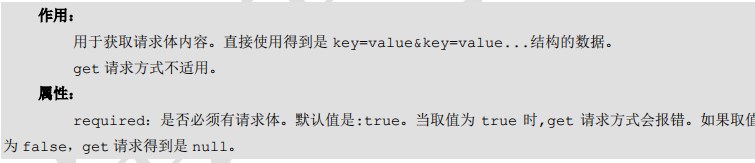
    public String testRequestBody(@RequestBody String body){

        System.out.println("testRequestParam执行了");

        System.out.println(body);

        return "success";

    }

}
<%@ page contentType="text/html;charset=UTF-8" language="java" %>
<html>
<head>
<title>Title</title>
</head>
<body>
<form action="/anno/testRequestBody" method="post">
用户姓名:<input type="text" name="username" /><br>
用户年龄:<input type="text" name="age" /><br>
<input type="submit" value="提交now" /><br>
</form>
</body>
</html>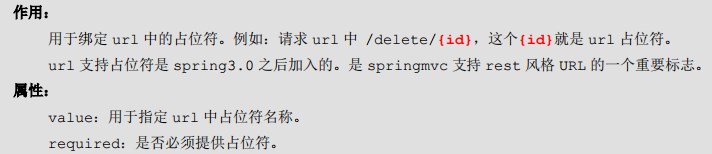
<%@ page contentType="text/html;charset=UTF-8" language="java" %>

<html>

<head>

    <title>Title</title>

</head>

<body>

<%--常用的注解--%>

<a href="anno/testPathVariable/10">RequestParam</a>

</body>

</html>
package cn.itcast.controller;
import org.springframework.stereotype.Controller;
import org.springframework.web.bind.annotation.PathVariable;
import org.springframework.web.bind.annotation.RequestBody;
import org.springframework.web.bind.annotation.RequestMapping;
import org.springframework.web.bind.annotation.RequestParam;
/**
* 常用的注解
*/
@Controller
@RequestMapping("/anno")
public class AnnoController {
/**
* PathVariable注解
* @return
*/
@RequestMapping("/testPathVariable/{sid}")
public String testPathVariable(@PathVariable(name="sid") String id){
System.out.println("testPathVariable执行了");
System.out.println(id);
return "success";
}
}
<%@ page contentType="text/html;charset=UTF-8" language="java" %>

<html>

<head>

    <title>Title</title>

</head>

<body>

<%--常用的注解--%>

<a href="anno/testRequestHeader">RequestParam</a>

</body>

</html>

/**

     * 获取请求头的值

     * @param header

     * @return

     */

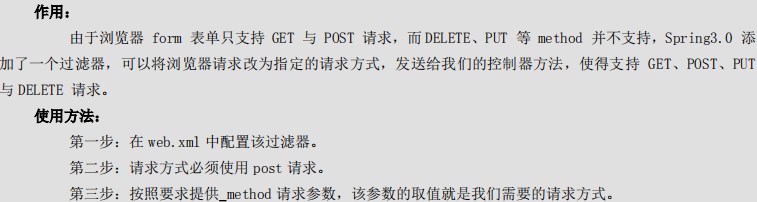
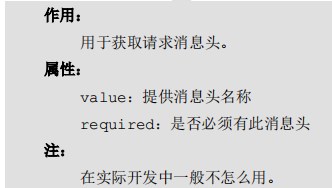
    @RequestMapping(value = "/testRequestHeader")

    public String testRequestHeader(@RequestHeader(value="Accept") String header){

        System.out.println("testPathVariable执行了");

        System.out.println(header);

        return "success";

    }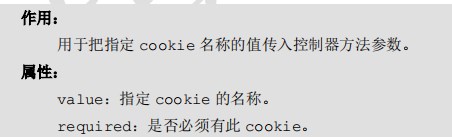
    @RequestMapping(value = "/testCookieValue")

    public String testCookieValue(@CookieValue(value = "JSESSIONID") String cookieValue){

        System.out.println("testPathVariable执行了");

        System.out.println(cookieValue);

        return "success";

    }
<%@ page contentType="text/html;charset=UTF-8" language="java" %>

<html>

<head>

    <title>Title</title>

</head>

<body>

<%--常用的注解--%>

<a href="anno/testCookieValue">RequestParam</a>

<form action="/anno/testModelAttribute" method="post">

    用户姓名:<input type="text" name="uname" /><br>

    用户年龄:<input type="text" name="age" /><br>

    <input type="submit" value="提交now" /><br>

</form>

</body>

</html>
/**
* ModelAttribute注解
* @return
*/
@RequestMapping(value = "/testModelAttribute")
public String testModelAttribute(User user){//直接拿到
//此时就能拿到User的日期
System.out.println("testModelAttribute执行了");
System.out.println(user);
return "success";
}
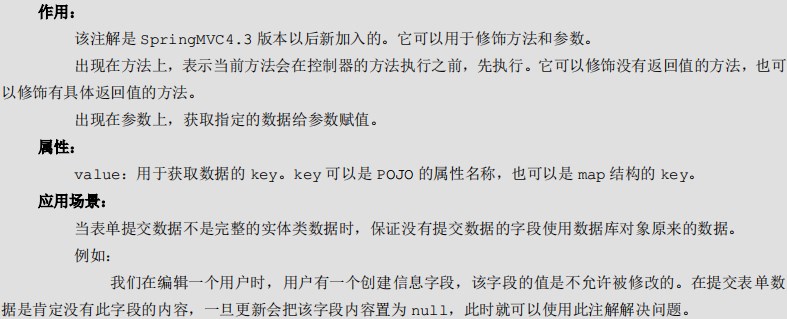
/**
* 有返回值
* 该方法会先执行
* 操作:
*/
@ModelAttribute
public User showUser(String uname){
System.out.println("showUser方法执行了");
//通过用户名查询数据库(模拟)
User user = new User();
user.setUname(uname);
user.setAge(20);
user.setDate(new Date());
//将全部数据封装上
return user;
} /**
* ModelAttribute注解
* @return
*/
@RequestMapping(value = "/testModelAttribute")
//方法内需要借助ModelAttribute注解
public String testModelAttribute(@ModelAttribute(value="abc") User user){
//此时就能拿到User的日期
System.out.println("testModelAttribute执行了");
System.out.println(user);
return "success";
}
/**
* 没有返回值
* @param uname
* @return
*/
@ModelAttribute
public void showUser(String uname, Map<String,User> map){
System.out.println("showUser方法执行了");
//通过用户名查询数据库(模拟)
User user = new User();
user.setUname(uname);
user.setAge(20);
user.setDate(new Date());
map.put("abc",user);
//将全部数据封装上
}
<%@ page contentType="text/html;charset=UTF-8" language="java" %>

<html>

<head>

    <title>Title</title>

</head>

<body>

<%--常用的注解--%>

<a href="anno/testCookieValue">RequestParam</a>

<form action="/anno/testModelAttribute" method="post">

    用户姓名:<input type="text" name="uname" /><br>

    用户年龄:<input type="text" name="age" /><br>

    <input type="submit" value="提交now" /><br>

</form>

<br>

<a href="anno/testSessionAttributes">RequestParam</a><br>

<a href="anno/getSessionAttributes">从session域中取值</a><br>

<a href="anno/delSessionAttributes">删除</a>

</body>

</html>
<%@ page contentType="text/html;charset=UTF-8" language="java" isELIgnored="false" %>
<html>
<head>
<title>Title</title>
</head>
<body>
<h3>入门成功</h3>
${ msg }
${ requestScope.msg }
${ sessionScope }
</body>
</html>package cn.itcast.controller;
import cn.itcast.domain.User;
import org.springframework.stereotype.Controller;
import org.springframework.ui.Model;
import org.springframework.ui.ModelMap;
import org.springframework.web.bind.annotation.*;
import org.springframework.web.bind.support.SessionStatus;
import javax.servlet.http.HttpServletRequest;
import java.util.Date;
import java.util.Map;
/**
* 常用的注解
*/
@Controller
@RequestMapping("/anno")
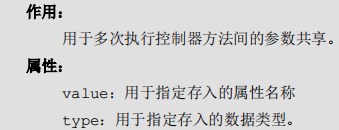
@SessionAttributes(value={"msg"}) //相当于把msg=美美存入到session域中
public class AnnoController {
/**
* SessionAttributes的注解
* @return
*/
@RequestMapping(value = "/testSessionAttributes")
public String testSessionAttributes(Model model){
//HttpServletRequest request作为参数
//此时就能拿到User的日期
System.out.println("testModelAttribute执行了");
//希望向request存一个值,从成功页面中把值取出来
//request.setAttribute("aaa","123");耦合性过高
//底层会存储到request对象中
model.addAttribute("msg","美美");
return "success";
}
/**
* 从session域中取值
* @param modelMap
* @return
*/
@RequestMapping(value = "/getSessionAttributes")
public String getSessionAttributes(ModelMap modelMap){
String msg = (String) modelMap.get("msg");
System.out.println(msg);
return "success";
}
/**
* 清除
* @param status
* @return
*/
@RequestMapping(value = "/delSessionAttributes")
public String delSessionAttributes(SessionStatus status){
status.setComplete();//清除
return "success";
}
}SpringMVC01:入门、请求参数绑定、自定义类型转换器、常见注解的更多相关文章
- Spring MVC请求参数绑定 自定义类型转化 和获取原声带额servlet request response信息
首先还在我们的框架的基础上建立文件 在domian下建立Account实体类 import org.springframework.stereotype.Controller; import org. ...
- springmvc:请求参数绑定集合类型
一.请求参数绑定实体类 domain: private String username; private String password; private Double money; private ...
- 阶段3 3.SpringMVC·_02.参数绑定及自定义类型转换_2 请求参数绑定实体类型
参数封装到javaBean对象中 创建新的包domain.在下面新建Account 实现序列化 的接口,定义几个属性 生成get和set.还有toString的方法 表单 重新发布tomcat jav ...
- 阶段3 3.SpringMVC·_02.参数绑定及自定义类型转换_4 请求参数绑定集合类型
jabaBean里面有集合的情况 把account里面的user对象先注释掉.get和set都注释掉.然后toString方法需要重写 List和Map这两种对象.生成get和set方法 toStri ...
- 阶段3 3.SpringMVC·_02.参数绑定及自定义类型转换_6 自定义类型转换器代码编写
mvc是基于组件的方式 类型转换的接口Converter,想实现类型转换,必须实现这个接口 Ctrl+N搜索 converter 这是一个接口类 它有很多的实现类.S是字符串.后面T是指要转换类型 新 ...
- 《SpringMVC从入门到放肆》十二、SpringMVC自定义类型转换器
之前的教程,我们都已经学会了如何使用Spring MVC来进行开发,掌握了基本的开发方法,返回不同类型的结果也有了一定的了解,包括返回ModelAndView.返回List.Map等等,这里就包含了传 ...
- 自定义类型转换器 及 使用 ServletAPI 对象作为方法参数
自定义类型转换器使用场景: jsp 代码: <!-- 特殊情况之:类型转换问题 --> <a href="account/deleteAccount?date=2018- ...
- <SpringMvc>入门三 参数绑定
1.get请求 <%--请求参数的绑定--%> <%--get请求参数--%> <a href="/param/testParam1?username=tom& ...
- SpringMVC 请求参数绑定
什么是请求参数绑定 请求参数格式 默认是key/value格式,比如:http:xxxx?id=1&type=2 请求参数值的数据类型 都是字符串类型的各种值 请求参数值要绑定的目标类型 Co ...
- [原创]java WEB学习笔记67:Struts2 学习之路-- 类型转换概述, 类型转换错误修改,如何自定义类型转换器
本博客的目的:①总结自己的学习过程,相当于学习笔记 ②将自己的经验分享给大家,相互学习,互相交流,不可商用 内容难免出现问题,欢迎指正,交流,探讨,可以留言,也可以通过以下方式联系. 本人互联网技术爱 ...
随机推荐
- Fluentd 使用 multiline 解析器来处理多行日志
转载自:https://mp.weixin.qq.com/s?__biz=MzU4MjQ0MTU4Ng==&mid=2247500439&idx=1&sn=45e9e0e0ef ...
- 使用Portainer管理其他主机的docker应用有两种方式
官方文档地址:https://docs.portainer.io/v/ce-2.9/admin/environments/add/docker 第一种方式 是在其他主机的docker 启动中放开237 ...
- 安装ceph (快速) 步骤三: Ceph 客户端
大多数 Ceph 用户不会直接往 Ceph 存储集群里存储对象,他们通常会使用 Ceph 块设备. Ceph 文件系统.或 Ceph 对象存储这三大功能中的一个或多个. 前提条件 先完成存储集群快速入 ...
- 使用KVM的命令行方式安装centos7虚拟机
前提条件 1.宿主机上已经安装KVM软件,参考网址:https://www.cnblogs.com/sanduzxcvbnm/p/15538881.html 2.已经上传centos7镜像到宿主机里 ...
- nacos基础知识理解
概念 Nacos是阿里巴巴开源的一款支持服务注册与发现,配置管理以及微服务管理的组件.用来取代以前常用的注册中心(zookeeper , eureka等等),以及配置中心(spring cloud c ...
- 修改NodePort的范围
在 Kubernetes 集群中,NodePort 默认范围是 30000-32767,某些情况下,因为您所在公司的网络策略限制,您可能需要修改 NodePort 的端口范围 修改kube-apise ...
- PAT (Basic Level) Practice 1022 D进制的A+B 分数 20
输入两个非负 10 进制整数 A 和 B (≤230−1),输出 A+B 的 D (1<D≤10)进制数. 输入格式: 输入在一行中依次给出 3 个整数 A.B 和 D. 输出格式: 输出 A+ ...
- ImGUI 1.87 绘制D3D外部菜单
ImGUI 它是与平台无关的C++轻量级跨平台图形界面库,没有任何第三方依赖,可以将ImGUI的源码直接加到项目中使用,该框架通常会配合特定的D3Dx9等图形开发工具包一起使用,ImGUI常用来实现进 ...
- value中放vue的参数
<input type="text" v-model="userInfo.name"/>
- printf-库函数重定向、重载
重定向:这是针对标准C语言语法来讲,指的是我们可以重新声明库函数并定义库函数的执行体 重载:这是CPP引入的新特性,即根据函数不同参数个数或参数类型来对同一函数名进行不同定义 C和CPP对重定向处理机 ...