
通过Shell脚本自动安装Hive&JDBC测试&提供CDH5网盘地址
〇、参考地址
1、Linux下编写脚本自动安装hive
2、如何运行.sh脚本文件
https://blog.csdn.net/weixin_55821558/article/details/125830542
3、hive教程:启动hiveserver2,通过jdbc方式访问hive☆
https://blog.csdn.net/a12355556/article/details/124565395
2、CDH安装hadoop与版本比较
https://www.freesion.com/article/8763708397/
一、代码编写
1、下载Hive
原生:http://archive.apache.org/dist/hive/hive-1.1.0/
CDH版本(已失效):https://archive.cloudera.com/p/cdh5/cdh/5 注意:登录名为邮箱,密码大小写数字+符号!
命令下载(已失效):wget https://archive.cloudera.com/cdh5/cdh/5/hive-1.1.0-cdh5.14.2.tar.gz
CDH5网盘备份:链接:https://pan.baidu.com/s/1XUGRMpjTbrJWDy9QCT9vTw?pwd=gmyf
比较:CDH版本比原生的兼容性更强,下载哪个都可以
2、编写脚本
vi hive_insatll.sh
echo "----------安装hive----------"

#-C 指定目录

tar -zxf /usr/local/hive-1.1.0-cdh5.14.2.tar.gz -C /usr/local/

#改名

mv /usr/local/hive-1.1.0-cdh5.14.2 /usr/local/hive110

#配置环境变量

echo '#hive' >>/etc/profile

echo 'export HIVE_HOME=/usr/local/hive110' >>/etc/profile

echo 'export PATH=$PATH:$HIVE_HOME/bin' >>/etc/profile

#创建配置文件hive-site.xml

touch /usr/local/hive110/conf/hive-site.xml

path="/usr/local/hive110/conf/hive-site.xml"

#编写配置

echo '<?xml version="1.0" encoding="UTF-8" standalone="no"?>' >> $path

echo '<?xml-stylesheet type="text/xsl" href="configuration.xsl"?>' >> $path

echo '<configuration>' >> $path

#和jdbc如出一辙,更换自己的ip地址和用户名密码即可

echo '<property><name>javax.jdo.option.ConnectionURL</name><value>jdbc:mysql://192.168.91.137:3306/hive137?createDatabaseIfNotExist=true</value></property>' >> $path

echo '<property><name>javax.jdo.option.ConnectionDriverName</name><value>com.mysql.jdbc.Driver</value></property>' >> $path

echo '<property><name>javax.jdo.option.ConnectionUserName</name><value>root</value></property>' >> $path

echo '<property><name>javax.jdo.option.ConnectionPassword</name><value>123123</value></property>' >> $path

echo '<property><name>hive.server2.thift.client.user</name><value>root</value></property>' >> $path

echo '<property><name>hive.server2.thift.client.password</name><value>123123</value></property>' >> $path

echo '</configuration>' >>$path
3、调用
添加执行权限:chmod u+x hive_insatll.sh
执行.sh文件:./hive_insatll.sh 或 sh hive_insatll.sh
4、使环境变量生效
source /etc/profile
二、运行后的其他操作
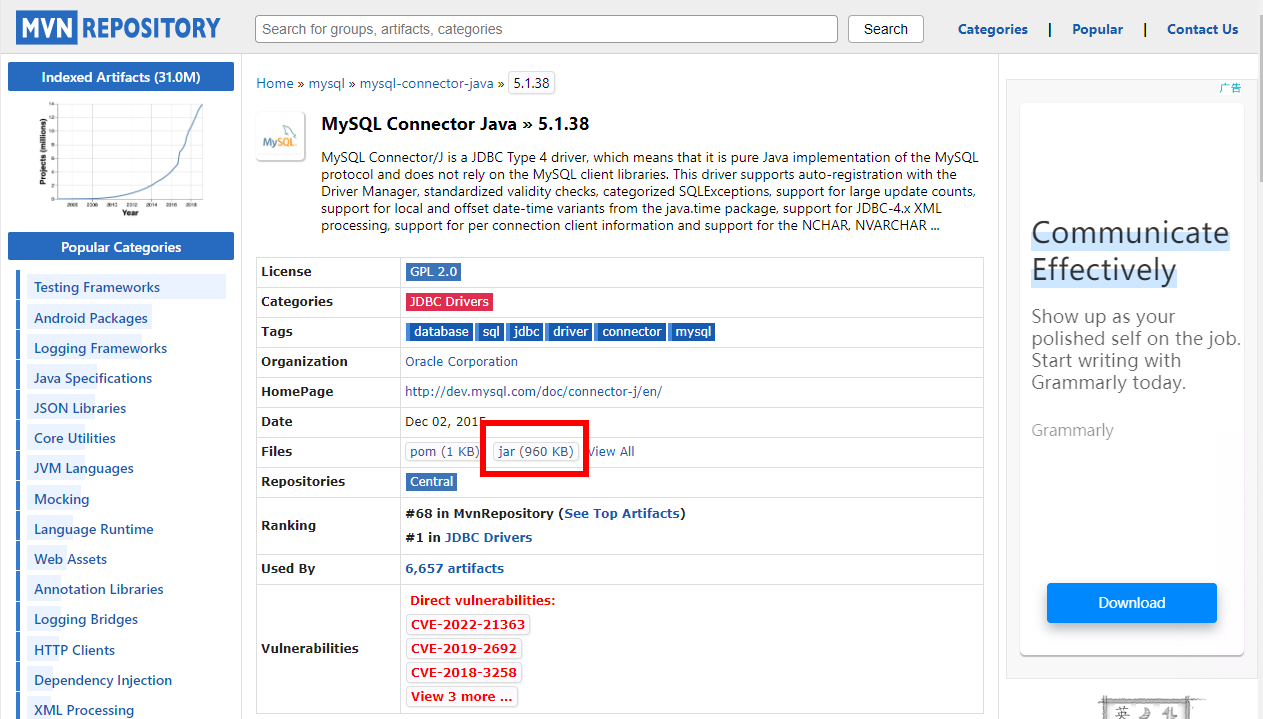
1、下载mysql的jar包
下载地址:https://mvnrepository.com/artifact/mysql/mysql-connector-java/5.1.38
其他jar包:mysql-binlog-connector-java、 eventuate-local-java-cdc-connector-mysql-binlog……
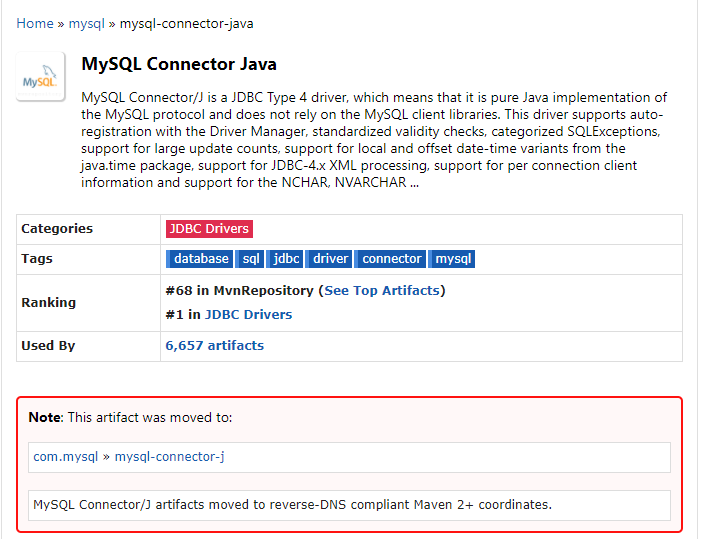
注意:已经转至新目录
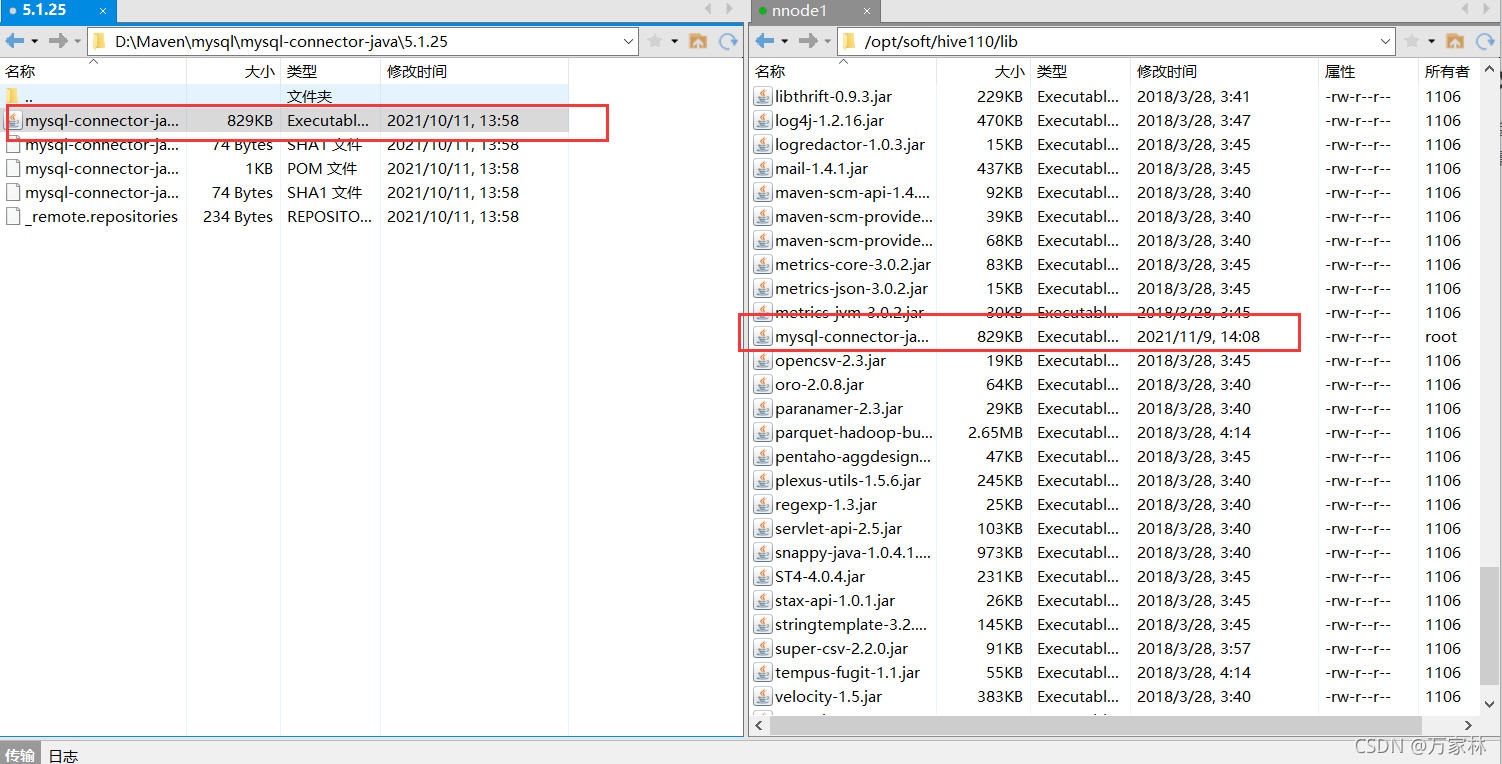
2、放入hive110/lib目录
3、执行格式化操作
schematool -dbType mysql -initSchema
4、启动hiveserver2
前台启动:hive --service hiveserver2
后台启动:nohup hive --service hiveserver2 2>&1 &
组合使用: nohup [xxx 命令操作]> file 2>&1 &,表示将 xxx 命令运行的结 果输出到 file 中(第一个2表示错误输出,另外0表示标准输入,1表示标准输出)
三、配置与验证
1、beeline 客户端连接hive
连接:beeline -u jdbc:hive2://localhost:10000 -n root

执行语句:show databases;
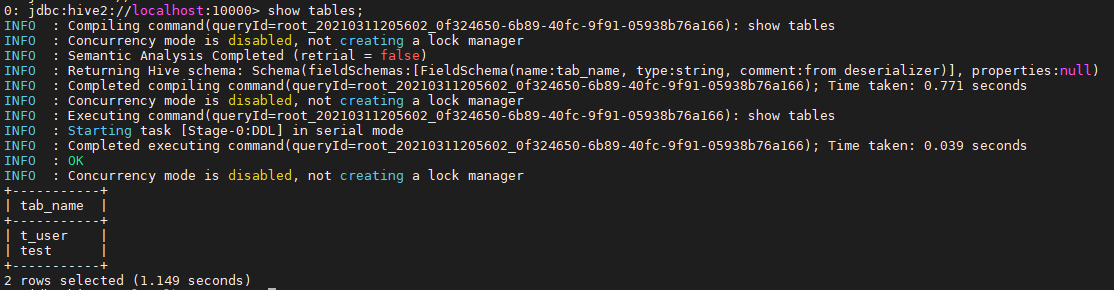
2、java验证
(1)引入依赖
<dependency>

      <groupId>org.apache.hive</groupId>

      <artifactId>hive-jdbc</artifactId>

      <version>1.1.0</version>

      <exclusions>

        <exclusion>

          <groupId>org.eclipse.jetty.aggregate</groupId>

          <artifactId>jetty-all</artifactId>

        </exclusion>

        <exclusion>

          <groupId>org.apache.hive</groupId>

          <artifactId>hive-shims</artifactId>

        </exclusion>

      </exclusions>

    </dependency>
(2)代码验证
import java.sql.SQLException;

import java.sql.Connection;

import java.sql.ResultSet;

import java.sql.Statement;

import java.sql.DriverManager;

public class HiveAPITest {

    private static String driverName = "org.apache.hive.jdbc.HiveDriver";

    public static void main(String[] args) throws SQLException {

        try {

            Class.forName(driverName);

        } catch (ClassNotFoundException e) {

            // TODO Auto-generated catch block

            e.printStackTrace();

            System.exit(1);

        }

        //replace "hive" here with the name of the user the queries should run as

        Connection con = DriverManager.getConnection("jdbc:hive2://localhost:10000/default",

"hive", "");

        Statement stmt = con.createStatement();

        String tableName = "testHiveDriverTable";

        stmt.execute("drop table if exists " + tableName);

        stmt.execute("create table " + tableName + " (key int, value string) row format delimited fields terminated by '\t'");

        // show tables

        String sql = "show tables '" + tableName + "'";

        System.out.println("Running: " + sql);

        ResultSet res = stmt.executeQuery(sql);

        if (res.next()) {

            System.out.println(res.getString(1));

        }

        // describe table

        sql = "describe " + tableName;

        System.out.println("Running: " + sql);

        res = stmt.executeQuery(sql);

        while (res.next()) {

            System.out.println(res.getString(1) + "\t" + res.getString(2));

        }

        // load data into table

        // NOTE: filepath has to be local to the hive server

        // NOTE: /opt/tmp/a.txt is a \t separated file with two fields per line

        String filepath = "/opt/tmp/a.txt";

        sql = "load data local inpath '" + filepath + "' into table " + tableName;

        System.out.println("Running: " + sql);

        stmt.execute(sql);

        // select * query

        sql = "select * from " + tableName;

        System.out.println("Running: " + sql);

        res = stmt.executeQuery(sql);

        while (res.next()) {

            System.out.println(String.valueOf(res.getInt(1)) + "\t" + res.getString(2));

        }

        // regular hive query

        sql = "select count(1) from " + tableName;

        System.out.println("Running: " + sql);

        res = stmt.executeQuery(sql);

        while (res.next()) {

            System.out.println(res.getString(1));

        }

    } }
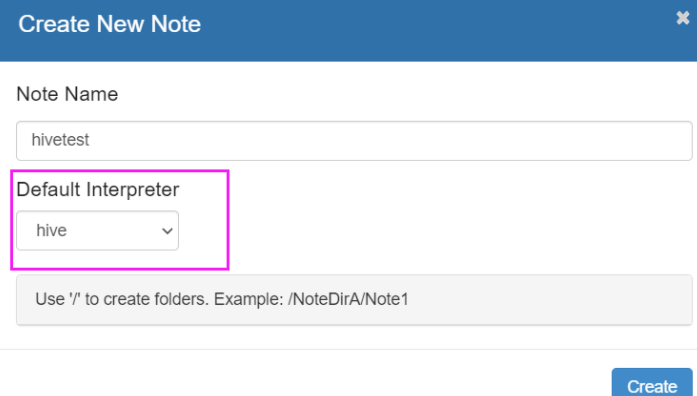
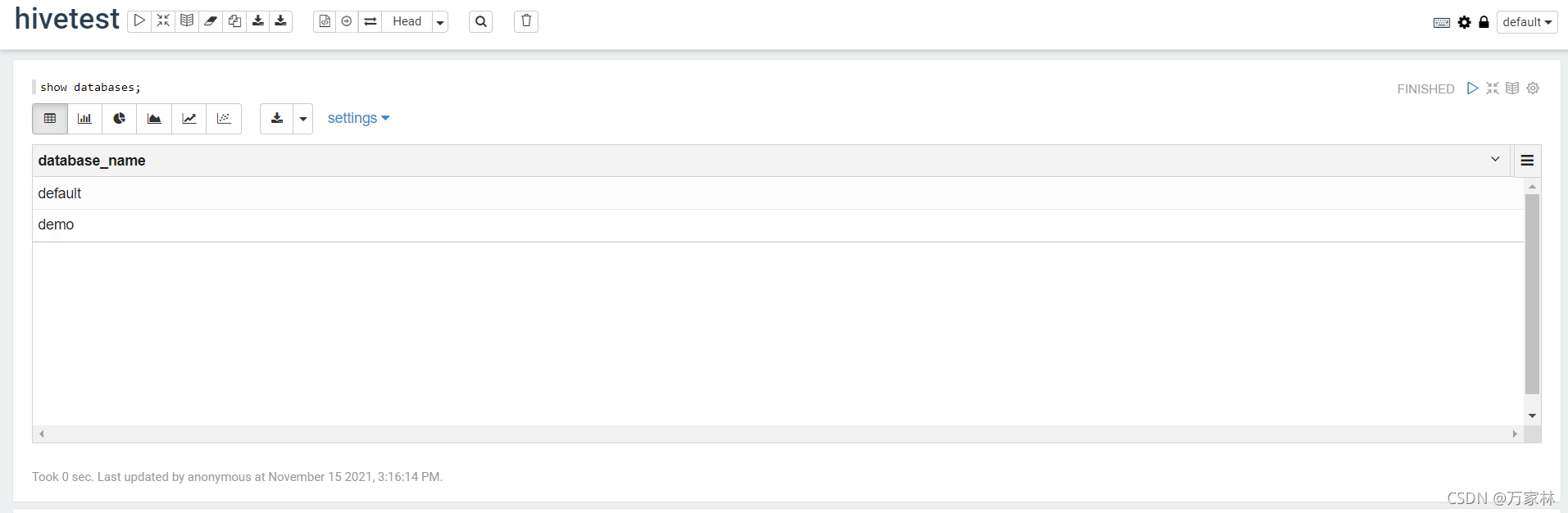
3、Zeppelin验证
(1)配置interpreter
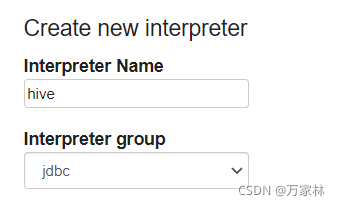
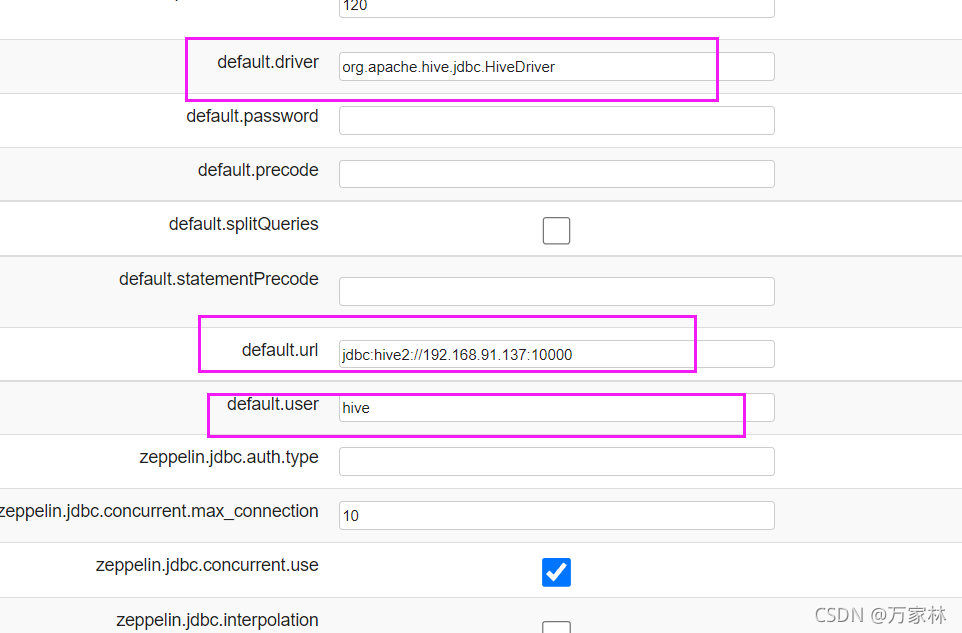
(2)验证-Note
通过Shell脚本自动安装Hive&JDBC测试&提供CDH5网盘地址的更多相关文章
- docker安装 之 ---CentOS 7 系统脚本自动安装
[使用脚本自动安装] 在测试或开发环境中Docker官方为了简化安装流程,提供了一套便捷的安装脚本,CentOS系统上可以使用这套脚本安装: $ curl -fsSL get.docker.com - ...
- 安装完Ubuntu后通过shell脚本一键安装软件
安装完Ubuntu后通过shell脚本一键安装软件 以下代码中#是单行注释 :<<! ! 是多行注释. 运行的时候需要把多行注释去掉. 比如把以下代码保存为install.sh, 那么在终 ...
- CentOS/Linux内存占用大,用Shell脚本自动定时清除/释放内存
CentOS/Linux内存占用大,用Shell脚本自动定时清除/释放内存来自:互联网 时间:2020-03-22 阅读:114以下情况可能造成Linux内存占用过高服务配置存在直接分配错误,或隐性分 ...
- Centos 6.4上面用Shell脚本一键安装vsftpd
Centos 6.4上面用Shell脚本一键安装vsftpd install.sh #!/bin/bash if [ `uname -m` == "x86_64" ];then m ...
- Centos 6.4上面用Shell脚本一键安装mysql 5.6.15
Centos 6.4上面用Shell脚本一键安装mysql 5.6.15 #!/bin/bash if [ `uname -m` == "x86_64" ];then machi ...
- shell脚本自动清理服务器日志、图片等信息
在做性能测试的时候,linux服务器时常会产生大量数据,如日志信息,图片信息,文件信息等,压测一段时间后,导致服务器磁盘空间暂满而崩溃,每天手动清理比较麻烦, 利用shell脚本自动清理,脚本如下 1 ...
- Ubuntu/CentOS下使用脚本自动安装 Docker
Ubuntu.Debian 系列安装 Docker 系统要求 Docker 支持以下版本的 Ubuntu 和 Debian 操作系统: Ubuntu Xenial 16.04 (LTS) Ubuntu ...
- nginx脚本自动安装
nginx脚本自动安装 脚本功能: 自动安装nginx 自动判别系统是否安装nginx 自定义安装nginx路径 自定义安装nginx版本. #!/bin/bash #2019年10月30日16:00 ...
- shell 脚本自动插入文件头
vim编辑shell脚本自动插入文件头部信息,将下面的代码写入home目录xia .vimrc 文件即可. shell 文件头: 1 autocmd BufNewFile *.sh exec &quo ...
- 使用 shell 脚本自动获取发版指标数据
问题背景 大一点的公司都会建立一套规章流程来避免低级错误,例如合入代码前必需经过同行评审:上线前必需提测且通过 QA 验证:全量前必需经过 1%.5%.10%.20%.50% 的灰度过程.尤其是最后一 ...
随机推荐
- 分布式安装部署MinIO
官方文档地址:http://docs.minio.org.cn/docs/master/distributed-minio-quickstart-guide 前提条件:分布式Minio至少需要4个硬盘 ...
- Elasticsearch:ICU分词器介绍
ICU Analysis插件是一组将Lucene ICU模块集成到Elasticsearch中的库. 本质上,ICU的目的是增加对Unicode和全球化的支持,以提供对亚洲语言更好的文本分割分析. 从 ...
- 学习ASP.NET Core Blazor编程系列六——初始化数据
学习ASP.NET Core Blazor编程系列一--综述 学习ASP.NET Core Blazor编程系列二--第一个Blazor应用程序(上) 学习ASP.NET Core Blazor编程系 ...
- PHP Phar反序列化学习
PHP Phar反序列化学习 Phar Phar是PHP的压缩文档,是PHP中类似于JAR的一种打包文件.它可以把多个文件存放至同一个文件中,无需解压,PHP就可以进行访问并执行内部语句. 默认开启版 ...
- Python模拟服务端
本机服务端 import socket # 获取到socket sk = socket.socket() # 获取到地址 ip 和 端口号 address = ('127.0.0.1', 8001) ...
- 9.MongoDB系列之创建副本集(二)
1. 如何设计副本集 大多数:选取主节点时需要由大多数决定,主节点只有在得到大多数支持时才能继续作为主节点,写操作被复制到大多数成员时就是安全的写操作.这里的大多数定义为"副本集中一半以上的 ...
- 一天五道Java面试题----第八天(怎么处理慢查询--------->简述Myisam和innodb的区别)
这里是参考B站上的大佬做的面试题笔记.大家也可以去看视频讲解!!! 文章目录 1.怎么处理慢查询 2.ACID靠什么保证的 3.什么是MVCC 4.mysql主从同步原理 5.简述Myisam和inn ...
- 驱动开发:内核测试模式过DSE签名
微软在x64系统中推出了DSE保护机制,DSE全称(Driver Signature Enforcement),该保护机制的核心就是任何驱动程序或者是第三方驱动如果想要在正常模式下被加载则必须要经过微 ...
- vue2和vue3组合使用教程地址
https://cn.vuejs.org/guide/essentials/watchers.html#eager-watchers
- Java函数式编程:二、高阶函数,闭包,函数组合以及柯里化
承接上文:Java函数式编程:一.函数式接口,lambda表达式和方法引用 这次来聊聊函数式编程中其他的几个比较重要的概念和技术,从而使得我们能更深刻的掌握Java中的函数式编程. 本篇博客主要聊聊以 ...