
Java类MemoryUsage查看虚拟机的使用情况
原文地址:https://www.cnblogs.com/xubiao/p/5465473.html
Java类MemoryUsage,通过MemoryUsage可以查看Java 虚拟机的内存池的内存使用情况。
MemoryUsage类有四个值(均以字节为单位):
Init:java虚拟机在启动的时候向操作系统请求的初始内存容量,java虚拟机在运行的过程中可能向操作系统请求更多的内存或将内存释放给操作系统,所以init的值是不确定的。
Used:当前已经使用的内存量。
Committed:表示保证java虚拟机能使用的内存量,已提交的内存量可以随时间而变化(增加或减少)。Java 虚拟机可能会将内存释放给系统,committed 可以小于 init。committed 将始终大于或等于 used。
Max:表示可以用于内存管理的最大内存量(以字节为单位)。可以不定义其值。如果定义了该值,最大内存量可能随时间而更改。已使用的内存量和已提 交的内存量将始终小于或等于 max(如果定义了 max)。如果内存分配试图增加满足以下条件的已使用内存将会失败:used > committed,即使 used <= max 仍然为 true(例如,当系统的虚拟内存不足时)。
直接看demo吧!
在实际开发中,一般可以用这个监控线程占用内存使用情况。
import java.lang.management.ManagementFactory;

import java.lang.management.MemoryUsage;

public class MemoryUseTest {

    public String getMemoryUseInfo(){

         MemoryUsage mu = ManagementFactory.getMemoryMXBean().getHeapMemoryUsage();

         long getCommitted = mu.getCommitted();

         long getInit = mu.getInit();

         long getUsed = mu.getUsed();

         long max = mu.getMax();

        return ">>getCommitted(MB)=>" + getCommitted / 1000 / 1000 + "\n"

         +">>getInit(MB)=" + getInit / 1000 / 1000 + "\n"

         +">>getUsed(MB)=" + getUsed / 1000 / 1000 + "\n"

         +">>max(MB)=" + max / 1000 / 1000 + "\n";

      }

   public static void main(String[] args){

           System.out.println(new MemoryUseTest().getMemoryUseInfo());

    }

}
https://blog.csdn.net/dataiyangu/article/details/83539727
JVM中MemoryUsage中init,committed,used,max的含义
package java.lang.management; import javax.management.openmbean.CompositeData;
import sun.management.MemoryUsageCompositeData; /**
* A <tt>MemoryUsage</tt> object represents a snapshot of memory usage.
* Instances of the <tt>MemoryUsage</tt> class are usually constructed
* by methods that are used to obtain memory usage
* information about individual memory pool of the Java virtual machine or
* the heap or non-heap memory of the Java virtual machine as a whole.
*
* <p> A <tt>MemoryUsage</tt> object contains four values:
* <table summary="Describes the MemoryUsage object content">
* <tr>
* <td valign=top> <tt>init</tt> </td>
* <td valign=top> represents the initial amount of memory (in bytes) that
* the Java virtual machine requests from the operating system
* for memory management during startup. The Java virtual machine
* may request additional memory from the operating system and
* may also release memory to the system over time.
* The value of <tt>init</tt> may be undefined.
* </td>
* </tr>
* <tr>
* <td valign=top> <tt>used</tt> </td>
* <td valign=top> represents the amount of memory currently used (in bytes).
* </td>
* </tr>
* <tr>
* <td valign=top> <tt>committed</tt> </td>
* <td valign=top> represents the amount of memory (in bytes) that is
* guaranteed to be available for use by the Java virtual machine.
* The amount of committed memory may change over time (increase
* or decrease). The Java virtual machine may release memory to
* the system and <tt>committed</tt> could be less than <tt>init</tt>.
* <tt>committed</tt> will always be greater than
* or equal to <tt>used</tt>.
* </td>
* </tr>
* <tr>
* <td valign=top> <tt>max</tt> </td>
* <td valign=top> represents the maximum amount of memory (in bytes)
* that can be used for memory management. Its value may be undefined.
* The maximum amount of memory may change over time if defined.
* The amount of used and committed memory will always be less than
* or equal to <tt>max</tt> if <tt>max</tt> is defined.
* A memory allocation may fail if it attempts to increase the
* used memory such that <tt>used > committed</tt> even
* if <tt>used <= max</tt> would still be true (for example,
* when the system is low on virtual memory).
* </td>
* </tr>
* </table>
*
* Below is a picture showing an example of a memory pool:
*
* <pre>
* +----------------------------------------------+
* +//////////////// | +
* +//////////////// | +
* +----------------------------------------------+
*
* |--------|
* init
* |---------------|
* used
* |---------------------------|
* committed
* |----------------------------------------------|
* max
* </pre>
*
* <h3>MXBean Mapping</h3>
* <tt>MemoryUsage</tt> is mapped to a {@link CompositeData CompositeData}
* with attributes as specified in the {@link #from from} method.
*
* @author Mandy Chung
* @since 1.5
*/
public class MemoryUsage {
private final long init;
private final long used;
private final long committed;
private final long max; /**
* Constructs a <tt>MemoryUsage</tt> object.
*
* @param init the initial amount of memory in bytes that
* the Java virtual machine allocates;
* or <tt>-1</tt> if undefined.
* @param used the amount of used memory in bytes.
* @param committed the amount of committed memory in bytes.
* @param max the maximum amount of memory in bytes that
* can be used; or <tt>-1</tt> if undefined.
*
* @throws IllegalArgumentException if
* <ul>
* <li> the value of <tt>init</tt> or <tt>max</tt> is negative
* but not <tt>-1</tt>; or</li>
* <li> the value of <tt>used</tt> or <tt>committed</tt> is negative;
* or</li>
* <li> <tt>used</tt> is greater than the value of <tt>committed</tt>;
* or</li>
* <li> <tt>committed</tt> is greater than the value of <tt>max</tt>
* <tt>max</tt> if defined.</li>
* </ul>
*/
public MemoryUsage(long init,
long used,
long committed,
long max) {
if (init < -1) {
throw new IllegalArgumentException( "init parameter = " +
init + " is negative but not -1.");
}
if (max < -1) {
throw new IllegalArgumentException( "max parameter = " +
max + " is negative but not -1.");
}
if (used < 0) {
throw new IllegalArgumentException( "used parameter = " +
used + " is negative.");
}
if (committed < 0) {
throw new IllegalArgumentException( "committed parameter = " +
committed + " is negative.");
}
if (used > committed) {
throw new IllegalArgumentException( "used = " + used +
" should be <= committed = " + committed);
}
if (max >= 0 && committed > max) {
throw new IllegalArgumentException( "committed = " + committed +
" should be < max = " + max);
} this.init = init;
this.used = used;
this.committed = committed;
this.max = max;
} /**
* Constructs a <tt>MemoryUsage</tt> object from a
* {@link CompositeData CompositeData}.
*/
private MemoryUsage(CompositeData cd) {
// validate the input composite data
MemoryUsageCompositeData.validateCompositeData(cd); this.init = MemoryUsageCompositeData.getInit(cd);
this.used = MemoryUsageCompositeData.getUsed(cd);
this.committed = MemoryUsageCompositeData.getCommitted(cd);
this.max = MemoryUsageCompositeData.getMax(cd);
} /**
* Returns the amount of memory in bytes that the Java virtual machine
* initially requests from the operating system for memory management.
* This method returns <tt>-1</tt> if the initial memory size is undefined.
*
* @return the initial size of memory in bytes;
* <tt>-1</tt> if undefined.
*/
public long getInit() {
return init;
} /**
* Returns the amount of used memory in bytes.
*
* @return the amount of used memory in bytes.
*
*/
public long getUsed() {
return used;
}; /**
* Returns the amount of memory in bytes that is committed for
* the Java virtual machine to use. This amount of memory is
* guaranteed for the Java virtual machine to use.
*
* @return the amount of committed memory in bytes.
*
*/
public long getCommitted() {
return committed;
}; /**
* Returns the maximum amount of memory in bytes that can be
* used for memory management. This method returns <tt>-1</tt>
* if the maximum memory size is undefined.
*
* <p> This amount of memory is not guaranteed to be available
* for memory management if it is greater than the amount of
* committed memory. The Java virtual machine may fail to allocate
* memory even if the amount of used memory does not exceed this
* maximum size.
*
* @return the maximum amount of memory in bytes;
* <tt>-1</tt> if undefined.
*/
public long getMax() {
return max;
}; /**
* Returns a descriptive representation of this memory usage.
*/
public String toString() {
StringBuffer buf = new StringBuffer();
buf.append("init = " + init + "(" + (init >> 10) + "K) ");
buf.append("used = " + used + "(" + (used >> 10) + "K) ");
buf.append("committed = " + committed + "(" +
(committed >> 10) + "K) " );
buf.append("max = " + max + "(" + (max >> 10) + "K)");
return buf.toString();
} /**
* Returns a <tt>MemoryUsage</tt> object represented by the
* given <tt>CompositeData</tt>. The given <tt>CompositeData</tt>
* must contain the following attributes:
*
* <blockquote>
* <table border summary="The attributes and the types the given CompositeData contains">
* <tr>
* <th align=left>Attribute Name</th>
* <th align=left>Type</th>
* </tr>
* <tr>
* <td>init</td>
* <td><tt>java.lang.Long</tt></td>
* </tr>
* <tr>
* <td>used</td>
* <td><tt>java.lang.Long</tt></td>
* </tr>
* <tr>
* <td>committed</td>
* <td><tt>java.lang.Long</tt></td>
* </tr>
* <tr>
* <td>max</td>
* <td><tt>java.lang.Long</tt></td>
* </tr>
* </table>
* </blockquote>
*
* @param cd <tt>CompositeData</tt> representing a <tt>MemoryUsage</tt>
*
* @throws IllegalArgumentException if <tt>cd</tt> does not
* represent a <tt>MemoryUsage</tt> with the attributes described
* above.
*
* @return a <tt>MemoryUsage</tt> object represented by <tt>cd</tt>
* if <tt>cd</tt> is not <tt>null</tt>;
* <tt>null</tt> otherwise.
*/
public static MemoryUsage from(CompositeData cd) {
if (cd == null) {
return null;
} if (cd instanceof MemoryUsageCompositeData) {
return ((MemoryUsageCompositeData) cd).getMemoryUsage();
} else {
return new MemoryUsage(cd);
} }
}
jdk 1.8.0_191
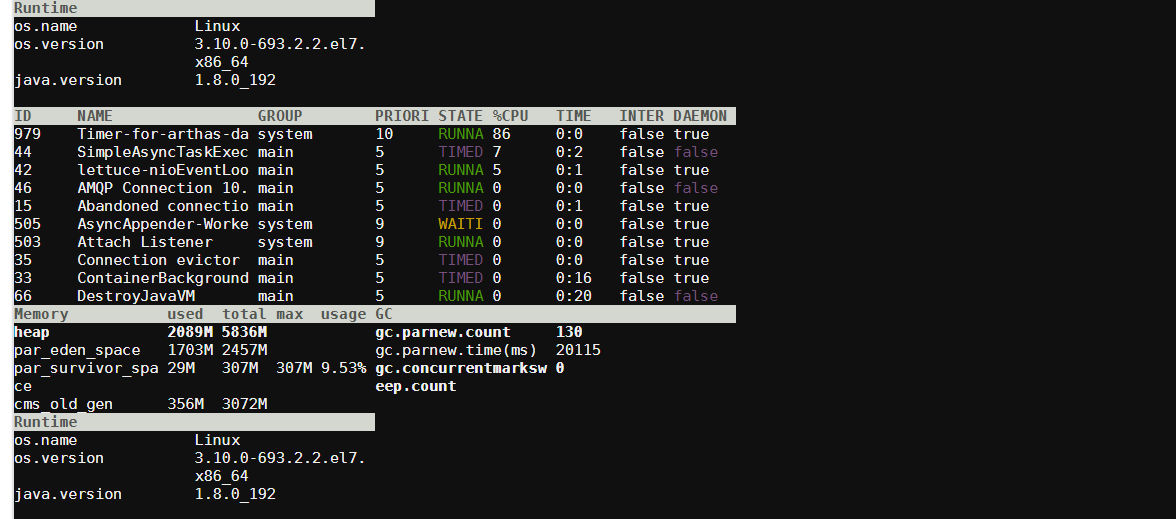
package com.taobao.arthas.core.command.monitor200;

import com.alibaba.fastjson.JSON;

import com.alibaba.fastjson.JSONObject;

import com.taobao.arthas.core.command.Constants;

import com.taobao.arthas.core.shell.command.AnnotatedCommand;

import com.taobao.arthas.core.shell.command.CommandProcess;

import com.taobao.arthas.core.shell.handlers.Handler;

import com.taobao.arthas.core.shell.handlers.shell.QExitHandler;

import com.taobao.arthas.core.shell.session.Session;

import com.taobao.arthas.core.util.LogUtil;

import com.taobao.arthas.core.util.NetUtils;

import com.taobao.arthas.core.util.NetUtils.Response;

import com.taobao.arthas.core.util.ThreadUtil;

import com.taobao.arthas.core.util.metrics.SumRateCounter;

import com.taobao.middleware.cli.annotations.Description;

import com.taobao.middleware.cli.annotations.Name;

import com.taobao.middleware.cli.annotations.Option;

import com.taobao.middleware.cli.annotations.Summary;

import com.taobao.middleware.logger.Logger;

import com.taobao.text.Color;

import com.taobao.text.Decoration;

import com.taobao.text.Style;

import com.taobao.text.renderers.ThreadRenderer;

import com.taobao.text.ui.RowElement;

import com.taobao.text.ui.TableElement;

import com.taobao.text.util.RenderUtil;

import java.lang.management.BufferPoolMXBean;

import java.lang.management.GarbageCollectorMXBean;

import java.lang.management.ManagementFactory;

import java.lang.management.MemoryPoolMXBean;

import java.lang.management.MemoryType;

import java.lang.management.MemoryUsage;

import java.util.List;

import java.util.Map;

import java.util.Timer;

import java.util.TimerTask;

/**

 * @author hengyunabc 2015年11月19日 上午11:57:21

 */

@Name("dashboard")

@Summary("Overview of target jvm's thread, memory, gc, vm, tomcat info.")

@Description(Constants.EXAMPLE +

        "  dashboard\n" +

        "  dashboard -n 10\n" +

        "  dashboard -i 2000\n" +

        Constants.WIKI + Constants.WIKI_HOME + "dashboard")

public class DashboardCommand extends AnnotatedCommand {

    private static final Logger logger = LogUtil.getArthasLogger();

    private SumRateCounter tomcatRequestCounter = new SumRateCounter();

    private SumRateCounter tomcatErrorCounter = new SumRateCounter();

    private SumRateCounter tomcatReceivedBytesCounter = new SumRateCounter();

    private SumRateCounter tomcatSentBytesCounter = new SumRateCounter();

    private int numOfExecutions = Integer.MAX_VALUE;

    private boolean batchMode;

    private long interval = 5000;

    private volatile long count = 0;

    private volatile Timer timer;

    @Option(shortName = "n", longName = "number-of-execution")

    @Description("The number of times this command will be executed.")

    public void setNumOfExecutions(int numOfExecutions) {

        this.numOfExecutions = numOfExecutions;

    }

    @Option(shortName = "b", longName = "batch")

    @Description("Execute this command in batch mode.")

    public void setBatchMode(boolean batchMode) {

        this.batchMode = batchMode;

    }

    @Option(shortName = "i", longName = "interval")

    @Description("The interval (in ms) between two executions, default is 5000 ms.")

    public void setInterval(long interval) {

        this.interval = interval;

    }

    @Override

    public void process(final CommandProcess process) {

        Session session = process.session();

        timer = new Timer("Timer-for-arthas-dashboard-" + session.getSessionId(), true);

        // ctrl-C support

        process.interruptHandler(new DashboardInterruptHandler(process, timer));

        /*

         * 通过handle回调,在suspend和end时停止timer,resume时重启timer

         */

        Handler<Void> stopHandler = new Handler<Void>() {

            @Override

            public void handle(Void event) {

                stop();

            }

        };

        Handler<Void> restartHandler = new Handler<Void>() {

            @Override

            public void handle(Void event) {

                restart(process);

            }

        };

        process.suspendHandler(stopHandler);

        process.resumeHandler(restartHandler);

        process.endHandler(stopHandler);

        // q exit support

        process.stdinHandler(new QExitHandler(process));

        // start the timer

        timer.scheduleAtFixedRate(new DashboardTimerTask(process), 0, getInterval());

    }

    public synchronized void stop() {

        if (timer != null) {

            timer.cancel();

            timer.purge();

            timer = null;

        }

    }

    public synchronized void restart(CommandProcess process) {

        if (timer == null) {

            Session session = process.session();

            timer = new Timer("Timer-for-arthas-dashboard-" + session.getSessionId(), true);

            timer.scheduleAtFixedRate(new DashboardTimerTask(process), 0, getInterval());

        }

    }

    public int getNumOfExecutions() {

        return numOfExecutions;

    }

    public boolean isBatchMode() {

        return batchMode;

    }

    public long getInterval() {

        return interval;

    }

    private static String beautifyName(String name) {

        return name.replace(' ', '_').toLowerCase();

    }

    private static void addBufferPoolMemoryInfo(TableElement table) {

        try {

            @SuppressWarnings("rawtypes")

            Class bufferPoolMXBeanClass = Class.forName("java.lang.management.BufferPoolMXBean");

            @SuppressWarnings("unchecked")

            List<BufferPoolMXBean> bufferPoolMXBeans = ManagementFactory.getPlatformMXBeans(bufferPoolMXBeanClass);

            for (BufferPoolMXBean mbean : bufferPoolMXBeans) {

                long used = mbean.getMemoryUsed();

                long total = mbean.getTotalCapacity();

                new MemoryEntry(mbean.getName(), used, total, Long.MIN_VALUE).addTableRow(table);

            }

        } catch (ClassNotFoundException e) {

            // ignore

        }

    }

    private static void addRuntimeInfo(TableElement table) {

        table.row("os.name", System.getProperty("os.name"));

        table.row("os.version", System.getProperty("os.version"));

        table.row("java.version", System.getProperty("java.version"));

        table.row("java.home", System.getProperty("java.home"));

        table.row("systemload.average",

                String.format("%.2f", ManagementFactory.getOperatingSystemMXBean().getSystemLoadAverage()));

        table.row("processors", "" + Runtime.getRuntime().availableProcessors());

        table.row("uptime", "" + ManagementFactory.getRuntimeMXBean().getUptime() / 1000 + "s");

    }

    private static void addMemoryInfo(TableElement table) {

        MemoryUsage heapMemoryUsage = ManagementFactory.getMemoryMXBean().getHeapMemoryUsage();

        MemoryUsage nonHeapMemoryUsage = ManagementFactory.getMemoryMXBean().getNonHeapMemoryUsage();

        List<MemoryPoolMXBean> memoryPoolMXBeans = ManagementFactory.getMemoryPoolMXBeans();

        new MemoryEntry("heap", heapMemoryUsage).addTableRow(table, Decoration.bold.bold());

        for (MemoryPoolMXBean poolMXBean : memoryPoolMXBeans) {

            if (MemoryType.HEAP.equals(poolMXBean.getType())) {

                MemoryUsage usage = poolMXBean.getUsage();

                String poolName = beautifyName(poolMXBean.getName());

                new MemoryEntry(poolName, usage).addTableRow(table);

            }

        }

        new MemoryEntry("nonheap", nonHeapMemoryUsage).addTableRow(table, Decoration.bold.bold());

        for (MemoryPoolMXBean poolMXBean : memoryPoolMXBeans) {

            if (MemoryType.NON_HEAP.equals(poolMXBean.getType())) {

                MemoryUsage usage = poolMXBean.getUsage();

                String poolName = beautifyName(poolMXBean.getName());

                new MemoryEntry(poolName, usage).addTableRow(table);

            }

        }

        addBufferPoolMemoryInfo(table);

    }

    private static void addGcInfo(TableElement table) {

        List<GarbageCollectorMXBean> garbageCollectorMxBeans = ManagementFactory.getGarbageCollectorMXBeans();

        for (GarbageCollectorMXBean garbageCollectorMXBean : garbageCollectorMxBeans) {

            String name = garbageCollectorMXBean.getName();

            table.add(new RowElement().style(Decoration.bold.bold()).add("gc." + beautifyName(name) + ".count",

                    "" + garbageCollectorMXBean.getCollectionCount()));

            table.row("gc." + beautifyName(name) + ".time(ms)", "" + garbageCollectorMXBean.getCollectionTime());

        }

    }

    private static String formatBytes(long size) {

        int unit = 1;

        String unitStr = "B";

        if (size / 1024 > 0) {

            unit = 1024;

            unitStr = "K";

        } else if (size / 1024 / 1024 > 0) {

            unit = 1024 * 1024;

            unitStr = "M";

        }

        return String.format("%d%s", size / unit, unitStr);

    }

    private void addTomcatInfo(TableElement table) {

        String threadPoolPath = "http://localhost:8006/connector/threadpool";

        String connectorStatPath = "http://localhost:8006/connector/stats";

        Response connectorStatResponse = NetUtils.request(connectorStatPath);

        if (connectorStatResponse.isSuccess()) {

            List<JSONObject> connectorStats = JSON.parseArray(connectorStatResponse.getContent(), JSONObject.class);

            for (JSONObject stat : connectorStats) {

                String name = stat.getString("name").replace("\"", "");

                long bytesReceived = stat.getLongValue("bytesReceived");

                long bytesSent = stat.getLongValue("bytesSent");

                long processingTime = stat.getLongValue("processingTime");

                long requestCount = stat.getLongValue("requestCount");

                long errorCount = stat.getLongValue("errorCount");

                tomcatRequestCounter.update(requestCount);

                tomcatErrorCounter.update(errorCount);

                tomcatReceivedBytesCounter.update(bytesReceived);

                tomcatSentBytesCounter.update(bytesSent);

                table.add(new RowElement().style(Decoration.bold.bold()).add("connector", name));

                table.row("QPS", String.format("%.2f", tomcatRequestCounter.rate()));

                table.row("RT(ms)", String.format("%.2f", processingTime / (double) requestCount));

                table.row("error/s", String.format("%.2f", tomcatErrorCounter.rate()));

                table.row("received/s", formatBytes((long) tomcatReceivedBytesCounter.rate()));

                table.row("sent/s", formatBytes((long) tomcatSentBytesCounter.rate()));

            }

        }

        Response threadPoolResponse = NetUtils.request(threadPoolPath);

        if (threadPoolResponse.isSuccess()) {

            List<JSONObject> threadPoolInfos = JSON.parseArray(threadPoolResponse.getContent(), JSONObject.class);

            for (JSONObject info : threadPoolInfos) {

                String name = info.getString("name").replace("\"", "");

                long busy = info.getLongValue("threadBusy");

                long total = info.getLongValue("threadCount");

                table.add(new RowElement().style(Decoration.bold.bold()).add("threadpool", name));

                table.row("busy", "" + busy);

                table.row("total", "" + total);

            }

        }

    }

    static String drawThreadInfo(int width, int height) {

        Map<String, Thread> threads = ThreadUtil.getThreads();

        return RenderUtil.render(threads.values().iterator(), new ThreadRenderer(), width, height);

    }

    static String drawMemoryInfoAndGcInfo(int width, int height) {

        TableElement table = new TableElement(1, 1);

        TableElement memoryInfoTable = new TableElement(3, 1, 1, 1, 1).rightCellPadding(1);

        memoryInfoTable.add(new RowElement().style(Decoration.bold.fg(Color.black).bg(Color.white)).add("Memory",

                "used", "total", "max", "usage"));

        addMemoryInfo(memoryInfoTable);

        TableElement gcInfoTable = new TableElement(1, 1).rightCellPadding(1);

        gcInfoTable.add(new RowElement().style(Decoration.bold.fg(Color.black).bg(Color.white)).add("GC", ""));

        addGcInfo(gcInfoTable);

        table.row(memoryInfoTable, gcInfoTable);

        return RenderUtil.render(table, width, height);

    }

    String drawRuntineInfoAndTomcatInfo(int width, int height) {

        TableElement table = new TableElement(1, 1);

        TableElement runtimeInfoTable = new TableElement(1, 1).rightCellPadding(1);

        runtimeInfoTable

                .add(new RowElement().style(Decoration.bold.fg(Color.black).bg(Color.white)).add("Runtime", ""));

        addRuntimeInfo(runtimeInfoTable);

        TableElement tomcatInfoTable = new TableElement(1, 1).rightCellPadding(1);

        try {

            // 如果请求tomcat信息失败,则不显示tomcat信息

            if (NetUtils.request("http://localhost:8006").isSuccess()) {

                tomcatInfoTable

                        .add(new RowElement().style(Decoration.bold.fg(Color.black).bg(Color.white)).add("Tomcat", ""));

                addTomcatInfo(tomcatInfoTable);

            }

        } catch (Throwable t) {

            logger.error(null, "get Tomcat Info error!", t);

        }

        table.row(runtimeInfoTable, tomcatInfoTable);

        return RenderUtil.render(table, width, height);

    }

    static class MemoryEntry {

        String name;

        long used;

        long total;

        long max;

        int unit;

        String unitStr;

        public MemoryEntry(String name, long used, long total, long max) {

            this.name = name;

            this.used = used;

            this.total = total;

            this.max = max;

            unitStr = "K";

            unit = 1024;

            if (used / 1024 / 1024 > 0) {

                unitStr = "M";

                unit = 1024 * 1024;

            }

        }

        public MemoryEntry(String name, MemoryUsage usage) {

            this(name, usage.getUsed(), usage.getCommitted(), usage.getMax());

        }

        private String format(long value) {

            String valueStr = "-";

            if (value == -1) {

                return "-1";

            }

            if (value != Long.MIN_VALUE) {

                valueStr = value / unit + unitStr;

            }

            return valueStr;

        }

        public void addTableRow(TableElement table) {

            double usage = used / (double) (max == -1 || max == Long.MIN_VALUE ? total : max) * 100;

            table.row(name, format(used), format(total), format(max), String.format("%.2f%%", usage));

        }

        public void addTableRow(TableElement table, Style.Composite style) {

            double usage = used / (double) (max == -1 || max == Long.MIN_VALUE ? total : max) * 100;

            table.add(new RowElement().style(style).add(name, format(used), format(total), format(max),

                    String.format("%.2f%%", usage)));

        }

    }

    private class DashboardTimerTask extends TimerTask {

        private CommandProcess process;

        public DashboardTimerTask(CommandProcess process) {

            this.process = process;

        }

        @Override

        public void run() {

            if (count >= getNumOfExecutions()) {

                // stop the timer

                timer.cancel();

                timer.purge();

                process.write("Process ends after " + getNumOfExecutions() + " time(s).\n");

                process.end();

                return;

            }

            int width = process.width();

            int height = process.height();

            // 上半部分放thread top。下半部分再切分为田字格,其中上面两格放memory, gc的信息。下面两格放tomcat,

            // runtime的信息

            int totalHeight = height - 1;

            int threadTopHeight = totalHeight / 2;

            int lowerHalf = totalHeight - threadTopHeight;

            int runtimeInfoHeight = lowerHalf / 2;

            int heapInfoHeight = lowerHalf - runtimeInfoHeight;

            String threadInfo = drawThreadInfo(width, threadTopHeight);

            String memoryAndGc = drawMemoryInfoAndGcInfo(width, runtimeInfoHeight);

            String runTimeAndTomcat = drawRuntineInfoAndTomcatInfo(width, heapInfoHeight);

            process.write(threadInfo + memoryAndGc + runTimeAndTomcat);

            count++;

            process.times().incrementAndGet();

        }

    }

}
com.taobao.arthas.core.command.monitor200.DashboardCommand
Java类MemoryUsage查看虚拟机的使用情况的更多相关文章
- 【转】Java类MemoryUsage查看虚拟机的使用情况
原文地址:https://www.cnblogs.com/xubiao/p/5465473.html Java类MemoryUsage,通过MemoryUsage可以查看Java 虚拟机的内存池的内存 ...
- 远程查看java虚拟机内存使用情况jconsole
jconsole 查看虚拟机使用情况 1.在远程机的tomcat的catalina.sh中加入配置: JAVA_OPTS="$JAVA_OPTS -Djava.rmi.server.host ...
- 《深入理解Java虚拟机》- Java虚拟机是如何加载Java类的?
Java虚拟机是如何加载Java类的? 这个问题也就是面试常问到的Java类加载机制.在年初面试百战之后,菜鸟喜鹊也是能把这流程倒背如流啊!但是,也只是字面上的背诵,根本就是像上学时背书考试一样. ...
- Java虚拟机(三):Java 类的加载机制
1.什么是类的加载 类的加载指的是将类的.class文件中的二进制数据读入到内存中,将其放在运行时数据区的方法区内,然后在堆区创建一个java.lang.Class对象,用来封装类在方法区内的数据结构 ...
- Java JVM- jstat查看jvm的GC情况[转]
ava通过jvm自己管理内存,同时Java提供了一些命令行工具,用于查看内存使用情况.这里主要介绍一下jstat.jmap命令以及相关工具. 一.jstat查看 gc实时执行情况 jstat命令命令格 ...
- Java 虚拟机是如何判定两个 Java 类是相同的?
Java 虚拟机是如何判定两个 Java 类是相同的? 答:Java 虚拟机不仅要看类的全名是否相同,还要看加载此类的类加载器是否一样.只有两者都相同的情况,才认为两个类是相同的.即便是同样的字节代码 ...
- C++创建虚拟机调用JAVA类
ZC: 简要摘抄: “ 1. Object类出创建JVM. 使用Java类之前必须要创建JVM环境.JDK由java.exe来完成.本文有Object类的静态方法BeginJVM来创建,用E ...
- Java中如何查看一个类依赖的包
Java中如何查看一个类依赖的包 如图, 我如何知道JSONArray是依赖的哪一个包呢,这里有两个json-lib包? 测试语句: public static void main(Strin ...
- Java类什么情况下被初始化?
1.创建类的实例(new 的方式).访问某个类或接口的静态变量,或者对该静态变量赋值,调用类的静态方法 2.反射的方式 3.当初始化一个类的时候,如果发现其父类还没有进行初始化,则需先触发其父类的初始 ...
随机推荐
- html,css,jquery,JavaScript
1.全选 (当点击checkall按钮时,选中所有checkbox用prop全选上)function checkAll() { $(':checkbox').prop('checked', true) ...
- ASP.NET Web API 框架研究 Web Host模式下的消息处理管道
寄宿的作用是开启一个进程为Web API提供一个运行环境以解决持续监听.请求监听和响应回复,即将接收到的请求转换成HttpRequestMessage对象传入管道,并将管道生成并经过处理后的HttpR ...
- 本地Git与github连接/上传配置
参照:http://www.runoob.com/w3cnote/git-guide.html 一.本地与githup连接配置1.本地创建ssh key: $ ssh-keygen -t rsa -C ...
- nips 2016 吴恩达
一年一度的 NIPS 又来了.今年举办地是笔者最爱的欧洲城市巴塞罗那.阳光沙滩配学术,确实很爽.这次的会议的第一天开场的大部分时间安排给了 tutorial.其中人数爆满的依旧是吴恩达(AndrewN ...
- C#之简易计算器设计
在学完了C#的方法和数据类型之后,写了一个简易的计算器的界面.本次界面具备加减乘除求余等五项运算.不过存在一点缺陷就是无法判断输入数据的类型,是整数还是小数,由于目前所学知识有限,等学到以后再进行完善 ...
- 背水一战 Windows 10 (49) - 控件(集合类): Pivot, Hub
[源码下载] 背水一战 Windows 10 (49) - 控件(集合类): Pivot, Hub 作者:webabcd 介绍背水一战 Windows 10 之 控件(集合类) Pivot Hub 示 ...
- IE浏览器兼容性模式
最近支持公司的一个内部业务管理系统,系统是基于jQuery来实现:用了2年的MVVM框架的我转向这个完全使用jQuery框架来开发的系统,真是相当不爽(相信用过MVVM框架的跟我是相同的感受):更为憋 ...
- 跟着刚哥学习Spring框架--Spring容器(二)
Spring容器 启动Spring容器(实例化容器) -- IOC容器读取Bean配置创建Bean实例之前,必须对它进行实例化(加载启动),这样才可以从容器中获取Bean的实例并使用. Bean是S ...
- java 路径的问题
在项目开发中会碰到各种各样的获取项目路径的一些问题: 1:java项目: 以获取 类路径下的mess.properties 为例来说明: 文件在项目中的位置: src/bz/beppe/demo/r ...
- day 39 jq 学习入门2
---恢复内容开始--- 前情提要: jq 是用来降低js 的工作的一个组件 一:利用jq 实现动画效果 <!DOCTYPE html> <html lang="en&qu ...