
Python接口自动化--requests 2
# _*_ encoding:utf-8 _*_

import json

import requests

#post请求

payload = {"cindy":"hello world",

           "python":""}

r = requests.post('http://httpbin.org/post',data=payload)

print (r.text)

#输出结果,data数据传输到form里面

# {

#   "args": {},

#   "data": "",

#   "files": {},

#   "form": {

#     "cindy": "hello world",

#     "python": "1078370383"

#   },

#   "headers": {

#     "Accept": "*/*",

#     "Accept-Encoding": "gzip, deflate",

#     "Connection": "close",

#     "Content-Length": "35",

#     "Content-Type": "application/x-www-form-urlencoded",

#     "Host": "httpbin.org",

#     "User-Agent": "python-requests/2.18.4"

#   },

#   "json": null,

#   "origin": "211.140.31.50",

#   "url": "http://httpbin.org/post"

# }

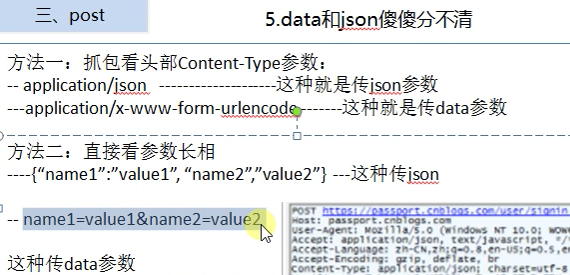
#把payload转换为json格式,post的body是json类型

data_json = json.dumps(payload)

r1 = requests.post('http://httpbin.org/post',data=data_json)

print (r1.text)

#输出结果,返回结果传回到data里

# {

#   "args": {},

#   "data": "{\"python\": \"1078370383\", \"cindy\": \"hello world\"}",

#   "files": {},

#   "form": {},

#   "headers": {

#     "Accept": "*/*",

#     "Accept-Encoding": "gzip, deflate",

#     "Connection": "close",

#     "Content-Length": "48",

#     "Host": "httpbin.org",

#     "User-Agent": "python-requests/2.18.4"

#   },

#   "json": {

#     "cindy": "hello world",

#     "python": "1078370383"

#   },

#   "origin": "211.140.31.50",

#   "url": "http://httpbin.org/post"

# }
Python接口自动化--requests 2的更多相关文章
- 【python接口自动化-requests库】【三】优化重构requests方法
一.重构post请求方法 上一张讲了如何使用requests库发送post请求,但是有时候,我们写脚本,不可能这么简单,代码完全不可复用,重复工作,那我们是不是可以想象,把我们的get,post请求, ...
- 【python接口自动化-requests库】【二】requests库简单使用(入门)
一.post请求 前面讲了,我们get请求的时候,引入requests的包,然后直接使用get方法,那么post是不是一样的? 1.首先我们先引入requests import requests 2. ...
- 【python接口自动化-requests库】【一】requests库安装
1.概念 requests 是用Python语言编写,基于 urllib,采用 Apache2 Licensed 开源协议的 HTTP 库.它比 urllib 更加方便,可以节约我们大量的工作,完全满 ...
- Python接口自动化--requests 1
# _*_ encoding:utf-8 _*_ import requests #请求博客园首页,无参数的get请求 r = requests.get('http://www.cnblogs.com ...
- python接口自动化(十)--post请求四种传送正文方式(详解)
简介 post请求我在python接口自动化(八)--发送post请求的接口(详解)已经讲过一部分了,主要是发送一些较长的数据,还有就是数据比较安全等.我们要知道post请求四种传送正文方式首先需要先 ...
- python接口自动化-Cookie_绕过验证码登录
前言 有些登录的接口会有验证码,例如:短信验证码,图形验证码等,这种登录的验证码参数可以从后台获取(或者最直接的可查数据库) 获取不到也没关系,可以通过添加Cookie的方式绕过验证码 前面在“pyt ...
- python接口自动化28-requests-html爬虫框架
前言 requests库的好,只有用过的人才知道,最近这个库的作者又出了一个好用的爬虫框架requests-html.之前解析html页面用过了lxml和bs4, requests-html集成了一些 ...
- python接口自动化-参数化
原文地址https://www.cnblogs.com/yoyoketang/p/6891710.html python接口自动化 -参数关联(一)https://www.cnblogs.com/11 ...
- python接口自动化 -参数关联(一)
原文地址https://www.cnblogs.com/yoyoketang/p/6886610.html 原文地址https://www.cnblogs.com/yoyoketang/ 原文地址ht ...
随机推荐
- [AHOI 2013]差异
Description 题库链接 给定一个长度为 \(n\) 的字符串 \(S\) ,令 \(T_i\) 表示它从第 \(i\) 个字符开始的后缀.求 \[\sum_{1\leqslant i< ...
- 以ORM的思路来从Excel文件中读取JSON数据列表
1.一个常见的问题就是如何读取excel. 这里面有几个分支的问题,一个是如何使用poi读取excel,网上例子很多,但是这只解决了第一步.如何将excel读取入一定的数据结构这是第二个问题,还有就是 ...
- Java基础——String类(二)
今天做了几道String常见操作.先来几个代码实例: 例一:此方法,仅把字符串前后出现的空格去掉了,中间部分不会. class TestTrim { public static void main(S ...
- Java四中引用
在JDK1.2以后将对象应用分为4中,强引用,软引用,弱引用,虚引用,这样的方式可以更加灵活控制对象的声明周期 强引用 String str = "123"; ...
- Android-远程Service
http://blog.csdn.net/guolin_blog/article/details/9797169 http://www.jianshu.com/p/eeb2bd59853f 将一个普通 ...
- linux_shell_入门
shell编程入门: 程序员标配:第一个shell脚本 输出 ---- " Hello World !!" 1.先创建一个hello.sh脚本文件 vi hello.sh 然后在输 ...
- imanager一些常用方法汇总
一.求和函数(根据键值数组求键值的总和) function sum(arr){ //arr是传入的值数组,格式如["张三","李四","王五" ...
- php将多个值的数组去除重复元素
array_unique(array) 只能处理value只有单个的数组. 去除有多个value数组,可以使用如下函数实现: function more_array_unique($arr=array ...
- <Android 应用 之路> 干货集中营 ~ GankIOClient
简介 利用干货集中营 , daimajia和他的小伙伴给我们开发者带来的福利开发的一个干货集中营客户端,主要功能在阅读干货上. Github地址: https://github.com/onlylov ...
- OSGI企业应用开发(四)使用Blueprint整合Spring框架(一)
上篇文章中介绍了如何使用独立的Equinox发行包搭建OSGI运行环境,而不是依赖与具体的Eclipse基础开发工具,本文开始介绍如何使用Blueprint將Spring框架整合到OSGI中. 一.开 ...