
2.2.2 RelativeLayout(相对布局)
本节引言
在上一节中我们对LinearLayout进行了详细的解析,LinearLayout也是我们 用的比较多的一个布局,我们更多的时候更钟情于他的weight(权重)属性,等比例划分,对屏幕适配还是 帮助蛮大的;但是使用LinearLayout的时候也有一个问题,就是当界面比较复杂的时候,需要嵌套多层的 LinearLayout,这样就会降低UI Render的效率(渲染速度),而且如果是listview或者GridView上的 item,效率会更低,另外太多层LinearLayout嵌套会占用更多的系统资源,还有可能引发stackoverflow; 但是如果我们使用RelativeLayout的话,可能仅仅需要一层就可以完成了,以父容器或者兄弟组件参考+margin +padding就可以设置组件的显示位置,是比较方便的!当然,也不是绝对的,具体问题具体分析吧! 总结就是:尽量使用RelativeLayout + LinearLayout的weight属性搭配使用吧!
1.核心属性
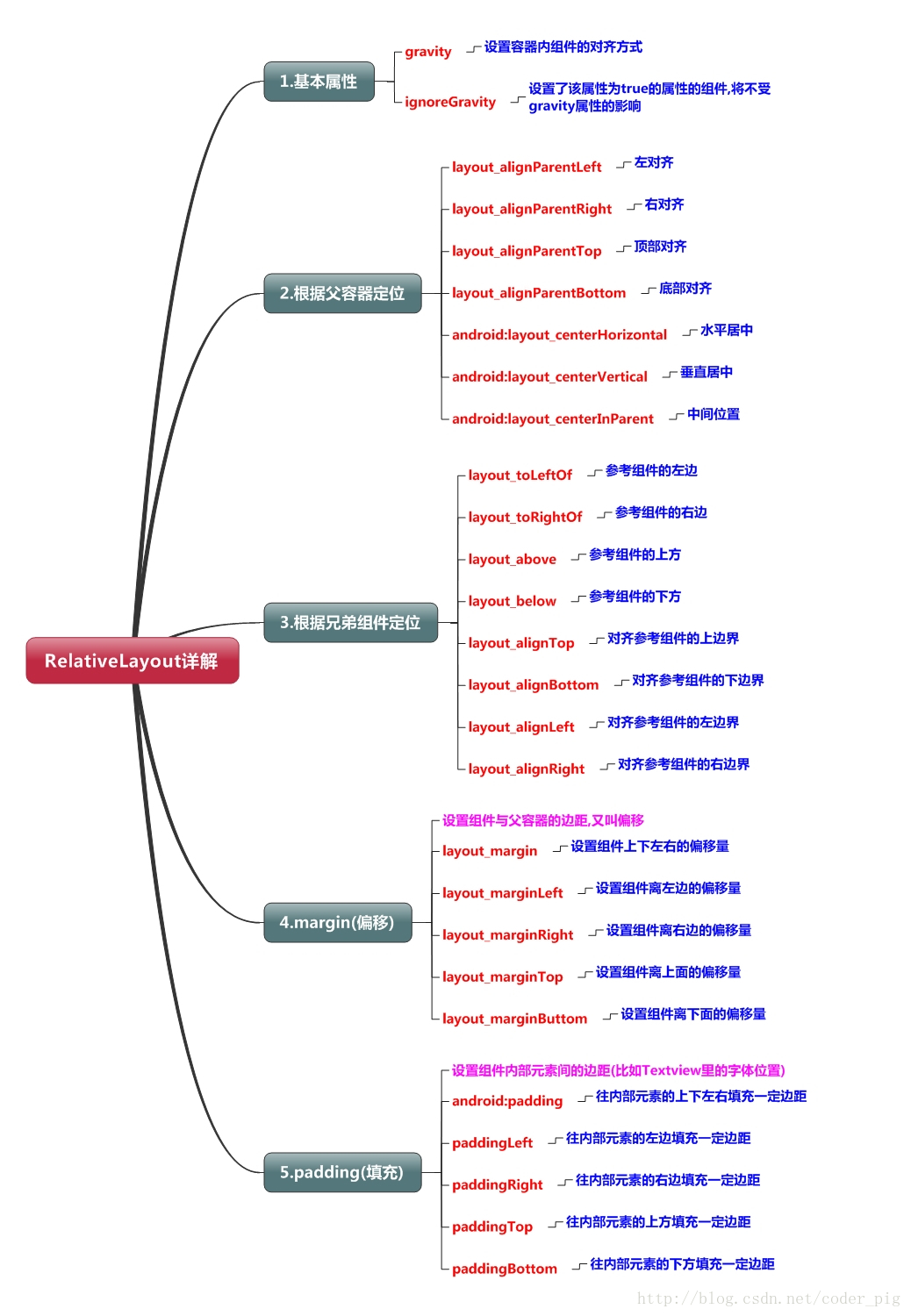
2.父容器定位属性示意图

3.根据兄弟组件定位

图中的组件1,2就是兄弟组件了,而组件3与组件1或组件2并不是兄弟组件,所以组件3不能通过 组件1或2来进行定位,比如layout_toleftof = "组件1"这样是会报错的!切记! 关于这个兄弟组件定位的最经典例子就是"梅花布局"了,下面代码实现下:
运行效果图:

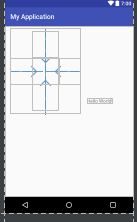
实现代码:
<RelativeLayout xmlns:android="http://schemas.android.com/apk/res/android"

    xmlns:tools="http://schemas.android.com/tools"

    android:id="@+id/RelativeLayout1"

    android:layout_width="match_parent"

    android:layout_height="match_parent" >

    <!-- 这个是在容器中央的 -->

    <ImageView

        android:id="@+id/img1"

        android:layout_width="80dp"

        android:layout_height="80dp"

        android:layout_centerInParent="true"

        android:src="@drawable/pic1"/>

    <!-- 在中间图片的左边 -->

    <ImageView

        android:id="@+id/img2"

        android:layout_width="80dp"

        android:layout_height="80dp"

        android:layout_toLeftOf="@id/img1"

        android:layout_centerVertical="true"

        android:src="@drawable/pic2"/>

    <!-- 在中间图片的右边 -->

    <ImageView

        android:id="@+id/img3"

        android:layout_width="80dp"

        android:layout_height="80dp"

        android:layout_toRightOf="@id/img1"

        android:layout_centerVertical="true"

        android:src="@drawable/pic3"/>

    <!-- 在中间图片的上面-->

    <ImageView

        android:id="@+id/img4"

        android:layout_width="80dp"

        android:layout_height="80dp"

        android:layout_above="@id/img1"

        android:layout_centerHorizontal="true"

        android:src="@drawable/pic4"/>

    <!-- 在中间图片的下面 -->

    <ImageView

        android:id="@+id/img5"

        android:layout_width="80dp"

        android:layout_height="80dp"

        android:layout_below="@id/img1"

        android:layout_centerHorizontal="true"

        android:src="@drawable/pic5"/>

</RelativeLayout>
4.margin与padding的区别
初学者对于这两个属性可能会有一点混淆,这里区分下: 首先margin代表的是偏移,比如marginleft = "5dp"表示组件离容器左边缘偏移5dp; 而padding代表的则是填充,而填充的对象针对的是组件中的元素,比如TextView中的文字 比如为TextView设置paddingleft = "5dp",则是在组件里的元素的左边填充5dp的空间! margin针对的是容器中的组件,而padding针对的是组件中的元素,要区分开来! 下面通过简单的代码演示两者的区别:
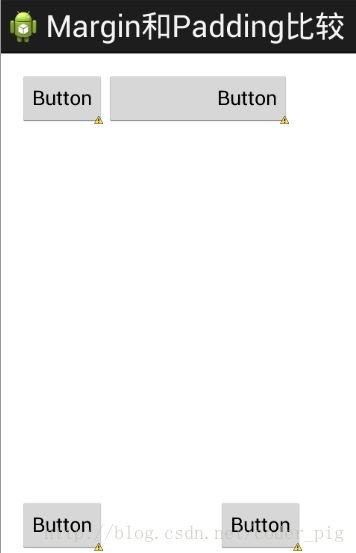
比较示例代码如下:
<RelativeLayout xmlns:android="http://schemas.android.com/apk/res/android"

    xmlns:tools="http://schemas.android.com/tools"

    android:layout_width="match_parent"

    android:layout_height="match_parent"

    android:paddingBottom="@dimen/activity_vertical_margin"

    android:paddingLeft="@dimen/activity_horizontal_margin"

    android:paddingRight="@dimen/activity_horizontal_margin"

    android:paddingTop="@dimen/activity_vertical_margin"

    tools:context=".MainActivity" >

    <Button

        android:id="@+id/btn1"

        android:layout_height="wrap_content"

        android:layout_width="wrap_content"

        android:text="Button"/>

    <Button

        android:paddingLeft="100dp"

        android:layout_height="wrap_content"

        android:layout_width="wrap_content"

        android:text="Button"

        android:layout_toRightOf="@id/btn1"/>

    <Button

        android:id="@+id/btn2"

        android:layout_height="wrap_content"

        android:layout_width="wrap_content"

        android:text="Button"

        android:layout_alignParentBottom="true"/>

    <Button

        android:layout_marginLeft="100dp"

        android:layout_height="wrap_content"

        android:layout_width="wrap_content"

        android:text="Button"

        android:layout_toRightOf="@id/btn2"

        android:layout_alignParentBottom="true"/>

</RelativeLayout>
5.很常用的一点:margin可以设置为负数
相信很多朋友都不知道一点吧,平时我们设置margin的时候都习惯了是正数的, 其实是可以用负数的,下面写个简单的程序演示下吧,模拟进入软件后,弹出广告 页面的,右上角的cancle按钮的margin则是使用负数的!
效果图如下:
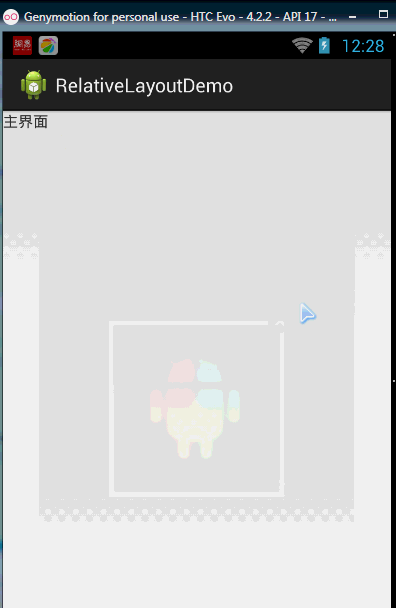
贴出的广告Activity的布局代码吧,当然,如果你对这个有兴趣的话可以下下demo, 因为仅仅是实现效果,所以代码会有些粗糙!
<RelativeLayout xmlns:android="http://schemas.android.com/apk/res/android"

    xmlns:tools="http://schemas.android.com/tools"

    android:layout_width="match_parent"

    android:layout_height="match_parent"

    tools:context="com.jay.example.relativelayoutdemo.MainActivity"

    android:background="#00CCCCFF">

    <ImageView

        android:id="@+id/imgBack"

        android:layout_width="200dp"

        android:layout_height="200dp"

        android:layout_centerInParent="true"

        android:background="@drawable/myicon" />

    <ImageView

        android:id="@+id/imgCancle"

        android:layout_width="28dp"

        android:layout_height="28dp"

        android:layout_alignRight="@id/imgBack"

        android:layout_alignTop="@id/imgBack"

        android:background="@drawable/cancel"

        android:layout_marginTop="-15dp"

        android:layout_marginRight="-10dp" />

</RelativeLayout>
2.2.2 RelativeLayout(相对布局)的更多相关文章
- Android开发重点难点1:RelativeLayout(相对布局)详解
前言 啦啦啦~博主又推出了一个新的系列啦~ 之前的Android开发系列主要以完成实验的过程为主,经常会综合许多知识来写,所以难免会有知识点的交杂,给人一种混乱的感觉. 所以博主推出“重点难点”系列, ...
- Android开发3:Intent、Bundle的使用和ListView的应用 、RelativeLayout(相对布局)简述(简单通讯录的实现)
前言 啦啦啦~博主又来骚扰大家啦~大家是不是感觉上次的Android开发博文有点长呢~主要是因为博主也是小白,在做实验的过程中查询了很多很多概念,努力去理解每一个知识点,才完成了最终的实验.还有就是随 ...
- RelativeLayout相对布局
RelativeLayout相对布局常用属性: 第一类:属性值为true或false android:layout_centerHrizontal 水平居中 android:layout_center ...
- Android(java)学习笔记164:Relativelayout相对布局案例
我们看看案例代码,自己心领神会: <?xml version="1.0" encoding="utf-8"?> <RelativeLayout ...
- RelativeLayout相对布局 安卓布局技巧
http://blog.csdn.net/nieweiking/article/details/38417317 RelativeLayout相对布局 相对布局 RelativeLayout 允许子元 ...
- 第13章、布局Layouts之RelativeLayout相对布局(从零開始学Android)
RelativeLayout相对布局 RelativeLayout是一种相对布局,控件的位置是依照相对位置来计算的,后一个控件在什么位置依赖于前一个控件的基本位置,是布局最经常使用,也是最灵活的一种布 ...
- Android精通:TableLayout布局,GridLayout网格布局,FrameLayout帧布局,AbsoluteLayout绝对布局,RelativeLayout相对布局
在Android中提供了几个常用布局: LinearLayout线性布局 RelativeLayout相对布局 FrameLayout帧布局 AbsoluteLayout绝对布局 TableLayou ...
- Android精通:View与ViewGroup,LinearLayout线性布局,RelativeLayout相对布局,ListView列表组件
UI的描述 对于Android应用程序中,所有用户界面元素都是由View和ViewGroup对象构建的.View是绘制在屏幕上能与用户进行交互的一个对象.而对于ViewGroup来说,则是一个用于存放 ...
- RelativeLayout相对布局 各个属性详解
RelativeLayout相对布局 相对布局 RelativeLayout 允许子元素指定它们相对于其父元素或兄弟元素的位置,这是实际布局中最常用的布局方式之一.它灵活性大很多,当然属性也多,操作难 ...
- Android(java)学习笔记107:Relativelayout相对布局
1. Relativelayout相对布局案例: 我们看看案例代码,自己心领神会: <?xml version="1.0" encoding="utf-8" ...
随机推荐
- 【Linux】编辑文件时,箭头按键还有BACKSPACE按键不能正常使用的解决办法
需要安装vim sudo apt-get remove vim-common sudo apt-get install vim
- Android四大组件-Content Provider
http://www.jianshu.com/p/c3ce81b638bd 一.基础回顾. 简介ContentProvider(数据提供者)是在应用程序间共享数据的一种接口机制,虽然我们可以采用文件存 ...
- 使用spring的JavaMail发送邮件
以前我们使用JavaMail发送邮件,步骤挺多的.现在的项目跟Spring整合的比较多.所以这里主要谈谈SpringMail发送. 导入jar包. 配置applicationContext-email ...
- 自定义MVC框架之工具类-分页类的封装
以前写过一个MVC框架,封装的有点low,经过一段时间的沉淀,打算重新改造下,之前这篇文章封装过一个验证码类. 这次重新改造MVC有几个很大的收获 >全部代码都是用Ubuntu+Vim编写,以前 ...
- HUD6182
A Math Problem Time Limit: 2000/1000 MS (Java/Others) Memory Limit: 32768/32768 K (Java/Others)To ...
- 在微信小程序中引入 Iconfont 阿里巴巴图标库
小程序的代码包不能超过4M,为了压缩代码包的大小,可以通过第三方链接引入图标资源 Iconfont 无疑是最常用的第三方图标库,这里介绍一下在微信小程序引入 Iconfont 的方法 一.下载图标 首 ...
- python-装饰器模式
源码地址:https://github.com/weilanhanf/PythonDesignPatterns 说明: 有时为了给某个对象而不是给整个类添加一个功能,使用继承机制是添加功能的一个有效途 ...
- python协程的简单了解
协程: 协程,又称微线程,纤程.英文名Coroutine. 可以在不同的函数间切换,而且切换的次数和时间都是由用户自己确定的. 协程的几种实现方式: (1)使用生成器yield实现. 如果不了解生成器 ...
- linux chmod 给目录或文件赋权限 可读可写可执行
前提: mode权限设定字串,格式:[ugoa...][[+-=][rwxX]...][,...] 其中u表示拥有者(user),g表示与拥有者属于同一个群体(group),o表示其他以外的人(ot ...
- 如何借助 NoSQL 提高 JPA 应用性能
[编者按]关注 NoSQL 的动态发展很重要.NoSQL 的好处并不仅限于新的应用开发.在某些案例中,你可以见识到重新访问现有的.传统的框架带来的积极效果,比如说你的 JPA 的实现.本文系国内 IT ...