
Structs复习 Action传递参数
Structs传递参数通常有三种方式 下面我来一个个介绍
1.属性
Jar包
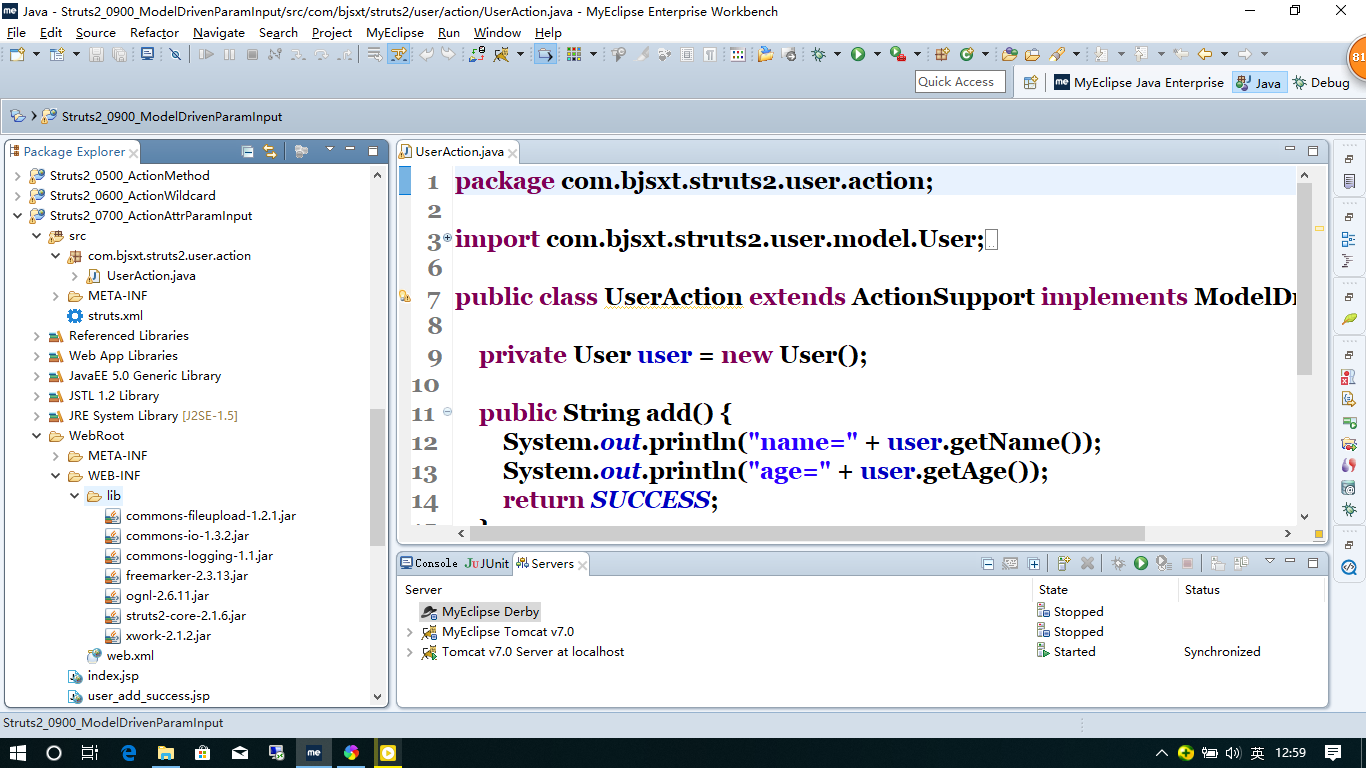
web.xml
<?xml version="1.0" encoding="UTF-8"?>

<web-app version="2.5"

    xmlns="http://java.sun.com/xml/ns/javaee"

    xmlns:xsi="http://www.w3.org/2001/XMLSchema-instance"

    xsi:schemaLocation="http://java.sun.com/xml/ns/javaee

    http://java.sun.com/xml/ns/javaee/web-app_2_5.xsd">

  <welcome-file-list>

    <welcome-file>index.jsp</welcome-file>

  </welcome-file-list>

  <filter>

        <filter-name>struts2</filter-name>

        <filter-class>org.apache.struts2.dispatcher.ng.filter.StrutsPrepareAndExecuteFilter</filter-class>

    </filter>

    <filter-mapping>

        <filter-name>struts2</filter-name>

        <url-pattern>/*</url-pattern>

    </filter-mapping>

</web-app>
Structs.xml
<?xml version="1.0" encoding="UTF-8" ?>

<!DOCTYPE struts PUBLIC

    "-//Apache Software Foundation//DTD Struts Configuration 2.0//EN"

    "http://struts.apache.org/dtds/struts-2.0.dtd">

<struts>

    <constant name="struts.devMode" value="true" />

    <package name="user" extends="struts-default" namespace="/user">

        <action name="user" class="com.bjsxt.struts2.user.action.UserAction">

            <result>/user_add_success.jsp</result>

        </action>

    </package>

</struts>
Useraction.java
package com.bjsxt.struts2.user.action;

import com.opensymphony.xwork2.ActionSupport;

public class UserAction extends ActionSupport {

    private String name;

    private int age;

    public String add() {

        System.out.println("name=" + name);

        System.out.println("age=" + age);

        return SUCCESS;

    }

    public String getName() {

        return name;

    }

    public void setName(String name) {

        this.name = name;

    }

    public int getAge() {

        return age;

    }

    public void setAge(int age) {

        this.age = age;

    }

}
index.jsp
<?xml version="1.0" encoding="GB18030" ?>

<%@ page language="java" contentType="text/html; charset=GB18030"

    pageEncoding="GB18030"%>

<%

String path = request.getContextPath();

String basePath = request.getScheme()+"://"+request.getServerName()+":"+request.getServerPort()+path+"/";

%>

<!DOCTYPE html PUBLIC "-//W3C//DTD XHTML 1.0 Transitional//EN" "http://www.w3.org/TR/xhtml1/DTD/xhtml1-transitional.dtd">

<html xmlns="http://www.w3.org/1999/xhtml">

<head>

<meta http-equiv="Content-Type" content="text/html; charset=GB18030" />

<base href="<%=basePath %>"/>

<title>Insert title here</title>

</head>

<body>

使用action属性接收参数<a href="user/user!add?name=a&age=8">添加用户</a>

</body>

</html>
user_add_success.jsp
<?xml version="1.0" encoding="GB18030" ?>

<%@ page language="java" contentType="text/html; charset=GB18030"

    pageEncoding="GB18030"%>

    <%@taglib uri="/struts-tags" prefix="s" %>

<!DOCTYPE html PUBLIC "-//W3C//DTD XHTML 1.0 Transitional//EN" "http://www.w3.org/TR/xhtml1/DTD/xhtml1-transitional.dtd">

<html xmlns="http://www.w3.org/1999/xhtml">

<head>

<meta http-equiv="Content-Type" content="text/html; charset=GB18030" />

<title>Insert title here</title>

</head>

<body>

    User Add Success!

</body>

</html>
2.DTO
Jar包
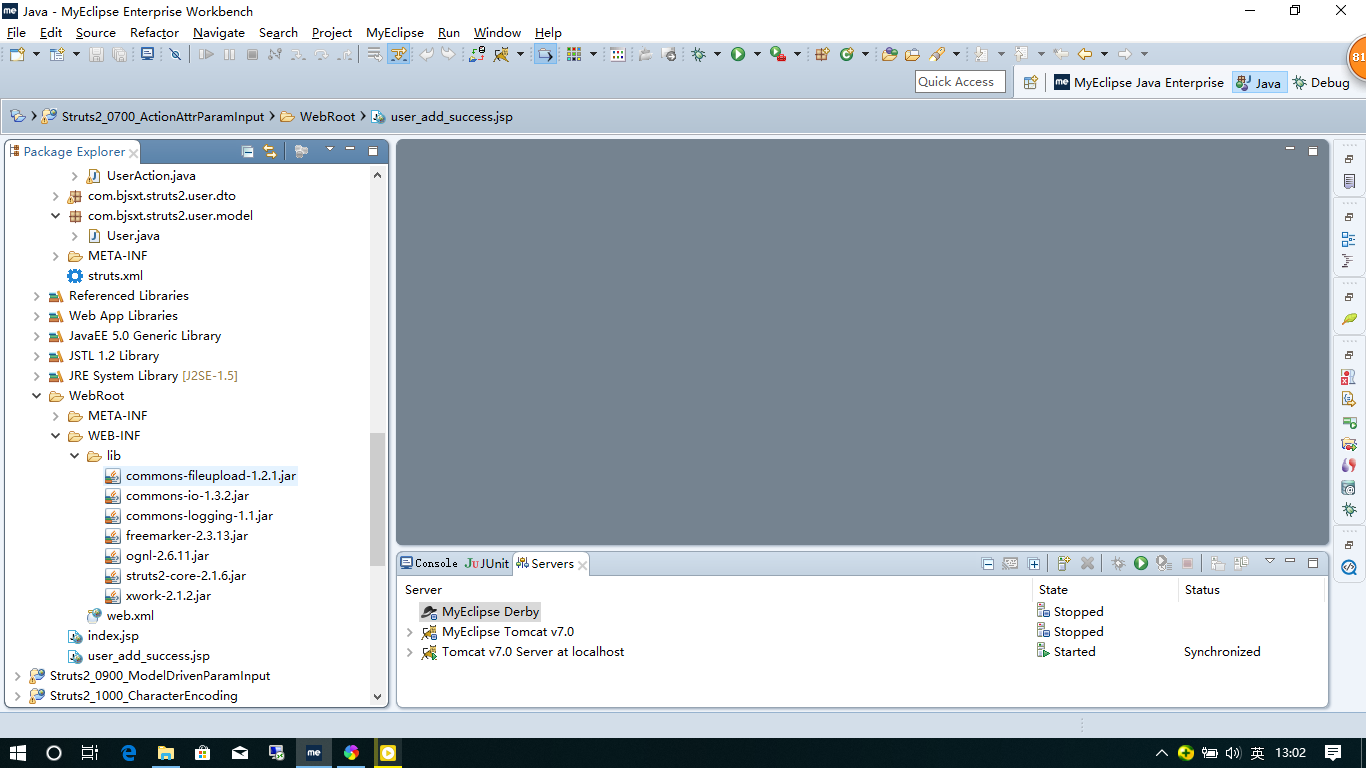
web.xml
<?xml version="1.0" encoding="UTF-8"?>

<web-app version="2.5"

    xmlns="http://java.sun.com/xml/ns/javaee"

    xmlns:xsi="http://www.w3.org/2001/XMLSchema-instance"

    xsi:schemaLocation="http://java.sun.com/xml/ns/javaee

    http://java.sun.com/xml/ns/javaee/web-app_2_5.xsd">

  <welcome-file-list>

    <welcome-file>index.jsp</welcome-file>

  </welcome-file-list>

  <filter>

        <filter-name>struts2</filter-name>

        <filter-class>org.apache.struts2.dispatcher.ng.filter.StrutsPrepareAndExecuteFilter</filter-class>

    </filter>

    <filter-mapping>

        <filter-name>struts2</filter-name>

        <url-pattern>/*</url-pattern>

    </filter-mapping>

</web-app>
Structs.xml
<?xml version="1.0" encoding="UTF-8" ?>

<!DOCTYPE struts PUBLIC

    "-//Apache Software Foundation//DTD Struts Configuration 2.0//EN"

    "http://struts.apache.org/dtds/struts-2.0.dtd">

<struts>

    <constant name="struts.devMode" value="true" />

    <package name="user" extends="struts-default" namespace="/user">

        <action name="user" class="com.bjsxt.struts2.user.action.UserAction">

            <result>/user_add_success.jsp</result>

        </action>

    </package>

</struts>
可以使用对象的属性直接传递 也可以使用dto转换一下属性之后再传
userAction.java
package com.bjsxt.struts2.user.action;

import com.bjsxt.struts2.user.model.User;

import com.opensymphony.xwork2.ActionSupport;

public class UserAction extends ActionSupport {

    private User user;

    //private UserDTO userDTO;

    public String add() {

        System.out.println("name=" + user.getName());

        System.out.println("age=" + user.getAge());

        return SUCCESS;

    }

    public User getUser() {

        return user;

    }

    public void setUser(User user) {

        this.user = user;

    }

}
UserDto.java
package com.bjsxt.struts2.user.dto;

public class UserDTO {

    private String name;

    private String password;

    private String confirmingPassword;

}
User.java
package com.bjsxt.struts2.user.model;

public class User {

    private String name;

    private int age;

    public String getName() {

        return name;

    }

    public void setName(String name) {

        this.name = name;

    }

    public int getAge() {

        return age;

    }

    public void setAge(int age) {

        this.age = age;

    }

}
index.jsp
<?xml version="1.0" encoding="GB18030" ?>

<%@ page language="java" contentType="text/html; charset=GB18030"

    pageEncoding="GB18030"%>

<%

String path = request.getContextPath();

String basePath = request.getScheme()+"://"+request.getServerName()+":"+request.getServerPort()+path+"/";

%>

<!DOCTYPE html PUBLIC "-//W3C//DTD XHTML 1.0 Transitional//EN" "http://www.w3.org/TR/xhtml1/DTD/xhtml1-transitional.dtd">

<html xmlns="http://www.w3.org/1999/xhtml">

<head>

<meta http-equiv="Content-Type" content="text/html; charset=GB18030" />

<base href="<%=basePath %>"/>

<title>Insert title here</title>

</head>

<body>

使用Domain Model接收参数<a href="user/user!add?user.name=a&user.age=8">添加用户</a>

</body>

</html>
user_add_success.jsp
<?xml version="1.0" encoding="GB18030" ?>

<%@ page language="java" contentType="text/html; charset=GB18030"

    pageEncoding="GB18030"%>

    <%@taglib uri="/struts-tags" prefix="s" %>

<!DOCTYPE html PUBLIC "-//W3C//DTD XHTML 1.0 Transitional//EN" "http://www.w3.org/TR/xhtml1/DTD/xhtml1-transitional.dtd">

<html xmlns="http://www.w3.org/1999/xhtml">

<head>

<meta http-equiv="Content-Type" content="text/html; charset=GB18030" />

<title>Insert title here</title>

</head>

<body>

    User Add Success!

</body>

</html>
3.继承自ModelDriven
jar包
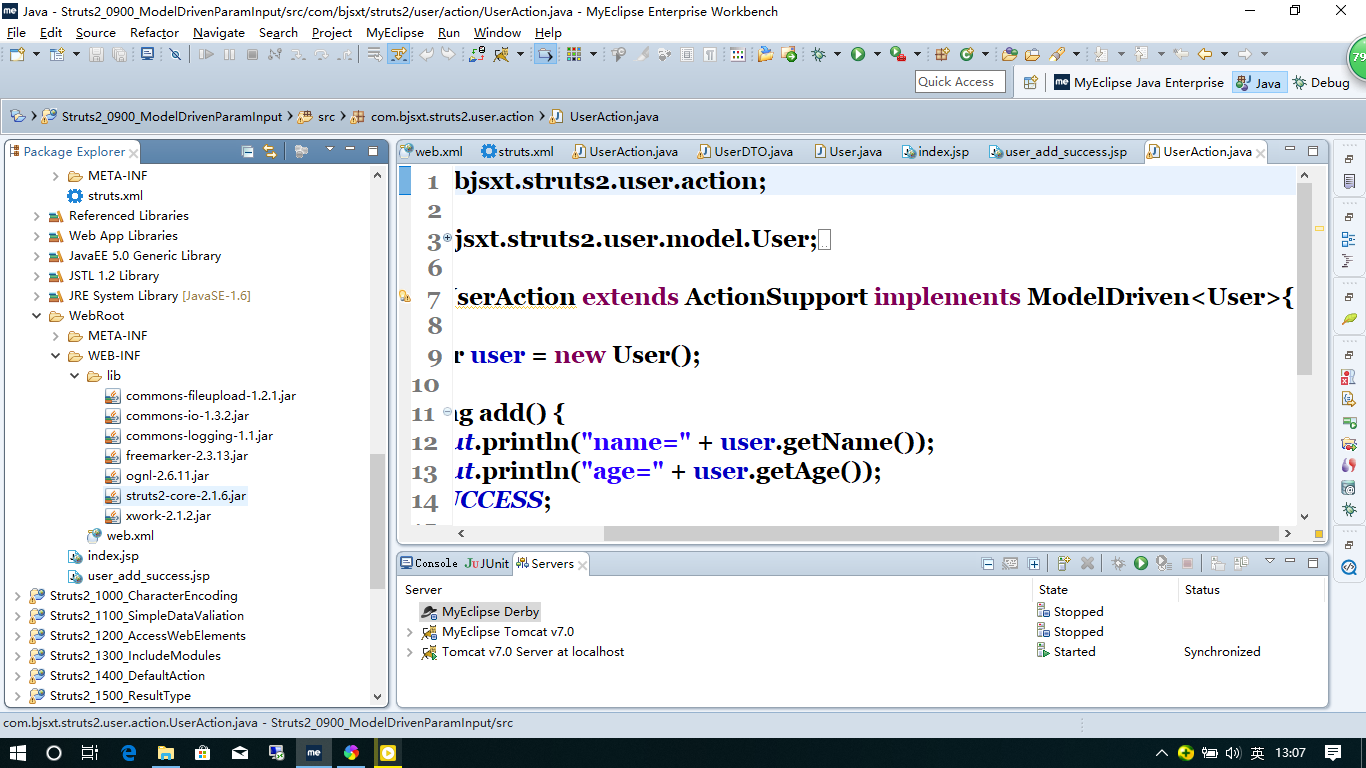
web.xml
<?xml version="1.0" encoding="UTF-8"?>

<web-app version="2.5"

    xmlns="http://java.sun.com/xml/ns/javaee"

    xmlns:xsi="http://www.w3.org/2001/XMLSchema-instance"

    xsi:schemaLocation="http://java.sun.com/xml/ns/javaee

    http://java.sun.com/xml/ns/javaee/web-app_2_5.xsd">

  <welcome-file-list>

    <welcome-file>index.jsp</welcome-file>

  </welcome-file-list>

  <filter>

        <filter-name>struts2</filter-name>

        <filter-class>org.apache.struts2.dispatcher.ng.filter.StrutsPrepareAndExecuteFilter</filter-class>

    </filter>

    <filter-mapping>

        <filter-name>struts2</filter-name>

        <url-pattern>/*</url-pattern>

    </filter-mapping>

</web-app>
Struct.xml
<?xml version="1.0" encoding="UTF-8" ?>

<!DOCTYPE struts PUBLIC

    "-//Apache Software Foundation//DTD Struts Configuration 2.0//EN"

    "http://struts.apache.org/dtds/struts-2.0.dtd">

<struts>

    <constant name="struts.devMode" value="true" />

    <package name="user" extends="struts-default" namespace="/user">

        <action name="user" class="com.bjsxt.struts2.user.action.UserAction">

            <result>/user_add_success.jsp</result>

        </action>

    </package>

</struts>
userAction.java
package com.bjsxt.struts2.user.action;

import com.bjsxt.struts2.user.model.User;

import com.opensymphony.xwork2.ActionSupport;

import com.opensymphony.xwork2.ModelDriven;

public class UserAction extends ActionSupport implements ModelDriven<User>{

    private User user = new User();

    public String add() {

        System.out.println("name=" + user.getName());

        System.out.println("age=" + user.getAge());

        return SUCCESS;

    }

    @Override

    public User getModel() {

        return user;

    }

}
index.jsp
<?xml version="1.0" encoding="GB18030" ?>

<%@ page language="java" contentType="text/html; charset=GB18030"

    pageEncoding="GB18030"%>

<%

String path = request.getContextPath();

String basePath = request.getScheme()+"://"+request.getServerName()+":"+request.getServerPort()+path+"/";

%>

<!DOCTYPE html PUBLIC "-//W3C//DTD XHTML 1.0 Transitional//EN" "http://www.w3.org/TR/xhtml1/DTD/xhtml1-transitional.dtd">

<html xmlns="http://www.w3.org/1999/xhtml">

<head>

<meta http-equiv="Content-Type" content="text/html; charset=GB18030" />

<base href="<%=basePath %>"/>

<title>Insert title here</title>

</head>

<body>

使用ModelDriven接收参数<a href="user/user!add?name=a&age=8">添加用户</a>

</body>

</html>
user_add_success.jsp
<?xml version="1.0" encoding="GB18030" ?>

<%@ page language="java" contentType="text/html; charset=GB18030"

    pageEncoding="GB18030"%>

    <%@taglib uri="/struts-tags" prefix="s" %>

<!DOCTYPE html PUBLIC "-//W3C//DTD XHTML 1.0 Transitional//EN" "http://www.w3.org/TR/xhtml1/DTD/xhtml1-transitional.dtd">

<html xmlns="http://www.w3.org/1999/xhtml">

<head>

<meta http-equiv="Content-Type" content="text/html; charset=GB18030" />

<title>Insert title here</title>

</head>

<body>

    User Add Success!

</body>

</html>
Structs复习 Action传递参数的更多相关文章
- JSP中页面向Action传递参数的几种方式
<form name="ThisForm" method="POST" action="index.jsp"> form是表单, ...
- Structs复习 Action
引入jar包 web.xml <?xml version="1.0" encoding="UTF-8"?> <web-app version= ...
- 常见问题一之拼接表格 js传递参数变量 Json接收值
1.前台拼接表格时,有时候需要使用拼接html字符串,需要多次循环拼接的,放在方法里边: //ary可以是数组中的一组数据.function(ary){var MyHtml="<tr& ...
- Struct2 向Action中传递参数(中文乱码问题)
就是把视图上的值传递到Action定义的方法中 也就是把数据从前台传递到后台 三种方式: 1. 使用action属性接收参数 比如jsp页面: <body> 使用action属性接收参数 ...
- .net中用Action等委托向外传递参数
原文:.net中用Action等委托向外传递参数 一般我们可以使用ref,out达到向外传递参数目的. Action<T>是一个特殊的委托,除了常规应用.我们还可以用它来实现简单 ...
- 当页面是本地页面时,通过ajax访问tomcat里的action,传递的参数在action里并不能识别
当页面是本地页面时,通过ajax访问tomcat里的action,传递的参数在action里并不能识别,这个问题困扰了我不少时间. 在测试时发现此问题
- Apache AB 如何传递参数
AB使用时,网上通篇一律,在进行示例时使用的连接一般都是http://*.com,这种写法是没有带参数,如果你想测试一个写入的Case,那需要传递参数给后台,如何传递参数呢? 这里有一个登录的请求,需 ...
- python 脚本传递参数
python查找指定字符 #!/usr/bin/env python import sys import re f = open("log.txt", "rb" ...
- ASP.NET MVC 页面调整并传递参数
转自:http://blog.csdn.net/zhensoft163/article/details/7174661 使用过ASP.NET MVC的人都知道在MVC中页面后台中常用的页面跳转方法有几 ...
随机推荐
- package.json-nodeJs
package.json文件描述了一个NPM包的所有相关信息,包括作者.简介.包依赖.构建等信息.格式必须是严格的JSON格式. 通常我们在创建一个NPM程序时,可以使用npm init命令,通过交互 ...
- linux中 shell编程 判断服务是否运行
判断nginx是否运行中: if ps -ef|grep "nginx"|egrep -v grep >/dev/null then echo ok! else echo n ...
- es6基础(3)-正则扩展
//正则扩展 { let regex=new RegExp('xyz','i'); let regex2=new RegExp(/xyz/i); console.log(regex.test('xyz ...
- MySQL · 最佳实践 · 分区表基本类型
MySQL · 最佳实践 · 分区表基本类型 MySQL分区表概述 随着MySQL越来越流行,Mysql里面的保存的数据也越来越大.在日常的工作中,我们经常遇到一张表里面保存了上亿甚至过十亿的记录.这 ...
- [python] 初学python,打卡签到
自学python第一周,学了变量和简单的条件判断. 附上猜数游戏代码 #Author:shijt trueAge=40 count=0 while count<3: guessAge=int(i ...
- RPM软件管理工具
1 概述 RPM(RedHat Package Manager),Rethat软件包管理工具,类似windows里面的setup.exe 是Linux这系列操作系统里面的打包安装工具,它虽然是RedH ...
- Java base64 图片编码转换
package com.test; import org.junit.Test; import sun.misc.BASE64Decoder; import sun.misc.BASE64Encode ...
- 学习笔记:CommonJS规范、AMD规范
CommonJS规范 http://wiki.jikexueyuan.com/project/webpack-handbook/commonjs.html CommonJS 规范 http://www ...
- python中strip、startswith、endswith
strip(rm)用来删除元素内的空白符: rm对应要删除空白符的元素,当rm为空(strip())时删除所有元素的空白符 startswith.endswith用来查找开头或结尾条件的元素 例子: ...
- winform 布局、容器
一.布局 属性:1.Anchor: 绑定控件到容器边缘位置保持不变 注:四周全锁定时控件随界面变化时变大 2.Dock:绑定到容器的边缘 注:下控件到边需先将下控件定义到边再将左右控件新建.到边 3 ...