
WPF实现可视化控件打印及打印预览
打印预览XAML代码:
<controls:WindowEx x:Class="SunCreate.Vipf.Client.UI.MapPrintPreview"

             xmlns="http://schemas.microsoft.com/winfx/2006/xaml/presentation"

             xmlns:x="http://schemas.microsoft.com/winfx/2006/xaml"

             xmlns:mc="http://schemas.openxmlformats.org/markup-compatibility/2006"

             xmlns:d="http://schemas.microsoft.com/expression/blend/2008"

             xmlns:controls="clr-namespace:SunCreate.Common.Controls;assembly=SunCreate.Common.Controls"

             mc:Ignorable="d"

             d:DesignHeight="700" d:DesignWidth="1000" Loaded="WindowEx_Loaded">

    <Window.Resources>

        <ResourceDictionary>

            <!-- 文字按钮 -->

            <Style x:Key="stlTxtBtn" TargetType="{x:Type Button}">

                <Setter Property="Template">

                    <Setter.Value>

                        <ControlTemplate TargetType="{x:Type Button}">

                            <Border Background="Transparent">

                                <Border x:Name="bd" Background="{TemplateBinding Background}" CornerRadius="2" Padding="{TemplateBinding Padding}">

                                    <TextBlock x:Name="txt" VerticalAlignment="Center" HorizontalAlignment="Center" Margin="5 2 5 2"  Foreground="White" ><InlineUIContainer>

                                            <ContentPresenter />

                                        </InlineUIContainer></TextBlock>

                                </Border>

                            </Border>

                            <ControlTemplate.Triggers>

                                <Trigger Property="IsMouseOver" Value="true">

                                    <Setter TargetName="bd" Property="Background" Value="#33c4f5"/>

                                </Trigger>

                                <Trigger Property="IsPressed" Value="true">

                                    <Setter TargetName="txt" Property="FontSize" Value="11"/>

                                </Trigger>

                            </ControlTemplate.Triggers>

                        </ControlTemplate>

                    </Setter.Value>

                </Setter>

            </Style>

        </ResourceDictionary>

    </Window.Resources>

    <Grid>

        <Grid.RowDefinitions>

            <RowDefinition Height="38"></RowDefinition>

            <RowDefinition></RowDefinition>

        </Grid.RowDefinitions>

        <Border Background="#f0f0f0">

            <Button x:Name="btnPrint" Margin="10 0 0 0" Background="#1aa4f5" Width="60" Height="28" HorizontalAlignment="Left" FontSize="12" Style="{StaticResource stlTxtBtn}" Click="btnPrint_Click" Content="打印"></Button>

        </Border>

        <Border Grid.Row="1" Background="#a0a0a0">

            <ScrollViewer HorizontalScrollBarVisibility="Auto" VerticalScrollBarVisibility="Auto">

                <!-- 该Border设置成固定A4纸大小 -->

                <Border Background="#fff" Margin="10" Width="842" Height="595">

                    <!-- 该Border可缩放至打印纸 -->

                    <Border x:Name="border">

                        <Image x:Name="img" Margin="10" Stretch="Uniform" Source="{Binding Image}" HorizontalAlignment="Left" VerticalAlignment="Top" ></Image>

                    </Border>

                </Border>

            </ScrollViewer>

        </Border>

    </Grid>

</controls:WindowEx>
打印预览后台代码(注意:打印的是Border不是Image):
using SunCreate.Common.Controls;

using System;

using System.Collections.Generic;

using System.IO;

using System.Linq;

using System.Printing;

using System.Text;

using System.Threading.Tasks;

using System.Windows;

using System.Windows.Controls;

using System.Windows.Data;

using System.Windows.Documents;

using System.Windows.Input;

using System.Windows.Media;

using System.Windows.Media.Imaging;

using System.Windows.Navigation;

using System.Windows.Shapes;

namespace SunCreate.Vipf.Client.UI

{

    /// <summary>

    /// 地图打印预览

    /// </summary>

    public partial class MapPrintPreview : WindowEx

    {

        /// <summary>

        /// 需要打印预览的控件

        /// </summary>

        private FrameworkElement _element;

        private BitmapImage _Image;

        public BitmapImage Image

        {

            get

            {

                return _Image;

            }

            set

            {

                _Image = value;

                OnPropertyChanged("Image");

            }

        }

        public MapPrintPreview(FrameworkElement element)

        {

            InitializeComponent();

            this.DataContext = this;

            _element = element;

        }

        private void WindowEx_Loaded(object sender, RoutedEventArgs e)

        {

            int width = (int)_element.ActualWidth;

            int height = (int)_element.ActualHeight;

            RenderTargetBitmap renderTargetBitmap = new RenderTargetBitmap(width, height, , , PixelFormats.Pbgra32);

            renderTargetBitmap.Render(_element);

            BmpBitmapEncoder bmpBitmapEncoder = new BmpBitmapEncoder();

            bmpBitmapEncoder.Frames.Add(BitmapFrame.Create(renderTargetBitmap));

            MemoryStream memoryStream = new MemoryStream();

            bmpBitmapEncoder.Save(memoryStream);

            memoryStream.Position = ;

            BitmapImage bitmapImage = new BitmapImage();

            bitmapImage.BeginInit();

            bitmapImage.StreamSource = memoryStream;

            bitmapImage.EndInit();

            Image = bitmapImage;

        }

        private void btnPrint_Click(object sender, RoutedEventArgs e)

        {

            PrintDialog printDialog = new PrintDialog();

            printDialog.PrintTicket.PageOrientation = PageOrientation.Landscape;

            if (printDialog.ShowDialog() == true)

            {

                printDialog.PrintVisual(border, "打印地图");

            }

        }

    }

}
打印预览效果图(说明:地图没数据所以都是空白;地图下面空白,是因为地图尺寸长宽比例和A4纸比例不同,缩放到A4纸):
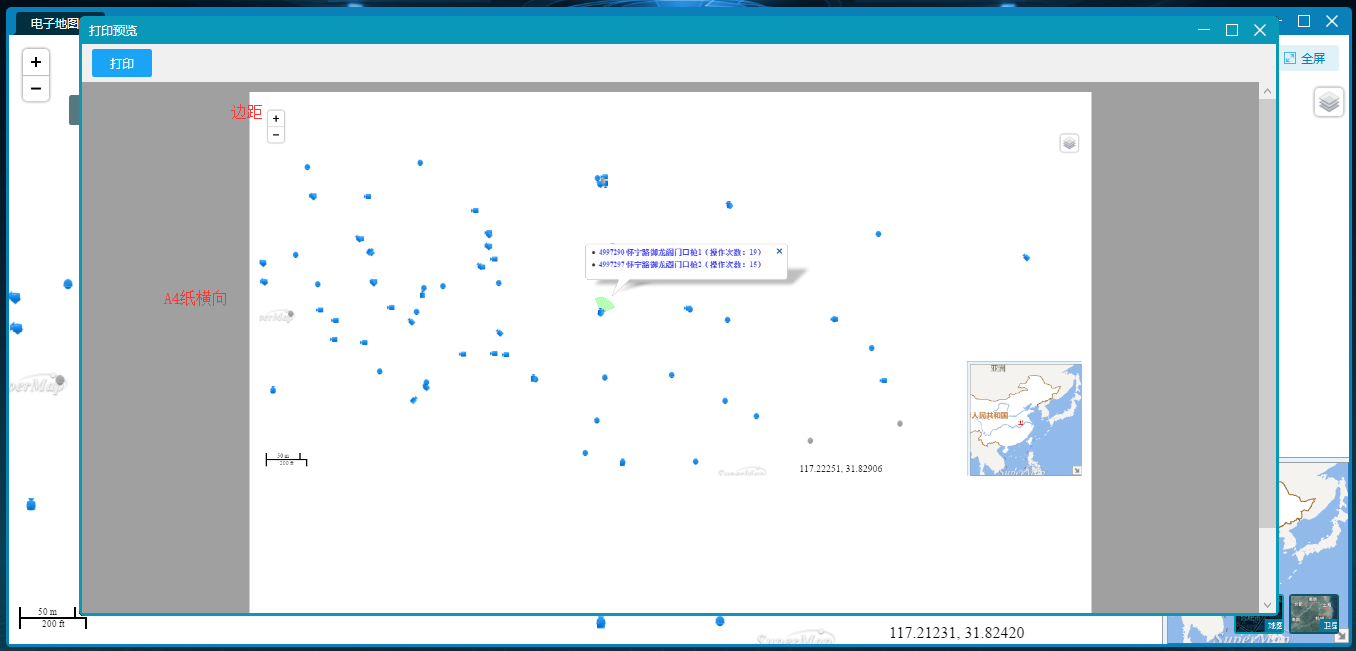
点击“打印”弹出系统的打印对话框。这个功能做的不是很理想,只是简单实现了预览与打印,没有达到我想要的效果。
WPF实现可视化控件打印及打印预览的更多相关文章
- 用Synoptic Panel自定义基于图形的可视化控件--制作一张剧场售票统计报表
数据可视化的一大特点就是能给报表使用者带来感官上的享受.不再是枯燥的数字,而变成一个一个亮丽的图形.之前业界大神公布过一个统计Car Accidents的报表,这个Power BI Report的特点 ...
- Lodop中特殊符号¥打印设计和预览不同
Lodop中¥符号样式改变问题 Lodop中对超文本样式的解析,虽然说是按照调用的本机ie引擎,但是调用的ie版本可能不同,导致在ie下是一种样式,预览又是另一种样式.可能是有些样式没有具体设置,走的 ...
- asp.net调用Lodop实现页面打印或局部打印,可进行打印设置或预览
<%@ Page Language="C#" AutoEventWireup="true" CodeFile="WebPrint.aspx.cs ...
- JS Web打印,实现预览新样式
问题描述: JS实现Web打印,要求打印前一种样式,打印预览时新样式 问题解决: (1)设置打印时的css样式,设置打印前的css样式 注: 以上为print. ...
- 自定义type为file型input控件+该控件具有本地图片预览功能
最近的一个项目需求是写一个type为filex型的input控件,这个控件: 第一,要自定义样式: 第二,要能直接在本地预览上传的图片: 第三,要能检测图片的尺寸是否符合要求. 故综合网上的资源写了下 ...
- WPF可视化控件打印
Introduction While coding an application that displays a detailed report in a ScrollViewer, it was d ...
- css去掉使用bootstrap框架后打印网页时预览效果下的超链接
在我们写网页的时候,超链接是链接各个页面的桥梁,也是搜索引擎爬虫(spider)收录网站页面的关键,因此,在每个网页中会有许多的超链. 今天,一个同行妹妹在使用了bootstrap框架来搭建自己的网站 ...
- LODOP打印控件进行批量打印
Lodop打印控件批量打印的方式:1.批量打印每页内容相同的:(1)批量打印相同内容的很多纸张,可以设置打印份数,把该内容打印出多份.2.批量打印每页不同内容的:(1)通过在一个任务中分页,循环添加页 ...
- C#、winform、wpf将类控件放进工具箱里
有时我们需要将vs自带的控件的某一些方法或属性进行一些修改,我们通常会新建一个类来继承它然后对它的方法或属性进行修改,那么我们如何将修改完成的控件类变成可视化控件放到工具箱中便于使用呢? 很简单,只要 ...
随机推荐
- [转]sqlmap使用教程
sqlmap也是渗透中常用的一个注入工具,其实在注入工具方面,一个sqlmap就足够用了,只要你用的熟,秒杀各种工具,只是一个便捷性问题,sql注入另一方面就是手工党了,这个就另当别论了. 今天把我一 ...
- paxos 练手 推进中
学习https://github.com/huoyu820125/SecondPaxos 自己编写网络版本 在学习过程将此代码的线程 锁等改成c++11 就不用包含那么多文件 主要更改如下 // M ...
- .net写本地文件的一个方法
整理代码,.net在本地写html文件的一个方法,代码如下 public static void WriteFile(string FilePath, string FileInfo, string ...
- 计算器的改良(NOIP2000)
题目链接:计算器的改良 这道题,不是很难,但代码也短不到哪去. 我们这里决定采取边读入边计算的方法,因为题目没有明确说式子有多长. 我们需要计算什么? 我们需要知道等号两边未知数的系数和常数项即可. ...
- 别人的Linux私房菜(2)Linux简介
同一操作系统无法在不同硬件平台上运行.架构. Bell实验室和麻省理工学院MIT和通用电气公司GE发起了Multics计划,分时兼容系统,300以上多终端连接主机. Unics 由Multics中的人 ...
- 再读c++primer plus 004
第九章 内存模型和名称空间 1.如果文件名包含在尖括号中,则c++编译器将在存储标准头文件的主机系统的文件系统中查找,但如果文件名包含在双引号中,则编译器将首先查找当前的工作目录或源代码目录(或其他 ...
- 22.上传app一些相关问题
1.截取上传的各个屏幕尺寸 1.按最大尺寸截取,快捷键 command+s 2.在模拟器上截取 3. 截图 iphone4 : 640x960 或者 960x640 phone5 640 x 1 ...
- thinkphp5 数据库和模型
1.Db和模型的存在只是ThinkPHP5.0架构设计中的职责和定位不同,Db负责的只是数据(表)访问,模型负责的是业务数据和业务逻辑.2.Db和模型最明显的一个区别就是Db查询返回的数据类型为数组( ...
- 2019.01.19 codeforces915E.Physical Education Lessons(ODT)
传送门 ODT水题(当然可以上线段树) 支持区间01覆盖,询问全局1的个数. 思路:直接上ODTODTODT. 不会的点这里 代码: #include<bits/stdc++.h> #de ...
- react组件父传子
react组件父传子,子组件使用父组件的数据,用props import React, { Component } from 'react'; class App extends Component ...