
基于Windows 机器学习(Machine Learning)的图像分类(Image classification)实现
今天看到一篇文章 Google’s Image Classification Model is now Free to Learn

说是狗狗的机器学习速成课程(Machine Learning Crash Course)现在可以免费学习啦,因为一开始年初的时候是内部使用的,后来开放给大众了。大家有谁对不作恶家的机器学习感兴趣的话,可以点击连接去看看。
但是以上不是我说的重点。

说狗狗的原因,是为了引出我大微软的机器学习。
在2018年3月7日,在Windows开发者日活动中,微软宣布推出Windows人工智能平台Windows ML。
ML means machine learning, not make love. Understand???
在Windows ML平台下,开发人员能够将不同的AI平台导入现有的学习模型,并在安装了Windows10系统的PC设备上使用预先培训的ML模型,并利用CPU和GPU(AMD,Intel,NVIDIA、Qualcomm)硬件进行加速,而非云端。从而加快对本地图像及视频数据的实时分析,甚至是后台任务的改进。
此外该技术支持ONNX格式的ML模型行业标准,开发者能够添加ONNX文件至UWP应用中,在并项目中生成模型界面。
目前微软已将自家的AI技术融入进了Office 365、Windows 10 照片中,甚至还使用了Windows Hello面部识别技术,来替换传统的开机密码。
看看你看,这么牛B的技术,我们怎么不来尝鲜呢。不过也不鲜了,已经过去仨月了。但是哪一家的技术不是先画一个饼,过很久你才能看到样品。哈哈。
现在学习ML还来得及。
在操作之前,先来说一下需要什么配置吧。
1. Windows 10 1803 或者更高
2. Visual Studio 15.7.1或更高
3. Microsoft Visual Studio Tools for AI,在工具——扩展和更新 里面搜索AI即可找到。
OK,大体说一下流程。
1. 创建和训练机器学习的模型
要实现对某一张图像的辨别,首先我们需要用一些数据来训练机器,告诉它这个是啥。也就是加标签tag.
比如,之前微软的小冰识狗,那你得首先找很多狗的照片吧,你要是拿猫的照片来训练机器,告诉它这是狗,也不是不可以。因为历史上也有指鹿为马的故事呢。当然在一个很大数据下,比如你拿了10万张狗的图片,里面有那么几张是猫的,鸡的图片,这样训练出来也没事。因为机器会在训练之后给你一个数据让你参考。在数据很大的前提下,允许小错的。
2. 代码实战
用代码来实现一下,并且随机挑一张照片,叫机器辨别它是个啥。因为机器刚才学习了啊,如果他认识,那么就会给出相应的可能性大小。
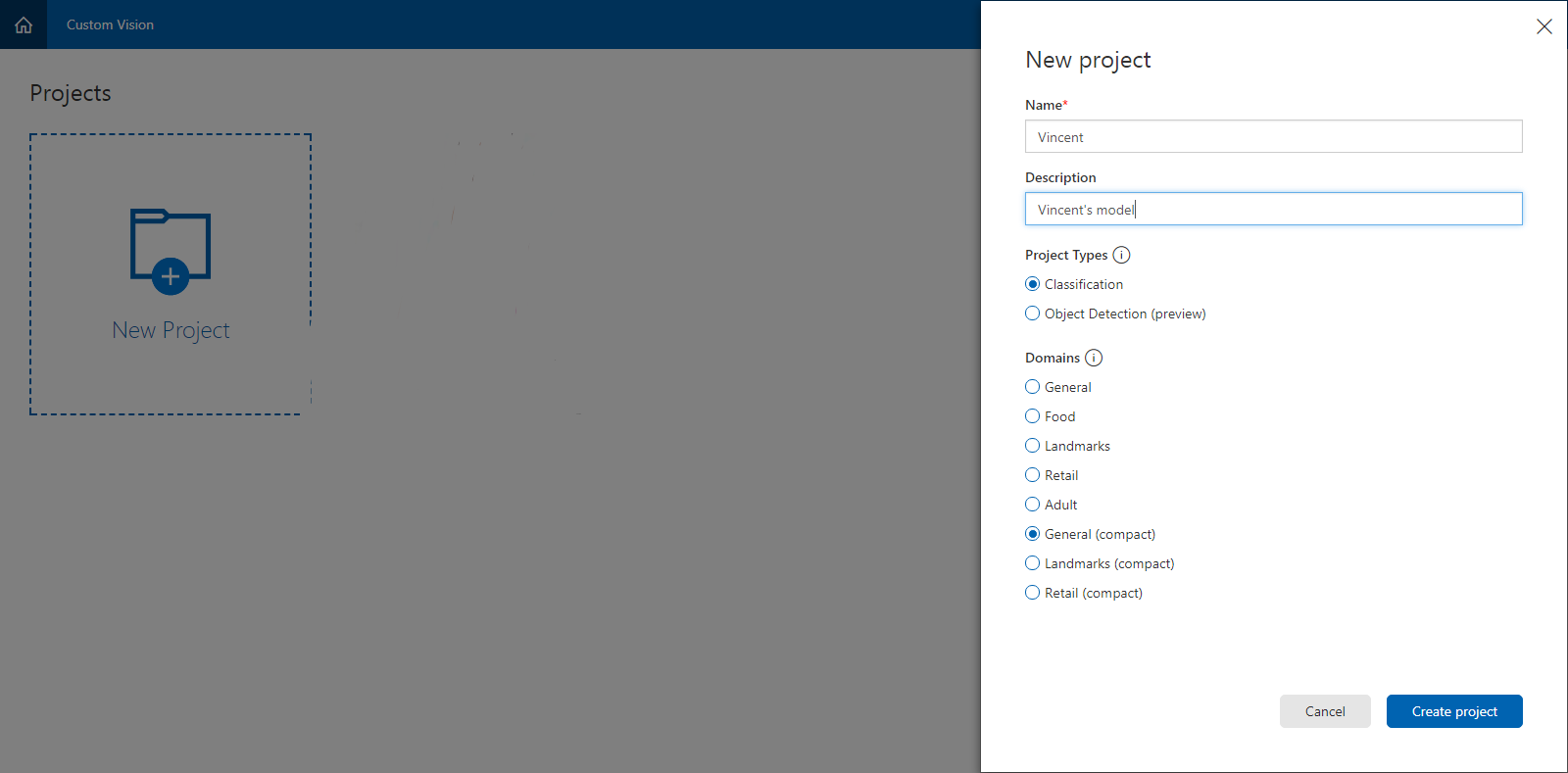
1. 创建和训练机器学习的模型
用你的Microsoft账号登陆 https://www.customvision.ai/projects, ,创建项目,类型就选择图像分类,Domains领域选择了General(Compact),带Compact是可以到处到Android和ios上用模型
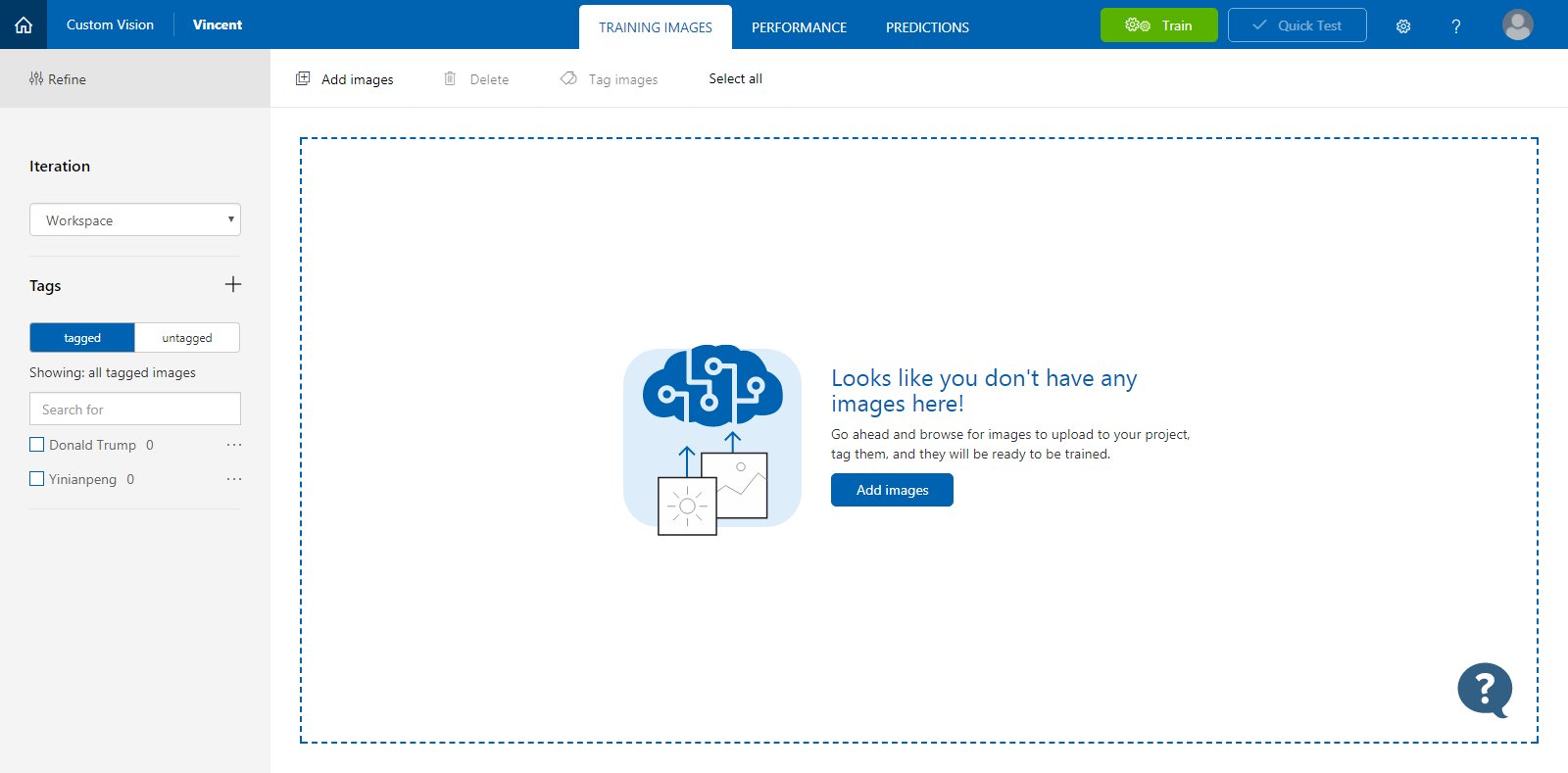
接下来你会看到下图,你可以先加标签tag,在给标签添加相应的图像。也可以先加图像,然后新加标签的。
我先训练一个川普出来试试,
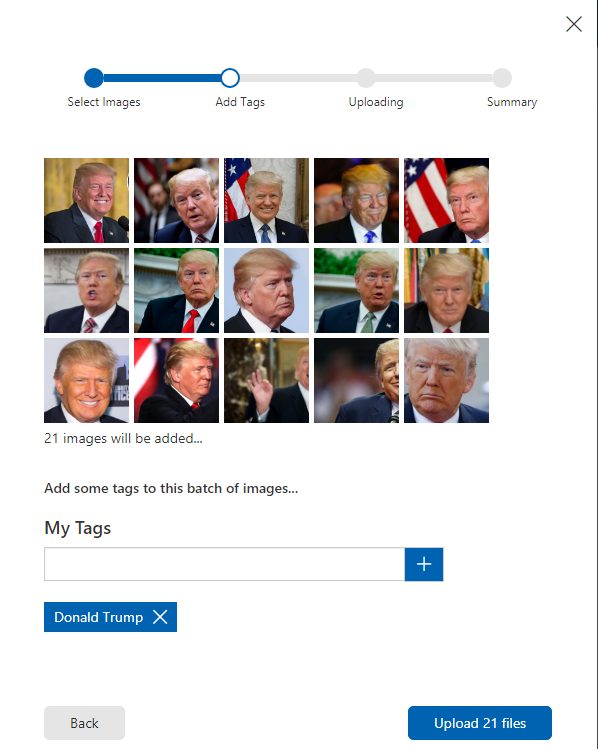
你可以多加几个标签。我一共做了两个。一个是川普,一个是一种花,一年蓬。
等把标签和对应的图像都上传完毕后,点击上面的【训练】

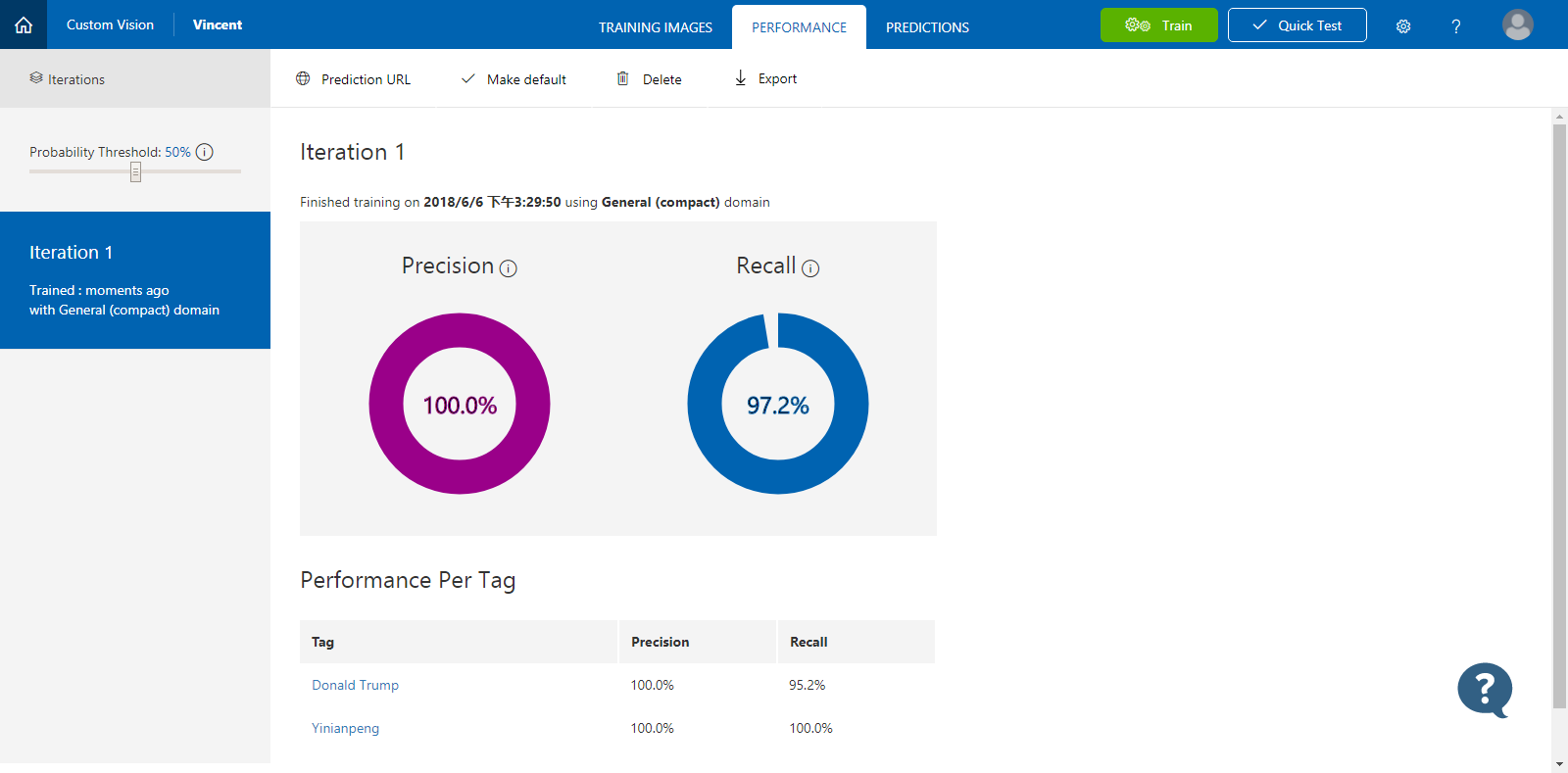
然后训练结果马上就出来了。
第一个Precision,表示模型包含的标签预测的精度,越大越好。
第一个Recall,模型标签外的预测精度,也是越大越好。
当然,你也可以现在试验一下。点击右上方的Quick Test,即可测试。。
然后,点击正上方的Export,导出模型。支持4种格式,Android,Ios,ONNX,DockFile。我们选择WIndows标准的ONNX。好了。第一步基本结束。很简单,都是点几下就搞定。
如果你好奇ONNX里面是啥样子,那么恭喜你,你很好学。去 https://github.com/lutzroeder/Netron 下载一个软件,看看吧。
2. 代码实战
模型做好了,就该写代码了。代码也不多,很简单滴。
新建一个UWP 程序,在Assets资产文件夹里面,添加刚才下载的ONNX文件(该文件可以随意重命名,也最好Rename一下,不然文件名字太长了),设置它的生成操作为【Content 内容】。
这是你会发现,多了一个.cs类。
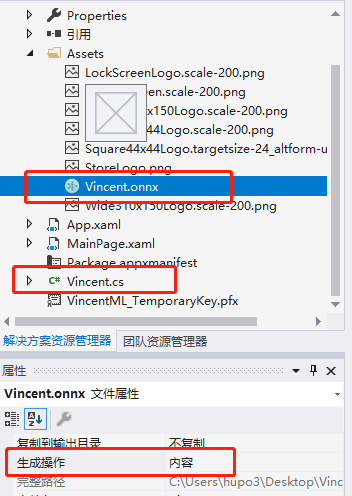
打开Vincent.cs看看啊,没错,又是有点乱。改一下咯
using System;

using System.Collections.Generic;

using System.Threading.Tasks;

using Windows.Media;

using Windows.Storage;

using Windows.AI.MachineLearning.Preview;

// e6c82f6e-c60f-422a-97b6-e0406cba82da_6ed0259c-001e-4895-be7a-4a930321a307

namespace VincentML

{

    public sealed class ModelInput

    {

        public VideoFrame data { get; set; }

    }

    public sealed class ModelOutput

    {

        public IList<string> classLabel { get; set; }

        public IDictionary<string, float> loss { get; set; }

        public ModelOutput()

        {

            this.classLabel = new List<string>();

            this.loss = new Dictionary<string, float>()

            {

                { "Donald Trump", float.NaN },

                { "Yinianpeng", float.NaN },

            };

        }

    }

    public sealed class Model

    {

        private LearningModelPreview learningModel;

        public static async Task<Model> CreateModel(StorageFile file)

        {

            LearningModelPreview learningModel = await LearningModelPreview.LoadModelFromStorageFileAsync(file);

            Model model = new Model();

            model.learningModel = learningModel;

            return model;

        }

        public async Task<ModelOutput> EvaluateAsync(ModelInput input) {

            ModelOutput output = new ModelOutput();

            LearningModelBindingPreview binding = new LearningModelBindingPreview(learningModel);

            binding.Bind("data", input.data);

            binding.Bind("classLabel", output.classLabel);

            binding.Bind("loss", output.loss);

            LearningModelEvaluationResultPreview evalResult = await learningModel.EvaluateAsync(binding, string.Empty);

            return output;

        }

    }

}
好,接下来写一个简单的界面,一个图像Image和一个按钮Button,一个文本TextBlock
    <Grid>

        <Grid>

            <Grid.RowDefinitions>

                <RowDefinition/>

                <RowDefinition Height="Auto"/>

                <RowDefinition Height="Auto"/>

            </Grid.RowDefinitions>

            <Image x:Name="image"/>

            <TextBlock Grid.Row="1" x:Name="tbResult" HorizontalAlignment="Center"/>

            <Button Grid.Row="2" Content="Choose a picture" HorizontalAlignment="Center" Click="ChooseImage"/>

        </Grid>

    </Grid>
主要看后台代码ChooseImage。
龙宫分四步:
1. 加载模型
2. 选择一个图片
3. 设置模型的输入数据
4. 输出结果
            //1. 加载模型
            StorageFile modelDile = await StorageFile.GetFileFromApplicationUriAsync(new Uri($"ms-appx:///Assets/Vincent.onnx"));

            Model model = await Model.CreateModel(modelDile);


            //2. 选择一个图片

            FileOpenPicker picker = new FileOpenPicker();

            picker.FileTypeFilter.Add(".jpg");

            picker.FileTypeFilter.Add(".jpeg");

            picker.FileTypeFilter.Add(".png");

            picker.FileTypeFilter.Add(".bmp");

            picker.SuggestedStartLocation = PickerLocationId.PicturesLibrary;

            var file = await picker.PickSingleFileAsync();

            if (file != null)

            {
BitmapImage src = new BitmapImage();
using (IRandomAccessStream stream = await file.OpenAsync(FileAccessMode.Read))
{
await src.SetSourceAsync(stream);
stream.Dispose();
};
image.Source = src;
                //3. 设置模型的输入数据

                ModelInput modelInput = new ModelInput();

                modelInput.data = await GetVideoFrame(file);


                //4. 输出结果

                ModelOutput modelOutput = await model.EvaluateAsync(modelInput);

                var topCategory = modelOutput.loss.OrderByDescending(kvp => kvp.Value).FirstOrDefault().Key;

            }
注意一下,ModelInput的输如数据类型是VideoFrame,所以需要将图片转换一下。
        private async Task<VideoFrame> GetVideoFrame(StorageFile file)

        {

            SoftwareBitmap softwareBitmap;

            using (IRandomAccessStream stream = await file.OpenAsync(FileAccessMode.Read))

            {

                // Create the decoder from the stream

                BitmapDecoder decoder = await BitmapDecoder.CreateAsync(stream);

                // Get the SoftwareBitmap representation of the file in BGRA8 format

                softwareBitmap = await decoder.GetSoftwareBitmapAsync();

                softwareBitmap = SoftwareBitmap.Convert(softwareBitmap, BitmapPixelFormat.Bgra8, BitmapAlphaMode.Premultiplied);

                return VideoFrame.CreateWithSoftwareBitmap(softwareBitmap);

            }

        }
好了,看一下咋样,运行一下。
我还特地找了一张川总很酷的发型图
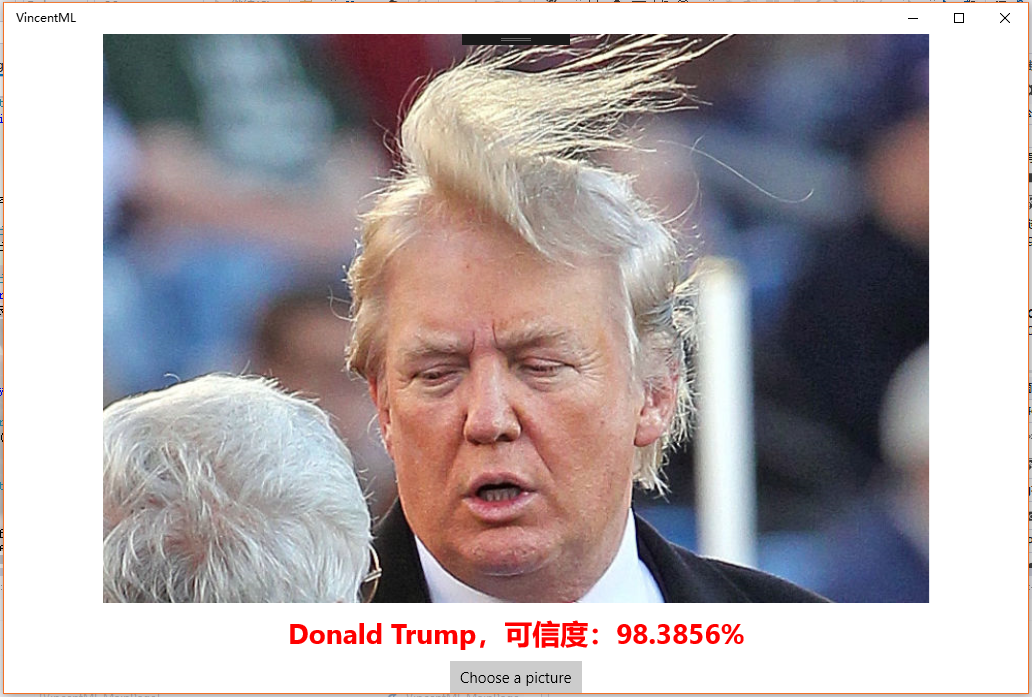
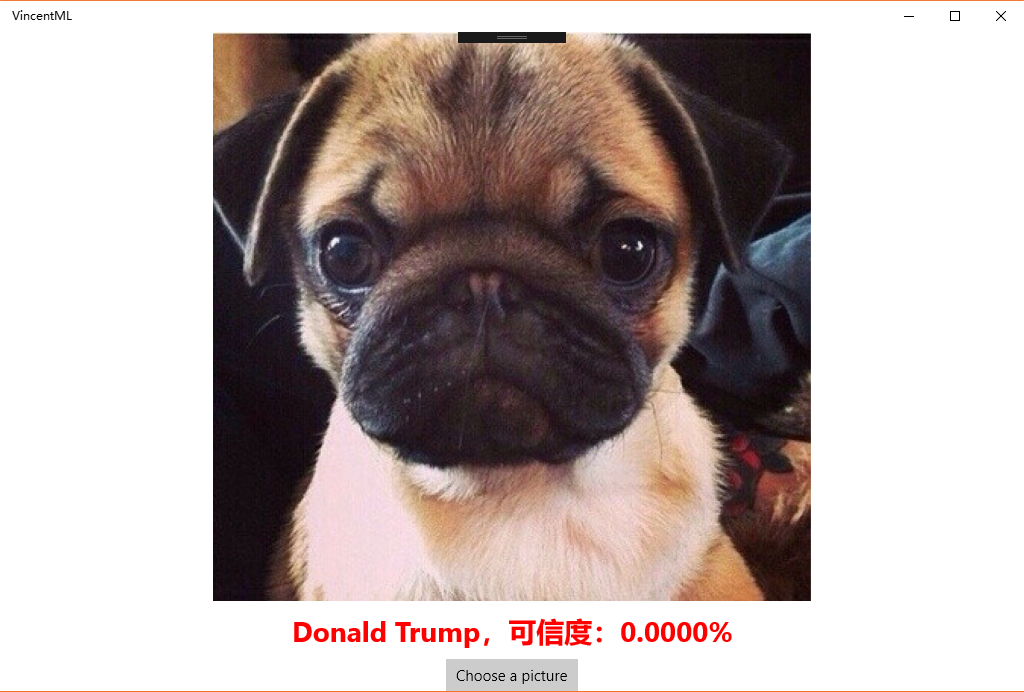
如果你选择了一个别的照片,比如狗,会得到这样的。
但是你非要说这条狗就叫Donald Trump,那我无F*ck可说了。
最后,欢迎大家去全球最大的同性恋交友平台Fork/Star我的项目:https://github.com/hupo376787/MachineLearningOnUWP
基于Windows 机器学习(Machine Learning)的图像分类(Image classification)实现的更多相关文章
- 【机器学习Machine Learning】资料大全
昨天总结了深度学习的资料,今天把机器学习的资料也总结一下(友情提示:有些网站需要"科学上网"^_^) 推荐几本好书: 1.Pattern Recognition and Machi ...
- 机器学习(Machine Learning)&深度学习(Deep Learning)资料【转】
转自:机器学习(Machine Learning)&深度学习(Deep Learning)资料 <Brief History of Machine Learning> 介绍:这是一 ...
- 机器学习(Machine Learning)与深度学习(Deep Learning)资料汇总
<Brief History of Machine Learning> 介绍:这是一篇介绍机器学习历史的文章,介绍很全面,从感知机.神经网络.决策树.SVM.Adaboost到随机森林.D ...
- 机器学习(Machine Learning)&深度学习(Deep Learning)资料(Chapter 2)
##机器学习(Machine Learning)&深度学习(Deep Learning)资料(Chapter 2)---#####注:机器学习资料[篇目一](https://github.co ...
- 机器学习(Machine Learning)&深度学习(Deep Learning)资料
机器学习(Machine Learning)&深度学习(Deep Learning)资料 機器學習.深度學習方面不錯的資料,轉載. 原作:https://github.com/ty4z2008 ...
- 数据挖掘(data mining),机器学习(machine learning),和人工智能(AI)的区别是什么? 数据科学(data science)和商业分析(business analytics)之间有什么关系?
本来我以为不需要解释这个问题的,到底数据挖掘(data mining),机器学习(machine learning),和人工智能(AI)有什么区别,但是前几天因为有个学弟问我,我想了想发现我竟然也回答 ...
- 【重磅干货整理】机器学习(Machine Learning)与深度学习(Deep Learning)资料汇总
[重磅干货整理]机器学习(Machine Learning)与深度学习(Deep Learning)资料汇总 .
- 机器学习(Machine Learning)&深度学习(Deep Learning)资料汇总 (上)
转载:http://dataunion.org/8463.html?utm_source=tuicool&utm_medium=referral <Brief History of Ma ...
- 机器学习(Machine Learning)&深度学习(Deep Learning)资料(下)
转载:http://www.jianshu.com/p/b73b6953e849 该资源的github地址:Qix <Statistical foundations of machine lea ...
随机推荐
- hbase 单机版安装
1.安装jdk参见http://www.cnblogs.com/lvlv/p/4337863.html 安装路径:/usr/java/jdk1.7.0_79 2.下载hbase http://mi ...
- nginx的hash
hash结构中有若干个桶,桶内是hash(key)值相同的若干数据. 查找数据时,首先对key值进行hash计算,然后hash值对桶的个数进行求余,得到数据所在的桶.然后在桶中使用key逐个查找,直到 ...
- velocity 框架
Java模板引擎 Velocity是一个基于java的模板引擎(template engine).它允许任何人仅仅使用简单的模板语言(template language)来引用由java代码定义的对象 ...
- [C#]做服务使用Process启动外部程序没窗体
这几天会到一个需要,要时时侦测文件生成,并上传到Server上,侦测文件生成使用的FileSystemWatch.但是时时运行遇到了问题,程序可能会人为退出或者意外终止,使用一个进程监控程序的监程,也 ...
- 关于SSH中tomcat下中文名称图片不显示的问题
最近做一个SSH框架的项目,用tomcat发布,需要上传图片到指定路径,然后再将图片显示在页面上.有一个问题:如果是英文名称的图片,就正常显示,可如果是中文的,它就是显示不出来,于是乎,在网上各种百度 ...
- input.text文件提示效果
<div class="search"><input type="text" value="Seach Products" ...
- centos7 虚拟机安装docker-ce-17.09
1.创建虚拟机使用iso镜像centos-x86_64-7.3.1611 2.安装centos选择桌面版 3.配置命令行环境,网卡(见博客另一篇文章) 4.安装container-selinux-2. ...
- 2018.12.15 spoj Longest Common Substring II(后缀自动机)
传送门 后缀自动机基础题. 给出10个串求最长公共子串. 我们对其中一个建一个samsamsam,然后用剩下九个去更新范围即可. 代码: #include<bits/stdc++.h> # ...
- Android APP测试流程
一. Monkey测试(冒烟测试) 使用monkey测试工具进行如下操作: 1. APP的安装 2. APP随机操作测试(APP压力测试) 3. APP的卸载 二. 安装卸载测试 1. 使用测试真机进 ...
- Methods to reduce the number of pipeline stages
Several techniques have been proposed to reduce the number of pipeline stages. We categorize them in ...