
Servlet会话管理三(HttpSession)
Session是服务器端技术,服务器在运行时可以为每一个用户的浏览器创建一个其独享的HttpSession对象。由于Session为浏览器用户所独享,所以用户在访问服务器的web资源时,可以把各自的数据放在各自的Session对象中,当用户再次访问服务器中的其他web资源时,其他web资源再从Session对象中取出用户的数据。
Session和Cookie的最大区别是:
(1)Session是将数据保存在服务器上;而Cookie是将数据以文本的形式保存在客户端浏览器上,由浏览器进行管理的维护。
(2)Session对象可以存放多个name和多个Object;而一个cookie只能放一个name和一个value
HttpSession对象在用户第一次访问网站的时候自动被创建,可以通过调用HttpServletRequest的getSession()方法获取该对象。
HttpSession getSession()  // 返回当前Session对象,如果没有则创建一个并返回。

HttpSession getSession(boolean create)  // 返回当前Session对象,如果没有,当create是true时创建一个并返回,当create时false时返回null
注意,所有保存在HttpSession对象中的数据不会被发送到客户端,不同于其他会话管理技术,Servlet容器为每个HttpSession生成唯一的标识,并将该标识发送给浏览器,或创建一个名为JSESSIONID的cookie,或在URL后附加一个名为jsessionid的参数。在后续的请求中,浏览器回京标识交给服务器,这样服务器就可以识别请求是由哪个用户发起的。Servlet容器会自动选择一种方式来传递标识,无需开发人员介入。
通过HttpSession的setAttribute(name, value)方法将数据放入Session对象中。可存放多对数据。调用该方法时如果name已经使用过,则新值会覆盖旧值。注意不同于URL重写、表单隐藏域、Cookie技术,放入Session对象中的数据是存储在服务器内存中,因此尽量不要存放太多数据,否则会影响性能。存放在Session对象中的值可以是任意实现了java.io.Serializable接口的java对象,因为Servlet容器必要时会将这些对象放入文件或数据库中。如果对象未实现java.io.Serializable接口,则Servlet容器在序列化的时候会失败并报错。
void setAttribute(java.lang.String name, java.lang.Object value)
通过调用HttpSession的getAttribute(name)方法可以获取之前放入的数据。
java.lang.Object getAttribute(java.lang.String name)  // 返回该Session对象中特定名称的数据

java.util.Enumeration<java.lang.String> getAttributeNames()  // 返回放入该session对象中的所有数据的名字
可以通过HttpSession的getId()来获取该Session对象的标识
java.lang.String getId() // 获取该Session对象的标识
Seesion的使用原理
1)浏览器第一次访问服务器,服务器会自动创建Session对象,给Session对象分配一个唯一的ID,JSESSIONID

2)将JSESSIONID作为cookie的值发送给浏览器保存

3)浏览器第二次访问服务器时,会将保存有JSESSIONID的cookie随HTTP header发送到服务器

4)服务器从cookie中得到JSESSIONID,然后在服务器中搜索该JSESSIONID的Session对象。找到则直接返回该对象;找不到则创建新的Session对象。
Session对象的销毁
1)调用void invalidate()方法  // 强制该Session对象过期,并清空存储的数据

2)session对象过期(超时)Tomcat 中 session 的默认有效时间是 30 min

3)服务器重启 修改修改 session 持久化配置
修改session默认有效时间
Tomcat中session的默认有效时间是30min。可以在Tomcat安装目录下的 conf/web.xml 文件中修改。
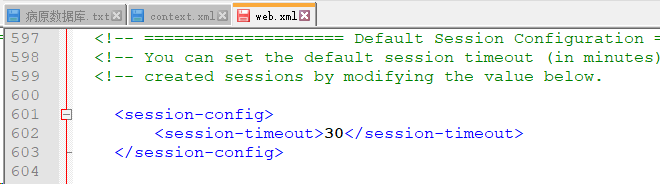
session持久化
session持久化是指当Tomcat重启后,session中仍然含有数据。
可以在 Tomcat 的安装目录下的 conf/context.xml 进行修改
    <!-- Uncomment this to disable session persistence across Tomcat restarts -->

    <!--

    <Manager pathname="" />

    -->
改为
    <!-- Uncomment this to disable session persistence across Tomcat restarts -->

    <Manager pathname="" />
实例
package app02a.httpsession;

public class Product {

    private int id;

    private String name;

    private String description;

    private float price;

    public Product(int id, String name, String description, float price) {

        this.id = id;

        this.name = name;

        this.description = description;

        this.price = price;

    }

    public int getId() {

        return id;

    }

    public void setId(int id) {

        this.id = id;

    }

    public String getName() {

        return name;

    }

    public void setName(String name) {

        this.name = name;

    }

    public String getDescription() {

        return description;

    }

    public void setDescription(String description) {

        this.description = description;

    }

    public float getPrice() {

        return price;

    }

    public void setPrice(float price) {

        this.price = price;

    }

}
package app02a.httpsession;

public class ShoppingItem {

    private Product product;

    private int quantity;

    public ShoppingItem(Product product, int quantity) {

        this.product = product;

        this.quantity = quantity;

    }

    public Product getProduct() {

        return this.product;

    }

    public void setProduct(Product product) {

        this.product = product;

    }

    public int getQuantity() {

        return this.quantity;

    }

    public void setQuantiry(int quantity) {

        this.quantity = quantity;

    }

}
package app02a.httpsession;

import java.io.IOException;

import java.io.PrintWriter;

import java.text.NumberFormat;

import java.util.ArrayList;

import java.util.List;

import java.util.Locale;

import javax.servlet.ServletException;

import javax.servlet.annotation.WebServlet;

import javax.servlet.http.HttpServlet;

import javax.servlet.http.HttpServletRequest;

import javax.servlet.http.HttpServletResponse;

import javax.servlet.http.HttpSession;

@WebServlet(name = "ShoppingCartServlet", urlPatterns = { "/products", "/viewProductDetails", "/addToCart", "/viewCart" })

public class ShoppingCartServlet extends HttpServlet {

    private static final long serialVersionUID = 1L;

    private static final String CART_ATTRIBUTE = "cart";

    private List<Product> products = new ArrayList<Product>();

    private NumberFormat currencyFormat = NumberFormat.getCurrencyInstance(Locale.US);

    public ShoppingCartServlet() {

        super();

    }

    @Override

    public void init() throws ServletException {

        products.add(new Product(1, "Bravo 32' HDTV", "Low-cost HDTV from renowned TV manufacturer", 159.95F));

        products.add(new Product(2, "Bravo BluRay Player", "High quality stylish BluRay palyer", 99.95F));

        products.add(new Product(3, "Bravo Stereo system", "5 speaker hifi system with ipod player", 129.95F));

        products.add(new Product(4, "Bravo ipod player", "An iPod plug-in that can play multiple formats", 39.95F));

    }

    private void sendProductList(HttpServletResponse response) throws IOException {

        response.setContentType("text/html");

        PrintWriter writer = response.getWriter();

        writer.println("<html>");

        writer.println("<head>");

        writer.println("<title>Products</title>");

        writer.println("<body>");

        writer.println("<h2>Products</h2>");

        writer.println("<ul>");

        for (Product product : products) {

            writer.println("<li>" + product.getName() + " (" + currencyFormat.format(product.getPrice()) + ") (" + "<a href='viewProductDetails?id="+ product.getId() + "'>Details)</a></li>");

        }

        writer.println("</ul>");

        writer.println("<a href='viewCart'>View Cart</a>");  // 一个超链接

        writer.println("</body>");

        writer.println("</html>");

    }

    private Product getProduct(int productId) {

        for (Product product : products) {

            if (product.getId() == productId) {

                return product;

            }

        }

        return null;

    }

    private void sendProductDetails(HttpServletRequest request, HttpServletResponse response) throws IOException {

        response.setContentType("text/html");

        PrintWriter writer = response.getWriter();

        int productId = 0;

        try {

            productId = Integer.parseInt(request.getParameter("id"));  // 获取uri后端的请求字符串

        } catch (NumberFormatException e) {

            e.printStackTrace();

        }

        Product product = getProduct(productId);

        if (product != null) {

            writer.println("<html>");

            writer.println("<head>");

            writer.println("<title>Product Details</title>");

            writer.println("<body>");

            writer.println("<h2>Product Details</h2>");

            writer.println("<form method='post' action='addToCart'>");  // 提交方式为post, 目标地址为addToCart

            writer.println("<input type='hidden' name='id' value='" + productId + "' />");  // 表单隐藏域

            writer.println("<table>");

            writer.println("<tr>");

            writer.println("<td>Name:</td>");

            writer.println("<td>" + product.getName() + "</td>");

            writer.println("</tr>");

            writer.println("<tr>");

            writer.println("<td>Description:</td>");

            writer.println("<td>" + product.getDescription() + "</td>");

            writer.println("</tr>");

            writer.println("<tr>");

            writer.println("<td><input name='quantity' /></td>");  // 默认type="text"

            writer.println("<td><input type='submit' value='Buy'></td>");  // 提交按钮

            writer.println("</tr>");

            writer.println("<tr>");

            writer.println("<td colspan='2'><a href='products'>Product List</a></td>");  // 返回到产品列表的超链接

            writer.println("</tr>");

            writer.println("</table>");

            writer.println("</body>");

            writer.println("</html>");

        } else {

            writer.println("No product found");

        }

    }

    private void showCart(HttpServletRequest request, HttpServletResponse response) throws IOException {

        response.setContentType("text/html");

        PrintWriter writer = response.getWriter();

        writer.println("<html>");

        writer.println("<head>");

        writer.println("<title>Shopping Cart</title>");

        writer.println("</head>");

        writer.println("<body>");

        writer.println("<a href='products'>Product List</a>");  // 返回到产品列表的超链接

        HttpSession session = request.getSession();  // 获得当前的HttpSession对象

        List<ShoppingItem> cart = (List<ShoppingItem>)session.getAttribute(CART_ATTRIBUTE);

        if (cart != null) {

            writer.println("<table>");

            writer.println("<tr>");

            writer.println("<td style='width:150px'>Product</td>");  // 元素内嵌样式

            writer.println("<td style='width:150px'>Quantity</td>");

            writer.println("<td style='width:150px'>Price</td>");

            writer.println("<td style='width:150px'>Amount</td>");

            writer.println("<tr>");

            double total = 0.0;

            for (ShoppingItem shoppingItem : cart) {

                Product product = shoppingItem.getProduct();

                int quantity = shoppingItem.getQuantity();

                if (quantity != 0) {

                    float price = product.getPrice();

                    double subtotal = price * quantity;

                    writer.println("<tr>");

                    writer.println("<td>" + product.getName() + "</td>");

                    writer.println("<td>" + quantity + "</td>");

                    writer.println("<td>" + currencyFormat.format(price) + "</td>");

                    writer.println("<td>" + currencyFormat.format(subtotal) + "</td>");

                    total += subtotal;

                    writer.println("</tr>");

                }

            }

            writer.println("<tr>");

            writer.println("<td colspan='3' style='text-align:right'>Total: </td>");

            writer.println("<td>" + currencyFormat.format(total) + "</td>");

            writer.println("</tr>");

            writer.println("</table>");

        }

        writer.println("</body>");

        writer.println("</html>");

    }

    @Override

    protected void doGet(HttpServletRequest request, HttpServletResponse response) throws ServletException, IOException {

        String uri = request.getRequestURI();

        if (uri.endsWith("/products")) {  // 根据不同的uri调用不同的方法处理

            sendProductList(response);

        }else if (uri.endsWith("/viewProductDetails")) {

            sendProductDetails(request, response);

        }else if (uri.endsWith("viewCart")) {

            showCart(request, response);

        }

    }

    protected void doPost(HttpServletRequest request, HttpServletResponse response) throws ServletException, IOException {

        int productId = 0;

        int quantity = 0;

        try {

            productId = Integer.parseInt(request.getParameter("id"));       // 即可以或的token的值

            quantity = Integer.parseInt(request.getParameter("quantity"));  // 也可以获的表单隐藏域的值

        } catch (NumberFormatException e) {

            e.printStackTrace();

        }

        Product product = getProduct(productId);

        if (product != null) {

            ShoppingItem shoppingItem = new ShoppingItem(product, quantity);

            HttpSession session = request.getSession();  // HttpSession对象被自动创建,该方法可以获得httpSession对象

            List<ShoppingItem> cart = (List<ShoppingItem>) session.getAttribute(CART_ATTRIBUTE);

            if (cart == null) {

                cart = new ArrayList<ShoppingItem>();

                session.setAttribute(CART_ATTRIBUTE, cart);  // 向HttpSession对象绑定数据

            }

            cart.add(shoppingItem);

        }

        sendProductList(response);

    }

}


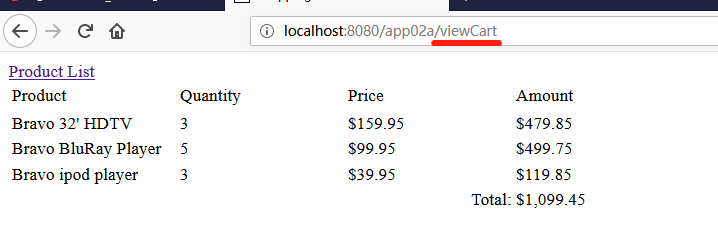
Servlet会话管理三(HttpSession)的更多相关文章
- servlet 会话管理
一.URL 重写 URL 重写是一种会话跟踪技术,它将一个或多个token添加到URL的查询字符串中,每个token通常为 key=value形式,如下: url?key-1=value-1& ...
- Servlet会话管理一(URL重写和表单隐藏域)
会话可以简单的理解为客户端用户打开一个浏览器,点击多个超链接,访问服务器多个web资源,然后关闭浏览器的整个过程称为一个会话.即一个客户端用户和服务器端进行通讯的过程,也是客户端和服务器端之间的数据传 ...
- Java Web(三) Servlet会话管理
会话跟踪 什么是会话? 可简单理解为,用户打开一个浏览器,点击多个超链接,访问服务器多个web资源,然后关闭服务器,整个过程称为一个会话.从特定客户端到服务器的一系列请求称为会话.记录会话信息的技术称 ...
- Servlet会话管理二(Cookie)
Cookie是在HTTP协议下,将服务器传递给浏览器的的少量信息保存到浏览器客户端的一种技术,通过这种技术,即使在浏览器被关闭或链接中断的情况下,用户仍可以维护Cookie中的数据. Cookie是经 ...
- Java EE.Servlet.会话管理
一次会话是从客户打开浏览器开始到关闭浏览器结束.记录会话信息的技术称为会话跟踪.常见的会话跟踪技术有Cookie.URL重写和隐藏表单域. 1.Cookie Cookie是一小块可以嵌入到HTTP请求 ...
- Servle中的会话管理
最近整理了下会话管理的相关笔记,以下做个总结: 一.会话管理(HttpSession) 1.Web服务器跟踪客户状态的四种方法: 1).使用Servlet API的Session机制(常用) 2).使 ...
- jsp/servlet学习三之会话管理初解
由于http的无状态性,使得会话管理或会话跟踪成为web应用开发一个无可避免的主题.默认下,一个web服务器无法区分一个http请求是否为第一次访问.例如,一个web邮件应用要求用户登陆后才能查看邮件 ...
- [Servlet&JSP] HttpSession会话管理
我们能够将会话期间必须共享的资料保存在HttpSession中,使之成为属性.假设用户关掉浏览器接受Cookie的功能.HttpSession也能够改用URL重写的方式继续其会话管理功能. HttpS ...
- java web Servlet 学习笔记 -3 会话管理技术
Cookie和HttpSession 什么是会话: 用户开一个浏览器,点击多个超链接,访问服务器多个web资源,然后关闭浏览器,整个过程称之为一个会话. 每个用户在使用浏览器与服务器进行会话的过 ...
随机推荐
- Sublime Text使用中的一些心得
Sublime Text3是每个web前端程序员的必备神器,其中有许多便利的功能及插件.下面列出一些在开发中比较实用的快捷操作,可以极大地提高代码的编写速度及效率. l 在文档中输入代码,即使忘记保 ...
- sqlserver 死锁相关
参考 https://www.cnblogs.com/fuyuanming/p/5783421.html -- 查询死锁 select request_session_id spid, OBJECT_ ...
- verilog之inout
1.inout 类型的data信号 写操作有效时(rd_wr_l=0):data端口输入信号,此时data为高阻态,允许对其进行赋值. 读操作有效时(rd_wr_l=1):data端口输出信号,此时d ...
- JS中DOM以及BOM
一.bom对象 1screen对象 console.log(screen.width);// 屏幕宽度 console.log(screen.height);// 屏幕高度 console.log(s ...
- OpenGL ES 2 for Android - A Quick Start Guide
英文原版,语法很简单,带书签,带实例,很好的书,从头到尾讲述OpenGL强烈推荐!~~~ 扫码时备注或说明中留下邮箱 付款后如未回复请至https://shop135452397.taobao.com ...
- sourceforge
sourceforge SourceForge.net,又称SF.net,是开源软件开发者进行开发管理的集中式场所. SourceForge.net由VA Software提供主机,并运行Source ...
- Javascript 强制浏览器渲染Dom文档
在Cordova+Framework7开发Hybrid App时,在iPhone 7上遇到一个诡异的现象(Chrome浏览器.Android都正常):js修改手风琴中的input文本框的值后,但页面仍 ...
- bootstrap-table 使用遇到的问题总结
问题一:右上角button样式自定义 方法: //修改bootstrap-table右上角按钮样式 $(".table-box .columns-right button").re ...
- swift - 16进制颜色扩展(1.支持# 2.支持不带# , 3支持带0X)
/** * 设置16进制颜色: * 可识别类型 * 1:有# * 2:没有# * 3:含有0X */ extension UIColor{ class func hexadecimalColor(he ...
- 32-改变eclipse默认的Tomcat部署路径
转载:https://www.cnblogs.com/helf/p/9433588.html eclipse中默认的项目部署路径是在项目的路径,不像myeclipse那样部署后项目在Tomcat的安装 ...