
搭建ssm环境
在eclipse下搭建ssm框架。
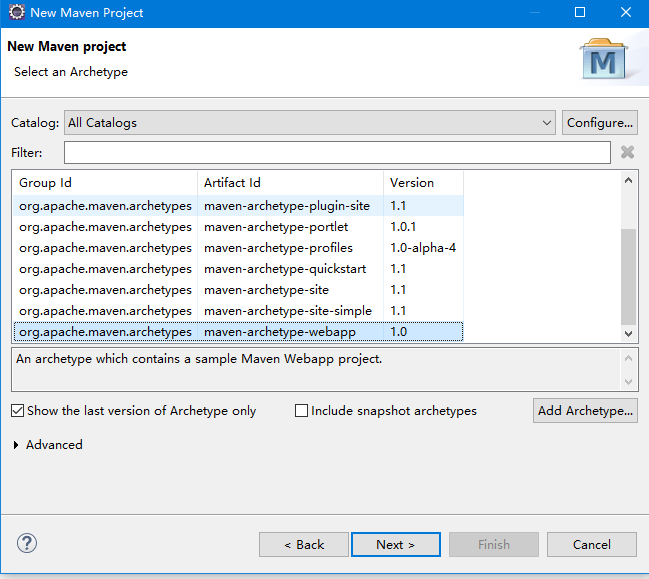
1.新建maven项目。
2.添加jar包依赖
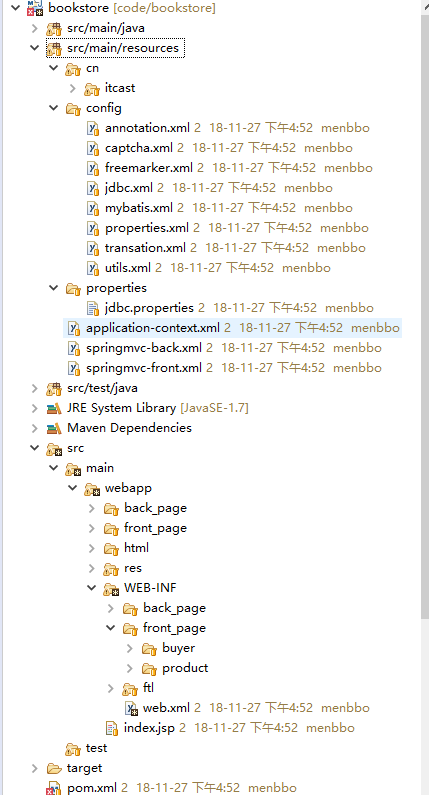
3.修改web.xml配置文件
<?xml version="1.0" encoding="UTF-8"?>

<web-app xmlns:xsi="http://www.w3.org/2001/XMLSchema-instance"

    xmlns="http://java.sun.com/xml/ns/j2ee" xmlns:javaee="http://java.sun.com/xml/ns/javaee"

    xmlns:web="http://java.sun.com/xml/ns/javaee/web-app_2_5.xsd"

    xsi:schemaLocation="http://java.sun.com/xml/ns/j2ee http://java.sun.com/xml/ns/j2ee/web-app_2_4.xsd"

    id="WebApp_ID" version="2.4">

<!-- 启动spring容器 -->

<context-param>

  <param-name>contextConfigLocation</param-name>

  <param-value>classpath:application-context.xml</param-value>

</context-param>

<!-- spring监听器 -->

<listener>

  <listener-class>org.springframework.web.context.ContextLoaderListener</listener-class>

</listener>

<!-- 配置DispatcherServlet -->

<servlet>

   <servlet-name>front</servlet-name>

   <servlet-class>org.springframework.web.servlet.DispatcherServlet</servlet-class>

   <init-param>

     <param-name>contextConfigLocation</param-name>

     <param-value>classpath:springmvc-front.xml</param-value>

   </init-param>

</servlet>

  <servlet-mapping>

     <servlet-name>front</servlet-name>

     <url-pattern>*.shtml</url-pattern>

  </servlet-mapping>

<servlet>

  <servlet-name>back</servlet-name>

   <servlet-class>org.springframework.web.servlet.DispatcherServlet</servlet-class>

   <init-param>

      <param-name>contextConfigLocation</param-name>

      <param-value>classpath:springmvc-back.xml</param-value>

   </init-param>

</servlet>

  <servlet-mapping>

    <servlet-name>back</servlet-name>

    <url-pattern>*.do</url-pattern>

  </servlet-mapping>

<!-- 中文过滤器 -->

 <filter>

   <filter-name>encoding</filter-name>

   <filter-class>org.springframework.web.filter.CharacterEncodingFilter</filter-class>

   <init-param> <!-- 入参 -->

      <param-name>encoding</param-name>

      <param-value>UTF-8</param-value>

   </init-param>

 </filter>

<filter-mapping>

   <filter-name>encoding</filter-name>

   <url-pattern>*.do</url-pattern>

</filter-mapping>

<filter-mapping>

  <filter-name>encoding</filter-name>

  <url-pattern>*.shtml</url-pattern>

</filter-mapping>

</web-app>
4.application-context.xml
<?xml version="1.0" encoding="UTF-8"?>

<beans xmlns="http://www.springframework.org/schema/beans"

    xmlns:xsi="http://www.w3.org/2001/XMLSchema-instance" xmlns:aop="http://www.springframework.org/schema/aop"

    xmlns:tx="http://www.springframework.org/schema/tx" xmlns:jdbc="http://www.springframework.org/schema/jdbc"

    xmlns:context="http://www.springframework.org/schema/context"

    xsi:schemaLocation="

     http://www.springframework.org/schema/context http://www.springframework.org/schema/context/spring-context-3.0.xsd

     http://www.springframework.org/schema/beans http://www.springframework.org/schema/beans/spring-beans-3.0.xsd

     http://www.springframework.org/schema/jdbc http://www.springframework.org/schema/jdbc/spring-jdbc-3.0.xsd

     http://www.springframework.org/schema/tx http://www.springframework.org/schema/tx/spring-tx-3.0.xsd

     http://www.springframework.org/schema/aop http://www.springframework.org/schema/aop/spring-aop-3.0.xsd">

    <import resource="config/*.xml"/>

</beans>
5.springMVC-font.xml
<?xml version="1.0" encoding="UTF-8"?>

<beans xmlns="http://www.springframework.org/schema/beans"

    xmlns:xsi="http://www.w3.org/2001/XMLSchema-instance" xmlns:aop="http://www.springframework.org/schema/aop"

    xmlns:tx="http://www.springframework.org/schema/tx" xmlns:jdbc="http://www.springframework.org/schema/jdbc"

    xmlns:context="http://www.springframework.org/schema/context"

    xsi:schemaLocation="

     http://www.springframework.org/schema/context http://www.springframework.org/schema/context/spring-context-3.0.xsd

     http://www.springframework.org/schema/beans http://www.springframework.org/schema/beans/spring-beans-3.0.xsd

     http://www.springframework.org/schema/jdbc http://www.springframework.org/schema/jdbc/spring-jdbc-3.0.xsd

     http://www.springframework.org/schema/tx http://www.springframework.org/schema/tx/spring-tx-3.0.xsd

     http://www.springframework.org/schema/aop http://www.springframework.org/schema/aop/spring-aop-3.0.xsd">

<context:component-scan base-package="cn.itcast">

    <context:include-filter type="annotation" expression="org.springframework.stereotype.Controller"/>  <!- 扫描@controller层-->

</context:component-scan>

<context:annotation-config/>

<bean id="jspViewResolver" class="org.springframework.web.servlet.view.InternalResourceViewResolver">

   <property name="prefix" value="/WEB-INF/front_page/"></property>

   <property name="suffix" value=".jsp"></property>

</bean>

    <!-- 配置全局时间转换器 -->

    <bean class="org.springframework.web.servlet.mvc.annotation.AnnotationMethodHandlerAdapter">

        <property name="webBindingInitializer">

           <bean class="cn.itcast.core.web.DateConverter"/>

        </property>

    </bean>
6.springMVC-back.xml
<?xml version="1.0" encoding="UTF-8"?>

<beans xmlns="http://www.springframework.org/schema/beans"

    xmlns:xsi="http://www.w3.org/2001/XMLSchema-instance" xmlns:aop="http://www.springframework.org/schema/aop"

    xmlns:tx="http://www.springframework.org/schema/tx" xmlns:jdbc="http://www.springframework.org/schema/jdbc"

    xmlns:context="http://www.springframework.org/schema/context"

    xsi:schemaLocation="

     http://www.springframework.org/schema/context http://www.springframework.org/schema/context/spring-context-3.0.xsd

     http://www.springframework.org/schema/beans http://www.springframework.org/schema/beans/spring-beans-3.0.xsd

     http://www.springframework.org/schema/jdbc http://www.springframework.org/schema/jdbc/spring-jdbc-3.0.xsd

     http://www.springframework.org/schema/tx http://www.springframework.org/schema/tx/spring-tx-3.0.xsd

     http://www.springframework.org/schema/aop http://www.springframework.org/schema/aop/spring-aop-3.0.xsd">

    <context:component-scan base-package="cn.itcast" use-default-filters="false">  <!-- 扫描@controller -->

       <context:include-filter type="annotation" expression="org.springframework.stereotype.Controller"/>

    </context:component-scan>

    <context:annotation-config/><!-- 自动装配 -->

        <!-- 配置全局时间转换器 -->

<!--     <bean class="org.springframework.web.servlet.mvc.annotation.AnnotationMethodHandlerAdapter">

        <property name="webBindingInitializer">

           <bean class="cn.itcast.core.web.BindingInitializer"/>

        </property>

    </bean> -->
<!-- 日期格式转换 -->
    <bean class="org.springframework.web.servlet.mvc.annotation.AnnotationMethodHandlerAdapter">

    <property name="webBindingInitializer">

        <bean class="cn.itcast.core.web.DateConverter" />

    </property>

</bean>

    <!-- 配置视图解析器 -->

    <bean id="jspViewResolver" class="org.springframework.web.servlet.view.InternalResourceViewResolver">

         <property name="prefix" value="/WEB-INF/back_page/"></property>

         <property name="suffix" value=".jsp"></property>

    </bean>

</beans>
7.config下的xml文件
7.1 annotation.xml
<?xml version="1.0" encoding="UTF-8"?>

<beans xmlns="http://www.springframework.org/schema/beans"

    xmlns:xsi="http://www.w3.org/2001/XMLSchema-instance" xmlns:aop="http://www.springframework.org/schema/aop"

    xmlns:tx="http://www.springframework.org/schema/tx" xmlns:jdbc="http://www.springframework.org/schema/jdbc"

    xmlns:context="http://www.springframework.org/schema/context"

    xsi:schemaLocation="

     http://www.springframework.org/schema/context http://www.springframework.org/schema/context/spring-context-3.0.xsd

     http://www.springframework.org/schema/beans http://www.springframework.org/schema/beans/spring-beans-3.0.xsd

     http://www.springframework.org/schema/jdbc http://www.springframework.org/schema/jdbc/spring-jdbc-3.0.xsd

     http://www.springframework.org/schema/tx http://www.springframework.org/schema/tx/spring-tx-3.0.xsd

     http://www.springframework.org/schema/aop http://www.springframework.org/schema/aop/spring-aop-3.0.xsd">

<!-- spring只扫描@service 除了@controller注解,其他注解都扫描 -->

    <context:component-scan base-package="cn.itcast">

            <context:exclude-filter type="annotation" expression="org.springframework.stereotype.Controller"/>

    </context:component-scan>

    <context:annotation-config/>

</beans>
7.2 jdbc.xml
<?xml version="1.0" encoding="UTF-8"?>

<beans xmlns="http://www.springframework.org/schema/beans"

    xmlns:xsi="http://www.w3.org/2001/XMLSchema-instance" xmlns:aop="http://www.springframework.org/schema/aop"

    xmlns:tx="http://www.springframework.org/schema/tx" xmlns:jdbc="http://www.springframework.org/schema/jdbc"

    xmlns:context="http://www.springframework.org/schema/context"

    xsi:schemaLocation="

     http://www.springframework.org/schema/context http://www.springframework.org/schema/context/spring-context-3.0.xsd

     http://www.springframework.org/schema/beans http://www.springframework.org/schema/beans/spring-beans-3.0.xsd

     http://www.springframework.org/schema/jdbc http://www.springframework.org/schema/jdbc/spring-jdbc-3.0.xsd

     http://www.springframework.org/schema/tx http://www.springframework.org/schema/tx/spring-tx-3.0.xsd

     http://www.springframework.org/schema/aop http://www.springframework.org/schema/aop/spring-aop-3.0.xsd">

      <bean id="dataSource" class="com.mchange.v2.c3p0.ComboPooledDataSource">

        <property name="driverClass" value="${driverClass}"/>

        <property name="jdbcUrl" value="${jdbcUrl}"></property>

        <property name="user" value="${user}" />

        <property name="password" value="${password}"/>

    </bean>

</beans>
7.3 mybatis.xml
<?xml version="1.0" encoding="UTF-8"?>

<beans xmlns="http://www.springframework.org/schema/beans"

    xmlns:xsi="http://www.w3.org/2001/XMLSchema-instance" xmlns:aop="http://www.springframework.org/schema/aop"

    xmlns:tx="http://www.springframework.org/schema/tx" xmlns:jdbc="http://www.springframework.org/schema/jdbc"

    xmlns:context="http://www.springframework.org/schema/context"

    xsi:schemaLocation="

     http://www.springframework.org/schema/context http://www.springframework.org/schema/context/spring-context-3.0.xsd

     http://www.springframework.org/schema/beans http://www.springframework.org/schema/beans/spring-beans-3.0.xsd

     http://www.springframework.org/schema/jdbc http://www.springframework.org/schema/jdbc/spring-jdbc-3.0.xsd

     http://www.springframework.org/schema/tx http://www.springframework.org/schema/tx/spring-tx-3.0.xsd

     http://www.springframework.org/schema/aop http://www.springframework.org/schema/aop/spring-aop-3.0.xsd">

  <bean  id="sqlSessionFactory" class="org.mybatis.spring.SqlSessionFactoryBean">

       <property name="dataSource" ref="dataSource"></property>

      <!-- <property name="typeAliasesPackage" value="cn.itcast.core.bean,cn.itcast.core.query"></property>

       <property name="mapperLocations" value="classpath:cn/itcast/core/dao/*.xml"></property> -->

  </bean>

     <!-- 配置mybatis扫描

  <bean class="org.mybatis.spring.mapper.MapperScannerConfigurer">

        <property name="basePackage" value="cn.itcast.core.dao">   </property>

  </bean>

     -->

</beans>
7.4 properties.xml
<bean class="org.springframework.beans.factory.config.PropertyPlaceholderConfigurer">

     <property name="locations">

        <list> <!-- 配置jdbc -->

          <value>classpath:properties/jdbc.properties</value>

        </list>

     </property>

</bean>
7.5 transaction.xml
 <bean id="transactionManager" class="org.springframework.jdbc.datasource.DataSourceTransactionManager">

         <property name="dataSource" ref="dataSource"></property>

    </bean>

    <!-- 开启注解 -->

    <tx:annotation-driven transaction-manager="transactionManager"/>
8.jdbc.properties
driverClass=com.mysql.jdbc.Driver

jdbcUrl=jdbc:mysql://localhost:3306/babasport1118?characterEncoding=UTF-8

user=root

password=root
运行结果:
搭建ssm环境的更多相关文章
- 这一次,我连 web.xml 都不要了,纯 Java 搭建 SSM 环境!
在 Spring Boot 项目中,正常来说是不存在 XML 配置,这是因为 Spring Boot 不推荐使用 XML ,注意,并非不支持,Spring Boot 推荐开发者使用 Java 配置来搭 ...
- 从web到搭建ssm环境
1:我先建立了个web项目, (1)在pom.xml中添加了如下 <dependencies> <!-- Spring --> <depend ...
- Maven学习 八 采用Maven搭建SSM环境
第一步:创建一个Maven项目 项目的打包方式选择,war 第二步:在webapp下面创建java web项目的目录结构,并配置web.xml文件 <?xml version="1.0 ...
- 搭建SSM环境(淘淘商城)
本文用到的资料: 链接:https://pan.baidu.com/s/1Pk_aI_PRbqRFP9i3o9Xodg 提取码:o4o4 1.1. 数据库 1.1.1. 使用navicat创建数据库连 ...
- 搭建 ssm 环境
<!-- 引入外部jdbc配置文件 --> <context:property-placeholder location="classpath:dbconfig.prope ...
- maven/eclipse搭建ssm(spring+spring mvc+mybatis)
maven/eclipse搭建ssm(spring+spring mvc+mybatis) 前言 本文旨在利用maven搭建ssm环境,而关于maven的具体内容,大家可以去阅读<Maven 实 ...
- 利用maven/eclipse搭建ssm(spring+spring mvc+mybatis)
前言 本文旨在利用maven搭建ssm环境,而关于maven的具体内容,大家可以去阅读<Maven 实战>.其实园内这方面文章已有不少,那么为什么我还要重复造轮子呢?我只是想记录自己的实践 ...
- maven搭建ssm
前言 本文旨在利用maven搭建ssm环境,而关于maven的具体内容,大家可以去阅读<Maven 实战>.其实园内这方面文章已有不少,那么为什么我还要重复造轮子呢?我只是想记录自己的实践 ...
- Spring Boot2 系列教程(一)纯 Java 搭建 SSM 项目
在 Spring Boot 项目中,正常来说是不存在 XML 配置,这是因为 Spring Boot 不推荐使用 XML ,注意,并非不支持,Spring Boot 推荐开发者使用 Java 配置来搭 ...
随机推荐
- HPROF - Heap Profile
基于动态链接库实现,可用于性能分析,锁内容.诊断memory leak问题等.获得堆开辟信息 java -agentlib:hprof=heap=sites ToBeProfiledClass 帮助文 ...
- Hive 组内计无重复数,追加每条记录后面
今天无意中碰到一个很简单的计算逻辑,但是用hive想了一大会才实现. 示例表数据: 需求逻辑: 给每条记录追加一个字段,用于统计按照p1和p2字段分组后,每个组中的num的数目(去重后的count). ...
- Mybatis五(一级二级缓存、第三方缓存)
一级缓存 Mybatis对缓存提供支持,但是在没有配置的默认情况下,它只开启一级缓存,一级缓存只是相对于同一个SqlSession而言.所以在参数和SQL完全一样的情况下,我们使用同一个SqlSess ...
- 水仙花在python3在pycharm的实现
---恢复内容开始--- #方法一:#-*- coding: utf-8-*-while True: num = input("请输入一个三位数") num = int(num) ...
- PHP单点登陆
本文主要介绍了利用webservice,session,cookie技术,来进行通用的单点登录系统的分析与设计.具体实现语言为PHP.单点 登录,英文名为Single Sign On,简称为 SSO, ...
- day30-模块和包
一.模块介绍 1.什么是模块 在python中,一个函数封装一个功能,当一个文件中包含很多个函数,而我们在其他程序中经常会用到这个文件中的功能时,那么我们就可以将这个包含多个函数的文件封装成一个模块, ...
- fb发布打包外部资源
将资源放在src文件夹下面即可 然后在打包那就会看到资源,勾上即可
- P12, cer, provisioning profile
p12,本地私钥(实际上证书和私钥可以一起导出成p12,这里我们仅指私钥) cer,证书,即苹果签名后的公钥 provisioning profile描述文件 一个证书对应一个私钥,也就是本地的p12 ...
- css:margin和padding的百分之使用
#app { position: fixed; width: 94%; height: 100%; background: pink; padding: 0px 3% 0px 3%;} 如上代码,最终 ...
- Kubernetes 1.8.x 全手动安装教程----转自Kubernetes中文社区(部分内容根据实验环境做了些修改,特此感谢Kubernetes中文社区)
Kubernetes 提供了许多云端平台与操作系统的安装方式,本章将以全手动安装方式来部署,主要是学习与了解 Kubernetes 创建流程.若想要了解更多平台的部署可以参考 Picking the ...