
WDA-4-ALV按钮&ICON
1.ICON图标
 |
AccessControlledArea (14x14) |
 |
Activate (14x14) |
 |
Active (14x14) |
 |
AdaptationTechnical (14x14) |
 |
Add (14x14) |
 |
AddFavorite (14x14) |
 |
AddFile (14x14) |
 |
AddParticipant (14x14) |
 |
AddRow (14x14) |
 |
AdvancedSearch (14x14) |
 |
Airplane01 (14x14) |
 |
AlertMessage (14x14) |
 |
Approve (14x14) |
 |
Area (14x14) |
 |
Attachment (14x14) |
 |
Auction (14x14) |
 |
AudioFile (14x14) |
 |
AudioFileAlias (14x14) |
 |
AutomatedTask (14x14) |
 |
AutomaticRating (14x14) |
 |
BatchProcessing (14x14) |
 |
BillMaterial (14x14) |
 |
BillMaterialItem (14x14) |
 |
Blog (14x14) |
 |
Boolean (14x14) |
 |
BoxTruck (14x14) |
 |
BusinessObject (14x14) |
 |
BusinessPartner (14x14) |
 |
BusinessProcess (14x14) |
 |
BusinessProcessStep (14x14) |
 |
BusinessScenario (14x14) |
 |
CallProcedure (14x14) |
 |
Cancel (14x14) |
 |
Cancelled (14x14) |
 |
Candidate (14x14) |
 |
Case (14x14) |
 |
ChAttachment (14x14) |
 |
ChCommentNote (14x14) |
 |
ChPriority (14x14) |
 |
ChTaskMessage (14x14) |
 |
ChangeNumber (14x14) |
 |
ChartArea (14x14) |
 |
ChartBubble (14x14) |
 |
ChartDotRadar (14x14) |
 |
ChartGroupHoriBar (14x14) |
 |
ChartGroupLine (14x14) |
 |
ChartGroupVertBar (14x14) |
 |
ChartHoriBar (14x14) |
 |
ChartHoriStackedBar (14x14) |
 |
ChartLine (14x14) |
 |
ChartMultiPie (14x14) |
 |
ChartPie (14x14) |
 |
ChartRadar (14x14) |
 |
ChartScattered (14x14) |
 |
ChartVertBar (14x14) |
 |
ChartVertBarLine (14x14) |
 |
ChartVertStackedBar (14x14) |
 |
CheckIn (14x14) |
 |
CheckOut (14x14) |
 |
CheckedOk (14x14) |
 |
CheckedOut (14x14) |
 |
CheckedOutByMe (14x14) |
 |
Class (14x14) |
 |
CollapseAll (14x14) |
 |
CollapseDriver (14x14) |
 |
ColumnResize (14x14) |
 |
ColumnSelected (14x14) |
 |
ColumnUnselected (14x14) |
 |
CommentNote (14x14) |
 |
Company (14x14) |
 |
Complete (14x14) |
 |
Compressor (14x14) |
 |
ConferenceSession (14x14) |
 |
Connected (14x14) |
 |
Constant (14x14) |
 |
Container (14x14) |
 |
Contract (14x14) |
 |
Copy (14x14) |
 |
CopyValue (14x14) |
 |
CreateNewReport (14x14) |
 |
Critical (14x14) |
 |
CustomActionType (14x14) |
 |
CustomExpressionType (14x14) |
 |
Cut (14x14) |
 |
DataConsistency (14x14) |
 |
DataVisualisation (14x14) |
 |
DatabaseLookUp (14x14) |
 |
DatabaseRule (14x14) |
 |
DatabaseRuleTemplate (14x14) |
 |
DecisionTable (14x14) |
 |
DecisionTree (14x14) |
 |
DefaultOverwritten (14x14) |
 |
DefaultValueSet (14x14) |
 |
Dehydrator (14x14) |
 |
Delete (14x14) |
 |
DeletedItem (14x14) |
 |
Dependencies (14x14) |
 |
DetailedSettings (14x14) |
 |
Devices (14x14) |
 |
Dial (14x14) |
 |
DifferentValueBefore (14x14) |
 |
Disconnected (14x14) |
 |
Display (14x14) |
 |
DocumentFile (14x14) |
 |
DocumentFileAlias (14x14) |
 |
DocumentFileTemplate (14x14) |
 |
DocumentList (14x14) |
 |
Done (14x14) |
 |
DoubleMinus (14x14) |
 |
DoublePlus (14x14) |
 |
Download (14x14) |
 |
Driver (14x14) |
 |
DropZone (14x14) |
 |
DuplicateInvoice (14x14) |
 |
DynamicExpression (14x14) |
 |
Edit (14x14) |
 |
EditAutomatically (14x14) |
 |
EditChangedItem (14x14) |
 |
EditedItem (14x14) |
 |
Element (14x14) |
 |
Empty (14x14) |
 |
Equipment (14x14) |
 |
EquipmentSettings (14x14) |
 |
ErrorMessage (14x14) |
 |
Escalation (14x14) |
 |
Exceptions (14x14) |
 |
ExeFile (14x14) |
 |
ExeFileAlias (14x14) |
 |
ExpandAll (14x14) |
 |
ExpandDriver (14x14) |
 |
ExpandMasterArea (14x14) |
 |
ExportToSpreadsheet (14x14) |
 |
ExpressionType (14x14) |
 |
Failure (14x14) |
 |
Family (14x14) |
 |
Faq (14x14) |
 |
Favorite (14x14) |
 |
Fax (14x14) |
 |
FeedUpdate (14x14) |
 |
File (14x14) |
 |
FileView (14x14) |
 |
FitToArea (14x14) |
 |
Flare (14x14) |
 |
Flow (14x14) |
 |
FolderFile (14x14) |
 |
FolderFileAlias (14x14) |
 |
FormFile (14x14) |
 |
FormFileAlias (14x14) |
 |
FormattedData (14x14) |
 |
Formula (14x14) |
 |
Forum (14x14) |
 |
ForwardedAlert (14x14) |
 |
ForwardedNotification (14x14) |
 |
ForwardedRequest (14x14) |
 |
ForwardedResponse (14x14) |
 |
ForwardedTask (14x14) |
 |
Function (14x14) |
 |
FunctionCall (14x14) |
 |
FunctionVariant (14x14) |
 |
Fund (14x14) |
 |
Gantt (14x14) |
 |
GanttChartAggregated (14x14) |
 |
GanttChartDetail (14x14) |
 |
GanttChartLegend (14x14) |
 |
GanttLayoutHorizontal (14x14) |
 |
GanttLayoutSingle (14x14) |
 |
GanttLayoutVertical (14x14) |
 |
GenericStructureObject (14x14) |
 |
GeographicalInfoSystem (14x14) |
 |
Glossary (14x14) |
 |
GreenLed (14x14) |
 |
Group (14x14) |
 |
GroupTechnical (14x14) |
 |
Heater (14x14) |
 |
Help (14x14) |
 |
HelpFile (14x14) |
 |
HelpFileAlias (14x14) |
 |
HideMasterArea (14x14) |
 |
HighPriority (14x14) |
 |
HintMessage (14x14) |
 |
History (14x14) |
 |
HtmlFile (14x14) |
 |
HtmlFileAlias (14x14) |
 |
HtmlFileTemplate (14x14) |
 |
IconTriangleBottom (14x14) |
 |
IconTriangleTop (14x14) |
 |
IfCase (14x14) |
 |
ImageFile (14x14) |
 |
ImageFileAlias (14x14) |
 |
ImportExport (14x14) |
 |
InProcess (14x14) |
 |
InProgress (14x14) |
 |
InactiveLed (14x14) |
 |
Inbound (14x14) |
 |
Inbox (14x14) |
 |
IncomingCall (14x14) |
 |
IncomingEmployee (14x14) |
 |
InheritedFrom (14x14) |
 |
InputSpecification (14x14) |
 |
InputStream (14x14) |
 |
Insert (14x14) |
 |
InspectionCharacter (14x14) |
 |
IntegrationTechnical (14x14) |
 |
Interface (14x14) |
 |
IntermediateMessage (14x14) |
 |
IsOpen (14x14) |
 |
Job (14x14) |
 |
JobPosition (14x14) |
 |
LTRText (14x14) |
 |
Less (14x14) |
 |
LessonUnitFolder (14x14) |
 |
LessonUnitFolderAlias (14x14) |
 |
LevelUp (14x14) |
 |
Location (14x14) |
 |
LocationZone (14x14) |
 |
Locked (14x14) |
 |
LockedByMe (14x14) |
 |
LockedCompletely (14x14) |
 |
Log (14x14) |
 |
LogicalComponent (14x14) |
 |
LowPriority (14x14) |
 |
MailFile (14x14) |
 |
MailFileAlias (14x14) |
 |
MaintenanceItem (14x14) |
 |
Manager (14x14) |
 |
Manifold (14x14) |
 |
MarkedForDeletion (14x14) |
 |
MasterAgreement (14x14) |
 |
Material (14x14) |
 |
Maximize (14x14) |
 |
MeasuringPoint (14x14) |
 |
MemberList (14x14) |
 |
Message (14x14) |
 |
Meter (14x14) |
 |
Minimize (14x14) |
 |
MinusMinus (14x14) |
 |
MissedCall (14x14) |
 |
MissingGoodsReceipt (14x14) |
 |
MissingInformation (14x14) |
 |
More (14x14) |
 |
MoveDown (14x14) |
 |
MoveItemToBottom (14x14) |
 |
MoveItemToTop (14x14) |
 |
MoveLeft (14x14) |
 |
MoveRight (14x14) |
 |
MoveUp (14x14) |
 |
MoveUpInHierarchy (14x14) |
 |
MultipleNode (14x14) |
 |
MultipleStructures (14x14) |
 |
Negative (14x14) |
 |
NewItem (14x14) |
 |
NewsFile (14x14) |
 |
NewsFileAlias (14x14) |
 |
NewsFileTemplate (14x14) |
 |
NoPictureAvailable (14x14) |
 |
Node (14x14) |
 |
NotStaffed (14x14) |
 |
Notification (14x14) |
 |
ObjectFamily (14x14) |
 |
ObjectOutdated (14x14) |
 |
ObjectReady (14x14) |
 |
ObjectSync (14x14) |
 |
ObjectVariant (14x14) |
 |
Objective (14x14) |
 |
Operation (14x14) |
 |
OrangeLed (14x14) |
 |
Order (14x14) |
 |
OrgChart (14x14) |
 |
OrgList (14x14) |
 |
OrgTreeView (14x14) |
 |
OrgUnit (14x14) |
 |
OtherOutlookEleFileAlias (14x14) |
 |
OtherOutlookElementFile (14x14) |
 |
Outbound (14x14) |
 |
OutgoingCall (14x14) |
 |
OutgoingEmployee (14x14) |
 |
OutputStream (14x14) |
 |
OverStaffed (14x14) |
 |
Overlapping (14x14) |
 |
OverlappingCollapse (14x14) |
 |
OverlappingExpand (14x14) |
 |
PartiallyPosted (14x14) |
 |
Paste (14x14) |
 |
PdfFile (14x14) |
 |
PdfFileAlias (14x14) |
 |
Performance (14x14) |
 |
Permit (14x14) |
 |
Person (14x14) |
 |
Personalize (14x14) |
 |
Phone (14x14) |
 |
Pipeline (14x14) |
 |
PlaintextFile (14x14) |
 |
PlaintextFileAlias (14x14) |
 |
PlaintextFileTemplate (14x14) |
 |
Planned (14x14) |
 |
Play01 (14x14) |
 |
PlusPlus (14x14) |
 |
PositionObsolete (14x14) |
 |
PositionOccupied (14x14) |
 |
PositionUnoccupied (14x14) |
 |
PositionVacant (14x14) |
 |
Positive (14x14) |
 |
Posted (14x14) |
 |
PracticeFile (14x14) |
 |
PracticeFileAlias (14x14) |
 |
PresentationFile (14x14) |
 |
PresentationFileAlias (14x14) |
 |
PresentationFileTemplate (14x14) |
 |
PriceVariance (14x14) |
 |
PrimaryOutput (14x14) |
 |
Print (14x14) |
 |
Process (14x14) |
 |
ProductionTools (14x14) |
 |
Program (14x14) |
 |
ProgressDone (14x14) |
 |
ProgressHalf (14x14) |
 |
ProgressOneQuarter (14x14) |
 |
ProgressOpen (14x14) |
 |
ProgressThreeQuarters (14x14) |
 |
ProjectFile (14x14) |
 |
ProjectFileAlias (14x14) |
 |
ProjectFileTemplate (14x14) |
 |
Pump (14x14) |
 |
QuantityVariance (14x14) |
 |
RTLText (14x14) |
 |
RandomNumber (14x14) |
 |
Range (14x14) |
 |
ReScheduling (14x14) |
 |
ReSequencing (14x14) |
 |
Recipe (14x14) |
 |
RecipeBuildingBlock (14x14) |
 |
Record (14x14) |
 |
Recurring (14x14) |
 |
RedDash (14x14) |
 |
RedLed (14x14) |
 |
RedSlash (14x14) |
 |
RedXCircle (14x14) |
 |
Redo (14x14) |
 |
Reject (14x14) |
 |
RelatedAlert (14x14) |
 |
RelatedNotification (14x14) |
 |
RelatedRequest (14x14) |
 |
RelatedResponse (14x14) |
 |
RelatedTask (14x14) |
 |
Reminder (14x14) |
 |
RemoteContent (14x14) |
 |
RemoteList (14x14) |
 |
Remove (14x14) |
 |
Remove01 (14x14) |
 |
RemoveItem (14x14) |
 |
RemoveParticipant (14x14) |
 |
RemoveRow (14x14) |
 |
ReorderTable (14x14) |
 |
ReplaceValue (14x14) |
 |
Report (14x14) |
 |
Request (14x14) |
 |
ResetToInitial (14x14) |
 |
Resource (14x14) |
 |
Response (14x14) |
 |
RestoreOriginalValue (14x14) |
 |
RowSelected (14x14) |
 |
RowUnselected (14x14) |
 |
Rule (14x14) |
 |
RuleSet (14x14) |
 |
SAPDocumentTemplate (14x14) |
 |
SafetyProtection (14x14) |
 |
Save (14x14) |
 |
SaveAndBack (14x14) |
 |
SaveAndNew (14x14) |
 |
SaveAsDraft (14x14) |
 |
Scheduled (14x14) |
 |
Search (14x14) |
 |
SecondaryOutput (14x14) |
 |
SelDependentAggregation (14x14) |
 |
Send (14x14) |
 |
SeparatorMachine (14x14) |
 |
Sequence (14x14) |
 |
SetAsRoot (14x14) |
 |
Ship (14x14) |
 |
ShipmentLocation (14x14) |
 |
ShoppingCart00 (14x14) |
 |
ShowLevelAbove (14x14) |
 |
Solution (14x14) |
 |
SpatialLocation (14x14) |
 |
Specification (14x14) |
 |
SpreadsheetFile (14x14) |
 |
SpreadsheetFileAlias (14x14) |
 |
SpreadsheetFileTemplate (14x14) |
 |
Staffed (14x14) |
 |
Structure (14x14) |
 |
StructureView (14x14) |
 |
SubOperation (14x14) |
 |
SubstitutedAlert (14x14) |
 |
SubstitutedNotification (14x14) |
 |
SubstitutedRequest (14x14) |
 |
SubstitutedResponse (14x14) |
 |
SubstitutedTask (14x14) |
 |
SuccessMessage (14x14) |
 |
Supplier (14x14) |
 |
Synchronize (14x14) |
 |
Table (14x14) |
 |
TableOperation (14x14) |
 |
Tag00 (14x14) |
 |
Tank (14x14) |
 |
TaskMessage (14x14) |
 |
TaxVariance (14x14) |
 |
TbDetail (14x14) |
 |
TbFilter (14x14) |
 |
TbQuery (14x14) |
 |
TbRefresh (14x14) |
 |
TbSettings (14x14) |
 |
TeamDriver (14x14) |
 |
TechicalPerformance (14x14) |
 |
TechnicalAvailability (14x14) |
 |
TechnicalDatabase (14x14) |
 |
TechnicalEvent (14x14) |
 |
TechnicalHost (14x14) |
 |
TechnicalInstance (14x14) |
 |
TechnicalMetric (14x14) |
 |
TechnicalSenario (14x14) |
 |
TechnicalSystem (14x14) |
 |
TextPad (14x14) |
 |
ThroughputAndBacklog (14x14) |
 |
Tractor (14x14) |
 |
Trailer (14x14) |
 |
Train (14x14) |
 |
Translate (14x14) |
 |
TrendConstant (14x14) |
 |
TrendDecreasing (14x14) |
 |
TrendIncreasing (14x14) |
 |
TrendStrongDownward (14x14) |
 |
TrendStrongUpward (14x14) |
 |
Truck (14x14) |
 |
Turbine (14x14) |
 |
Undo (14x14) |
 |
Unfavorite (14x14) |
 |
UnknownIPart (14x14) |
 |
UnknownStatus (14x14) |
 |
UnkownFile (14x14) |
 |
UnkownFileAlias (14x14) |
 |
Unlocked (14x14) |
 |
Upload (14x14) |
 |
Utilization (14x14) |
 |
UtilizationCollapse (14x14) |
 |
UtilizationExpand (14x14) |
 |
ValueWillChangeOn (14x14) |
 |
VectorFileTemplate (14x14) |
 |
VectorgraphicFile (14x14) |
 |
VectorgraphicFileAlias (14x14) |
 |
VerticalBarChart (14x14) |
 |
VideoFile (14x14) |
 |
VideoFileAlias (14x14) |
 |
Virtual (14x14) |
 |
VirtualFolderFile (14x14) |
 |
VirtualFolderFileAlias (14x14) |
 |
WaitingForApproval (14x14) |
 |
Warehouse (14x14) |
 |
WarningMessage (14x14) |
 |
WebService (14x14) |
 |
Well (14x14) |
 |
WellCompletion (14x14) |
 |
WhereUsed (14x14) |
 |
Wiki (14x14) |
 |
Workspace (14x14) |
 |
WorkspaceContent (14x14) |
 |
WrongReference (14x14) |
 |
XSLTransformation (14x14) |
 |
XmlFile (14x14) |
 |
XmlFileAlias (14x14) |
 |
XpsFile (14x14) |
 |
XpsFileAlias (14x14) |
 |
YellowLed (14x14) |
 |
ZipFile (14x14) |
 |
ZipFileAlias (14x14) |
2.ALV状态栏增加按钮:创建 / 修改 / 保存
2.1添加按钮
进入控制器COMPONENTCONTROLLER
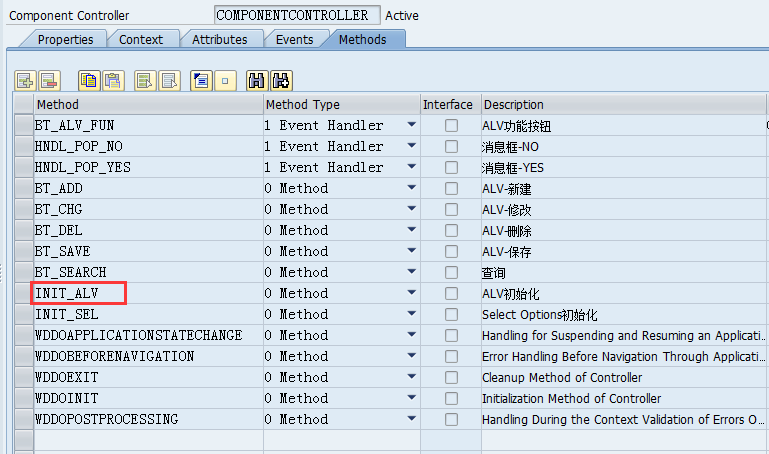
方法INIT_ALV初始化,新增4个按钮:新增/修改/删除/保存 ,代码红色部分。
method init_alv .

  data:

    lo_nd_zsmm_mat type ref to if_wd_context_node,

    lo_cmp_alv     type ref to if_wd_component_usage,

    lo_cmpif_alv   type ref to iwci_salv_wd_table,

    lo_config      type ref to cl_salv_wd_config_table.

* alv component usage

  lo_cmp_alv = wd_this->wd_cpuse_alv_mat( ).

  if lo_cmp_alv->has_active_component( ) is initial.

    lo_cmp_alv->create_component( ).

  endif.

* set data node

  lo_nd_zsmm_mat = wd_context->get_child_node( name = wd_this->wdctx_zsmm_material ).

  lo_cmpif_alv  = wd_this->wd_cpifc_alv_mat( ).

  lo_cmpif_alv->set_data( lo_nd_zsmm_mat ).

* configure alv

  lo_config = lo_cmpif_alv->get_model( ).

* table settings

  lo_config->if_salv_wd_table_settings~set_fixed_table_layout( value = abap_true ).

  lo_config->if_salv_wd_table_settings~set_visible_row_count(  ).

  lo_config->if_salv_wd_table_settings~set_width( '100%' ).

  lo_config->if_salv_wd_table_settings~set_footer_visible( if_salv_wd_c_table_settings=>footer_visible_on_demand ).

  lo_config->if_salv_wd_table_settings~set_scrollable_col_count(  ).

  lo_config->if_salv_wd_table_settings~set_read_only( abap_false ).

  lo_config->if_salv_wd_table_settings~set_data_check( if_salv_wd_c_table_settings=>data_check_on_cell_event ).

  lo_config->if_salv_wd_std_functions~set_view_list_allowed( abap_false ).

  lo_config->if_salv_wd_std_functions~set_pdf_allowed( abap_false ).

  lo_config->if_salv_wd_std_functions~set_edit_check_available( abap_false ).

  lo_config->if_salv_wd_std_functions~set_edit_insert_row_allowed( abap_false ).

  lo_config->if_salv_wd_std_functions~set_edit_append_row_allowed( abap_false ).

  lo_config->if_salv_wd_std_functions~set_edit_delete_row_allowed( abap_false ).

* table toolbar

  data:

    lo_fun_add  type ref to cl_salv_wd_function,

    lo_btn_add  type ref to cl_salv_wd_fe_button,

    lo_fun_chg  type ref to cl_salv_wd_function,

    lo_btn_chg  type ref to cl_salv_wd_fe_button,

    lo_fun_del  type ref to cl_salv_wd_function,

    lo_btn_del  type ref to cl_salv_wd_fe_button,

    lo_fun_save type ref to cl_salv_wd_function,

    lo_btn_save type ref to cl_salv_wd_fe_button.

  lo_fun_add = lo_config->if_salv_wd_function_settings~create_function( 'BT_ADD' ).

  create object lo_btn_add.

  lo_btn_add->set_text( wd_assist->get_text( key = 'B01' ) ).

  lo_btn_add->set_image_source( value = '~Icon/AddRow' ).

  lo_fun_add->set_editor( lo_btn_add ).

  lo_fun_chg = lo_config->if_salv_wd_function_settings~create_function( 'BT_CHG' ).

  create object lo_btn_chg.

  lo_btn_chg->set_text( wd_assist->get_text( key = 'B02' ) ).

  lo_btn_chg->set_image_source( value = '~Icon/EditChangedItem' ).

  lo_fun_chg->set_editor( lo_btn_chg ).

  lo_fun_del = lo_config->if_salv_wd_function_settings~create_function( 'BT_DEL' ).

  create object lo_btn_del.

  lo_btn_del->set_text( wd_assist->get_text( key = 'B03' ) ).

  lo_btn_del->set_image_source( value = '~Icon/DeletedItem' ).

  lo_fun_del->set_editor( lo_btn_del ).

  lo_fun_save = lo_config->if_salv_wd_function_settings~create_function( 'BT_SAVE' ).

  create object lo_btn_save.

  lo_btn_save->set_text( wd_assist->get_text( key = 'B04' ) ).

  lo_btn_save->set_image_source( value = '~Icon/Save' ).

  lo_fun_save->set_editor( lo_btn_save ).

* table columns and column header

  data:

    lt_columns         type salv_wd_t_column_ref,

    ls_column          type salv_wd_s_column_ref,

    lo_column          type ref to cl_salv_wd_column,

    lo_header          type ref to cl_salv_wd_column_header,

    lo_dropdown_by_key type ref to cl_salv_wd_uie_dropdown_by_key,

    lo_input_field     type ref to cl_salv_wd_uie_input_field,

    lo_text_view       type ref to cl_salv_wd_uie_text_view,

    lv_field_name      type string,

    lv_length          type i.

  lt_columns = lo_config->if_salv_wd_column_settings~get_columns( ).

  loop at lt_columns into ls_column.

    lo_column = ls_column-r_column.

    lo_header = lo_column->get_header( ).

    lo_header->set_ddic_binding_field( if_salv_wd_c_column_settings=>ddic_bind_none ).

    case ls_column-id.

      when 'MATNR'.

        "lo_column->set_width( value = '18' ).

        lo_header->set_text( value = wd_assist->get_text( key = 'A01' )  ).

        create object lo_input_field exporting value_fieldname = ls_column-id.

        lo_input_field->set_read_only_fieldname( value = 'FG_READ' ).

        lo_column->set_cell_editor( lo_input_field ).

      when 'ERNAM'.

        "lo_column->set_width( value = '12' ).

        lo_header->set_text( value = wd_assist->get_text( key = 'A02' )  ).

      when 'ERSDA'.

        "lo_column->set_width( value = '8' ).

        lo_header->set_text( value = wd_assist->get_text( key = 'A03' )  ).

      when 'MTART'.

        "lo_column->set_width( value = '4' ).

        lo_header->set_text( value = wd_assist->get_text( key = 'A04' )  ).

        create object lo_input_field

          exporting

            value_fieldname = ls_column-id.

        lo_input_field->set_read_only_fieldname( value = 'FG_READ' ).

        lo_column->set_cell_editor( lo_input_field ).

      when 'MBRSH'.

        "lo_column->set_width( value = '1' ).

        lo_header->set_text( value = wd_assist->get_text( key = 'A05' )  ).

        create object lo_input_field

          exporting

            value_fieldname = ls_column-id.

        lo_input_field->set_read_only_fieldname( value = 'FG_READ' ).

        lo_column->set_cell_editor( lo_input_field ).

      when 'MATKL'.

        "lo_column->set_width( value = '9' ).

        lo_header->set_text( value = wd_assist->get_text( key = 'A06' )  ).

        create object lo_input_field

          exporting

            value_fieldname = ls_column-id.

        lo_input_field->set_read_only_fieldname( value = 'FG_READ' ).

        lo_column->set_cell_editor( lo_input_field ).

      when 'MEINS'.

        "lo_column->set_width( value = '3' ).

        lo_header->set_text( value = wd_assist->get_text( key = 'A07' )  ).

        create object lo_input_field

          exporting

            value_fieldname = ls_column-id.

        lo_input_field->set_read_only_fieldname( value = 'FG_READ' ).

        lo_column->set_cell_editor( lo_input_field ).

      when 'GROES'.

        "lo_column->set_width( value = '32' ).

        lo_header->set_text( value = wd_assist->get_text( key = 'A08' )  ).

        create object lo_input_field

          exporting

            value_fieldname = ls_column-id.

        lo_input_field->set_read_only_fieldname( value = 'FG_READ' ).

        lo_column->set_cell_editor( lo_input_field ).

      when 'SPART'.

        "lo_column->set_width( value = '2' ).

        lo_header->set_text( value = wd_assist->get_text( key = 'A09' )  ).

        create object lo_input_field

          exporting

            value_fieldname = ls_column-id.

        lo_input_field->set_read_only_fieldname( value = 'FG_READ' ).

        lo_column->set_cell_editor( lo_input_field ).

      when 'WERKS'.

        "lo_column->set_width( value = '4' ).

        lo_header->set_text( value = wd_assist->get_text( key = 'A10' )  ).

        create object lo_input_field

          exporting

            value_fieldname = ls_column-id.

        lo_input_field->set_read_only_fieldname( value = 'FG_READ' ).

        lo_column->set_cell_editor( lo_input_field ).

      when 'EKGRP'.

        "lo_column->set_width( value = '3' ).

        lo_header->set_text( value = wd_assist->get_text( key = 'A11' )  ).

        create object lo_input_field

          exporting

            value_fieldname = ls_column-id.

        lo_input_field->set_read_only_fieldname( value = 'FG_READ' ).

        lo_column->set_cell_editor( lo_input_field ).

      when others.

        lo_column->set_visible( value = cl_wd_uielement=>e_visible-blank ).

    endcase.

  endloop.

endmethod.
ALV按钮增加后需要触发,则需要添加ON_FUNCTION事件,如下图BT_ALV_FUN:
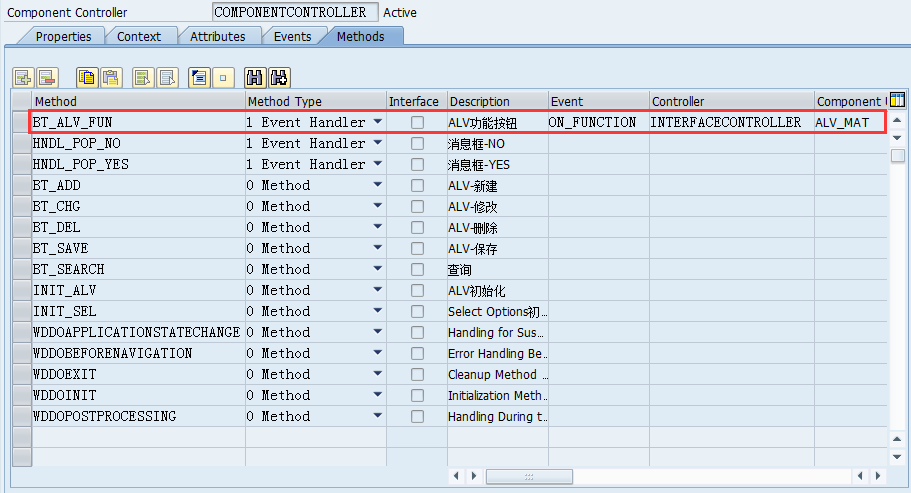
BT_ALV_FUN事件代码:
method bt_alv_fun .

  case r_param->id.

    when 'BT_ADD'.     bt_add( ).  "新增

    when 'BT_CHG'.     bt_chg( ).  "修改

    when 'BT_DEL'.     bt_del( ).  "删除

    when 'BT_SAVE'.    bt_save( ).  "保存

    when others.

  endcase.

endmethod.
上述代码中不同的按钮调用不同的方法,该方法需要在控制器中进行定义:

BT_ADD代码部分:
method bt_add .

  data:

    lo_nd_zsmm_mat type ref to if_wd_context_node,

    lo_el_zsmm_mat type ref to if_wd_context_element,

    ls_zsmm_mat    type wd_this->element_zsmm_material.

  lo_nd_zsmm_mat = wd_context->get_child_node( name = wd_this->wdctx_zsmm_material ).

  ls_zsmm_mat-fg_read = abap_false.   "设置ALV字段值只读

  ls_zsmm_mat-ersda   = sy-datum.     "日期

  ls_zsmm_mat-ernam   = sy-uname.     "用户

  lo_el_zsmm_mat = lo_nd_zsmm_mat->bind_structure(

    new_item             = ls_zsmm_mat    "new_item 结构新增  new_items 内表新增

    set_initial_elements = abap_false     "abap_false保留原始记录并新增行

    index                =               "第1行索引

    ).

  lo_nd_zsmm_mat->set_lead_selection( lo_el_zsmm_mat ).

  data:

    lo_config type ref to cl_salv_wd_config_table,

    ls_field  type salv_wd_s_field_ref,

    lt_field  type salv_wd_t_field_ref.

  lo_config = wd_this->wd_cpifc_alv_mat( )->get_model( ).

  lt_field = cl_salv_wd_model_table_util=>if_salv_wd_table_util_fields~get_filtered_fields( lo_config ).

  "过滤清空

  loop at lt_field into ls_field.

    ls_field-r_field->if_salv_wd_filter~delete_filter_rules( ).

  endloop.

  wd_this->wd_cpifc_alv_mat( )->refresh( ).

  "设置焦点

  wd_this->wd_cpifc_alv_mat( )->set_focus( column = 'MATNR' index  =  ).

endmethod.
BT_CHG代码部分:
method bt_chg .

  data:

    lo_nd_zsmm_mat     type ref to if_wd_context_node,

    lt_el_zsmm_mat     type wdr_context_element_set,

    lo_el_zsmm_mat     type ref to if_wd_context_element,

    ls_zsmm_mat        type wd_this->element_zsmm_material,

    lt_zsmm_mat        type wd_this->elements_zsmm_material,

    lo_api_controller  type ref to if_wd_controller,

    lo_message_manager type ref to if_wd_message_manager.

  data:

    lv_iserror type abap_bool.

  clear: wd_this->gv_message.

  lo_api_controller ?= wd_this->wd_get_api( ).

  "消息

  lo_message_manager = lo_api_controller->get_message_manager( ).

  lo_nd_zsmm_mat = wd_context->get_child_node( name = wd_this->wdctx_zsmm_material ).

  "获取选择行数据

  lt_el_zsmm_mat = lo_nd_zsmm_mat->get_selected_elements( including_lead_selection = abap_true ).

  if lt_el_zsmm_mat is initial.

    wd_this->gv_message = wd_assist->get_text( key = 'M01' ).

    lo_message_manager->report_error_message( message_text = wd_this->gv_message ).

    return.

  endif.

  clear: lt_zsmm_mat, lv_iserror.

  loop at lt_el_zsmm_mat into lo_el_zsmm_mat.

    clear: ls_zsmm_mat.

    lo_el_zsmm_mat->get_static_attributes( importing static_attributes = ls_zsmm_mat ).

    if ls_zsmm_mat-groes is initial.

      wd_this->gv_message = wd_assist->get_text( key = 'M02' ).

      lo_message_manager->report_error_message( message_text = wd_this->gv_message ).

      lv_iserror = abap_true.

      exit.

    endif.

    append ls_zsmm_mat to lt_zsmm_mat.

  endloop.

  if lv_iserror eq abap_true.

    return.

  endif.

  loop at lt_el_zsmm_mat into lo_el_zsmm_mat.

    clear: ls_zsmm_mat.

    lo_el_zsmm_mat->get_static_attributes(  importing static_attributes = ls_zsmm_mat ).

    ls_zsmm_mat-fg_read = abap_false.

    lo_el_zsmm_mat->set_static_attributes(  static_attributes = ls_zsmm_mat ).

  endloop.

endmethod.
BT_DEL代码部分:
method bt_del .

  data:

    lo_window_manager type ref to if_wd_window_manager,

    lo_popup_window   type ref to if_wd_window,

    lo_cmp_api        type ref to if_wd_component,

    lt_text           type string_table,

    lv_titlebar       type string.

  lo_cmp_api          = wd_this->wd_get_api( ).

  lo_window_manager   = lo_cmp_api->get_window_manager( ).

  lv_titlebar         = wd_assist->get_text( key = 'M03' ).

  wd_this->gv_message = wd_assist->get_text( key = 'M04' ).

  append wd_this->gv_message to lt_text.

  call method lo_window_manager->create_popup_to_confirm

    exporting

      text            = lt_text

      button_kind     = if_wd_window=>co_buttons_yesno

      message_type    = if_wd_window=>co_msg_type_warning

      close_button    = abap_false

      window_title    = lv_titlebar

      window_position = if_wd_window=>co_center

      default_button  = if_wd_window=>co_button_yes

    receiving

      result          = lo_popup_window.

  try.

      lo_popup_window->popup_to_confirm->subscribe_to_button_event(

          controller   = lo_cmp_api

          handler_name = 'HNDL_POP_YES'

          button       = if_wd_window=>co_button_yes ).

    catch cx_wdr_rt_exception.

  endtry.

  try.

      lo_popup_window->popup_to_confirm->subscribe_to_button_event(

          controller   = lo_cmp_api

          handler_name = 'HNDL_POP_NO'

          button       = if_wd_window=>co_button_no ).

    catch cx_wdr_rt_exception.

  endtry.

  lo_popup_window->open( ).

endmethod.
上述代码中增加了弹出窗口POPUP_TO_CONFIRM,则需要针对不同的选择结果添加不同的触发事件。
选择'是',则调用HNDL_POP_YES,选择'否',则调用HNDL_POP_NO。
两个事件需要在控制器中添加:
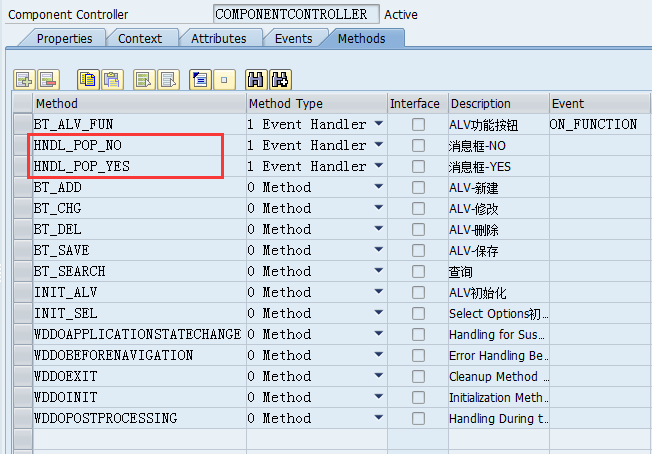
HNDL_POP_YES事件代码:
method hndl_pop_yes .

  data:

    lo_nd_zsmm_mat     type ref to if_wd_context_node,

    lt_el_zsmm_mat     type wdr_context_element_set,

    lo_el_zsmm_mat     type ref to if_wd_context_element,

    ls_zsmm_mat        type wd_this->element_zsmm_material,

    lt_zsmm_mat        type wd_this->elements_zsmm_material,

    lo_api_controller  type ref to if_wd_controller,

    lo_message_manager type ref to if_wd_message_manager.

  data:

    lv_iserror type abap_bool.

  field-symbols:

    <fs_zsmm_mat>     type wd_this->element_zsmm_material.

  clear: wd_this->gv_message.

  lo_api_controller ?= wd_this->wd_get_api( ).

  "消息

  lo_message_manager = lo_api_controller->get_message_manager( ).

  lo_nd_zsmm_mat = wd_context->get_child_node( name = wd_this->wdctx_zsmm_material ).

  lo_el_zsmm_mat = lo_nd_zsmm_mat->get_element( ).

  "获取选择行数据

*  lt_el_zsmm_mat = lo_nd_zsmm_mat->get_selected_elements( including_lead_selection = abap_true ).

*  if lt_el_zsmm_mat is initial.

*    wd_this->gv_message = wd_assist->get_text( key = 'M01' ).

*    lo_message_manager->report_error_message( message_text = wd_this->gv_message ).

*    return.

*  endif.

  clear: lt_zsmm_mat, lv_iserror.

  lo_el_zsmm_mat->get_static_attributes( importing static_attributes = ls_zsmm_mat ).

  lo_nd_zsmm_mat->get_static_attributes_table( importing table = lt_zsmm_mat ).

  loop at lt_zsmm_mat assigning <fs_zsmm_mat>

  where matnr = ls_zsmm_mat-matnr.

    delete lt_zsmm_mat.

  endloop.

  lo_nd_zsmm_mat->bind_table( lt_zsmm_mat ).

  lo_message_manager->report_success( message_text = wd_assist->get_text( key = 'M05') ).

endmethod.
HNDL_POP_NO触发事件暂不做处理。
BT_SAVE保存方法暂不做处理。
2.2测试
选择WebDynpro应用程序,点击执行按钮。
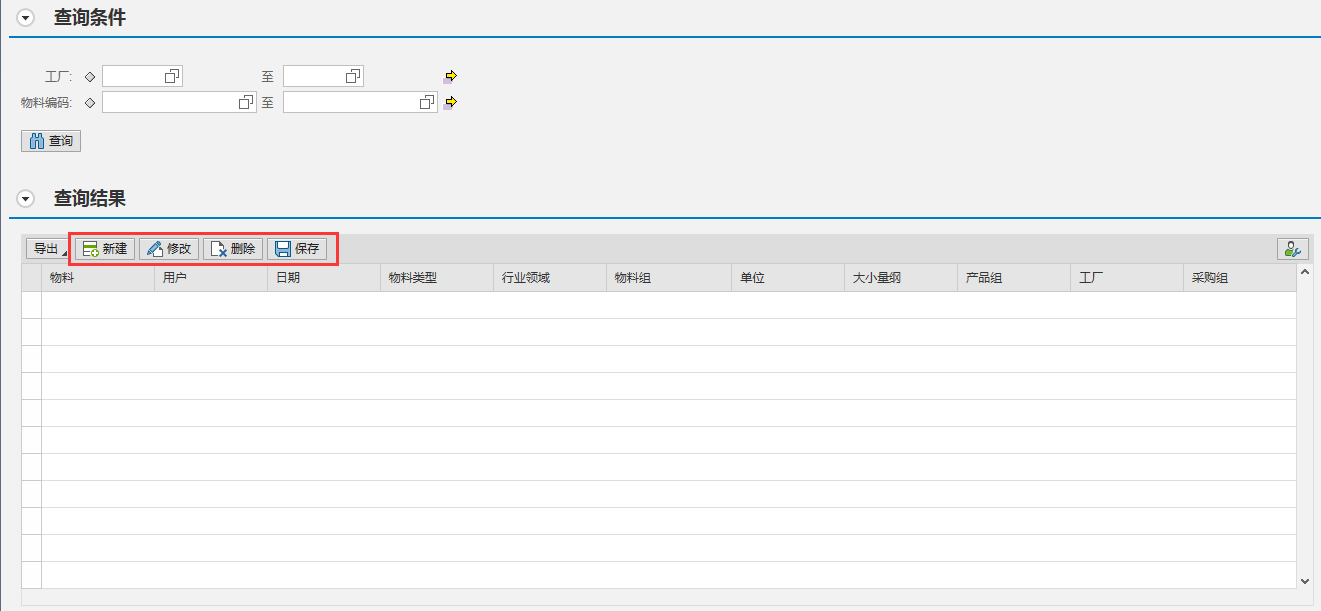
界面新增了4个按钮:新建/修改/删除/保存。
查询记录:
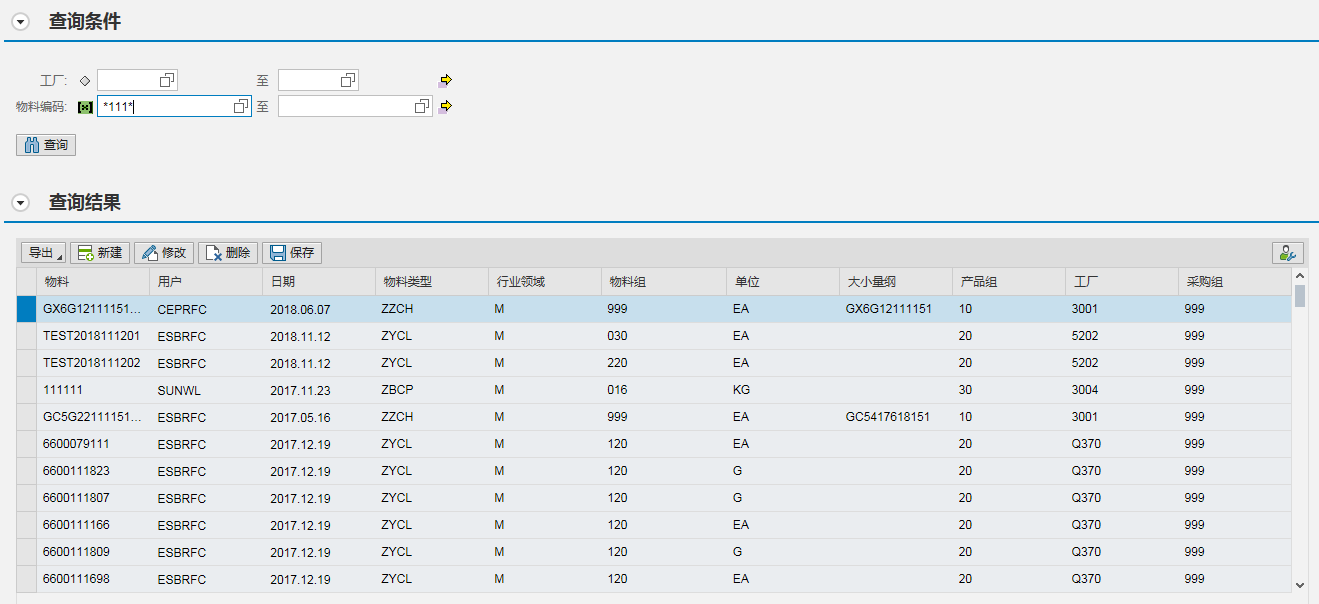
新建:
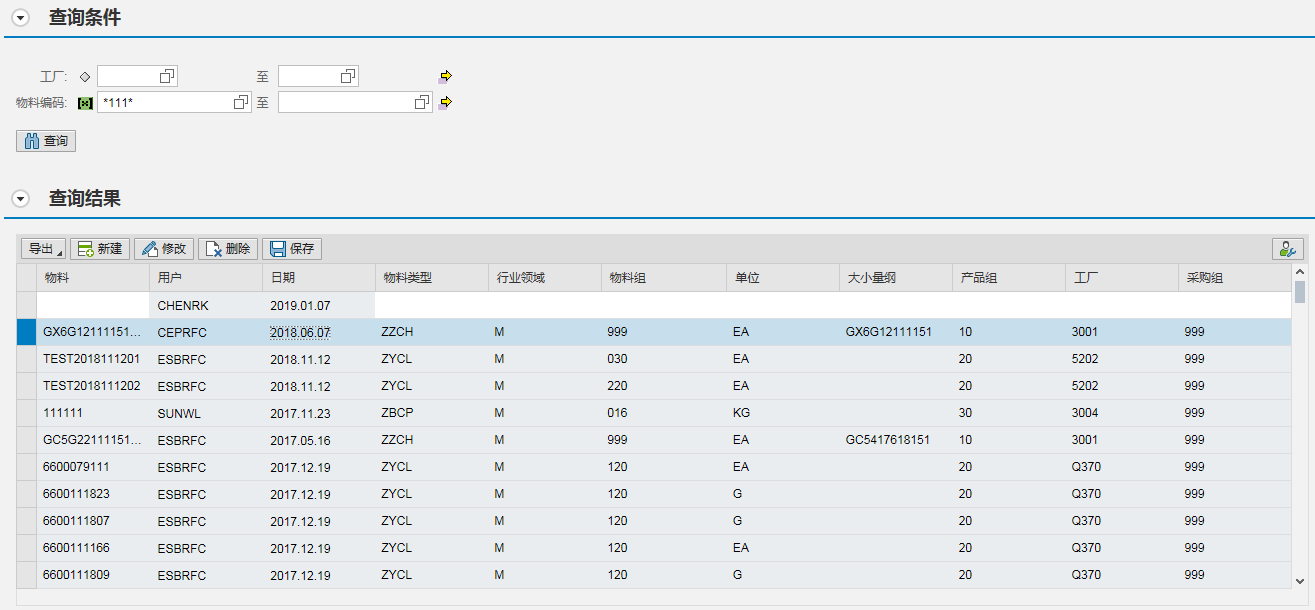
修改:

删除:
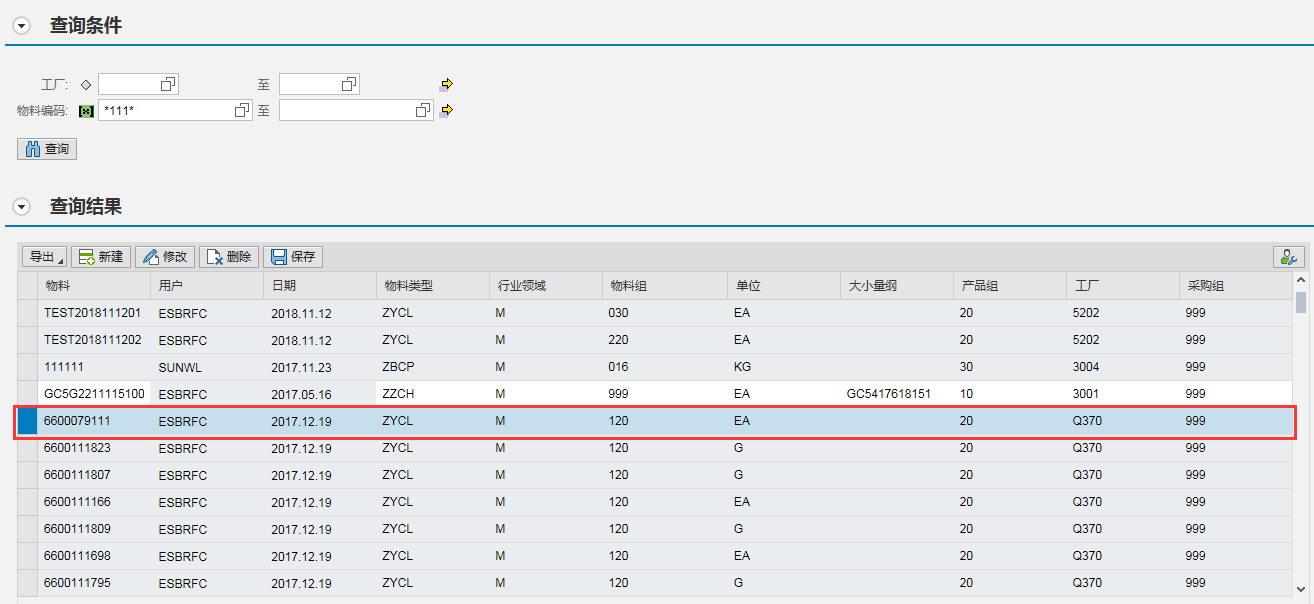
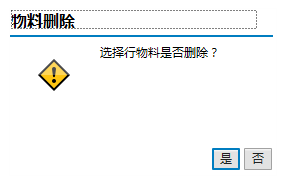
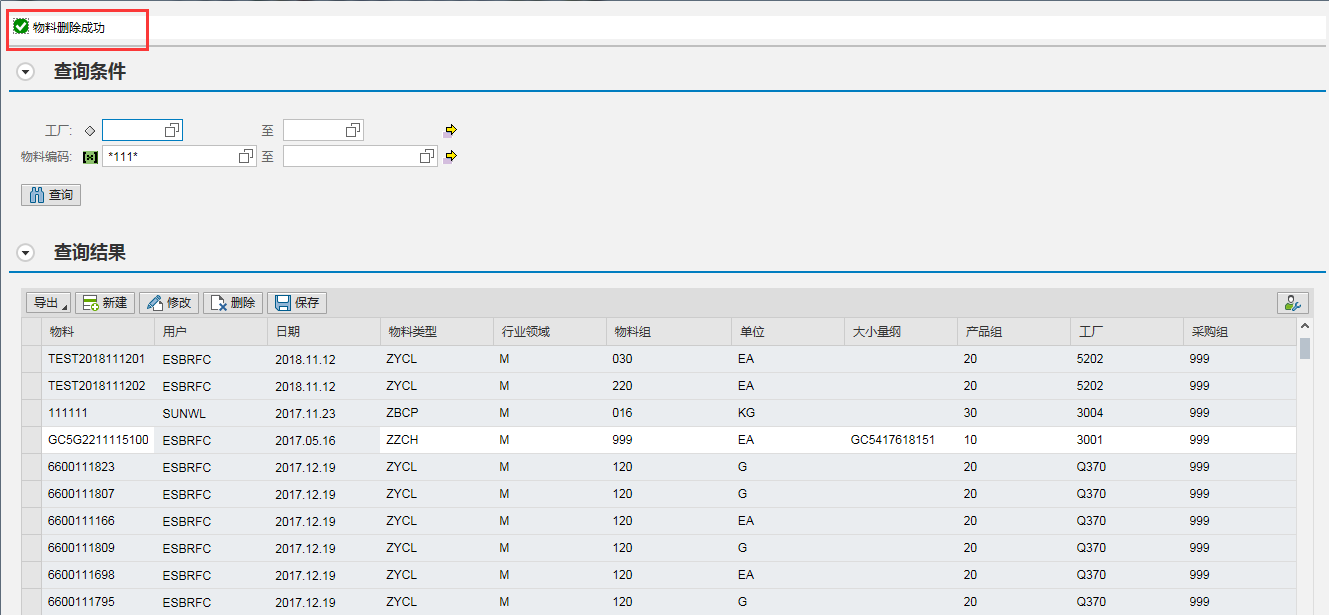
上述步骤基本完成ALV控件的新建/修改/删除操作。
WDA-4-ALV按钮&ICON的更多相关文章
- WDA基础五:ALV组件的使用
说明,因为ALV的功能比TABLE强大,所以在很多时候都习惯性的选择ALV显示. ALV是WDA的组件,封装好的,和SELECT OPTION一样.所以使用的方法一般就是:引入组件,初始化组件,数据绑 ...
- icon图标和文字整体居中在button按钮
icon图标和文字整体居中在button按钮 icon图标和文字整体居中 一般我们常做的button按钮是文字居中 现在这个需要icon图标和文字一起居中在背景色 <a href="# ...
- Jetpack Compose学习(3)——图标(Icon) 按钮(Button) 输入框(TextField) 的使用
原文地址: Jetpack Compose学习(3)--图标(Icon) 按钮(Button) 输入框(TextField) 的使用 | Stars-One的杂货小窝 本篇分别对常用的组件:图标(Ic ...
- ALV详解:OO ALV
声明:原创作品,转载时请注明文章来自SAP师太技术博客( 博/客/园www.cnblogs.com):www.cnblogs.com/jiangzhengjun,并以超链接形式标明文章原始出处,否则将 ...
- OO方式实现ALV: cl_salv_table
这里总结最近用cl_salv_table实现ALV遇到问题和解决办法 FORM set_alv2 . DATA: lv_syrepid TYPE syrepid. lv_syrepid = sy-cp ...
- CSS3:优雅地绘制不规则ICON
早上在w3ctech上看到 中国第二届CSS Conf总结 的时候,真是开心极了: 自从去年在慕课网上看了第一届CSS conf 视频之后,整个人都震惊了,原来还有大会是专门用来讨论CSS的,而且分 ...
- WPF自定义控件与样式-自定义按钮(Button)
一.前言 程序界面上的按钮多种多样,常用的就这几种:普通按钮.图标按钮.文字按钮.图片文字混合按钮.本文章记录了不同样式类型的按钮实现方法. 二.固定样式的按钮 固定样式的按钮一般在临时使用时或程序的 ...
- Ztree节点前加上两个自定义按钮
前言: 在我的权限管理模块遇到了给某些角色加权限的问题,这时就需要实现将每个模块做成树,在每个节点前加上预览和编辑的按钮,这样可以根据数据库的某个字段给每个角色赋权限. 必须必须吐槽的是,这部分的功能 ...
- amazeui学习笔记--css(HTML元素1)--按钮Button
amazeui学习笔记--css(HTML元素1)--按钮Button 一.总结 1.button的基本使用:a.am-btn 在要应用按钮样式的元素上添加 .am-btn,b.颜色 再设置相应的颜色 ...
随机推荐
- DevOps利器- Hygieia平台开发部署
前言碎语 Hygieia是什么? Capitalone(全美十大银行之一)开源的DevOps利器.使用Hygieia后,在整个软件开发周期中,用户可以选择VersionOne或Jira进行用户故事的追 ...
- Ajax的总结
1.运行Ajax的环境,在服务器上才可以实现他的功能,客户端等别的地方,虽然也可以运行,但是功能一定是不全的,有可能很多东西都不会发生反应: 2.传参 (只写关键步骤) (必须在服务器上运行) ge ...
- 游戏设计思考:对COK的理解和思考
转自:http://www.gameres.com/804983.html 一.前言 发此文的起因是最近加入了一个游戏研究群,受到大家对游戏研究热情的感染,也想将自己对游戏的理解和感悟发出来和大家一起 ...
- ubuntu下 net core 安装web模板
---恢复内容开始--- 今天想试试在Linux用C#开发WebAPI,查了下,要用: dotnet new -t Web 来建立工程,结果我试了下,出来这段: Invalid input switc ...
- (转)Intellij IDEA 快捷键整理
[常规] Ctrl+Shift + Enter,语句完成 “!”,否定完成,输入表达式时按 “!”键 Ctrl+E,最近的文件 Ctrl+Shift+E,最近更改的文件 Shift+Click,可以关 ...
- 18 LVM逻辑卷管理
根据上一节的内容,我们知道md这个内核模块可以用来做软RAID的管理.同时RAID实现了两个功能:1.提高了磁盘的读写能力:2.对于数据进行了冗余备份: 但是,如果是管理员手动误删的数据,则一样无法找 ...
- courator - create
0. retry policy RetryPolicy retryPolicy = new ExponentialBackoffRetry(3000,3); 1. client 1) recipes ...
- BZOJ2134 luoguP1297 [国家集训队]单选错位
单选错位 [问题描述] gx和lc去参加noip初赛,其中有一种题型叫单项选择题,顾名思义,只有一个选项是正确答案.试卷上共有n道单选题,第i道单选题有ai个选项,这ai个选项编号是1,2,3,…,a ...
- (转)日期类型的input元素设置默认值为当天
原文地址 html5的form元素对日期时间有丰富的支持 <input type="date"> <input type="time"> ...
- gentoo rt-thread pkgs --update except Exception, e:
使用 rt-thread pkgs --update 时候, 提示出错,信息如下: Traceback (most recent call last): File "/home/ptz/.e ...