
在ASP.NET MVC中使用Knockout实践02,组合View Model成员、Select绑定、通过构造器创建View Model,扩展View Model方法
本篇体验使用ko.computed(fn)计算、组合View Model成员、Select元素的绑定、使用构造器创建View Model、通过View Model的原型(Prototype)为View Model添加扩展方法。
□ 使用ko.computed(fn)计算成员
有时候,我们希望把View Model中的几个成员组合起来成为一个新成员,使用ko.computed(fn)可实现。
接着上一篇,为productViewModel这个json对象增加一个计算成员。
<div data-bind="text:formatted"></div> <hr/><input type="text" data-bind="value:name"/>@section scripts{<script src="~/Scripts/knockout-2.2.0.js"></script><script type="text/javascript">$(function() {$.getJSON('@Url.Action("GetFirstProduct","Home")', function (data) {productViewModel.name(data.Name);productViewModel.category(data.Category);});});var productViewModel = {id: ko.observable(""),name: ko.observable("初始值"),price: ko.observable(""),category: ko.observable("")};//为productViewModel增加一个计算成员productViewModel.formatted = ko.computed(function() {return productViewModel.name() + "--" + productViewModel.category();});//绑定ko.applyBindings(productViewModel);</script>
以上,对于在View Model中的成员,如果已经被赋予observable后,必须通过类似name()的方式获取成员值。
□ Select元素的绑定
对于Select元素,它的options属性应该绑定一个数组,它的value属性绑定一个选中值。
<select data-bind="options: categories, value: category" ></select><hr/>@section scripts{<script src="~/Scripts/knockout-2.2.0.js"></script><script type="text/javascript">$(function() {$.getJSON('@Url.Action("GetFirstProduct","Home")', function (data) {productViewModel.name(data.Name);productViewModel.category(data.Category);});});var productViewModel = {id: ko.observable(""),name: ko.observable("初始值"),price: ko.observable(""),category: ko.observable(""),categories: ["小说","散文","传记"]};//为productViewModel增加一个计算成员productViewModel.formatted = ko.computed(function() {return productViewModel.name() + "--" + productViewModel.category();});//绑定ko.applyBindings(productViewModel);</script>}
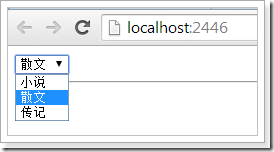
□ 使用构造器创建View Model
<select data-bind="options: categories, value: category" ></select><hr/>@section scripts{<script src="~/Scripts/knockout-2.2.0.js"></script><script type="text/javascript">$(function() {$.getJSON('@Url.Action("GetFirstProduct","Home")', function (data) {product.name(data.Name);product.category (data.Category);});});var Product = function(name, category, categories) {this.name = ko.observable(name);this.category = ko.observable(category);this.categories = categories;this.formatted = ko.computed(function() {return this.name() + "--" + this.category();}, this);};var product = new Product("默认值", "默认值", ["小说", "散文", "传记"]);//绑定ko.applyBindings(product);</script>}

□ 为View Model原型(Prototype)扩展方法
以上,ko.computed中使用了一个匿名函数,如果把这个匿名函数作为Product的扩展方法,该如何做到呢?<select data-bind="options: categories, value: category" ></select><hr/>@section scripts{<script src="~/Scripts/knockout-2.2.0.js"></script><script type="text/javascript">$(function() {$.getJSON('@Url.Action("GetFirstProduct","Home")', function (data) {product.name(data.Name);product.category (data.Category);});});var Product = function(name, category, categories) {this.name = ko.observable(name);this.category = ko.observable(category);this.categories = categories;this.formatted = ko.computed(this.getFormatted, this);};ko.utils.extend(Product.prototype, {getFormatted: function() {return this.name() + "--" + this.category();}});var product = new Product("默认值", "默认值", ["小说", "散文", "传记"]);//绑定ko.applyBindings(product);</script>}
以上,通过ko.utils.extend方法,为Product的原型添加了扩展方法getFormatted。
在ASP.NET MVC中使用Knockout实践02,组合View Model成员、Select绑定、通过构造器创建View Model,扩展View Model方法的更多相关文章
- 在ASP.NET MVC中使用Knockout实践01,绑定Json对象
本篇体验在ASP.NET MVC下使用Knockout,将使用EF Code First创建数据库.最后让Knockout绑定一个Json对象. 创建一个领域模型. namespace MvcAppl ...
- 在ASP.NET MVC中使用Knockout实践08,使用foreach绑定集合
本篇体验使用 foreach 绑定一个Product集合. 首先使用构造创建一个View Model. var Product = function(data) { this.name = ko.ob ...
- 在ASP.NET MVC中使用Knockout实践05,基本验证
本篇体验View Model验证.Knockout的subscribe方法能为View Model成员注册验证规则. @{ ViewBag.Title = "Index"; Lay ...
- 在ASP.NET MVC中使用Knockout实践09,自定义绑定
Knockout真正强大之处在于绑定机制,通过data-bind属性值体现绑定,不仅可以绑定值,还可以绑定事件,甚至可以自定义绑定. 从一个例子看Knockou的绑定机制 假设想给一个button元素 ...
- 在ASP.NET MVC中使用Knockout实践07,自定义验证信息的位置与内容
在前两篇中,体验了Knockout的基本验证和自定义验证.本篇自定义验证信息的显示位置与内容. 自定义验证信息的显示位置 通常,Knockout的验证信息紧跟在input后面,通过validation ...
- 在ASP.NET MVC中使用Knockout实践06,自定义验证、异步验证
在上一篇中体验了Knockout.Validation的基本验证,本篇体验自定义验证和异步验证. 自定义验证规则 ko.validation有一个rules属性,专门用来存放验证规则,它是一个键值对集 ...
- 在ASP.NET MVC中使用Knockout实践04,控制View Model的json格式内容
通常,需要把View Model转换成json格式传给服务端.但在很多情况下,View Model既会包含字段,还会包含方法,我们只希望把字段相关的键值对传给服务端. 先把上一篇的Product转换成 ...
- 在ASP.NET MVC中使用Knockout实践03,巧用data参数
使用Knockout,当通过构造函数创建View Model的时候,构造函数的参数个数很可能是不确定的,于是就有了这样的一个解决方案:向构造函数传递一个object类型的参数data. <inp ...
- 关于ASP.NET MVC中Response.Redirect和RedirectToAction的BUG (跳转后继续执行后面代码而不结束进程)以及处理方法
关于ASP.NET MVC中Response.Redirect和RedirectToAction的BUG (跳转后继续执行后面代码而不结束进程)以及处理方法 在传统的ASP.NET中,使用Resp ...
随机推荐
- 浅介HTML DOM
什么是DOM? DOM是Document Object Model(文档对象模型)的缩写. DOM是W3C(万维网联盟)的标准. DOM定义了访问HTML和XML文档的标准: “W3C文档对象模型(D ...
- Shiro:ajax的session超时处理
本问题解决方案参照网站多篇文章融合解决,在此表示感谢! 环境:springboot+shiro+jquery-easyui 问题:在ajax请求时,如果此时session已经失效,系统没有自动跳转到登 ...
- 小白学习安全测试(四)——扫描工具-Vega
WEB扫描工具-Vega 纯图形化界面,Java编写的开源web扫描器.两种工作模式:扫描模式和代理模式[主流扫描功能].用于爬站.处理表单,注入测试等.支持SSL:http://vega/ca.cr ...
- google地图的url参数
Google Maps Intents for Android The Google Maps app for Android exposes several intents that you can ...
- SecureCRT中常用linux命令 -《转载》
常用命令: 一.ls 只列出文件名 (相当于dir,dir也可以使用) -A:列出所有文件,包含隐藏文 件. -l:列表形式,包含文件的绝大部分属性. -R:递归显示. --help:此命令的帮助. ...
- poj 2253 一条路径中的最大边 再找出最小的
题目大意,有两只青蛙,分别在两个石头上,青蛙A想要到青蛙B那儿去,他可以直接跳到B的石头上,也可以跳到其他石头上,再从其他石头跳到B那儿,求青蛙从A到B的所有路径中最小的Frog Distance,我 ...
- day10--协成\异步IO\缓存
协成(Gevent) 协程,又称微线程,纤程.英文名Coroutine.一句话说明什么是线程:协程是一种用户态的轻量级线程.CPU只认识线程. 协程拥有自己的寄存器上下文和栈.协程调度切换时,将 ...
- vuejs递归组件
vuejs学习--递归组件 前言 学习vue有一段时间了,最近使用vue做了一套后台管理系统,其中使用最多就是递归组件,也因为自己对官方文档的不熟悉使得自己踩了不少坑,今天写出来和大家一起分享. ...
- 009 jquery过滤选择器-----------(表单对象属性过滤选择器 与 表单选择器)
1.表单对象属性选择器 2.程序 <!DOCTYPE html> <html> <head> <meta charset="UTF-8"& ...
- SpringMVC(七) RequestMapping 路径中带占位符的URL
使用方法:在@RequestMapping("/delete/{id}")中,通过{id}带入pathvariable,然后在方法中,通过@PathVariable("变 ...