
在ASP.NET MVC中使用Knockout实践02,组合View Model成员、Select绑定、通过构造器创建View Model,扩展View Model方法
本篇体验使用ko.computed(fn)计算、组合View Model成员、Select元素的绑定、使用构造器创建View Model、通过View Model的原型(Prototype)为View Model添加扩展方法。
□ 使用ko.computed(fn)计算成员
有时候,我们希望把View Model中的几个成员组合起来成为一个新成员,使用ko.computed(fn)可实现。
接着上一篇,为productViewModel这个json对象增加一个计算成员。
<div data-bind="text:formatted"></div> <hr/><input type="text" data-bind="value:name"/>@section scripts{<script src="~/Scripts/knockout-2.2.0.js"></script><script type="text/javascript">$(function() {$.getJSON('@Url.Action("GetFirstProduct","Home")', function (data) {productViewModel.name(data.Name);productViewModel.category(data.Category);});});var productViewModel = {id: ko.observable(""),name: ko.observable("初始值"),price: ko.observable(""),category: ko.observable("")};//为productViewModel增加一个计算成员productViewModel.formatted = ko.computed(function() {return productViewModel.name() + "--" + productViewModel.category();});//绑定ko.applyBindings(productViewModel);</script>
以上,对于在View Model中的成员,如果已经被赋予observable后,必须通过类似name()的方式获取成员值。
□ Select元素的绑定
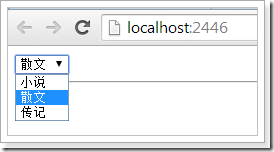
对于Select元素,它的options属性应该绑定一个数组,它的value属性绑定一个选中值。
<select data-bind="options: categories, value: category" ></select><hr/>@section scripts{<script src="~/Scripts/knockout-2.2.0.js"></script><script type="text/javascript">$(function() {$.getJSON('@Url.Action("GetFirstProduct","Home")', function (data) {productViewModel.name(data.Name);productViewModel.category(data.Category);});});var productViewModel = {id: ko.observable(""),name: ko.observable("初始值"),price: ko.observable(""),category: ko.observable(""),categories: ["小说","散文","传记"]};//为productViewModel增加一个计算成员productViewModel.formatted = ko.computed(function() {return productViewModel.name() + "--" + productViewModel.category();});//绑定ko.applyBindings(productViewModel);</script>}
□ 使用构造器创建View Model
<select data-bind="options: categories, value: category" ></select><hr/>@section scripts{<script src="~/Scripts/knockout-2.2.0.js"></script><script type="text/javascript">$(function() {$.getJSON('@Url.Action("GetFirstProduct","Home")', function (data) {product.name(data.Name);product.category (data.Category);});});var Product = function(name, category, categories) {this.name = ko.observable(name);this.category = ko.observable(category);this.categories = categories;this.formatted = ko.computed(function() {return this.name() + "--" + this.category();}, this);};var product = new Product("默认值", "默认值", ["小说", "散文", "传记"]);//绑定ko.applyBindings(product);</script>}

□ 为View Model原型(Prototype)扩展方法
以上,ko.computed中使用了一个匿名函数,如果把这个匿名函数作为Product的扩展方法,该如何做到呢?<select data-bind="options: categories, value: category" ></select><hr/>@section scripts{<script src="~/Scripts/knockout-2.2.0.js"></script><script type="text/javascript">$(function() {$.getJSON('@Url.Action("GetFirstProduct","Home")', function (data) {product.name(data.Name);product.category (data.Category);});});var Product = function(name, category, categories) {this.name = ko.observable(name);this.category = ko.observable(category);this.categories = categories;this.formatted = ko.computed(this.getFormatted, this);};ko.utils.extend(Product.prototype, {getFormatted: function() {return this.name() + "--" + this.category();}});var product = new Product("默认值", "默认值", ["小说", "散文", "传记"]);//绑定ko.applyBindings(product);</script>}
以上,通过ko.utils.extend方法,为Product的原型添加了扩展方法getFormatted。
在ASP.NET MVC中使用Knockout实践02,组合View Model成员、Select绑定、通过构造器创建View Model,扩展View Model方法的更多相关文章
- 在ASP.NET MVC中使用Knockout实践01,绑定Json对象
本篇体验在ASP.NET MVC下使用Knockout,将使用EF Code First创建数据库.最后让Knockout绑定一个Json对象. 创建一个领域模型. namespace MvcAppl ...
- 在ASP.NET MVC中使用Knockout实践08,使用foreach绑定集合
本篇体验使用 foreach 绑定一个Product集合. 首先使用构造创建一个View Model. var Product = function(data) { this.name = ko.ob ...
- 在ASP.NET MVC中使用Knockout实践05,基本验证
本篇体验View Model验证.Knockout的subscribe方法能为View Model成员注册验证规则. @{ ViewBag.Title = "Index"; Lay ...
- 在ASP.NET MVC中使用Knockout实践09,自定义绑定
Knockout真正强大之处在于绑定机制,通过data-bind属性值体现绑定,不仅可以绑定值,还可以绑定事件,甚至可以自定义绑定. 从一个例子看Knockou的绑定机制 假设想给一个button元素 ...
- 在ASP.NET MVC中使用Knockout实践07,自定义验证信息的位置与内容
在前两篇中,体验了Knockout的基本验证和自定义验证.本篇自定义验证信息的显示位置与内容. 自定义验证信息的显示位置 通常,Knockout的验证信息紧跟在input后面,通过validation ...
- 在ASP.NET MVC中使用Knockout实践06,自定义验证、异步验证
在上一篇中体验了Knockout.Validation的基本验证,本篇体验自定义验证和异步验证. 自定义验证规则 ko.validation有一个rules属性,专门用来存放验证规则,它是一个键值对集 ...
- 在ASP.NET MVC中使用Knockout实践04,控制View Model的json格式内容
通常,需要把View Model转换成json格式传给服务端.但在很多情况下,View Model既会包含字段,还会包含方法,我们只希望把字段相关的键值对传给服务端. 先把上一篇的Product转换成 ...
- 在ASP.NET MVC中使用Knockout实践03,巧用data参数
使用Knockout,当通过构造函数创建View Model的时候,构造函数的参数个数很可能是不确定的,于是就有了这样的一个解决方案:向构造函数传递一个object类型的参数data. <inp ...
- 关于ASP.NET MVC中Response.Redirect和RedirectToAction的BUG (跳转后继续执行后面代码而不结束进程)以及处理方法
关于ASP.NET MVC中Response.Redirect和RedirectToAction的BUG (跳转后继续执行后面代码而不结束进程)以及处理方法 在传统的ASP.NET中,使用Resp ...
随机推荐
- mysql innobackupex 备份及恢复
----------------------------------全量备份恢复-------------------------------------1.生成一个完整的备份 innobackupe ...
- linux驱动---等待队列、工作队列、Tasklets【转】
转自:https://blog.csdn.net/ezimu/article/details/54851148 概述: 等待队列.工作队列.Tasklet都是linux驱动很重要的API,下面主要从用 ...
- 在windows上实现多个java jdk的共存解决办法
转自:https://www.cnblogs.com/jianyungsun/p/6918024.html 分析问题 为了多快好省的解决当前的问题,我的想法是在windows中同时安装jdk1.6和j ...
- 公共语言运行库(CLR)开发系列课程(3):COM Interop基础 学习笔记
上章地址 什么是COM Component Object Model 组建对象模型 基于接口(Interface) 接口=协议 IID 标识接口 V-table 虚表 方式调用 单继承 对象(Obje ...
- 不将EF连接字符串写在配置文件的方法
edmx的构造函数: public DecorationMSEntities() : base(myConfig.DataBaseConnectionString, "DecorationM ...
- Ibatis.Net 执行存储过程学习(八)
首先在数据库创建存储过程: create proc [dbo].[usp_GetPersonById] @Id int as begin select Id,Name from Person wher ...
- 洛谷P1886 滑动窗口
传送门啦 以最大值为例,既然我们想要保证队列开头为答案,那么我们就要保证每次更新使最大值一直放在队列.那么如果存储的最大值该弹出了怎么办呢?我们只需要记录下每个元素的位置,判断是否在区间内即可. 队头 ...
- 在centos中修改yum源为阿里源
cd /etc/yum.repos.d 备份旧的配置文件:mv CentOS-Base.repo CentOS-Base.repo.bak 下载阿里源的文件: wget -O CentOS-Base. ...
- Java登陆拦截器
package com.beidou.warehouseerp.interceptor; import com.alibaba.fastjson.JSON; import com.beidou.war ...
- centos7 mysql5.7 rpm 安装
卸载MariaDB CentOS7默认安装MariaDB而不是MySQL,而且yum服务器上也移除了MySQL相关的软件包.因为MariaDB和MySQL可能会冲突,故先卸载MariaDB. 查看已安 ...