
iOS一个简单的设置圆角不引起性能问题的分类
http://www.cocoachina.com/articles/18756
iOS设置圆角矩形和阴影效果
https://www.cnblogs.com/rayshen/p/4900336.html
////
iOS_使用UIBezierPath对象实现视图控件的立体阴影效果和半透明背景效果
https://blog.csdn.net/Sponge_CMZ/article/details/48498885
核心API
Class : UIBezierPath, CALayer
涉及的API:(API的官方详细注释详见本章结尾)
/** CALayer 的shadowPath属性. */
@property CGPathRef shadowPath
/** 创建UIBezierPath对象的相关类方法. */
+ (UIBezierPath *)bezierPathWithRect:(CGRect)rect
+ (UIBezierPath *)bezierPathWithRoundedRect:(CGRect)rect cornerRadius:(CGFloat)cornerRadius
+ (UIBezierPath *)bezierPathWithOvalInRect:(CGRect)rect
功能实现
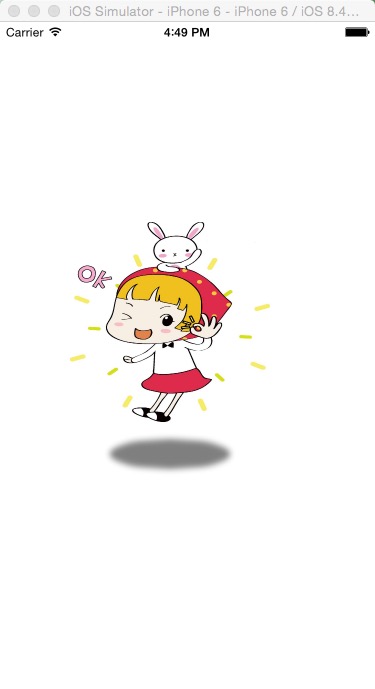
1 . 椭圆形阴影效果
效果图:
2 . 半透明背景
效果图:
Code:

1 . 椭圆形阴影效果
- (void)layoutOvalShadow
{
/** 1. 创建一个UIImageView的对象. */
UIImage *image = [UIImage imageNamed:@"1.jpg"];
UIImageView *imageView = [[UIImageView alloc] initWithFrame:CGRectMake(70, 200, 150, 200)];
imageView.image = image;
[self.view addSubview:imageView];
[imageView release];
/**
* @brief 2. 创建UIBezierPath的对象(椭圆形状).
* @param 椭圆形状位置和大小(参考的坐标系是要设置阴影的视图)
*/
UIBezierPath *path = [UIBezierPath bezierPathWithOvalInRect:CGRectMake(25, 230, 100, 20)];
/** 3. 设置imageView的阴影, 制造立体效果. */
imageView.layer.shadowPath = path.CGPath; /**< 指定path对象. */
imageView.layer.shadowOpacity = 0.5; /**< 阴影透明度.*/
imageView.layer.shadowRadius = 0; /**< 阴影模糊效果的半径. */
imageView.layer.shadowColor = [UIColor grayColor].CGColor; /**< 阴影颜色.*/
}
2 . 半透明背景
- (void)bezierPathBackground
{
/** 1. 创建一个UIImageView的对象, 当做背景图片. */
UIImage *image = [UIImage imageNamed:@"33.jpg"];
UIImageView *imageView = [[UIImageView alloc] initWithFrame:self.view.frame];
imageView.image = image;
[self.view addSubview:imageView];
[imageView release];
/** 2. 创建UILabel的对象. */
UILabel *label = [[UILabel alloc] initWithFrame:CGRectMake(25, 50, 320, 100)];
label.text = @"Our mind is a sponge, our heart is a stream.";
label.font = [UIFont systemFontOfSize:30];
label.textColor = [UIColor whiteColor];
label.backgroundColor = [UIColor clearColor];
label.numberOfLines = 0;
label.textAlignment = NSTextAlignmentCenter;
[imageView addSubview:label];
[label release];
/**
* @brief 3. 创建UIBezierPath的对象(圆角效果的矩形)
* @param 1: 矩形的位置和大小(参考的坐标系是要设置阴影的视图)
* @param 2: 圆角的半径
*/
UIBezierPath *backgroundPath = [UIBezierPath bezierPathWithRoundedRect:CGRectMake(0, 0, 320, 100) cornerRadius:5];
/** 4. 设置label的阴影, 制造半透明背景效果. */
label.layer.shadowPath = backgroundPath.CGPath;
label.layer.shadowOpacity = 0.4;
label.layer.shadowRadius = 0;
label.layer.shadowColor = [UIColor grayColor].CGColor;
}
核心API
功能实现
Code
API 官方注释
API 官方注释
/**
* @brief Creates and returns a new UIBezierPath object initialized with a rectangular path.
* @param <rect> The rectangle describing the path to create.
* @return A new path object with the rectangular path.
*/
+ (UIBezierPath *)bezierPathWithRect:(CGRect)rect
/**
* @brief Creates and returns a new UIBezierPath object initialized with an oval path inscribed in the specified rectangle
* @ param <rect> The rectangle in which to inscribe an oval.
*/
+ (UIBezierPath *)bezierPathWithOvalInRect:(CGRect)rect
/**
* @brief Creates and returns a new UIBezierPath object initialized with a rounded rectangular path.
* @param <rect> The rectangle that defines the basic shape of the path
* @param <cornerRadius> The radius of each corner oval. A value of 0 results in a rectangle without rounded corners. Values larger than half the rectangle’s width or height are clamped appropriately to half the width or height.
* @return A new path object with the rounded rectangular path.
*/
+ (UIBezierPath *)bezierPathWithRoundedRect:(CGRect)rect cornerRadius:(CGFloat)cornerRadius
---------------------
作者:Sponge_CMZ
来源:CSDN
原文:https://blog.csdn.net/Sponge_CMZ/article/details/48498885
版权声明:本文为博主原创文章,转载请附上博文链接!
iOS一个简单的设置圆角不引起性能问题的分类的更多相关文章
- iOS8 超简单的设置圆角按钮 ImageView等UIView
button.layer.cornerRadius = // 这个值根据你想要的效果可以更改 button.clipsToBounds = true 这种方法不止可以设置按钮,UIView应该都可以设 ...
- 一个简单的创建圆角图像的UIImage扩展实现
- (UIImage *)roundedCornerImageWithCornerRadius:(CGFloat)cornerRadius { CGFloat w = self.size.width; ...
- iOS 一个简单的单例
比如我有一个Singleton的类(DemoStatusManage),他有一个实例方法currentStatus会返回一个1-100的随机数. @interface DemoStatusManage ...
- iOS - 一个简单的带标题的图标的实现
代码不复杂,直接上代码: ImageViewButton.h // // ImageViewButton.h// // 带有图片.底部标题或者顶部的按钮 // // #import <UIKit ...
- 【小白学PyTorch】15 TF2实现一个简单的服装分类任务
[新闻]:机器学习炼丹术的粉丝的人工智能交流群已经建立,目前有目标检测.医学图像.时间序列等多个目标为技术学习的分群和水群唠嗑的总群,欢迎大家加炼丹兄为好友,加入炼丹协会.微信:cyx64501661 ...
- 用nodejs搭建一个简单的服务器
使用nodejs搭建一个简单的服务器 nodejs优点:性能高(读写文件) 数据操作能力强 官网:www.nodejs.org 验证是否安装成功:cmd命令行中输入node -v 如果显示版本号表示安 ...
- ios开发UI篇—使用纯代码自定义UItableviewcell实现一个简单的微博界面布局
本文转自 :http://www.cnblogs.com/wendingding/p/3761730.html ios开发UI篇—使用纯代码自定义UItableviewcell实现一个简单的微博界面布 ...
- iOS开发UI篇—使用嵌套模型完成的一个简单汽车图标展示程序
iOS开发UI篇—使用嵌套模型完成的一个简单汽车图标展示程序 一.plist文件和项目结构图 说明:这是一个嵌套模型的示例 二.代码示例: YYcarsgroup.h文件代码: // // YYcar ...
- iOS开发UI篇—使用xib自定义UItableviewcell实现一个简单的团购应用界面布局
iOS开发UI篇—使用xib自定义UItableviewcell实现一个简单的团购应用界面布局 一.项目文件结构和plist文件 二.实现效果 三.代码示例 1.没有使用配套的类,而是直接使用xib文 ...
随机推荐
- 「题解」「JZOJ-4238」纪念碑
题目 在 \(N\times M\) 的网格中,有 \(P\) 个矩形建筑,求一个最大边长的正方形,使得网格中能找到一个放置正方形的地方,不会与建筑重合. 保证 \(N,M\le 10^6,P\le ...
- gulp 常用方法 任务 插件
执行gulp 任务 gulp taskname (default任务不输入名称亦可:gulp) var gulp = require("gulp"); gulp.task(&quo ...
- js 页面滚动到指定位置
当页面的长度比较长时,如果进行刷新页面,我们希望能够在刷新完成页面之后,能够停留在当前位置,而不是从头再手动滚动到当前位置. 那么这样的效果如何实现呢?下面开始简单描写(由于博客园不支持效果展示,所以 ...
- AI人工智能之基于OpenCV+face_recognition实现人脸识别
因近期公司项目需求,需要从监控视频里识别出人脸信息.OpenCV非常庞大,其中官方提供的人脸模型分类器也可以满足基本的人脸识别,当然我们也可以训练自己的人脸模型数据,但是从精确度和专业程度上讲Open ...
- AngularJS Learning Notes
AngularJS 简介 AngularJS 是一个 JavaScript 框架.它可通过 <script> 标签添加到 HTML 页面. AngularJS 通过 指令 扩展了 HTML ...
- tkinter+pickle+python的一个登录界面设计
1.代码: #导出模块 import tkinter as tk from tkinter import messagebox import pickle #定义登录的窗口.标题.大小和位置 wind ...
- zookeeper 源码(二) session 和 处理事务请求
问题 session 如何生成的?sessionId为什么不直接使用时间戳+单机名 sessionid 关闭的时候的逻辑,sessionid 的维护是由各节点还是leader ? 会话相关 sessi ...
- CSS3实现魔方动画
本文将借助css3实现魔方动画效果,设计思路如下: HTML方面采用六个div容器形成六个立方面: CSS方面采用transform-style: preserve-3d;形成三维场景:transfo ...
- C语言:计算并输出给定10个数的方差。
//计算并输出给定10个数的方差. #include<math.h> #include<stdio.h> ]) { double p = 0.0,f=0.0,g=0.0; ; ...
- SSIS 从oracle 转数据回MS SQL
SSIS 从oracle 转数据回MS SQL,转每月的销售记录,大概15000以内,在开发机器上没问题,部署到生产环境出现各种状况“ SSIS 无法从连接伺服器的OLE DB提供者BULK 提取资料 ...