
face_recognition人脸识别
对亚洲人识别准确度有点差,具体安装移步:https://www.cnblogs.com/ckAng/p/10981025.html
更多操作移步:https://github.com/ageitgey/face_recognition
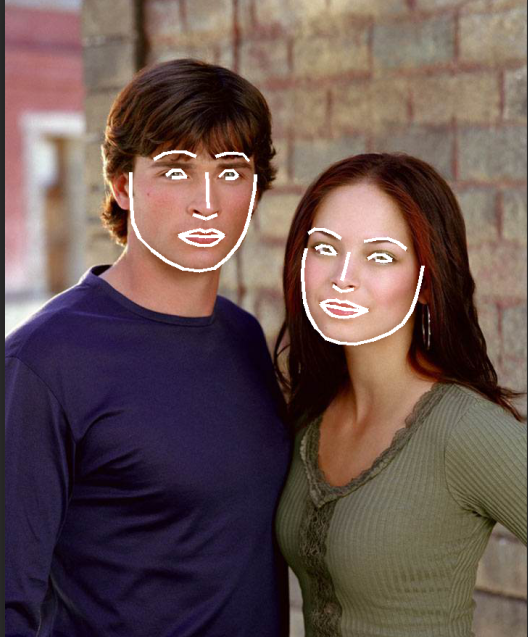
from PIL import Image, ImageDraw

import face_recognition

# Load the jpg file into a numpy array

image = face_recognition.load_image_file("img/test2.jpg")

# Find all facial features in all the faces in the image

face_landmarks_list = face_recognition.face_landmarks(image)

print("I found {} face(s) in this photograph.".format(len(face_landmarks_list)))

# Create a PIL imagedraw object so we can draw on the picture

pil_image = Image.fromarray(image)

d = ImageDraw.Draw(pil_image)

for face_landmarks in face_landmarks_list:

    # Print the location of each facial feature in this image

    for facial_feature in face_landmarks.keys():

        print("The {} in this face has the following points: {}".format(facial_feature, face_landmarks[facial_feature]))

    # Let's trace out each facial feature in the image with a line!

    for facial_feature in face_landmarks.keys():

        d.line(face_landmarks[facial_feature], width=5)

# Show the picture

pil_image.show()
face_recognition人脸识别的更多相关文章
- Python 使用 face_recognition 人脸识别
Python 使用 face_recognition 人脸识别 官方说明:https://face-recognition.readthedocs.io/en/latest/readme.html 人 ...
- 模块 face_recognition 人脸识别
face_recognition 人脸识别 api 说明 1 load_image_file 将img文件加载到numpy 数组中 2 face_locations 查找图像中所有面部和所有面部特征的 ...
- face_recognition人脸识别框架
一.环境搭建 1.系统环境 Ubuntu 17.04 Python 2.7.14 pycharm 开发工具 2.开发环境,安装各种系统包 人脸检测基于dlib,dlib依赖Boost和cmake $ ...
- python face_recognition模块实现人脸识别
import face_recognition #人脸识别库 pip cmake dlib import cv2 #读取图像 face_image1 = face_recognition.load_i ...
- 人脸识别课件需要安装的python模块
Python3.6安装face_recognition人脸识别库 https://www.jianshu.com/p/8296f2aac1aa
- 手把手教你用1行代码实现人脸识别 --Python Face_recognition
环境要求: Ubuntu17.10 Python 2.7.14 环境搭建: 1. 安装 Ubuntu17.10 > 安装步骤在这里 2. 安装 Python2.7.14 (Ubuntu17.10 ...
- Python 人工智能之人脸识别 face_recognition 模块安装
Python人工智能之人脸识别face_recognition安装 face_recognition 模块使用系统环境搭建 系统环境 Ubuntu / deepin操作系统 Python 3.6 py ...
- Ubuntu下使用face_recognition进行人脸识别
Face Recognition是一个基于Python的人脸识别库,在github上地址如下:https://github.com/ageitgey/face_recognition. 看着挺好玩,本 ...
- 人脸识别-关于face_recognition库的安装
首先十分感谢博客https://blog.csdn.net/scc_722/article/details/80613933,经历过很多尝试(快要醉了),终于看了这篇博客后安装成功. face_rec ...
随机推荐
- FFmpeg——AVCodec,AVCodecContext,AVCodecParameters 辨析
先贴上雷神的一张FFmpeg关键结构体之间的关系图: 再看雷神的分析: 每个AVStream存储一个视频/音频流的相关数据: 每个AVStream对应一个AVCodecContext,存储该视频/音频 ...
- Python 基础之递归 递归函数 尾递归 斐波那契
1.递归函数 定义:自己调用自己的函数递:去归:回有去有回是递归#(1)简单的递归函数def digui(n): print(n) if n > 0: digui(n- ...
- 【Java】变量命名规范
Java是一种区分字母的大小写的语言,所以我们在定义变量名的时候应该注意区分大小写的使用和一些规范,接下来我们简单的来讲讲Java语言中包.类.变量等的命名规范. (一)Package(包)的命名 P ...
- python多线程采集图片
cmd中运行 >python untitled2.py 图片的网站 import requests import threading from bs4 import BeautifulSo ...
- Xcode Edit Schemes
关于本文:有关“Xcode Edit Schemes”的设置,还是有很大的学问的.由于时间关系,我一点一点的补充. 1.在开发的时候,至少将Run的Build Configuration设置为Debu ...
- leetcode209 Minimum Size Subarray Sum
""" Given an array of n positive integers and a positive integer s, find the minimal ...
- ubuntu16.04 使用tensorflow object detection训练自己的模型
一.构建自己的数据集 1.格式必须为jpg.jpeg或png. 2.在models/research/object_detection文件夹下创建images文件夹,在images文件夹下创建trai ...
- java并发:初探sleep方法
sleep与wait sleep是Thread方法,使得当前线程从运行态变为阻塞态.但它不会释放对象的锁. wait方法是Object方法,它的作用是使得当前拥有对象锁的线程从运行态变为阻塞态, 它会 ...
- kafka-console-consumer接收不到flume推送过来的消息
原因和解决方法:需要先启动kafka,再启动flume,两者启动有先后顺序.
- 第2节 storm实时看板案例:10、redis的安装使用回顾
2.redis的持久化机制: redis支持两种持久化机制:RDB AOF RDB:多少秒之内,有多少个key放生变化,将redis当中的数据dump到磁盘保存,保存成一个文件,下次再恢复的时候,首 ...