
二十九、rsync+inotity实时监控同步工具
一、场景应用:
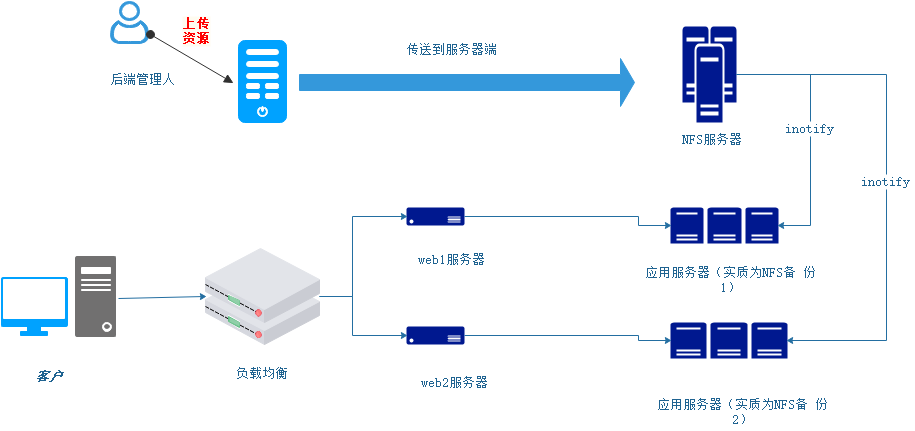
客户通过url访问资源(查询,下载等),并发量是非常高的,所以运用负载均衡分担web服务器的压力,在后端连接不同的NFS备份服务器,同样也是分担压力;那么在同步nfs服务器上的资源的时候,我们需要实时的同步到备份服务器上,这样用户才能使用这些资源,传统的定时任务,我们知道最快1分钟,同步一次,这是无法忍受的,所以我们用inotity进行实时的同步。
二、inotify+rsync组合的起源
Rsync远程同步工具可以进行数据的同步,但是在数据量非常庞大的今天,如果要实现两边的数据一致,rsync是支持的,那么就要进行数据的对比,但是在对比中发现,变化的数据只是一小部分,而且对比又是比较耗时,所以这里就出现了rsync的瓶颈,inotify的出现,缓解rsync的不足之处,实现实时同步。
三、Inotify的工作机制
Inotify是一种强大的,细粒度的,异步的文件系统事件监控机制。
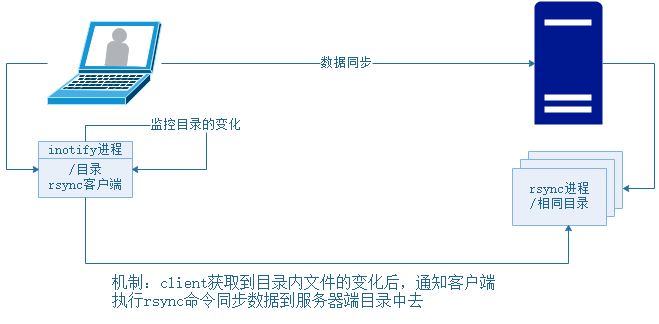
四、启发:inotify可以监控目录的变化,那么变化后,既然可以触发同步rsync,那么同样可以触发发送邮件、打电话等,用处多多!!!
五、安装inotify
1.首先inotify的实现软件有很多,这里说两种:
1)inotify自身 简单 2)sercync 国内软件开发,功能强大,可以做过滤
在性能上intofy大于sersyrc
2.安装前置条件:
1)版本必须大于2.6.13
2)有/proc/sys/fs/inotify

3.源码下载,源码安装:
- mkdir -p /home/oldboy/tools/
- cd /home/oldboy/tools/
- wget http://github.com/downloads/rvoicilas/inotify-tools/inotify-tools-3.14.tar.gz --no-check-certificate
- tar xf inotify-tools-3.14.tar.gz
- cd inotify-tools-3.14
- ./configure --prefix=/usr/local/inotify-tools-3.14(安装出错,因为没有安装yum install gcc)-----》配置参数的安装和安装目录的指定
- [root@djw1 inotify-tools-3.14]# echo $? 0 ====》检查没有出错了!!!!
- make&&make install -->编译成机器认识的语言 make成功在进行make install 安装
- ls -s /usr/local/inotify-tools-3.14 /usr/local/inotify ---->软链接
六、配置参数 :cd /usr/local/inotify

1)bin inotify执行命令 2)include inotify头文件 3)lib 动态链接的库文件(系统调用) 4)share 帮助文档
有两个命令要注意;inotifywait(监听事件)、inotifywatch
inotifywait配置参数:建议用的时候熟练,多多看帮忙文档,如下:
文档参数:
[root@djw1 inotify]# ./bin/inotifywait --help
Wait for a particular event on a file or set of files.
Usage: inotifywait [ options ] file1 [ file2 ] [ file3 ] [ ... ]
Options:
-h|--help Show this help text.
@<file> Exclude the specified file from being watched.
--exclude <pattern>
Exclude all events on files matching the
extended regular expression <pattern>.
--excludei <pattern>
Like --exclude but case insensitive.
-m|--monitor Keep listening for events forever. Without
this option, inotifywait will exit after one
event is received.
-d|--daemon Same as --monitor, except run in the background
logging events to a file specified by --outfile.
Implies --syslog.
-r|--recursive Watch directories recursively.
--fromfile <file>
Read files to watch from <file> or `-' for stdin.
-o|--outfile <file>
Print events to <file> rather than stdout.
-s|--syslog Send errors to syslog rather than stderr.
-q|--quiet Print less (only print events).
-qq Print nothing (not even events).
--format <fmt> Print using a specified printf-like format
string; read the man page for more details.
--timefmt <fmt> strftime-compatible format string for use with
%T in --format string.
-c|--csv Print events in CSV format.
-t|--timeout <seconds>
When listening for a single event, time out after
waiting for an event for <seconds> seconds.
If <seconds> is 0, inotifywait will never time out.
-e|--event <event1> [ -e|--event <event2> ... ]
Listen for specific event(s). If omitted, all events are
listened for.
0 - An event you asked to watch for was received.
1 - An event you did not ask to watch for was received
(usually delete_self or unmount), or some error occurred.
2 - The --timeout option was given and no events occurred
in the specified interval of time.
access file or directory contents were read
modify file or directory contents were written
attrib file or directory attributes changed
close_write file or directory closed, after being opened in
writeable mode
close_nowrite file or directory closed, after being opened in
read-only mode
close file or directory closed, regardless of read/write mode
open file or directory opened
moved_to file or directory moved to watched directory
moved_from file or directory moved from watched directory
move file or directory moved to or from watched directory
create file or directory created within watched directory
delete file or directory deleted within watched directory
delete_self file or directory was deleted
unmount file system containing file or directory unmounted

这里要注意:close_write 监控的是写入文件的内容,只要写入就会被监听到,但是如果创造文件,也是一种写入,所以有create存在,就会有两个事件,如下:

八、简单脚本:
[root@djw1 scripts]# vim inotify.sh
#!/bin/bash
path="/usr/local/inotify/bin/inotifywait"
$path -mrq --format '%w%f' -e create,delete,close_write /backup |\
while read line
do
rsync -az $line rsync_backup@192.168.0.103::oldboy --password-file=/etc/rsync.password
done
测试成功!!!

九、inotity的缺点:
1)并发不能大于200个文件(10-100k的文件)
二十九、rsync+inotity实时监控同步工具的更多相关文章
- VMwarevSphere 服务器虚拟化之二十九 桌面虚拟化之安装View副本服务器
VMwarevSphere 服务器虚拟化之二十九 桌面虚拟化之安装View副本服务器 VMware View中高可用性可是一个必须要考虑的问题.在整个虚拟桌面环境中View Connection S ...
- rsync+inotify实时数据同步多目录实战
rsync+inotify实时数据同步多目录实战 inotify配置是建立在rsync服务基础上的配置过程 操作系统 主机名 网卡eth0 默认网关 用途 root@58server1 1 ...
- rsync+inotify实时数据同步单目录实战
rsync+inotify实时数据同步单目录实战 rsync+inotify实时数据同步单目录实战 inotify是一个强大的.细粒度的.异步的文件系统事件监控机制,linux内核从2.6.13起 ...
- Web 开发人员和设计师必读文章推荐【系列二十九】
<Web 前端开发精华文章推荐>2014年第8期(总第29期)和大家见面了.梦想天空博客关注 前端开发 技术,分享各类能够提升网站用户体验的优秀 jQuery 插件,展示前沿的 HTML5 ...
- 【黑金原创教程】【FPGA那些事儿-驱动篇I 】原创教程连载导读【连载完成,共二十九章】
前言: 无数昼夜的来回轮替以后,这本<驱动篇I>终于编辑完毕了,笔者真的感动到连鼻涕也流下来.所谓驱动就是认识硬件,还有前期建模.虽然<驱动篇I>的硬件都是我们熟悉的老友记,例 ...
- 使用Typescript重构axios(二十九)——添加baseURL
0. 系列文章 1.使用Typescript重构axios(一)--写在最前面 2.使用Typescript重构axios(二)--项目起手,跑通流程 3.使用Typescript重构axios(三) ...
- Bootstrap <基础二十九>面板(Panels)
Bootstrap 面板(Panels).面板组件用于把 DOM 组件插入到一个盒子中.创建一个基本的面板,只需要向 <div> 元素添加 class .panel 和 class .pa ...
- WCF技术剖析之二十九:换种不同的方式调用WCF服务[提供源代码下载]
原文:WCF技术剖析之二十九:换种不同的方式调用WCF服务[提供源代码下载] 我们有两种典型的WCF调用方式:通过SvcUtil.exe(或者添加Web引用)导入发布的服务元数据生成服务代理相关的代码 ...
- Bootstrap入门(二十九)JS插件6:弹出框
Bootstrap入门(二十九)JS插件6:弹出框 加入小覆盖的内容,像在iPad上,用于存放非主要信息 弹出框是依赖于工具提示插件的,那它也和工具提示是一样的,是需要初始化才能够使用的 首先我们引入 ...
随机推荐
- 已知root用户密码并登录,修改mysql用户名密码方法
首先进入命令行下:以root用户登录,命令:mysql -uroot -p 回车 输入密码:mysql>use mysql:mysql>UPDATE user SET password=P ...
- JDK源码阅读-------自学笔记(五)(浅析数组)
一.数组基础 1.定义和特点 数组也可以看做是对象,数组变量属于引用类型,数组中每个元素相当于该队形的成员变量,数组对象存储在堆中. 2.初始化数组 常用类初始化 // 整型初始化 int[] int ...
- POJ 1164:The Castle
The Castle Time Limit: 1000MS Memory Limit: 10000K Total Submissions: 6677 Accepted: 3767 Descri ...
- POJ 3438:Look and Say
Look and Say Time Limit: 5000MS Memory Limit: 65536K Total Submissions: 9196 Accepted: 5566 Desc ...
- freeswitch初识
一.参考内容 1.<FreeSWITCH权威指南>杜金房.张令考著 2.FreeSwitch 国内源码快速下载 3.Ubuntu下freeSwitch安裝指导(推荐) 4.Freeswit ...
- 学生信息的添加 Java web简单项目初试(失败)
题目要求: 1登录账号:要求由6到12位字母.数字.下划线组成,只有字母可以开头:(1分) 2登录密码:要求显示“• ”或“*”表示输入位数,密码要求八位以上字母.数字组成.(1分) 3性别:要求用单 ...
- JVM探秘:jstat查看JVM统计信息
本系列笔记主要基于<深入理解Java虚拟机:JVM高级特性与最佳实践 第2版>,是这本书的读书笔记. jstat命令用来查看JVM统计信息,可以查看类加载信息.垃圾收集的信息.JIT编译信 ...
- web页面内容打印总结
web页面打印有两种,一种是直接调用window.print()命令操作,一种是使用ActiveX插件(Object标签)操作,但是第二种只支持IE内核的浏览器. 示例1: <!DOCTYPE ...
- hdu1232 城镇间修路(并查集)
问题是这样的: Problem Description 某省调查城镇交通状况,得到现有城镇道路统计表,表中列出了每条道路直接连通的城镇.省政府"畅通工程"的目标是使全省任何两个城镇 ...
- 协程与异步IO
协 程 协程,又称微线程,纤程. 协程的优势: 协程的特点在于是一个线程执行. 协程的最大优势是极高的执行效率,因为子程序切换不是线程切换,而是由 ...