
Java借助axis2发布WebService
Webservice:
1、Xml:
2、WSDL:
Web service描述语言(WSDL)就是这样一个基于XML(标准通用标记语言下的一个子集)的语言,用于描述Web service及其函数、参数和返回值。WSDL既是机器可阅读的,又是人可阅读的,这将是一个很大的好处。
3、soap simple object access protoacl (简单对象访问协议) :
限定了xml的格式
soap 在http(因为有请求体,所以必须是post请求)的基础上传输xml数据
请求和响应的xml 的格式如: <Envelop><body>//....</body></Envelop>
operation name:服务提供的方法
静态方法不能发布为外部服务
运用jkd自带的代码生成访问服务器的客户端代码 E:/wsimort -s . http://test.cm/?wsdl
我们可以把webservice看做是web服务器上的一个应用,web服务器是webservice的一个容器
函数的参数在 http://test.cm/?xsd=1
JAX-WS是指 java api for xml -WebService
//测试 WebService服务的 explorer
Web Service Explorer 可以显示返回的xml格式
targetNamespace 默认为倒置的包名
一、借助axis2发布wenService服务的一种简单实现
第一步:首先要下载开发所需要的jar包
下载:axis2-1.6.2-war.zip: http://www.apache.org/dist//axis/axis2/java/core/1.6.2/
下载完后将axis2.war放至tomcat安装目录下的webapps文件夹下,然后启动tomcat后,在webapps目录下会生成axis2文件夹。
访问http://localhost:8080/axis2/能看到Apache的webservice页面表示axis2运行成功。
第二步:拷贝axis2必要文件到webproject中
将tomcate发布axis2 -> WEB_INF 下的conf、modules和services 拷贝到当前项目(webProject)的WEB-INF下,并且把axis2 -> WEB-INF -> lib 下的jar拷贝到当前项目lib下;
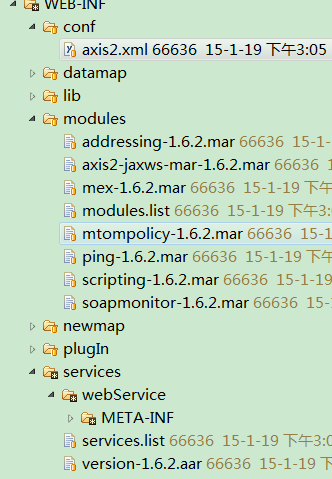
第三步:配置service.xml
在当前项目services/webservice/META-INF(没有该路径需要新建)下新建services.xml,配置对应的类格式如下:
 <?xml version="1.0" encoding="UTF-8"?>

       <serviceGroup>

         <service name="income" targetNamespace="http://tempuri.org/">

           <schema schemaNamespace="http://tempuri.org/"/>

           <description>axis2 webservice接口</description>

           <parameter name="ServiceClass">tempuri.org.IncomeJC</parameter>

           <operation name="incomeAdd">

             <messageReceiver mep="http://www.w3.org/2004/08/wsdl/in-out"

               class="org.apache.axis2.rpc.receivers.RPCMessageReceiver"  />

           </operation>

         </service>

        <service name="incomeData" targetNamespace="http://tempuri.org/">

         <schema schemaNamespace="http://tempuri.org/"/>

         <description> WebServices提供到账数据查询接口</description>

         <parameter name="ServiceClass"> tempuri.org.IncomeDataJC</parameter>

         <operation name="incomeList">

           <messageReceiver mep="http://www.w3.org/2004/08/wsdl/in-out"

             class="org.apache.axis2.rpc.receivers.RPCMessageReceiver" />

         </operation>

        </service>

     </serviceGroup>
1、发布多个接口:services.xml修改为

    <serviceGroup>

        <service name= "xxx" targetNamespace="http://tempuri.org/" >

            <schema schemaNamespace ="http://tempuri.org/"/>

            <description > WebServices接口1</description >

            <parameter name ="ServiceClass">tempuri.org.xxx</parameter >

            <operation name ="function">

                <messageReceiver mep= "http://www.w3.org/2004/08/wsdl/in-out"

                     class= "org.apache.axis2.rpc.receivers.RPCMessageReceiver" />

            </operation >

        </service>

        <service name= "yyy" targetNamespace="http://tempuri.org/" >

         ...

        </service>

    </serviceGroup>

2、接口方法消息接收形式(具体限定某方法)

1):有接收值没有返回值

    <operation name = "function1">

        <messageReceiver mep= "http://www.w3.org/2004/08/wsdl/in-only"

             class= "org.apache.axis2.rpc.receivers.RPCInOnlyMessageReceiver" />

    </operation >

2):既有接收值也有返回值

    <operation name = "function2">

        <messageReceiver mep= "http://www.w3.org/2004/08/wsdl/in-out"

             class= "org.apache.axis2.rpc.receivers.RPCMessageReceiver" />

    </operation >
第三步:创建类
新建包tempuri.org,在tempuri.org下新建类IncomeJC。
代码如下:
package tempuri.org;

      public class IncomeJC {

        public String incomeAdd(String xml) {

        String success = "0";

        try {

          ProjectIncomePub incomePub = readProjectIncome(xml);//读取xml数据

          if (null != incomePub) {

            success = new ProjectIncomeAction().incomeByJC(incomePub);//进一步处理

          }

        } catch (Exception e) {

          //e.printStackTrace();

          System.out.println("到账接口异常");

          return success;

        }

        return success;

      }
第四步:修改web.xml配置
在WEB-INF目录下修改web.xml文件,内容如下:
<?xml version="1.0" encoding="UTF-8"?>
<web-app version="2.5"
xmlns="http://java.sun.com/xml/ns/javaee"
xmlns:xsi="http://www.w3.org/2001/XMLSchema-instance"
xsi:schemaLocation="http://java.sun.com/xml/ns/javaee
http://java.sun.com/xml/ns/javaee/web-app_2_5.xsd">
<!--Axis2 config start-->
<servlet>
<servlet-name>AxisServlet</servlet-name>
<servlet-class>org.apache.axis2.transport.http.AxisServlet</servlet-class >
<load-on-startup>1</load-on-startup>
</servlet>
<servlet-mapping>
<servlet-name>AxisServlet</servlet-name>
<url-pattern>/services/*</url-pattern>
</servlet-mapping>
<!--Axis2 end-->
</web-app>
新建一个客户端的程序中使用:
 /***调用网络服务axis调用webservice**/

     this.incomeService();

     /***********************************/

     import javax.xml.namespace.QName;

     import org.apache.axis2.addressing.EndpointReference;

     import org.apache.axis2.client.Options;

     import org.apache.axis2.rpc.client.RPCServiceClient;

     private void incomeService() {

       String xmlStr = "xmlData";//xml格式的参数数据拼成的字符串

       String url = "http://127.0.0.1:8080/webProject/services/systemDDLService";

       String method="incomeJC";

       String webObject = null;

       try {

         RPCServiceClient serviceClient = new RPCServiceClient();

         Options options = serviceClient.getOptions();

         EndpointReference targetEPR = new EndpointReference(url);

         options.setTo(targetEPR);

         /** 在创建QName对象时,QName类的构造方法的第一个参数表示WSDL文件的命名空间名,也就是<wsdl:definitions>元素的targetNamespace属性值,method指定方法名 */

         QName opAddEntry = new QName("http://org.tempuri",method);

         /** 参数,如果有多个,继续往后面增加即可,不用指定参数的名称*/

         Object[] opAddEntryArgs = new Object[] {xmlStr};

         // 返回参数类型,这个和axis1有点区别

         /**invokeBlocking方法有三个参数, 其中第一个参数的类型是QName对象,表示要调用的方法名;第二个参数表示要调用的WebService方法的参数值,参数类型为Object[]; 第三个参数表示WebService方法的返回值类型的Class对象,参数类型为Class[]。 */

         /**注意: 当方法没有参数时,invokeBlocking方法的第二个参数值不能是null,而要使用new Object[]{}

           如果被调用的WebService方法没有返回值,应使用RPCServiceClient类的invokeRobust方法,

           该方法只有两个参数,它们的含义与invokeBlocking方法的前两个参数的含义相同

         */

         Class[] classes = new Class[] { String.class };

         webObject = (String)serviceClient.invokeBlocking(opAddEntry,opAddEntryArgs, classes)[0];

         System.out.println(webObject);

       }catch (Exception e) {

         e.printStackTrace();

         long end = System.currentTimeMillis();

       }

     }
Java借助axis2发布WebService的更多相关文章
- Java通过Axis2发布WebService
参考文档: http://blog.csdn.net/ghsau/article/details/12714965 http://www.iteye.com/topic/1135747 http:// ...
- WebService学习之旅(七)Axis2发布WebService的几种方式
前面几篇文章中简单的介绍了如何使用Axis2发布WebService及如何使用Axis2实现Web服务的客户端调用,本节將详细介绍Axis2发布WebService的几种方式. 一.使用aar包方式发 ...
- 使用JDK和axis2发布webservice
最近使用webservice进行远程调用一直很火,自从JDK1.6版本发布后,发布一个webservice项目变得更加简单了 笔者由于工作的需要针对JDK和axis2如何发布webservice做过相 ...
- 用AXIS2发布WebService的方法
Axis2+tomcat6.0 实现webService 服务端发布与客户端的调用. 第一步:首先要下载开发所需要的jar包 下载:axis2-1.6.1-war.zip http://www.apa ...
- tomcat 用AXIS2发布WebService 网站的方法
Axis2+tomcat7.0 实现webService 服务端发布与客户端的调用. Aixs2开发webService的方法有很多,在此只介绍一种比较简单的实现方法. 第一步:首先要下载开发所需要的 ...
- Eclipse中Axis2发布WebService
介绍:Axis是apache下一个开源的webservice开发组件. l 开发工具下载: 1. eclipse的Java EE版本.下载地址:http://www.eclipse.org/dow ...
- Rhythmk 一步一步学 JAVA (18) Axis2 创建 WebService
一 > 环境配置 1.下载Axis2: 目前版本为 1.6.2 下载地址: http://axis.apache.org/axis2/java/core/ 下载 axis2-1.6.2-bin. ...
- 微信小程序访问webservice(wsdl)+ axis2发布服务端(Java)
0.主要思路:使用axis2发布webservice服务端,微信小程序作为客户端访问.步骤如下: 1.服务端: 首先微信小程序仅支持访问https的url,且必须是已备案域名.因此前期的服务器端工作需 ...
- spring与axis2整合发布webservice
最近在研究整合spring框架和axis2发布webservice服务,由于本人也才学java不久,为了便于以后的查看,在这里记录下发布过程. 所需的工具包,spring.jar和axis2链接地址为 ...
随机推荐
- 重温Servlet学习笔记--编码问题
在说编码问题之前,首先先了解一下常见的字符编码: ISO-8859-1: 拉丁编码,不支持中文 gbk,gb2312,gb18030:系统默认编码,是中国的国标码 utf-8: 支持几乎所有语言的编 ...
- Ubuntu下搭建Mininet环境
Mininet环境搭建分为两个步骤,如下: 1.从GITHUB上获取mininet源码到本地的opt目录下 打开Linux终端,切换目录到根目录 cd / 切换到Linux的opt目录下 cd opt ...
- HTML5+CSS3实现图片可倾斜摆放的动画相册效果
先看看效果:其中鼠标悬浮在图片上会有动态效果图 直接上代码: css文件 @CHARSET "UTF-8"; *{ padding:0px; margin:0px; } div{ ...
- 使用fiddler的autoResponder及设置手机端代理实现远程调试,出现的问题及解决办法
这是开通博客的第一篇随笔,好鸡冻哈哈o_O 首先是下载安装,我安装的是最新的v4.6.2.0版本,大家在百度上搜fidddler4在百度软件中心普通下载就可以了.或者直接用这个连接:http://dl ...
- jquery实现tab切换完整代码
代码如下,保存到html文件打开: <!DOCTYPE html PUBLIC "-//W3C//DTD XHTML 1.0 Transitional//EN" " ...
- Entity Framework 代码先行之约定配置
要更改EF中的默认配置有两个方法,一个是用Data Annotations(在命名空间System.ComponentModel.DataAnnotations;),直接作用于类的属性上面;还有一个就 ...
- Ehcache 缓存使用
在开发高并发量,高性能的网站应用系统时,缓存Cache起到了非常重要的作用.本文主要介绍EHCache的使用,以及使用EHCache的实践经验. 笔者使用过多种基于Java的开源Cache组件,其中包 ...
- 华硕笔记本U盘启动系统/WinPE报错。Windows failed to start. A Recent hardware or software change might be the cause.
最近在整一台华硕笔记本,大概有5年寿命了吧,质量还行,由于系统出了问题,打算用自制U盘WinPE进去修复一下.按照个人经验,在主板设置里启用了USB启动选项,并且设置USB启动顺序为第一个,可是进系统 ...
- 【转】PHP 杂谈《重构-改善既有代码的设计》之一 重新组织你的函数
原文地址: PHP 杂谈<重构-改善既有代码的设计>之一 重新组织你的函数 思维导图 点击下图,可以看大图. 介绍 我把我比较喜欢的和比较关注的地方写下来和大家分享.上次我写 ...
- 悟透JavaScript(理解JS面向对象的好文章)
引子 编程世界里只存在两种基本元素,一个是数据,一个是代码.编程世界就是在数据和代码千丝万缕的纠缠中呈现出无限的生机和活力. 数据天生就是文静的,总想保持自己固有的本色:而代码却天生活泼,总想改变这个 ...