
matplotlib locators
2020-03-23 17:59:59  -- Edit by yangray

The Locator class is the base class for all tick locators. The locators
handle autoscaling of the view limits based on the data limits, and the
choosing of tick locations.   --- matplotlib document

Tips: To control the major and minor tick label formats, use one of the
following methods::
  ax.xaxis.set_major_formatter(xmajor_formatter)
  ax.xaxis.set_minor_formatter(xminor_formatter)
  ax.yaxis.set_major_formatter(ymajor_formatter)
  ax.yaxis.set_minor_formatter(yminor_formatter)

Figure without locator:
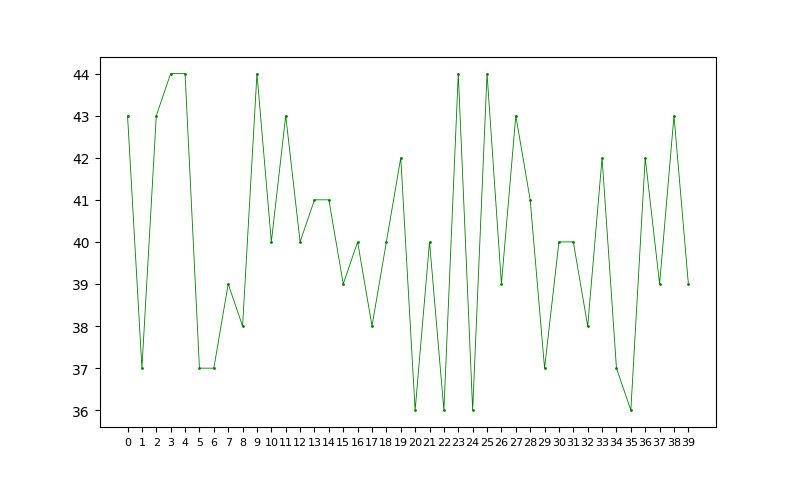
#!/usr/bin/python

# _*_ Coding: Utf-8 _*_

import matplotlib.pyplot as plt

import numpy as np

import random

from matplotlib.ticker import *

t = [str(i) for i in range(40)]

s = [36 + random.randint(0, 8) for i in range(40)]

fig, axes = plt.subplots()

axes.plot(t, s, 'go-', markersize=1, linewidth=0.6)

axes.tick_params(axis='x', labelsize=8)  # tick_params

axes.set_xticks(t)  # set ticks

plt.show()
- MaxNLocator
Select no more than N intervals at nice locations. default_params = dict(nbins=10, steps=None, integer=False, symmetric=False, prune=None, min_n_ticks=2)
maxNLocator = MaxNLocator(nbins=8) # max N (divisions)
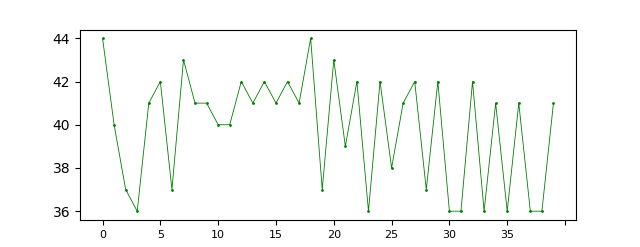
maxNLocator = MaxNLocator(steps=[1, 2, 4, 5, 10]) # where the values are acceptable tick multiples

maxNLocator = MaxNLocator(min_n_ticks=5) # minimum number of ticks
other params: [integer] If True, ticks will take only integer values
[symmetric] If True, autoscaling will result in a range symmetric about zero
[prune] ['lower' | 'upper' | 'both' | None] Remove edge ticks
- MultipleLocator

multipleLocator = MultipleLocator(6) # Set a tick on each integer multiple of a base within the view interval
- FixedLocator
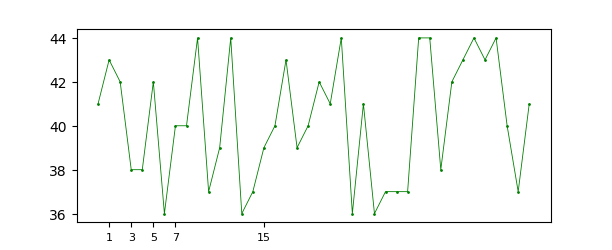
fixedLocator = FixedLocator([1, 3, 5, 7, 15], nbins=7) # fixed index (ticks <= nbins +1)
- IndexLocator

indexLocator = IndexLocator(5, 2) #
- AutoMinorLocator
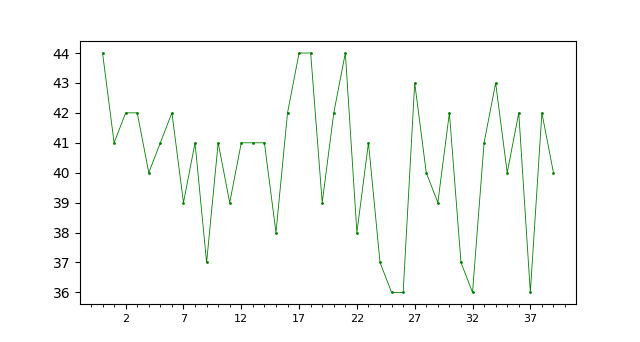
autoMinor = AutoMinorLocator(5) # generate minor locs with the number of subdivisions (must be on linear type locator)
matplotlib locators的更多相关文章
- 【Matplotlib】详解图像各个部分
首先一幅Matplotlib的图像组成部分介绍. 在matplotlib中,整个图像为一个Figure对象.在Figure对象中可以包含一个或者多个Axes对象.每个Axes(ax)对象都是一个拥有自 ...
- 【Matplotlib】 刻度设置(2)
Tick locating and formatting 该模块包括许多类以支持完整的刻度位置和格式的配置.尽管 locators 与主刻度或小刻度没有关系,他们经由 Axis 类使用来支持主刻度和小 ...
- 【Python】一份非常好的Matplotlib教程
Matplotlib 教程 本文为译文,原文载于此,译文原载于此.本文欢迎转载,但请保留本段文字,尊重作者和译者的权益.谢谢.: ) 介绍 Matplotlib 可能是 Python 2D-绘图领域使 ...
- 基于matplotlib的数据可视化 - 笔记
1 基本绘图 在plot()函数中只有x,y两个量时. import numpy as np import matplotlib.pyplot as plt # 生成曲线上各个点的x,y坐标,然后用一 ...
- python3绘图示例6-2(基于matplotlib,绘图流程介绍及设置等)
#!/usr/bin/env python# -*- coding:utf-8 -*- import os import numpy as npimport matplotlib as mpltfro ...
- python3绘图示例6-1(基于matplotlib,绘图流程介绍及设置等)
#!/usr/bin/env python# -*- coding:utf-8 -*- import os import pylab as pyimport numpy as npfrom matpl ...
- Python 绘图与可视化 matplotlib(下)
详细的参考链接:更详细的:https://www.cnblogs.com/zhizhan/p/5615947.html 图像.子图.坐标轴以及记号 Matplotlib中图像的意思是打开的整个画图窗口 ...
- matplotlib PyQt5 nivigationBar 中pan和zoom功能的探索
为matplotlib生成的图添加编辑条,我们导入NavigationToolbar2QT from matplotlib.backends.backend_qt5agg import Navigat ...
- python安装numpy、scipy和matplotlib等whl包的方法
最近装了python和PyCharm开发环境,但是在安装numpy和matplotlib等包时出现了问题,现总结一下在windows平台下的安装方法. 由于现在找不到了工具包新版本的exe文件,所以采 ...
随机推荐
- vue前端登录
登陆流程 1.用户登录从后台获取 token,菜单数据 2.将token和菜单数据存入sessionStorage,token用来校验用户是否已经登录 2.将返回的菜单数据前端生成对应菜单列表 3.处 ...
- bash中的if条件语句报错[: missing `]'
这是我的一个小demo #!/bin/bash read -p "请输入3个数:" n1 n2 n3 if [ $n1 -gt $n2 ] && [ $n1 -gt ...
- drf-jwt的过滤,筛选,排序,分页组件
目录 自定义drf-jwt配置 案例:实现多方式登陆签发token urls.py models.py serializers.py views.py 案例:自定义认证反爬规则的认证类 urls.py ...
- windows10环境下QtCreator中出现skipping incompatible xxx when searching for xxx 问题解决办法
windows10环境下QtCreator中出现skipping incompatible xxx when searching for xxx 我再QtCreator中想导入一个外部库时,他提示不匹 ...
- 手把手教你学Git
Git 使用手册独家实战 0.查看本机公钥 步骤: 1.进入.ssh目录 cd ~/.ssh 2.找到id_rsa.pub文件 ls / ll 3.查看文件 cat id_rsa.pub JackFe ...
- 简单理解vertical-align属性和基线问题
vertical-align属性主要用于改变行内元素的对齐方式,对于行内布局影响很大,如果不了解的话,我们开发调整样式的时候很容易出错. 网上关于这个属性的原理说得很是复杂,看一眼就让人觉得望而生畏, ...
- 关于java动态代理模式
1. 动态代理 动态代理就是通过代理类是代理类与相关接口不直接发生联系,而在运行期(Runtime)实现动态关联. 动态代理主要用到java.lang.reflect包中的两个类,Invocation ...
- javascript中的符号 == 和 === 的区别
== 表示相等 即仅仅比较两边变量的数值是否相等. 相等运算符隐藏的类型转换,会带来一些违反直觉的结果. 这就是为什么建议尽量不要使用相等运算符. 至于使用相等运算符会不会对后续代码造成意外影响,答 ...
- 【nodejs 爬虫】使用 puppeteer 爬取链家房价信息
使用 puppeteer 爬取链家房价信息 目录 使用 puppeteer 爬取链家房价信息 页面结构 爬虫库 pupeteer 库 实现 打开待爬页面 遍历区级页面 方法一 方法二 遍历街道页面 遍 ...
- css指示箭头两种实现方法
<!DOCTYPE html> <html lang="en"> <head> <meta charset="UTF-8&quo ...