
Spring Boot笔记(一) springboot 集成 swagger-ui
个人博客网:https://wushaopei.github.io/ (你想要这里多有)
1、添加依赖
                <!--SpringBoot整合Swagger-ui-->

                <dependency>

			<groupId>io.springfox</groupId>

			<artifactId>springfox-swagger2</artifactId>

			<version>2.9.2</version>

		</dependency>

		<!-- https://mvnrepository.com/artifact/io.springfox/springfox-swagger-ui -->

		<dependency>

			<groupId>io.springfox</groupId>

			<artifactId>springfox-swagger-ui</artifactId>

			<version>2.9.2</version>

		</dependency>
2、设置配置类

package com.example.poiutis.config;

import org.springframework.context.annotation.Bean;

import org.springframework.context.annotation.Configuration;

import springfox.documentation.builders.ApiInfoBuilder;

import springfox.documentation.builders.PathSelectors;

import springfox.documentation.builders.RequestHandlerSelectors;

import springfox.documentation.service.ApiInfo;

import springfox.documentation.service.Contact;

import springfox.documentation.spi.DocumentationType;

import springfox.documentation.spring.web.plugins.Docket;

import springfox.documentation.swagger2.annotations.EnableSwagger2;

/**

 * @ClassName SwaggerConfig

 * @Description TODO

 * @Author wushaopei

 * @Date 2019/7/22 16:05

 * @Version 1.0

 */

// 启动时加载类

@Configuration

// 启用Swagger API文档

@EnableSwagger2

public class SwaggerConfig {

    @Bean

    public Docket api() {

        return new Docket(DocumentationType.SWAGGER_2)

                .apiInfo(apiInfo())

                .select()

                // 自行修改为自己的包路径

                .apis(RequestHandlerSelectors.basePackage("com.example.poiutis.controller"))

                .paths(PathSelectors.any())

                .build();

    }

    private ApiInfo apiInfo() {

        return new ApiInfoBuilder()

                .title("报表管理")

                .description("报表管理中心 API 1.0 操作文档")

                //服务条款网址

                .termsOfServiceUrl("https://blog.csdn.net/weixin_42405670")

                .version("1.0")

                .contact(new Contact("鮀城小帅", "https://blog.csdn.net/weixin_42405670", "15989746839@163.com"))

                .build();

    }

}
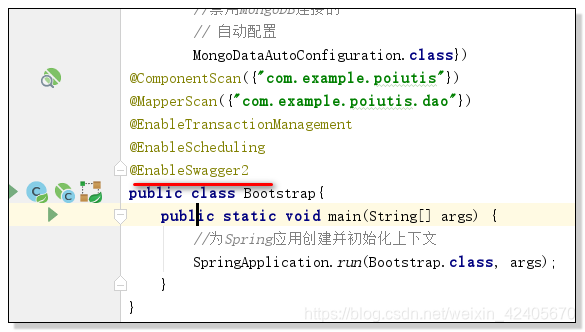
3、启动类加上注解@EnableSwagger

启动该注解使得用在controller中的swagger注解生效,覆盖的范围下的所有controller
4、Controller 类配置
@Api的使用
API作用在Controller,作为swagger文档资源,该注解将一个controller标注为一个Swagger资源(API). 在默认情况下,Swagger-Core 只会扫描解析具有 @Api 注解的类,而会自动忽略其他类别资源(JAX-RS endpoints、Servlets 等)的注解。
@ApiOperation 的使用
ApiOperation 定义在方法上,描述方法名、方法解释、返回信息、标记等信息。
/**

 * 发票管理

 * @author issuser

 *

 */

@Api(value = "发票",description = "发票操作 API", position = 100, protocols = "http")

@RestController

@RequestMapping(value = "/webcode")

public class InvoiceController {

    private static Logger logger = LoggerFactory.getLogger(InvoiceController.class);

    @Autowired

    invoiceOrderService InvoiceOrderService;

   @ApiOperation(value = "导出操作日志到xls文件", notes = "需要登录")

    @GetMapping("/exporInvoiceOrderXls")

    @ResponseBody

    public Object exporInvoiceOrderXls( HttpServletRequest request, HttpServletResponse response,

                                        @RequestParam(value="invoiceOrders")@ApiParam(value="invoiceOrders") List<String>  invoiceOrders) {

        Map<String, Object> map = new HashMap<>();

        response.setContentType("octets/stream");

        Map<String, Object> map2 = new HashMap<String, Object>();

        map2.put("sheetTitle", "消费记录");

        map2.put("header", new String[]{"订单号", "商店名称", "发票批次", "账户名称", "商店地址", "刷卡账号","商店电话","信用卡开户行名称"});

        map2.put("fields", new String[]{"invoiceOrder", "companyName", "taxNumber", "accountBank", "companyAddress","bankNumber","companyTelephone","accountName"});

        List<InvoiceOrder> invoiceOrderss = InvoiceOrderService.queryInvoiceLists(invoiceOrders,0,9999);

        map2.put("data",invoiceOrderss);

        List<Map<String, Object>> list = new ArrayList<>();

        list.add(map2);

        String title = "日常消费刷卡发票记录";

        Map<String, short[]> mergedRegion = new HashMap<String, short[]>();

        mergedRegion.put("通用标题名称合并", new short[] {0, 0, 0, 100});

        ExportExcel<InvoiceOrder> ex = new ExportExcel<>();

        // 声明一个工作薄

        HSSFWorkbook workbook = new HSSFWorkbook();

        // 生成一个标题样式

        HSSFCellStyle headerStyle = ex.cellStyle(workbook);

        // 生成一个内容样式

        HSSFCellStyle textStyle = ex.cellStyle(workbook);

        // 生成标题字体

        ex.setFont(workbook, headerStyle, (short) 10, HSSFFont.BOLDWEIGHT_NORMAL);

        // 生成内容字体

        ex.setFont(workbook, textStyle, HSSFFont.BOLDWEIGHT_NORMAL);

        try {

            OutputStream out = response.getOutputStream();

            // 导出文件名称添加当前时间

            String date = new SimpleDateFormat("yyyyMMddHHmmss").format(new Date());

            //防止乱码

//            response.addHeader("Access-Control-Expose-Headers", "Content-Type,Content-Disposition");

//            response.addHeader("Content-Disposition",

//                    "attachment;filename=" + URLEncoder.encode(title, "GBK") + date

//                            + ".xls");

            response.setHeader("Content-Disposition", "attachment; filename=" + new String((title+".xls").getBytes("GB2312"),"ISO8859-1"));

            list.forEach(m -> {

                ExcelModel excelModel = new ExcelModel();

                excelModel.setWorkbook(workbook);

                excelModel.setTitle(title);

                excelModel.setFields((String[]) m.get("fields"));

                excelModel.setHeader((String[]) m.get("header"));

                excelModel.setHeaderRow(2);

                excelModel.setMergedRegion(mergedRegion);

                excelModel.setHeaderStyle(headerStyle);

                excelModel.setTextStyle(textStyle);

                excelModel.setTitles((String) m.get("sheetTitle"));

                // 生成一页表格

                HSSFSheet sheet = workbook.createSheet((String) m.get("sheetTitle"));

                excelModel.setSheet(sheet);

                ex.exportExcel(excelModel, (Collection<InvoiceOrder>) m.get("data"));

            });

            try {

                workbook.write(out);

            } catch (IOException e) {

                e.printStackTrace();

            }finally {

                out.close();

            }

            map.put("state","0");

            map.put("message", "导出成功");

            return map;

        } catch (IOException e) {

            e.printStackTrace();

            map.put("state", "1");

            map.put("message", e.getMessage());

            return map;

        }

    }

}
| 属性名称 | 备注 |
|---|---|
| value | url 的路径值 |
| tags | 如果设置这个值,value 的值会被覆盖 |
| description | 对 API 资源的描述 |
| produces | For example, "application/json, application/xml" |
| consumes | For example, "application/json, application/xml" |
| protocols | Possible values: http, https, ws, wss |
| authorizations | 高级特性认证时配置 |
| hidden | 配置为 true 将在文档中隐藏 |
| response | 返回的对象 |
| responseContainer | 这些对象是有效的 "List", "Set" or "Map",其他无效 |
| httpMethod | "GET"、"HEAD"、"POST"、"PUT"、"DELETE"、"OPTIONS" and "PATCH" |
| code | http 的状态码 默认 200 |
| extensions | 扩展属性 |
@ApiImplicitParams 和 @ApiImplicitParam 的使用
@ApiImplicitParams 用于描述方法的返回信息,和 @ApiImplicitParam 注解配合使用;@ApiImplicitParam 用来描述具体某一个参数的信息,包括参数的名称、类型、限制等信息。
5、启动项目,进入API列表,localhost/swagger-ui.html#

完整springBoot 整合 Swagger 代码 GitHub 链接地址:
注意问题:
出现以下问题时,要检查SwaggerConfig 中配置的路径是否正确;
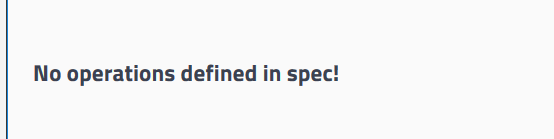
即:

6、Swagger常用注解
| 作用范围 | API | 使用位置 |
|---|---|---|
| 协议集描述 | @Api | 用于 Controller 类上 |
| 协议描述 | @ApiOperation | 用在 Controller 的方法上 |
| 非对象参数集 | @ApiImplicitParams | 用在 Controller 的方法上 |
| 非对象参数描述 | @ApiImplicitParam | 用在 @ApiImplicitParams 的方法里边 |
| 响应集 | @ApiResponses | 用在 Controller 的方法上 |
| 响应信息参数 | @ApiResponse | 用在 @ApiResponses 里边 |
| 描述返回对象的意义 | @ApiModel | 用在返回对象类上 |
| 对象属性 | @ApiModelProperty | 用在出入参数对象的字段上 |
Spring Boot笔记(一) springboot 集成 swagger-ui的更多相关文章
- Spring Boot笔记(三) springboot 集成 Quartz 定时任务
个人博客网:https://wushaopei.github.io/ (你想要这里多有) 1. 在 pom.xml 中 添加 Quartz 所需要 的 依赖 <!--定时器 quartz- ...
- Spring Boot笔记(二) springboot 集成 SMTP 发送邮件
个人博客网:https://wushaopei.github.io/ (你想要这里多有) 笔记:乘着项目迭代的间隙,把一些可复用的功能从项目中抽取出来,这是其中之一, 一.添加SMTP 及 MA ...
- Spring Boot笔记(六) springboot 集成 timer 定时任务
个人博客网:https://wushaopei.github.io/ (你想要这里多有) 1.创建具体要执行的任务类: package com.example.poiutis.timer; im ...
- Spring Boot笔记(五) SpringBoot 集成Lombok 插件
个人博客网:https://wushaopei.github.io/ (你想要这里多有) 为了减少代码量,为当前项目添加 lombok 来优雅编码 Lombok 插件安装: a . 添加依赖: ...
- springboot 集成swagger ui
springboot 配置swagger ui 1. 添加依赖 <!-- swagger ui --> <dependency> <groupId>io.sprin ...
- 15、Spring Boot 2.x 集成 Swagger UI
1.15.Spring Boot 2.x 集成 Swagger UI 完整源码: Spring-Boot-Demos 1.15.1 pom文件添加swagger包 <swagger2.versi ...
- spring-boot 集成 swagger 问题的解决
spring-boot 集成 swagger 网上有许多关于 spring boot 集成 swagger 的教程.按照教程去做,发现无法打开接口界面. 项目由 spring mvc 迁移过来,是一个 ...
- SpringBoot集成Swagger,Postman,newman,jenkins自动化测试.
环境:Spring Boot,Swagger,gradle,Postman,newman,jenkins SpringBoot环境搭建. Swagger简介 Swagger 是一款RESTFUL接口的 ...
- springboot集成swagger添加消息头(header请求头信息)
springboot集成swagger上篇文章介绍: https://blog.csdn.net/qiaorui_/article/details/80435488 添加头信息: package co ...
随机推荐
- 加速你的网络!软路由构建 去AD+国内域名加速解析+抗污染+速度优选 与PSW无缝集成 综合方案
本方案利用OpenWrt搭建4级DNS,实现 去AD + 国内域名加速解析 + 抗污染(域名解析按地区分流)+ 访问速度优选. 方案涉及部分软件配置细节可以参照之前博文:https://www.cnb ...
- Day_11【集合】扩展案例3_打印最高分的学员姓名、年龄、成绩,打印10个学生的总成绩和平均分,打印不及格的学员信息及数量
分析以下需求,并用代码实现 1.定义Student类 属性: 姓名:String name 年龄:int age 成绩:int score 行为: 空参构造方法 有参构造方法 set和get方法 to ...
- 多线程测试时的辅助类--CountDownLatch
多线程时,很多时候由于mian线程与多线程结束时间不可控,造成无法测试 辅助测试类---CountDownLatch 我看的视频教程匿名内部类无法使用外部的变量,所以CountDownLatch定义为 ...
- Python 简明教程 --- 1,搭建Python 环境
微信公众号:码农充电站pro 个人主页:https://codeshellme.github.io 人生苦短,我用Python. -- 龟叔T恤 Python 是一门解释型语言,所以要想运行Pytho ...
- jquery-----ajax的几种方法
$.get(url,function(data,status){ if(status == 'success'){ layer.msg(data,{shift:1,time:2000},functio ...
- java调用oracle存储过程返回多条结果集
oracle版本:11g oracle存储过程,使用游标的方式返回多行.多列数据集合: CREATE OR REPLACE PROCEDURE SP_DATA_TEST( /*P_ID IN INT, ...
- java 获取请求ip,服务本地ip
/** * 获取请求IP * * @param request * @return */ public static String getRequestIpAddress(HttpServletReq ...
- 【雕爷学编程】Arduino动手做(58)---SR04超声波传感器
37款传感器与执行器的提法,在网络上广泛流传,其实Arduino能够兼容的传感器模块肯定是不止这37种的.鉴于本人手头积累了一些传感器和执行器模块,依照实践出真知(一定要动手做)的理念,以学习和交流为 ...
- 「雕爷学编程」Arduino动手做(36)——WS2812B 4位彩灯模块
37款传感器与模块的提法,在网络上广泛流传,其实Arduino能够兼容的传感器模块肯定是不止37种的.鉴于本人手头积累了一些传感器和模块,依照实践出真知(一定要动手做)的理念,以学习和交流为目的,这里 ...
- Java基础之抽象类和接口
今天来说说抽象类和接口的实现以及它们的区别.我们知道抽象类和接口都是对具体事物的抽象,接口在实现上比抽象类更加抽象,抽象类中可以有普通方法和变量,而接口中只有抽象方法和不可变常量.但是从另一个角度看, ...