
上传组件Fine Uploader在ASP.NET中的应用


 using System.IO;

 using System.Web.Mvc;

 namespace FineUploaderTest.Web.Model

 {

     [ModelBinder(typeof(ModelBinder))]

     public class FineUpload

     {

         public string Filename { get; set; }

         public Stream InputStream { get; set; }

         public void SaveAs(string destination, bool overwrite = false, bool autoCreateDirectory = true)

         {

             if (autoCreateDirectory)

             {

                 var directory = new FileInfo(destination).Directory;

                 if (directory != null) directory.Create();

             }

             using (var file = new FileStream(destination, overwrite ? FileMode.Create : FileMode.CreateNew))

                 InputStream.CopyTo(file);

         }

         public class ModelBinder : IModelBinder

         {

             public object BindModel(ControllerContext controllerContext, ModelBindingContext bindingContext)

             {

                 var request = controllerContext.RequestContext.HttpContext.Request;

                 var formUpload = request.Files.Count > ;

                 // find filename

                 var xFileName = request.Headers["X-File-Name"];

                 var qqFile = request["qqfile"];

                 var formFilename = formUpload ? request.Files[].FileName : null;

                 var upload = new FineUpload

                 {

                     Filename = xFileName ?? qqFile ?? formFilename,

                     InputStream = formUpload ? request.Files[].InputStream : request.InputStream

                 };

                 return upload;

             }

         }

     }

 }
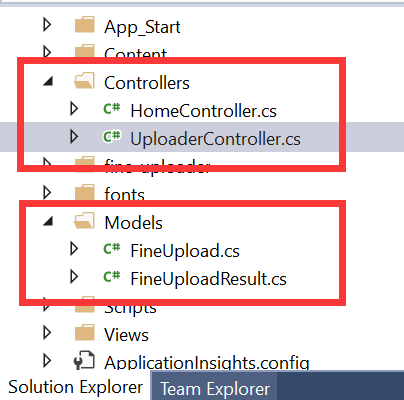
FineUpload.cs
 using System.Web.Mvc;

 using Newtonsoft.Json.Linq;

 namespace FineUploaderTest.Web.Model

 {

     /// <remarks>

     /// Docs at https://github.com/Widen/fine-uploader/blob/master/server/readme.md

     /// </remarks>

     public class FineUploaderResult : ActionResult

     {

         public const string ResponseContentType = "text/plain";

         private readonly bool _success;

         private readonly string _error;

         private readonly bool? _preventRetry;

         private readonly JObject _otherData;

         public FineUploaderResult(bool success, object otherData = null, string error = null, bool? preventRetry = null)

         {

             _success = success;

             _error = error;

             _preventRetry = preventRetry;

             if (otherData != null)

                 _otherData = JObject.FromObject(otherData);

         }

         public override void ExecuteResult(ControllerContext context)

         {

             var response = context.HttpContext.Response;

             response.ContentType = ResponseContentType;

             response.Write(BuildResponse());

         }

         public string BuildResponse()

         {

             var response = _otherData ?? new JObject();

             response["success"] = _success;

             if (!string.IsNullOrWhiteSpace(_error))

                 response["error"] = _error;

             if (_preventRetry.HasValue)

                 response["preventRetry"] = _preventRetry.Value;

             return response.ToString();

         }

     }

 }
FineUploadResult.cs
 using FineUploaderTest.Web.Model;

 using System;

 using System.Collections.Generic;

 using System.IO;

 using System.Linq;

 using System.Web;

 using System.Web.Mvc;

 namespace FineUploaderTest.Web.Controllers

 {

     public class UploaderController : Controller

     {

         // GET: Uploader

         public ActionResult Index()

         {

             return View();

         }

         [HttpPost]

         public FineUploaderResult UploadFile(FineUpload upload)

         {

             var dir = Server.MapPath("~/Upload");

             int pos1 = upload.Filename.LastIndexOf("\\");

             string fileName = pos1 == - ? upload.Filename : upload.Filename.Substring(pos1 + , upload.Filename.Length - pos1 - );

             string storeName = Guid.NewGuid() + fileName;

             var filePath = Path.Combine(dir, storeName);

             try

             {

                 upload.SaveAs(filePath);

                 ViewBag.SourcePath = filePath;

             }

             catch (Exception ex)

             {

                 return new FineUploaderResult(false, error: ex.Message);

             }

             // the anonymous object in the result below will be convert to json and set back to the browser

             return new FineUploaderResult(true, new { extraInformation = filePath });

         }

     }

 }
UploaderController.cs
 @{

     ViewBag.Title = "Test Fine Upload";

 }

 <h3>Test Fine Upload</h3>

 <link href="~/fine-uploader/fine-uploader-new.css" rel="stylesheet" />

 <style>

     #trigger-upload {

         color: white;

         background-color: #00ABC7;

         font-size: 14px;

         padding: 7px 20px;

         background-image: none;

     }

     #Query {

         color: white;

         background-color: #00ABC7;

         font-size: 14px;

         padding: 7px 20px;

         background-image: none;

     }

     #fine-uploader-manual-trigger .qq-upload-button {

         margin-right: 15px;

     }

     #fine-uploader-manual-trigger .buttons {

         width: 36%;

     }

     #fine-uploader-manual-trigger .qq-uploader .qq-total-progress-bar-container {

         width: 60%;

     }

 </style>

 <div id="fine-uploader-manual-trigger"></div>

 <div id="BeginQuery" style="margin-top:30px;">

     <p><a id="Query" class="btn btn-default">Test File Name</a></p>

 </div>

 </br>

 <div class="panel panel-default">

     <div class="panel-heading">

         <h3 class="panel-title">注意事项</h3>

     </div>

     <div class="panel-body">

         <ul>

             <li>文件最大支持<strong>20M</strong></li>

             <li>Some other info.</li>

         </ul>

     </div>

 </div>

 @section Scripts {

     <script src="~/fine-uploader/jquery.fine-uploader.js"></script>

     <!-- Fine Uploader Thumbnails template w/ customization

     ====================================================================== -->

     <script type="text/template" id="qq-template-manual-trigger">

         <div class="qq-uploader-selector qq-uploader" qq-drop-area-text="Drop files here">

             <div class="qq-total-progress-bar-container-selector qq-total-progress-bar-container">

                 <div role="progressbar" aria-valuenow="0" aria-valuemin="0" aria-valuemax="100" class="qq-total-progress-bar-selector qq-progress-bar qq-total-progress-bar"></div>

             </div>

             <div class="qq-upload-drop-area-selector qq-upload-drop-area" qq-hide-dropzone>

                 <span class="qq-upload-drop-area-text-selector"></span>

             </div>

             <div class="buttons">

                 <div class="qq-upload-button-selector qq-upload-button">

                     <div>选择文件</div>

                 </div>

                 <button type="button" id="trigger-upload" class="btn btn-primary">

                     <i class="icon-upload icon-white"></i> 上传

                 </button>

             </div>

             <span class="qq-drop-processing-selector qq-drop-processing">

                 <span>Processing dropped files...</span>

                 <span class="qq-drop-processing-spinner-selector qq-drop-processing-spinner"></span>

             </span>

             <ul class="qq-upload-list-selector qq-upload-list" aria-live="polite" aria-relevant="additions removals">

                 <li>

                     <div class="qq-progress-bar-container-selector">

                         <div role="progressbar" aria-valuenow="0" aria-valuemin="0" aria-valuemax="100" class="qq-progress-bar-selector qq-progress-bar"></div>

                     </div>

                     <span class="qq-upload-spinner-selector qq-upload-spinner"></span>

                     <img class="qq-thumbnail-selector" qq-max-size="100" qq-server-scale>

                     <span class="qq-upload-file-selector qq-upload-file"></span>

                     <span class="qq-edit-filename-icon-selector qq-edit-filename-icon" aria-label="Edit filename"></span>

                     <input class="qq-edit-filename-selector qq-edit-filename" tabindex="0" type="text">

                     <span class="qq-upload-size-selector qq-upload-size"></span>

                     <button type="button" class="qq-btn qq-upload-cancel-selector qq-upload-cancel">Cancel</button>

                     <button type="button" class="qq-btn qq-upload-retry-selector qq-upload-retry">Retry</button>

                     <button type="button" class="qq-btn qq-upload-delete-selector qq-upload-delete">Delete</button>

                     <span role="status" class="qq-upload-status-text-selector qq-upload-status-text"></span>

                 </li>

             </ul>

             <dialog class="qq-alert-dialog-selector">

                 <div class="qq-dialog-message-selector"></div>

                 <div class="qq-dialog-buttons">

                     <button type="button" class="qq-cancel-button-selector">Close</button>

                 </div>

             </dialog>

             <dialog class="qq-confirm-dialog-selector">

                 <div class="qq-dialog-message-selector"></div>

                 <div class="qq-dialog-buttons">

                     <button type="button" class="qq-cancel-button-selector">No</button>

                     <button type="button" class="qq-ok-button-selector">Yes</button>

                 </div>

             </dialog>

             <dialog class="qq-prompt-dialog-selector">

                 <div class="qq-dialog-message-selector"></div>

                 <input type="text">

                 <div class="qq-dialog-buttons">

                     <button type="button" class="qq-cancel-button-selector">Cancel</button>

                     <button type="button" class="qq-ok-button-selector">Ok</button>

                 </div>

             </dialog>

         </div>

     </script>

     <script>

         var filePath;

         $('#fine-uploader-manual-trigger').fineUploader({

             template: 'qq-template-manual-trigger',

             request: {

                 endpoint: '/Uploader/UploadFile'

             },

             thumbnails: {

                 placeholders: {

                     waitingPath: '/source/placeholders/waiting-generic.png',

                     notAvailablePath: '/source/placeholders/not_available-generic.png'

                 }

             },

             autoUpload: false,

             deleteFile: {

                 enabled: false, // if want to delete, make this true

                 forceConfirm: true,

                 endpoint: '/Home/DeleteFile'

             },

             validation: {

                 allowedExtensions: ['txt', 'csv'],

                 itemLimit: 1,

                 sizeLimit: 51200000 // 50 kB = 50 * 1024 bytes

             },

             callbacks: {

                 onComplete: function (id, fileName, responseJSON) {

                     filePath = responseJSON.extraInformation;

                 }

             }

         });

         $('#trigger-upload').click(function () {

             $('#fine-uploader-manual-trigger').fineUploader('uploadStoredFiles');

         });

         $('#Query').click(function () {

             alert(filePath);

         });

     </script>

 }
Index.cshtml
源代码下载
上传组件Fine Uploader在ASP.NET中的应用的更多相关文章
- 从零开始编写自己的C#框架(23)——上传组件使用说明
文章导航 1.前言 2.上传组件功能说明 3.数据库结构 4.上传配置管理 5.上传组件所使用到的类 6.上传组件调用方法 7.效果演示 8.小结 1.前言 本系列所使用的是上传组件是大神July开发 ...
- Web Uploader - 功能齐全,完美兼容 IE 的上传组件
文件上传是网站和 Web 应用程序的常用功能,一直没有一款完美的文件上传组件,因此让很多开发人员碰到头疼的浏览器兼容问题. WebUploader 是由 Baidu FEX 团队开发的一款以 HTML ...
- 异步文件上传组件 Uploader
Uploader是非常强大的异步文件上传组件,支持ajax.iframe.flash三套方案,实现浏览器的全兼容,调用非常简单,内置多套主题支持 和常用插件,比如验证.图片预览.进度条等,广泛应用于淘 ...
- ASP.Net大文件上传组件详解
首先右键单击网站根目录,在弹出的快捷菜单中,选择"添加引用"菜单项,弹出"添加引用",切换到"浏览"找到组件的Dll文件"Best ...
- ASP中文件上传组件ASPUpload介绍和使用方法
[导读]要实现该功能,就要利用一些特制的文件上传组件.文件上传组件网页非常多,这里介绍国际上非常有名的ASPUpload组件 1 下载和安装ASPUpload 要实现该功能,就要利用一些特制的文件上 ...
- 前端异步文件上传组件 Uploader
Uploader是非常强大的异步文件上传组件,支持ajax.iframe.flash三套方案,实现浏览器的全兼容,调用非常简单,内置多套主题支持 和常用插件,比如验证.图片预览.进度条等,广泛应用于淘 ...
- ASP.NET Core WEB API 使用element-ui文件上传组件el-upload执行手动文件文件,并在文件上传后清空文件
前言: 从开始学习Vue到使用element-ui-admin已经有将近快两年的时间了,在之前的开发中使用element-ui上传组件el-upload都是直接使用文件选取后立即选择上传,今天刚好做了 ...
- ASP.NET MVC 一款可预览、裁剪头像上传组件
今天介绍一款Web上常用的头像上传组件,常用于头像上传时对用户上传的图片进行裁剪并实时预览,最终效果如下: 源代码结构: Github地址: https://github.com/FrankFan/A ...
- 多文件上传组件FineUploader使用心得
原文 多文件上传组件FineUploader使用心得 做Web开发的童鞋都知道,需要经常从客户端上传文件到服务端,当然,你可以使用<input type="file"/> ...
随机推荐
- docker-compose中redis查询版本
1.查询CONTAINER ID docker ps 2.进入容器,查询版本号信息 docker exec -it CONTAINER ID /bin/bash 3.查询到redis中的redis-s ...
- PAT 链表倒序的算法优化
之前的答案错误问题已经解决了,现在还有运行超时的问题,先贴上之前的代码 1 #include <iostream> 2 #include <string.h> 3 using ...
- Jmeter使用Websocket插件测试SingalR,外加还有阿里云PTS的Jmeter原生测试爬坑日志。
题外话:距离我的上一篇博客已经过去7年多了,我实在是个不务正业的程序员,遇到测试方面的东西总想分享一下,因为可用的资料实在太少了(包括国外的资料). 本人不喜欢授人以鱼,所以不会直接给出问题和解决方案 ...
- python3(三十六)StringIO BytesIO
""" StringIO和BytesIO """ __author__on__ = 'shaozhiqi 2019/9/23' # !/us ...
- 判断一组checkbox/redio是否被选中,为其添加样式
业务场景:当一行中有一个CheckBox被选中,则为此行添加class. <script type="text/javascript"> $(function(){ $ ...
- Android Google Play app signing 最终完美解决方式
转载请标明出处:http://blog.csdn.net/zhaoyanjun6/article/details/105561341 本文出自[赵彦军的博客] 在 GooglePlay 创建 App ...
- git撤销远程commit
git reset --hard [commit_id] git push origin HEAD --force
- (转) 关于Windows CE和Windows Mobile
转发自http://www.cnblogs.com/chump/articles/1281955.aspx 一.Windows CE Windows CE是微软的嵌入式操作系统主要的一种,面世于199 ...
- 一个好的olap框架
一.何为一个好的olap框架? 框架大概分为两种: (1)底层技术框架,专注于抽象底层技术,如网络通信netty.中间件kafka等 (2)开发人员框架,专注于提高开发效率,如spring的面向切面和 ...
- vue组件之间值传递四种方法汇总
1.父组件获取子组件的数据和方法 $refs 子组件: <template> <div class="header"> <h3>{{ zz }} ...