
vue全家桶(2.3)
3.4.嵌套路由
实际生活中的应用界面,通常由多层嵌套的组件组合而成。同样地,URL 中各段动态路径也按某种结构对应嵌套的各层组件,例如:

再来看看下面这种更直观的嵌套图:
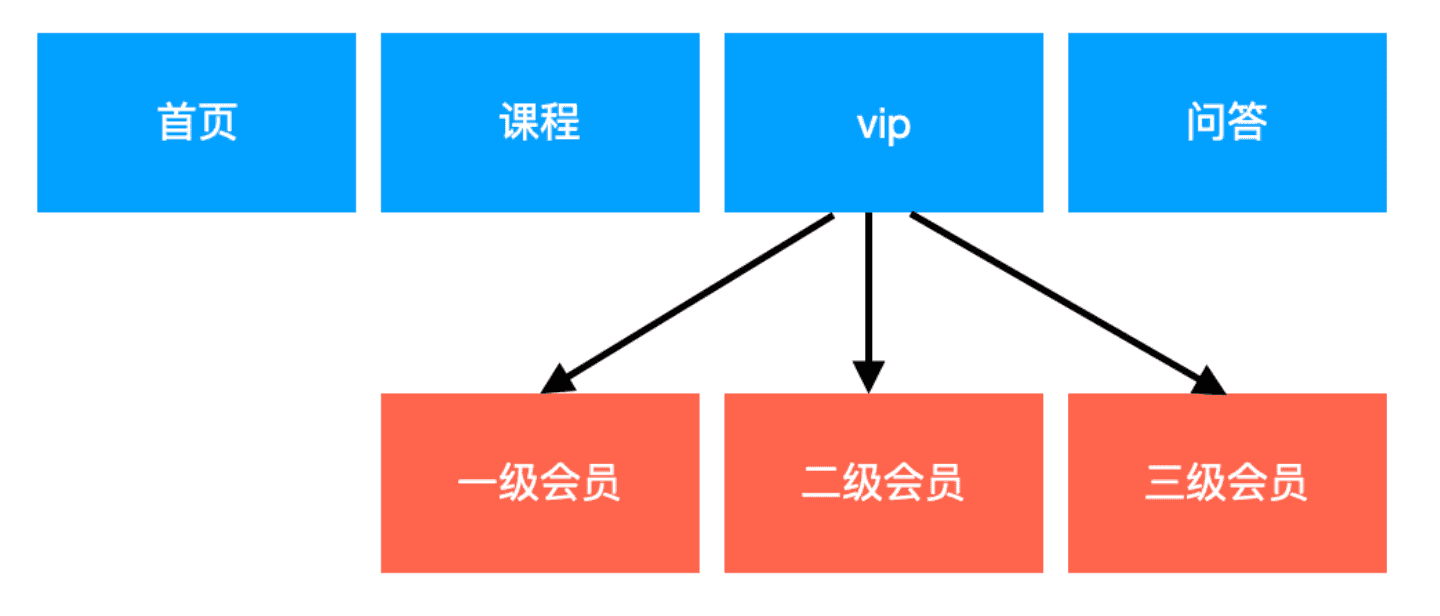
接下来我们需要实现下面这种效果

核心代码:
1.需要在vip组件中增加嵌套代码
<template>

 <div class="page">

  <h1>我是vip会员页面</h1>

  <ul class="nav">

    <router-link tag="li" to="/vip/one"><a>一级会员</a></router-link>

    <router-link tag="li" to="/vip/two"><a>二级会员</a></router-link>

    <router-link tag="li" to="/vip/three"><a>三级会员</a></router-link>

  </ul>

  <!--当路由匹配成功,组件one/two/three会被渲染到这里-->

  <router-view></router-view>

 </div>

</template>

<script>

export default {

  data () {

    return {

    }

  },

  components: {

  }

}

</script>

<style scoped>

ul,li{

  margin: 0;

  padding: 0;

  list-style: none;

}

.nav{

  height: 230px;

}

.nav li{

   float: left;

   width: 200px;

   height: 200px;

   margin-left: 10px;

   line-height: 200px;

   text-align: center;

   font-size: 20px;

   background-color: darkcyan;

}

.nav li a{

  color: white;

  text-decoration: none;

  display: block;

  width: 200px;

  height: 200px;

  /* background-color: darkcyan; */

}

.vip-active-class{

  background-color: blueviolet;

}

</style>
2.在路由配置文件中,需要为vip配置children字段
import Vue from 'vue'

import VueRouter from 'vue-router'

import Course from '@/components/Course'

import Vip from '@/components/Vip'

import Questions from '@/components/Questions'

import Home from '@/components/Home'

import One from '@/components/One'

import Two from '@/components/Two'

import Three from '@/components/Three'

Vue.use(VueRouter)

const router = new VueRouter({

  linkActiveClass: 'nav-active',

  routes: [

    {

      path: '/',

      component: Home

    },

    {

      path: '/questions',

      component: Questions

    },

    {

      path: '/vip',

      component: Vip,

      children: [

        {

          path: 'one',

          component: One

        },

        {

          path: 'two',

          component: Two

        },

        {

          path: 'three',

          component: Three

        }

      ]

    },

    {

      path: '/course',

      component: Course

    }

  ]

})

export default router
3.5.命名路由和命名视图
3.5.1.命名路由
有时候,通过一个名称来标识一个路由显得更方便一些,特别是在链接一个路由,或者是执行一些跳转的时候,通俗的说,命名路由就是用name属性给路由取一个名字 例如:
1.给'/questions'取一个名字 'wenda'
const router = new VueRouter({

  linkActiveClass: 'nav-active',

  routes: [

    {

      path: '/',

      component: Home

    },

    {

      path: '/questions',

      name: 'wenda',  //注意这里的name值 wenda

      component: Questions

    },

    {

      path: '/vip',

      component: Vip,

      children: [

        {

          path: 'one',

          component: One

        },

        {

          path: 'two',

          component: Two

        },

        {

          path: 'three',

          component: Three

        }

      ]

    },

    {

      path: '/course',

      component: Course

    }

  ]

})
2.使用这个name属性
<template>

 <div class="header">

   <div class="nav">

     <ul>

      <li><router-link exact to="/"   >首页</router-link></li>

      <li><router-link to="/course"  >课程</router-link></li>

      <li><router-link to="/vip"  >vip</router-link></li>

      <!-- 这里使用 name值 -->

      <li><router-link :to="{name: 'wenda'}"  >问答</router-link></li>

     </ul>

   </div>

 </div>

</template>
3.5.2.命名视图
有时候想同时 (同级) 展示多个视图,而不是嵌套展示,这个时候可以给视图命名,就可以在一个路由中展示多个视图(组件)
例如: 在home路由中增加侧边栏和主体内容两个组件
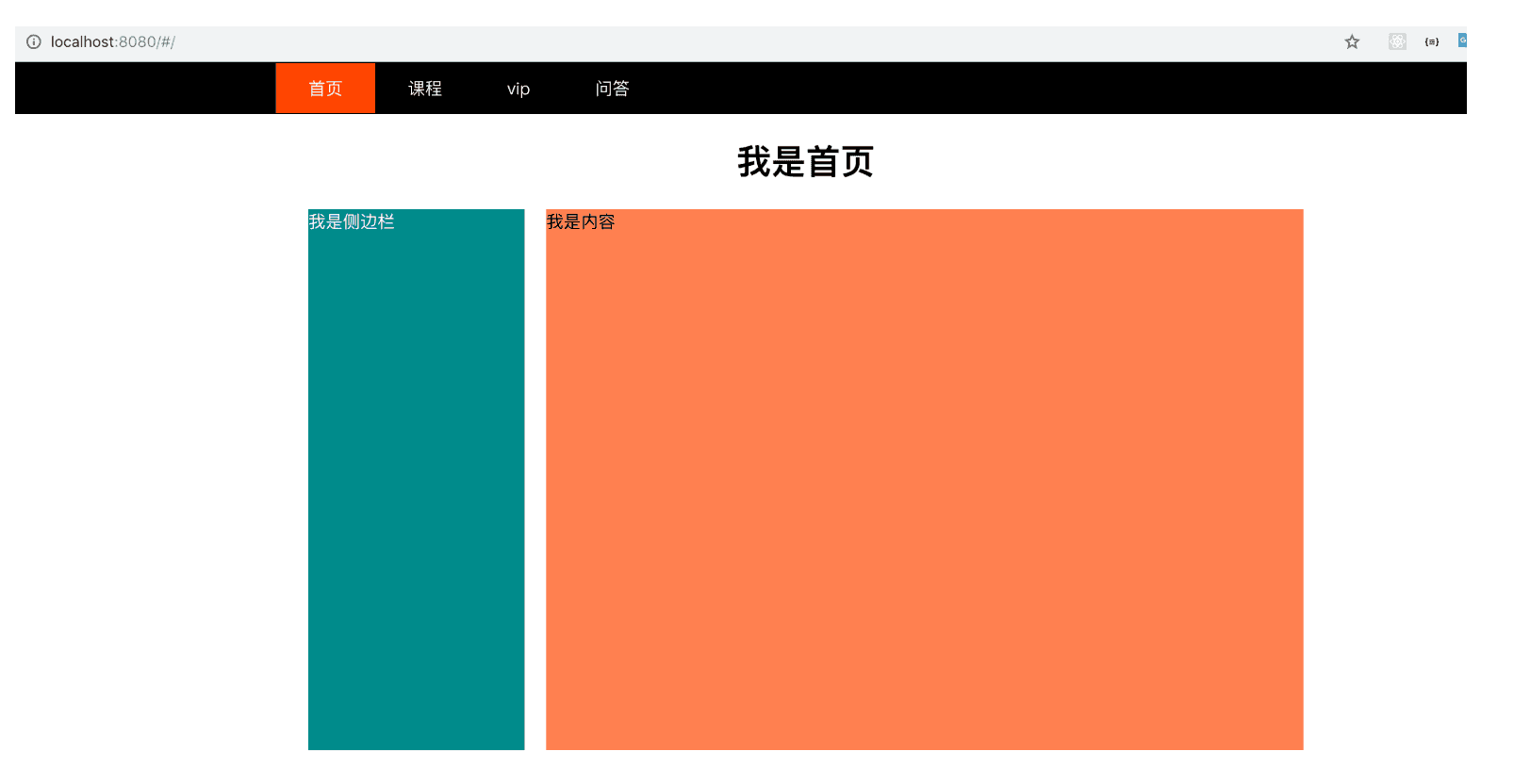
核心代码
1.设置路由对应的组件
import Vue from 'vue'

import VueRouter from 'vue-router'

import Course from '@/components/Course'

import Vip from '@/components/Vip'

import Questions from '@/components/Questions'

import Home from '@/components/Home'

import One from '@/components/One'

import Two from '@/components/Two'

import Three from '@/components/Three'

import Sider from '@/components/Sider'

import HomeContent from '@/components/HomeContent'

Vue.use(VueRouter)

const router = new VueRouter({

  linkActiveClass: 'nav-active',

  routes: [

    {

      path: '/',

      components: {   //注意这里的components,  default设置的组件 被渲染到 <router-view></router-view> 放置的位置

        default: Home,

        sider: Sider,    //Sider组件被渲染到<router-view name=“sider”></router-view> 放置的位置

        homecontent: HomeContent  //同理

      }

    },

    {

      path: '/questions',

      name: 'wenda',

      component: Questions

    },

    {

      path: '/vip',

      component: Vip,

      children: [

        {

          path: 'one',

          component: One

        },

        {

          path: 'two',

          component: Two

        },

        {

          path: 'three',

          component: Three

        }

      ]

    },

    {

      path: '/course',

      component: Course

    }

  ]

})

export default router
2.渲染视图
<template>

 <div class="page">

   <my-header></my-header>

   <router-view></router-view>

   <div class="page-main">

    <router-view name="sider"></router-view>

    <router-view name="homecontent"></router-view>

   </div>

 </div>

</template>
螺钉课堂视频课程地址:http://edu.nodeing.com
vue全家桶(2.3)的更多相关文章
- 用 Vue 全家桶二次开发 V2EX 社区
一.开发背景 为了全面的熟悉Vue+Vue-router+Vuex+axios技术栈,结合V2EX的开放API开发了这个简洁版的V2EX. 在线预览 (为了实现跨域,直接npm run dev部署的, ...
- Vue全家桶
简介 “简单却不失优雅,小巧而不乏大匠”. Vue.js 是一个JavaScriptMVVM库,是一套构建用户界面的渐进式框架.它是以数据驱动和组件化的思想构建的,采用自底向上增量开发的设计. 为什么 ...
- 从零开始系列之vue全家桶(3)安装使用vuex
什么是vuex? vuex:Vue提供的状态管理工具,用于同一管理我们项目中各种数据的交互和重用,存储我们需要用到数据对象. 即data中属性同时有一个或几个组件同时使用,就是data中共用的属性. ...
- 使用vue全家桶制作博客网站
前面的话 笔者在做一个完整的博客上线项目,包括前台.后台.后端接口和服务器配置.本文将详细介绍使用vue全家桶制作的博客网站 概述 该项目是基于vue全家桶(vue.vue-router.vuex.v ...
- 转载: 使用vue全家桶制作博客网站 HTML5 移动网站制作的好教程
使用vue全家桶制作博客网站 前面的话 笔者在做一个完整的博客上线项目,包括前台.后台.后端接口和服务器配置.本文将详细介绍使用vue全家桶制作的博客网站 概述 该项目是基于vue全家桶(vue. ...
- Vue全家桶介绍
一直不清楚全家桶是什么玩意,上网搜了一下,才知道就是平时项目中使用的几个依赖包,下面分享一下 Vue 全家桶介绍 Vue有著名的全家桶系列,包含了vue-router(http://router.vu ...
- 一个简单的假vue全家桶(vue+vue-router+require)
首先说明我觉得这是一个比较好理解的vue全家桶(虽然是假的),模块化也是用require来做的,而且如果后期有必要压缩我也会用gulp来做 1.依赖个个本地模块,require只是用来载入page,这 ...
- Vue 全家桶 + Electron 开发的一个跨三端的应用
代码地址如下:http://www.demodashi.com/demo/11738.html GitHub Repo:vue-objccn Follow: halfrost · GitHub 利用 ...
- Vue全家桶了解一下(待补充)
vue全家桶了解一下 一.vue+vue-router+vuex+axios1.vue:使用vue-cli,生成最基本的vue项目2.vue-router:vue项目中的路由管理插件3.vuex:vu ...
- 升级vue全家桶过程记录
背景 如果你使用了element-ui的el-tabs组件,并且想要单独升级element-ui至2.10.0,你会发现,使用了el-tabs组件的页面只要打开就卡死.原因是element-ui~2. ...
随机推荐
- Linux (三) 基础命令 上
个人博客网:https://wushaopei.github.io/ (你想要这里多有) 一 . 背景知识 1. Linux系统中一切皆文件 在Linux系统中任何东西都是以文件形式来存储的.这 ...
- Java实现 LeetCode 790 多米诺和托米诺平铺(递推)
790. 多米诺和托米诺平铺 有两种形状的瓷砖:一种是 2x1 的多米诺形,另一种是形如 "L" 的托米诺形.两种形状都可以旋转. XX <- 多米诺 XX <- &q ...
- Java实现 LeetCode 714 买卖股票的最佳时机含手续费(动态规划 || 迭代法)
714. 买卖股票的最佳时机含手续费 给定一个整数数组 prices,其中第 i 个元素代表了第 i 天的股票价格 :非负整数 fee 代表了交易股票的手续费用. 你可以无限次地完成交易,但是你每次交 ...
- Java实现 LeetCode 347 前 K 个高频元素
347. 前 K 个高频元素 给定一个非空的整数数组,返回其中出现频率前 k 高的元素. 示例 1: 输入: nums = [1,1,1,2,2,3], k = 2 输出: [1,2] 示例 2: 输 ...
- Java实现 LeetCode 31下一个排列
31. 下一个排列 实现获取下一个排列的函数,算法需要将给定数字序列重新排列成字典序中下一个更大的排列. 如果不存在下一个更大的排列,则将数字重新排列成最小的排列(即升序排列). 必须原地修改,只允许 ...
- Java实现夺冠概率模拟
足球比赛具有一定程度的偶然性,弱队也有战胜强队的可能. 假设有甲.乙.丙.丁四个球队.根据他们过去比赛的成绩,得出每个队与另一个队对阵时取胜的概率表: 甲 乙 丙 丁 甲 - 0.1 0.3 0.5 ...
- java实现第二届蓝桥杯地铁换乘(C++)
地铁换乘. 为解决交通难题,某城市修建了若干条交错的地铁线路,线路名及其所属站名如stations.txt所示. 线1 苹果园 .... 四惠东 线2 西直门 车公庄 .... 建国门 线4 .... ...
- 【1】svn 指令总结
[1]svn log 1.svn log 2. [2]svn di [3]
- web静态页面资源访问路径问题
我使用的是idea,今天搭建一个项目时遇见了css和js路径错误,导致浏览器获取不到资源路径 这是我最开始写的路径 <link href="/main/loginMain.css&qu ...
- Debian安装NVIDIA显卡驱动
1. sudo apt-get install nvidia-detect nvidia-detect 输出信息: Detected NVIDIA GPUs: 01:00.0 VGA compatib ...