
Redis集群-主从模式
1、架构设计
集群在单台主机上模拟搭建6个节点(3主3从的集群):

2、配置
创建与端口相同的文件夹存储Redis配置文件和持久化文件。
目录如下:
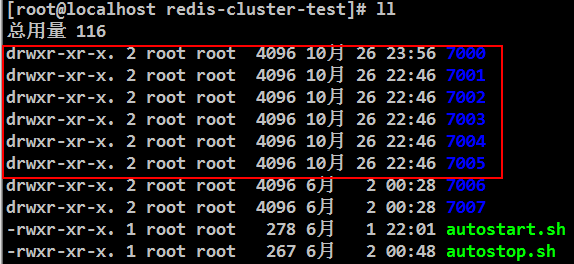
每个节点配置文件如下:
节点1:
bind 192.168.229.3
port 7000
cluster-enabled yes
cluster-config-file nodes.conf
cluster-node-timeout 5000
appendonly yes
daemonize yes
节点2:
bind 192.168.229.3
port 7001
cluster-enabled yes
cluster-config-file nodes.conf
cluster-node-timeout 5000
appendonly yes
daemonize yes
节点3:
bind 192.168.229.3
port 7002
cluster-enabled yes
cluster-config-file nodes.conf
cluster-node-timeout 5000
appendonly yes
daemonize yes
节点4:
bind 192.168.229.3
port 7003
cluster-enabled yes
cluster-config-file nodes.conf
cluster-node-timeout 5000
appendonly yes
daemonize yes
节点5:
bind 192.168.229.3
port 7004
cluster-enabled yes
cluster-config-file nodes.conf
cluster-node-timeout 5000
appendonly yes
daemonize yes
节点6:
bind 192.168.229.3
port 7006
cluster-enabled yes
cluster-config-file nodes.conf
cluster-node-timeout 5000
appendonly yes
daemonize yes
3、脚本
脚本名称:autostart.sh
#!/bin/bash

cd

../bin/redis-server ./redis.conf

cd ../

../bin/redis-server ./redis.conf

cd ../

../bin/redis-server ./redis.conf

cd ../

../bin/redis-server ./redis.conf

cd ../

../bin/redis-server ./redis.conf

cd ../

../bin/redis-server ./redis.conf
启动每个节点:./autostart.sh
脚本名称:autostop.sh
#!/bin/bash

bin/redis-cli -c -h 192.168.229.3 -p  shutdown

bin/redis-cli -c -h 192.168.229.3 -p  shutdown

bin/redis-cli -c -h 192.168.229.3 -p  shutdown

bin/redis-cli -c -h 192.168.229.3 -p  shutdown

bin/redis-cli -c -h 192.168.229.3 -p  shutdown
关闭每个节点:./autostop.sh
4、节点加入集群
./bin/redis-cli --cluster create \

192.168.229.3: \

192.168.229.3: \

192.168.229.3: \

192.168.229.3: \

192.168.229.3: \

192.168.229.3: \

--cluster-replicas
5、查看集群
[root@localhost redis-cluster-test]# bin/redis-cli -p  cluster nodes

Could not connect to Redis at 127.0.0.1:: Connection refused

[root@localhost redis-cluster-test]# bin/redis-cli -h 192.168.229.3 -p  cluster nodes

e096ad21c0ebdf3b7d69027e913fa3c39efee567 192.168.229.3:@ slave c7a0a4d6c2df0c1ef4fa64547208ea344c8bdcae    connected

977ed4958c35dcb2ac91b93ebb7a40dbdc1ad6ba 192.168.229.3:@ slave b0eaa0f5f64afcd24d8ccf881ae5008b932f5e9b    connected

c7a0a4d6c2df0c1ef4fa64547208ea344c8bdcae 192.168.229.3:@ master -    connected -

b0eaa0f5f64afcd24d8ccf881ae5008b932f5e9b 192.168.229.3:@ master -    connected -

97a9f66809401267d342edf06ab28e7baaf88963 192.168.229.3:@ myself,master -    connected -

5f4123f86387bd9252ade71940877a5224907fc6 192.168.229.3:@ slave 97a9f66809401267d342edf06ab28e7baaf88963    connected
如上图所示:
端口:7000、7001、7003节点为主节点;7002、7004、7005节点为从节点;myself为连接查看信息节点。
6、登录指定节点
[root@localhost redis-cluster-test]# bin/redis-cli -h 192.168.229.3 -p 7000 #登录指定节点
192.168.229.3:7000>
[root@localhost redis-cluster-test]# bin/redis-cli -c -h 192.168.229.3 -p 7000 #集群方式登录指定节点
192.168.229.3:7000> cluster nodes #查看集群信息
e096ad21c0ebdf3b7d69027e913fa3c39efee567 192.168.229.3:7002@17002 slave c7a0a4d6c2df0c1ef4fa64547208ea344c8bdcae 0 1572114511000 7 connected
977ed4958c35dcb2ac91b93ebb7a40dbdc1ad6ba 192.168.229.3:7005@17005 slave b0eaa0f5f64afcd24d8ccf881ae5008b932f5e9b 0 1572114512542 6 connected
c7a0a4d6c2df0c1ef4fa64547208ea344c8bdcae 192.168.229.3:7003@17003 master - 0 1572114512643 7 connected 10923-16383
b0eaa0f5f64afcd24d8ccf881ae5008b932f5e9b 192.168.229.3:7001@17001 master - 0 1572114512542 2 connected 5461-10922
97a9f66809401267d342edf06ab28e7baaf88963 192.168.229.3:7000@17000 myself,master - 0 1572114512000 1 connected 0-5460
5f4123f86387bd9252ade71940877a5224907fc6 192.168.229.3:7004@17004 slave 97a9f66809401267d342edf06ab28e7baaf88963 0 1572114512000 5 connected
192.168.229.3:7000>
7、集群添加节点
启动创建7006节点,配置如下:
bind 192.168.229.3
port 7006
cluster-enabled yes
cluster-config-file nodes.conf
cluster-node-timeout 5000
appendonly yes
daemonize yes
启动:
../bin/redis-server ./redis.conf
①添加节点到集群并查看:
[root@localhost redis-cluster-test]# bin/redis-cli --cluster add-node 192.168.229.3:7006 192.168.229.3:7000

>>> Adding node 192.168.229.3: to cluster 192.168.229.3:

>>> Performing Cluster Check (using node 192.168.229.3:)

S: 97a9f66809401267d342edf06ab28e7baaf88963 192.168.229.3:

   slots: ( slots) slave

   replicates 5f4123f86387bd9252ade71940877a5224907fc6

M: 5f4123f86387bd9252ade71940877a5224907fc6 192.168.229.3:

   slots:[-] ( slots) master

    additional replica(s)

M: c7a0a4d6c2df0c1ef4fa64547208ea344c8bdcae 192.168.229.3:

   slots:[-] ( slots) master

    additional replica(s)

S: e096ad21c0ebdf3b7d69027e913fa3c39efee567 192.168.229.3:

   slots: ( slots) slave

   replicates c7a0a4d6c2df0c1ef4fa64547208ea344c8bdcae

S: 977ed4958c35dcb2ac91b93ebb7a40dbdc1ad6ba 192.168.229.3:

   slots: ( slots) slave

   replicates b0eaa0f5f64afcd24d8ccf881ae5008b932f5e9b

M: b0eaa0f5f64afcd24d8ccf881ae5008b932f5e9b 192.168.229.3:

   slots:[-] ( slots) master

    additional replica(s)

[OK] All nodes agree about slots configuration.

>>> Check for open slots...

>>> Check slots coverage...

[OK] All  slots covered.

>>> Send CLUSTER MEET to node 192.168.229.3: to make it join the cluster.

[OK] New node added correctly.

[root@localhost redis-cluster-test]# bin/redis-cli -h 192.168.229.3 -p 7000 cluster nodes

e00cecbd042881c04167169f2f0f2df286146160 192.168.229.3:7006@17006 master - 0 1572115865563 0 connected

5f4123f86387bd9252ade71940877a5224907fc6 192.168.229.3:@ master -    connected -

c7a0a4d6c2df0c1ef4fa64547208ea344c8bdcae 192.168.229.3:@ master -    connected -

e096ad21c0ebdf3b7d69027e913fa3c39efee567 192.168.229.3:@ slave c7a0a4d6c2df0c1ef4fa64547208ea344c8bdcae    connected

977ed4958c35dcb2ac91b93ebb7a40dbdc1ad6ba 192.168.229.3:@ slave b0eaa0f5f64afcd24d8ccf881ae5008b932f5e9b    connected

b0eaa0f5f64afcd24d8ccf881ae5008b932f5e9b 192.168.229.3:@ master -    connected -

97a9f66809401267d342edf06ab28e7baaf88963 192.168.229.3:@ myself,slave 5f4123f86387bd9252ade71940877a5224907fc6    connected

[root@localhost redis-cluster-test]#
②删除7006节点,添加从节点:
删除7006文件已有的DB文件,否则在添加节点到集群的时候会报错:
[ERR] Node 192.168.229.3:7006 is not empty. Either the node already knows other nodes (check with CLUSTER NODES) or contains some key in database 0.
[root@localhost 7006]# ls
appendonly.aof nodes.conf redis.conf
[root@localhost 7006]# rm appendonly.aof nodes.conf
../bin/redis-server ./redis.conf #启动7006节点
[root@localhost redis-cluster-test]# bin/redis-cli --cluster add-node 192.168.229.3:7006 192.168.229.3:7000 --cluster-slave
>>> Adding node 192.168.229.3:7006 to cluster 192.168.229.3:7000
>>> Performing Cluster Check (using node 192.168.229.3:7000)
S: 97a9f66809401267d342edf06ab28e7baaf88963 192.168.229.3:7000
slots: (0 slots) slave
replicates 5f4123f86387bd9252ade71940877a5224907fc6
M: 5f4123f86387bd9252ade71940877a5224907fc6 192.168.229.3:7004
slots:[0-5460] (5461 slots) master
1 additional replica(s)
M: c7a0a4d6c2df0c1ef4fa64547208ea344c8bdcae 192.168.229.3:7003
slots:[10923-16383] (5461 slots) master
1 additional replica(s)
S: e096ad21c0ebdf3b7d69027e913fa3c39efee567 192.168.229.3:7002
slots: (0 slots) slave
replicates c7a0a4d6c2df0c1ef4fa64547208ea344c8bdcae
S: 977ed4958c35dcb2ac91b93ebb7a40dbdc1ad6ba 192.168.229.3:7005
slots: (0 slots) slave
replicates b0eaa0f5f64afcd24d8ccf881ae5008b932f5e9b
M: b0eaa0f5f64afcd24d8ccf881ae5008b932f5e9b 192.168.229.3:7001
slots:[5461-10922] (5462 slots) master
1 additional replica(s)
[OK] All nodes agree about slots configuration.
>>> Check for open slots...
>>> Check slots coverage...
[OK] All 16384 slots covered.
Automatically selected master 192.168.229.3:7004
>>> Send CLUSTER MEET to node 192.168.229.3:7006 to make it join the cluster.
Waiting for the cluster to join
>>> Configure node as replica of 192.168.229.3:7004.
[OK] New node added correctly.
[root@localhost redis-cluster-test]# bin/redis-cli -h 192.168.229.3 -p 7000 cluster nodes #查看节点信息
5f4123f86387bd9252ade71940877a5224907fc6 192.168.229.3:7004@17004 master - 0 1572116629602 8 connected 0-5460
c7a0a4d6c2df0c1ef4fa64547208ea344c8bdcae 192.168.229.3:7003@17003 master - 0 1572116630000 7 connected 10923-16383
e096ad21c0ebdf3b7d69027e913fa3c39efee567 192.168.229.3:7002@17002 slave c7a0a4d6c2df0c1ef4fa64547208ea344c8bdcae 0 1572116630942 7 connected
977ed4958c35dcb2ac91b93ebb7a40dbdc1ad6ba 192.168.229.3:7005@17005 slave b0eaa0f5f64afcd24d8ccf881ae5008b932f5e9b 0 1572116629000 6 connected
b0eaa0f5f64afcd24d8ccf881ae5008b932f5e9b 192.168.229.3:7001@17001 master - 0 1572116630532 2 connected 5461-10922
97a9f66809401267d342edf06ab28e7baaf88963 192.168.229.3:7000@17000 myself,slave 5f4123f86387bd9252ade71940877a5224907fc6 0 1572116630000 1 connected
407c8781fcfd4e84ebc0dda63c33ef978d826f66 192.168.229.3:7006@17006 slave 5f4123f86387bd9252ade71940877a5224907fc6 0 1572116629917 8 connected
[root@localhost redis-cluster-test]#
③删除7006节点,给指定主节点添加从节点:
bin/redis-cli --cluster add-node 192.168.229.3:7006 192.168.229.3:7000 --cluster-slave --cluster-master-id 3c3a0c74aae0b56170ccb03a76b60cfe7dc1912e
8、删除节点:
[root@localhost redis-cluster-test]# bin/redis-cli --cluster del-node 192.168.229.3:7006 e00cecbd042881c04167169f2f0f2df286146160

>>> Removing node e00cecbd042881c04167169f2f0f2df286146160 from cluster 192.168.229.3:

>>> Sending CLUSTER FORGET messages to the cluster...

>>> SHUTDOWN the node.

[root@localhost redis-cluster-test]# bin/redis-cli -h 192.168.229.3 -p  cluster nodes

5f4123f86387bd9252ade71940877a5224907fc6 192.168.229.3:@ master -    connected -

c7a0a4d6c2df0c1ef4fa64547208ea344c8bdcae 192.168.229.3:@ master -    connected -

e096ad21c0ebdf3b7d69027e913fa3c39efee567 192.168.229.3:@ slave c7a0a4d6c2df0c1ef4fa64547208ea344c8bdcae    connected

977ed4958c35dcb2ac91b93ebb7a40dbdc1ad6ba 192.168.229.3:@ slave b0eaa0f5f64afcd24d8ccf881ae5008b932f5e9b    connected

b0eaa0f5f64afcd24d8ccf881ae5008b932f5e9b 192.168.229.3:@ master -    connected -

97a9f66809401267d342edf06ab28e7baaf88963 192.168.229.3:@ myself,slave 5f4123f86387bd9252ade71940877a5224907fc6    connected
9、从节点复制主节点数据
[root@localhost redis-cluster-test]# bin/redis-cli -h 192.168.229.3 -p  cluster nodes

5f4123f86387bd9252ade71940877a5224907fc6 192.168.229.3:@ master -    connected -

c7a0a4d6c2df0c1ef4fa64547208ea344c8bdcae 192.168.229.3:@ master -    connected -

e096ad21c0ebdf3b7d69027e913fa3c39efee567 192.168.229.3:@ slave c7a0a4d6c2df0c1ef4fa64547208ea344c8bdcae    connected

977ed4958c35dcb2ac91b93ebb7a40dbdc1ad6ba 192.168.229.3:@ slave b0eaa0f5f64afcd24d8ccf881ae5008b932f5e9b    connected

b0eaa0f5f64afcd24d8ccf881ae5008b932f5e9b 192.168.229.3:@ master -    connected -

97a9f66809401267d342edf06ab28e7baaf88963 192.168.229.3:@ myself,slave 5f4123f86387bd9252ade71940877a5224907fc6    connected

407c8781fcfd4e84ebc0dda63c33ef978d826f66 192.168.229.3:@ slave 5f4123f86387bd9252ade71940877a5224907fc6    connected

[root@localhost redis-cluster-test]# bin/redis-cli -c -h 192.168.229.3 -p 7006 #手动同步主节点数据

192.168.229.3:> cluster replicate 5f4123f86387bd9252ade71940877a5224907fc6

OK

192.168.229.3:>
从上图可以7006节点为7004节点的从节点,手动触发同步主节点数据。
10、数据分片
添加新节点分片时,需要手动触发。
方式1:引导式
从7001移动100个slots到7004。
[root@localhost redis-cluster-test]# bin/redis-cli --cluster reshard 192.168.229.3:

>>> Performing Cluster Check (using node 192.168.229.3:)

S: 97a9f66809401267d342edf06ab28e7baaf88963 192.168.229.3:

   slots: ( slots) slave

   replicates 5f4123f86387bd9252ade71940877a5224907fc6

M: 5f4123f86387bd9252ade71940877a5224907fc6 192.168.229.3:

   slots:[-] ( slots) master

    additional replica(s)

M: c7a0a4d6c2df0c1ef4fa64547208ea344c8bdcae 192.168.229.3:

   slots:[-] ( slots) master

    additional replica(s)

S: e096ad21c0ebdf3b7d69027e913fa3c39efee567 192.168.229.3:

   slots: ( slots) slave

   replicates c7a0a4d6c2df0c1ef4fa64547208ea344c8bdcae

S: 977ed4958c35dcb2ac91b93ebb7a40dbdc1ad6ba 192.168.229.3:

   slots: ( slots) slave

   replicates b0eaa0f5f64afcd24d8ccf881ae5008b932f5e9b

M: b0eaa0f5f64afcd24d8ccf881ae5008b932f5e9b 192.168.229.3:

   slots:[-] ( slots) master

    additional replica(s)

S: 407c8781fcfd4e84ebc0dda63c33ef978d826f66 192.168.229.3:

   slots: ( slots) slave

   replicates 5f4123f86387bd9252ade71940877a5224907fc6

[OK] All nodes agree about slots configuration.

>>> Check for open slots...

>>> Check slots coverage...

[OK] All  slots covered.

How many slots do you want to move (from  to )?

What is the receiving node ID? 5f4123f86387bd9252ade71940877a5224907fc6

Please enter all the source node IDs.

  Type 'all' to use all the nodes as source nodes for the hash slots.

  Type 'done' once you entered all the source nodes IDs.

Source node #: b0eaa0f5f64afcd24d8ccf881ae5008b932f5e9b

Source node #: done

Ready to move  slots.

  Source nodes:

    M: b0eaa0f5f64afcd24d8ccf881ae5008b932f5e9b 192.168.229.3:

       slots:[-] ( slots) master

        additional replica(s)

  Destination node:

    M: 5f4123f86387bd9252ade71940877a5224907fc6 192.168.229.3:

       slots:[-] ( slots) master

        additional replica(s)

  Resharding plan:

    Moving slot  from b0eaa0f5f64afcd24d8ccf881ae5008b932f5e9b

    Moving slot  from b0eaa0f5f64afcd24d8ccf881ae5008b932f5e9b

    Moving slot  from b0eaa0f5f64afcd24d8ccf881ae5008b932f5e9b

    Moving slot  from b0eaa0f5f64afcd24d8ccf881ae5008b932f5e9b

    Moving slot  from b0eaa0f5f64afcd24d8ccf881ae5008b932f5e9b

    Moving slot  from b0eaa0f5f64afcd24d8ccf881ae5008b932f5e9b

    Moving slot  from b0eaa0f5f64afcd24d8ccf881ae5008b932f5e9b

    Moving slot  from b0eaa0f5f64afcd24d8ccf881ae5008b932f5e9b

    Moving slot  from b0eaa0f5f64afcd24d8ccf881ae5008b932f5e9b

    Moving slot  from b0eaa0f5f64afcd24d8ccf881ae5008b932f5e9b

    Moving slot  from b0eaa0f5f64afcd24d8ccf881ae5008b932f5e9b

    Moving slot  from b0eaa0f5f64afcd24d8ccf881ae5008b932f5e9b

    Moving slot  from b0eaa0f5f64afcd24d8ccf881ae5008b932f5e9b

    Moving slot  from b0eaa0f5f64afcd24d8ccf881ae5008b932f5e9b

    Moving slot  from b0eaa0f5f64afcd24d8ccf881ae5008b932f5e9b

    Moving slot  from b0eaa0f5f64afcd24d8ccf881ae5008b932f5e9b

    Moving slot  from b0eaa0f5f64afcd24d8ccf881ae5008b932f5e9b

    Moving slot  from b0eaa0f5f64afcd24d8ccf881ae5008b932f5e9b

    Moving slot  from b0eaa0f5f64afcd24d8ccf881ae5008b932f5e9b

    Moving slot  from b0eaa0f5f64afcd24d8ccf881ae5008b932f5e9b

    Moving slot  from b0eaa0f5f64afcd24d8ccf881ae5008b932f5e9b

    Moving slot  from b0eaa0f5f64afcd24d8ccf881ae5008b932f5e9b

    Moving slot  from b0eaa0f5f64afcd24d8ccf881ae5008b932f5e9b

    Moving slot  from b0eaa0f5f64afcd24d8ccf881ae5008b932f5e9b

    Moving slot  from b0eaa0f5f64afcd24d8ccf881ae5008b932f5e9b

    Moving slot  from b0eaa0f5f64afcd24d8ccf881ae5008b932f5e9b

    Moving slot  from b0eaa0f5f64afcd24d8ccf881ae5008b932f5e9b

    Moving slot  from b0eaa0f5f64afcd24d8ccf881ae5008b932f5e9b

    Moving slot  from b0eaa0f5f64afcd24d8ccf881ae5008b932f5e9b

    Moving slot  from b0eaa0f5f64afcd24d8ccf881ae5008b932f5e9b

    Moving slot  from b0eaa0f5f64afcd24d8ccf881ae5008b932f5e9b

    Moving slot  from b0eaa0f5f64afcd24d8ccf881ae5008b932f5e9b

    Moving slot  from b0eaa0f5f64afcd24d8ccf881ae5008b932f5e9b

    Moving slot  from b0eaa0f5f64afcd24d8ccf881ae5008b932f5e9b

    Moving slot  from b0eaa0f5f64afcd24d8ccf881ae5008b932f5e9b

    Moving slot  from b0eaa0f5f64afcd24d8ccf881ae5008b932f5e9b

    Moving slot  from b0eaa0f5f64afcd24d8ccf881ae5008b932f5e9b

    Moving slot  from b0eaa0f5f64afcd24d8ccf881ae5008b932f5e9b

    Moving slot  from b0eaa0f5f64afcd24d8ccf881ae5008b932f5e9b

    Moving slot  from b0eaa0f5f64afcd24d8ccf881ae5008b932f5e9b

    Moving slot  from b0eaa0f5f64afcd24d8ccf881ae5008b932f5e9b

    Moving slot  from b0eaa0f5f64afcd24d8ccf881ae5008b932f5e9b

    Moving slot  from b0eaa0f5f64afcd24d8ccf881ae5008b932f5e9b

    Moving slot  from b0eaa0f5f64afcd24d8ccf881ae5008b932f5e9b

    Moving slot  from b0eaa0f5f64afcd24d8ccf881ae5008b932f5e9b

    Moving slot  from b0eaa0f5f64afcd24d8ccf881ae5008b932f5e9b

    Moving slot  from b0eaa0f5f64afcd24d8ccf881ae5008b932f5e9b

    Moving slot  from b0eaa0f5f64afcd24d8ccf881ae5008b932f5e9b

    Moving slot  from b0eaa0f5f64afcd24d8ccf881ae5008b932f5e9b

    Moving slot  from b0eaa0f5f64afcd24d8ccf881ae5008b932f5e9b

    Moving slot  from b0eaa0f5f64afcd24d8ccf881ae5008b932f5e9b

    Moving slot  from b0eaa0f5f64afcd24d8ccf881ae5008b932f5e9b

    Moving slot  from b0eaa0f5f64afcd24d8ccf881ae5008b932f5e9b

    Moving slot  from b0eaa0f5f64afcd24d8ccf881ae5008b932f5e9b

    Moving slot  from b0eaa0f5f64afcd24d8ccf881ae5008b932f5e9b

    Moving slot  from b0eaa0f5f64afcd24d8ccf881ae5008b932f5e9b

    Moving slot  from b0eaa0f5f64afcd24d8ccf881ae5008b932f5e9b

    Moving slot  from b0eaa0f5f64afcd24d8ccf881ae5008b932f5e9b

    Moving slot  from b0eaa0f5f64afcd24d8ccf881ae5008b932f5e9b

    Moving slot  from b0eaa0f5f64afcd24d8ccf881ae5008b932f5e9b

    Moving slot  from b0eaa0f5f64afcd24d8ccf881ae5008b932f5e9b

    Moving slot  from b0eaa0f5f64afcd24d8ccf881ae5008b932f5e9b

    Moving slot  from b0eaa0f5f64afcd24d8ccf881ae5008b932f5e9b

    Moving slot  from b0eaa0f5f64afcd24d8ccf881ae5008b932f5e9b

    Moving slot  from b0eaa0f5f64afcd24d8ccf881ae5008b932f5e9b

    Moving slot  from b0eaa0f5f64afcd24d8ccf881ae5008b932f5e9b

    Moving slot  from b0eaa0f5f64afcd24d8ccf881ae5008b932f5e9b

    Moving slot  from b0eaa0f5f64afcd24d8ccf881ae5008b932f5e9b

    Moving slot  from b0eaa0f5f64afcd24d8ccf881ae5008b932f5e9b

    Moving slot  from b0eaa0f5f64afcd24d8ccf881ae5008b932f5e9b

    Moving slot  from b0eaa0f5f64afcd24d8ccf881ae5008b932f5e9b

    Moving slot  from b0eaa0f5f64afcd24d8ccf881ae5008b932f5e9b

    Moving slot  from b0eaa0f5f64afcd24d8ccf881ae5008b932f5e9b

    Moving slot  from b0eaa0f5f64afcd24d8ccf881ae5008b932f5e9b

    Moving slot  from b0eaa0f5f64afcd24d8ccf881ae5008b932f5e9b

    Moving slot  from b0eaa0f5f64afcd24d8ccf881ae5008b932f5e9b

    Moving slot  from b0eaa0f5f64afcd24d8ccf881ae5008b932f5e9b

    Moving slot  from b0eaa0f5f64afcd24d8ccf881ae5008b932f5e9b

    Moving slot  from b0eaa0f5f64afcd24d8ccf881ae5008b932f5e9b

    Moving slot  from b0eaa0f5f64afcd24d8ccf881ae5008b932f5e9b

    Moving slot  from b0eaa0f5f64afcd24d8ccf881ae5008b932f5e9b

    Moving slot  from b0eaa0f5f64afcd24d8ccf881ae5008b932f5e9b

    Moving slot  from b0eaa0f5f64afcd24d8ccf881ae5008b932f5e9b

    Moving slot  from b0eaa0f5f64afcd24d8ccf881ae5008b932f5e9b

    Moving slot  from b0eaa0f5f64afcd24d8ccf881ae5008b932f5e9b

    Moving slot  from b0eaa0f5f64afcd24d8ccf881ae5008b932f5e9b

    Moving slot  from b0eaa0f5f64afcd24d8ccf881ae5008b932f5e9b

    Moving slot  from b0eaa0f5f64afcd24d8ccf881ae5008b932f5e9b

    Moving slot  from b0eaa0f5f64afcd24d8ccf881ae5008b932f5e9b

    Moving slot  from b0eaa0f5f64afcd24d8ccf881ae5008b932f5e9b

    Moving slot  from b0eaa0f5f64afcd24d8ccf881ae5008b932f5e9b

    Moving slot  from b0eaa0f5f64afcd24d8ccf881ae5008b932f5e9b

    Moving slot  from b0eaa0f5f64afcd24d8ccf881ae5008b932f5e9b

    Moving slot  from b0eaa0f5f64afcd24d8ccf881ae5008b932f5e9b

    Moving slot  from b0eaa0f5f64afcd24d8ccf881ae5008b932f5e9b

    Moving slot  from b0eaa0f5f64afcd24d8ccf881ae5008b932f5e9b

    Moving slot  from b0eaa0f5f64afcd24d8ccf881ae5008b932f5e9b

    Moving slot  from b0eaa0f5f64afcd24d8ccf881ae5008b932f5e9b

    Moving slot  from b0eaa0f5f64afcd24d8ccf881ae5008b932f5e9b

Do you want to proceed with the proposed reshard plan (yes/no)? yes

Moving slot  from 192.168.229.3: to 192.168.229.3::

Moving slot  from 192.168.229.3: to 192.168.229.3::

Moving slot  from 192.168.229.3: to 192.168.229.3::

Moving slot  from 192.168.229.3: to 192.168.229.3::

Moving slot  from 192.168.229.3: to 192.168.229.3::

Moving slot  from 192.168.229.3: to 192.168.229.3::

Moving slot  from 192.168.229.3: to 192.168.229.3::

Moving slot  from 192.168.229.3: to 192.168.229.3::

Moving slot  from 192.168.229.3: to 192.168.229.3::

Moving slot  from 192.168.229.3: to 192.168.229.3::

Moving slot  from 192.168.229.3: to 192.168.229.3::

Moving slot  from 192.168.229.3: to 192.168.229.3::

Moving slot  from 192.168.229.3: to 192.168.229.3::

Moving slot  from 192.168.229.3: to 192.168.229.3::

Moving slot  from 192.168.229.3: to 192.168.229.3::

Moving slot  from 192.168.229.3: to 192.168.229.3::
[root@localhost redis-cluster-test]#
方式2:命令式
从7001移动100个slots到7004。
[root@localhost redis-cluster-test]# bin/redis-cli --cluster reshard 192.168.229.3:7000 \

> --cluster-from b0eaa0f5f64afcd24d8ccf881ae5008b932f5e9b \

> --cluster-to 5f4123f86387bd9252ade71940877a5224907fc6 \

> --cluster-slots 100 \

> --cluster-yes

>>> Performing Cluster Check (using node 192.168.229.3:)

S: 97a9f66809401267d342edf06ab28e7baaf88963 192.168.229.3:

   slots: ( slots) slave

   replicates 5f4123f86387bd9252ade71940877a5224907fc6

M: 5f4123f86387bd9252ade71940877a5224907fc6 192.168.229.3:

   slots:[-] ( slots) master

    additional replica(s)

M: c7a0a4d6c2df0c1ef4fa64547208ea344c8bdcae 192.168.229.3:

   slots:[-] ( slots) master

    additional replica(s)

S: e096ad21c0ebdf3b7d69027e913fa3c39efee567 192.168.229.3:

   slots: ( slots) slave

   replicates c7a0a4d6c2df0c1ef4fa64547208ea344c8bdcae

S: 977ed4958c35dcb2ac91b93ebb7a40dbdc1ad6ba 192.168.229.3:

   slots: ( slots) slave

   replicates b0eaa0f5f64afcd24d8ccf881ae5008b932f5e9b

M: b0eaa0f5f64afcd24d8ccf881ae5008b932f5e9b 192.168.229.3:

   slots:[-] ( slots) master

    additional replica(s)

S: 407c8781fcfd4e84ebc0dda63c33ef978d826f66 192.168.229.3:

   slots: ( slots) slave

   replicates 5f4123f86387bd9252ade71940877a5224907fc6

[OK] All nodes agree about slots configuration.

>>> Check for open slots...

>>> Check slots coverage...

[OK] All  slots covered.

Ready to move  slots.

  Source nodes:

    M: b0eaa0f5f64afcd24d8ccf881ae5008b932f5e9b 192.168.229.3:

       slots:[-] ( slots) master

        additional replica(s)

  Destination node:

    M: 5f4123f86387bd9252ade71940877a5224907fc6 192.168.229.3:

       slots:[-] ( slots) master

        additional replica(s)

  Resharding plan:

    Moving slot  from b0eaa0f5f64afcd24d8ccf881ae5008b932f5e9b

    Moving slot  from b0eaa0f5f64afcd24d8ccf881ae5008b932f5e9b

    Moving slot  from b0eaa0f5f64afcd24d8ccf881ae5008b932f5e9b

    Moving slot  from b0eaa0f5f64afcd24d8ccf881ae5008b932f5e9b

    Moving slot  from b0eaa0f5f64afcd24d8ccf881ae5008b932f5e9b

    Moving slot  from b0eaa0f5f64afcd24d8ccf881ae5008b932f5e9b

    Moving slot  from b0eaa0f5f64afcd24d8ccf881ae5008b932f5e9b

    Moving slot  from b0eaa0f5f64afcd24d8ccf881ae5008b932f5e9b

    Moving slot  from b0eaa0f5f64afcd24d8ccf881ae5008b932f5e9b

    Moving slot  from b0eaa0f5f64afcd24d8ccf881ae5008b932f5e9b

    Moving slot  from b0eaa0f5f64afcd24d8ccf881ae5008b932f5e9b

    Moving slot  from b0eaa0f5f64afcd24d8ccf881ae5008b932f5e9b

    Moving slot  from b0eaa0f5f64afcd24d8ccf881ae5008b932f5e9b

    Moving slot  from b0eaa0f5f64afcd24d8ccf881ae5008b932f5e9b

    Moving slot  from b0eaa0f5f64afcd24d8ccf881ae5008b932f5e9b

    Moving slot  from b0eaa0f5f64afcd24d8ccf881ae5008b932f5e9b

    Moving slot  from b0eaa0f5f64afcd24d8ccf881ae5008b932f5e9b

    Moving slot  from b0eaa0f5f64afcd24d8ccf881ae5008b932f5e9b

    Moving slot  from b0eaa0f5f64afcd24d8ccf881ae5008b932f5e9b

    Moving slot  from b0eaa0f5f64afcd24d8ccf881ae5008b932f5e9b

    Moving slot  from b0eaa0f5f64afcd24d8ccf881ae5008b932f5e9b

    Moving slot  from b0eaa0f5f64afcd24d8ccf881ae5008b932f5e9b

    Moving slot  from b0eaa0f5f64afcd24d8ccf881ae5008b932f5e9b

    Moving slot  from b0eaa0f5f64afcd24d8ccf881ae5008b932f5e9b

    Moving slot  from b0eaa0f5f64afcd24d8ccf881ae5008b932f5e9b

    Moving slot  from b0eaa0f5f64afcd24d8ccf881ae5008b932f5e9b

    Moving slot  from b0eaa0f5f64afcd24d8ccf881ae5008b932f5e9b

    Moving slot  from b0eaa0f5f64afcd24d8ccf881ae5008b932f5e9b

    Moving slot  from b0eaa0f5f64afcd24d8ccf881ae5008b932f5e9b

    Moving slot  from b0eaa0f5f64afcd24d8ccf881ae5008b932f5e9b

    Moving slot  from b0eaa0f5f64afcd24d8ccf881ae5008b932f5e9b

    Moving slot  from b0eaa0f5f64afcd24d8ccf881ae5008b932f5e9b

    Moving slot  from b0eaa0f5f64afcd24d8ccf881ae5008b932f5e9b

    Moving slot  from b0eaa0f5f64afcd24d8ccf881ae5008b932f5e9b

    Moving slot  from b0eaa0f5f64afcd24d8ccf881ae5008b932f5e9b

    Moving slot  from b0eaa0f5f64afcd24d8ccf881ae5008b932f5e9b

    Moving slot  from b0eaa0f5f64afcd24d8ccf881ae5008b932f5e9b

    Moving slot  from b0eaa0f5f64afcd24d8ccf881ae5008b932f5e9b

    Moving slot  from b0eaa0f5f64afcd24d8ccf881ae5008b932f5e9b

    Moving slot  from b0eaa0f5f64afcd24d8ccf881ae5008b932f5e9b

    Moving slot  from b0eaa0f5f64afcd24d8ccf881ae5008b932f5e9b

    Moving slot  from b0eaa0f5f64afcd24d8ccf881ae5008b932f5e9b

    Moving slot  from b0eaa0f5f64afcd24d8ccf881ae5008b932f5e9b

    Moving slot  from b0eaa0f5f64afcd24d8ccf881ae5008b932f5e9b

    Moving slot  from b0eaa0f5f64afcd24d8ccf881ae5008b932f5e9b

    Moving slot  from b0eaa0f5f64afcd24d8ccf881ae5008b932f5e9b

    Moving slot  from b0eaa0f5f64afcd24d8ccf881ae5008b932f5e9b

    Moving slot  from b0eaa0f5f64afcd24d8ccf881ae5008b932f5e9b

    Moving slot  from b0eaa0f5f64afcd24d8ccf881ae5008b932f5e9b

    Moving slot  from b0eaa0f5f64afcd24d8ccf881ae5008b932f5e9b

    Moving slot  from b0eaa0f5f64afcd24d8ccf881ae5008b932f5e9b

    Moving slot  from b0eaa0f5f64afcd24d8ccf881ae5008b932f5e9b

    Moving slot  from b0eaa0f5f64afcd24d8ccf881ae5008b932f5e9b

    Moving slot  from b0eaa0f5f64afcd24d8ccf881ae5008b932f5e9b

    Moving slot  from b0eaa0f5f64afcd24d8ccf881ae5008b932f5e9b

    Moving slot  from b0eaa0f5f64afcd24d8ccf881ae5008b932f5e9b

    Moving slot  from b0eaa0f5f64afcd24d8ccf881ae5008b932f5e9b

    Moving slot  from b0eaa0f5f64afcd24d8ccf881ae5008b932f5e9b

    Moving slot  from b0eaa0f5f64afcd24d8ccf881ae5008b932f5e9b

    Moving slot  from b0eaa0f5f64afcd24d8ccf881ae5008b932f5e9b

    Moving slot  from b0eaa0f5f64afcd24d8ccf881ae5008b932f5e9b

    Moving slot  from b0eaa0f5f64afcd24d8ccf881ae5008b932f5e9b

    Moving slot  from b0eaa0f5f64afcd24d8ccf881ae5008b932f5e9b

    Moving slot  from b0eaa0f5f64afcd24d8ccf881ae5008b932f5e9b

    Moving slot  from b0eaa0f5f64afcd24d8ccf881ae5008b932f5e9b

    Moving slot  from b0eaa0f5f64afcd24d8ccf881ae5008b932f5e9b

    Moving slot  from b0eaa0f5f64afcd24d8ccf881ae5008b932f5e9b

    Moving slot  from b0eaa0f5f64afcd24d8ccf881ae5008b932f5e9b

    Moving slot  from b0eaa0f5f64afcd24d8ccf881ae5008b932f5e9b

    Moving slot  from b0eaa0f5f64afcd24d8ccf881ae5008b932f5e9b

    Moving slot  from b0eaa0f5f64afcd24d8ccf881ae5008b932f5e9b

    Moving slot  from b0eaa0f5f64afcd24d8ccf881ae5008b932f5e9b

    Moving slot  from b0eaa0f5f64afcd24d8ccf881ae5008b932f5e9b

    Moving slot  from b0eaa0f5f64afcd24d8ccf881ae5008b932f5e9b

    Moving slot  from b0eaa0f5f64afcd24d8ccf881ae5008b932f5e9b

    Moving slot  from b0eaa0f5f64afcd24d8ccf881ae5008b932f5e9b

    Moving slot  from b0eaa0f5f64afcd24d8ccf881ae5008b932f5e9b

    Moving slot  from b0eaa0f5f64afcd24d8ccf881ae5008b932f5e9b

    Moving slot  from b0eaa0f5f64afcd24d8ccf881ae5008b932f5e9b

    Moving slot  from b0eaa0f5f64afcd24d8ccf881ae5008b932f5e9b

    Moving slot  from b0eaa0f5f64afcd24d8ccf881ae5008b932f5e9b

    Moving slot  from b0eaa0f5f64afcd24d8ccf881ae5008b932f5e9b

    Moving slot  from b0eaa0f5f64afcd24d8ccf881ae5008b932f5e9b

    Moving slot  from b0eaa0f5f64afcd24d8ccf881ae5008b932f5e9b

    Moving slot  from b0eaa0f5f64afcd24d8ccf881ae5008b932f5e9b

    Moving slot  from b0eaa0f5f64afcd24d8ccf881ae5008b932f5e9b

    Moving slot  from b0eaa0f5f64afcd24d8ccf881ae5008b932f5e9b

    Moving slot  from b0eaa0f5f64afcd24d8ccf881ae5008b932f5e9b

    Moving slot  from b0eaa0f5f64afcd24d8ccf881ae5008b932f5e9b

    Moving slot  from b0eaa0f5f64afcd24d8ccf881ae5008b932f5e9b

    Moving slot  from b0eaa0f5f64afcd24d8ccf881ae5008b932f5e9b

    Moving slot  from b0eaa0f5f64afcd24d8ccf881ae5008b932f5e9b

    Moving slot  from b0eaa0f5f64afcd24d8ccf881ae5008b932f5e9b

    Moving slot  from b0eaa0f5f64afcd24d8ccf881ae5008b932f5e9b

    Moving slot  from b0eaa0f5f64afcd24d8ccf881ae5008b932f5e9b

    Moving slot  from b0eaa0f5f64afcd24d8ccf881ae5008b932f5e9b

    Moving slot  from b0eaa0f5f64afcd24d8ccf881ae5008b932f5e9b

    Moving slot  from b0eaa0f5f64afcd24d8ccf881ae5008b932f5e9b

    Moving slot  from b0eaa0f5f64afcd24d8ccf881ae5008b932f5e9b

    Moving slot  from b0eaa0f5f64afcd24d8ccf881ae5008b932f5e9b

Moving slot  from 192.168.229.3: to 192.168.229.3::

Moving slot  from 192.168.229.3: to 192.168.229.3::

Moving slot  from 192.168.229.3: to 192.168.229.3::

Moving slot  from 192.168.229.3: to 192.168.229.3::

Moving slot  from 192.168.229.3: to 192.168.229.3::

Moving slot  from 192.168.229.3: to 192.168.229.3::

Moving slot  from 192.168.229.3: to 192.168.229.3::

Moving slot  from 192.168.229.3: to 192.168.229.3::

Moving slot  from 192.168.229.3: to 192.168.229.3::

Moving slot  from 192.168.229.3: to 192.168.229.3::

Moving slot  from 192.168.229.3: to 192.168.229.3::

Moving slot  from 192.168.229.3: to 192.168.229.3::

Moving slot  from 192.168.229.3: to 192.168.229.3::

Moving slot  from 192.168.229.3: to 192.168.229.3::

Moving slot  from 192.168.229.3: to 192.168.229.3::

Moving slot  from 192.168.229.3: to 192.168.229.3::

Moving slot  from 192.168.229.3: to 192.168.229.3::

Moving slot  from 192.168.229.3: to 192.168.229.3::

Moving slot  from 192.168.229.3: to 192.168.229.3::

Moving slot  from 192.168.229.3: to 192.168.229.3::

Moving slot  from 192.168.229.3: to 192.168.229.3::

Moving slot  from 192.168.229.3: to 192.168.229.3::

Moving slot  from 192.168.229.3: to 192.168.229.3::

Moving slot  from 192.168.229.3: to 192.168.229.3::

Moving slot  from 192.168.229.3: to 192.168.229.3::

Moving slot  from 192.168.229.3: to 192.168.229.3::

Moving slot  from 192.168.229.3: to 192.168.229.3::

Moving slot  from 192.168.229.3: to 192.168.229.3::

Moving slot  from 192.168.229.3: to 192.168.229.3::

Moving slot  from 192.168.229.3: to 192.168.229.3::

Moving slot  from 192.168.229.3: to 192.168.229.3::

Moving slot  from 192.168.229.3: to 192.168.229.3::

Moving slot  from 192.168.229.3: to 192.168.229.3::

Moving slot  from 192.168.229.3: to 192.168.229.3::

Moving slot  from 192.168.229.3: to 192.168.229.3::

Moving slot  from 192.168.229.3: to 192.168.229.3::

Moving slot  from 192.168.229.3: to 192.168.229.3::

Moving slot  from 192.168.229.3: to 192.168.229.3::

Moving slot  from 192.168.229.3: to 192.168.229.3::

Moving slot  from 192.168.229.3: to 192.168.229.3::

Moving slot  from 192.168.229.3: to 192.168.229.3::

Moving slot  from 192.168.229.3: to 192.168.229.3::

Moving slot  from 192.168.229.3: to 192.168.229.3::

Moving slot  from 192.168.229.3: to 192.168.229.3::

Moving slot  from 192.168.229.3: to 192.168.229.3::

Moving slot  from 192.168.229.3: to 192.168.229.3::

Moving slot  from 192.168.229.3: to 192.168.229.3::

Moving slot  from 192.168.229.3: to 192.168.229.3::

Moving slot  from 192.168.229.3: to 192.168.229.3::

Moving slot  from 192.168.229.3: to 192.168.229.3::

Moving slot  from 192.168.229.3: to 192.168.229.3::

Moving slot  from 192.168.229.3: to 192.168.229.3::

Moving slot  from 192.168.229.3: to 192.168.229.3::

Moving slot  from 192.168.229.3: to 192.168.229.3::

Moving slot  from 192.168.229.3: to 192.168.229.3::

Moving slot  from 192.168.229.3: to 192.168.229.3::

Moving slot  from 192.168.229.3: to 192.168.229.3::

Moving slot  from 192.168.229.3: to 192.168.229.3::

Moving slot  from 192.168.229.3: to 192.168.229.3::

Moving slot  from 192.168.229.3: to 192.168.229.3:: .

Moving slot  from 192.168.229.3: to 192.168.229.3::

Moving slot  from 192.168.229.3: to 192.168.229.3::

Moving slot  from 192.168.229.3: to 192.168.229.3::

Moving slot  from 192.168.229.3: to 192.168.229.3::

Moving slot  from 192.168.229.3: to 192.168.229.3::

Moving slot  from 192.168.229.3: to 192.168.229.3::

Moving slot  from 192.168.229.3: to 192.168.229.3::

Moving slot  from 192.168.229.3: to 192.168.229.3::

Moving slot  from 192.168.229.3: to 192.168.229.3::

Moving slot  from 192.168.229.3: to 192.168.229.3::

Moving slot  from 192.168.229.3: to 192.168.229.3::

Moving slot  from 192.168.229.3: to 192.168.229.3::

Moving slot  from 192.168.229.3: to 192.168.229.3::

Moving slot  from 192.168.229.3: to 192.168.229.3::

Moving slot  from 192.168.229.3: to 192.168.229.3::

Moving slot  from 192.168.229.3: to 192.168.229.3::

Moving slot  from 192.168.229.3: to 192.168.229.3::

Moving slot  from 192.168.229.3: to 192.168.229.3::

Moving slot  from 192.168.229.3: to 192.168.229.3::

Moving slot  from 192.168.229.3: to 192.168.229.3::

Moving slot  from 192.168.229.3: to 192.168.229.3::

Moving slot  from 192.168.229.3: to 192.168.229.3::

Moving slot  from 192.168.229.3: to 192.168.229.3::

Moving slot  from 192.168.229.3: to 192.168.229.3::

Moving slot  from 192.168.229.3: to 192.168.229.3::

Moving slot  from 192.168.229.3: to 192.168.229.3::

Moving slot  from 192.168.229.3: to 192.168.229.3::

Moving slot  from 192.168.229.3: to 192.168.229.3::

Moving slot  from 192.168.229.3: to 192.168.229.3::

Moving slot  from 192.168.229.3: to 192.168.229.3::

Moving slot  from 192.168.229.3: to 192.168.229.3::

Moving slot  from 192.168.229.3: to 192.168.229.3::

Moving slot  from 192.168.229.3: to 192.168.229.3::

Moving slot  from 192.168.229.3: to 192.168.229.3::

Moving slot  from 192.168.229.3: to 192.168.229.3::

Moving slot  from 192.168.229.3: to 192.168.229.3::

Moving slot  from 192.168.229.3: to 192.168.229.3::

Moving slot  from 192.168.229.3: to 192.168.229.3::

Moving slot  from 192.168.229.3: to 192.168.229.3::

Moving slot  from 192.168.229.3: to 192.168.229.3::
Redis集群-主从模式的更多相关文章
- (转)基于Redis Sentinel的Redis集群(主从&Sharding)高可用方案
转载自:http://warm-breeze.iteye.com/blog/2020413 本文主要介绍一种通过Jedis&Sentinel实现Redis集群高可用方案,该方案需要使用Jedi ...
- 基于Redis Sentinel的Redis集群(主从Sharding)高可用方案(转)
本文主要介绍一种通过Jedis&Sentinel实现Redis集群高可用方案,该方案需要使用Jedis2.2.2及以上版本(强制),Redis2.8及以上版本(可选,Sentinel最早出现在 ...
- redis集群cluster模式搭建
实验服务器 :192.168.44.139 192.168.44.138 192.168.44.144 在 192.168.44.139上操作: 将redis的包上传的新建的目录newtouc ...
- 基于Redis Sentinel的Redis集群(主从&Sharding)高可用方案
本文主要介绍一种通过Jedis&Sentinel实现Redis集群高可用方案,该方案需要使用Jedis2.2.2及以上版本(强制),Redis2.8及以上版本(可选,Sentinel最早出现在 ...
- php操作redis集群哨兵模式
前段时间项目里正好用到了redis的集群哨兵部署,因为此前并无了解过,所以一脸懵逼啊,查阅了几篇资料,特此综合总结一下,作为记录. 写在前沿:随着项目的扩张,对redis的依赖也越来越大,为了增强re ...
- 查看Redis集群主从对应关系工具
工具的作用: 1)比"cluster nodes"更为直观的显示结果 2)指出落在同一个IP上的master 3)指出落在同一个IP上的master和slave对 运行效果图: 源 ...
- redis集群主从集群搭建、sentinel(哨兵集群)配置以及Jedis 哨兵模式简要配置
前端时间项目上为了提高平台性能,为应用添加了redis缓存,为了提高服务的可靠性,redis部署了高可用的主从缓存,主从切换使用的redis自带的sentinel集群.现在权作记录.
- Redis Sentinel的Redis集群(主从&Sharding)高可用方案
在不使用redis3.0之后版本的情况下,对于redis服务端一般是采用Sentinel哨兵模式,也就是一主多备的方式. 这里,先抛出三个问题, 问题1:单节点宕机数据丢失?问题2:多节点(节点间没有 ...
- Redis集群-Cluster模式
我理解的此模式与哨兵模式根本区别: 哨兵模式采用主从复制模式,主和从数据都是一致的.全量数据: Cluster模式采用数据分片存储,对每个 key 计算 CRC16 值,然后对 16384 取模,可以 ...
随机推荐
- react 动态渲染echarts折线图,鼠标放大缩小
//折线图组件import React,{Component} from 'react'; import ReactEcharts from 'echarts-for-react'; class Ec ...
- Linux下几个与磁盘空间和文件尺寸相关的命令
大家好,我是良许. 硬盘是计算机非常重要的一个部件,不管是代码,还是 UI .声音.文档,抑或是没人时偷偷看的小视频,都需要保存在硬盘里. 对于很多 Linux 服务器,会进行很多的编译操作.而编译操 ...
- scrapy请求发送详解
scrapy自动发送请求 对start_urls列表中存储的起始url进行过请求的发送并没有通过手动实现,但是在parse函数中还是获取到了响应数据,这是因为爬虫文件中的爬虫类继承到了Spider父类 ...
- 10.02经典类的bug
#以下在python 3.6版本里已没有这个问题了1class A: def _init__(self): print ("this is A") def save(self): ...
- Ext.tree.TreePanel 属性详解
Ext.tree.TreePanel 属性详解 2013-06-09 11:02:47| 分类: ExtJs|举报|字号 订阅 原文地址:http://blog.163.com/zzf_fly/b ...
- 苏浪浪 201771010120 第三周 Java基本程序设计总结
理论知识: Java有五种语句: (1)方法调用语句(2)表达式语句(3)复合语句(4)控制语句(5)package.import语句 3.8控制流程 3.9大数值 *如果基本的整型和浮点型数据无法达 ...
- arch 系列manjaro更新deepin-screenshot没有图标
问题描述 deepin软件安装到其他分支后,这个问题出现,相信各位一点都不意外,原因不细说,简单的概括就是没有DDE的桌面环境!! 简单介绍 deepin-screen截图软件在使用的时候是深受国人的 ...
- Maven系列(二) -- 将开源库上传到maven仓库私服
前言 之前简单说了下Maven的搭建,现在跟大家说一下如何将自己的aar传到我们新搭建的maven仓库里面,接下来我们就从最基本的新建一个library开始讲述整个流程,话不多说,让我们把愉快的开始吧 ...
- 《HelloGitHub》第 50 期
兴趣是最好的老师,HelloGitHub 就是帮你找到兴趣! 简介 分享 GitHub 上有趣.入门级的开源项目. 这是一个面向编程新手.热爱编程.对开源社区感兴趣 人群的月刊,月刊的内容包括:各种编 ...
- 服务器ip地址 服务器ip登录方法
服务器是指保存有该网络中所有主机的域名和对应IP地址,并具有将域名转换为IP地址功能的服务器.其中域名必须对应一个IP地址,一个域名可以有多个IP地址,而IP地址不一定有域名. 简单的解释就是:服 ...