
Redis集群-主从模式
1、架构设计
集群在单台主机上模拟搭建6个节点(3主3从的集群):

2、配置
创建与端口相同的文件夹存储Redis配置文件和持久化文件。
目录如下:
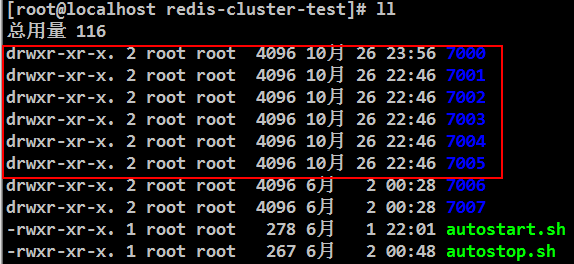
每个节点配置文件如下:
节点1:
bind 192.168.229.3
port 7000
cluster-enabled yes
cluster-config-file nodes.conf
cluster-node-timeout 5000
appendonly yes
daemonize yes
节点2:
bind 192.168.229.3
port 7001
cluster-enabled yes
cluster-config-file nodes.conf
cluster-node-timeout 5000
appendonly yes
daemonize yes
节点3:
bind 192.168.229.3
port 7002
cluster-enabled yes
cluster-config-file nodes.conf
cluster-node-timeout 5000
appendonly yes
daemonize yes
节点4:
bind 192.168.229.3
port 7003
cluster-enabled yes
cluster-config-file nodes.conf
cluster-node-timeout 5000
appendonly yes
daemonize yes
节点5:
bind 192.168.229.3
port 7004
cluster-enabled yes
cluster-config-file nodes.conf
cluster-node-timeout 5000
appendonly yes
daemonize yes
节点6:
bind 192.168.229.3
port 7006
cluster-enabled yes
cluster-config-file nodes.conf
cluster-node-timeout 5000
appendonly yes
daemonize yes
3、脚本
脚本名称:autostart.sh
#!/bin/bash

cd

../bin/redis-server ./redis.conf

cd ../

../bin/redis-server ./redis.conf

cd ../

../bin/redis-server ./redis.conf

cd ../

../bin/redis-server ./redis.conf

cd ../

../bin/redis-server ./redis.conf

cd ../

../bin/redis-server ./redis.conf
启动每个节点:./autostart.sh
脚本名称:autostop.sh
#!/bin/bash

bin/redis-cli -c -h 192.168.229.3 -p  shutdown

bin/redis-cli -c -h 192.168.229.3 -p  shutdown

bin/redis-cli -c -h 192.168.229.3 -p  shutdown

bin/redis-cli -c -h 192.168.229.3 -p  shutdown

bin/redis-cli -c -h 192.168.229.3 -p  shutdown
关闭每个节点:./autostop.sh
4、节点加入集群
./bin/redis-cli --cluster create \

192.168.229.3: \

192.168.229.3: \

192.168.229.3: \

192.168.229.3: \

192.168.229.3: \

192.168.229.3: \

--cluster-replicas
5、查看集群
[root@localhost redis-cluster-test]# bin/redis-cli -p  cluster nodes

Could not connect to Redis at 127.0.0.1:: Connection refused

[root@localhost redis-cluster-test]# bin/redis-cli -h 192.168.229.3 -p  cluster nodes

e096ad21c0ebdf3b7d69027e913fa3c39efee567 192.168.229.3:@ slave c7a0a4d6c2df0c1ef4fa64547208ea344c8bdcae    connected

977ed4958c35dcb2ac91b93ebb7a40dbdc1ad6ba 192.168.229.3:@ slave b0eaa0f5f64afcd24d8ccf881ae5008b932f5e9b    connected

c7a0a4d6c2df0c1ef4fa64547208ea344c8bdcae 192.168.229.3:@ master -    connected -

b0eaa0f5f64afcd24d8ccf881ae5008b932f5e9b 192.168.229.3:@ master -    connected -

97a9f66809401267d342edf06ab28e7baaf88963 192.168.229.3:@ myself,master -    connected -

5f4123f86387bd9252ade71940877a5224907fc6 192.168.229.3:@ slave 97a9f66809401267d342edf06ab28e7baaf88963    connected
如上图所示:
端口:7000、7001、7003节点为主节点;7002、7004、7005节点为从节点;myself为连接查看信息节点。
6、登录指定节点
[root@localhost redis-cluster-test]# bin/redis-cli -h 192.168.229.3 -p 7000 #登录指定节点
192.168.229.3:7000>
[root@localhost redis-cluster-test]# bin/redis-cli -c -h 192.168.229.3 -p 7000 #集群方式登录指定节点
192.168.229.3:7000> cluster nodes #查看集群信息
e096ad21c0ebdf3b7d69027e913fa3c39efee567 192.168.229.3:7002@17002 slave c7a0a4d6c2df0c1ef4fa64547208ea344c8bdcae 0 1572114511000 7 connected
977ed4958c35dcb2ac91b93ebb7a40dbdc1ad6ba 192.168.229.3:7005@17005 slave b0eaa0f5f64afcd24d8ccf881ae5008b932f5e9b 0 1572114512542 6 connected
c7a0a4d6c2df0c1ef4fa64547208ea344c8bdcae 192.168.229.3:7003@17003 master - 0 1572114512643 7 connected 10923-16383
b0eaa0f5f64afcd24d8ccf881ae5008b932f5e9b 192.168.229.3:7001@17001 master - 0 1572114512542 2 connected 5461-10922
97a9f66809401267d342edf06ab28e7baaf88963 192.168.229.3:7000@17000 myself,master - 0 1572114512000 1 connected 0-5460
5f4123f86387bd9252ade71940877a5224907fc6 192.168.229.3:7004@17004 slave 97a9f66809401267d342edf06ab28e7baaf88963 0 1572114512000 5 connected
192.168.229.3:7000>
7、集群添加节点
启动创建7006节点,配置如下:
bind 192.168.229.3
port 7006
cluster-enabled yes
cluster-config-file nodes.conf
cluster-node-timeout 5000
appendonly yes
daemonize yes
启动:
../bin/redis-server ./redis.conf
①添加节点到集群并查看:
[root@localhost redis-cluster-test]# bin/redis-cli --cluster add-node 192.168.229.3:7006 192.168.229.3:7000

>>> Adding node 192.168.229.3: to cluster 192.168.229.3:

>>> Performing Cluster Check (using node 192.168.229.3:)

S: 97a9f66809401267d342edf06ab28e7baaf88963 192.168.229.3:

   slots: ( slots) slave

   replicates 5f4123f86387bd9252ade71940877a5224907fc6

M: 5f4123f86387bd9252ade71940877a5224907fc6 192.168.229.3:

   slots:[-] ( slots) master

    additional replica(s)

M: c7a0a4d6c2df0c1ef4fa64547208ea344c8bdcae 192.168.229.3:

   slots:[-] ( slots) master

    additional replica(s)

S: e096ad21c0ebdf3b7d69027e913fa3c39efee567 192.168.229.3:

   slots: ( slots) slave

   replicates c7a0a4d6c2df0c1ef4fa64547208ea344c8bdcae

S: 977ed4958c35dcb2ac91b93ebb7a40dbdc1ad6ba 192.168.229.3:

   slots: ( slots) slave

   replicates b0eaa0f5f64afcd24d8ccf881ae5008b932f5e9b

M: b0eaa0f5f64afcd24d8ccf881ae5008b932f5e9b 192.168.229.3:

   slots:[-] ( slots) master

    additional replica(s)

[OK] All nodes agree about slots configuration.

>>> Check for open slots...

>>> Check slots coverage...

[OK] All  slots covered.

>>> Send CLUSTER MEET to node 192.168.229.3: to make it join the cluster.

[OK] New node added correctly.

[root@localhost redis-cluster-test]# bin/redis-cli -h 192.168.229.3 -p 7000 cluster nodes

e00cecbd042881c04167169f2f0f2df286146160 192.168.229.3:7006@17006 master - 0 1572115865563 0 connected

5f4123f86387bd9252ade71940877a5224907fc6 192.168.229.3:@ master -    connected -

c7a0a4d6c2df0c1ef4fa64547208ea344c8bdcae 192.168.229.3:@ master -    connected -

e096ad21c0ebdf3b7d69027e913fa3c39efee567 192.168.229.3:@ slave c7a0a4d6c2df0c1ef4fa64547208ea344c8bdcae    connected

977ed4958c35dcb2ac91b93ebb7a40dbdc1ad6ba 192.168.229.3:@ slave b0eaa0f5f64afcd24d8ccf881ae5008b932f5e9b    connected

b0eaa0f5f64afcd24d8ccf881ae5008b932f5e9b 192.168.229.3:@ master -    connected -

97a9f66809401267d342edf06ab28e7baaf88963 192.168.229.3:@ myself,slave 5f4123f86387bd9252ade71940877a5224907fc6    connected

[root@localhost redis-cluster-test]#
②删除7006节点,添加从节点:
删除7006文件已有的DB文件,否则在添加节点到集群的时候会报错:
[ERR] Node 192.168.229.3:7006 is not empty. Either the node already knows other nodes (check with CLUSTER NODES) or contains some key in database 0.
[root@localhost 7006]# ls
appendonly.aof nodes.conf redis.conf
[root@localhost 7006]# rm appendonly.aof nodes.conf
../bin/redis-server ./redis.conf #启动7006节点
[root@localhost redis-cluster-test]# bin/redis-cli --cluster add-node 192.168.229.3:7006 192.168.229.3:7000 --cluster-slave
>>> Adding node 192.168.229.3:7006 to cluster 192.168.229.3:7000
>>> Performing Cluster Check (using node 192.168.229.3:7000)
S: 97a9f66809401267d342edf06ab28e7baaf88963 192.168.229.3:7000
slots: (0 slots) slave
replicates 5f4123f86387bd9252ade71940877a5224907fc6
M: 5f4123f86387bd9252ade71940877a5224907fc6 192.168.229.3:7004
slots:[0-5460] (5461 slots) master
1 additional replica(s)
M: c7a0a4d6c2df0c1ef4fa64547208ea344c8bdcae 192.168.229.3:7003
slots:[10923-16383] (5461 slots) master
1 additional replica(s)
S: e096ad21c0ebdf3b7d69027e913fa3c39efee567 192.168.229.3:7002
slots: (0 slots) slave
replicates c7a0a4d6c2df0c1ef4fa64547208ea344c8bdcae
S: 977ed4958c35dcb2ac91b93ebb7a40dbdc1ad6ba 192.168.229.3:7005
slots: (0 slots) slave
replicates b0eaa0f5f64afcd24d8ccf881ae5008b932f5e9b
M: b0eaa0f5f64afcd24d8ccf881ae5008b932f5e9b 192.168.229.3:7001
slots:[5461-10922] (5462 slots) master
1 additional replica(s)
[OK] All nodes agree about slots configuration.
>>> Check for open slots...
>>> Check slots coverage...
[OK] All 16384 slots covered.
Automatically selected master 192.168.229.3:7004
>>> Send CLUSTER MEET to node 192.168.229.3:7006 to make it join the cluster.
Waiting for the cluster to join
>>> Configure node as replica of 192.168.229.3:7004.
[OK] New node added correctly.
[root@localhost redis-cluster-test]# bin/redis-cli -h 192.168.229.3 -p 7000 cluster nodes #查看节点信息
5f4123f86387bd9252ade71940877a5224907fc6 192.168.229.3:7004@17004 master - 0 1572116629602 8 connected 0-5460
c7a0a4d6c2df0c1ef4fa64547208ea344c8bdcae 192.168.229.3:7003@17003 master - 0 1572116630000 7 connected 10923-16383
e096ad21c0ebdf3b7d69027e913fa3c39efee567 192.168.229.3:7002@17002 slave c7a0a4d6c2df0c1ef4fa64547208ea344c8bdcae 0 1572116630942 7 connected
977ed4958c35dcb2ac91b93ebb7a40dbdc1ad6ba 192.168.229.3:7005@17005 slave b0eaa0f5f64afcd24d8ccf881ae5008b932f5e9b 0 1572116629000 6 connected
b0eaa0f5f64afcd24d8ccf881ae5008b932f5e9b 192.168.229.3:7001@17001 master - 0 1572116630532 2 connected 5461-10922
97a9f66809401267d342edf06ab28e7baaf88963 192.168.229.3:7000@17000 myself,slave 5f4123f86387bd9252ade71940877a5224907fc6 0 1572116630000 1 connected
407c8781fcfd4e84ebc0dda63c33ef978d826f66 192.168.229.3:7006@17006 slave 5f4123f86387bd9252ade71940877a5224907fc6 0 1572116629917 8 connected
[root@localhost redis-cluster-test]#
③删除7006节点,给指定主节点添加从节点:
bin/redis-cli --cluster add-node 192.168.229.3:7006 192.168.229.3:7000 --cluster-slave --cluster-master-id 3c3a0c74aae0b56170ccb03a76b60cfe7dc1912e
8、删除节点:
[root@localhost redis-cluster-test]# bin/redis-cli --cluster del-node 192.168.229.3:7006 e00cecbd042881c04167169f2f0f2df286146160

>>> Removing node e00cecbd042881c04167169f2f0f2df286146160 from cluster 192.168.229.3:

>>> Sending CLUSTER FORGET messages to the cluster...

>>> SHUTDOWN the node.

[root@localhost redis-cluster-test]# bin/redis-cli -h 192.168.229.3 -p  cluster nodes

5f4123f86387bd9252ade71940877a5224907fc6 192.168.229.3:@ master -    connected -

c7a0a4d6c2df0c1ef4fa64547208ea344c8bdcae 192.168.229.3:@ master -    connected -

e096ad21c0ebdf3b7d69027e913fa3c39efee567 192.168.229.3:@ slave c7a0a4d6c2df0c1ef4fa64547208ea344c8bdcae    connected

977ed4958c35dcb2ac91b93ebb7a40dbdc1ad6ba 192.168.229.3:@ slave b0eaa0f5f64afcd24d8ccf881ae5008b932f5e9b    connected

b0eaa0f5f64afcd24d8ccf881ae5008b932f5e9b 192.168.229.3:@ master -    connected -

97a9f66809401267d342edf06ab28e7baaf88963 192.168.229.3:@ myself,slave 5f4123f86387bd9252ade71940877a5224907fc6    connected
9、从节点复制主节点数据
[root@localhost redis-cluster-test]# bin/redis-cli -h 192.168.229.3 -p  cluster nodes

5f4123f86387bd9252ade71940877a5224907fc6 192.168.229.3:@ master -    connected -

c7a0a4d6c2df0c1ef4fa64547208ea344c8bdcae 192.168.229.3:@ master -    connected -

e096ad21c0ebdf3b7d69027e913fa3c39efee567 192.168.229.3:@ slave c7a0a4d6c2df0c1ef4fa64547208ea344c8bdcae    connected

977ed4958c35dcb2ac91b93ebb7a40dbdc1ad6ba 192.168.229.3:@ slave b0eaa0f5f64afcd24d8ccf881ae5008b932f5e9b    connected

b0eaa0f5f64afcd24d8ccf881ae5008b932f5e9b 192.168.229.3:@ master -    connected -

97a9f66809401267d342edf06ab28e7baaf88963 192.168.229.3:@ myself,slave 5f4123f86387bd9252ade71940877a5224907fc6    connected

407c8781fcfd4e84ebc0dda63c33ef978d826f66 192.168.229.3:@ slave 5f4123f86387bd9252ade71940877a5224907fc6    connected

[root@localhost redis-cluster-test]# bin/redis-cli -c -h 192.168.229.3 -p 7006 #手动同步主节点数据

192.168.229.3:> cluster replicate 5f4123f86387bd9252ade71940877a5224907fc6

OK

192.168.229.3:>
从上图可以7006节点为7004节点的从节点,手动触发同步主节点数据。
10、数据分片
添加新节点分片时,需要手动触发。
方式1:引导式
从7001移动100个slots到7004。
[root@localhost redis-cluster-test]# bin/redis-cli --cluster reshard 192.168.229.3:

>>> Performing Cluster Check (using node 192.168.229.3:)

S: 97a9f66809401267d342edf06ab28e7baaf88963 192.168.229.3:

   slots: ( slots) slave

   replicates 5f4123f86387bd9252ade71940877a5224907fc6

M: 5f4123f86387bd9252ade71940877a5224907fc6 192.168.229.3:

   slots:[-] ( slots) master

    additional replica(s)

M: c7a0a4d6c2df0c1ef4fa64547208ea344c8bdcae 192.168.229.3:

   slots:[-] ( slots) master

    additional replica(s)

S: e096ad21c0ebdf3b7d69027e913fa3c39efee567 192.168.229.3:

   slots: ( slots) slave

   replicates c7a0a4d6c2df0c1ef4fa64547208ea344c8bdcae

S: 977ed4958c35dcb2ac91b93ebb7a40dbdc1ad6ba 192.168.229.3:

   slots: ( slots) slave

   replicates b0eaa0f5f64afcd24d8ccf881ae5008b932f5e9b

M: b0eaa0f5f64afcd24d8ccf881ae5008b932f5e9b 192.168.229.3:

   slots:[-] ( slots) master

    additional replica(s)

S: 407c8781fcfd4e84ebc0dda63c33ef978d826f66 192.168.229.3:

   slots: ( slots) slave

   replicates 5f4123f86387bd9252ade71940877a5224907fc6

[OK] All nodes agree about slots configuration.

>>> Check for open slots...

>>> Check slots coverage...

[OK] All  slots covered.

How many slots do you want to move (from  to )?

What is the receiving node ID? 5f4123f86387bd9252ade71940877a5224907fc6

Please enter all the source node IDs.

  Type 'all' to use all the nodes as source nodes for the hash slots.

  Type 'done' once you entered all the source nodes IDs.

Source node #: b0eaa0f5f64afcd24d8ccf881ae5008b932f5e9b

Source node #: done

Ready to move  slots.

  Source nodes:

    M: b0eaa0f5f64afcd24d8ccf881ae5008b932f5e9b 192.168.229.3:

       slots:[-] ( slots) master

        additional replica(s)

  Destination node:

    M: 5f4123f86387bd9252ade71940877a5224907fc6 192.168.229.3:

       slots:[-] ( slots) master

        additional replica(s)

  Resharding plan:

    Moving slot  from b0eaa0f5f64afcd24d8ccf881ae5008b932f5e9b

    Moving slot  from b0eaa0f5f64afcd24d8ccf881ae5008b932f5e9b

    Moving slot  from b0eaa0f5f64afcd24d8ccf881ae5008b932f5e9b

    Moving slot  from b0eaa0f5f64afcd24d8ccf881ae5008b932f5e9b

    Moving slot  from b0eaa0f5f64afcd24d8ccf881ae5008b932f5e9b

    Moving slot  from b0eaa0f5f64afcd24d8ccf881ae5008b932f5e9b

    Moving slot  from b0eaa0f5f64afcd24d8ccf881ae5008b932f5e9b

    Moving slot  from b0eaa0f5f64afcd24d8ccf881ae5008b932f5e9b

    Moving slot  from b0eaa0f5f64afcd24d8ccf881ae5008b932f5e9b

    Moving slot  from b0eaa0f5f64afcd24d8ccf881ae5008b932f5e9b

    Moving slot  from b0eaa0f5f64afcd24d8ccf881ae5008b932f5e9b

    Moving slot  from b0eaa0f5f64afcd24d8ccf881ae5008b932f5e9b

    Moving slot  from b0eaa0f5f64afcd24d8ccf881ae5008b932f5e9b

    Moving slot  from b0eaa0f5f64afcd24d8ccf881ae5008b932f5e9b

    Moving slot  from b0eaa0f5f64afcd24d8ccf881ae5008b932f5e9b

    Moving slot  from b0eaa0f5f64afcd24d8ccf881ae5008b932f5e9b

    Moving slot  from b0eaa0f5f64afcd24d8ccf881ae5008b932f5e9b

    Moving slot  from b0eaa0f5f64afcd24d8ccf881ae5008b932f5e9b

    Moving slot  from b0eaa0f5f64afcd24d8ccf881ae5008b932f5e9b

    Moving slot  from b0eaa0f5f64afcd24d8ccf881ae5008b932f5e9b

    Moving slot  from b0eaa0f5f64afcd24d8ccf881ae5008b932f5e9b

    Moving slot  from b0eaa0f5f64afcd24d8ccf881ae5008b932f5e9b

    Moving slot  from b0eaa0f5f64afcd24d8ccf881ae5008b932f5e9b

    Moving slot  from b0eaa0f5f64afcd24d8ccf881ae5008b932f5e9b

    Moving slot  from b0eaa0f5f64afcd24d8ccf881ae5008b932f5e9b

    Moving slot  from b0eaa0f5f64afcd24d8ccf881ae5008b932f5e9b

    Moving slot  from b0eaa0f5f64afcd24d8ccf881ae5008b932f5e9b

    Moving slot  from b0eaa0f5f64afcd24d8ccf881ae5008b932f5e9b

    Moving slot  from b0eaa0f5f64afcd24d8ccf881ae5008b932f5e9b

    Moving slot  from b0eaa0f5f64afcd24d8ccf881ae5008b932f5e9b

    Moving slot  from b0eaa0f5f64afcd24d8ccf881ae5008b932f5e9b

    Moving slot  from b0eaa0f5f64afcd24d8ccf881ae5008b932f5e9b

    Moving slot  from b0eaa0f5f64afcd24d8ccf881ae5008b932f5e9b

    Moving slot  from b0eaa0f5f64afcd24d8ccf881ae5008b932f5e9b

    Moving slot  from b0eaa0f5f64afcd24d8ccf881ae5008b932f5e9b

    Moving slot  from b0eaa0f5f64afcd24d8ccf881ae5008b932f5e9b

    Moving slot  from b0eaa0f5f64afcd24d8ccf881ae5008b932f5e9b

    Moving slot  from b0eaa0f5f64afcd24d8ccf881ae5008b932f5e9b

    Moving slot  from b0eaa0f5f64afcd24d8ccf881ae5008b932f5e9b

    Moving slot  from b0eaa0f5f64afcd24d8ccf881ae5008b932f5e9b

    Moving slot  from b0eaa0f5f64afcd24d8ccf881ae5008b932f5e9b

    Moving slot  from b0eaa0f5f64afcd24d8ccf881ae5008b932f5e9b

    Moving slot  from b0eaa0f5f64afcd24d8ccf881ae5008b932f5e9b

    Moving slot  from b0eaa0f5f64afcd24d8ccf881ae5008b932f5e9b

    Moving slot  from b0eaa0f5f64afcd24d8ccf881ae5008b932f5e9b

    Moving slot  from b0eaa0f5f64afcd24d8ccf881ae5008b932f5e9b

    Moving slot  from b0eaa0f5f64afcd24d8ccf881ae5008b932f5e9b

    Moving slot  from b0eaa0f5f64afcd24d8ccf881ae5008b932f5e9b

    Moving slot  from b0eaa0f5f64afcd24d8ccf881ae5008b932f5e9b

    Moving slot  from b0eaa0f5f64afcd24d8ccf881ae5008b932f5e9b

    Moving slot  from b0eaa0f5f64afcd24d8ccf881ae5008b932f5e9b

    Moving slot  from b0eaa0f5f64afcd24d8ccf881ae5008b932f5e9b

    Moving slot  from b0eaa0f5f64afcd24d8ccf881ae5008b932f5e9b

    Moving slot  from b0eaa0f5f64afcd24d8ccf881ae5008b932f5e9b

    Moving slot  from b0eaa0f5f64afcd24d8ccf881ae5008b932f5e9b

    Moving slot  from b0eaa0f5f64afcd24d8ccf881ae5008b932f5e9b

    Moving slot  from b0eaa0f5f64afcd24d8ccf881ae5008b932f5e9b

    Moving slot  from b0eaa0f5f64afcd24d8ccf881ae5008b932f5e9b

    Moving slot  from b0eaa0f5f64afcd24d8ccf881ae5008b932f5e9b

    Moving slot  from b0eaa0f5f64afcd24d8ccf881ae5008b932f5e9b

    Moving slot  from b0eaa0f5f64afcd24d8ccf881ae5008b932f5e9b

    Moving slot  from b0eaa0f5f64afcd24d8ccf881ae5008b932f5e9b

    Moving slot  from b0eaa0f5f64afcd24d8ccf881ae5008b932f5e9b

    Moving slot  from b0eaa0f5f64afcd24d8ccf881ae5008b932f5e9b

    Moving slot  from b0eaa0f5f64afcd24d8ccf881ae5008b932f5e9b

    Moving slot  from b0eaa0f5f64afcd24d8ccf881ae5008b932f5e9b

    Moving slot  from b0eaa0f5f64afcd24d8ccf881ae5008b932f5e9b

    Moving slot  from b0eaa0f5f64afcd24d8ccf881ae5008b932f5e9b

    Moving slot  from b0eaa0f5f64afcd24d8ccf881ae5008b932f5e9b

    Moving slot  from b0eaa0f5f64afcd24d8ccf881ae5008b932f5e9b

    Moving slot  from b0eaa0f5f64afcd24d8ccf881ae5008b932f5e9b

    Moving slot  from b0eaa0f5f64afcd24d8ccf881ae5008b932f5e9b

    Moving slot  from b0eaa0f5f64afcd24d8ccf881ae5008b932f5e9b

    Moving slot  from b0eaa0f5f64afcd24d8ccf881ae5008b932f5e9b

    Moving slot  from b0eaa0f5f64afcd24d8ccf881ae5008b932f5e9b

    Moving slot  from b0eaa0f5f64afcd24d8ccf881ae5008b932f5e9b

    Moving slot  from b0eaa0f5f64afcd24d8ccf881ae5008b932f5e9b

    Moving slot  from b0eaa0f5f64afcd24d8ccf881ae5008b932f5e9b

    Moving slot  from b0eaa0f5f64afcd24d8ccf881ae5008b932f5e9b

    Moving slot  from b0eaa0f5f64afcd24d8ccf881ae5008b932f5e9b

    Moving slot  from b0eaa0f5f64afcd24d8ccf881ae5008b932f5e9b

    Moving slot  from b0eaa0f5f64afcd24d8ccf881ae5008b932f5e9b

    Moving slot  from b0eaa0f5f64afcd24d8ccf881ae5008b932f5e9b

    Moving slot  from b0eaa0f5f64afcd24d8ccf881ae5008b932f5e9b

    Moving slot  from b0eaa0f5f64afcd24d8ccf881ae5008b932f5e9b

    Moving slot  from b0eaa0f5f64afcd24d8ccf881ae5008b932f5e9b

    Moving slot  from b0eaa0f5f64afcd24d8ccf881ae5008b932f5e9b

    Moving slot  from b0eaa0f5f64afcd24d8ccf881ae5008b932f5e9b

    Moving slot  from b0eaa0f5f64afcd24d8ccf881ae5008b932f5e9b

    Moving slot  from b0eaa0f5f64afcd24d8ccf881ae5008b932f5e9b

    Moving slot  from b0eaa0f5f64afcd24d8ccf881ae5008b932f5e9b

    Moving slot  from b0eaa0f5f64afcd24d8ccf881ae5008b932f5e9b

    Moving slot  from b0eaa0f5f64afcd24d8ccf881ae5008b932f5e9b

    Moving slot  from b0eaa0f5f64afcd24d8ccf881ae5008b932f5e9b

    Moving slot  from b0eaa0f5f64afcd24d8ccf881ae5008b932f5e9b

    Moving slot  from b0eaa0f5f64afcd24d8ccf881ae5008b932f5e9b

    Moving slot  from b0eaa0f5f64afcd24d8ccf881ae5008b932f5e9b

    Moving slot  from b0eaa0f5f64afcd24d8ccf881ae5008b932f5e9b

    Moving slot  from b0eaa0f5f64afcd24d8ccf881ae5008b932f5e9b

Do you want to proceed with the proposed reshard plan (yes/no)? yes

Moving slot  from 192.168.229.3: to 192.168.229.3::

Moving slot  from 192.168.229.3: to 192.168.229.3::

Moving slot  from 192.168.229.3: to 192.168.229.3::

Moving slot  from 192.168.229.3: to 192.168.229.3::

Moving slot  from 192.168.229.3: to 192.168.229.3::

Moving slot  from 192.168.229.3: to 192.168.229.3::

Moving slot  from 192.168.229.3: to 192.168.229.3::

Moving slot  from 192.168.229.3: to 192.168.229.3::

Moving slot  from 192.168.229.3: to 192.168.229.3::

Moving slot  from 192.168.229.3: to 192.168.229.3::

Moving slot  from 192.168.229.3: to 192.168.229.3::

Moving slot  from 192.168.229.3: to 192.168.229.3::

Moving slot  from 192.168.229.3: to 192.168.229.3::

Moving slot  from 192.168.229.3: to 192.168.229.3::

Moving slot  from 192.168.229.3: to 192.168.229.3::

Moving slot  from 192.168.229.3: to 192.168.229.3::
[root@localhost redis-cluster-test]#
方式2:命令式
从7001移动100个slots到7004。
[root@localhost redis-cluster-test]# bin/redis-cli --cluster reshard 192.168.229.3:7000 \

> --cluster-from b0eaa0f5f64afcd24d8ccf881ae5008b932f5e9b \

> --cluster-to 5f4123f86387bd9252ade71940877a5224907fc6 \

> --cluster-slots 100 \

> --cluster-yes

>>> Performing Cluster Check (using node 192.168.229.3:)

S: 97a9f66809401267d342edf06ab28e7baaf88963 192.168.229.3:

   slots: ( slots) slave

   replicates 5f4123f86387bd9252ade71940877a5224907fc6

M: 5f4123f86387bd9252ade71940877a5224907fc6 192.168.229.3:

   slots:[-] ( slots) master

    additional replica(s)

M: c7a0a4d6c2df0c1ef4fa64547208ea344c8bdcae 192.168.229.3:

   slots:[-] ( slots) master

    additional replica(s)

S: e096ad21c0ebdf3b7d69027e913fa3c39efee567 192.168.229.3:

   slots: ( slots) slave

   replicates c7a0a4d6c2df0c1ef4fa64547208ea344c8bdcae

S: 977ed4958c35dcb2ac91b93ebb7a40dbdc1ad6ba 192.168.229.3:

   slots: ( slots) slave

   replicates b0eaa0f5f64afcd24d8ccf881ae5008b932f5e9b

M: b0eaa0f5f64afcd24d8ccf881ae5008b932f5e9b 192.168.229.3:

   slots:[-] ( slots) master

    additional replica(s)

S: 407c8781fcfd4e84ebc0dda63c33ef978d826f66 192.168.229.3:

   slots: ( slots) slave

   replicates 5f4123f86387bd9252ade71940877a5224907fc6

[OK] All nodes agree about slots configuration.

>>> Check for open slots...

>>> Check slots coverage...

[OK] All  slots covered.

Ready to move  slots.

  Source nodes:

    M: b0eaa0f5f64afcd24d8ccf881ae5008b932f5e9b 192.168.229.3:

       slots:[-] ( slots) master

        additional replica(s)

  Destination node:

    M: 5f4123f86387bd9252ade71940877a5224907fc6 192.168.229.3:

       slots:[-] ( slots) master

        additional replica(s)

  Resharding plan:

    Moving slot  from b0eaa0f5f64afcd24d8ccf881ae5008b932f5e9b

    Moving slot  from b0eaa0f5f64afcd24d8ccf881ae5008b932f5e9b

    Moving slot  from b0eaa0f5f64afcd24d8ccf881ae5008b932f5e9b

    Moving slot  from b0eaa0f5f64afcd24d8ccf881ae5008b932f5e9b

    Moving slot  from b0eaa0f5f64afcd24d8ccf881ae5008b932f5e9b

    Moving slot  from b0eaa0f5f64afcd24d8ccf881ae5008b932f5e9b

    Moving slot  from b0eaa0f5f64afcd24d8ccf881ae5008b932f5e9b

    Moving slot  from b0eaa0f5f64afcd24d8ccf881ae5008b932f5e9b

    Moving slot  from b0eaa0f5f64afcd24d8ccf881ae5008b932f5e9b

    Moving slot  from b0eaa0f5f64afcd24d8ccf881ae5008b932f5e9b

    Moving slot  from b0eaa0f5f64afcd24d8ccf881ae5008b932f5e9b

    Moving slot  from b0eaa0f5f64afcd24d8ccf881ae5008b932f5e9b

    Moving slot  from b0eaa0f5f64afcd24d8ccf881ae5008b932f5e9b

    Moving slot  from b0eaa0f5f64afcd24d8ccf881ae5008b932f5e9b

    Moving slot  from b0eaa0f5f64afcd24d8ccf881ae5008b932f5e9b

    Moving slot  from b0eaa0f5f64afcd24d8ccf881ae5008b932f5e9b

    Moving slot  from b0eaa0f5f64afcd24d8ccf881ae5008b932f5e9b

    Moving slot  from b0eaa0f5f64afcd24d8ccf881ae5008b932f5e9b

    Moving slot  from b0eaa0f5f64afcd24d8ccf881ae5008b932f5e9b

    Moving slot  from b0eaa0f5f64afcd24d8ccf881ae5008b932f5e9b

    Moving slot  from b0eaa0f5f64afcd24d8ccf881ae5008b932f5e9b

    Moving slot  from b0eaa0f5f64afcd24d8ccf881ae5008b932f5e9b

    Moving slot  from b0eaa0f5f64afcd24d8ccf881ae5008b932f5e9b

    Moving slot  from b0eaa0f5f64afcd24d8ccf881ae5008b932f5e9b

    Moving slot  from b0eaa0f5f64afcd24d8ccf881ae5008b932f5e9b

    Moving slot  from b0eaa0f5f64afcd24d8ccf881ae5008b932f5e9b

    Moving slot  from b0eaa0f5f64afcd24d8ccf881ae5008b932f5e9b

    Moving slot  from b0eaa0f5f64afcd24d8ccf881ae5008b932f5e9b

    Moving slot  from b0eaa0f5f64afcd24d8ccf881ae5008b932f5e9b

    Moving slot  from b0eaa0f5f64afcd24d8ccf881ae5008b932f5e9b

    Moving slot  from b0eaa0f5f64afcd24d8ccf881ae5008b932f5e9b

    Moving slot  from b0eaa0f5f64afcd24d8ccf881ae5008b932f5e9b

    Moving slot  from b0eaa0f5f64afcd24d8ccf881ae5008b932f5e9b

    Moving slot  from b0eaa0f5f64afcd24d8ccf881ae5008b932f5e9b

    Moving slot  from b0eaa0f5f64afcd24d8ccf881ae5008b932f5e9b

    Moving slot  from b0eaa0f5f64afcd24d8ccf881ae5008b932f5e9b

    Moving slot  from b0eaa0f5f64afcd24d8ccf881ae5008b932f5e9b

    Moving slot  from b0eaa0f5f64afcd24d8ccf881ae5008b932f5e9b

    Moving slot  from b0eaa0f5f64afcd24d8ccf881ae5008b932f5e9b

    Moving slot  from b0eaa0f5f64afcd24d8ccf881ae5008b932f5e9b

    Moving slot  from b0eaa0f5f64afcd24d8ccf881ae5008b932f5e9b

    Moving slot  from b0eaa0f5f64afcd24d8ccf881ae5008b932f5e9b

    Moving slot  from b0eaa0f5f64afcd24d8ccf881ae5008b932f5e9b

    Moving slot  from b0eaa0f5f64afcd24d8ccf881ae5008b932f5e9b

    Moving slot  from b0eaa0f5f64afcd24d8ccf881ae5008b932f5e9b

    Moving slot  from b0eaa0f5f64afcd24d8ccf881ae5008b932f5e9b

    Moving slot  from b0eaa0f5f64afcd24d8ccf881ae5008b932f5e9b

    Moving slot  from b0eaa0f5f64afcd24d8ccf881ae5008b932f5e9b

    Moving slot  from b0eaa0f5f64afcd24d8ccf881ae5008b932f5e9b

    Moving slot  from b0eaa0f5f64afcd24d8ccf881ae5008b932f5e9b

    Moving slot  from b0eaa0f5f64afcd24d8ccf881ae5008b932f5e9b

    Moving slot  from b0eaa0f5f64afcd24d8ccf881ae5008b932f5e9b

    Moving slot  from b0eaa0f5f64afcd24d8ccf881ae5008b932f5e9b

    Moving slot  from b0eaa0f5f64afcd24d8ccf881ae5008b932f5e9b

    Moving slot  from b0eaa0f5f64afcd24d8ccf881ae5008b932f5e9b

    Moving slot  from b0eaa0f5f64afcd24d8ccf881ae5008b932f5e9b

    Moving slot  from b0eaa0f5f64afcd24d8ccf881ae5008b932f5e9b

    Moving slot  from b0eaa0f5f64afcd24d8ccf881ae5008b932f5e9b

    Moving slot  from b0eaa0f5f64afcd24d8ccf881ae5008b932f5e9b

    Moving slot  from b0eaa0f5f64afcd24d8ccf881ae5008b932f5e9b

    Moving slot  from b0eaa0f5f64afcd24d8ccf881ae5008b932f5e9b

    Moving slot  from b0eaa0f5f64afcd24d8ccf881ae5008b932f5e9b

    Moving slot  from b0eaa0f5f64afcd24d8ccf881ae5008b932f5e9b

    Moving slot  from b0eaa0f5f64afcd24d8ccf881ae5008b932f5e9b

    Moving slot  from b0eaa0f5f64afcd24d8ccf881ae5008b932f5e9b

    Moving slot  from b0eaa0f5f64afcd24d8ccf881ae5008b932f5e9b

    Moving slot  from b0eaa0f5f64afcd24d8ccf881ae5008b932f5e9b

    Moving slot  from b0eaa0f5f64afcd24d8ccf881ae5008b932f5e9b

    Moving slot  from b0eaa0f5f64afcd24d8ccf881ae5008b932f5e9b

    Moving slot  from b0eaa0f5f64afcd24d8ccf881ae5008b932f5e9b

    Moving slot  from b0eaa0f5f64afcd24d8ccf881ae5008b932f5e9b

    Moving slot  from b0eaa0f5f64afcd24d8ccf881ae5008b932f5e9b

    Moving slot  from b0eaa0f5f64afcd24d8ccf881ae5008b932f5e9b

    Moving slot  from b0eaa0f5f64afcd24d8ccf881ae5008b932f5e9b

    Moving slot  from b0eaa0f5f64afcd24d8ccf881ae5008b932f5e9b

    Moving slot  from b0eaa0f5f64afcd24d8ccf881ae5008b932f5e9b

    Moving slot  from b0eaa0f5f64afcd24d8ccf881ae5008b932f5e9b

    Moving slot  from b0eaa0f5f64afcd24d8ccf881ae5008b932f5e9b

    Moving slot  from b0eaa0f5f64afcd24d8ccf881ae5008b932f5e9b

    Moving slot  from b0eaa0f5f64afcd24d8ccf881ae5008b932f5e9b

    Moving slot  from b0eaa0f5f64afcd24d8ccf881ae5008b932f5e9b

    Moving slot  from b0eaa0f5f64afcd24d8ccf881ae5008b932f5e9b

    Moving slot  from b0eaa0f5f64afcd24d8ccf881ae5008b932f5e9b

    Moving slot  from b0eaa0f5f64afcd24d8ccf881ae5008b932f5e9b

    Moving slot  from b0eaa0f5f64afcd24d8ccf881ae5008b932f5e9b

    Moving slot  from b0eaa0f5f64afcd24d8ccf881ae5008b932f5e9b

    Moving slot  from b0eaa0f5f64afcd24d8ccf881ae5008b932f5e9b

    Moving slot  from b0eaa0f5f64afcd24d8ccf881ae5008b932f5e9b

    Moving slot  from b0eaa0f5f64afcd24d8ccf881ae5008b932f5e9b

    Moving slot  from b0eaa0f5f64afcd24d8ccf881ae5008b932f5e9b

    Moving slot  from b0eaa0f5f64afcd24d8ccf881ae5008b932f5e9b

    Moving slot  from b0eaa0f5f64afcd24d8ccf881ae5008b932f5e9b

    Moving slot  from b0eaa0f5f64afcd24d8ccf881ae5008b932f5e9b

    Moving slot  from b0eaa0f5f64afcd24d8ccf881ae5008b932f5e9b

    Moving slot  from b0eaa0f5f64afcd24d8ccf881ae5008b932f5e9b

    Moving slot  from b0eaa0f5f64afcd24d8ccf881ae5008b932f5e9b

    Moving slot  from b0eaa0f5f64afcd24d8ccf881ae5008b932f5e9b

    Moving slot  from b0eaa0f5f64afcd24d8ccf881ae5008b932f5e9b

    Moving slot  from b0eaa0f5f64afcd24d8ccf881ae5008b932f5e9b

    Moving slot  from b0eaa0f5f64afcd24d8ccf881ae5008b932f5e9b

Moving slot  from 192.168.229.3: to 192.168.229.3::

Moving slot  from 192.168.229.3: to 192.168.229.3::

Moving slot  from 192.168.229.3: to 192.168.229.3::

Moving slot  from 192.168.229.3: to 192.168.229.3::

Moving slot  from 192.168.229.3: to 192.168.229.3::

Moving slot  from 192.168.229.3: to 192.168.229.3::

Moving slot  from 192.168.229.3: to 192.168.229.3::

Moving slot  from 192.168.229.3: to 192.168.229.3::

Moving slot  from 192.168.229.3: to 192.168.229.3::

Moving slot  from 192.168.229.3: to 192.168.229.3::

Moving slot  from 192.168.229.3: to 192.168.229.3::

Moving slot  from 192.168.229.3: to 192.168.229.3::

Moving slot  from 192.168.229.3: to 192.168.229.3::

Moving slot  from 192.168.229.3: to 192.168.229.3::

Moving slot  from 192.168.229.3: to 192.168.229.3::

Moving slot  from 192.168.229.3: to 192.168.229.3::

Moving slot  from 192.168.229.3: to 192.168.229.3::

Moving slot  from 192.168.229.3: to 192.168.229.3::

Moving slot  from 192.168.229.3: to 192.168.229.3::

Moving slot  from 192.168.229.3: to 192.168.229.3::

Moving slot  from 192.168.229.3: to 192.168.229.3::

Moving slot  from 192.168.229.3: to 192.168.229.3::

Moving slot  from 192.168.229.3: to 192.168.229.3::

Moving slot  from 192.168.229.3: to 192.168.229.3::

Moving slot  from 192.168.229.3: to 192.168.229.3::

Moving slot  from 192.168.229.3: to 192.168.229.3::

Moving slot  from 192.168.229.3: to 192.168.229.3::

Moving slot  from 192.168.229.3: to 192.168.229.3::

Moving slot  from 192.168.229.3: to 192.168.229.3::

Moving slot  from 192.168.229.3: to 192.168.229.3::

Moving slot  from 192.168.229.3: to 192.168.229.3::

Moving slot  from 192.168.229.3: to 192.168.229.3::

Moving slot  from 192.168.229.3: to 192.168.229.3::

Moving slot  from 192.168.229.3: to 192.168.229.3::

Moving slot  from 192.168.229.3: to 192.168.229.3::

Moving slot  from 192.168.229.3: to 192.168.229.3::

Moving slot  from 192.168.229.3: to 192.168.229.3::

Moving slot  from 192.168.229.3: to 192.168.229.3::

Moving slot  from 192.168.229.3: to 192.168.229.3::

Moving slot  from 192.168.229.3: to 192.168.229.3::

Moving slot  from 192.168.229.3: to 192.168.229.3::

Moving slot  from 192.168.229.3: to 192.168.229.3::

Moving slot  from 192.168.229.3: to 192.168.229.3::

Moving slot  from 192.168.229.3: to 192.168.229.3::

Moving slot  from 192.168.229.3: to 192.168.229.3::

Moving slot  from 192.168.229.3: to 192.168.229.3::

Moving slot  from 192.168.229.3: to 192.168.229.3::

Moving slot  from 192.168.229.3: to 192.168.229.3::

Moving slot  from 192.168.229.3: to 192.168.229.3::

Moving slot  from 192.168.229.3: to 192.168.229.3::

Moving slot  from 192.168.229.3: to 192.168.229.3::

Moving slot  from 192.168.229.3: to 192.168.229.3::

Moving slot  from 192.168.229.3: to 192.168.229.3::

Moving slot  from 192.168.229.3: to 192.168.229.3::

Moving slot  from 192.168.229.3: to 192.168.229.3::

Moving slot  from 192.168.229.3: to 192.168.229.3::

Moving slot  from 192.168.229.3: to 192.168.229.3::

Moving slot  from 192.168.229.3: to 192.168.229.3::

Moving slot  from 192.168.229.3: to 192.168.229.3::

Moving slot  from 192.168.229.3: to 192.168.229.3:: .

Moving slot  from 192.168.229.3: to 192.168.229.3::

Moving slot  from 192.168.229.3: to 192.168.229.3::

Moving slot  from 192.168.229.3: to 192.168.229.3::

Moving slot  from 192.168.229.3: to 192.168.229.3::

Moving slot  from 192.168.229.3: to 192.168.229.3::

Moving slot  from 192.168.229.3: to 192.168.229.3::

Moving slot  from 192.168.229.3: to 192.168.229.3::

Moving slot  from 192.168.229.3: to 192.168.229.3::

Moving slot  from 192.168.229.3: to 192.168.229.3::

Moving slot  from 192.168.229.3: to 192.168.229.3::

Moving slot  from 192.168.229.3: to 192.168.229.3::

Moving slot  from 192.168.229.3: to 192.168.229.3::

Moving slot  from 192.168.229.3: to 192.168.229.3::

Moving slot  from 192.168.229.3: to 192.168.229.3::

Moving slot  from 192.168.229.3: to 192.168.229.3::

Moving slot  from 192.168.229.3: to 192.168.229.3::

Moving slot  from 192.168.229.3: to 192.168.229.3::

Moving slot  from 192.168.229.3: to 192.168.229.3::

Moving slot  from 192.168.229.3: to 192.168.229.3::

Moving slot  from 192.168.229.3: to 192.168.229.3::

Moving slot  from 192.168.229.3: to 192.168.229.3::

Moving slot  from 192.168.229.3: to 192.168.229.3::

Moving slot  from 192.168.229.3: to 192.168.229.3::

Moving slot  from 192.168.229.3: to 192.168.229.3::

Moving slot  from 192.168.229.3: to 192.168.229.3::

Moving slot  from 192.168.229.3: to 192.168.229.3::

Moving slot  from 192.168.229.3: to 192.168.229.3::

Moving slot  from 192.168.229.3: to 192.168.229.3::

Moving slot  from 192.168.229.3: to 192.168.229.3::

Moving slot  from 192.168.229.3: to 192.168.229.3::

Moving slot  from 192.168.229.3: to 192.168.229.3::

Moving slot  from 192.168.229.3: to 192.168.229.3::

Moving slot  from 192.168.229.3: to 192.168.229.3::

Moving slot  from 192.168.229.3: to 192.168.229.3::

Moving slot  from 192.168.229.3: to 192.168.229.3::

Moving slot  from 192.168.229.3: to 192.168.229.3::

Moving slot  from 192.168.229.3: to 192.168.229.3::

Moving slot  from 192.168.229.3: to 192.168.229.3::

Moving slot  from 192.168.229.3: to 192.168.229.3::

Moving slot  from 192.168.229.3: to 192.168.229.3::
Redis集群-主从模式的更多相关文章
- (转)基于Redis Sentinel的Redis集群(主从&Sharding)高可用方案
转载自:http://warm-breeze.iteye.com/blog/2020413 本文主要介绍一种通过Jedis&Sentinel实现Redis集群高可用方案,该方案需要使用Jedi ...
- 基于Redis Sentinel的Redis集群(主从Sharding)高可用方案(转)
本文主要介绍一种通过Jedis&Sentinel实现Redis集群高可用方案,该方案需要使用Jedis2.2.2及以上版本(强制),Redis2.8及以上版本(可选,Sentinel最早出现在 ...
- redis集群cluster模式搭建
实验服务器 :192.168.44.139 192.168.44.138 192.168.44.144 在 192.168.44.139上操作: 将redis的包上传的新建的目录newtouc ...
- 基于Redis Sentinel的Redis集群(主从&Sharding)高可用方案
本文主要介绍一种通过Jedis&Sentinel实现Redis集群高可用方案,该方案需要使用Jedis2.2.2及以上版本(强制),Redis2.8及以上版本(可选,Sentinel最早出现在 ...
- php操作redis集群哨兵模式
前段时间项目里正好用到了redis的集群哨兵部署,因为此前并无了解过,所以一脸懵逼啊,查阅了几篇资料,特此综合总结一下,作为记录. 写在前沿:随着项目的扩张,对redis的依赖也越来越大,为了增强re ...
- 查看Redis集群主从对应关系工具
工具的作用: 1)比"cluster nodes"更为直观的显示结果 2)指出落在同一个IP上的master 3)指出落在同一个IP上的master和slave对 运行效果图: 源 ...
- redis集群主从集群搭建、sentinel(哨兵集群)配置以及Jedis 哨兵模式简要配置
前端时间项目上为了提高平台性能,为应用添加了redis缓存,为了提高服务的可靠性,redis部署了高可用的主从缓存,主从切换使用的redis自带的sentinel集群.现在权作记录.
- Redis Sentinel的Redis集群(主从&Sharding)高可用方案
在不使用redis3.0之后版本的情况下,对于redis服务端一般是采用Sentinel哨兵模式,也就是一主多备的方式. 这里,先抛出三个问题, 问题1:单节点宕机数据丢失?问题2:多节点(节点间没有 ...
- Redis集群-Cluster模式
我理解的此模式与哨兵模式根本区别: 哨兵模式采用主从复制模式,主和从数据都是一致的.全量数据: Cluster模式采用数据分片存储,对每个 key 计算 CRC16 值,然后对 16384 取模,可以 ...
随机推荐
- csdn code git下载运行的问题
问题是,上传上去的脚本编码会有问题,老报 syntax error: unexpected end of file 搜索之,找到了 http://hi.baidu.com/homappy/item/f ...
- express+mysql实现简单的登录功能
登录页面图: node.js文件代码: const express=require("express"); const app=express(); const path=requ ...
- Netty 中的消息解析和编解码器
本篇内容主要梳理一下 Netty 中编解码器的逻辑和编解码器在 Netty 整个链路中的位置. 前面我们在分析 ChannelPipeline 的时候说到入站和出站事件的处理都在 pipeline 中 ...
- shiro的ssm集成和简单的开发尝试
配置web.xml <!-- 配置shiro的集成开始 --> <filter> <filter-name>shiroFilter</filter-name& ...
- Docker的iptables规则在iptables重启后丢失
前因后果 1.在跳板机上使用ansible命令测试机器B时,报错如下,于是就怀疑是网络防火墙的问题 10.10.0.86 | FAILED >> { "failed": ...
- 【JavaScript数据结构系列】00-开篇
[JavaScript数据结构系列]00-开篇 码路工人 CoderMonkey 转载请注明作者与出处 ## 0. 开篇[JavaScript数据结构与算法] 大的计划,写以下两部分: 1[JavaS ...
- 【图像处理】利用C++编写函数,绘制灰度图像直方图
1. 简介 利用OpenCV读取图像,转换为灰度图像,绘制该灰度图像直方图.点击直方图,控制台输出该灰度级像素个数. 2. 原理 (1) 实现原理较为简单,主要利用了OpenCV读取图像,并转换为灰度 ...
- [256个管理学理论]002.青蛙效应(Frog Effect)
青蛙效应(Frog Effect) 从一个话题开始: 当下,社会发展突飞猛进,日新月异.在世界经济危机中,我国国民生产总值增长幅度始终在8%以上,引起世人的瞩目. 但,在国内时常也能听到广大投资者对股 ...
- 【转】shell的反引号、单引号、双引号的作用
Linux Shell中有三种引号,分别为双引号(" ").单引号(' ')以及反引号(` `). 其中双引号对字符串中出现的$.''.`和\进行替换:单引号不进行替换,将字符串中 ...
- Java多线程通关——基础知识挑战
等掌握了基础知识之后,才有资格说基础知识没用这样的话.否则就老老实实的开始吧. 对象的监视器 每一个Java对象都有一个监视器.并且规定,每个对象的监视器每次只能被一个线程拥有,只有拥有它的线 ...