
Spring Cloud Alibaba系列(一)nacos作为服务注册中心
Spring Cloud Alibaba各组件版本关系
| Spring Cloud Alibaba Version | Sentinel Version | Nacos Version | RocketMQ Version | Dubbo Version | Seata Version |
|---|---|---|---|---|---|
| 2.2.1.RELEASE | 1.7.1 | 1.2.1 | 4.4.0 | 2.7.6 | 1.1.0 |
| 2.2.0.RELEASE | 1.7.1 | 1.1.4 | 4.4.0 | 2.7.4.1 | 1.0.0 |
| 2.1.2.RELEASE or 2.0.2.RELEASE | 1.7.1 | 1.2.1 | 4.4.0 | 2.7.6 | 1.1.0 |
| 2.1.1.RELEASE or 2.0.1.RELEASE or 1.5.1.RELEASE | 1.7.0 | 1.1.4 | 4.4.0 | 2.7.3 | 0.9.0 |
| 2.1.0.RELEASE or 2.0.0.RELEASE or 1.5.0.RELEASE | 1.6.3 | 1.1.1 | 4.4.0 | 2.7.3 | 0.7.1 |
毕业版本依赖关系
| Spring Cloud Version | Spring Cloud Alibaba Version | Spring Boot Version |
|---|---|---|
| Spring Cloud Hoxton.SR3 | 2.2.1.RELEASE | 2.2.5.RELEASE |
| Spring Cloud Hoxton.RELEASE | 2.2.0.RELEASE | 2.2.X.RELEASE |
| Spring Cloud Greenwich | 2.1.2.RELEASE | 2.1.X.RELEASE |
| Spring Cloud Finchley | 2.0.2.RELEASE | 2.0.X.RELEASE |
| Spring Cloud Edgware | 1.5.1.RELEASE | 1.5.X.RELEASE |
这次项目中我们用的alibaba版本是2.2.1.REALEASE,因此各组件的版本与之对应,在实际应用中请务必使用与Spring Cloud Alibaba版本相对应的Spring Cloud版本和Spring Boot版本。
什么是nacos
在spring cloud版本中我们使用eureka、consul等做为服务注册中心,使用spring cloud config做为配置中心。而在spring cloud alibaba中,使用nacos组件即可完成服务注册发现与服务配置两大功能。
安装nacos
下载地址:https://github.com/alibaba/nacos/releases
nacos支持的三种模式:
- 单机模式 - 用于测试和单机试用。
- 集群模式 - 用于生产环境,确保高可用。
- 多集群模式 - 用于多数据中心场景。
下载完成后解压,我们发现有两个启动文件,stratup.cmd 和 startup.sh。打开这两个文件我们发现startup.cmd默认支持的是单机模式,startup.sh默认支持的是集群模式。
我们双击运行startup.cmd。
- nacos默认端口是:8848
- 默认用户名:nacos
- 默认密码:nacos
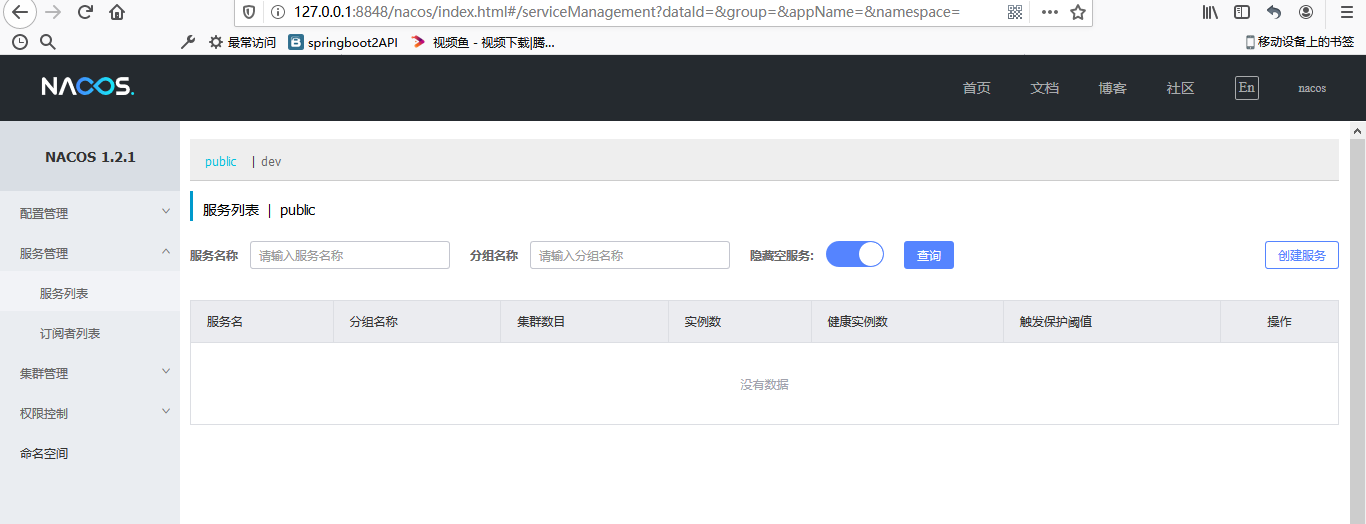
访问http://127.0.0.1:8848/nacos/index.html,如果出现以下界面则安装正常。
注册一个服务到nacos
- 新建一个服务,在pom中加入必要的依赖
  <parent>

      <groupId>org.springframework.boot</groupId>

      <artifactId>spring-boot-starter-parent</artifactId>

      <version>2.2.5.RELEASE</version>

      <relativePath/> <!-- lookup parent from repository -->

  </parent>

  <dependencyManagement>

    <dependencies>

      <!--Spring cloud Hoxton.SR3-->

      <dependency>

        <groupId>org.springframework.cloud</groupId>

        <artifactId>spring-cloud-dependencies</artifactId>

        <version>Hoxton.SR3</version>

        <type>pom</type>

        <scope>import</scope>

      </dependency>

      <!--Spring cloud alibaba 2.1.0.RELEASE-->

      <dependency>

        <groupId>com.alibaba.cloud</groupId>

        <artifactId>spring-cloud-alibaba-dependencies</artifactId>

        <version>2.2.1.RELEASE</version>

        <type>pom</type>

        <scope>import</scope>

      </dependency>

    </dependencies>

  </dependencyManagement>

  <dependencies>

    <dependency>

      <groupId>com.alibaba.cloud</groupId>

      <artifactId>spring-cloud-starter-alibaba-nacos-discovery</artifactId>

    </dependency>

  </dependencies>
- 在application.yml中配置服务名称和nacos地址
server:

  port: 9001

spring:

  application:

    name: nacos-discovery-server

  cloud:

    nacos:

      discovery:

        server-addr: 127.0.0.1:8848
- 提供一个接口
@SpringBootApplication

public class NacosDiscoveryServerApplication {

    public static void main(String[] args) {

        SpringApplication.run(NacosDiscoveryServerApplication.class, args);

    }

    @RestController

    static class TestController {

        @GetMapping("/hello")

        public String hello(@RequestParam String name) {

            return "hello,nacos discovery! " + name;

        }

    }

}
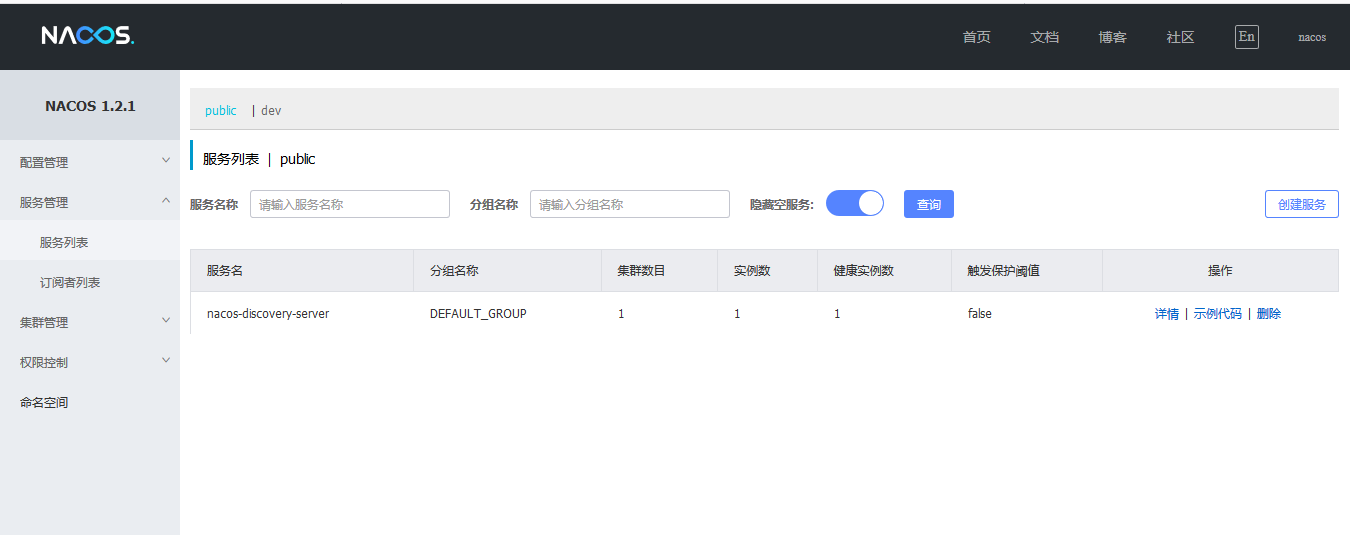
- 启动服务,控制台打印以下内容,就说明注册成功了。
2020-04-28 14:49:42.749 INFO 9864 --- [ main] c.a.c.n.registry.NacosServiceRegistry : nacos registry, DEFAULT_GROUP nacos-discovery-server 192.168.9.114:9001 register finished
- 打开nacos控制台,我们可以在服务列表中发现我们的服务了。
注意事项
为什么我们的启动类上没有加@EnableDiscoveryClient注解,但是已经把服务注册到nacos上了?
在springcloud E版本的时候,对服务注册进行了优化,在依赖了spring-cloud-starter-alibaba-nacos-discovery之后,默认会将服务注册到注册中心。
在已经依赖spring-cloud-starter-alibaba-nacos-discovery的情况下,如果我们不想让我们的服务注册到nacos应该怎么做?
在配置文件中添加如下依赖即可:
spring:

  cloud:

    nacos:

      discovery:

        enabled: false
代码示例
- github:https://github.com/binzh303/spring-cloud-alibaba-learning
- gitee:https://gitee.com/zhixie/spring-cloud-alibaba-learning
Spring Cloud Alibaba系列(一)nacos作为服务注册中心的更多相关文章
- spring cloud 2.x版本 Eureka Server服务注册中心教程
本文采用Spring cloud本文为2.1.8RELEASE,version=Greenwich.SR3 1.创建服务注册中心 1.1 新建Spring boot工程:eureka-server 1 ...
- Spring Cloud(二):Eureka 服务注册中心
前言 服务治理 随着业务的发展,微服务应用也随之增加,这些服务的管理和治理会越来越难,并且集群规模.服务位置.服务命名都会发生变化,手动维护的方式极易发生错误或是命名冲突等问题.而服务治理正是为了解决 ...
- Spring Cloud Eureka 2 (Eureka Server搭建服务注册中心)
工具:IntelliJ IDEA 2017.1.2 x64.maven3.3.9 打开IDE file===>new===>project next next 选择相应的依赖 next ...
- Spring Cloud Alibaba基础教程-Nacos(三)
在Spring Cloud Alibaba基础教程-Nacos(二)当中学习了,如何使用 nacos图形化界面操作 ,使用Nacos部署集群,下面我们开始Nacos最后一篇的学习 ,如果对你有帮助,记 ...
- Spring Cloud Alibaba基础教程-Nacos(二)
在Spring Cloud Alibaba基础教程-Nacos(一)当中学习了,如何从 nacos当中 通过Java的方式获取值,以及连接数据库,下面我们开始第二篇的学习 ,如果对你有帮助,方便下次寻 ...
- Spring Cloud Alibaba基础教程-Nacos(一)
2019快结束,也有很久没写博客了,今天我们来谈谈Nacos,如果对您有帮助,麻烦左上角点个关注 ,谢谢 ! 嘻嘻 今天先写第一篇 文章目录 为什么要使用Nacos Eureka 闭源 Nacos的优 ...
- spring cloud(学习笔记)高可用注册中心(Eureka)的实现(二)
绪论 前几天我用一种方式实现了spring cloud的高可用,达到两个注册中心,详情见spring cloud(学习笔记)高可用注册中心(Eureka)的实现(一),今天我意外发现,注册中心可以无限 ...
- Spring Cloud Alibaba系列(二)nacos作为服务配置中心
Nacos 提供用于存储配置和其他元数据的 key/value 存储,为分布式系统中的外部化配置提供服务器端和客户端支持.使用 Spring Cloud Alibaba Nacos Config,您可 ...
- Spring Cloud Alibaba系列之分布式服务组件Dubbo
本博客的例子代码可以在github找到下载链接:代码下载 SpringBoot.SpringCloud Alibaba系列博客专栏:链接 1.分布式理论 1.1.分布式基本定义 <分布式系统原理 ...
随机推荐
- springboot httpsession.getAtt....is null
1.开始怀疑是 @RequestMapping("") public String loginIndex() { return "admin/login"; } ...
- 数据结构和算法(Golang实现)(1)简单入门Golang-前言
数据结构和算法在计算机科学里,有非常重要的地位.此系列文章尝试使用 Golang 编程语言来实现各种数据结构和算法,并且适当进行算法分析. 我们会先简单学习一下Golang,然后进入计算机程序世界的第 ...
- python脚本如何同时运行多个
当我们想一次运行多个py脚本的时候你想到了什么应用场景了吗?当你想同时并行的处理一些对象时你有什么好方法吗?下面我就简单的总结一些这方面的小技巧,方便大家根据情况灵活处理. 1 用一个py脚本运行多个 ...
- Python 分析后告诉你闲鱼上哪些商品抢手?
前言 文的文字及图片来源于网络,仅供学习.交流使用,不具有任何商业用途,版权归原作者所有,如有问题请及时联系我们以作处理. 作者:[Airpython] PS:如有需要Python学习资料的小伙伴可以 ...
- tensorflow基础--LeNet-5测试模型遇到TypeError: Failed to convert object of type <class 'list'> to Tensor
最近在看<TensorFlow 实战Google深度学习框架第二版>这本书,测试LeNet-5这个模型时遇到了TypeError: Failed to convert object of ...
- Django文档阅读-Day1
Django文档阅读-Day1 Django at a glance Design your model from djano.db import models #数据库操作API位置 class R ...
- jmeter引入外部jar包的方法
jmeter最完美的jar包引入 第一步:需要新建一个文件夹用来存放需要引用的外部jar包,例如:建一个dependencies 文件夹 第二步:jmeter 的配置文件 jmeter.propert ...
- vue中使用echarts 制作某市各个街道镇的地图
我要制作的是青州的各街道镇的地图,于是我上网搜,很感谢这篇文章的作者给的提点和帮助https://www.jianshu.com/p/7337c2f56876 现在我把自己的制作过程做个整理,以山东省 ...
- 10w+QPS 的 Redis 真的只是因为单线程和内存?360° 深入底层设计为你揭开 Redis 神秘面纱!
原文链接:10w+QPS 的 Redis 真的只是因为单线程和内存?360° 深入底层设计为你揭开 Redis 神秘面纱! 你以为 Redis 这么快仅仅因为单线程和基于内存? 那么你想得太少了,我个 ...
- 在php中如何实现cookie即时生效,不用刷新就可以使用
参考:https://www.jianshu.com/p/0468ef5dbf4d 今天在用php设置cookie的时候,发现cookie如果只是赋值一次的话,要手动刷新一下浏览器才能把数据及时更新, ...