
Pytorch的19种损失函数
基本用法
1 |
criterion = LossCriterion() |
损失函数
L1范数损失:L1Loss
计算 output 和 target 之差的绝对值。
1 |
torch.nn.L1Loss(reduction='mean') |
参数:reduction-三个值,none: 不使用约简;mean:返回loss和的平均值;sum:返回loss的和。默认:mean。
均方误差损失:MSELoss
计算 output 和 target 之差的均方差。
1 |
torch.nn.MSELoss(reduction='mean') |
参数:reduction-三个值,none: 不使用约简;mean:返回loss和的平均值;sum:返回loss的和。默认:mean。
交叉熵损失:CrossEntropyLoss
当训练有 C 个类别的分类问题时很有效. 可选参数 weight 必须是一个1维 Tensor, 权重将被分配给各个类别. 对于不平衡的训练集非常有效。
在多分类任务中,经常采用 softmax 激活函数+交叉熵损失函数,因为交叉熵描述了两个概率分布的差异,然而神经网络输出的是向量,并不是概率分布的形式。所以需要 softmax激活函数将一个向量进行“归一化”成概率分布的形式,再采用交叉熵损失函数计算 loss。
1 |
torch.nn.CrossEntropyLoss(weight=None,ignore_index=-100, reduction='mean') |
参数:weight (Tensor, optional) – 自定义的每个类别的权重. 必须是一个长度为 C 的 Tensor。ignore_index (int, optional) – 设置一个目标值, 该目标值会被忽略, 从而不会影响到 输入的梯度。reduction-三个值,none: 不使用约简;mean:返回loss和的平均值;sum:返回loss的和。默认:mean。
KL散度损失:KLDivLoss
计算 input 和 target 之间的 KL 散度。KL散度可用于衡量不同的连续分布之间的距离, 在连续的输出分布的空间上(离散采样)上进行直接回归时,很有效。
1 |
torch.nn.KLDivLoss(reduction='mean') |
参数:reduction-三个值,none: 不使用约简;mean:返回loss和的平均值;sum:返回loss的和。默认:mean。
二进制交叉熵损失:BCELoss
二分类任务时的交叉熵计算函数。用于测量重构的误差,例如自动编码机。注意目标的值 t[i] 的范围为0到1之间。
1 |
torch.nn.BCELoss(weight=None, reduction='mean') |
参数:weight(Tensor, optional) – 自定义的每个 batch 元素的 loss 的权重。必须是一个长度为 “nbatch” 的 Tensor。
BCEWithLogitsLoss
BCEWithLogitsLoss损失函数把 Sigmoid 层集成到了 BCELoss 类中。该版比用一个简单的 Sigmoid 层和 BCELoss 在数值上更稳定, 因为把这两个操作合并为一个层之后, 可以利用 log-sum-exp 的技巧来实现数值稳定。
1 |
torch.nn.BCEWithLogitsLoss(weight=None, reduction='mean', pos_weight=None) |
参数:weight(Tensor, optional) – 自定义的每个 batch 元素的 loss 的权重。必须是一个长度为 “nbatch” 的 Tensor。
MarginRankingLoss
1 |
torch.nn.MarginRankingLoss(margin=0.0, reduction='mean') |
对于 mini-batch(小批量) 中每个实例的损失函数如下:
参数:margin:默认值 0。
HingeEmbeddingLoss
1 |
torch.nn.HingeEmbeddingLoss(margin=1.0, reduction='mean') |
对于 mini-batch(小批量) 中每个实例的损失函数如下: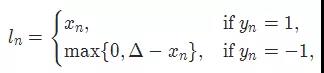
参数:margin:默认值 1。
多标签分类损失:MultiLabelMarginLoss
1 |
torch.nn.MultiLabelMarginLoss(reduction='mean') |
对于mini-batch(小批量) 中的每个样本按如下公式计算损失:
大专栏 Pytorch的19种损失函数 class="headerlink" title="平滑版L1损失:SmoothL1Loss">平滑版L1损失:SmoothL1Loss
也被称为 Huber 损失函数。
1 |
torch.nn.SmoothL1Loss(reduction='mean') |
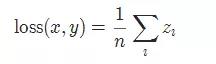
其中,
2分类的logistic损失:SoftMarginLoss
1 |
torch.nn.SoftMarginLoss(reduction='mean') |

多标签 one-versus-all 损失:MultiLabelSoftMarginLoss
1 |
torch.nn.MultiLabelSoftMarginLoss(weight=None, reduction='mean') |

cosine 损失:CosineEmbeddingLoss
1 |
torch.nn.CosineEmbeddingLoss(margin=0.0, reduction='mean') |

参数:margin:默认值 0。
多类别分类的hinge损失:MultiMarginLoss
1 |
torch.nn.MultiMarginLoss(p=1, margin=1.0, weight=None, reduction='mean') |

参数:p=1 或者 2,默认值:1。margin:默认值为 1。
三元组损失:TripletMarginLoss
和孪生网络相似,具体例子:给一个A,然后再给B、C,看看B、C谁和A更像。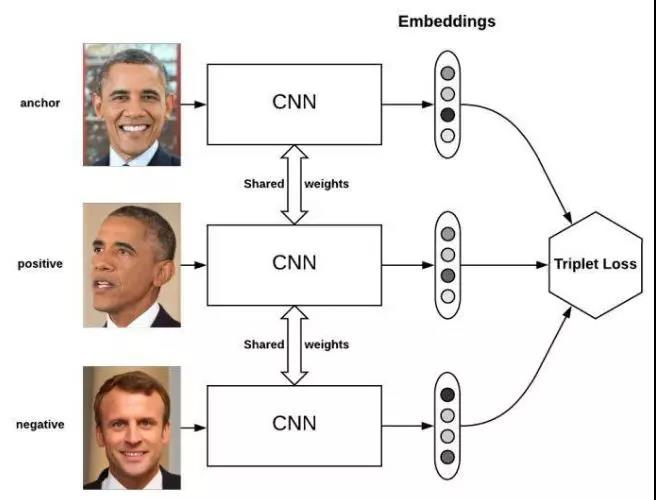
1 |
torch.nn.TripletMarginLoss(margin=1.0, p=2.0, eps=1e-06, swap=False, reduction='mean') |

其中,
连接时序分类损失:CTCLoss
CTC连接时序分类损失,可以对没有对齐的数据进行自动对齐,主要用在没有事先对齐的序列化数据训练上。比如语音识别、ocr识别等等。
1 |
torch.nn.CTCLoss(blank=0, reduction='mean') |
参数:reduction-三个值,none: 不使用约简;mean:返回loss和的平均值;sum:返回loss的和。默认:mean。
负对数似然损失:NLLLoss
负对数似然损失。用于训练 C 个类别的分类问题。
1 |
torch.nn.NLLLoss(weight=None, ignore_index=-100, reduction='mean') |
参数:weight (Tensor, optional) – 自定义的每个类别的权重. 必须是一个长度为 C 的 Tensor。ignore_index (int, optional) – 设置一个目标值, 该目标值会被忽略, 从而不会影响到 输入的梯度。
NLLLoss2d
对于图片输入的负对数似然损失。它计算每个像素的负对数似然损失。
1 |
torch.nn.NLLLoss2d(weight=None, ignore_index=-100, reduction='mean') |
参数:
weight(Tensor, optional) – 自定义的每个类别的权重。必须是一个长度为 C 的 Tensor。
reduction – 三个值,none: 不使用约简;mean:返回loss和的平均值;sum:返回loss的和。默认:mean。
PoissonNLLLoss
目标值为泊松分布的负对数似然损失。
1 |
torch.nn.PoissonNLLLoss(log_input=True, full=False, eps=1e-08, reduction='mean') |
参数:
log_input (bool, optional) – 如果设置为 True , loss 将会按照公 式 exp(input) - target input 来计算, 如果设置为 False , loss 将会按照 input - target log(input+eps) 计算。
full (bool, optional) – 是否计算全部的 loss, i. e. 加上 Stirling 近似项 target log(target) - target + 0.5 log(2 pi target)。
eps (float, optional) – 默认值: 1e-8。
Pytorch的19种损失函数的更多相关文章
- PyTorch的十七个损失函数
本文截取自<PyTorch 模型训练实用教程>,获取全文pdf请点击: tensor-yu/PyTorch_Tutorialgithub.com 版权声明:本文为博主原创文章,转载请附上 ...
- 入口点函数的19种消息,AcRxArxApp只处理16种。
AcRx::AppMsgCode一共有19种消息. 但由IMPLEMENT_ARX_ENTRYPOINT宏实现的App类,只处理了16种消息. 缺: kSuspendMsg = 16, kIni ...
- 用19种编程语言写Hello World
用19种编程语言写Hello World 转载自:http://www.admin10000.com/document/394.html Hello World 程序是每一种编程语言最基本的程序,通常 ...
- 如今领占主导地位的19种AI技术!
如今领占主导地位的19种AI技术! http://blog.itpub.net/31542119/viewspace-2212797/ 深度学习的突破将人工智能带进全新阶段. 2006 年-2015 ...
- lr中错误解决方法19种
一.Error -27727: Step download timeout (120 seconds)has expired when downloading resource(s). Set the ...
- pytorch自定义网络层以及损失函数
转自:https://blog.csdn.net/dss_dssssd/article/details/82977170 https://blog.csdn.net/dss_dssssd/articl ...
- 【小白学PyTorch】19 TF2模型的存储与载入
[新闻]:机器学习炼丹术的粉丝的人工智能交流群已经建立,目前有目标检测.医学图像.时间序列等多个目标为技术学习的分群和水群唠嗑的总群,欢迎大家加炼丹兄为好友,加入炼丹协会.微信:cyx64501661 ...
- pytorch(16)损失函数(二)
5和6是在数据回归中用的较多的损失函数 5. nn.L1Loss 功能:计算inputs与target之差的绝对值 代码: nn.L1Loss(reduction='mean') 公式: \[l_n ...
- pytorch(15)损失函数
损失函数 1. 损失函数概念 损失函数:衡量模型输出与真实标签的差异 \[损失函数(Loss Function): Loss = f(\hat y,y) \] \[代价函数(Cost Function ...
随机推荐
- c++ opencv 入门
//类型定义 CvPoint point(2, 3); CvPoint2D32f point1(2, 3); CvPoint3D32f point2(2, 3); CvSize size(2, 3); ...
- Busybox文件系统的移植
相关软件下载地址:http://pan.baidu.com/s/16yo8Y fsc100开发板 交叉编译器:arm-cortex_a8-linux-gnueabi-gcc busybox-1.17. ...
- C++基础--函数模板
函数模板是通用的函数描述,其使用泛型来定义函数.其实就是有些操作,如果撇开具体的变量的数据类型,其操作是一样的如果我们将这些操作写成一个模板,在调用不同变量的时候就设定好变量类型就可了,后续的操作基本 ...
- oracle查询语句注意事项:
我想查出datatype 不等于1的所有结果,包括空. '; //这条sql查不出datatype为空的数据 发现oracle需要使用 is null .is not null查询空或非空 ' ...
- DFS+BFS(广度优先搜索弥补深度优先搜索遍历漏洞求合格条件总数)--09--DFS+BFS--蓝桥杯剪邮票
题目描述 如下图, 有12张连在一起的12生肖的邮票.现在你要从中剪下5张来,要求必须是连着的.(仅仅连接一个角不算相连) 比如,下面两张图中,粉红色所示部分就是合格的剪取. 请你计算,一共有多少 ...
- DispatcherServlet(2)_HandlerMapping
HandlerMapping_xmind SpringMVC默认提供的HandlerMapping BeanNameUrlHandlerMapping SimpleUrlHandlerMapping ...
- OC Swift混编-Swift.h File not found
https://www.jianshu.com/p/f860fe1718ca 2016.09.13 11:53* 字数 266 阅读 1935评论 1喜欢 1 今天碰到个神坑,本人项目是OC项目,最近 ...
- Mybatis之配置文件
Mybatis_config.xml <?xml version="1.0" encoding="UTF-8"?><!DOCTYPE conf ...
- python3+Opencv 搭建环境和基本操作
一.必备前提: Python3.5及以上版本.pip.windows环境 二.搭建opencv 该部分可以创建隔绝的Python环境来引入,参照virtualenv的使用 在目标的cmd窗口,依次输入 ...
- 吴裕雄--天生自然 PHP开发学习:超级全局变量
<!DOCTYPE html> <html> <body> <?php $x = 75; $y = 25; function addition() { $GL ...