
Struts2 (三)
1 Struts2的拦截器
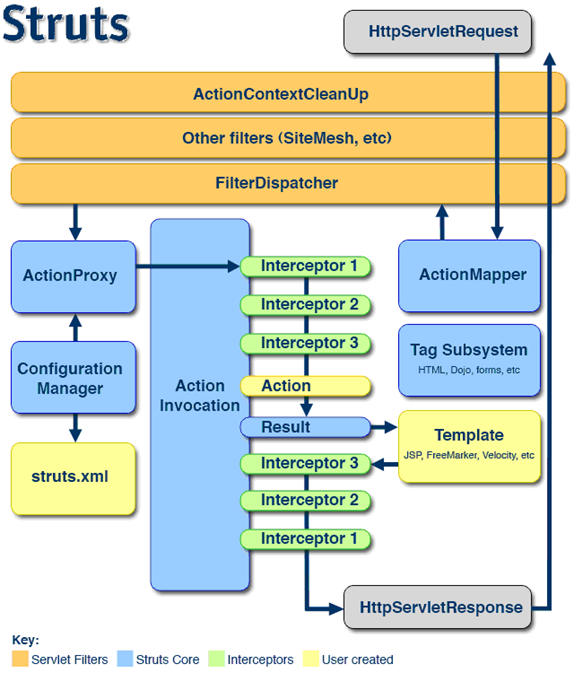
- Struts2拦截器在访问某个Action方法之前或之后实施拦截,拦截器是可插拔的,拦截器是AOP的一种实现。
- Struts2拦截器栈:将拦截器按一定顺序联结成一条链,在访问被拦截的方式的时候,Struts2拦截器链中的拦截器就会按之前定义的顺序被依次调用。。
1.1 Interceptor接口
- 每个拦截器都是实现了com.opensyymphony.xwork2.interceptor接口的java类。
//
// Source code recreated from a .class file by IntelliJ IDEA
// (powered by Fernflower decompiler)
//

package com.opensymphony.xwork2.interceptor;

import com.opensymphony.xwork2.ActionInvocation;
import java.io.Serializable;

public interface Interceptor extends Serializable {
    void destroy();

    void init();

    String intercept(ActionInvocation var1) throws Exception;
}
- init()方法
- 该方法将在拦截器被创建后立即被调用,它在拦截器的生命周期内只被调用一次,可以在该方法中对相关资源进行必要的初始化。
- intercept()方法
- 每拦截一个动作请求,该方法就会被调用一次。
- destory()方法
- 该方法将在拦截器被销毁之前被带哦用,它在拦截器的生命周期中也只被调用一次。
- Struts2会依次调用程序员为某个Action而注册的每个拦截器的intercept()方法。
- 每次调用intercept()方法的时候,Struts2会传递一个ActionInvocation接口的实例。
- ActionInvocation:代表一个给定动作的执行状态,拦截器可以从该类的对象里获取与该动作相关联的Action对象和Result对象,在完成拦截器自己的任务之后,拦截器将调用ActionInvocation对象的invoke()放阿飞前进到Action处理流程的下一个环节。
- AbstractInterceptor类实现了Interceptor解耦,并未init、destory提供了一个空白的实现。
1.2 自定义拦截器
- ①编写一个实现Interceptor接口,或继承AbstractInterceptor类。
- ②在struts.xml中注册自定义拦截器。
- 示例:
- web.xml
<?xml version="1.0" encoding="UTF-8"?>
<web-app xmlns="http://xmlns.jcp.org/xml/ns/javaee"
         xmlns:xsi="http://www.w3.org/2001/XMLSchema-instance"
         xsi:schemaLocation="http://xmlns.jcp.org/xml/ns/javaee http://xmlns.jcp.org/xml/ns/javaee/web-app_3_1.xsd"
         version="3.1">
    <filter>
        <filter-name>struts2</filter-name>
        <filter-class>org.apache.struts2.dispatcher.ng.filter.StrutsPrepareAndExecuteFilter</filter-class>
    </filter>
    <filter-mapping>
        <filter-name>struts2</filter-name>
        <url-pattern>/*</url-pattern>
    </filter-mapping>

</web-app>
- index.jsp
<%@ page contentType="text/html;charset=UTF-8" language="java" %>
<html>
  <head>
    <title>首页</title>
  </head>
  <body>

  <a href="${pageContext.request.contextPath}/update">更新</a>
  <a href="${pageContext.request.contextPath}/save">保存</a>

  </body>
</html>
- User.java
package com.xuweiwei.domain;

import java.io.Serializable;

public class User implements Serializable {
    private String username;
    private String password;

    public String getUsername() {
        return username;
    }

    public void setUsername(String username) {
        this.username = username;
    }

    public String getPassword() {
        return password;
    }

    public void setPassword(String password) {
        this.password = password;
    }
}
- CustomerAction.java
package com.xuweiwei.action;

import com.opensymphony.xwork2.Action;
import com.opensymphony.xwork2.ActionSupport;
import com.xuweiwei.domain.User;
import org.apache.struts2.ServletActionContext;

import javax.servlet.http.HttpSession;

public class CustomerAction extends ActionSupport {

    //保存方法
    public String save(){
        System.out.println("保存");
        return Action.SUCCESS;
    }
    //更新方法
    public String update(){
        System.out.println("更新");
        return Action.SUCCESS;
    }
    //登录方法
    public String login(){
        HttpSession sessoin = ServletActionContext.getRequest().getSession();
        sessoin.setAttribute("user",new User());
        return Action.SUCCESS;
    }

}
- LoginInterceptor.java
package com.xuweiwei.interceptor;

import com.opensymphony.xwork2.Action;
import com.opensymphony.xwork2.ActionInvocation;
import com.opensymphony.xwork2.interceptor.MethodFilterInterceptor;
import com.xuweiwei.domain.User;
import org.apache.struts2.ServletActionContext;

import javax.servlet.http.HttpSession;

public class LoginInterceptor extends MethodFilterInterceptor {
    @Override
    protected String doIntercept(ActionInvocation invocation) throws Exception {

        HttpSession session = ServletActionContext.getRequest().getSession();
        User user = (User) session.getAttribute("user");
        if(user != null){
            return invocation.invoke();
        }else{
            return Action.LOGIN;
        }
    }
}
- struts.xml
<?xml version="1.0"?>

<!DOCTYPE struts PUBLIC
        "-//Apache Software Foundation//DTD Struts Configuration 2.3//EN"
        "http://struts.apache.org/dtds/struts-2.3.dtd">
<struts>
    <package name="default" namespace="/" extends="struts-default">
        <interceptors>
            <interceptor name="LoginInterceptor" class="com.xuweiwei.interceptor.LoginInterceptor">
                <param name="excludeMethods">login</param>
            </interceptor>
            <interceptor-stack name="myDefaultStack">
                <interceptor-ref name="LoginInterceptor"/>
                <interceptor-ref name="defaultStack"/>
            </interceptor-stack>
        </interceptors>
        <default-interceptor-ref name="myDefaultStack"/>

        <global-results>
            <result name="login" type="redirect">/login.jsp</result>
        </global-results>
        <action name="save" class="com.xuweiwei.action.CustomerAction" method="save">
            <result name="success">/success.jsp</result>
        </action>
        <action name="update" class="com.xuweiwei.action.CustomerAction" method="update">
            <result name="success">/success.jsp</result>
        </action>
        <action name="login" class="com.xuweiwei.action.CustomerAction" method="login">
            <result name="success">/index.jsp</result>
        </action>
    </package>
</struts>
- success.jsp
<%@ page contentType="text/html;charset=UTF-8" language="java" %>
<html>
<head>
    <title>成功</title>
</head>
<body>
    成功
</body>
</html>
- login.jsp
<%@ page contentType="text/html;charset=UTF-8" language="java" %>
<html>
<head>
    <title>登录</title>
</head>
<body>
    <a href="${pageContext.request.contextPath}/login">登录</a>
</body>
</html>
- 执行过程:
- ①当用户访问index.jsp中的超链接,不管是保存还是更新,都需要经过LoginInterceptor拦截器。
- ②LoginInterceptor拦截器会从session中访问是否有登录的标记,如果没有,那么就跳转到login视图。
- ③我们查看struts.xml文件可以知道login视图是一个全局视图,然后重定向或转发到login,jsp(我这里使用的是重定向)。
- ④当用户点击登录按钮的时候,这次我们查看struts.xml可以LoginInterceptor拦截器将login方法放行了,这个时候,执行login()方法,一旦login()方法执行了,就向session中放入登录的标记,然后转到index.jsp。
- ⑤当用户再次点击保存或更新的时候,会再次经过LoginInterceptor,这个时候,LoginInterceptor会判断session中有登录标记,那么就放行,然后去执行save或update方法,执行完毕之后,跳转到success.jsp。
2 表单重复提交
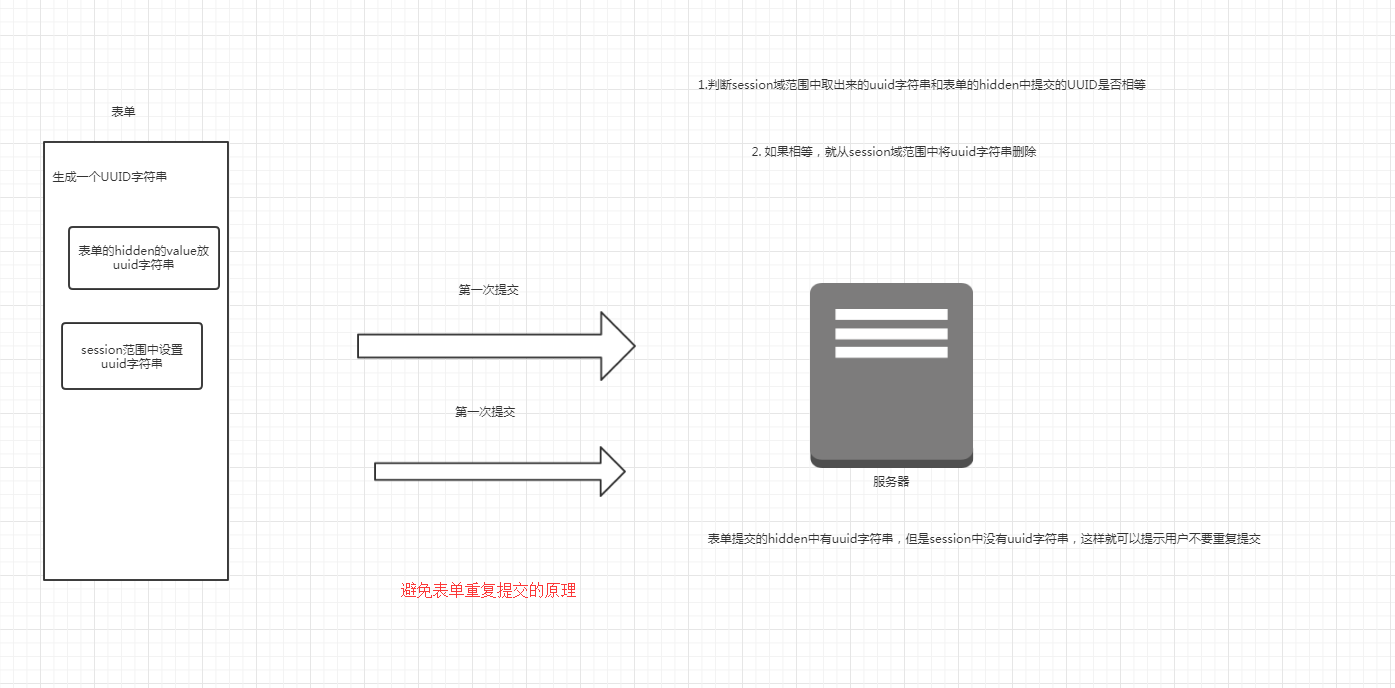
- 还有一种解决方案就是:当用户提交成功之后,就进行页面的重定向,这样路径就不一样了,即使用户不停的刷新f5,也是不一样的。
3 OGNL
3.1 OGNL的概述
- OGNL:对象图导航语言的缩写,是一个开源项目。
3.2 OGNL相对其它表达式语言具有下面的优势
- 前提:在Struts2中用OGNL,需要用到标签。
- 支持对象方法的调用。
<%@ page contentType="text/html;charset=UTF-8" language="java" %>
<%@ taglib prefix="s" uri="/struts-tags" %>
<html>
  <head>
    <title>首页</title>
  </head>
  <body>

  <s:property value="'abcdefg'.endsWith('a')"></s:property>

  </body>
</html>
- 支持类的静态属性的调用
<%@ page contentType="text/html;charset=UTF-8" language="java" %>
<%@ taglib prefix="s" uri="/struts-tags" %>
<html>
  <head>
    <title>首页</title>
  </head>
  <body>

  <s:property value="@java.lang.Integer@MAX_VALUE"></s:property>

  </body>
</html>
- 支持类的静态方法的调用(在Struts2中默认是关闭的,所以需要开启)
- Struts.xml
<?xml version="1.0"?>

<!DOCTYPE struts PUBLIC
        "-//Apache Software Foundation//DTD Struts Configuration 2.3//EN"
        "http://struts.apache.org/dtds/struts-2.3.dtd">
<struts>
    <constant name="struts.ognl.allowStaticMethodAccess" value="true"></constant>

</struts>
- index.jsp
<%@ page contentType="text/html;charset=UTF-8" language="java" %>
<%@ taglib prefix="s" uri="/struts-tags" %>
<html>
  <head>
    <title>首页</title>
  </head>
  <body>

  <s:property value="@java.util.UUID@randomUUID()"></s:property>

  </body>
</html>
- 支持赋值操作和表达式的串联
- 访问OGNL上下文和ActionContext
- 操作集合对象
4 ValueStack
4.1 ValueStack的生命周期
- 每次Action的访问都会创建一个ValueStack,动作类的实例生命周期也是每次访问的时候创建的。
4.2 ValueStack和ActionContext的关系(源码解析)
- ActionContext.java
//
// Source code recreated from a .class file by IntelliJ IDEA
// (powered by Fernflower decompiler)
//

package com.opensymphony.xwork2;

import com.opensymphony.xwork2.inject.Container;
import com.opensymphony.xwork2.util.ValueStack;
import java.io.Serializable;
import java.util.HashMap;
import java.util.Locale;
import java.util.Map;

public class ActionContext implements Serializable {
    static ThreadLocal<ActionContext> actionContext = new ThreadLocal();
    public static final String ACTION_NAME = "com.opensymphony.xwork2.ActionContext.name";
    public static final String VALUE_STACK = "com.opensymphony.xwork2.util.ValueStack.ValueStack";
    public static final String SESSION = "com.opensymphony.xwork2.ActionContext.session";
    public static final String APPLICATION = "com.opensymphony.xwork2.ActionContext.application";
    public static final String PARAMETERS = "com.opensymphony.xwork2.ActionContext.parameters";
    public static final String LOCALE = "com.opensymphony.xwork2.ActionContext.locale";
    public static final String TYPE_CONVERTER = "com.opensymphony.xwork2.ActionContext.typeConverter";
    public static final String ACTION_INVOCATION = "com.opensymphony.xwork2.ActionContext.actionInvocation";
    public static final String CONVERSION_ERRORS = "com.opensymphony.xwork2.ActionContext.conversionErrors";
    public static final String CONTAINER = "com.opensymphony.xwork2.ActionContext.container";
    private Map<String, Object> context;

    public ActionContext(Map<String, Object> context) {
        this.context = context;
    }

    public void setActionInvocation(ActionInvocation actionInvocation) {
        this.put("com.opensymphony.xwork2.ActionContext.actionInvocation", actionInvocation);
    }

    public ActionInvocation getActionInvocation() {
        return (ActionInvocation)this.get("com.opensymphony.xwork2.ActionContext.actionInvocation");
    }

    public void setApplication(Map<String, Object> application) {
        this.put("com.opensymphony.xwork2.ActionContext.application", application);
    }

    public Map<String, Object> getApplication() {
        return (Map)this.get("com.opensymphony.xwork2.ActionContext.application");
    }

    public static void setContext(ActionContext context) {
        actionContext.set(context);
    }

    public static ActionContext getContext() {
        return (ActionContext)actionContext.get();
    }

    public void setContextMap(Map<String, Object> contextMap) {
        getContext().context = contextMap;
    }

    public Map<String, Object> getContextMap() {
        return this.context;
    }

    public void setConversionErrors(Map<String, Object> conversionErrors) {
        this.put("com.opensymphony.xwork2.ActionContext.conversionErrors", conversionErrors);
    }

    public Map<String, Object> getConversionErrors() {
        Map<String, Object> errors = (Map)this.get("com.opensymphony.xwork2.ActionContext.conversionErrors");
        if (errors == null) {
            errors = new HashMap();
            this.setConversionErrors((Map)errors);
        }

        return (Map)errors;
    }

    public void setLocale(Locale locale) {
        this.put("com.opensymphony.xwork2.ActionContext.locale", locale);
    }

    public Locale getLocale() {
        Locale locale = (Locale)this.get("com.opensymphony.xwork2.ActionContext.locale");
        if (locale == null) {
            locale = Locale.getDefault();
            this.setLocale(locale);
        }

        return locale;
    }

    public void setName(String name) {
        this.put("com.opensymphony.xwork2.ActionContext.name", name);
    }

    public String getName() {
        return (String)this.get("com.opensymphony.xwork2.ActionContext.name");
    }

    public void setParameters(Map<String, Object> parameters) {
        this.put("com.opensymphony.xwork2.ActionContext.parameters", parameters);
    }

    public Map<String, Object> getParameters() {
        return (Map)this.get("com.opensymphony.xwork2.ActionContext.parameters");
    }

    public void setSession(Map<String, Object> session) {
        this.put("com.opensymphony.xwork2.ActionContext.session", session);
    }

    public Map<String, Object> getSession() {
        return (Map)this.get("com.opensymphony.xwork2.ActionContext.session");
    }

    public void setValueStack(ValueStack stack) {
        this.put("com.opensymphony.xwork2.util.ValueStack.ValueStack", stack);
    }

    public ValueStack getValueStack() {
        return (ValueStack)this.get("com.opensymphony.xwork2.util.ValueStack.ValueStack");
    }

    public void setContainer(Container cont) {
        this.put("com.opensymphony.xwork2.ActionContext.container", cont);
    }

    public Container getContainer() {
        return (Container)this.get("com.opensymphony.xwork2.ActionContext.container");
    }

    public <T> T getInstance(Class<T> type) {
        Container cont = this.getContainer();
        if (cont != null) {
            return cont.getInstance(type);
        } else {
            throw new XWorkException("Cannot find an initialized container for this request.");
        }
    }

    public Object get(String key) {
        return this.context.get(key);
    }

    public void put(String key, Object value) {
        this.context.put(key, value);
    }
}
- ValueStack.java
//
// Source code recreated from a .class file by IntelliJ IDEA
// (powered by Fernflower decompiler)
//

package com.opensymphony.xwork2.util;

import java.util.Map;

public interface ValueStack {
    String VALUE_STACK = "com.opensymphony.xwork2.util.ValueStack.ValueStack";
    String REPORT_ERRORS_ON_NO_PROP = "com.opensymphony.xwork2.util.ValueStack.ReportErrorsOnNoProp";

    Map<String, Object> getContext();

    void setDefaultType(Class var1);

    void setExprOverrides(Map<Object, Object> var1);

    Map<Object, Object> getExprOverrides();

    CompoundRoot getRoot();

    void setValue(String var1, Object var2);

    void setParameter(String var1, Object var2);

    void setValue(String var1, Object var2, boolean var3);

    String findString(String var1);

    String findString(String var1, boolean var2);

    Object findValue(String var1);

    Object findValue(String var1, boolean var2);

    Object findValue(String var1, Class var2);

    Object findValue(String var1, Class var2, boolean var3);

    Object peek();

    Object pop();

    void push(Object var1);

    void set(String var1, Object var2);

    int size();
}
- CompoundRoot.java
//
// Source code recreated from a .class file by IntelliJ IDEA
// (powered by Fernflower decompiler)
//

package com.opensymphony.xwork2.util;

import java.util.ArrayList;
import java.util.List;

public class CompoundRoot extends ArrayList {
    public CompoundRoot() {
    }

    public CompoundRoot(List list) {
        super(list);
    }

    public CompoundRoot cutStack(int index) {
        return new CompoundRoot(this.subList(index, this.size()));
    }

    public Object peek() {
        return this.get(0);
    }

    public Object pop() {
        return this.remove(0);
    }

    public void push(Object o) {
        this.add(0, o);
    }
}
- ①我们查看CompoundRoo可以看出这个类继承了ArrayList,但是它同时也是一个栈结构。
- ②解析ActionContext
static ThreadLocal<ActionContext> actionContext = new ThreadLocal();
- 从上面的代码中,我们可以看出ActionContext是和线程绑定在一起的,也就是说,同一个线程,是可以共享ActionContext的。
public static final String ACTION_NAME = "com.opensymphony.xwork2.ActionContext.name";
public static final String VALUE_STACK = "com.opensymphony.xwork2.util.ValueStack.ValueStack";
public static final String SESSION = "com.opensymphony.xwork2.ActionContext.session";
public static final String APPLICATION = "com.opensymphony.xwork2.ActionContext.application";
public static final String PARAMETERS = "com.opensymphony.xwork2.ActionContext.parameters";
public static final String LOCALE = "com.opensymphony.xwork2.ActionContext.locale";
public static final String TYPE_CONVERTER = "com.opensymphony.xwork2.ActionContext.typeConverter";
public static final String ACTION_INVOCATION = "com.opensymphony.xwork2.ActionContext.actionInvocation";
public static final String CONVERSION_ERRORS = "com.opensymphony.xwork2.ActionContext.conversionErrors";
public static final String CONTAINER = "com.opensymphony.xwork2.ActionContext.container";
- 从上面的代码中,我们可以看出这里的ActionContext中的常量,其中需要注意的VALUE_STACK这个常量。因为ValueStack接口的全类名就是这个常量的值。
private Map<String, Object> context;
- 从上面的代码中,我们可以看出ActionContext中维护了一个名为context的Map接口。
public ActionContext(Map<String, Object> context) {
        this.context = context;
    }
- 从上面的代码中,我们可以看出通过构造方法来给context这个属性赋值。
public void put(String key, Object value) {
        this.context.put(key, value);
    }
- 从上面的代码中,我们可以看出这个方法就是向名为context的Map中添加值。
public void setActionInvocation(ActionInvocation actionInvocation) {
        this.put("com.opensymphony.xwork2.ActionContext.actionInvocation", actionInvocation);
    }
- 从上面的代码中,我们可以看出这个方法就是向名为context的Map设置key为com.opensymphony.xworks.ActionContext.actionInvocation,value为ActionInvocation的实例对象。
  public ActionInvocation getActionInvocation() {
        return (ActionInvocation)this.get("com.opensymphony.xwork2.ActionContext.actionInvocation");
    }
- 从上面的代码中,我们可以看出这个方法就是从context的Map中获取key为com.opensymphony.xworks.ActionContext.actionInvocation的value,即ActionContext的实例对象。
    this.put("com.opensymphony.xwork2.ActionContext.application", application);
    }

    public Map<String, Object> getApplication() {
        return (Map)this.get("com.opensymphony.xwork2.ActionContext.application");
    }
 public void setConversionErrors(Map<String, Object> conversionErrors) {
        this.put("com.opensymphony.xwork2.ActionContext.conversionErrors", conversionErrors);
    }

    public Map<String, Object> getConversionErrors() {
        Map<String, Object> errors = (Map)this.get("com.opensymphony.xwork2.ActionContext.conversionErrors");
        if (errors == null) {
            errors = new HashMap();
            this.setConversionErrors((Map)errors);
        }

        return (Map)errors;
    }
public void setLocale(Locale locale) {
        this.put("com.opensymphony.xwork2.ActionContext.locale", locale);
    }

    public Locale getLocale() {
        Locale locale = (Locale)this.get("com.opensymphony.xwork2.ActionContext.locale");
        if (locale == null) {
            locale = Locale.getDefault();
            this.setLocale(locale);
        }

        return locale;
    }
  public void setName(String name) {
        this.put("com.opensymphony.xwork2.ActionContext.name", name);
    }

    public String getName() {
        return (String)this.get("com.opensymphony.xwork2.ActionContext.name");
    }
 public void setParameters(Map<String, Object> parameters) {
        this.put("com.opensymphony.xwork2.ActionContext.parameters", parameters);
    }

    public Map<String, Object> getParameters() {
        return (Map)this.get("com.opensymphony.xwork2.ActionContext.parameters");
    }
 public void setSession(Map<String, Object> session) {
        this.put("com.opensymphony.xwork2.ActionContext.session", session);
    }

    public Map<String, Object> getSession() {
        return (Map)this.get("com.opensymphony.xwork2.ActionContext.session");
    }
 public void setValueStack(ValueStack stack) {
        this.put("com.opensymphony.xwork2.util.ValueStack.ValueStack", stack);
    }

    public ValueStack getValueStack() {
        return (ValueStack)this.get("com.opensymphony.xwork2.util.ValueStack.ValueStack");
    }
 public void setContainer(Container cont) {
        this.put("com.opensymphony.xwork2.ActionContext.container", cont);
    }

    public Container getContainer() {
        return (Container)this.get("com.opensymphony.xwork2.ActionContext.container");
    }

    public <T> T getInstance(Class<T> type) {
        Container cont = this.getContainer();
        if (cont != null) {
            return cont.getInstance(type);
        } else {
            throw new XWorkException("Cannot find an initialized container for this request.");
        }
    }
- 这些代码的功能,和上述的相同,就是向名为context的Map中存值和取值。
public Object get(String key) {
        return this.context.get(key);
    }
- 从上面的代码中,我们可以看出这个方法,是可以从Map中获取指定的key的value。
public static void setContext(ActionContext context) {
        actionContext.set(context);
    }

    public static ActionContext getContext() {
        return (ActionContext)actionContext.get();
    }
- 从上面的代码中,我们可以看出就是将context这个属性对象设置到ThreadLocal中。
  public void setContextMap(Map<String, Object> contextMap) {
        getContext().context = contextMap;
    }

    public Map<String, Object> getContextMap() {
        return this.context;
    }
- 从上面的代码中,我们可以看出其就是将传递过来的Map对象,直接设置到ThreadLocal中。
- ③解析ValueStack接口
Map<String, Object> getContext();
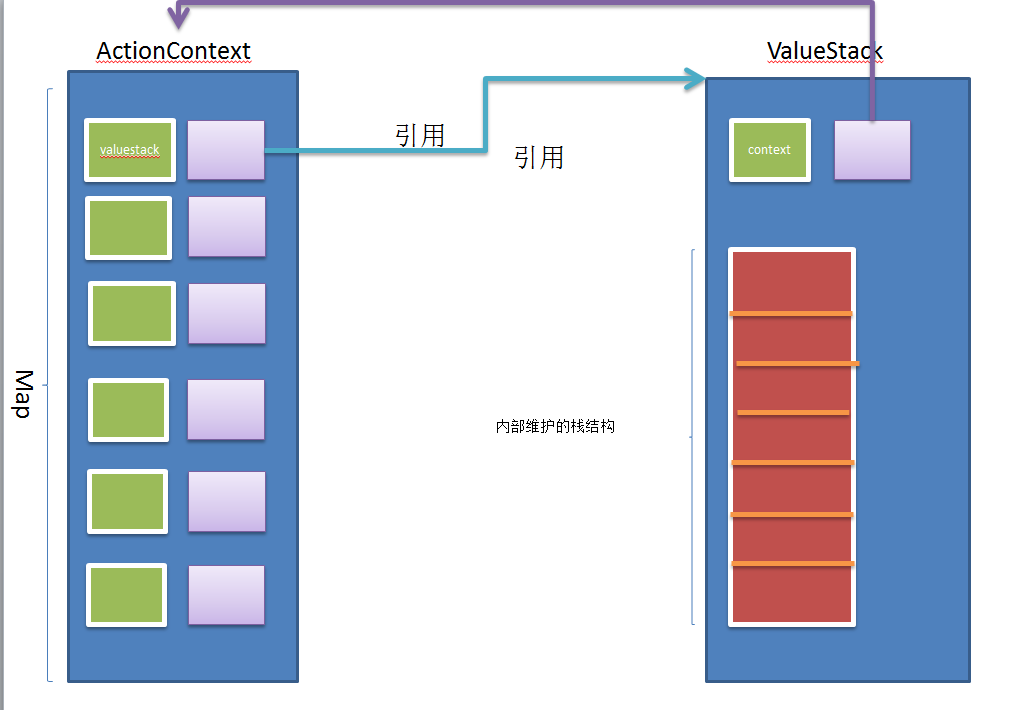
- 从上面的代码中,我们可以看出这个方法的功能就是获取ActionContext对象内部的那个名为context的Map集合。
- 图解:ActionContext和ValueStack的关系
4.3 获取ValueStack的三种方式
- 方式一:
ValueStack valueStack = ActionContext.getContext().getValueStack();
- 方式二:
ValueStack valueStack = (ValueStack) ActionContext.getContext().get(ValueStack.VALUE_STACK);
- 方式三:
ValueStack valueStack = (ValueStack) ServletActionContext.getRequest().getAttribute("struts.valueStack");
4.4 ValueStack常用的方法
- 先获取根栈栈顶的Map,如果不存在,压入一个新的Map,把key和value方法这个新创建的Map中,如果Map已经存在,那么就是存放key和value。
void set(String var1, Object var2);
- String是一个OGNL表达式,如果表达式是以#开头,操作的是contextMap,如果不是,设置根栈中对象的某个属性,从栈顶依次查找
void setValue(String ognlExp, Object var2);
- String是一个OGNL表达式,如果以#开头,从contextMap中找key值对应的对象,如果不是,搜索根栈中对象的属性。【注意】如果编写的表达式不是以#开头,先搜索根栈对象的所有属性,如果没有找到,会把它当做key设置到contextMap中。
Object findValue(String var1);
- 和findValue的功能一样,但是把OGNL表达式虎丘的对象转换为String。
String findString(String var1);
Struts2 (三)的更多相关文章
- Struts2(三)——数据在框架中的数据流转问题
一款软件,无在乎对数据的处理.而B/S软件,一般都是用户通过浏览器客户端输入数据,传递到服务器,服务器进行相关处理,然后返回到指定的页面,进行相关显示,完成相关功能.这篇博客重点简述一下Struts2 ...
- 框架学习之Struts2(三)---OGNL和值栈
一.OGNL概述 1.1OGNL是对象图导航语言(Object-Graph Navigation Languaged)的缩写,他是一种功能强大的表达式语言,通过简单一致的表达式语法,可以存取Java对 ...
- struts2(三) 输入校验和拦截器
前面知道了struts2的架构图和struts2的自动封装表单参数和数据类型自动转换,今天来学struts2的第三第四个东西,输入校验和拦截器, --WH 一.输入校验 在以前我们写一个登录页面时,并 ...
- Struts2(三)配置详解
一.概述 Struts2提供了多种可选的配置文件形式. 其中,struts-default.xml和default.properties是框架级别的配置文件,这两个文件在Struts的核心JAR包中, ...
- Struts2 (三) — OGNL与值栈
一.OGNL表达式 1.概述 1.1什么是OGNL OGNL是Object-Graph Navigation Language的缩写,俗称对象图导航语言. 它是一种功能强大的表达式语言,通过它简单 ...
- Struts2(三):新建Struts2工程
下载的struts2xx-all.zip包对搭建项目的作用 一般情况下,我们下载一个Struts2的full包时,并不知道新建过程中需要哪些包,那么这时我们可以从下载的包中解压出的目录\apps\st ...
- Struts2 三、指定Struts2处理的请求后缀
Action的请求通常情况下默认为以.action结尾,例如:http://localhost:9000/Struts2/hello/helloAction_sayHello.action .a ...
- 浅谈Struts2(三)
一.Struts2收集client的参数 核心思路: <form method="post" action="XXXX"> <input ty ...
- 深入struts2(三)---工作机制和运行流程图
1 工作原理 1.1 体系架构 图2.1 struts2.0体系架构图 1.2 工作机制 针对上节体系架构图,以下分步说明运行流程 Ø client初始化一个指向Servle ...
随机推荐
- SQL Server-聚焦什么时候用OPTION(COMPILE)呢?
前言 上一篇我们探讨了在静态语句中使用WHERE Column = @Param OR @Param IS NULL的问题,有对OPTION(COMPILE)的评论,那这节我们来探讨OPTION(CO ...
- MariaDB的"response time"插件
"响应时间"是衡量数据库性能的常用指标.在MariaDB中可以使用插件"QUERY_RESPONSE_TIME"来获取查询时间区间的统计信息. // 安装插 件 ...
- 算法8 五大查找之:二叉排序树(BSTree)
上一篇总结了索引查找,这一篇要总结的是二叉排序树,又称为二叉搜索树(BSTree) . 构造一棵二叉排序树的目的,其实并不是为了排序,而是为了提高查找和插入删除的效率. 什么是二叉排序树呢?二叉排序树 ...
- app额外后台运行操作
//在视图中运行操作中进行周期操作 - (void)applicationDidEnterBackground:(UIApplication *)application { [self beingBa ...
- Spring Boot快速入门(四):使用jpa进行数据库操作
原文地址:https://lierabbit.cn/articles/5 添加依赖 新建项目选择web,JPA,MySQL三个依赖 对于已存在的项目可以在bulid.gradle加入,spring b ...
- 【原】IOS兼容性之APP内fixed定位头部跳动
兼容现象: 在App的webview里边,我们有时候会在页面里写自定义头部,会使用到fixed定位,我们想要的效果是,页面无论怎么滑动,这个自定义的头部始终是固定在顶部的,但是在ios 11以上的版本 ...
- HDU1016 DFS+回溯(保存路径)
Prime Ring Problem Time Limit: 4000/2000 MS (Java/Others) Memory Limit: 65536/32768 K (Java/Other ...
- NYoj_20吝啬的国度
吝啬的国度 时间限制:1000 ms | 内存限制:65535 KB 难度:3 描述 在一个吝啬的国度里有N个城市,这N个城市间只有N-1条路把这个N个城市连接起来.现在,Tom在第S号城市,他有 ...
- .26-浅析webpack源码之事件流make(1)
compilation事件流中,依然只是针对细节步骤做事件流注入,代码流程如图: // apply => this-compilation // apply => compilation ...
- phpmyadmin设置密码,不用登录直接进入
版权声明:本文为博主原创文章,未经博主允许不得转载. 1.config.sample.inc.PHP改为config.inc.php 2.加入或更改代码: [php] view plain copy ...