
Redis笔记-单机版安装
1、几个相关概念
| 概念 | 现象描述 | 规避措施 |
| 穿透 | 通过访问一个缓存中不存在的key,导致程序一定要在数据库中执行查询 | 将访问结果进行处理,如果返回是null,也存储在缓存中,可以将过期时间设置较短 |
| 雪崩 | 某一个时间段内,大量缓存key同时失效,导致访问直接查询数据库 | 讲不同的缓存数据进行分级分类,并进行不通的过期时间设置,例如可以通过定值+随机的方式生成过期时间,防止集中失效的的情况 |
| 击穿 | 缓存中某个key被访问的频率极高,在缓存失效的瞬间,访问直接访问数据库,比如商城的爆款等 | 可以将对应的缓存过期时间设置较大甚至是永不过期来规避 |
2、Linux安装(以CentOS 7.X为例)
step1、到官网下载对应的tar安装包http://download.redis.io/releases截止目前,最新版本已经发布到5.X
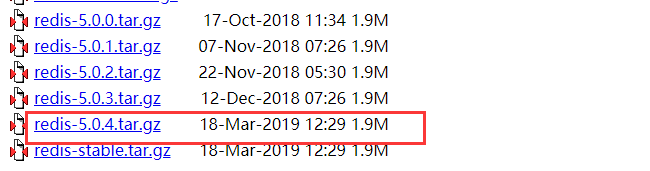
下载:wget http://download.redis.io/releases/redis-5.0.4.tar.gz
解压:tar zxvf redis-5.0.4.tar.gz
step2、编译
cd redis-5.0.4 然后执行make
编译完进入src目录,可以看到生成对应的文件如下:
[root@VM_0_14_centos redis-5.0.]# ll

total

-rw-rw-r--   root root  Mar  : -RELEASENOTES

-rw-rw-r--   root root     Mar  : BUGS

-rw-rw-r--   root root   Mar  : CONTRIBUTING

-rw-rw-r--   root root   Mar  : COPYING

drwxrwxr-x   root root   Mar  : deps

-rw-rw-r--   root root     Mar  : INSTALL

-rw-rw-r--   root root    Mar  : Makefile

-rw-rw-r--   root root   Mar  : MANIFESTO

-rw-rw-r--   root root  Mar  : README.md

-rw-rw-r--   root root  Mar  : redis.conf

-rwxrwxr-x   root root    Mar  : runtest

-rwxrwxr-x   root root    Mar  : runtest-cluster

-rwxrwxr-x   root root    Mar  : runtest-sentinel

-rw-rw-r--   root root   Mar  : sentinel.conf

drwxrwxr-x   root root   Mar  : src

drwxrwxr-x  root root   Mar  : tests

drwxrwxr-x   root root   Mar  : utils

[root@VM_0_14_centos redis-5.0.]#

[root@VM_0_14_centos redis-5.0.]#

[root@VM_0_14_centos redis-5.0.]#

[root@VM_0_14_centos redis-5.0.]#

[root@VM_0_14_centos redis-5.0.]#

[root@VM_0_14_centos redis-5.0.]# cd src

[root@VM_0_14_centos src]# ls -lrt redis-*

-rwxr-xr-x  root root  Mar  : redis-server

-rwxr-xr-x  root root  Mar  : redis-sentinel

-rwxr-xr-x  root root  Mar  : redis-cli

-rwxr-xr-x  root root  Mar  : redis-benchmark

-rwxr-xr-x  root root  Mar  : redis-check-rdb

-rwxr-xr-x  root root  Mar  : redis-check-aof
step3、新建redis目录/usr/redis,并将文件copy进去(目前以单节点测试,先可以不用copy其他文件)
 [root@VM_0_14_centos /]# mkdir /usr/redis

 [root@VM_0_14_centos /]# cp /data01/redis-5.0./redis.conf /usr/redis/

 [root@VM_0_14_centos /]# cp /data01/redis-5.0./src/redis-server /usr/redis/

 [root@VM_0_14_centos /]# cp /data01/redis-5.0./src/redis-cli /usr/redis/

 [root@VM_0_14_centos /]#
step4、启动测试 ./redis-server redis.conf
 [root@VM_0_14_centos redis]#

 [root@VM_0_14_centos redis]# ./redis-server redis.conf

 :C  Mar  ::13.047 # oO0OoO0OoO0Oo Redis is starting oO0OoO0OoO0Oo

 :C  Mar  ::13.047 # Redis version=5.0., bits=, commit=, modified=, pid=, just started

 :C  Mar  ::13.047 # Configuration loaded

                 _._

            _.-``__ ''-._

       _.-``    `.  `_.  ''-._           Redis 5.0. (/)  bit

   .-`` .-```.  ```\/    _.,_ ''-._

  (    '      ,       .-`  | `,    )     Running in standalone mode

  |`-._`-...-` __...-.``-._|'` _.-'|     Port:

  |    `-._   `._    /     _.-'    |     PID: 6440

   `-._    `-._  `-./  _.-'    _.-'

  |`-._`-._    `-.__.-'    _.-'_.-'|

  |    `-._`-._        _.-'_.-'    |           http://redis.io

   `-._    `-._`-.__.-'_.-'    _.-'

  |`-._`-._    `-.__.-'    _.-'_.-'|

  |    `-._`-._        _.-'_.-'    |

   `-._    `-._`-.__.-'_.-'    _.-'

       `-._    `-.__.-'    _.-'

           `-._        _.-'

               `-.__.-'

 :M  Mar  ::13.048 # WARNING: The TCP backlog setting of  cannot be enforced because /proc/sys/net/core/somaxconn is set to the lower value of .

 :M  Mar  ::13.048 # Server initialized

 :M  Mar  ::13.048 # WARNING overcommit_memory is set to ! Background save may fail under low memory condition. To fix this issue add 'vm.overcommit_memory = 1' to /etc/sysctl.conf and then reboot or run the command 'sysctl vm.overcommit_memory=1' for this to take effect.

 :M  Mar  ::13.048 # WARNING you have Transparent Huge Pages (THP) support enabled in your kernel. This will create latency and memory usage issues with Redis. To fix this issue run the command 'echo never > /sys/kernel/mm/transparent_hugepage/enabled' as root, and add it to your /etc/rc.local in order to retain the setting after a reboot. Redis must be restarted after THP is disabled.

 :M  Mar  ::13.048 * Ready to accept connections
开启客户端,并测试:
 [root@VM_0_14_centos redis]#

 [root@VM_0_14_centos redis]# ./redis-cli

 127.0.0.1:>

 127.0.0.1:>

 127.0.0.1:> set name hello

 OK

 127.0.0.1:> get name

 "hello"

 127.0.0.1:>
OK,显示成功。
重启:./redis-cli -h 127.0.0.1 -p 6379 shutdown 或 kill -9 进程号
3、Redis数据备份模式
Redis支持RDB和AOF两种方式实现数据备份,可以在重启后实现数据恢复。关于RDB和AOF说明如下:
RDB:redis默认开启的数据备份方式,会将数据定时dump到磁盘上,缺点是可能在定时间隔时间内断电,数据未完全写入磁盘,导致数据部分丢失
AOF:通过记录操作日志追加操作日志的方式写入文件,在数据恢复时执行日志分析实现数据恢复,缺点是在大量数据备份时效率略低于RDB
关于RDB和AOF的持久化配置可以参考redis的配置文件redis.conf配置项:
RDB持久化配置: save m n 表示在m秒后,如果有n个key发生变化,则dump内存快照
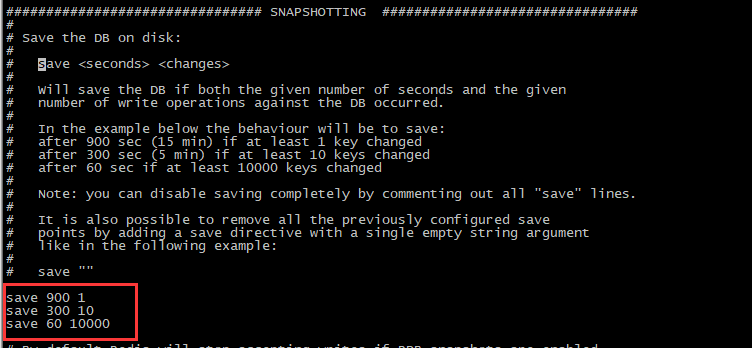
AOF持久化配置:
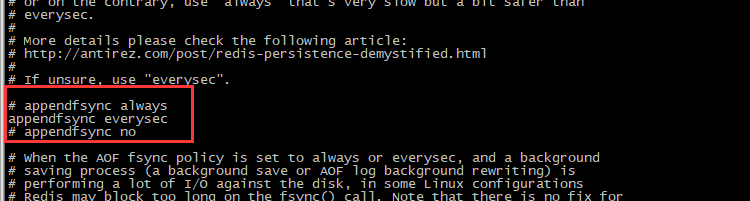
appendfsync always #每次有数据修改发生时都会写入AOF文件。
appendfsync everysec #每秒钟同步一次,该策略为AOF的缺省策略。
appendfsync no #从不同步,高效但是数据不会被持久化。
说明:AOF默认是没开启的,需要将appendonly no的值设置为yes,重启后生效
修改后重启:
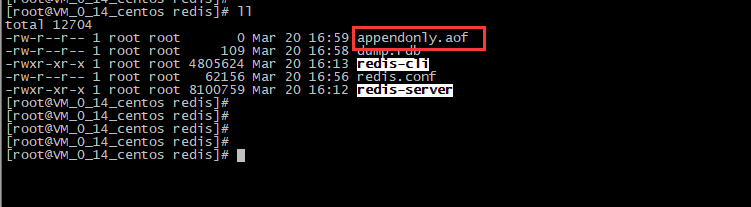
测试,set一条记录:

然后查看appendonly.aof文件,set操作记录已被追加到aof文件:
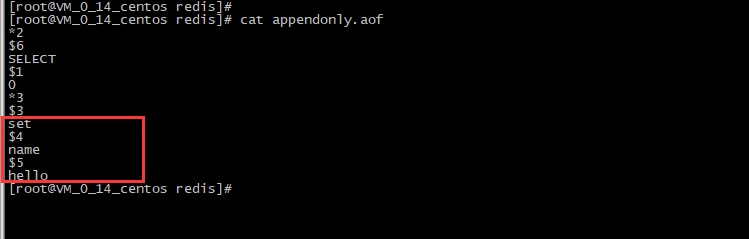
4、开启远程访问
配置protected-mode no (redis 3.2版本以后),注释掉bind 地址即可。
5、开启守护进程
redis采用的是单进程多线程的模式,当redis.conf中选项daemonize设置成yes时,代表开启守护进程模式。在该模式下,redis会在后台运行,并将进程pid号写入至redis.conf选项pidfile设置的文件中,此时redis将一直在后台运行
关于Redis集群模式下节再接着说。
Redis笔记-单机版安装的更多相关文章
- Redis笔记,安装和常用命令
转载于:http://www.itxuexiwang.com/a/shujukujishu/redis/2016/0216/96.html?1455870708 一.redis简单介绍 redis是N ...
- Redis笔记2-Redis安装、配置
下载安装包 wget http://download.redis.io/releases/redis-4.0.8.tar.gz解压 tar xzvf redis-4.0.8.tar.gz安装 cd r ...
- Redis单机版安装
1.工具简单介绍 1.博主使用的是Xshell工具 ps:需要设置端口和连接名称,端口一般默认为22,需要的童鞋可以自行百度 2.Redis单机版安装 第一步:安装gcc编译环境 yum instal ...
- Centos7下安装redis实战(单机版以及集群)
一.背景 因项目需要,要引入redis做缓存,就在centos7下亲自安装了一遍redis,刚好趁着这个机会就来把redis的概念以及单机版和集群版redis安装步骤记录下来,在此和大家一起分享. 二 ...
- redis相关笔记(一.安装及单机及哨兵使用)
redis笔记一 redis笔记二 redis笔记三 1.安装 cd /usr/src #进入下载目录(这个目录自己定) yum install -y wget gcc make tcl #安装依赖 ...
- Redis学习笔记一(Redis的详细安装及Linux环境变量配置和启动)
Redis Redis是一个开源的使用ANSI C语言编写.支持网络.可基于内存亦可持久化的日志型.Key-Value数据库,并提供多种语言的API. 我使用的是下面这个版本: 若没有资源的话,我在 ...
- Redis笔记(一):Redis安装教程
Redis是一个开源的使用ANSI C语言编写.支持网络.可基于内存亦可持久化的日志型.Key-Value数据库,并提供多种语言的API. Redis是目前应用最广泛的内存数据存储技术,相比之前的Me ...
- redis 3.2.5单机版安装、使用、systemctl管理Redis启动、停止、开机启动
参照地址 http://www.mamicode.com/info-detail-1488639.html 前提:防火墙安装,然后打开端口,设置开机启动 一.redis源码安装 [root@host- ...
- redis笔记之一
NoSQL简介 全称是Not Only SQL,泛指菲关系型数据库,它是通过键值对存储数据并且将数据存储在内存中.而像mysql,sql server这些通过关系表存数据的就叫关系型数据库 为什么需要 ...
随机推荐
- 大数据量下DataTable To List效率对比
使用反射和动态生成代码两种方式(Reflect和Emit) 反射将DataTable转为List方法 public static List<T> ToListByReflect<T& ...
- Eureka服务配置与进阶
1. Eureka服务配置与进阶 1.1. 主要配置 1.1.1. 服务端(eureka.server.*) enableSelfPreservation默认true,启用注册中心的自保护机制,Eur ...
- .net之设计模式
在上一篇文章里我通过具体场景总结了“.net面向对象的设计原则”,其中也多次提到一些设计模式方面的技术,可想而知,设计模式在我们的开发过程中也是必不可少的.今天我们就来简单交流下设计模式.对于设计模式 ...
- Odoo 12 开发手册指南(八)—— 业务逻辑 – 业务流程的支持
在前面的文章中,我们学习了模型层.如何创建应用数据结构以及如何使用 ORM API 来存储查看数据.本文中我们将利用前面所学的模型和记录集知识实现应用中常用的业务逻辑模式. 本文的主要内容有: 以文件 ...
- 2.App Inventor 2编程流程
一.Chrome浏览器打开App Inventor 2编程网站注册登陆: 可选: A. http://ai2.appinventor.mit.edu/ 网速 ...
- android 请求接口报错 org.apache.http.conn.HttpHostConnectException: Connection to http://192.168.1.90:9090 refused
No Network Security Config specified, using platform defaultI/System.out: org.apache.http.conn.HttpH ...
- windows系统库
内部组件 这些程序库文件通常不会被程序直接使用,不过它们却是用来实现其他程序库功能的重要程序库. Hal.dll Windows系统的硬件抽象层就是由Hal.dll实现[1].HAL提供很多函数,而这 ...
- qt+vs2017环境下XIMEA相机库的配置
从第一篇博客出来之后就没再更新过博客,这一次再更新博客的时候已经是换了项目了,现在在搞双目视觉方面.刚开始接触这一方面,前几天一直在研究相机原本的库函数的调用问题 网上这一方面的很少,而且很多都是在u ...
- 《Python黑客编程之极速入门》正式开课
玄魂 玄魂工作室 今天 之前开启了一个<Python黑客编程>的系列,后来中断了,内容当时设置的比较宽,不太适合入门.现在将其拆分成两个系列<Python黑客编程之极速入门>和 ...
- Java使用Try with resources自动关闭资源
Try-with-resources Try-with-resources是Java7中一个新的异常处理机制,它能够很容易地关闭在try-catch语句块中使用的资源. 利用Try-Catch-Fin ...