
Requests库介绍
Requests 是用Python语言编写,基于 urllib,采用 Apache2 Licensed 开源协议的 HTTP 库。它比 urllib 更加方便,可以节约我们大量的工作,完全满足 HTTP 测试需求。Requests 的哲学是以 PEP 20 的习语为中心开发的,所以它比 urllib 更加 Pythoner。更重要的一点是它支持 Python3 哦!
- Beautiful is better than ugly.(美丽优于丑陋)
- Explicit is better than implicit.(清楚优于含糊)
- Simple is better than complex.(简单优于复杂)
- Complex is better than complicated.(复杂优于繁琐)
- Readability counts.(重要的是可读性)
requests库常用的7种方法:
requests.requests()
requests.get(‘https://github.com/timeline.json’) #GET请求
requests.post(“http://httpbin.org/post”) #POST请求
requests.put(“http://httpbin.org/put”) #PUT请求(提交修改全部的数据)
requests.delete(“http://httpbin.org/delete”) #DELETE请求
requests.head(“http://httpbin.org/get”) #HEAD请求
requests.patch(“http://httpbin.org/get”) #PATCH请求(提交修改部分数据)
剩下六种方法都是由requests()方法实现的,因此我们也可以说requests()方法是最基本的
在网络上,对服务器数据进行修改是比较困难的,在实际中get()方法是最为常用的方法
1.requests()方法:
requests.requests(method, url, **kwargs)
method:请求方式:GET, PUT,POST,HEAD, PATCH, delete, OPTIONS7种方式
url:网络链接
**kwargs: (13个可选参数)(下面演示这些参数如何使用)
params: 字典或者字节序列,作为参数增加到url中
>>> payload = {'key1': 'value1', 'key2': 'value2'}

>>> r = requests.get("http://httpbin.org/get", params=payload)
通过打印输出该URL,你能看到URL已被正确编码:

>>> print r.url

u'http://httpbin.org/get?key2=value2&key1=value1'
json: JSON格式的数据,作为requests的内容
>>> import requests

>>> r = requests.get('https://github.com/timeline.json')

>>> r.json()

[{u'repository': {u'open_issues': 0, u'url': 'https://github.com/...
headers: 字典,HTTP定制头
data: 是第二个控制参数,向服务器提交数据
import requests

import json

data = {'some': 'data'}

headers = {'content-type': 'application/json',

           'User-Agent': 'Mozilla/5.0 (X11; Ubuntu; Linux x86_64; rv:22.0) Gecko/20100101 Firefox/22.0'}

r = requests.post('https://api.github.com/some/endpoint', data=data, headers=headers)

print(r.text)
cookies: 字典或CookieJar, Requests中的cookie
如果某个响应中包含一些Cookie,你可以快速访问它们:
import requests

r = requests.get('http://www.google.com.hk/')

print(r.cookies['NID'])

print(tuple(r.cookies))
要想发送你的cookies到服务器,可以使用 cookies 参数:
import requests

url = 'http://httpbin.org/cookies'

cookies = {'testCookies_1': 'Hello_Python3', 'testCookies_2': 'Hello_Requests'}

# 在Cookie Version 0中规定空格、方括号、圆括号、等于号、逗号、双引号、斜杠、问号、@,冒号,分号等特殊符号都不能作为Cookie的内容。

r = requests.get(url, cookies=cookies)

print(r.json())
auth: 元组,支持HTTP认证功能
import requests

from requests.auth import HTTPBasicAuth

r = requests.get('https://httpbin.org/hidden-basic-auth/user/passwd', auth=HTTPBasicAuth('user', 'passwd'))

# r = requests.get('https://httpbin.org/hidden-basic-auth/user/passwd', auth=('user', 'passwd'))    # 简写

print(r.json())
files: 字典类型,传输文件
import requests

url = 'http://127.0.0.1:5000/upload'

files = {'file': open('/home/lyb/sjzl.mpg', 'rb')}

#files = {'file': ('report.jpg', open('/home/lyb/sjzl.mpg', 'rb'))}     #显式的设置文件名

r = requests.post(url, files=files)

print(r.text)
timeout: 设置的超时时间,秒为单位
>>> requests.get('http://github.com', timeout=0.001)

Traceback (most recent call last):

  File "<stdin>", line 1, in <module>

requests.exceptions.Timeout: HTTPConnectionPool(host='github.com', port=80): Request timed out. (timeout=0.001)
proxies: 字典类型,设定访问代理服务器,可以增加登录认证
import requests

proxies = {

  "http": "http://10.10.1.10:3128",

  "https": "http://10.10.1.10:1080",

}

requests.get("http://www.zhidaow.com", proxies=proxies)
如果代理需要账户和密码,则需这样:
proxies = {

    "http": "http://user:pass@10.10.1.10:3128/",

}
allow_redirects: True/False,默认为True, 重定向开关
stream: True/False,默认为True,获取内容立即下载开关
verity: True/False,默认为True, 认证SSL证书
cert: 本地SSL证书路径
2.get()方法:
requests.get(url, params=None, **kwargs)
url: 拟获取页面的url链接
params: url中的额外参数,字典或字节流,可选择
**kwargs:12个控制访问的参数,就是requests中除params参数
3.head()方法
requests.head(url, **kwargs)
url: 拟获取页面的url链接
**kwargs:13个控制访问的参数
4.post()方法
requests.post(url, data=None, json=None, **kwargs)
url: 拟获取页面的url链接
data: 字典,字节序列或文件,Requests的内容
json: JSON格式的数据,Requests的内容
**kwargs:11个控制访问的参数
5.put()方法
requests.put(url, data=None, **kwargs)
url: 拟获取页面的url链接
data: 字典,字节序列或文件,Requests的内容
**kwargs:12个控制访问的参数
6.patch()方法
requests.patch(url, data=None, **kwargs)
url: 拟获取页面的url链接
data: 字典,字节序列或文件,Requests的内容
**kwargs:12个控制访问的参数
7.delete()方法
requests.delete(url, **kwargs)
url: 拟删除页面的url链接
**kwargs:13个控制访问的参数
Response对象
使用requests方法后,会返回一个response对象,其存储了服务器响应的内容,
常用属性:
r.status_code #HTTP响应状态码,200表示响应成功,404表示失败
r.content #HTTP响应内容的二进制形式
r.text #字符串方式的响应体,
r.headers #以字典对象存储服务器响应头,但是这个字典比较特殊,字典键不区分大小写,若键不存在则返回None
(要注意区分r.headers,与前面的headers参数字段,前者只是Response对象的一个属性,后者是传递的参数)
r.encoding#从HTTP头header中提取响应内容的编码方式(这个编码方式不一定存在)
r.apparent_encoding#从内容中分析出响应内容的编码方式(这个编码方式是绝对正确的)
r.raw #返回原始响应体,也就是 urllib 的 response 对象,使用 r.raw.read() 读取
在这里有一个比较特殊的属性: r.request.headers可以查看HTTP请求的头部,注意区分r.headers
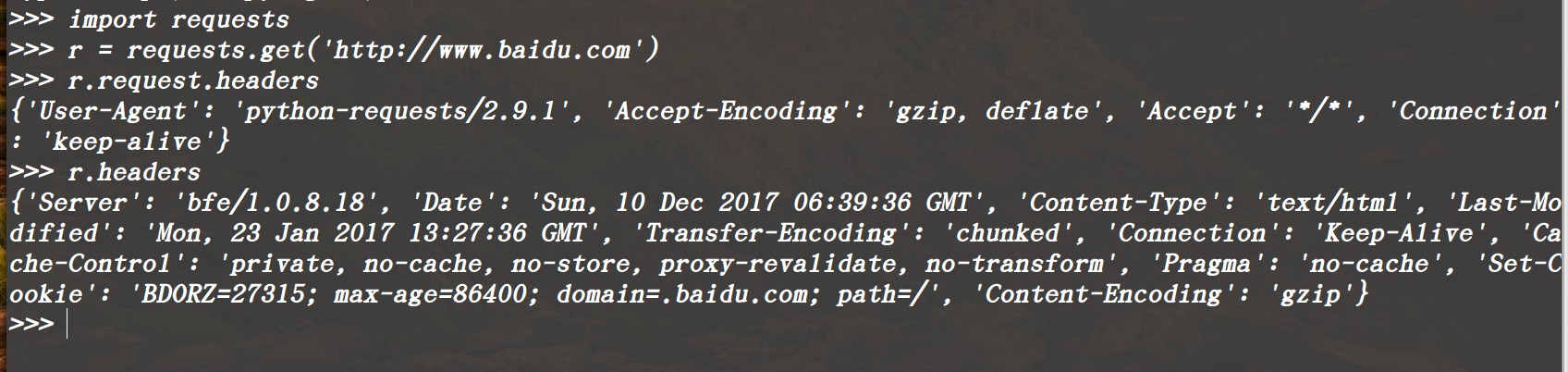
常用方法:
r.raise_for_status() #失败请求(非200响应)抛出requests.HTTPError异常
Requests库的异常:
requests.ConnectionError: 网络连接错误异常,如DNS查询失败,拒接连接等
requests.HTTPError: HTTP错误异常
requests.URLRequired: URL缺失异常
requests.TooManyRedirects: 超过最大重定向次数,产生的重定向异常
requests.ConnectTimeout: 远程连接服务器异常超时
requests.Timeout: 请求URL超时,产生的超时异常
Requests库介绍的更多相关文章
- 『居善地』接口测试 — 3、Requests库介绍
目录 1.Requests库 2.Requests库文档 3.Requests库安装 4.Requests库的使用 (1)使用步骤 (2)示例练习 5.补充:Json数据和Python对象互相转化 1 ...
- [python爬虫]Requests-BeautifulSoup-Re库方案--Requests库介绍
[根据北京理工大学嵩天老师“Python网络爬虫与信息提取”慕课课程编写 文章中部分图片来自老师PPT 慕课链接:https://www.icourse163.org/learn/BIT-10018 ...
- Python爬虫之requests库介绍(一)
一:Requests: 让 HTTP 服务人类 虽然Python的标准库中 urllib2 模块已经包含了平常我们使用的大多数功能,但是它的 API 使用起来让人感觉不太好,而 Requests 自称 ...
- python爬虫之requests库介绍(二)
一.requests基于cookie操作 引言:有些时候,我们在使用爬虫程序去爬取一些用户相关信息的数据(爬取张三“人人网”个人主页数据)时,如果使用之前requests模块常规操作时,往往达不到我们 ...
- requests库的使用、安装及方法的简单介绍
requests库的使用.安装及方法的简单介绍 1.requests库的概述 requests库是一个简洁且简单的处理HTTP请求的第三方库,是公认的最好获得第三方信息的库. requests库更多信 ...
- python网络爬虫(二)requests库的基本介绍和使用
一.requests库的七个重要方法 (1)最常用方法:requests.get(url,params=None,**kwargs)//对应HTTP协议的GET()操作 (请求获得URL位置的资源) ...
- Python爬虫小白入门(二)requests库
一.前言 为什么要先说Requests库呢,因为这是个功能很强大的网络请求库,可以实现跟浏览器一样发送各种HTTP请求来获取网站的数据.网络上的模块.库.包指的都是同一种东西,所以后文中可能会在不同地 ...
- python爬虫之requests模块介绍
介绍 #介绍:使用requests可以模拟浏览器的请求,比起之前用到的urllib,requests模块的api更加便捷(本质就是封装了urllib3) #注意:requests库发送请求将网页内容下 ...
- 芝麻HTTP: Python爬虫利器之Requests库的用法
前言 之前我们用了 urllib 库,这个作为入门的工具还是不错的,对了解一些爬虫的基本理念,掌握爬虫爬取的流程有所帮助.入门之后,我们就需要学习一些更加高级的内容和工具来方便我们的爬取.那么这一节来 ...
随机推荐
- 织梦dedecms默认网站地图sitemap.html优化
网站地图对于网站优化很重要,搜索引擎就是靠网站地图去收录网站页面,本文主要讲解优化织梦自带的网站地图功能. 织梦自带的网站地图使用方法:织梦后台--生成--HTML更新--更新网站地图,可以在 ...
- C语言Linix服务器网络爬虫项目(二)项目设计和通过一个http请求抓取网页的简单实现
我们通过上一篇了解了爬虫具体要实现的工作之后,我们分析得出的网络爬虫的基本工作流程如下: 1.首先选取一部分精心挑选的种子URL: 2.将这些URL放入待抓取URL队列: 3.从待抓取URL队列中取出 ...
- Python基础学习篇章三
一. Python对象类型 1. 对象是Python最基本的概念,一个Python程序可以分解为模块.语句.表达式.和对象.它们的关系如下:(1)程序由模块构成 (2)模块包含语句 (3)语句包含表达 ...
- Linux实战案例(1)CentOS修改主机名(hostname)
1.临时修改主机名 显示主机名: oracle@localhost:~$ hostname localhost 修改主机名: oracle@localhost:~$ sudo hostname orc ...
- ASP.NET Web API编程——序列化与内容协商
1 多媒体格式化器 多媒体类型又叫MIME类型,指示了数据的格式.在HTTP协议中多媒体类型描述了消息体的格式.一个多媒体类型包括两个字符串:类型和子类型. 例如: text/html.image/p ...
- spring4——IOC之基于注解的依赖注入(DI )
spring容器对于Bean的创建和对象属性的依赖注入提供了注解的支持,让我们在开发中能够更加便捷的实现对象的创建和对象属性的依赖注入.一,对于Bean的创建spring容器提供了以下四个注解的支持: ...
- shiro的sessionManager类继承结构及主要类方法
shiro1.3.2 sessionManage的作用是对会话进行管理. 1.类结构 2.主要接口介绍 SessionManager: 包括两个方法,一个是新建会话,一个是通过key获取会话 Vali ...
- Java:现有线程T1/T2/T3,如何确保T1执行完成之后执行T2,T3在T2执行完成之后执行。
要实现多个线程执行完成先后,就要知道如何实现线程之间的等待,java线程等待实现是join.java的jdk中join方法实现如下: public final synchronized void jo ...
- SpringMVC(三):@RequestMapping中的URL中设定通配符,可以使用@PathVariable映射URL绑定的占位符
1)带占位符的URL是Spring3.0新增的功能,该功能在SpringMVC向REST目标挺进发展过程中具有里程碑的意义. 2)通过@PathVariable可以将URL中占位符参数绑定到控制器处理 ...
- netcore webapi帮助文档设置
如何建 .netcore webapi 项目这个就不说了,这个都没有没必要看下去. 我这里是.netcore 2.0,虽然没测过1.0的,但想来差不多. 1.Nuget Packages安装,使用程序 ...