
使用 NLog 给 Asp.Net Core 做请求监控
为了减少由于单个请求挂掉而拖垮整站的情况发生,给所有请求做统计是一个不错的解决方法,通过观察哪些请求的耗时比较长,我们就可以找到对应的接口、代码、数据表,做有针对性的优化可以提高效率。在 asp.net web api 中我们可以通过注册一个 DelegatingHandler 来实现该功能。那在 asp.net core 中该如何实现呢?
一:比较 asp.net web api 和 asp.net core 的请求管道

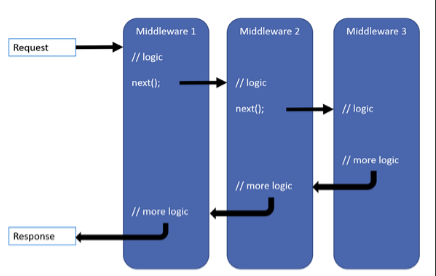
观察这两张图,可以发现他们非常的相似,都是管道式的设计,在 asp.net web api 中,我们可以注册一系列的 DelegatingHandler 来处理请求上下文 HttpRequestMessage,在 asp.net core 中,我们可以注册一系列中间件来处理请求上下文,他们两者从功能和意义上是非常相似的,我这里这里不会详细介绍各自的管道是如何的(这样的文章非常多,博客园随处可见),他们都完成了类似中间件的功能,只是在代码设计上有一点区别。
我们先看一段代码,新建一个 asp.net web api 项目,添加几个 DelegatinHandler
    public class DelegatingHandler1 : DelegatingHandler

    {

        protected override async Task<HttpResponseMessage> SendAsync(HttpRequestMessage request, CancellationToken cancellationToken)

        {

            Trace.WriteLine("DelegatingHandler1 HashCode: " + this.GetHashCode());

            Trace.WriteLine("DelegatingHandler1 base InnerHandler HashCode: " + base.InnerHandler.GetHashCode());

            Trace.WriteLine("DelegatingHandler1 start");

            var response = await base.SendAsync(request, cancellationToken);

            Trace.WriteLine("DelegatingHandler1 end");

            return response;

        }

    }

    public class DelegatingHandler2 : DelegatingHandler

    {

        protected override async Task<HttpResponseMessage> SendAsync(HttpRequestMessage request, CancellationToken cancellationToken)

        {

            Trace.WriteLine("DelegatingHandler2 HashCode: " + this.GetHashCode());

            Trace.WriteLine("DelegatingHandler2 base InnerHandler HashCode: " + base.InnerHandler.GetHashCode());

            Trace.WriteLine("DelegatingHandler2 start");

            var response = await base.SendAsync(request, cancellationToken);

            Trace.WriteLine("DelegatingHandler2 end");

            return response;

        }

    }

    public class DelegatingHandler3 : DelegatingHandler

    {

        protected override async Task<HttpResponseMessage> SendAsync(HttpRequestMessage request, CancellationToken cancellationToken)

        {

            Trace.WriteLine("DelegatingHandler3 HashCode: " + this.GetHashCode());

            Trace.WriteLine("DelegatingHandler3 base InnerHandler HashCode: " + base.InnerHandler.GetHashCode());

            Trace.WriteLine("DelegatingHandler3 start");

            var response = await base.SendAsync(request, cancellationToken);

            Trace.WriteLine("DelegatingHandler3 end");

            return response;

        }

    }
然后在 Global 中注册
    public class WebApiApplication : System.Web.HttpApplication

    {

        protected void Application_Start()

        {

            AreaRegistration.RegisterAllAreas();

            GlobalConfiguration.Configure(WebApiConfig.Register);

            FilterConfig.RegisterGlobalFilters(GlobalFilters.Filters);

            RouteConfig.RegisterRoutes(RouteTable.Routes);

            BundleConfig.RegisterBundles(BundleTable.Bundles);

            GlobalConfiguration.Configuration.MessageHandlers.Add(new DelegatingHandler1());

            GlobalConfiguration.Configuration.MessageHandlers.Add(new DelegatingHandler2());

            GlobalConfiguration.Configuration.MessageHandlers.Add(new DelegatingHandler3());

        }

    }
修改一下 ValuesController
    public class ValuesController : ApiController

    {

        // GET api/values

        public IEnumerable<string> Get()

        {

            Trace.WriteLine("/api/values");

            var handlers = this.RequestContext.Configuration.MessageHandlers;

            return new string[] { "value1", "value2" };

        }

    }
启动后输入路径 /api/values,我们可以在VS 的输出栏看到下面这些内容
DelegatingHandler1 HashCode: 58154627
DelegatingHandler1 base InnerHandler HashCode: 35529478
DelegatingHandler1 start
DelegatingHandler2 HashCode: 35529478
DelegatingHandler2 base InnerHandler HashCode: 47422476
DelegatingHandler2 start
DelegatingHandler3 HashCode: 47422476
DelegatingHandler3 base InnerHandler HashCode: 65273341
DelegatingHandler3 start
/api/values
DelegatingHandler3 end
DelegatingHandler2 end
DelegatingHandler1 end
输出中我们可以看到 DelegatingHandler1 的 InnerHandler 是 DelegatingHandler2,以此类推,在 DelegatingHandler3 的 InnerHandler 处理请求的时候就转发到了相关控制器,这里和 .net core 中的中间件非常相似,在.net core 中间件顺序是 RequestServicesContainerMiddleware(给请求上下文绑定容器)-> AuthenticationMiddleware(认证)-> RouterMiddleware (路由以及MVC)
如果我们在 ValuesController 中观察表达式 this.RequestContext.Configuration.MessageHandlers 还可以看到最终处理请求的是一个 HttpRoutingDispatcher,最也是是分配到路由以及控制器来处理的,按照如此方式我们可以很容易在 asp.net web api 中对请求统计。这里是比较简陋的,对此我们可以记录客户端和服务器更详细的信息,包括 IP 地址,http状态码,是否是认证用户等等,但是这篇主要是以 asp.net core 为主的,所以这里就不详细写下去了。
    public class ApplicationInsight : DelegatingHandler

    {

        protected override async Task<HttpResponseMessage> SendAsync(HttpRequestMessage request, CancellationToken cancellationToken)

        {

            var stopWatch = new Stopwatch();

            stopWatch.Start();

            var response = await base.SendAsync(request, cancellationToken);

            stopWatch.Stop();

            //停止计时器,并记录

        }

    }

    public partial class Startup

    {

        public void Configuration(IAppBuilder app)

        {

            GlobalConfiguration.Configuration.MessageHandlers.Add(new ApplicationInsight());

        }

    }
二:asp.net core 中间件 + NLog 实现请求监控
先看统计结果,start 开始时间,time 是请求消耗时间(毫秒),authenicate 是认证通过的 schema,使用 NLog 自定义字段也是非常方便的

先说一说遇到的问题
(1)NLog 记录一张以上的表如何实现,应为首先会有一个一般性的日志表(称他为 log),并且这些统计不对写到 log 表
(2)使用 NLog 自定义字段 LayoutRenderer 没有类似 .net framework 中的 System.Web.Current
(3)使用 UseMiddleware 无法在让我们的中间件成为第一个中间件
(4)实现忽略记录的方法,肯定有一些接口是不希望记录的,所以这个也要实现
NLog 配置
这里只列出了部分内容,github 地址在最后,数据库是 mysql ,apiinsight 表示请求统计,log 是一般性的日志,debughelper 可以加快我们调试时日志的检索速度
<targets>

    <!--黑洞 忽略的日志-->

    <target xsi:type="Null"

            name="blackhole" />

    <!--文件日志-->

    <target xsi:type="File"

        name="debughelper"

        fileName="${var:root}\Logs\debug_helper.log"

        layout="${longdate}|${event-properties:item=EventId.Id}|${logger}|${uppercase:${level}}|${message} ${exception}" />

    <!--apiinsight api 统计-->

    <target name="apiinsight" xsi:type="Database"

             dbProvider="MySql.Data.MySqlClient.MySqlConnection, MySql.Data"

             connectionString="${var:connectionString}"

             >

    </target>

    <!--日志-->

    <target name="log" xsi:type="Database"

         dbProvider="MySql.Data.MySqlClient.MySqlConnection, MySql.Data"

         connectionString="${var:connectionString}"

             >

    </target>

  </targets>
在 Startup 中
public void Configure(IApplicationBuilder app, IHostingEnvironment env)

{

    //省略了其他配置

    //全局的 HttpContext

    app.UseGlobalHttpContext();

    //省略了其他配置

    LogManager.Configuration = new XmlLoggingConfiguration(Path.Combine(env.ContentRootPath, "nlog.config"));

    LogManager.Configuration.Variables["root"] = env.ContentRootPath;

    LogManager.Configuration.Variables["connectionString"] = Configuration.GetConnectionString("DefaultConnection");

}
自定义字段都是通过 LayoutRenderer 实现,由于自定义字段有很多,这里只列出了一个开始时间是如何查询的,这个时间是在我们注册的第一个中间件执行 Invoke 方法的时候写进 HttpContext.Items 的
    [LayoutRenderer("apiinsight-start")]

    public class StartApiInsightRenderer : LayoutRenderer

    {

        protected override void Append(StringBuilder builder, LogEventInfo logEvent)

        {

            var httpContext = HttpContextProvider.Current;

            if (httpContext == null)

            {

                return;

            }

            var _apiInsightsKeys = httpContext.RequestServices.GetService<IApiInsightsKeys>();

            if (httpContext != null)

            {

                if (httpContext.Items.TryGetValue(_apiInsightsKeys.StartTimeName, out var start) == true)

                {

                    builder.Append(start.ToString());

                }

            }

        }

    }
NLog 规则,很容易理解日志统计只记录 Cheers 命名空间下的日志
  <rules>

    <!--需要记录的日志-->

    <logger name="Cheers.*" minlevel="Trace" writeTo="apiinsight" />

    <logger name="WebApp.*" minlevel="Info" writeTo="log" />

    <logger name="*" minlevel="Trace" maxlevel="Debug" writeTo="debughelper" />

    <!--忽略的日志-->

    <logger name="Microsoft.*" minlevel="Trace" writeTo="blackhole" final="true" />

  </rules>
核心 ApiInsightMiddleware 中间件
    public class ApiInsightMiddleware

    {

        private readonly RequestDelegate _next;

        private readonly IServiceProvider _serverProvider;

        private readonly IApiInsightsKeys _apiInsightsKeys;

        private readonly ILogger<ApiInsightMiddleware> _logger;

        private HttpContext _httpContext;

        public ApiInsightMiddleware(RequestDelegate next, IServiceProvider serviceProvider, ILogger<ApiInsightMiddleware> logger)

        {

            _next = next;

            _serverProvider = serviceProvider;

            _apiInsightsKeys = _serverProvider.GetService<IApiInsightsKeys>();

            _logger = logger;

        }

        public async Task Invoke(HttpContext httpContext)

        {

            _httpContext = httpContext;

            var flag = SetValues();

            await _next(httpContext);

            if (flag == true)

            {

                ApiInsight();

            }

        }

        //省略了其他的代码

    }
很好理解,在执行下一个中间件之前调用 SetValues 开始计时,下一个中间件执行成功开始统计并写入日志(或者忽略不写)。现在他是 asp.net core mvc 的第一个中间件了,好处就是更符合这个中间件本身的所做的事情了,但是带来的问题就是 httpContext.RequestService 是 null ,因为 RequestService 是在 RequestServicesContainerMiddleware 这个中间件写进去的,在者其实很多地方我们都需要 HttpContext ,并且目前微软还没有给我们定义一个静态的 HttpContext。
静态的 HttpContext
HttpContext 是通过单例 IHttpContextAccessor 提供的,当 HttpContext 创建的时候就会赋值给他,当请求到达中间件这个管道的时候,HttpContext 就已经存在于 IHttpContextAccessor 了,并且和 Invoke 参数列表中的 HttpContext 是一致的(同一个请求中),问题在于 RequestServicesContainerMiddleware 这个中间件没有执行就没有容器,并且很多时候我们都要用到容器,所以就模仿源码在这里都加进去了。
    public static class HttpContextProvider

    {

        private static IHttpContextAccessor _accessor;

        private static IServiceScopeFactory _serviceScopeFactory;

        public static Microsoft.AspNetCore.Http.HttpContext Current

        {

            get

            {

                var context = _accessor?.HttpContext;

                if (context != null)

                {

                    var replacementFeature = new RequestServicesFeature(_serviceScopeFactory);

                    context.Features.Set<IServiceProvidersFeature>(replacementFeature);

                    return context;

                }

                return null;

            }

        }

        internal static void ConfigureAccessor(IHttpContextAccessor accessor, IServiceScopeFactory serviceScopeFactory)

        {

            _accessor = accessor;

            _serviceScopeFactory = serviceScopeFactory;

        }

    }

    public static class HttpContextExtenstion

    {

        public static void AddHttpContextAccessor(this IServiceCollection services)

        {

            services.AddSingleton<IHttpContextAccessor, HttpContextAccessor>();

        }

        public static IApplicationBuilder UseGlobalHttpContext(this IApplicationBuilder app)

        {

            var httpContextAccessor = app.ApplicationServices.GetRequiredService<IHttpContextAccessor>();

            var serviceScopeFactory = app.ApplicationServices.GetRequiredService<IServiceScopeFactory>();

            HttpContextProvider.ConfigureAccessor(httpContextAccessor, serviceScopeFactory);

            return app;

        }

    }
我们只需要在 Startup 中使用 app.UseGlobalHttpContext(); 就可以在程序的任何地方得到 HttpContext 和容器了,肯定会有人说为什么不通过构造函数来获取我们想要的注入呢,因为有些第三方框架或这某些地方我们不能使用容器获取服务,比如这里 NLog 的自定义字段使用的 LayoutRenderer 就无法通过构造器得到我们想要的服务。
第一个中间件
在 Startup 的 Configure 方法中目前还没发现如何注册第一个中间件,因为 Configure 方法始终是在 IStartupFilter 这个接口之后执行的,这也提供了我们让自己的中间件成为第一个中间件的可能。可能这样做并不是特别有必要,甚至是没有意义的,但是实现的过程确实很有意思的。这里在 Startup 中的 方法 ConfigureService 注册我们的中间件。
    public void ConfigureServices(IServiceCollection services)

    {

        services.AddApiInsights();

        services.AddMvc();

    }
具体的
    public static class ApiInsightsServiceCollectionExtensions

    {

        static readonly string stopWatchName = "__stopwatch__";

        static readonly string startTimeName = "__start__";

        /// <summary>

        ///     注册和 API 监控相关的服务,中间件

        /// </summary>

        /// <param name="services"></param>

        public static void AddApiInsights(this IServiceCollection services)

        {

            services.AddSingleton<IApiInsightsKeys>(

                    new ApiInsightsKeys(stopWatchName, startTimeName)

                );

            services.FirstRegister<IStartupFilter, RequestApiInsightBeginStartupFilter>(ServiceCollectionServiceExtensions.AddTransient<IStartupFilter, RequestApiInsightBeginStartupFilter>);

            services.AddSingleton<IRequestIsAuthenticate, DefaultRequestIsAuthenticate>();

        }

    }
这里注册了三个服务
IApiInsightsKeys
定义了存储在 HttpContext.Item 中的键值对的名称
   public interface IApiInsightsKeys

    {

        string StopWatchName { get; }

        string StartTimeName { get; }

    }
IRequestIsAuthenticate
    /// <summary>

    ///     验证请求用户是否已经认证

    /// </summary>

    public interface IRequestIsAuthenticate

    {

        /// <summary>

        ///     返回已经认证的 scheme

        /// </summary>

        /// <returns></returns>

        Task<string> IsAuthenticateAsync();

        /// <summary>

        ///     返回已经认证的 用户名

        /// </summary>

        /// <returns></returns>

        Task<string> AuthenticatedUserName();

    }
就验证而言可能不同的开发者使用的是不一样的验证方式,可能是基于 Asp.Net Core Authentication 中间件的认证方式,也可能是其他的比如自定义的 token,或者有一个单点登录的服务器,又或者是 session,其实 Asp.Net Core 的 Authentication 中间件也可以帮我们实现基于 restful 的token 认证。所以就把它定义出来了,并且默认的实现就是基于 Authentication 这个中间件的。
IStartupFilter
看到他是一个非常特殊的方式来注册的,自定义的 FirstRegister 这个方法,实际上 Asp.Net Core 内置有多个 IStartup 这样的服务,并且都是在 Startup 的 Configure 之前执行的,所以这里一定要用这个服务来让我们的中间件成为第一个中间件。FirstRegister 代码也很容易理解,由于在宿主启动之前,内部注册了多个 IStartup,并且最后会按先后顺序配置 IApplicationBuilder,所以我们只能让第一个 StartupFilter 的 IApplicationBuilder 就注册我们的中间件,通过改动 ServiceCollection 中服务的顺序可以实现。虽然不是很有必要,但是可以从中观察的 Startup 的 Configure方法 以及 接口StartupFilter (还有 IHostingStartup )的执行顺序。
    public class RequestApiInsightBeginStartupFilter : IStartupFilter

    {

        public Action<IApplicationBuilder> Configure(Action<IApplicationBuilder> next)

        {

            return builder =>

            {

                builder.UseMiddleware<RequestApiInsightBeginMiddleware>();

                next(builder);

            };

        }

    }
忽略的方法
    [AttributeUsage(AttributeTargets.Method, AllowMultiple = false, Inherited = true)]

    public class NoInsightAttribute : Attribute

    {

    }
在 ApiInsight 方法中会调用 IsIgnore 检测该方法是否打了标签 NoInsightAttribute,如果是那就忽略该方法,这里建议使用特性路由,原因有两点,第一特性路由不需要使用 IActionSelector 接口重新查找匹配的方法,第二,在 restful api 中,结合特性路由和 HttpMethodAttribute 标签可以使方法更简洁,相同的接口名称通过不同的请求方式达到不同的目的
    private bool IsIgnore()

    {

        var actionDescriptor = GetSelectedActionDescriptor() as ControllerActionDescriptor;

        if (actionDescriptor == null)

        {

            return false;

        }

        else

        {

            var noInsight = actionDescriptor.MethodInfo.GetCustomAttribute<NoInsightAttribute>();

            return noInsight != null;

        }

    }
程序地址:https://github.com/cheesebar/ApiInsights
使用 NLog 给 Asp.Net Core 做请求监控的更多相关文章
- .Net Core 做请求监控NLog
使用 NLog 给 Asp.Net Core 做请求监控 https://www.cnblogs.com/cheesebar/p/9078207.html 为了减少由于单个请求挂掉而拖垮整站的情况发生 ...
- 《ASP.NET Core In Action》读书笔记系列三 ASP.NET Core如何处理请求的?
在本节中,您将看到ASP.NET Core应用程序如何运行的,从请求URL开始到页面呈现在浏览器中. 为此,您将看到 一个HTTP请求在Web服务器中是如何被处理的.ASP.NET Core如何扩展该 ...
- ASP.NET CORE做的网站运行在docker实践
用VS2017 建立了 DotNet Core 2.2 的网站后,如何转移到 Docker 下运行? 下面分两种方式来实践: 1.直接手动命今行,将本机目录映射进Docker,运行网站.2.制作 Im ...
- 牛腩学ASP.NET CORE做博客(视频)
牛腩学习ASP.NET CORE做的项目,边学边做. 目录: 01-dotnetcore网站部署到centos7系统上(时长 2:03:16) 02-前期准备及项目搭建 (时长:0:23:35) 03 ...
- win10 uwp 使用 asp dotnet core 做图床服务器客户端
原文 win10 uwp 使用 asp dotnet core 做图床服务器客户端 本文告诉大家如何在 UWP 做客户端和 asp dotnet core 做服务器端来做一个图床工具 服务器端 从 ...
- win10 uwp 手把手教你使用 asp dotnet core 做 cs 程序
本文是一个非常简单的博客,让大家知道如何使用 asp dot net core 做后台,使用 UWP 或 WPF 等做前台. 本文因为没有什么业务,也不想做管理系统,所以看到起来是很简单. Visua ...
- Elasticsearch,Kibana,Logstash,NLog实现ASP.NET Core 分布式日志系统
Elasticsearch - 简介 Elasticsearch 作为核心的部分,是一个具有强大索引功能的文档存储库,并且可以通过 REST API 来搜索数据.它使用 Java 编写,基于 Apac ...
- Asp.Net Core获取请求上下文HttpContext
注:特别说明当前版本对应.Net Core2.1意义上框架 一.注入HttpContextAccessor ASP.NET Core中提供了一个IHttpContextAccessor接口,HttpC ...
- ASP.NET Core MVC请求超时设置解决方案
设置请求超时解决方案 当进行数据导入时,若导入数据比较大时此时在ASP.NET Core MVC会出现502 bad gateway请求超时情况(目前对于版本1.1有效,2.0未知),此时我们需要在项 ...
随机推荐
- Linux的eth0,eth1,eth2,lo详解
eth0,eth1,eth2……代表网卡一,网卡二,网卡三……lo代表127.0.0.1,即localhost 参考:Linux命令:ifconfig 功能说明:显示或设置网络设备 语 法:ifcon ...
- 接口文档神器之apidoc
//@desn:apidoc linux环境 windows环境使用 //@desn:码字不宜,转载请注明出处 //@author:张慧源 <turing_zhy@163.com> / ...
- linux下单独线程启动
void linux_start() { signal(2, signal_callback_handler); //signal(9, signal_callback_handler); pid_t ...
- 摘抄详细的VUE生命周期
Vue所有的生命周期钩子自动绑定在this上下文到实例中,因此你可以访问数据,对属性和方法进行运算.这意味着你不能使用箭头函数来定义一个生命周期方法.这是因为箭头函数绑定了父上下文,因此this与你 ...
- 【备忘】Windows的命令行下设置网络代理
在公司访问网络的时候,需要设置代理,设置浏览器的代理是相当的方便了.但有的时候要使用命令行,就需要自己设置了(貌似只要浏览器设置好了,可以直接使用命令行,但我们公司的借,需要有用户名和密码,如果没有使 ...
- android解析xml文件方法之一-----DOM
Hello.xml文件 <dict num="219" id="219" name="219"> <key>hell ...
- Yii2表单提交(带文件上传)
今天写一个php的表单提交接口,除了基本的字符串数据,还带文件上传,不用说前端form标签内应该有这些属性 <form enctype="multipart/form-data&quo ...
- 在Java中谈尾递归--尾递归和垃圾回收的比较(转载)
我不是故意在JAVA中谈尾递归的,因为在JAVA中谈尾递归真的是要绕好几个弯,只是我确实只有JAVA学得比较好,虽然确实C是在学校学过还考了90+,真学得没自学的JAVA好 不过也是因为要绕几个弯,所 ...
- 微信小程序 bug及解决方案
1.小程序遮罩滚动穿透问题 解决方案: <view class="mask" wx:if="{{showVipRights}}" catchtap='hi ...
- springboot数据库连接池使用策略
springboot官方文档介绍数据库连接池的使用策略如下: Production database connections can also be auto-configured using a p ...