
Create小程序
我有时候喜欢直接用命令行创建、编译、执行java文件, 每次创建一个文件都要新建一个.java文件,然后再编辑.java文件加入类名,主函数……
这些流程我有点厌倦,于是就编写了一个超级简单的自动创建工具。下面贴出代码:
import java.awt.EventQueue;

import java.awt.event.ActionEvent;

import java.awt.event.ActionListener;

import java.io.BufferedReader;

import java.io.File;

import java.io.FileNotFoundException;

import java.io.InputStreamReader;

import java.io.PrintWriter;

import java.util.HashMap;

import java.util.Map;

import javax.swing.JButton;

import javax.swing.JFrame;

import javax.swing.JLabel;

import javax.swing.JOptionPane;

import javax.swing.JPanel;

import javax.swing.JScrollPane;

import javax.swing.JTextArea;

import javax.swing.JTextField;

import javax.swing.border.EmptyBorder;

public class Create extends JFrame {

    private String classname;

    private JPanel contentPane;

    private JTextField textField;

    private JLabel lblNewLabel_1;

    private JButton btnNewButton_1;

    private JButton btnNewButton_2;

    /**

     * Launch the application.

     */

    public static void main(String[] args) {

        EventQueue.invokeLater(new Runnable() {

            public void run() {

                try {

                    Create frame = new Create();

                    frame.setVisible(true);

                } catch (Exception e) {

                    e.printStackTrace();

                }

            }

        });

    }

    /**

     * Create the frame.

     */

    public Create() {

        setDefaultCloseOperation(JFrame.EXIT_ON_CLOSE);

        setBounds(100, 100, 450, 300);

        contentPane = new JPanel();

        contentPane.setBorder(new EmptyBorder(5, 5, 5, 5));

        setContentPane(contentPane);

        contentPane.setLayout(null);

        JLabel lblNewLabel = new JLabel("Class name:");

        lblNewLabel.setBounds(49, 0, 93, 42);

        contentPane.add(lblNewLabel);

        textField = new JTextField();

        textField.setBounds(170, 7, 212, 26);

        contentPane.add(textField);

        textField.setColumns(10);

        lblNewLabel_1 = new JLabel("");

        lblNewLabel_1.setBounds(49, 34, 333, 18);

        contentPane.add(lblNewLabel_1);

        JButton btnNewButton = new JButton("create");

        btnNewButton.addActionListener(new ActionListener() {

            public void actionPerformed(ActionEvent e) {

                try {

                    classname = textField.getText();

                    if(classname.equals("")){

                        lblNewLabel_1.setText("请输入需要创建的类名!");

                    }else{

                        PrintWriter out = new PrintWriter(new File(classname+".java"));

                        String str = "class "+classname+"{\n\tpublic "+classname+"(){}\n\tpublic static void main(String[] args){\n\t// TODO Auto-generated method stub\n\n\t}\n}";

                        out.print(str);

                        out.close();

                        textField.setText("");

                        lblNewLabel_1.setText(classname+".java 创建成功");

                    }

                } catch (FileNotFoundException e1) {

                    // TODO Auto-generated catch block

                    JOptionPane.showMessageDialog(getComponent(0), "创建失败");

                }

            }

        });

        btnNewButton.setBounds(275, 62, 107, 23);

        contentPane.add(btnNewButton);

        JScrollPane scrollPane = new JScrollPane();

        scrollPane.setBounds(10, 95, 414, 156);

        contentPane.add(scrollPane);

        JTextArea textArea = new JTextArea();

        scrollPane.setViewportView(textArea);

        btnNewButton_1 = new JButton("javac编译");

        btnNewButton_1.addActionListener(new ActionListener() {

            public void actionPerformed(ActionEvent e) {

                if(classname.equals("")){

                    lblNewLabel_1.setText("你还没有创建类文件!");

                }else{

                    final Map<String, String> env = new HashMap<String, String>(System.getenv());

                    final String[] strings=mapToStringArray(env);

                    BufferedReader reader=null;

                    Process p;

                    String error="";

                    try {

                        p = Runtime.getRuntime().exec("cmd /c javac "+classname+".java",strings);

                        p.waitFor();

                        reader=new BufferedReader(new InputStreamReader(p.getErrorStream()));

                        String line;

                        while((line = reader.readLine()) != null)

                        {

                            error+=line+"\n";

                        }

                    } catch (Exception e1) {

                        // TODO Auto-generated catch block

                        System.out.println("编译程序出错");

                    }

                    if(error.equals("")){

                        textArea.setText("编译成功。");

                    }else{

                        textArea.setText(error);

                    }

                }

            }

        });

        btnNewButton_1.setBounds(38, 62, 93, 23);

        contentPane.add(btnNewButton_1);

        btnNewButton_2 = new JButton("java运行");

        btnNewButton_2.addActionListener(new ActionListener() {

            public void actionPerformed(ActionEvent e) {

                final Map<String, String> env = new HashMap<String, String>(System.getenv());

                final String[] strings=mapToStringArray(env);

                BufferedReader reader=null;

                Process p;

                String error="";

                String success="";

                try {

                    p = Runtime.getRuntime().exec("cmd /c java "+classname,strings);

                    p.waitFor();

                    reader=new BufferedReader(new InputStreamReader(p.getErrorStream()));

                    String line;

                    while((line = reader.readLine()) != null)

                    {

                        error+=line+"\n";

                    }

                    if(error.equals("")){

                        reader=new BufferedReader(new InputStreamReader(p.getInputStream()));

                        while((line = reader.readLine()) != null)

                        {

                            success+=line+"\n";

                        }

                    }

                } catch (Exception e1) {

                    // TODO Auto-generated catch block

                    System.out.println("运行程序出错");

                }

                if(error.equals("")){

                    textArea.setText("运行成功.\n"+success);

                }else{

                    textArea.setText(error);

                }

            }

        });

        btnNewButton_2.setBounds(159, 62, 93, 23);

        contentPane.add(btnNewButton_2);

        this.setDefaultCloseOperation(DISPOSE_ON_CLOSE);

    }

    String[] mapToStringArray(Map<String, String> map) {

        final String[] strings = new String[map.size()];

        int i = 0;

        for (Map.Entry<String, String> e : map.entrySet()) {

            strings[i] = e.getKey() + '=' + e.getValue();

            i++;

        }

        return strings;

    }

}
程序运行图:
我们在Class name栏目输入我们需要创建的类名。
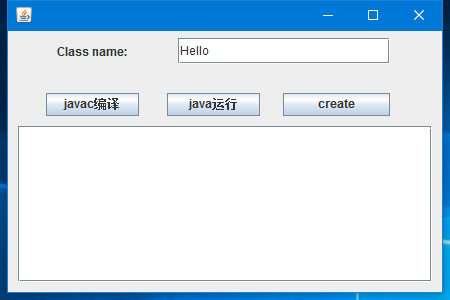
点击create按钮后就会在当前路径下生成Hello.java文件。文件内容是:
class Hello{

    public Hello(){}

    public static void main(String[] args){

    // TODO Auto-generated method stub

    }

}
然后我们在源文件中添加一行测试代码:System.out.println("hello");
class Hello{

    public Hello(){}

    public static void main(String[] args){

    // TODO Auto-generated method stub

        System.out.println("hello");

    }

}
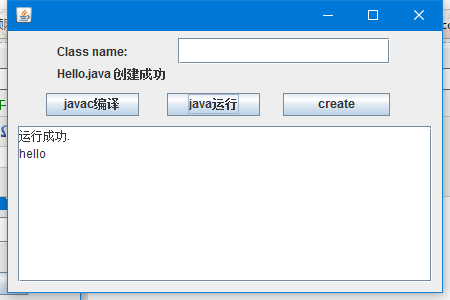
点击编译就能编译成功生成.class文件。

点击运行就能出现运行结果:
虽然很简单,但是还是挺实用的,以后每次就用它来创建我的类文件了,O(∩_∩)O!
当然也可以写几行脚本来完成这个小小的功能……
Create小程序的更多相关文章
- 微信应用号(小程序)开发IDE配置(第一篇)
2016年9月22日凌晨,微信宣布“小程序”问世,当然只是开始内测了,微信公众平台对200个服务号发送了小程序内测邀请.那么什么是“小程序”呢,来看微信之父怎么说 看完之后,相信大家大概都有些明白了吧 ...
- 【微信小程序开发•系列文章六】生命周期和路由
这篇文章理论的知识比较多一些,都是个人观点,描述有失妥当的地方希望读者指出. [微信小程序开发•系列文章一]入门 [微信小程序开发•系列文章二]视图层 [微信小程序开发•系列文章三]数据层 [微信小程 ...
- 微信小程序(微信应用号)开发ide安装解决方法
这两天整个技术圈都炸锅了,微信小程序(微信应用号)发布内测,首批200家收到邀请,但是没受邀请的同学,也不用担心,下面介绍一下解决方法. 首先需要下载ide,昨天只需要下载0.9版本的编辑器并替换文件 ...
- 天河微信小程序入门《四》:融会贯通,form表单提交数据库
天河在阔别了十几天之后终于又回来了.其实这篇文章里的demo是接着(天河微信小程序入门<三>)后面就做了的,但是因为最近在做别的项目,所以就偷懒没有发出来.放到今天来看,从前台提交数据到数 ...
- hotCity 小程序城市选择器, 城市数据库可自己导出
hotCity 城市选择器, 城市数据库可自己导出 后台数据API 由HotApp小程序统计提供并维护,如果需要导出并部署在公司的生产环境,最后有SQL导出下载地址 开源地址 https://gith ...
- mac版微信web开发者工具(小程序开发工具)无法显示二维码 解决方案
微信小程序概念的提出,绝对可以算得上中国IT界惊天动地的一件大事,这可能意味着一场新的开发热潮即将到来, 我也怀着激动的心情准备全身心投入其中,不过截止目前,在官方网站上下载的最新版本都无法使用,打开 ...
- ADO.NET学习系列(四)---窗体版的登录小程序
1.需求分析:做一个登录的小程序,基于Winform的窗体小程序.基本要求:登录成功:弹框显示登录成功,登录失败就弹框显示失败. 扩展功能:登录次数超过3次,就”锁定“用户,提示登录错误次数过多,不能 ...
- python学习之最简单的用户注册及登录验证小程序
文章都是从我的个人博客上粘贴过来的哦,更多内容请点击 http://www.iwangzheng.com 正如很多同学所知道的,楼主开始学习python了,前进的道路曲曲折折,有荆棘也有陷阱,从最简单 ...
- 微信小程序(原名微信应用号)开发工具0.9版安装教程
微信小程序全称微信公众平台·小程序,原名微信公众平台·应用号(简称微信应用号) 声明 微信小程序开发工具类似于一个轻量级的IDE集成开发环境,目前仅开放给了少部分受微信官方邀请的人士(据说仅200个名 ...
随机推荐
- JSTL与EL的区别
JSTL JSTL(JSP Standard Tag Library,JSP标准标签库)是一个不断完善的开放源代码的JSP标签库,是由apache的jakarta小组来维护的.JSTL只能运行在支持J ...
- Redis-安装、启动
安装Redis 下载redis安装包http://download.redis.io/redis-stable.tar.gz 解压安装包tar xzf redis-stable.tar.gz 安装cd ...
- ListCtrl控件
一 CListCtrl类型 LVS_EDITLABELS LVS_OWNERDRAWFIXED LVS_REPORT LVS_SHOWSELALWAYS LVS_SINGLESEL LVS_SMALL ...
- WebRoot 与 webContent的区别
Web项目发布到Tomcat中. 在Eclipse中生成项目是WebContent目录 而在MyEclipse中生成的项目目录名字好像叫做WebRoot,那么如果把MyEclipse的项目导入到Ecl ...
- Java Cookie和Session
*/ .hljs { display: block; overflow-x: auto; padding: 0.5em; color: #333; background: #f8f8f8; } .hl ...
- 童攀TP5企业网站实战笔记
$this->assign('data',$data) ---恢复内容开始--- return view(); 载入视图 {include file='public/head'} 包含文件 ...
- 【转】Linux从入门到精通——运维工程师成长路线图——CTO马哥Linux视频教学
加油! http://edu.51cto.com/roadmap/view/id-2.html#6853467-sqq-1-36881-57ccc7d95ea58df839decd91bd220170
- TCP/IP网络协议基础知识集锦[转]
引言 本篇属于TCP/IP协议的基础知识,重点介绍了TCP/IP协议簇的内容.作用以及TCP.UDP.IP三种常见网络协议相关的基础知识. 内容 TCP/IP协议簇是由OSI七层模型发展而来的,之所以 ...
- Asp.net core 2.0.1 Razor 的使用学习笔记(五)
按说这里应该写关于Role角色类的笔记,但是我还没时间实验这块,所以等以后我搞定了再来分享.现在先写其他部分. Asp.net core 2.0.1 Razor 的使用学习笔记——建立模型 按照微软官 ...
- PHP使用file_get_contents或curl请求https的域名内容为空或Http 505错误的问题排查方法
前段日子,突然接到用户的反馈,说系统中原来的QQ登录.微博登录通通都不能用,跟踪代码进去后发现,是在 file_get_contents这个函数请求QQ登录的地方报错,在用该函数file_get_co ...