
android 基本布局(RelativeLayout、TableLayout等)使用方法及各种属性
博客逐步迁移至 极客兔兔的小站
本文介绍 Android 界面开发中最基本的四种布局LinearLayout、RelativeLayout、FrameLayout、TableLayout 的使用方法及这四种布局中常用的属性。
- LinearLayout
线性布局,布局中空间呈线性排列- RelativeLayout
相对布局,通过相对定位的方式,控制控件位置- FrameLayout
帧布局,最简单的布局,所有控件放置左上角- TableLayout
表格布局,以行列方式控制控件位置
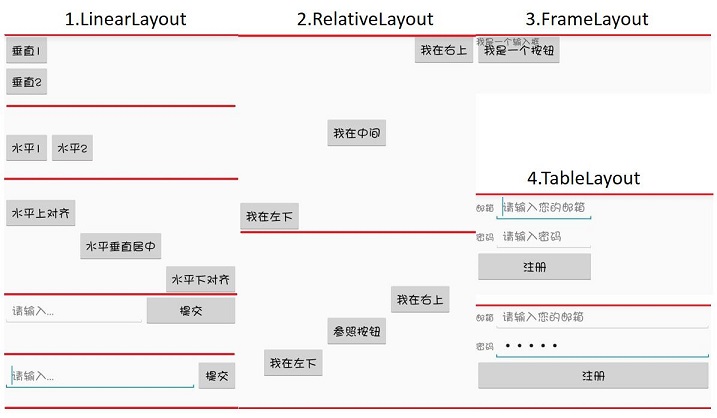
1.LinearLayout
<LinearLayout xmlns:android="http://schemas.android.com/apk/res/android"

    android:layout_width="match_parent"

    android:layout_height="match_parent"

    android:orientation="vertical">

    <LinearLayout xmlns:android="http://schemas.android.com/apk/res/android"

        android:layout_width="match_parent"

        android:layout_height="150dp"

        android:orientation="vertical">

        <Button

            android:layout_width="wrap_content"

            android:layout_height="wrap_content"

            android:text="垂直1" />

        <Button

            android:layout_width="wrap_content"

            android:layout_height="wrap_content"

            android:text="垂直2" />

    </LinearLayout>

    <LinearLayout xmlns:android="http://schemas.android.com/apk/res/android"

        android:layout_width="match_parent"

        android:layout_height="100dp"

        android:orientation="horizontal">

        <Button

            android:layout_width="wrap_content"

            android:layout_height="wrap_content"

            android:text="水平1" />

        <Button

            android:layout_width="wrap_content"

            android:layout_height="wrap_content"

            android:text="水平2" />

    </LinearLayout>

    <LinearLayout xmlns:android="http://schemas.android.com/apk/res/android"

        android:layout_width="match_parent"

        android:layout_height="150dp"

        android:orientation="horizontal">

        <Button

            android:layout_width="wrap_content"

            android:layout_height="wrap_content"

            android:layout_gravity="top"

            android:text="水平上对齐" />

        <Button

            android:layout_width="wrap_content"

            android:layout_height="wrap_content"

            android:layout_gravity="center_vertical"

            android:text="水平垂直居中" />

        <Button

            android:layout_width="wrap_content"

            android:layout_height="wrap_content"

            android:layout_gravity="bottom"

            android:text="水平下对齐" />

    </LinearLayout>

    <LinearLayout xmlns:android="http://schemas.android.com/apk/res/android"

        android:layout_width="match_parent"

        android:layout_height="100dp"

        android:orientation="horizontal">

        <EditText

            android:layout_width="0dp"

            android:layout_height="wrap_content"

            android:layout_weight="3"

            android:hint="请输入..."/>

        <Button

            android:layout_width="0dp"

            android:layout_height="wrap_content"

            android:layout_weight="2"

            android:text="提交" />

    </LinearLayout>

    <LinearLayout xmlns:android="http://schemas.android.com/apk/res/android"

        android:layout_width="match_parent"

        android:layout_height="100dp"

        android:orientation="horizontal">

        <EditText

            android:layout_width="0dp"

            android:layout_height="wrap_content"

            android:layout_weight="1"

            android:hint="请输入..."/>

        <Button

            android:layout_width="wrap_content"

            android:layout_height="wrap_content"

            android:text="提交" />

    </LinearLayout>

</LinearLayout>
- orientation:horizontal(水平)/vertical(垂直),表示线性排列的方向。
- layout_width/layout_height:元素的宽度与高度
- layout_gravity:top/bottom/center/left/right/etc,表示当前元素相对父元素的对齐方式,多种对齐方式用“|”隔开,右上对齐:
top|right。- layout_weight:占据空间的比例,例如元素A和B,A设置为1,B设置为3, 元素A、B分别占空间的1/4、3/4,此时元素宽度不由layout_width决定,设置为
0dp是比较规范的写法。- layout_weight 若元素A设置为1,元素B不设置,将layout_width设置为具体的值或wrap_content,那么元素B的宽度由layout_width决定,元素A将占满屏幕剩下的空间。
2.RelativeLayout
<LinearLayout ...>

    <RelativeLayout xmlns:android="http://schemas.android.com/apk/res/android"

        android:layout_width="match_parent"

        android:layout_height="300dp">

        <Button

            android:layout_width="wrap_content"

            android:layout_height="wrap_content"

            android:layout_alignParentLeft="true"

            android:layout_alignParentBottom="true"

            android:text="我在左下"/>

        <Button

            android:layout_width="wrap_content"

            android:layout_height="wrap_content"

            android:layout_centerInParent="true"

            android:text="我在中间"/>

        <Button

            android:layout_width="wrap_content"

            android:layout_height="wrap_content"

            android:layout_alignParentRight="true"

            android:layout_alignParentTop="true"

            android:text="我在右上"/>

    </RelativeLayout>

    <RelativeLayout xmlns:android="http://schemas.android.com/apk/res/android"

        android:layout_width="match_parent"

        android:layout_height="300dp">

        <Button

            android:id="@+id/button_2"

            android:layout_width="wrap_content"

            android:layout_height="wrap_content"

            android:layout_centerInParent="true"

            android:text="参照按钮"/>

        <Button

            android:layout_width="wrap_content"

            android:layout_height="wrap_content"

            android:layout_above="@id/button_2"

            android:layout_toRightOf="@id/button_2"

            android:text="我在右上"/>

        <Button

            android:layout_width="wrap_content"

            android:layout_height="wrap_content"

            android:layout_below="@id/button_2"

            android:layout_toLeftOf="@id/button_2"

            android:text="我在左下"/>

    </RelativeLayout>

</LinearLayout>
以下属性值为true/false
- layout_centerHorizontal/layout_centerVertical: 水平居中、垂直居中
- layout_centerInparent: 相对父元素垂直&水平居中
- layout_alignParentBottom: 元素下边界和父元素下边界对齐
- layout_alignParentLeft: 左边界对齐
- layout_alignParentRight: 右边界对齐
- layout_alignParentTop: 上边界对齐
以下属性值为控件id
- layout_above/layout_below: 在某元素的上方/下方
- layout_toLeftOf/layout_toRightOf: 在某元素的左方/右方
- layout_alignTop/layout_alignBottom: 元素上(下)边界与某元素上(下)边界对齐
- layout_alignLeft/layout_alignRight: 左(右)边界对齐
3.FrameLayout
所有元素都放置在布局的左上角
<FrameLayout xmlns:android="http://schemas.android.com/apk/res/android"

    android:layout_width="match_parent"

    android:layout_height="match_parent">

    <Button

        android:layout_width="wrap_content"

        android:layout_height="wrap_content"

        android:text="我是一个按钮"/>

    <TextView

        android:layout_width="wrap_content"

        android:layout_height="wrap_content"

        android:text="我是一个输入框"/>

</FrameLayout>
4.TableLayout
<TableLayout xmlns:android="http://schemas.android.com/apk/res/android"

    android:layout_width="match_parent"

    android:layout_height="match_parent">

    <TableRow>

        <TextView

            android:layout_height="wrap_content"

            android:text="邮箱"/>

        <EditText

            android:layout_height="wrap_content"

            android:inputType="textEmailAddress"

            android:hint="请输入您的邮箱" />

    </TableRow>

    <TableRow>

        <TextView

            android:layout_height="wrap_content"

            android:text="密码"/>

        <EditText

            android:layout_height="wrap_content"

            android:inputType="textPassword"

            android:hint="请输入密码" />

    </TableRow>

    <TableRow>

        <Button

            android:layout_height="wrap_content"

            android:layout_span="2"

            android:text="注册" />

    </TableRow>

</TableLayout>
<TableLayout xmlns:android="http://schemas.android.com/apk/res/android"

    android:layout_width="match_parent"

    android:layout_height="match_parent"

    android:stretchColumns="1">

    ...

</TableLayout>
- TableRow: 代表表格布局的一行,行内一个元素代表一列。
- layout_span: 合并单元格,设置为2,代表该元素占据2列空间。
- stretchColumns: TableRow中无法指定空间宽度,那么需要用到该属性,设置为1,表示拉伸第2列(0为第1列)与屏幕一样宽,效果如TableLayout的第二张图。
5.自定义布局
Android中,布局下可以放置控件,也可以放置子布局。如果子布局内容较为独立且经常使用,例如标题栏,或者布局比较复杂,这时候可以考虑使用自定义布局的形式导入。方法很简单。
- 新建一个布局文件,例如
example.xml - 在父布局中引入:
<LinearLayout xmlns:android="http://schemas.android.com/apk/res/android"

    android:orientation="vertical"

    android:layout_width="match_parent"

    android:layout_height="match_parent">

    <include layout="@layout/example"/>

</LinearLayout>
android 基本布局(RelativeLayout、TableLayout等)使用方法及各种属性的更多相关文章
- Android相对布局(RelativeLayout)
Android相对布局(RelativeLayout) 备注:这里的视图和元素是等同的概念. RelativeLayout是一个允许子视图相对于其他兄弟视图或是父视图显示的视图组(通过ID指定).每个 ...
- Android UI布局之TableLayout
从字面上了解TableLayout是一种表格式的布局.这样的布局会把包括的元素以行和列的形式进行排列.表格的列数为每一行的最大列数.当然表格里边的单元格是能够为空的. 实例:LayoutDemo 执行 ...
- Android之布局RelativeLayout
线性布局的weight属性在等比例分配时比较方便,但是对复杂的界面,嵌套多层LinearLayout布局会导致渲染变慢,占用更多系统资源:而使用RelativeLayout的话,可能仅仅需要一层就可以 ...
- android的布局-----RelativeLayout(相对布局)
学习导图 注:父容器定位的属性值只能是Boolean ,兄弟组件定位的属性值只能是ID 典型案例(梅花) <?xml version="1.0" encoding=" ...
- Android 五大布局(LinearLayout、FrameLayout、AbsoulteLayout、RelativeLayout、TableLayout )
前言 欢迎大家我分享和推荐好用的代码段~~ 声明 欢迎转载,但请保留文章原始出处: CSDN:http://www.csdn.net ...
- [转]浅谈Android五大布局(二)——RelativeLayout和TableLayout
在浅谈Android五大布局(一)中已经描述了LinearLayout(线性布局).FrameLayout(单帧布局)和AbsoulteLayout(绝对布局)三种布局结构,剩下的两种布局Relati ...
- 【深入篇】Android常用布局方式简介
LinearLayout 线性布局是程序中最常见的布局方式.一般分为水平线性布局和竖直线性布局,通过android.orientation属性可以设置线性布局的方向. 在布局中操作颜色时,要用的是十六 ...
- 动态布局--动态修改RelativeLayout宽高的方法
本文实例讲述了Android编程动态修改RelativeLayout宽高的方法.分享给大家供大家参考,具体如下: 我们经常会动态修改RelativeLayout的宽高,这样的代码,比较简单,就是修改R ...
- Android 表格布局<TableLayout>
表格布局即,tableLayout,表格布局通过行.列的形式来管理UI组件,TablelLayout并不需要明确地声明包含多少行.多少列,而是通过TableRow,以及其他组件来控制表格的行数和列数, ...
随机推荐
- SQL常用语句(2)
//计算表tb_Blog的字段个数 select count(*) from syscolumns where id=object_id('tb_Blog') 获取指定表的所有字段和字段类型 SELE ...
- MVC之前的那点事儿系列(3):HttpRuntime详解分析(下)
文章内容 话说,经过各种各样复杂的我们不知道的内部处理,非托管代码正式开始调用ISPAIRuntime的ProcessRequest方法了(ISPAIRuntime继承了IISPAIRuntime接口 ...
- 孙鑫MFC学习笔记2:C++回顾
1.通常可以把实例与对象等同起来 2.函数重载是发生在同一个类中的 3.函数的覆盖是发生在父类与子类之间的(函数被覆盖后可以使用父类的类名加作用域操作符::) 4.含有纯虚函数的类叫抽象类,抽象类无法 ...
- 一个奇葩常见的问题 nginx 403 forbidden错误
今天安装dedecms,配置Nginx,然后生成一键生成静态页面,然后就没有然后了,所有栏目页面都显示nginx 403 forbidden. 一般来说nginx 的 403 Forbidden er ...
- GJM :用JIRA管理你的项目(二)JIRA语言包支持及插件支持 [转载]
感谢您的阅读.喜欢的.有用的就请大哥大嫂们高抬贵手"推荐一下"吧!你的精神支持是博主强大的写作动力以及转载收藏动力.欢迎转载! 版权声明:本文原创发表于 [请点击连接前往] ,未经 ...
- 实体类的枚举属性--原来支持枚举类型这么简单,没有EF5.0也可以
通常,我们都是在业务层和界面层使用枚举类型,这能够为我们编程带来便利,但在数据访问层,不使用枚举类型,因为很多数据库都不支持,比如我们现在用的SqlServer2008就不支持枚举类型的列,用的时候也 ...
- Guacamole之配置Guacamole(五)
摘要 在网上看到一篇Guacamole官方手册的翻译,但是找不到后续,于是想自己也翻译几篇,有时间的话,会尽量多翻译一些. 原文地址:http://guacamole.incubator.apache ...
- js快速排序方法
function quickSort(arr){ if(arr.length<=1){ return arr; } var arrIndex=Math.floor(arr.length/2); ...
- 钉钉如何进行PC端开发
前段时间,用钉钉进行了服务器端的开发,对照着官方文档,感觉还是比较顺利的.后续想有时间研究一下PC端客户端的开发,看着官方文档,说的确实是比较简练,但也确实没看太明白,废了半天劲也没成功.后来经过无数 ...
- angularjs封装bootstrap官网的时间插件datetimepicker
背景:angular与jquery类库的协作 第三方类库中,不得不提的是大名鼎鼎的jquery,现在基本上已经是国内web开发的必修工具了.它灵活的dom操作,让很多web开发人员欲罢不能.再加上已经 ...