
WP、Win10开发或者WPF开发时绘制自定义窗体~例如:一个手机
WP and Win10
效果:(数字是参考值,和UI无关)

<Page

    x:Class="_05.AllControls._BorderUsePage"

    xmlns="http://schemas.microsoft.com/winfx/2006/xaml/presentation"

    xmlns:x="http://schemas.microsoft.com/winfx/2006/xaml"

    xmlns:local="using:_05.AllControls"

    xmlns:d="http://schemas.microsoft.com/expression/blend/2008"

    xmlns:mc="http://schemas.openxmlformats.org/markup-compatibility/2006"

    mc:Ignorable="d"

    Background="{ThemeResource ApplicationPageBackgroundThemeBrush}">

    <!--快乐玩耍:DIV一个手机-->

    <Grid>

        <!--手机整体-->

        <Border BorderBrush="Green"

                BorderThickness="4"

                CornerRadius="10,10,10,10">

            <Grid>

                <!--主屏幕-->

                <Border BorderBrush="Gray"

                BorderThickness="2"

                Margin="10,60,10,30">

                    <TextBlock FontFamily="微软雅黑">对不起,系统已挂联系逆天重装Win10!</TextBlock>

                </Border>

                <!--底部-->

                <Border BorderBrush="Black"

                BorderThickness="2"

                CornerRadius="0,0,10,10"

                VerticalAlignment="Bottom"

                Height="30">

                    <!--底部按键-->

                    <Grid>

                        <SymbolIcon Symbol="Back" HorizontalAlignment="Left" Margin="50,0,0,0" Width="50" />

                        <SymbolIcon Symbol="Home" HorizontalAlignment="Center" Width="50" />

                        <SymbolIcon Symbol="Zoom" HorizontalAlignment="Right" Margin="0,0,50,0" Width="50" />

                    </Grid>

                </Border>

            </Grid>

        </Border>

    </Grid>

</Page>
WPF
效果:(边框想要div必须注意==>WindowStyle="None" Background="Transparent" AllowsTransparency="True" MouseLeftButtonDown="DragWindow")
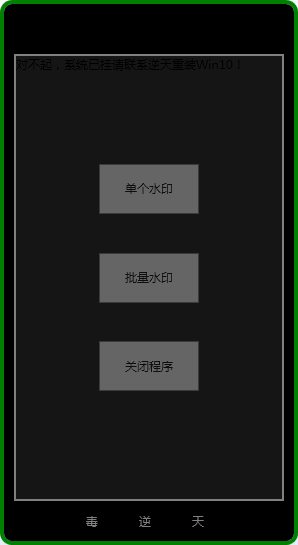
代码:
<Window x:Class="WaterMarkAPP.MainWindow"

        xmlns="http://schemas.microsoft.com/winfx/2006/xaml/presentation"

        xmlns:x="http://schemas.microsoft.com/winfx/2006/xaml"

        Title="水印工具" Height="545" Width="298" Background="Transparent" AllowsTransparency="True"

        WindowStyle="None" ShowInTaskbar="False" WindowStartupLocation="CenterScreen" MouseLeftButtonDown="DragWindow">

    <!--快乐玩耍:DIV一个手机-->

    <!--手机整体-->

    <Border BorderBrush="Green"

            Background="Black"

            BorderThickness="4"

            CornerRadius="10,10,10,10">

        <Grid>

            <!--主屏幕-->

            <Border BorderBrush="Gray"

                BorderThickness="2"

                Margin="10,50,10,40">

                <Grid Background="#FF151515">

                    <Grid.RowDefinitions>

                        <RowDefinition></RowDefinition>

                        <RowDefinition></RowDefinition>

                        <RowDefinition></RowDefinition>

                        <RowDefinition></RowDefinition>

                        <RowDefinition></RowDefinition>

                    </Grid.RowDefinitions>

                    <TextBlock FontFamily="微软雅黑">对不起,系统已挂请联系逆天重装Win10!</TextBlock>

                    <Button Grid.Row="1" Opacity="0.4"  HorizontalAlignment="Center" VerticalAlignment="Center" Height="50" Width="100" Click="Button_Click">单个水印</Button>

                    <Button Grid.Row="2" Opacity="0.4"  HorizontalAlignment="Center" VerticalAlignment="Center" Height="50" Width="100" Click="Button_Click_1">批量水印</Button>

                    <Button Grid.Row="3" Opacity="0.4"  HorizontalAlignment="Center" VerticalAlignment="Center" Height="50" Width="100" Click="Button_Click_2">关闭程序</Button>

                </Grid>

            </Border>

            <!--底部-->

            <Border BorderBrush="Black"

                BorderThickness="2"

                CornerRadius="0,0,10,10"

                VerticalAlignment="Bottom"

                Height="40">

                <!--底部按键-->

                <Grid>

                    <TextBlock Text="毒" HorizontalAlignment="Left" VerticalAlignment="Center" Margin="80,0,0,0" Width="20" Foreground="Gray" MouseLeave="TextBlock_MouseLeave" />

                    <TextBlock Text="逆" HorizontalAlignment="Center" VerticalAlignment="Center" Width="20" Foreground="Gray"  MouseLeave="TextBlock_MouseLeave_1"/>

                    <TextBlock Text="天" HorizontalAlignment="Right" VerticalAlignment="Center" Margin="0,0,80,0" Width="20" Foreground="Gray"  MouseLeave="TextBlock_MouseLeave_2"/>

                </Grid>

            </Border>

        </Grid>

    </Border>

</Window>
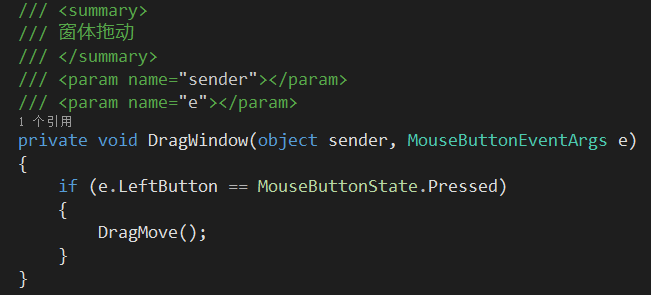
扩:DragWindow事件如图
WP、Win10开发或者WPF开发时绘制自定义窗体~例如:一个手机的更多相关文章
- ios开发UI篇—使用纯代码自定义UItableviewcell实现一个简单的微博界面布局
本文转自 :http://www.cnblogs.com/wendingding/p/3761730.html ios开发UI篇—使用纯代码自定义UItableviewcell实现一个简单的微博界面布 ...
- 工欲善其事,必先利其器 之 WPF篇: 随着开发轨迹来看高效WPF开发的工具和技巧
之前一篇<工欲善其事,必先利其器.VS2013全攻略(安装,技巧,快捷键,插件)!> 看到很多朋友回复和支持,非常感谢,尤其是一些拍砖的喷油,感谢你们的批评,受益良多. 我第一份工作便是W ...
- WPF Multi-Touch 开发:高效开发模式
原文 WPF Multi-Touch 开发:高效开发模式 在前几篇文章中已经介绍了触屏操作的多种模式,并对其开发方式也有了进一步了解.细心的朋友应该会发现在上一篇文章中,如果拖动图片过快它会因惯性效果 ...
- Win10 FaceAPI小demo开发问题汇总
Win10 FaceAPI小demo开发问题汇总 最近使用微软牛津计划做一个小demo,使用FaceAPI做一个小应用,实现刷脸的功能.开发的过程中用到几个问题,具体如下: Stream 与IRand ...
- 干货--微信公众平台客户端调试工具-初试WPF开发
本工具可以由任意一个开发微信公众平台的开发者使用,虽然它本身使用WPF(C#)开发的,但是并不受你想调试的服务所用的语言的影响. 之前一直在做微信公众平台开发,客户端调试是必须做的事情,一直以来都是用 ...
- WPF开发的彩票程序(练手好例子) 附源码
前言 WPF是.NET最新的界面开发库,开发界面非常灵活!但是学习WPF难度也非常大. 应朋友之邀,编写了一个小程序.程序虽小,五脏俱全,WPF开发的灵活性可窥见一斑. 对于新手学习有很好的借鉴意义, ...
- DotNetCore 3.0 助力 WPF 开发
DotNetCore Is AnyWhere. 前言 Visual Studio 2019 已经正式发布了,DotNetCore 3.0 的正式版也指日可待.在之前的版本中,作为一名基于微软生态的传统 ...
- win10+vscode部署java开发环境
目录 Java开发插件配置: 调试: 快捷键: 启动配置文件launch.json: 启动配置说明: Launch: Attach: User Setting: 遇到的问题: 参考: Java开发插件 ...
- WPF开发的彩票程序(练手好例子)
前言 WPF是.NET最新的界面开发库,开发界面非常灵活!但是学习WPF难度也非常大. 应朋友之邀,编写了一个小程序.程序虽小,五脏俱全,WPF开发的灵活性可窥见一斑. 对于新手学习有很好的借鉴意义, ...
随机推荐
- mysql 函数(一)
1.ascii() 查询ascii值,多个字符的情况下,显示左边第一个字符的ascii值 SELECT ASCII("abc"); 等同于 SELECT ASCII("a ...
- c++ STL中的vector与list为什么没有提供find操作?
map里有,set里也有,vector,list没有,太不公平了吧. 其实应该考虑为什么map,set里有find操作. include<algorithm>里有通用的find操作,通用的 ...
- 浅谈Swift集合类型
Swift 的集合表现形式由数组和字典组成.它可以完美的存储任何呢想存储的东西. 数组是一个同类型的序列化列表集合,它用来存储相同类型的不同值.字典也是一个数组,但它的存值方式类似于Map,通过一对一 ...
- d3 API axis
场景 1.画网格线 使用方法.innerTickSize(): 指定内刻度大小 或者 .tickSize(inner, outer): 2.内外刻度线 innerTickSize outerTickS ...
- Linux内核--网络栈实现分析(六)--应用层获取数据包(上)
本文分析基于内核Linux 1.2.13 原创作品,转载请标明http://blog.csdn.net/yming0221/article/details/7541907 更多请看专栏,地址http: ...
- 安装RPM包或者安装源码包
本系列的博客来自于:http://www.92csz.com/study/linux/ 在此,感谢原作者提供的入门知识 这个系列的博客的目的在于将比较常用的liunx命令从作者的文章中摘录下来,供自己 ...
- 黑马程序员——HTML表格布局
---------------------- <a href="http://edu.csdn.net"target="blank">ASP.Net ...
- 使用WPF动态生成Code 39条形码
最近在看些条形码方面相关的资料,而如果只是看的话,效果似乎并不怎么好,所以决定动手做点Demo,以增强对相关知识的记忆. 这里是一个我编写的使用WPF生成Code 39的例子,Code 39的编码很简 ...
- 从KRE到XRE:ASP.NET 5中正在消失的那些K
前几天写了篇博客ASP.NET 5中的那些K,刚把ASP.NET 5中的那些K搞明白了些,昨天发现微软正在让那些K消失. 首先是在 KRuntime 的git日志中发现的: * Runtime ren ...
- ENode 1.0 - 整体架构介绍
前言 今天是个开心的日子,又是周末,可以安心轻松的写写文章了.经过了大概3年的DDD理论积累,以及去年年初的第一个版本的event sourcing框架的开发以及项目实践经验,再通过今年上半年利用业余 ...