
ASP.NET Core (Database First)
CREATE DATABASE [EFCore_dbfirst]

GO

USE [EFCore_dbfirst]

GO

CREATE TABLE [Blog] (

    [BlogId] int NOT NULL IDENTITY,

    [Url] nvarchar(max) NOT NULL,

    CONSTRAINT [PK_Blog] PRIMARY KEY ([BlogId])

);

GO

CREATE TABLE [Post] (

    [PostId] int NOT NULL IDENTITY,

    [BlogId] int NOT NULL,

    [Content] nvarchar(max),

    [Title] nvarchar(max),

    CONSTRAINT [PK_Post] PRIMARY KEY ([PostId]),

    CONSTRAINT [FK_Post_Blog_BlogId] FOREIGN KEY ([BlogId]) REFERENCES [Blog] ([BlogId]) ON DELETE CASCADE

);

GO

INSERT INTO [Blog] (Url) VALUES

('http://blogs.msdn.com/dotnet'),

('http://blogs.msdn.com/webdev'),

('http://blogs.msdn.com/visualstudio')

GO
先创建数据库
创建一个新项目
这里我们选择 ASP.NET Core Web Application (.NET Core)

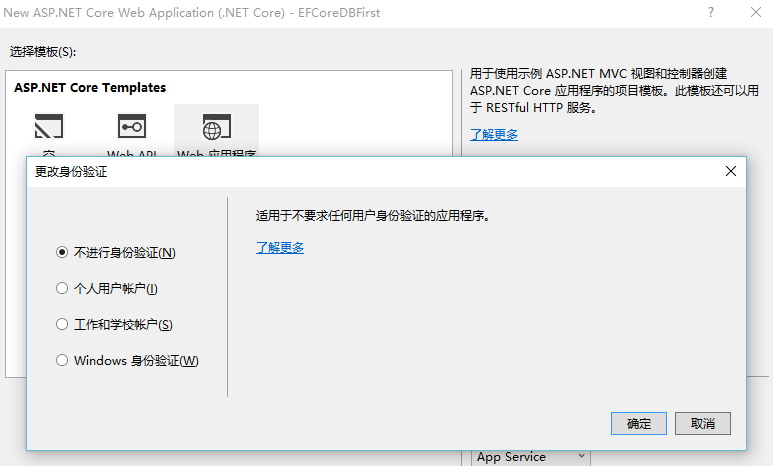
这里选择Web 应用程序,然后更改身份验证 改为 不进行身份验证
添加包
工具‣的NuGet包管理器‣包管理器控制台

- Run
Install-Package Microsoft.EntityFrameworkCore - Run
Install-Package Microsoft.EntityFrameworkCore.SqlServer
- Run
Install-Package Microsoft.EntityFrameworkCore.Tools –Pre - Run
Install-Package Microsoft.EntityFrameworkCore.SqlServer.Design
引用好以后我们在project.json -> tools 节点加上 "Microsoft.EntityFrameworkCore.Tools": "1.0.0-preview2-final"
"tools": {

        "Microsoft.EntityFrameworkCore.Tools": "1.0.0-preview2-final",

        "BundlerMinifier.Core": "2.0.238",

        "Microsoft.AspNetCore.Razor.Tools": "1.0.0-preview2-final",

        "Microsoft.AspNetCore.Server.IISIntegration.Tools": "1.0.0-preview2-final"

    },
根据数据库生成EF
还是使用程序包管理控制台
执行
Scaffold-DbContext "Data Source=.;Initial Catalog=EFCore_dbfirst;User ID=sa;Password=sa.123" Microsoft.EntityFrameworkCore.SqlServer -OutputDir Models
分析一下这条命令
Scaffold-DbContext 命令名称 +"数据库连接字符串" + Microsoft.EntityFrameworkCore.SqlServer -OutputDir Models ( 这貌似是Provider参数)
注意
运行以下命令来创建从现有数据库的模型。如果您收到一个错误, ‘Scaffold-DbContext’ is not recognized as the name of a cmdlet ,请重新打开Visual Studio中。
执行成功后生成了如下代码

注册与依赖注入上下文(Register your context with dependency injection)
在ASP.NET Core,配置通常在 Startup.cs。为了符合这种模式,我们将移动数据库配置 到Startup.cs中。
EFCore_dbfirstContext 中
删除如下代码
        protected override void OnConfiguring(DbContextOptionsBuilder optionsBuilder)

        {

            //#warning To protect potentially sensitive information in your connection string, you should move it out of source code. See http://go.microsoft.com/fwlink/?LinkId=723263 for guidance on storing connection strings.

            optionsBuilder.UseSqlServer(@"Data Source=.;Initial Catalog=EFCore_dbfirst;User ID=sa;Password=sa.123");

        }
添加如下代码
  public EFCore_dbfirstContext(DbContextOptions<EFCore_dbfirstContext> options)

            : base(options)

        {

        }
在 Startup.cs中 的 ConfigureServices方法 增加代码
这是增加后的效果
   // This method gets called by the runtime. Use this method to add services to the container.

        public void ConfigureServices(IServiceCollection services)

        {

            services.AddDbContext<EFCore_dbfirstContext>(options =>

                options.UseSqlServer("Data Source =.; Initial Catalog = EFCore_dbfirst; User ID = sa; Password = sa.123"));

            // Add framework services.

            services.AddMvc();

        }
开始写代码
添加 BlogsController
using System;

using System.Collections.Generic;

using System.Linq;

using System.Threading.Tasks;

using Microsoft.AspNetCore.Mvc;

using EFCoreDbFirst.Models;

// For more information on enabling MVC for empty projects, visit http://go.microsoft.com/fwlink/?LinkID=397860

namespace EFCoreDbFirst.Controllers

{

    public class BlogsController : Controller

    {

        private EFCore_dbfirstContext _context;

        public BlogsController(EFCore_dbfirstContext context)

        {

            _context = context;

        }

        public IActionResult Index()

        {

            return View(_context.Blog.ToList());

        }

        public IActionResult Create()

        {

            return View();

        }

        [HttpPost]

        [ValidateAntiForgeryToken]

        public IActionResult Create(Blog blog)

        {

            if (ModelState.IsValid)

            {

                _context.Blog.Add(blog);

                _context.SaveChanges();

                return RedirectToAction("Index");

            }

            return View(blog);

        }

    }

}
BlogsController
添加 Index.cshtml
@model IEnumerable<EFCoreDbFirst.Models.Blog>

@{

    ViewBag.Title = "Blogs";

}

<h2>Blogs</h2>

<p>

    <a asp-controller="Blogs" asp-action="Create">Create New</a>

</p>

<table class="table">

    <tr>

        <th>Id</th>

        <th>Url</th>

    </tr>

    @foreach (var item in Model)

    {

        <tr>

            <td>

                @Html.DisplayFor(modelItem => item.BlogId)

            </td>

            <td>

                @Html.DisplayFor(modelItem => item.Url)

            </td>

        </tr>

    }

</table>
Index.cshtml
添加 Create.cshtml
@model  EFCoreDbFirst.Models.Blog

@{

    ViewBag.Title = "New Blog";

}

<h2>@ViewData["Title"]</h2>

<form asp-controller="Blogs" asp-action="Create" method="post" class="form-horizontal" role="form">

    <div class="form-horizontal">

        <div asp-validation-summary="All" class="text-danger"></div>

        <div class="form-group">

            <label asp-for="Url" class="col-md-2 control-label"></label>

            <div class="col-md-10">

                <input asp-for="Url" class="form-control" />

                <span asp-validation-for="Url" class="text-danger"></span>

            </div>

        </div>

        <div class="form-group">

            <div class="col-md-offset-2 col-md-10">

                <input type="submit" value="Create" class="btn btn-default" />

            </div>

        </div>

    </div>

</form>
Create.cshtml
来看看效果

ASP.NET Core (Database First)的更多相关文章
- ASP.NET Core 开发-Entity Framework (EF) Core 1.0 Database First
ASP.NET Core 开发-Entity Framework Core 1.0 Database First,ASP.NET Core 1.0 EF Core操作数据库. Entity Frame ...
- ASP.Net Core 2.2 InProcess托管的Bug:unable to open database file
最近把项目更新到了ASP.Net Core 2.2,发布之后发现在IIS下使用SQLite数据库不行了,报异常说不能打开数据库."unable to open database file&q ...
- [转]Using NLog for ASP.NET Core to write custom information to the database
本文转自:https://github.com/NLog/NLog/issues/1366 In the previous versions of NLog it was easily possibl ...
- [转]Setting the NLog database connection string in the ASP.NET Core appsettings.json
本文转自:https://damienbod.com/2016/09/22/setting-the-nlog-database-connection-string-in-the-asp-net-cor ...
- ASP.Net Core 2.2使用SQLite数据库unable to open database file
原文:ASP.Net Core 2.2使用SQLite数据库unable to open database file 最近把项目更新到了ASP.Net Core 2.2,发布之后发现在IIS下使用SQ ...
- Asp.net Core中使用Session
前言 2017年就这么悄无声息的开始了,2017年对我来说又是特别重要的一年. 元旦放假在家写了个Asp.net Core验证码登录, 做demo的过程中遇到两个小问题,第一是在Asp.net Cor ...
- TechEmpower 13轮测试中的ASP.NET Core性能测试
应用性能直接影响到托管服务的成本,因此公司在开发应用时需要格外注意应用所使用的Web框架,初创公司尤其如此.此外,糟糕的应用性能也会影响到用户体验,甚至会因此受到相关搜索引擎的降级处罚.在选择框架时, ...
- ASP.NET Core 1.0 使用 Dapper 操作 MySql(包含事务)
操作 MySql 数据库使用MySql.Data程序包(MySql 开发,其他第三方可能会有些问题). project.json 代码: { "version": "1. ...
- ASP.NET Core 1.0 开发记录
官方资料: https://github.com/dotnet/core https://docs.microsoft.com/en-us/aspnet/core https://docs.micro ...
随机推荐
- 关于ZendFramework环境的配置
在运用PHP进行网站建设的时候,使用框架能够很好的提高编程效率,PHP语言的框架很多,现在普遍使用的是由Zend公司开发的ZendFramework框架,本篇文章是关于ZendFramework的运行 ...
- HelloWorld Makefile Template
DEPDIR = build_dep TARGET_NAME = helloworld CFLAGS = -Wall SRCS = main.c SRCS += foo.c OBJS = $(SRCS ...
- MYSQL 处理批量更新数据的一些经验。
首先,我们需要了解下MYSQL CASE EXPRESSION 语法. 手册传送门:http://dev.mysql.com/doc/refman/5.7/en/control-flow-functi ...
- Apache Flume 1.7.0 发布,日志服务器
Apache Flume 1.7.0 发布了,Flume 是一个分布式.可靠和高可用的服务,用于收集.聚合以及移动大量日志数据,使用一个简单灵活的架构,就流数据模型.这是一个可靠.容错的服务. 本次更 ...
- 数据类型int、bigint、smallint 和 tinyint范围
bigint 从 -2^63 (-9223372036854775808) 到 2^63-1 (9223372036854775807) 的整型数据(所有数字).存储大小为 8 个字节. int ...
- Python的平凡之路(18)
一.JS 正则部分 test - 判断字符串是否符合规定的正则rep = /\d+/;rep.test("asdfoiklfasdf89asdfasdf")# truerep ...
- 使用共享网卡的NAT模式配置VMware中的CentOS的上网功能
昨天写了一篇文章总结了前两天折腾VMware 10中的CentOS上网的问题,结果留下一下小瑕疵,就是视频教程中通过共享网卡使用NAT模式配置虚拟机的方法.今天在结合昨天的基础上终于弄明白了这个问题. ...
- yate: windows下源码下载,配置,编译
源码下载:使用svn下载checkout:http://voip.null.ro/svn/yate/trunk 配置:(本人使用的是vs2008,故下载的qt工具都是对应2008) 1. 下载并安装q ...
- ArcMap常用VBA
--点坐标X VBA部分: Dim pGeo As IGeometry Set pGeo = [Shape] Dim pPoint As IPoint Set pPoint = pGeo 赋值部分: ...
- UIKit框架之UIGestureRecognizer
---恢复内容开始--- 1.继承链:NSObject 2.UIGestureRecognizer的子类有以下: UITapGestureRecognizer :点击 UIPinchGestureRe ...