
D3树状图异步按需加载数据
D3.js这个绘图工具,功能强大不必多说,完全一个Data Driven Document的绘图工具,用户可以按照自己的数据以及希望实现的图形,随心所欲的绘图。
图形绘制,D3默认采用的是异步加载,但是,这里的异步加载,指的是一次性的将图形展示所需要的数据异步的方式加载到浏览器前端显示。主要有如下这两种方式:
 d3.csv(url[[, row], callback])

 Creates a request for the CSV file at the specified url with the default mime type text/csv. An optional row conversion function may be specified to map and filter row objects to a more-specific representation; see dsv.parse for details.

 The row conversion function can be changed by calling request.row on the returned instance. For example, this:

 d3.csv(url, row, callback);

 Is equivalent to this:

 d3.csv(url)

     .row(row)

     .get(callback);
 d3.json(url[, callback])

 Creates a request for the JSON file at the specified url with the default mime type application/json.

 This convenience constructor is approximately equivalent to:

 d3.request(url)

     .mimeType("application/json")

     .response(function(xhr) { return JSON.parse(xhr.responseText); })

     .get(callback);
上述两种方式获取的数据,在很多时候,是比较难满足实际需求场景的。
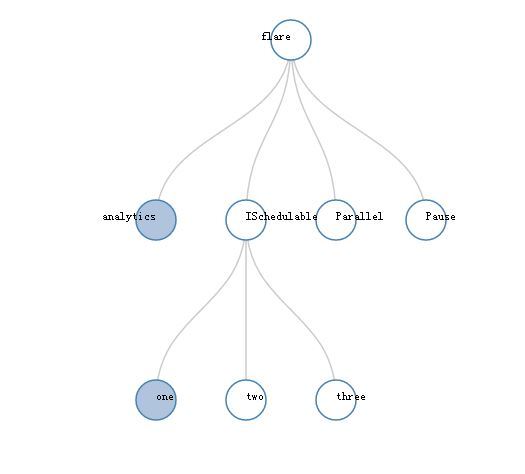
比如,我们现在设计的一款微信公众号的应用中,捕获关注者转帖的轨迹,最终以树状图展现给用户。 若一次性加载所有的数据,会比较影响用户体验,因为一次遍历数据库所有的跟踪记录,无论是递归先根遍历还是非递归方式循环查找,最终的体验都是不令人满意的。 我们便采取按需的异步加载数据方式,即,当用户点击节点时,才从后台取数据。由于D3的优秀数据管理架构,数据一旦加载了,后续便可以不用再从服务器后台取数据。
其实,实现这种on demand方式的异步加载,其实也很简单。下面就基于官网的一个例子,做点修改,介绍如何实现。
官网原版的例子如下:
 <!DOCTYPE html>

 <meta charset="utf-8">

 <style>

 .node {

   cursor: pointer;

 }

 .node circle {

   fill: #fff;

   stroke: steelblue;

   stroke-width: .5px;

 }

 .node text {

   font: 10px sans-serif;

 }

 .link {

   fill: none;

   stroke: #ccc;

   stroke-width: .5px;

 }

 </style>

 <body>

 <script src="http://d3js.org/d3.v3.min.js" charset="utf-8"></script>

 <script>

 var root = {

     "name": "flare",

     "deal": "",

     "children": [{

             "name": "analytics" ,

             "children": [{

                 "name": "cluster",

                 "children": [{

                      "name": "AgglomerativeCluster",

                      "size":

                 }, {

                     "name": "CommunityStructure",

                     "size":

                 }, {

                     "name": "HierarchicalCluster",

                     "size":

                 }, {

                     "name": "MergeEdge",

                     "size":

                 }]

             }]

         }, {

             "name": "ISchedulable",

             "deal": "",

             "size":

         }, {

             "name": "Parallel",

             "size":

         }, {

             "name": "Pause",

             "size":

         }

     ]

 };

 var margin = {top: , right: , bottom: , left: },

     width =  - margin.right - margin.left,

     height =  - margin.top - margin.bottom;

 var i = ,

 duration = ,

 root;

 var tree = d3.layout.tree().nodeSize([, ]);

 var diagonal = d3.svg.diagonal()

     .projection(function(d) { return [d.x, d.y]; });

 /*

 var svg = d3.select("body").append("svg")

     .attr("width", width + margin.right + margin.left)

     .attr("height", height + margin.top + margin.bottom)

   .append("g")

     .attr("transform", "translate(" + margin.left + "," + margin.top + ")");

 */

 //Redraw for zoom

 function redraw() {

   //console.log("here", d3.event.translate, d3.event.scale);

   svg.attr("transform", "translate(" + d3.event.translate + ")" + " scale(" + d3.event.scale + ")");

 }

 var svg = d3.select("body").append("svg").attr("width", ).attr("height", )

     .call(zm = d3.behavior.zoom().scaleExtent([,]).on("zoom", redraw)).append("g")

     .attr("transform", "translate(" +  + "," +  + ")");

 //necessary so that zoom knows where to zoom and unzoom from

 zm.translate([, ]);

 //d3.json("flare.json", function(error, flare)

 //  if (error) throw error;

 {

 root.x0 = ;

 root.y0 = height / ;

   function collapse(d) {

     if (d.children) {

       d._children = d.children;

       d._children.forEach(collapse);

       d.children = null;

     }

   }

   root.children.forEach(collapse);

   update(root);

 }

 d3.select(self.frameElement).style("height", "800px");

 function update(source) {

   // Compute the new tree layout.

   var nodes = tree.nodes(root).reverse(),

       links = tree.links(nodes);

       debugger;

   // Normalize for fixed-depth.

   nodes.forEach(function(d) { d.y = d.depth * ; });

   // Update the nodes…

   var node = svg.selectAll("g.node")

       .data(nodes, function(d) { return d.id || (d.id = ++i); });

   // Enter any new nodes at the parent's previous position.

   var nodeEnter = node.enter().append("g")

       .attr("class", "node")

       .attr("transform", function(d) { return "translate(" + source.x0 + "," + source.y0 + ")"; })

       .on("click", click);

   nodeEnter.append("circle")

       .attr("r", 1e-)

       .style("fill", function(d) { return d._children ? "lightsteelblue" : "#fff"; });

   nodeEnter.append("text")

       .attr("x", function(d) { return d.children || d._children ? - : ; })

       .attr("dy", ".35em")

       .attr("text-anchor", function(d) { return d.children || d._children ? "end" : "start"; })

       .text(function(d) { return d.name; })

       .style("fill-opacity", 1e-);

   // Transition nodes to their new position.

   var nodeUpdate = node.transition()

       .duration(duration)

       .attr("transform", function(d) { return "translate(" + d.x + "," + d.y + ")"; });

   nodeUpdate.select("circle")

       .attr("r", )

       .style("fill", function(d) { return d._children ? "lightsteelblue" : "#fff"; });

   nodeUpdate.select("text")

       .style("fill-opacity", );

   // Transition exiting nodes to the parent's new position.

   var nodeExit = node.exit().transition()

       .duration(duration)

       .attr("transform", function(d) { return "translate(" + source.x + "," + source.y + ")"; })

       .remove();

   nodeExit.select("circle")

       .attr("r", 1e-);

   nodeExit.select("text")

       .style("fill-opacity", 1e-);

   // Update the links…

   var link = svg.selectAll("path.link")

       .data(links, function(d) { return d.target.id; });

   // Enter any new links at the parent's previous position.

   link.enter().insert("path", "g")

       .attr("class", "link")

       .attr("d", function(d) {

         var o = {x: source.x0, y: source.y0};

         return diagonal({source: o, target: o});

       });

   // Transition links to their new position.

   link.transition()

       .duration(duration)

       .attr("d", diagonal);

   // Transition exiting nodes to the parent's new position.

   link.exit().transition()

       .duration(duration)

       .attr("d", function(d) {

         var o = {x: source.x, y: source.y};

         return diagonal({source: o, target: o});

       })

       .remove();

   // Stash the old positions for transition.

   nodes.forEach(function(d) {

     d.x0 = d.x;

     d.y0 = d.y;

   });

 }

 // Toggle children on click.

 function click(d) {

   if (d.children) {

     d._children = d.children;

     d.children = null;

   } else {

     d.children = d._children;

     d._children = null;

   }

   update(d);

 }

 </script>
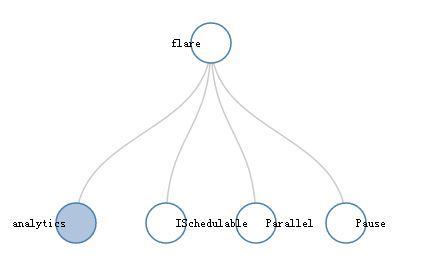
下面,再看看,如何实现on demand的异步加载:
 <!DOCTYPE html>

 <meta charset="utf-8">

 <style>

 .node {

   cursor: pointer;

 }

 .node circle {

   fill: #fff;

   stroke: steelblue;

   stroke-width: .5px;

 }

 .node text {

   font: 10px sans-serif;

 }

 .link {

   fill: none;

   stroke: #ccc;

   stroke-width: .5px;

 }

 .link2 {

   fill: none;

   stroke: #f00;

   stroke-width: .5px;

 }

 </style>

 <body>

 <script src="js/jquery-2.1.1.min.js" charset="utf-8"></script>

 <script src="http://d3js.org/d3.v3.min.js" charset="utf-8"></script>

 <script>

 var root = {

     "name": "flare",

     "deal": "",

     "children": [{

             "name": "analytics" ,

             "children": [{

                 "name": "cluster",

                 "children": [{

                      "name": "AgglomerativeCluster",

                      "size":

                 }, {

                     "name": "CommunityStructure",

                     "size":

                 }, {

                     "name": "HierarchicalCluster",

                     "size":

                 }, {

                     "name": "MergeEdge",

                     "size":

                 }]

             }]

         }, {

             "name": "ISchedulable",

             "deal": "",

             "size":

         }, {

             "name": "Parallel",

             "size":

         }, {

             "name": "Pause",

             "size":

         }

     ]

 };

 var margin = {top: , right: , bottom: , left: },

     width =  - margin.right - margin.left,

     height =  - margin.top - margin.bottom;

 var i = ,

 duration = ,

 root;

 var tree = d3.layout.tree().nodeSize([, ]);

 var diagonal = d3.svg.diagonal()

     .projection(function(d) { return [d.x, d.y]; });

 /*

 var svg = d3.select("body").append("svg")

     .attr("width", width + margin.right + margin.left)

     .attr("height", height + margin.top + margin.bottom)

   .append("g")

     .attr("transform", "translate(" + margin.left + "," + margin.top + ")");

 */

 //Redraw for zoom

 function redraw() {

   //console.log("here", d3.event.translate, d3.event.scale);

   svg.attr("transform", "translate(" + d3.event.translate + ")" + " scale(" + d3.event.scale + ")");

 }

 var svg = d3.select("body").append("svg").attr("width", ).attr("height", )

     .call(zm = d3.behavior.zoom().scaleExtent([,]).on("zoom", redraw)).append("g")

     .attr("transform", "translate(" +  + "," +  + ")");

 //necessary so that zoom knows where to zoom and unzoom from

 zm.translate([, ]);

 //d3.json("flare.json", function(error, flare)

 //  if (error) throw error;

 root.x0 = ;

 root.y0 = height / ;

 function collapse(d) {

     if (d.children) {

       d._children = d.children;

       d._children.forEach(collapse);

       d.children = null;

     }

 }

 root.children.forEach(collapse);

 update(root);

 d3.select(self.frameElement).style("height", "800px");

 function update(source) {

   // Compute the new tree layout.

   var nodes = tree.nodes(root).reverse(),

       links = tree.links(nodes);

   // Normalize for fixed-depth.

   nodes.forEach(function(d) { d.y = d.depth * ; });

   // Update the nodes…

   var node = svg.selectAll("g.node")

       .data(nodes, function(d) { return d.id || (d.id = ++i); });

   // Enter any new nodes at the parent's previous position.

   var nodeEnter = node.enter().append("g")

       .attr("class", "node")

       .attr("transform", function(d) { return "translate(" + source.x0 + "," + source.y0 + ")"; })

       .on("click", click);

   nodeEnter.append("circle")

       .attr("r", 1e-)

       .style("fill", function(d) { return d._children ? "lightsteelblue" : "#fff"; });

   nodeEnter.append("text")

       .attr("cx", function(d) { return d.children || d._children ? - : ; })

       .attr("cy", ".35em")

       .attr("text-anchor", function(d) { return d.children || d._children ? "end" : "start"; })

       .text(function(d) { return d.name; })

       .style("fill-opacity", 1e-);

   // Transition nodes to their new position.

   var nodeUpdate = node.transition()

       .duration(duration)

       .attr("transform", function(d) { return "translate(" + d.x + "," + d.y + ")"; });

   nodeUpdate.select("circle")

       .attr("r", )

       .style("fill", function(d) { return d._children ? "lightsteelblue" : "#fff"; });

   nodeUpdate.select("text")

       .style("fill-opacity", );

   // Transition exiting nodes to the parent's new position.

   var nodeExit = node.exit().transition()

       .duration(duration)

       .attr("transform", function(d) { return "translate(" + source.x + "," + source.y + ")"; })

       .remove();

   nodeExit.select("circle")

       .attr("r", 1e-);

   nodeExit.select("text")

       .style("fill-opacity", 1e-);

   // Update the links…

   var link = svg.selectAll("path.link")

       .data(links, function(d) { return d.target.id; });

   // Enter any new links at the parent's previous position.

   link.enter().insert("path", "g")

       .attr("class", "link")

       .attr("d", function(d) {

         var o = {x: source.x0, y: source.y0};

         return diagonal({source: o, target: o});

       });

   /*

   console.log(link);

   link.enter().insert("path", "g")

   .attr("class", function(d){

       if(d.source.deal != null && d.source.deal != undefined){

             if(d.target.deal != null && d.target.deal != undefined){

                 return "link2";

             }

         }

         return "link";

       })

   .attr("d", function(d) {

     var o = {x: source.x0, y: source.y0};

     return diagonal({source: o, target: o});

   });

   */

   // Transition links to their new position.

   link.transition()

       .duration(duration)

       .attr("d", diagonal);

   // Transition exiting nodes to the parent's new position.

   link.exit().transition()

       .duration(duration)

       .attr("d", function(d) {

         var o = {x: source.x, y: source.y};

         return diagonal({source: o, target: o});

       })

       .remove();

   // Stash the old positions for transition.

   nodes.forEach(function(d) {

     d.x0 = d.x;

     d.y0 = d.y;

   });

 }

 function getNode(){       #自定义的一个新的以同步方式从后台取数据的ajax函数

     var mynodes = null;

     $.ajax({

         url : "./node",

         async : false, // 注意此处需要同步

         type : "POST",

         dataType : "json",

         success : function(data) {

             mynodes = data;

             console.log(mynodes);

             //nodes = JSON.parse(nodes);

         }

     });

     return mynodes;

 }

 // Toggle children on click.

 function click(d) {          #重点关注这个函数的不同之处。尤其是else部分

       if (d.children) {

         d._children = d.children;

         d.children = null;

       } else if(d._children){

         d.children = d._children;

         d._children = null;

       }else {

          var mnodes = getNode();

         d.children = mnodes.children;

       }

   update(d);

 }

 </script>
配合这个ajax的函数,java后台的代码,其实非常的简单,为了测试,构建D3树状图所需的数据结构。主要都是Array (含有孩子节点)
 /**

  * @author "shihuc"

  * @date   2016年11月14日

  */

 package com.tk.es.search.controller;

 import java.util.ArrayList;

 import java.util.HashMap;

 import javax.servlet.http.HttpServletRequest;

 import org.springframework.stereotype.Controller;

 import org.springframework.web.bind.annotation.RequestMapping;

 import org.springframework.web.bind.annotation.ResponseBody;

 import com.google.gson.Gson;

 /**

  * @author chengsh05

  *

  */

 @Controller

 public class D3Controller {

     @RequestMapping(value = "/d3")

     public String d3Page(HttpServletRequest req){

         return "d3demo";

     }

     @RequestMapping(value = "/node")

     @ResponseBody

     public String asyncGet(HttpServletRequest req){

         HashMap<String, Object> data = new HashMap<String, Object>();

         ArrayList<Object>elem1 = new ArrayList<Object>();

         HashMap<String, String> elem1e = new HashMap<String, String>();

         elem1e.put("name", "one");

         elem1e.put("deal", "");

         HashMap<String, String> elem2e = new HashMap<String, String>();

         elem2e.put("name", "two");

         HashMap<String, String> elem3e = new HashMap<String, String>();

         elem3e.put("name", "three");

         elem1.add(elem1e);

         elem1.add(elem2e);

         elem1.add(elem3e);

         data.put("name", "Pause");

         data.put("children", elem1);

         Gson gson = new Gson();

         return gson.toJson(data);

     }

 }
有一定的参考价值,需要的请转载,转载指明出处!
D3树状图异步按需加载数据的更多相关文章
- D3树状图给指定特性的边特别显示颜色
D3作为前端图形显示的利器,功能之强,对底层技术细节要求相对比较多. 有一点,就是要理解其基本的数据和节点的匹配规则架构,即enter,update和exit原理,我前面的D3基础篇中有介绍过,不明白 ...
- 用D3.js画树状图
做项目遇到一个需求,将具有层级关系的词语用树状图的形式展示它们之间的关系,像这样: 或者是这样: 上面的图片只是样例,跟我下面的代码里面用的数据不同 网上有很多这种数据可视化展示的js控件,我这里选择 ...
- python爬取股票最新数据并用excel绘制树状图
大家好,最近大A的白马股们简直 跌妈不认,作为重仓了抱团白马股基金的养鸡少年,每日那是一个以泪洗面啊. 不过从金融界最近一个交易日的大盘云图来看,其实很多中小股还是红色滴,绿的都是白马股们. 以下截图 ...
- Highcharts 树状图(Treemap)
Highcharts 树状图(Treemap) 树状图 series 配置 设置 series 的 type 属性为 treemap ,series.type 描述了数据列类型.默认值为 " ...
- angular2如何按需加载?
angular2用webpack打包每次都只打包成单个mian文件,很大,例如页面中的关于我们,联系我们这样的页面,用户可能几乎不会打开,但是我们还是每次都要让用户加载,体验很不好, 这样就需要按需加 ...
- vue 动态路由按需加载的三种方式
在Vue项目中,一般使用vue-cli构建项目后,我们会在Router文件夹下面的index.js里面引入相关的路由组件,如: import Hello from '@/components/Hell ...
- D3.js系列——布局:弦图和集群图/树状图
一.弦图 1.弦图是什么 弦图(Chord),主要用于表示两个节点之间的联系的图表.两点之间的连线,表示谁和谁具有联系. 2.数据 初始数据为: var city_name = [ "北京& ...
- d3.js(v5.7)树状图
一.新建画布 二.数据处理 三.绘制连接线 图示: 四.绘制节点.文字 图示: 五.总结 path元素:其实就是定义了绘图的坐标点,从哪开始,移动到哪,怎样移动(命令) 具体可百度(或许以后我会总结一 ...
- ztree 树状图——例
效果: <!DOCTYPE html> <html> <head> <meta charset="utf-8"> <meta ...
随机推荐
- Android深度探索--HAL与驱动开发----第五章读书笔记
第五章主要学习了搭建S3C6410开发板的测试环境.首先要了解到S3C6410是一款低功耗.高性价比的RISC处理器它是基于ARMI1内核,广泛应用于移动电话和通用处理等领域. 开发板从技术上说与我们 ...
- 搭建java web开发环境、使用eclipse编写第一个java web程序
开发工具:eclipse-jee-juno-SR2-win32-x86_64(请自行官网下载) 使用服务器:apache-tomcat-7.0.35-windows-x64(请自行官网下载) 打开 e ...
- NSDateFormatter遇到无法转换的问题
NSDateFormatter并不是万能的,并不是给出什么字符串都能转遍为NSDate类型,所转换的格式必须必须和你给出的格式想对应 比如说:NSString *dateStr = @"20 ...
- 1st贝塞尔函数的使用
x=-100:0.1:100; y1=besselj(7,x);y2=besselj(10,x);y3=besselj(20,x);y4=besselj(40,x);y5=besselj(60,x); ...
- understand equal and gethashcode
Supposed we have a class below public class TestHash { public int x; int y; public TestHash(int x, i ...
- Oracle 导入导出--and一些知识,备忘
这两天在做迁移Ora数据库,有一个圆友帮忙,哈哈,两个臭皮匠顶半个诸葛亮. 本来以为很简单的就imp和exp就欧了,结果各种状况百出,百度了老多,学到好多东西. 你的导出:exp yc/yc@orcl ...
- 【LeetCode OJ】Symmetric Tree
Problem Link: https://oj.leetcode.com/problems/symmetric-tree/ To solve the problem, we can traverse ...
- AMD系统中,virtualbox 不能为虚拟电脑打开一个新任务
我的电脑装的Genymotion,之前开发Andriod4.4版本的时候在Genymotion上都可以运行,可是开发Andriod5.0+的时候,Genymotion就不能运行了,究其原因,原来是Vi ...
- 12、c#中事务及回滚
public void UpdateContactTableByDataSet(DataSet ds, string strTblName) { try { SqlDataAdapter myAdap ...
- 在VS的EF中连接MySQL
VS没有主动提供那些繁多的连接器,需要的话得自己再安装这些第三方程序包. MySQL为windows平台开发者提供了许多程序包:http://dev.mysql.com/downloads/windo ...