
Linux CentOS安装postgresql 9.4
一、前言
PostgreSQL通常也简称Postgres,是一个关系型数据库管理系统,适用于各种Linux操作系统、Windows、Solaris、BSD和Mac OS X。PostgreSQL遵循PostgreSQL许可,是一个开源软件。PostgreSQL由PostgreSQL全球开发组开发,由极少数的公司志愿组成并进行监督管理,这些公司有红帽、EnterpriseDB等。
PostgreSQL的知名度越来越大,这是理所当然的:它是如此可靠、高效。与传统企业级关系型数据库相比,PostgreSQL完全基于社区驱动,有着丰富的工具和文档,形成了一个完善的生态系统。
目前搜索的大部分CentOS下安装均是用于Centos6.X的部分命令已经有很大变化,本文主要记录在Linux Centos 7.1下安装PostgreSQL的过程。
二、安装PostgreSQL源
CentOS 6.x 32bit
rpm -Uvh http://yum.postgresql.org/9.4/redhat/rhel-6-i386/pgdg-centos94-9.4-1.noarch.rpm
CentOS 6.x 64bit
rpm -Uvh http://yum.postgresql.org/9.4/redhat/rhel-6-x86_64/pgdg-centos94-9.4-1.noarch.rpm
CentOS 7 64bit
rpm -Uvh http://yum.postgresql.org/9.4/redhat/rhel-7-x86_64/pgdg-centos94-9.4-1.noarch.rpm
在添加源的步骤中并没有太多的区别,主要是源的地址有一定的变化。
三、执行安装命令
yum update

yum install postgresql94-server postgresql94-contrib
四、验证是否安装成功
rpm -aq| grep postgres
执行结果如下:
postgresql94-libs-9.4.1-1PGDG.rhel7.x86_64

postgresql94-server-9.4.1-1PGDG.rhel7.x86_64

postgresql94-9.4.1-1PGDG.rhel7.x86_64

postgresql94-contrib-9.4.1-1PGDG.rhel7.x86_64
五、初始化数据库
CentOS 6.x 系统
service postgresql-9.4 initdb
CentOS 7 系统
/usr/pgsql-9.4/bin/postgresql94-setup initdb
如果我在CentOS 7下执行 service postgresql-9.4 initdb 将会报如下问题
The service command supports only basic LSB actions (start, stop, restart, try-restart, reload, force-reload, status). For other actions, please try to use systemctl.
六、启动服务并设置为开机启动
CentOS 6.x 系统
service postgresql-9.4 start

chkconfig postgresql-9.4 on
CentOS 7 系统
systemctl enable postgresql-9.4

systemctl start postgresql-9.4
七、开放防火墙端口
CentOS 6.x 系统
vi /etc/sysconfig/iptables
按下I进入输入模式,在文件中加入一下语句
-A INPUT -m state --state NEW -m tcp -p tcp --dport 5432 -j ACCEPT

-A INPUT -m state --state NEW -m tcp -p tcp --dport 80 -j ACCEPT
输入完成后按ESC退出编辑模式,输入:wq退出VI编辑界面。
重启防火墙服务
service iptables restart
CentOS 7 系统
firewall-cmd --permanent --add-port=5432/tcp

firewall-cmd --permanent --add-port=80/tcp

firewall-cmd --reload
八、访问PostgreSQL
su - postgres
输出结果如下:
上一次登录:一 5月 18 15:17:29 CST 2015pts/0 上

-bash-4.2$
输入命令psql将看到PostgrSQL的版本信息。
psql (9.4.1)

输入 "help" 来获取帮助信息.
九、设置postgres用户密码
postgres=# \password postgres
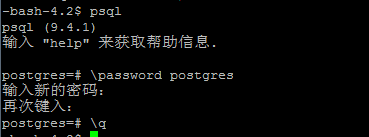
以上操作基本完成整个PostgreSQL的安装。
十、修改配置文件,令服务器可通过远程访问
对于未执行该步骤的配置将无法通过pgadmin远程管理。运行一下脚本修改pg的配置
echo "allow remote connections"

cat >> /var/lib/pgsql/9.4/data/pg_hba.conf <<EOF

host    all             all             0.0.0.0/0               md5

EOF

echo "listen all"

cat >> /var/lib/pgsql/9.4/data/postgresql.conf <<EOF

listen_addresses = '*'

EOF

sed 's/ssl = true/#ssl = true/' -i /var/lib/pgsql/9.4/data/postgresql.conf
Linux CentOS安装postgresql 9.4的更多相关文章
- Linux下安装PostgreSQL 转载linux社区
Linux下安装PostgreSQL [日期:2016-12-25] 来源:Linux社区 作者:xiaojian [字体:大 中 小] 在Linux下安装PostgreSQL有二进制格式安装和 ...
- 阿里云服务器Linux CentOS安装配置(零)目录
阿里云服务器Linux CentOS安装配置(零)目录 阿里云服务器Linux CentOS安装配置(一)购买阿里云服务器 阿里云服务器Linux CentOS安装配置(二)yum安装svn 阿里云服 ...
- 阿里云服务器Linux CentOS安装配置(九)shell编译、打包、部署
阿里云服务器Linux CentOS安装配置(九)shell编译.打包.部署 1.查询当前目录以及子目录下所有的java文件,并显示查询结果 find . -name *.java -type f - ...
- 阿里云服务器Linux CentOS安装配置(八)nginx安装、配置、域名绑定
阿里云服务器Linux CentOS安装配置(八)nginx安装.配置.域名绑定 1.安装nginx yum -y install nginx 2.启动nginx service nginx star ...
- 阿里云服务器Linux CentOS安装配置(七)域名解析
阿里云服务器Linux CentOS安装配置(七)域名解析 1.购买域名 登录阿里云,左侧菜单点击[域名],然后[域名注册],完成域名购买.(一般首年45元) 2.添加域名解析 在域名列表里点击你的域 ...
- 阿里云服务器Linux CentOS安装配置(六)resin多端口配置、安装、部署
阿里云服务器Linux CentOS安装配置(六)resin多端口配置.安装.部署 1.下载resin包 http://125.39.66.162/files/2183000003E08525/cau ...
- 阿里云服务器Linux CentOS安装配置(五)jetty配置、部署
阿里云服务器Linux CentOS安装配置(五)jetty配置.部署 1.官网下载jetty:wget http://repo1.maven.org/maven2/org/eclipse/jetty ...
- 阿里云服务器Linux CentOS安装配置(四)yum安装tomcat
阿里云服务器Linux CentOS安装配置(四)yum安装tomcat 1.yum -y install tomcat 执行命令后,会帮你把jdk也安装好 2.tomcat安装目录:/var/li ...
- 阿里云服务器Linux CentOS安装配置(三)yum安装mysql
阿里云服务器Linux CentOS安装配置(三)yum安装mysql 1.执行yum安装mysql命令:yum -y install mysql-server mysql-devel 2.启动mys ...
随机推荐
- assign、copy 、retain等关键字的含义
assign: 简单赋值,不更改索引计数copy: 建立一个索引计数为1的对象,然后释放旧对象retain:释放旧的对象,将旧对象的值赋予输入对象,再提高输入对象的索引计数为1Copy其实是建立了一个 ...
- java二分查找举例讨论
最近做笔试题有这么一个关于二分查找的例子. 给一个有序数组,和一个查找目标,用二分查找找出目标所在index,如果不存在,则返回-1-(其应该出现的位置),比如在0,6,9,15,18中找15,返回3 ...
- Matlab语法
第一节 基本数值计算1. 变量:分为数值变量和字符变量 2. 常量:计算机中不变的量.如i.j.pi.NaN(不确定).Inf(无穷大) 3. 字符变量:将字符串作为变量.有三种方法表示: (1 ...
- 全面解析sizeof(上) 分类: C/C++ StudyNotes 2015-06-15 10:18 188人阅读 评论(0) 收藏
以下代码使用平台是Windows7 64bits+VS2012. sizeof是C/C++中的一个操作符(operator),其作用就是返回一个对象或者类型所占的内存字节数,使用频繁,有必须对齐有个全 ...
- unity panel删除drawcall失败导致的残留影像
ngui panel 被隐藏或者删除的时候调用ondisable,清空drawcall,如果这个操作是在ontriggerenter等物理操作中就会删除不掉导致留下残影 解决方式 : 讲这些操转移到协 ...
- oracle备份工具exp-imp
rpm -ivh http://download.fedoraproject.org/pub/epel/6/i386/epel-release-6-7.noarch.rpmrpm -ivh http: ...
- Oracle 11.2.0.1的一个Bug,客户端报ORA-03113: 通信通道的文件结尾
半小时前,一个项目反馈应用系统部分功能报错,ORA-03113: 通信通道的文件结尾.好像是个常见的错误. 异常信息:ORA-03113: 通信通道的文件结尾 进程 ID: 2392 会话 ID: 2 ...
- 一起买beta版本文档报告汇总
一起买beta版本文档报告汇总 031402401鲍亮 031402402曹鑫杰 031402403常松 031402412林淋 031402418汪培侨 031402426许秋鑫 一.Beta版本冲 ...
- python中import和from...import区别
在python用import或者from...import来导入相应的模块.模块其实就是一些函数和类的集合文件,它能实现一些相应的功能,当我们需要使用这些功能的时候,直接把相应的模块导入到我们的程序中 ...
- kvm虚拟化平台搭建入门
KVM虚拟化有两种网络模式:1)Bridge网桥模式2)NAT网络地址转换模式Bridge方式适用于服务器主机的虚拟化.NAT方式适用于桌面主机的虚拟化. 环境: 本次实验要开启VMWare中对应Ce ...