
Android自定义控件2--优酷菜单界面初始化
本文开始将逐步去实现下面优酷菜单的效果:
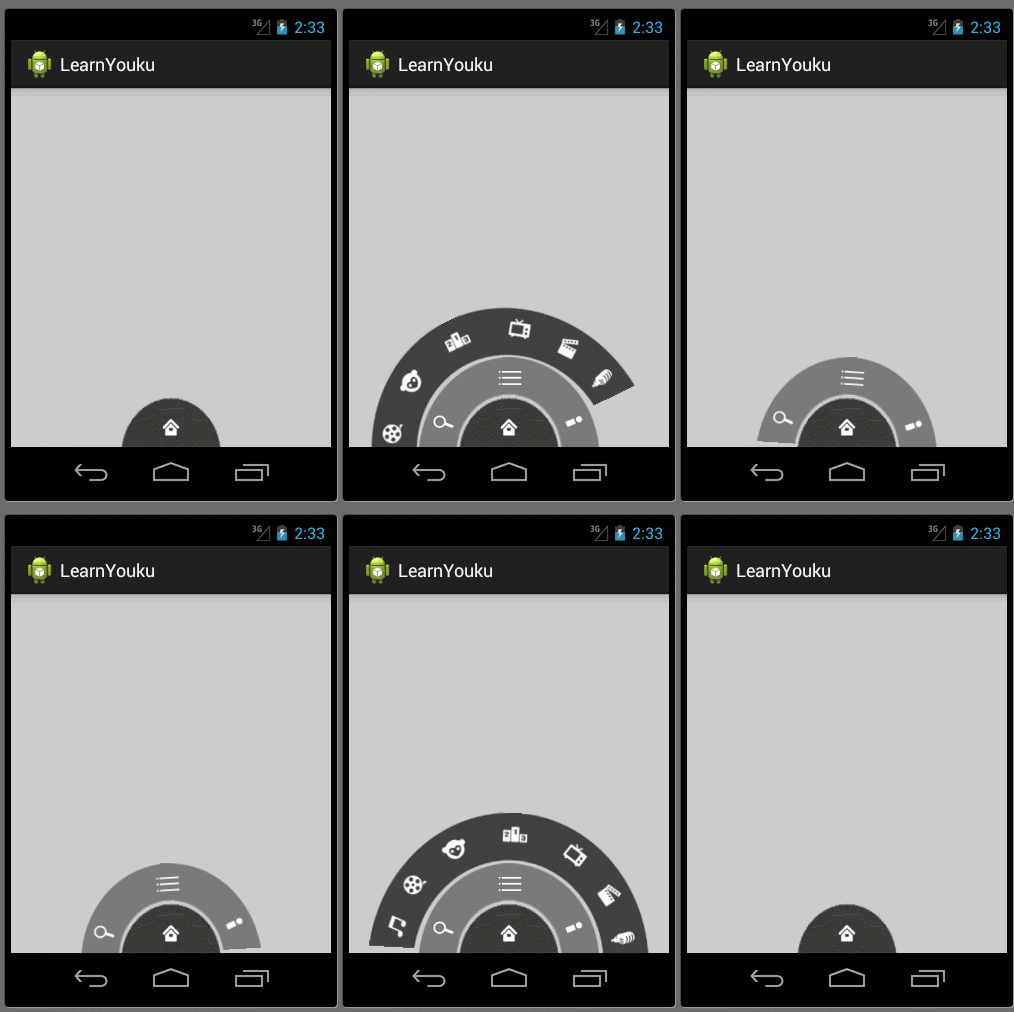
本文地址:http://www.cnblogs.com/wuyudong/p/5912538.html,转载请注明源地址。
本文首先来实现优酷菜单界面初始化工作
首先使用相对布局
<RelativeLayout xmlns:android="http://schemas.android.com/apk/res/android"

    xmlns:tools="http://schemas.android.com/tools"

    android:layout_width="match_parent"

    android:layout_height="match_parent"

    tools:context=".MainActivity" >

    <RelativeLayout

        android:layout_width="100dp"

        android:layout_height="50dp"

        android:background="@drawable/level1"

        android:layout_alignParentBottom="true"

        android:layout_centerHorizontal="true"

        ></RelativeLayout>

    <RelativeLayout

        android:layout_width="180dp"

        android:layout_height="90dp"

        android:background="@drawable/level2"

        android:layout_alignParentBottom="true"

        android:layout_centerHorizontal="true"

        ></RelativeLayout>

    <RelativeLayout

        android:layout_width="280dp"

        android:layout_height="140dp"

        android:background="@drawable/level3"

        android:layout_alignParentBottom="true"

        android:layout_centerHorizontal="true"

        ></RelativeLayout>

</RelativeLayout>
实现下面的效果

接着将一些小图标嵌入里面,布局比较简单有规律
<RelativeLayout xmlns:android="http://schemas.android.com/apk/res/android"

    xmlns:tools="http://schemas.android.com/tools"

    android:layout_width="match_parent"

    android:layout_height="match_parent"

    tools:context=".MainActivity" >

    <RelativeLayout

        android:layout_width="100dp"

        android:layout_height="50dp"

        android:layout_alignParentBottom="true"

        android:layout_centerHorizontal="true"

        android:background="@drawable/level1" >

        <ImageButton

            android:layout_width="wrap_content"

            android:layout_height="wrap_content"

            android:layout_centerInParent="true"

            android:background="@null"

            android:src="@drawable/icon_home" />

    </RelativeLayout>

    <RelativeLayout

        android:layout_width="180dp"

        android:layout_height="90dp"

        android:layout_alignParentBottom="true"

        android:layout_centerHorizontal="true"

        android:background="@drawable/level2" >

          <ImageButton

            android:layout_width="wrap_content"

            android:layout_height="wrap_content"

            android:layout_alignParentBottom="true"

            android:layout_alignParentLeft="true"

            android:layout_marginBottom="5dp"

            android:layout_marginLeft="10dp"

            android:background="@null"

            android:src="@drawable/icon_search" />

        <ImageButton

            android:layout_width="wrap_content"

            android:layout_height="wrap_content"

            android:layout_centerHorizontal="true"

            android:layout_marginTop="5dp"

            android:background="@null"

            android:src="@drawable/icon_menu" />

         <ImageButton

            android:layout_width="wrap_content"

            android:layout_height="wrap_content"

            android:layout_alignParentBottom="true"

            android:layout_alignParentRight="true"

            android:layout_marginBottom="5dp"

            android:layout_marginRight="10dp"

            android:background="@null"

            android:src="@drawable/icon_myyouku" />

    </RelativeLayout>

    <RelativeLayout

        android:layout_width="280dp"

        android:layout_height="140dp"

        android:layout_alignParentBottom="true"

        android:layout_centerHorizontal="true"

        android:background="@drawable/level3" >

        <ImageButton

            android:layout_width="wrap_content"

            android:layout_height="wrap_content"

            android:layout_alignParentBottom="true"

            android:layout_alignParentLeft="true"

            android:layout_marginBottom="5dp"

            android:layout_marginLeft="10dp"

            android:background="@null"

            android:src="@drawable/channel1" />

        <ImageButton

            android:layout_width="wrap_content"

            android:layout_height="wrap_content"

            android:layout_marginLeft="30dp"

            android:layout_marginTop="60dp"

            android:background="@null"

            android:src="@drawable/channel2" />

        <ImageButton

            android:layout_width="wrap_content"

            android:layout_height="wrap_content"

            android:layout_marginLeft="65dp"

            android:layout_marginTop="25dp"

            android:background="@null"

            android:src="@drawable/channel3" />

        <ImageButton

            android:layout_width="wrap_content"

            android:layout_height="wrap_content"

            android:layout_centerHorizontal="true"

            android:layout_marginTop="5dp"

            android:background="@null"

            android:src="@drawable/channel4" />

        <ImageButton

            android:layout_width="wrap_content"

            android:layout_height="wrap_content"

            android:layout_alignParentRight="true"

            android:layout_marginRight="30dp"

            android:layout_marginTop="60dp"

            android:background="@null"

            android:src="@drawable/channel5" />

        <ImageButton

            android:layout_width="wrap_content"

            android:layout_height="wrap_content"

            android:layout_alignParentRight="true"

            android:layout_marginRight="65dp"

            android:layout_marginTop="25dp"

            android:background="@null"

            android:src="@drawable/channel6" />

        <ImageButton

            android:layout_width="wrap_content"

            android:layout_height="wrap_content"

            android:layout_alignParentBottom="true"

            android:layout_alignParentRight="true"

            android:layout_marginBottom="5dp"

            android:layout_marginRight="10dp"

            android:background="@null"

            android:src="@drawable/channel7" />

    </RelativeLayout>

</RelativeLayout>
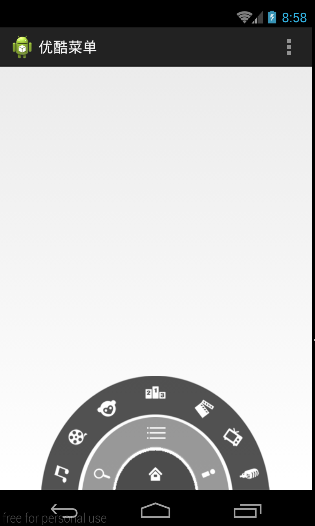
运行后的效果如下:
Android自定义控件2--优酷菜单界面初始化的更多相关文章
- android自定义控件之模仿优酷菜单
去年的优酷HD版有过这样一种菜单,如下图: 应用打开之后,先是三个弧形的三级菜单,点击实体键menu之后,这三个菜单依次旋转退出,再点击实体键menu之后,一级菜单会旋转进入,点击一级菜单,二级菜单旋 ...
- 自定义View(一)-ViewGroup实现优酷菜单
自定义View的第一个学习案例 ViewGroup是自动以View中比较常用也比较简单的一种方式,通过组合现有的UI控件,绘制出一个全新的View 效果如下: 主类实现如下: package com. ...
- Android自定义控件系列(四)—底部菜单(下)
转载请注明出处:http://www.cnblogs.com/landptf/p/6290862.html 在app中经常会用到底部菜单的控件,每次都需要写好多代码,今天我们用到了前几篇博客里的控件来 ...
- Android自定义控件7--自定义开关--绘制界面内容
本文实现全自定义控件--自定义开关 本文地址:http://www.cnblogs.com/wuyudong/p/5922316.html,转载请注明源地址. 自定义开关 (View),本文完成下面内 ...
- Android自定义控件4--优酷菜单的菜单键及细节补充
在上篇文章中实现了优酷菜单执行动画,本文接着完善已经实现的动画功能 本文地址:http://www.cnblogs.com/wuyudong/p/5915958.html ,转载请注明源地址. 已经实 ...
- Android自定义控件3--优酷菜单执行动画
在上篇文章中实现了优酷菜单的布局,本文接着实现动画功能 本文地址:http://www.cnblogs.com/wuyudong/p/5914901.html,转载请注明源地址. 新建动画工具类Ani ...
- android 使用WebView 支持播放优酷视频,土豆视频
看了很多文章和所谓的解决android WebView播放优酷,土豆等视频的办法,都是什么 setPluginsEnabled,在android 4.x之后都不好使,压根就没这函数,因为android ...
- Android笔记——Android自定义控件
目录: 1.自定义控件概述 01_什么是自定义控件 Android系统中,继承Android系统自带的View或者ViewGroup控件或者系统自带的控件,并在这基础上增加或者重新组合成我们想要的效果 ...
- [android] 优酷环形菜单-相对布局练习
优酷环形菜单 布局文件,使用<RelativeLayout/>控件作为第一级菜单,相对布局,位于父控件的底部,水平居中,因为图片不是特别的标准,因此宽度和高度都钉死,宽度是高度的两倍 二次 ...
随机推荐
- GitHub一代:我们都是开源控
我们是新的GitHub一代?GitHub塑造了新式开源文化?嗯,看看十几年开源控.Getable CTO Mikeal Rogers 是怎么说的吧: GitHub本来想做一个开源软件协作平台,结果做着 ...
- CSS魔法堂:再次认识font
一.前言 文字承载着站点内涵,而良好的字体.排版则为用户提供舒适的阅读体验.本文打算对字体稍微深入一下子网页字体的内容,若有纰漏请大家指正,谢谢! 目录一坨: 二, 字体分类 1. 衬线体(Serif ...
- WPF DataGrid绑定及列居中
基本的数据绑定 把集合的字段(属性)绑定在DataGrid的Binding属性就能将数据绑定列表 public class CashItem { public int Value { get; set ...
- 快速学习JavaScript面向对象编程
到处都是属性.方法,代码极其难懂,天哪,我的程序员,你究竟在做什么?仔细看看这篇指南,让我们一起写出优雅的面向对象的JavaScript代码吧! 作为一个开发者,能否写出优雅的代码对于你的职业生涯至关 ...
- 不可或缺 Windows Native (23) - C++: 虚函数
[源码下载] 不可或缺 Windows Native (23) - C++: 虚函数 作者:webabcd 介绍不可或缺 Windows Native 之 C++ 虚函数 示例1.基类CppHuman ...
- jquery内容选择器(匹配包含指定选择器的元素)
<!DOCTYPE html PUBLIC "-//W3C//DTD XHTML 1.0 Transitional//EN" "http://www.w3.org/ ...
- 第 30 章 使用 Emmet 插件
学习要点: 1.安装方式 2.自定义!生成 3.快速生成 主讲教师:李炎恢 本章主要探讨了解一下 Sublime Text3 的一个 HTML5 代码提示插件:Emmet,这个插件比自带原生的要强 ...
- 第 11 章 进度条媒体对象和 Well 组件
学习要点: 1.Well 组件 2.进度条组件 3.媒体对象组件 主讲教师:李炎恢 本节课我们主要学习一下 Bootstrap 的三个组件功能:Well 组件.进度条组件.媒体对象组件. 一.Well ...
- 窗口之间的主从关系与Z-Order
说明:这是本人2008年写的一篇旧文,从未公开发表过.其中除了一小段描述Window Mobile平台的内容已过时,大部分内容对于从事Win32开发的程序员还是很有参考价值的,也是对自己从事Windo ...
- PDF.NET 开发框架之 SOD框架 Ver 5.2 正式版开源源码发布
PDF.NET 开发框架之 SOD框架 Ver 5.2.1.0307 正式版发布,包含以下部分: SOD_Pwmis.Core --包括下列数据提供程序 SqlServer SqlServerCe A ...