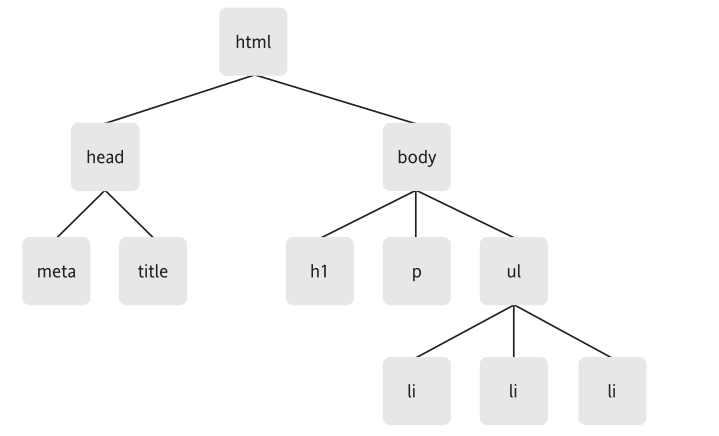
DOM : Document Object Model
D is for document :
The DOM cant work without a document . When you create a web page and load it in a web browser, the DOM comes to life. It takes the document that you have written and turns it into
an object .
O is for Objects : Just as we see before.
M is for Model :
The M in DOM stands for Model, but it could just as easily stand for Map.
The DOM represents the web page thats currently loaded in the browser window. The browser
provides a map (or a model) of the page. You can use JavaScript to read this map.
The most important convention used by the DOM is the representation of a document as a tree.
More specifically, the document is represented as a family tree.

However, instead of using the term family tree, its more accurate to call a document a node tree.
Nodes :
A document is a collection of nodes, with nodes as the branches and leaves on the document tree.
There are a number of defferent types of nodes. Lets take a quick look at three of them :
element nodes, text nodes, attribute nodes.
Element nodes :
such as <body> <p> <ul> , Elemnets are the basic building blocks of documents on the Web, and
its the arrangement of these elements in a document that gives the document its structure.
Text nodes:
if a document consisted purely of empty elements, it would have a structure, but the document
itself wouldnt contain much content. On the web, most content is provided by text.
such as <p>Dont forget to buy this stuff</p> , "Dont forget to buy this stuff" is a text node.
In XHTML, text nodes are always enclosed within element nodes.
Attribute nodes:
Attributes are used to give more specific information about an element.
<p title = "a gentle reminder"> Dont forget to buy this stuff. </p>
In DOM, title = "a gentle reminder" is an attribute node.

Because attributes are always placed within opening tags, attribute nodes are always contained
within element nodes. Not all elements contain attribute, but all attributes are contained by elements.
In fact, each element in a document is an object. Using the DOM, you can "get" at all of these
elements .
Getting Elements :
Three DOM methods allow you to access element nodes by ID, tag name, and class name.
getElementById() :
usage : document.getElementById(id) :
this method will return a specific object in the document model.
you can use the typeof to test this : eg :
alert( typeof document.getElementById("purchases") ) ;
getElementsByTagName() :
usage : element.getElementByTagName( tag );
Even if there is only one element with the specified tag name, getElementByTagName still returns
an array. The length of the array will be simply 1.
you can also use a wildcard(通配符) with getElementByTagName, which means you can make an
array with every single element. eg :
alert ( document.getElementsByTagName("*").length ) ;
you can also combine getElementsByTagName with getElementById. eg :
var shopping = document.getElementById("purchases") ;
var items = shopping.getElementsByTagName("*") ;
alert( items.length );
getElementsByClassName()
It also behaves in the same way as getElementsByTagName by returning an array of elements with a common class name.The getElementsByClassName method is quite useful, but it’s supported by only modern browsers. To make up for this lack of support, DOM scripters have needed to roll their own getElementsByClassName function using existing DOM methods, sort of like a rite of passage.
function getElementsByClassName(node, classname) {

    if (node.getElementsByClassName) {

        // Use the existing method

        return node.getElementsByClassName(classname);

     } else {

        var results = new Array();

        var elems = node.getElementsByTagName("*");

            for (var i=0; i<elems.length; i++) {

                if (elems[i].className.indexOf(classname) != -1) {

                  results[results.length] = elems[i];

               }

         }

        return results;

    }

}
Before you may write like this :
var shopping = document.getElementById("purchases");
var sales = shopping.getElementsByClassName("sale");
With this function, you can write the code like this :
var shopping = document.getElementById("purchases");
var sales = getElementsByClassName(shopping, "sale");
Here's a quick summary of what you've seen so far :
- A document is a tree of nodes.
- There are different types of nodes : elements, attributes, text, and so on
- you can go straight to a specific element node using getElementById.
- you can go directly to a collection of element nodes using getElementsByTagName or getElementsByClassName
- Every one of these nodes is an object.
Getting and Setting Attributes :
getAttribute()
usage : object.getAttribute( attribute ) ;
Unlike the other methods you've seen before, you cant use getAttribute on the document object.
It can be used on only an element node object.
SetAttribute()
usage : object.setAttribute(attribute, value);
- HTML与DOM BOM javascript
1.什么是DOM? 简单说就是DOM规定了HTML,XML等的一些文档映射规范,使JavaScript可以根据这些规范来进行获取元素,在元素上进行各种操作,使得用户页面可以动态的变化,从而大大使页面的 ...
- 第61节:Java中的DOM和Javascript技术
Java中的DOM和Javascript技术 DOM是一门技术,是文档对象模型.所需的文档只有标记型文档,如我们所学的html文档(文档中的所有标签都封装成为对象了) DOM: 为Document O ...
- DOM与JavaScript、jQuery之间的关系
DOM(document object model) 其实是浏览器内元素对象的一个总称 我们用JavaScript对网页进行的所有操作都是通过DOM进行的.DOM属于浏览器,而不是JavaScript ...
- javascript+dom 做javascript图片库
废话不多说 直接贴代码 <!DOCTYPE html><html lang="en"><head> <meta charset=" ...
- DOM(JavaScript高程笔记)
一.节点层次 1.Node类型 if (someNode.nodeType == 1){ // 适用于所有浏览器 alert("Node is an element."); } N ...
- html dom与javascript的关系 -我们用JavaScript对网页(HTML)进行的所有操作都是通过DOM进行的
一,什么是DOM (参考源http://www.cnblogs.com/chaogex/p/3959723.html) DOM是什么 DOM全称为The Document Object Model,应 ...
- HTML(DOM)与JavaScript嵌套数组之间相互转换
html2ja:将html目标元素解析为JavaScript数组字面量,每项的值为tagName, className, id等CSS选择器组合: showJa:将html2ja生成的数组缩进格式化显 ...
- DOM,javascript,Web API之间的关系——onclick 引起的思考与调研
平时习惯了用js操作dom树来与html页面进行交互,基本都是通过web API接口实现的,最近看闭包和原生js的知识点比较多,昨天无意中看到了onclick中的this指向问题,遂用native j ...
- Html 内嵌 选择器属性 Dom操作 JavaScript 事件
HTML标签: 一.通用标签(一般标签) 1.格式控制标签 <font color="#6699aa" face="楷体" size="24&q ...
随机推荐
- webpack.config.js====CSS相关:插件optimize-css-assets-webpack-plugin
1. 安装:主要是用来压缩css文件 cnpm install --save-dev optimize-css-assets-webpack-plugin cssnano 2. webpack.con ...
- Xcode警告忽略
Xcode中 cmd+B 之后总会出现各种各样的警告,对于一个对代码有洁癖的人,这种情况很难忍,接下来我们用些特殊手段强制消除这些警告 一.忽略源文件中的警告 使用编译器宏来操作 #pragma c ...
- 构建第一个spring boot2.0应用之项目启动运行的几种方式(二)
方法一. 配置Run/Debug Configuration 选择Main Class为项目 Application启动类(入口main方法) (2).进行项目目录,即包含pom.xml的目录下,启 ...
- [AngularJS] $location 服务简介
参考博客: https://www.cnblogs.com/gaoruixin/p/6070502.html 简介 $location服务解析在浏览器地址栏中的URL(基于window.locati ...
- jQuery_2_常规选择器-高级选择器
高级选择器 层次选择器 1. 后代选择器 $("#d1 p") 获取追溯到的多个DOM对象 (无论儿子还是孙子都是后代) 2. 子选择器 $("# ...
- linux 命令——32 gzip(转)
减少文件大小有两个明显的好处,一是可以减少存储空间,二是通过网络传输文件时,可以减少传输的时间.gzip是在Linux系统中经常使用的一个对文件进行压缩和解压缩的命令,既方便又好用.gzip不仅可以用 ...
- 安装Ubuntu桌面环境后只能Guest登录的解决办法
1.安装Ubuntu桌面环境后,登录界面只显示了Guest 2.在登录界面按住crtl+shift+F1,进入tty模式 3.输入sudo -s进入root模式 4.输入vi /etc/lightdm ...
- cuda科普像素坐标和线性偏移
cuda科普像素坐标和线性偏移
- C#创建和使用ActiveX组件
开发基于.Net平台上的程序员是很难从本质上把Visual C#和ActiveX组件联起来,虽然在使用Visual C#开发应用程序时,有时为了快速开发或者由于.Net FrameWork SDK的不 ...
- 2017年9月22日作业 c++算术运算符 自增 自减 逻辑运算符 位运算符 条件运算符(三元运算符)
作业1: c++算术运算符试题,分析下面程序的输出结果是什么 //第一个: int x=8999;int value=x*1000/1000; //第二个 int x=8999;int value=x ...