
Maven私服搭建(Nexus Repository Manager 3)
下载和安装
下载地址:https://help.sonatype.com/repomanager3/download

注意:Nexus Repository Manager 3是一个Java服务器应用程序,安装需要 jdk1.8以上的版本。
下载解压后,用命令行到解压目录的bin目录下运行 nexus.exe /run(Linux运行./nexus run),启动完成后会显示“Started Sonatype Nexus”:
-------------------------------------------------

Started Sonatype Nexus OSS 3.16.2-01

-------------------------------------------------
访问Nexus管理后台
Nexus管理后台地址:http://localhost:8081/
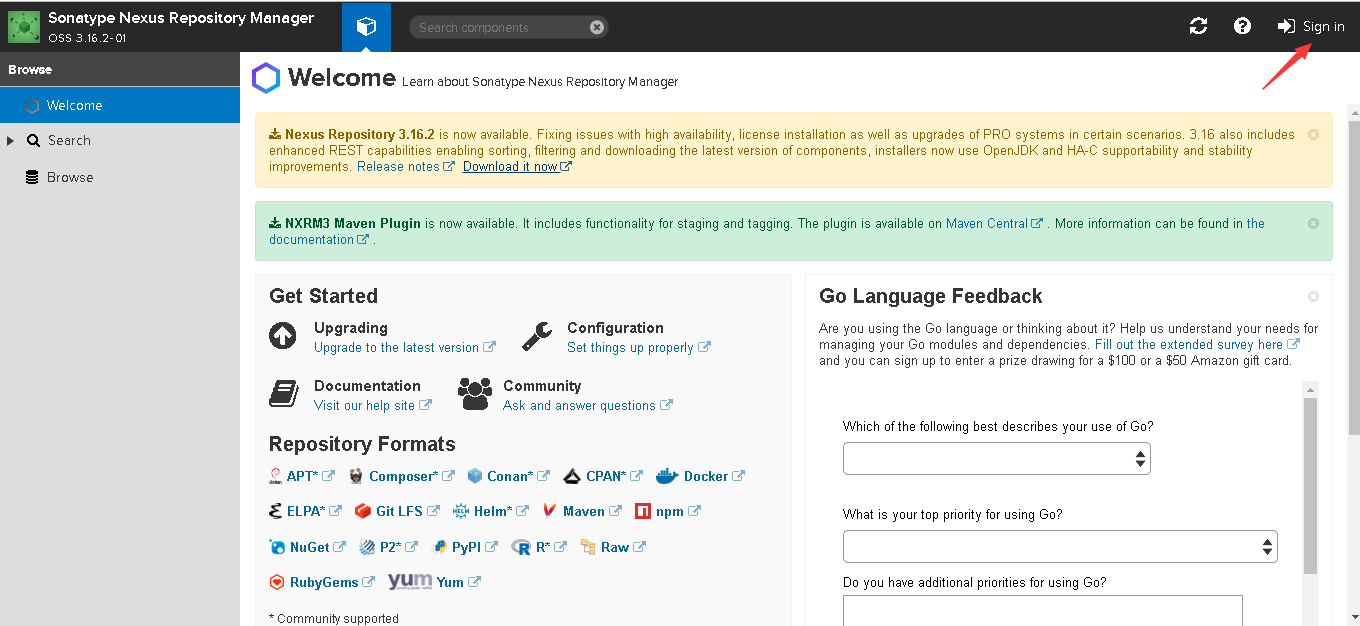
点击右上角Sign in登录,默认账号和密码为:admin/admin123
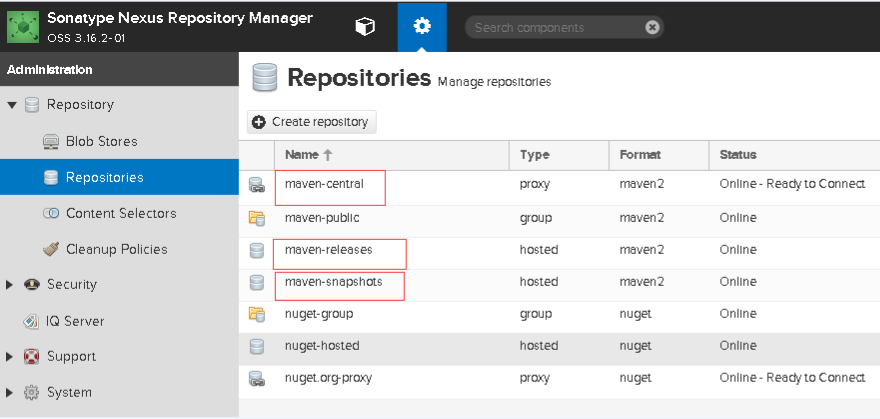
在Repositories 仓库管理界面中有多种默认的仓库,也可以添加新的仓库,本实例直接使用默认的仓库:
maven-central,Type为proxy,表示代理仓库。代理仓库用来代理远程仓库(maven-central代理的是超级POM中配置的Maven中央仓库),当在下载组件时,如果代理仓库搜索不到,则会把请求转发到远程仓库从远程仓库下载。从远程仓库下载后会缓存到代理仓库,下次还有该组件的请求则会直接到代理仓库下载,不会再次请求远程仓库。
maven-releases/maven-snapshots,Type为hosted,表示为宿主仓库。宿主仓库主要用来部署团队内部使用的内部组件,默认的maven-releases和maven-snapshots分别用来部署团队内部的发布版本组件和快照版本组件。
配置代理仓库
配置settings.xml:
<settings>

   <!-- 配置镜像,此处拦截所有远程仓库的请求到代理仓库-->

  <mirrors>

    <mirror>

      <id>nexus</id>

      <mirrorOf>*</mirrorOf>

      <url>http://localhost:8081/repository/maven-central/</url>

    </mirror>

  </mirrors>

  <!-- 配置远程库和远程插件库-->

  <profiles>

    <profile>

      <id>nexus</id>

      <!-- Maven用于填充构建系统本地存储库的远程仓库集合-->

      <repositories>

        <repository>

          <id>central</id>

          <url>http://central</url>

          <releases><enabled>true</enabled></releases>

          <snapshots><enabled>true</enabled></snapshots>

        </repository>

      </repositories>

     <!-- 类似于repositories元素,指定Maven可以在哪里找到Maven插件的远程仓库位置-->

     <pluginRepositories>

        <pluginRepository>

          <id>central</id>

          <url>http://central</url>

          <releases><enabled>true</enabled></releases>

          <snapshots><enabled>true</enabled></snapshots>

        </pluginRepository>

      </pluginRepositories>

    </profile>

  </profiles>

  <!-- 激活profiles配置 -->

  <activeProfiles>

    <activeProfile>nexus</activeProfile>

  </activeProfiles>

</settings>
创建Maven项目,pom.xml如下:
<project xmlns="http://maven.apache.org/POM/4.0.0" xmlns:xsi="http://www.w3.org/2001/XMLSchema-instance"

  xsi:schemaLocation="http://maven.apache.org/POM/4.0.0 http://maven.apache.org/xsd/maven-4.0.0.xsd">

  <modelVersion>4.0.0</modelVersion>

  <groupId>com.nocoffee</groupId>

  <artifactId>coffee-api</artifactId>

  <version>0.0.1-SNAPSHOT</version>

  <packaging>jar</packaging>

  <name>coffee-api</name>

  <url>http://maven.apache.org</url>

  <dependencies>

    <dependency>

      <groupId>junit</groupId>

      <artifactId>junit</artifactId>

      <version>3.8.1</version>

      <scope>test</scope>

    </dependency>

  </dependencies>

</project>
执行mvn clean,执行mvn clean需要下载maven-clean-plugin插件,通过Browse界面可以看到因为执行mvn clean而下载的maven-clean-plugin.jar:

注意:如果界面为空,表示没有下载,原因是之前下载过该插件到本地仓库,需要把本地仓库的maven-clean-plugin插件删除,我的本地仓库路径为D:\Reporsitory,所以需要删掉文件夹:D:\Reporsitory\org\apache\maven\plugins\maven-clean-plugin,然后重新构建即可。
配置宿主仓库
settings.xml增加如下配置:
<servers>

     <server>

        <id>nexus</id>

        <username>admin</username>

        <password>admin123</password>

    </server>

</servers>
配置pom.xml:
<project xmlns="http://maven.apache.org/POM/4.0.0" xmlns:xsi="http://www.w3.org/2001/XMLSchema-instance"

  xsi:schemaLocation="http://maven.apache.org/POM/4.0.0 http://maven.apache.org/xsd/maven-4.0.0.xsd">

  <modelVersion>4.0.0</modelVersion>

  <groupId>com.nocoffee</groupId>

  <artifactId>coffee-api</artifactId>

  <version>0.0.1-SNAPSHOT</version>

  <packaging>jar</packaging>

  <name>coffee-api</name>

  <url>http://maven.apache.org</url>

  <dependencies>

    <dependency>

      <groupId>junit</groupId>

      <artifactId>junit</artifactId>

      <version>3.8.1</version>

      <scope>test</scope>

    </dependency>

  </dependencies>

  <distributionManagement>

		<repository>

		<id>nexus</id>

		<name>maven-releases</name>

		<url>http://localhost:8081/repository/maven-releases/</url>

		</repository>

		<snapshotRepository>

		<id>nexus</id>

		<name>maven-snapshots</name>

		<url>http://localhost:8081/repository/maven-snapshots/</url>

		</snapshotRepository>

   </distributionManagement>

</project>
执行mvn clean deploy将项目打包并发布到宿主仓库,构建成功后到Browse中maven-snapshots库查看(因为项目版本为0.0.1-SNAPSHOT,是带SNAPSHOT的快照版本):

maven-releases库
需要将项目版本改成发布版本,在pom.xml中0.0.1-SNAPSHOT去掉-SNAPSHOT,改为0.0.1。重新执行mvn clean deploy:
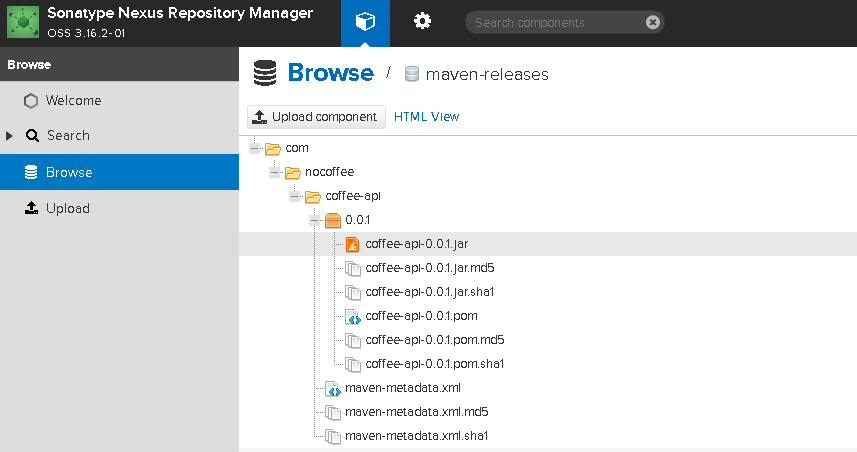
注意:maven-releases库默认不能重新发布,需要可重新发布则需要修改该仓库配置。
测试重新发布到maven-releases库,执行mvn clean deploy将会构建失败:
[INFO] ------------------------------------------------------------------------

[INFO] BUILD FAILURE

[INFO] ------------------------------------------------------------------------

[INFO] Total time: 4.112 s

[INFO] Finished at: 2019-06-10T16:34:29+08:00

[INFO] Final Memory: 18M/164M

[INFO] ------------------------------------------------------------------------

[ERROR] Failed to execute goal org.apache.maven.plugins:maven-deploy-plugin:2.7:deploy (default-deploy) on project coffee-api: Failed to deploy artifacts: Could not transfer artifact com.nocoffee:coffee-api:jar:0.0.1 from/to nexus (http://localhost:8081/repository/maven-releases/): Failed to transfer file: http://localhost:8081/repository/maven-releases/com/nocoffee/coffee-api/0.0.1/coffee-api-0.0.1.jar. Return code is: 400, ReasonPhrase: Repository does not allow updating assets: maven-releases. -> [Help 1]

[ERROR]

[ERROR] To see the full stack trace of the errors, re-run Maven with the -e switch.

[ERROR] Re-run Maven using the -X switch to enable full debug logging.

[ERROR]

[ERROR] For more information about the errors and possible solutions, please read the following articles:

[ERROR] [Help 1] http://cwiki.apache.org/confluence/display/MAVEN/MojoExecutionException
将maven-releases库中Deployment pollcy改为Allow redeploy既可:

Maven私服搭建(Nexus Repository Manager 3)的更多相关文章
- window Maven私服搭建——nexus
注:本文来源于 <window Maven私服搭建--nexus> Maven私服搭建--nexus 1.下载nexus https://www.sonatype.com/downlo ...
- maven私服搭建nexus/windows/linux(一)
为什么要搭建nexus私服,原因很简单,有些公司都不提供外网给项目组人员,因此就不能使用maven访问远程的仓库地址,还有就是公司内部开发的一些版本的jar包,如果没有私服需要一人拷贝一份然后再自己安 ...
- maven私服搭建nexus介绍(二)
1.各个仓库介绍 Hosted:宿主仓库 主要放本公司开发的SNAPSHOTS测试版本,RELEASES正式发行版.合作公司第三方的jar包. Proxy:代理仓库 代理中央仓库:代理Apache下测 ...
- 使用 Nexus Repository Manager 搭建 npm 私服
目录 环境 下载与安装 添加npm仓库 配置与验证npm仓库 发布自己的包 Nexus开启启动 脚注 环境 windows10(1803) Nexus Repository Manager OSS 3 ...
- Linux安装配置maven以及搭建nexus私服(编写启动脚本)
2011年07月12日16:32 下面介绍在Linux操作系统下安装配置maven和搭建nexus私服. 一.安装前的准备 下载 jdk http://www.oracle.com/technetw ...
- [转] 使用HTTPS在Nexus Repository Manager 3.0上搭建私有Docker仓库
FROM: https://www.hifreud.com/2018/06/06/03-nexus-docker-repository-with-ssl/ 搭建方式 搭建SSL的Nexus官方提供两种 ...
- maven仓库总结,maven私服搭建
配置pom.xml依赖包时在这里找包的描述: http://search.maven.org/#browse 以java为根目录. mvn archtype:generate -DgroupId=zt ...
- Nexus Repository Manager OSS 3.x 安装配置
前言想要使用maven搭建项目,但是国内的网络环境可以想象,还有公司自己开发的jar包等问题,所以需要搭建一个maven的私服,这样便于管理. 找了一些教程,顺便记下来,当做笔记. 本文以Window ...
- maven仓库总结,maven私服搭建,批量mvn eclipse:eclipse
配置pom.xml依赖包时在这里找包的描述: http://search.maven.org/#browse 以java为根目录. mvn archtype:generate -DgroupId=zt ...
随机推荐
- 虚拟化(五):vsphere高可用群集与容错(存储DRS是一种可用于将多个数据存储作为单个数据存储群集进行管理的功能)
vsphere高级功能需要vcenter server和共享存储的支持才能实现.vsphere的高级功能有 vmotion.storage vmotion.vsphere HA.vsphere DRS ...
- [数据挖掘课程笔记]Naïve Bayesian Classifier
朴素贝叶斯模型 1) X:一条未被标记的数据 2) H:一个假设,如H=X属于Ci类 根据贝叶斯公式 把X表示为(x1,x2,....xn) x1,x2,....xn表示X在各个特征上的值. 假设有c ...
- 不懂不能装懂--邮箱后缀“inc”的含义
之前实习的公司,邮箱域名是XXX@XXX-inc.com 再之前,投递简历了或者关注某个公司的一些信息或者和这些公司的人邮件联系是也发现有这个inc的后缀,一直不明白,今天觉得自己找到答案了,不怕丢人 ...
- jquery特效(6)—判断复选框是否选中进行答题提示
前面有一段时间思想开了小差,跟着师父学习了一段时间才发现差距很大,看来我要奋起直追~\(≧▽≦)/~啦啦啦. 最近公司在做一个项目,需要根据用户选择的选项给出相应的提示,下面来看我写的测试程序的效果: ...
- ansible 基础知识
英文官网,值得拥有! http://docs.ansible.com/ansible/list_of_files_modules.html# 摘自: http://blog.csdn.net/b624 ...
- css 鼠标移入边框填充效果
<!DOCTYPE html> <html> <head> <meta charset="UTF-8"> <title> ...
- atexit函数详解
对C语言有所了解的人都知道main函数是整个程序的入口,但是其实不然,在内核中可以使用链接器来设置程序的开始地方.当内核使⽤⼀个exec函数执⾏C程序时,在调⽤main函数之前先调⽤⼀个特殊的启动例程 ...
- linux sdk配置
http://blog.csdn.net/wudj810818/article/details/51251408,环境变量配置不要用 SDK环境变量: export PATH=$PATH:/opt/a ...
- .NETFramework:Timers
ylbtech-.NETFramework:Timers 1.返回顶部 1. #region 程序集 System, Version=4.0.0.0, Culture=neutral, PublicK ...
- MFC在对话框中的Picture contrl控件中添加icon图标,并改变icon图标的背景色与对话框背景色一致
1.在对话框添加Picture Contrl 控件 2.选中控件,修改ID为IDC_STATIC_PICTURE 和 Type属性为icon 其图标改为 3.添加变量m_picture变量名是灰色,说 ...