
浅析PropertySource 基本使用
一、PropertySource 简介
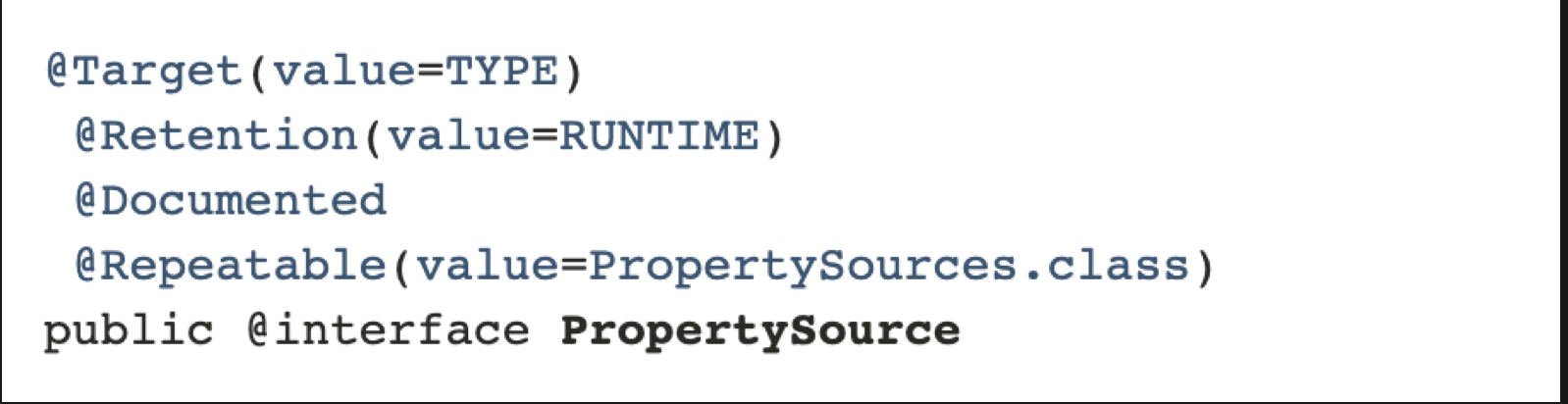
org.springframework.context.annotation.PropertySource 是一个注解,可以标记在类上、接口上、枚举上,在运行时起作用。而@Repeatable(value = PropertySources.class) 表示在PropertySources 中此注解时可以重复使用的。如下:
二、@PropertySource与Environment读取配置文件
此注解@PropertySource 为Spring 中的 Environment提供方便和声明机制,通常与Configuration一起搭配使用。
- 新建一个maven 项目,添加pom.xml 依赖:
<?xml version="1.0" encoding="UTF-8"?>

<project xmlns="http://maven.apache.org/POM/4.0.0" xmlns:xsi="http://www.w3.org/2001/XMLSchema-instance"

	xsi:schemaLocation="http://maven.apache.org/POM/4.0.0 http://maven.apache.org/xsd/maven-4.0.0.xsd">

	<modelVersion>4.0.0</modelVersion>

	<groupId>com.spring.propertysource</groupId>

	<artifactId>spring-propertysource</artifactId>

	<version>0.0.1-SNAPSHOT</version>

	<name>spring-propertysource</name>

	<description>Demo project for Spring Boot</description>

	<properties>

		<java.version>1.8</java.version>

		<spring.version>4.3.13.RELEASE</spring.version>

	</properties>

	<dependencies>

		<dependency>

			<groupId>org.springframework</groupId>

			<artifactId>spring-core</artifactId>

			<version>${spring.version}</version>

		</dependency>

		<dependency>

			<groupId>org.springframework</groupId>

			<artifactId>spring-context</artifactId>

			<version>${spring.version}</version>

		</dependency>

	</dependencies>

	<build>

		<pluginManagement>

			<plugins>

				<plugin>

					<groupId>org.apache.maven.plugins</groupId>

					<artifactId>maven-compiler-plugin</artifactId>

					<version>3.2</version>

					<configuration>

						<source>1.6</source>

						<target>1.6</target>

					</configuration>

				</plugin>

			</plugins>

		</pluginManagement>

	</build>

</project>
一般把版本名称统一定义在 标签中,便于统一管理,如上可以通过
${…}来获取指定版本。
- 定义一个application.properties 来写入如下配置
com.spring.name=liuXuan

com.spring.age=18
- 新建一个TestBean,定义几个属性
public class TestBean {

    private String name;

    private Integer age;

    public String getName() {

        return name;

    }

    public void setName(String name) {

        this.name = name;

    }

    public Integer getAge() {

        return age;

    }

    public void setAge(Integer age) {

        this.age = age;

    }

    @Override

    public String toString() {

        return "TestBean{" +

                "name='" + name + '\'' +

                ", age=" + age +

                '}';

    }

}
- 新建一个main class ,用来演示@PropertySource 的使用
	@Configuration

  @PropertySource(value = "classpath:application.properties",ignoreResourceNotFound = false)

  public class SpringPropertysourceApplication {

    @Resource

    Environment environment;

    @Bean

    public TestBean testBean(){

      TestBean testBean = new TestBean();

      // 读取application.properties中的name

      testBean.setName(environment.getProperty("com.spring.name"));

      // 读取application.properties中的age

      testBean.setAge(Integer.valueOf(environment.getProperty("com.spring.age")));

      System.out.println("testBean = " + testBean);

      return testBean;

    }

    public static void main(String[] args) {

      ApplicationContext applicationContext = new AnnotationConfigApplicationContext(SpringPropertysourceApplication.class);

      TestBean testBean = (TestBean)applicationContext.getBean("testBean");

    }

  }
输出:
testBean = TestBean{name='liuXuan', age=18}
Refreshing the spring context
@Configuration : 相当于 标签,注意不是,一个配置类可以有多个bean,但是只能有一个
@PropertySource: 用于引入外部属性配置,和Environment 配合一起使用。其中ignoreResourceNotFound 表示没有找到文件是否会报错,默认为false,就是会报错,一般开发情况应该使用默认值,设置为true相当于生吞异常,增加排查问题的复杂性.
引入PropertySource,注入Environment,然后就能用environment 获取配置文件中的value值。
三、@PropertySource与@Value读取配置文件
@Value 基本使用
我们以DB的配置文件为例,来看一下如何使用@Value读取配置文件
- 首先新建一个DBConnection,具体代码如下:
	// 组件bean

	@Component

  @PropertySource("classpath:db.properties")

  public class DBConnection {

    @Value("${DB_DRIVER_CLASS}")

    private String driverClass;

    @Value("${DB_URL}")

    private String dbUrl;

    @Value("${DB_USERNAME}")

    private String userName;

    @Value("${DB_PASSWORD}")

    private String password;

    public DBConnection(){}

    public void printDBConfigs(){

      System.out.println("Db Driver Class = " + driverClass);

      System.out.println("Db url = " + dbUrl);

      System.out.println("Db username = " + userName);

      System.out.println("Db password = " + password);

    }

  }
类上加入@Component 表示这是一个组件bean,需要被spring进行管理,@PropertySource 用于获取类路径下的db.properties 配置文件,@Value用于获取properties中的key 对应的value值,printDBConfigs方法打印出来对应的值。
- 新建一个db.properties,具体文件如下
#MYSQL Database Configurations

DB_DRIVER_CLASS=com.mysql.jdbc.Driver

DB_URL=jdbc:mysql://localhost:3306/test

DB_USERNAME=cxuan

DB_PASSWORD=111111

APP_NAME=PropertySourceExample
这是一个MYSQL连接数据库驱动的配置文件。
- 新建一个SpringMainClass,用于测试DBConection中是否能够获取到@Value的值
		public class SpringMainClass {

        public static void main(String[] args) {

            AnnotationConfigApplicationContext context = new AnnotationConfigApplicationContext();

            // 注解扫描,和@ComponentScan 和 基于XML的配置<context:component-scan base-package>相同

            context.scan("com.spring.propertysource.app");

            // 刷新上下文环境

            context.refresh();

            System.out.println("Refreshing the spring context");

            // 获取DBConnection这个Bean,调用其中的方法

            DBConnection dbConnection = context.getBean(DBConnection.class);

            dbConnection.printDBConfigs();

            // 关闭容器(可以省略,容器可以自动关闭)

            context.close();

        }

    }
输出:
Refreshing the spring context
Db Driver Class = com.mysql.jdbc.Driver
Db url = jdbc:mysql://localhost:3306/test
Db username = cxuan
Db password = 111111
@Value 高级用法
在实现了上述的例子之后,我们再来看一下@Value 的高级用法:
- @Value 可以直接为字段赋值,例如:
@Value("cxuan")

String name;

@Value(10)

Integer age;

@Value("${APP_NAME_NOT_FOUND:Default}")

private String defaultAppName;
- @Value 可以直接获取系统属性,例如:
@Value("${java.home}")

// @Value("#{systemProperties['java.home']}") SPEL 表达式

String javaHome;

@Value("${HOME}")

String dir;
- @Value 可以注解在方法和参数上
@Value("Test") // 可以直接使用Test 进行单元测试

public void printValues(String s, @Value("another variable") String v) {

 	...

}
修改DBConnection后的代码如下:
public class DBConnection {

    @Value("${DB_DRIVER_CLASS}")

    private String driverClass;

    @Value("${DB_URL}")

    private String dbUrl;

    @Value("${DB_USERNAME}")

    private String userName;

    @Value("${DB_PASSWORD}")

    private String password;

    public DBConnection(){}

    public void printDBConfigs(){

        System.out.println("Db Driver Class = " + driverClass);

        System.out.println("Db url = " + dbUrl);

        System.out.println("Db username = " + userName);

        System.out.println("Db password = " + password);

    }

}
在com.spring.propertysource.app 下 新增DBConfiguration,作用是配置管理类,管理DBConnection,并读取配置文件,代码如下:
@Configuration

@PropertySources({

        @PropertySource("classpath:db.properties"),

        @PropertySource(value = "classpath:root.properties", ignoreResourceNotFound = true)

})

public class DBConfiguration {

    @Value("Default DBConfiguration")

    private String defaultName;

    @Value("true")

    private boolean defaultBoolean;

    @Value("10")

    private int defaultInt;

    @Value("${APP_NAME_NOT_FOUND:Default}")

    private String defaultAppName;

     @Value("#{systemProperties['java.home']}")

//    @Value("${java.home}")

    private String javaHome;

    @Value("${HOME}")

    private String homeDir;

    @Bean

    public DBConnection getDBConnection() {

        DBConnection dbConnection = new DBConnection();

        return dbConnection;

    }

    @Value("Test") // 开启测试

    public void printValues(String s, @Value("another variable") String v) {

        System.out.println("Input Argument 1 = " + s);

        System.out.println("Input Argument 2 = " + v);

        System.out.println("Home Directory = " + homeDir);

        System.out.println("Default Configuration Name = " + defaultName);

        System.out.println("Default App Name = " + defaultAppName);

        System.out.println("Java Home = " + javaHome);

        System.out.println("Home dir = " + homeDir);

        System.out.println("Boolean = " + defaultBoolean);

        System.out.println("Int = " + defaultInt);

    }

}
使用SpringMainClass 进行测试,测试结果如下:
Input Argument 1 = Test
Input Argument 2 = another variable
Home Directory = /Users/mr.l
Default Configuration Name = Default DBConfiguration
Default App Name = Default
Java Home = /Library/Java/JavaVirtualMachines/jdk1.8.0_191.jdk/Contents/Home/jre
Home dir = /Users/mr.l
Boolean = true
Int = 10
Refreshing the spring context
Db Driver Class = com.mysql.jdbc.Driver
Db url = jdbc:mysql://localhost:3306/test
Db username = cxuan
Db password = 111111
可以看到上述代码并没有显示调用printValues 方法,默认是以单元测试的方式进行的。
四、@PropertySource 与 @Import
@Import 可以用来导入 @PropertySource 标注的类,具体代码如下:
- 新建一个PropertySourceReadApplication 类,用于读取配置文件并测试,具体代码如下:
// 导入BasicPropertyWithJavaConfig类

@Import(BasicPropertyWithJavaConfig.class)

public class PropertySourceReadApplication {

    @Resource

    private Environment env;

    @Value("${com.spring.name}")

    private String name;

    @Bean("context")

    public PropertySourceReadApplication contextLoadInitialized(){

      	// 用environment 读取配置文件

        System.out.println(env.getProperty("com.spring.age"));

      	// 用@Value 读取配置文件

        System.out.println("name = " + name);

        return null;

    }

    public static void main(String[] args) {

      	// AnnotationConnfigApplicationContext 内部会注册Bean

        new AnnotationConfigApplicationContext(PropertySourceReadApplication.class);

    }

}
- 新建一个BasicPropertyWithJavaConfig 类,用于配置类并加载配置文件
@Configuration

@PropertySource(value = "classpath:application.properties")

public class BasicPropertyWithJavaConfig {

    public BasicPropertyWithJavaConfig(){

        super();

    }

}
启动PropertySourceReadApplication ,console能够发现读取到配置文件中的value值
18
name = cxuan
浅析PropertySource 基本使用的更多相关文章
- Spring和Springboot相关知识点整理
简介 本文主要整理一些Spring & SpringBoot应用时和相关原理的知识点,对于源码不做没有深入的讲解. 1. 思维导图 右键新窗口打开可以放大. 说明 使用@Configurati ...
- SQL Server on Linux 理由浅析
SQL Server on Linux 理由浅析 今天的爆炸性新闻<SQL Server on Linux>基本上在各大科技媒体上刷屏了 大家看到这个新闻都觉得非常震精,而美股,今天微软开 ...
- 【深入浅出jQuery】源码浅析--整体架构
最近一直在研读 jQuery 源码,初看源码一头雾水毫无头绪,真正静下心来细看写的真是精妙,让你感叹代码之美. 其结构明晰,高内聚.低耦合,兼具优秀的性能与便利的扩展性,在浏览器的兼容性(功能缺陷.渐 ...
- 高性能IO模型浅析
高性能IO模型浅析 服务器端编程经常需要构造高性能的IO模型,常见的IO模型有四种: (1)同步阻塞IO(Blocking IO):即传统的IO模型. (2)同步非阻塞IO(Non-blocking ...
- netty5 HTTP协议栈浅析与实践
一.说在前面的话 前段时间,工作上需要做一个针对视频质量的统计分析系统,各端(PC端.移动端和 WEB端)将视频质量数据放在一个 HTTP 请求中上报到服务器,服务器对数据进行解析.分拣后从不同的 ...
- Jvm 内存浅析 及 GC个人学习总结
从诞生至今,20多年过去,Java至今仍是使用最为广泛的语言.这仰赖于Java提供的各种技术和特性,让开发人员能优雅的编写高效的程序.今天我们就来说说Java的一项基本但非常重要的技术内存管理 了解C ...
- 从源码浅析MVC的MvcRouteHandler、MvcHandler和MvcHttpHandler
熟悉WebForm开发的朋友一定都知道,Page类必须实现一个接口,就是IHttpHandler.HttpHandler是一个HTTP请求的真正处理中心,在HttpHandler容器中,ASP.NET ...
- 【深入浅出jQuery】源码浅析2--奇技淫巧
最近一直在研读 jQuery 源码,初看源码一头雾水毫无头绪,真正静下心来细看写的真是精妙,让你感叹代码之美. 其结构明晰,高内聚.低耦合,兼具优秀的性能与便利的扩展性,在浏览器的兼容性(功能缺陷.渐 ...
- 浅析匿名函数、lambda表达式、闭包(closure)区别与作用
浅析匿名函数.lambda表达式.闭包(closure)区别与作用 所有的主流编程语言都对函数式编程有支持,比如c++11.python和java中有lambda表达式.lua和JavaScript中 ...
随机推荐
- java做http接口
问题描述 我要对外提供一个http接口给别人调用...但是我不知道用java怎么做这个接口.请大家详细给我讲讲.从开发到如何发布到服务器.谢谢了 解决方案 如果你这个很简单的话,而且数量也很少,建议直 ...
- nrf52裸机学习——GPIO操作
/** * @brief Function for writing a value to a GPIO pin. * * Note that the pin must be configured as ...
- The 2018 ACM-ICPC Chinese Collegiate Programming Contest Fight Against Monsters
#include <iostream> #include <cstdio> #include <cstring> #include <string> # ...
- 设置eclipse中的${user}
打开eclipse根目录找到eclipse.ini文件增加初始配置: -Duser.name=snzigod@hotmail.com 重启eclipse后${user}变量的值就变成了snzigod@ ...
- selenium2基本控件介绍及其代码
输入框:input 表现形式: 1.在html中一般为:<input id="user" type="text"> 主要操作: ...
- TensorFlow——小练习:counter
下面的例子演示了如何使用变量实现一个 简单的计数器(counter) # _*_coding:utf-8_*_ import tensorflow as tf import numpy as np # ...
- [python学习篇][廖雪峰][1]高级特性--列表生成式
>>> import os >>> [d for d in os.listdir(r"d:\temp")] ['0.png', '0.xml', ...
- [python篇]学习网址--更新
http://www.yiibai.com/python/python_modules.html ---易白教程 http://python.jobbole.com/81477/---伯乐在线
- django 修改urls.py 报错误:TypeError: view must be a callable or a list/tuple in the case of include().
#coding=utf-8 from django.conf.urls import include,url from django.contrib import admin from blog im ...
- hdu5443 The Water Problem
The Water Problem Time Limit: 1500/1000 MS (Java/Others) Memory Limit: 131072/131072 K (Java/Othe ...