
[nRF51822] 8、基础实验代码解析大全 · 实验11 - PPI
前一篇分析了前十个基础实验的代码,从这里开始分析后十个~
一、PPI原理:
PPI(Programmable Peripheral Interconnect),中文翻译为可编程外设互连。
在nRF51822 内部设置了PPI 方式,可以通过任务和事件让不同外设之间进行互连,而不需要CPU 进行参与。
PPI 通过通道让任务和事件连接在一起。PPI 通道由两个端点组成:
- 任务端点:Task End-Point (TEP)。
- 事件端点:Event End-Point (EEP)。
所谓的互联就是将任务端点写入需要连接的任务寄存器地址,事件端点写入需要连接事件寄存器地址,之后,使能该PPI 通道,即实现了任务和事件的互联。
可以通过如下两种方式使能和关闭PPI 通道:
- 1) 通过独立设置CHEN,CHENSET 和CHENCLR 寄存器。
- 2) 通过PPI 通道组的使能和关闭任务。使用这种方式,在触发任务之前,需要先配置好哪些PPI 通道属于哪个组。
二、运行逻辑:
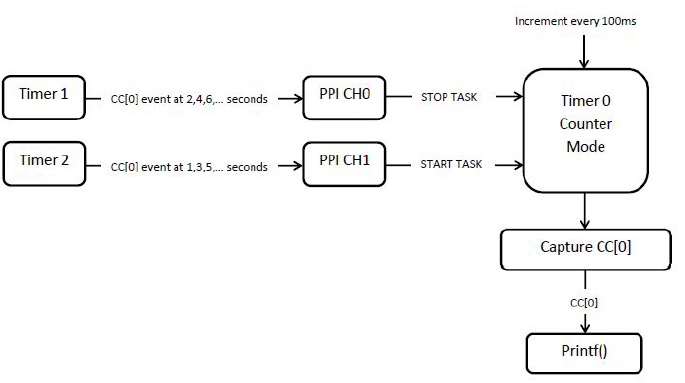
实验中,用到了3 个定时器:Timer 0、Timer 1 和Timer 2。
1) Timer 0 配置为计数器,在主循环中每100ms 被触发一次,并通过串口打印出计数值。
2) Timer 1 每个偶数秒(2、4、6、8……)产生一次比较匹配事件,该事件通过PPI通道0 和Timer 0 的STOP Task 互联,互联后通过该事件触发Timer 0 的STOP Task。
3) Timer 2 每个奇数秒(1、3、5、7……)产生一次比较匹配事件,该事件通过PPI通道1 和Timer 0 的START Task 互联,互联后通过该事件触发Timer 0 的START Task。
实验原理框图如图1 所示:
三、核心代码分析
系统运行后,在循环中Timer 0 计数器的计数值每100ms 增加一次,在偶数秒时,Timer2 产生比较匹配事件,通过PPI 触发Timer 0 的STOP Task,Timer 0 停止计数。此时,尽管主循环中每隔100ms 触发一次Timer 0 计数,但是由于Timer 0 已经停止,所以,计数值不会增加。每个奇数秒,Timer2 产生比较匹配事件,通过PPI 触发Timer 0 的START Task,Timer 0 恢复计数。
main函数部分:
 int main(void)

 {

     timer0_init(); // Timer used to blink the LEDs.

     timer1_init(); // Timer to generate events on even number of seconds.

     timer2_init(); // Timer to generate events on odd number of seconds.

     ppi_init();    // PPI to redirect the event to timer start/stop tasks.

       串口初始化(略)

     // Enabling constant latency as indicated by PAN 11 "HFCLK: Base current with HFCLK

     // running is too high" found at Product Anomaly document found at

     // https://www.nordicsemi.com/eng/Products/Bluetooth-R-low-energy/nRF51822/#Downloads

     //

     // @note This example does not go to low power mode therefore constant latency is not needed.

     //       However this setting will ensure correct behaviour when routing TIMER events through

     //       PPI (shown in this example) and low power mode simultaneously.

     NRF_POWER->TASKS_CONSTLAT = ;

     // Start clock.

     nrf_drv_timer_enable(&timer0);

     nrf_drv_timer_enable(&timer1);

     nrf_drv_timer_enable(&timer2);

     // Loop and increment the timer count value and capture value into LEDs. @note counter is only incremented between TASK_START and TASK_STOP.

     while (true)

     {

         printf("Current cout: %d\r\n", (int)nrf_drv_timer_capture(&timer0,NRF_TIMER_CC_CHANNEL0));

         /* increment the counter */

         nrf_drv_timer_increment(&timer0);

         nrf_delay_ms();

     }

 }
定时器初始化部分:
 // Timer even handler. Not used since timer is used only for PPI.

 void timer_event_handler(nrf_timer_event_t event_type, void * p_context){}

 /** @brief Function for Timer 0 initialization, which will be started and stopped by timer1 and timer2 using PPI.

 */

 static void timer0_init(void)

 {

     ret_code_t err_code = nrf_drv_timer_init(&timer0, NULL, timer_event_handler);

     APP_ERROR_CHECK(err_code);

 }

 /** @brief Function for Timer 1 initialization.

  *  @details Initializes Timer 1 peripheral, creates event and interrupt every 2 seconds,

  *           by configuring CC[0] to timer overflow value, we create events at even number of seconds

  *           for example, events are created at 2,4,6 ... seconds. This event can be used to stop Timer 0

  *           with Timer1->Event_Compare[0] triggering Timer 0 TASK_STOP through PPI.

 */

 static void timer1_init(void)

 {

     // Configure Timer 1 to overflow every 2 seconds. Check TIMER1 configuration for details

     // The overflow occurs every 0xFFFF/(SysClk/2^PRESCALER).

     // = 65535/31250 = 2.097 sec

     ret_code_t err_code = nrf_drv_timer_init(&timer1, NULL, timer_event_handler);

     APP_ERROR_CHECK(err_code);

     nrf_drv_timer_extended_compare(&timer1, NRF_TIMER_CC_CHANNEL0, 0xFFFFUL, NRF_TIMER_SHORT_COMPARE0_CLEAR_MASK, false);//比较模式,Timer 1 每个偶数秒(2、4、6、8……)产生一次比较匹配事件,该事件通过PPI通道0 和Timer 0 的STOP Task 互联,互联后通过该事件触发Timer 0 的STOP Task。

 }

 /** @brief Function for Timer 2 initialization.

  *  @details Initializes Timer 2 peripheral, creates event and interrupt every 2 seconds

  *           by configuring CC[0] to half of timer overflow value. Events are created at odd number of seconds.

  *           For example, events are created at 1,3,5,... seconds. This event can be used to start Timer 0

  *           with Timer2->Event_Compare[0] triggering Timer 0 TASK_START through PPI.

 */

 static void timer2_init(void)

 {

     // Generate interrupt/event when half of time before the timer overflows has past, that is at 1,3,5,7... seconds from start.

     // Check TIMER1 configuration for details

     // now the overflow occurs every 0xFFFF/(SysClk/2^PRESCALER)

     // = 65535/31250 = 2.097 sec */

     ret_code_t err_code = nrf_drv_timer_init(&timer2, NULL, timer_event_handler);

     APP_ERROR_CHECK(err_code);

     nrf_drv_timer_extended_compare(&timer2, NRF_TIMER_CC_CHANNEL0, 0x7FFFUL, NRF_TIMER_SHORT_COMPARE0_CLEAR_MASK, false);//Timer 2 每个奇数秒(1、3、5、7……)产生一次比较匹配事件,该事件通过PPI通道1 和Timer 0 的START Task 互联,互联后通过该事件触发Timer 0 的START Task。

 }
PPI连接事件部分:
 /** @brief Function for initializing the PPI peripheral.

 */

 static void ppi_init(void)

 {

     uint32_t err_code = NRF_SUCCESS;

     err_code = nrf_drv_ppi_init();

     APP_ERROR_CHECK(err_code);

     // Configure 1st available PPI channel to stop TIMER0 counter on TIMER1 COMPARE[0] match, which is every even number of seconds.

     err_code = nrf_drv_ppi_channel_alloc(&ppi_channel1);

     APP_ERROR_CHECK(err_code);

13     err_code = nrf_drv_ppi_channel_assign(ppi_channel1,//PPI连接事件

14                                           nrf_drv_timer_event_address_get(&timer1, NRF_TIMER_EVENT_COMPARE0),

15                                           nrf_drv_timer_task_address_get(&timer0, NRF_TIMER_TASK_STOP));

     APP_ERROR_CHECK(err_code);

     // Configure 2nd available PPI channel to start timer0 counter at TIMER2 COMPARE[0] match, which is every odd number of seconds.

     err_code = nrf_drv_ppi_channel_alloc(&ppi_channel2);

     APP_ERROR_CHECK(err_code);

21     err_code = nrf_drv_ppi_channel_assign(ppi_channel2,

22                                           nrf_drv_timer_event_address_get(&timer2, NRF_TIMER_EVENT_COMPARE0),

23                                           nrf_drv_timer_task_address_get(&timer0, NRF_TIMER_TASK_START));

     APP_ERROR_CHECK(err_code);

     // Enable both configured PPI channels

     err_code = nrf_drv_ppi_channel_enable(ppi_channel1);

     APP_ERROR_CHECK(err_code);

     err_code = nrf_drv_ppi_channel_enable(ppi_channel2);

     APP_ERROR_CHECK(err_code);

 }
@beautifulzzzz - 物联网&普适计算实践者
e-mail:beautifulzzzz@qq.com
i-blog:blog.beautifulzzzz.com
[nRF51822] 8、基础实验代码解析大全 · 实验11 - PPI的更多相关文章
- [nRF51822] 12、基础实验代码解析大全 · 实验19 - PWM
一.PWM概述: PWM(Pulse Width Modulation):脉冲宽度调制技术,通过对一系列脉冲的宽度进行调制,来等效地获得所需要波形. PWM 的几个基本概念: 1) 占空比:占空比是指 ...
- [nRF51822] 11、基础实验代码解析大全 · 实验16 - 内部FLASH读写
一.实验内容: 通过串口发送单个字符到NRF51822,NRF51822 接收到字符后将其写入到FLASH 的最后一页,之后将其读出并通过串口打印出数据. 二.nRF51822芯片内部flash知识 ...
- [nRF51822] 10、基础实验代码解析大全 · 实验15 - RTC
一.实验内容: 配置NRF51822 的RTC0 的TICK 频率为8Hz,COMPARE0 匹配事件触发周期为3 秒,并使能了TICK 和COMPARE0 中断. TICK 中断中驱动指示灯D1 翻 ...
- [nRF51822] 9、基础实验代码解析大全 · 实验12 - ADC
一.本实验ADC 配置 分辨率:10 位. 输入通道:5,即使用输入通道AIN5 检测电位器的电压. ADC 基准电压:1.2V. 二.NRF51822 ADC 管脚分布 NRF51822 的ADC ...
- [nRF51822] 7、基础实验代码解析大全(前十)
实验01 - GPIO输出控制LED 引脚输出配置:nrf_gpio_cfg_output(LED_1); 引脚输出置高:nrf_gpio_pin_set(LED_1); 引脚电平转换:nrf_gpi ...
- 基础Gan代码解析
initializer总结: #f.constant_initializer(value) 将变量初始化为给定的常量,初始化一切所提供的值. #tf.random_normal_initializer ...
- MYSQL常见出错mysql_errno()代码解析
如题,今天遇到怎么一个问题, 在理论上代码是不会有问题的,但是还是报了如上的错误,把sql打印出來放到DB中却可以正常执行.真是郁闷,在百度里面 渡 了很久没有相关的解释,到时找到几个没有人回复的 & ...
- 【原创】大数据基础之Spark(5)Shuffle实现原理及代码解析
一 简介 Shuffle,简而言之,就是对数据进行重新分区,其中会涉及大量的网络io和磁盘io,为什么需要shuffle,以词频统计reduceByKey过程为例, serverA:partition ...
- 【原创】大数据基础之Spark(4)RDD原理及代码解析
一 简介 spark核心是RDD,官方文档地址:https://spark.apache.org/docs/latest/rdd-programming-guide.html#resilient-di ...
随机推荐
- strtok源码 bitset 空间压缩
源代码里有一段: unsigned char map[32]; /* Clear control map */ for (count = 0; count < 32; count++) map[ ...
- UWP Jenkins + NuGet + MSBuild 手把手教你做自动UWP Build 和 App store包
背景 项目上需要做UWP的自动安装包,在以前的公司接触的是TFS来做自动build. 公司要求用Jenkins来做,别笑话我,之前还真不晓得这个东西. 会的同学请看一下指出错误,不会的同学请先自行脑补 ...
- CGI与fastcgi与php-fpm与php-cgi的关系
cgi是一个协议,它规定了服务器Nginx会将那些数据传送给PHP-cgi fastcgi也可以说是一个协议.fastcgi是对cgi的性能的一次提高.fastcgi会先启动一个master,解析配置 ...
- Python 格式化输出
转载 今天写程序又记不清格式化输出细节了--= =索性整理一下. 注意: 与C/C++ 不同的是这里括号后面不需要加' , '号. python print格式化输出. 1. 打印字符串 print ...
- 电脑只有网页打不开,QQ和其他软件都能用
应该就是浏览器设置代理服务器的问题 1.打开浏览器->找到工具->internet选项->链接->局域网设置 将代理服务器下面勾去掉
- VS自定义项目模板:[2]创建VSIX项目模板扩展
VS自定义项目模板:[2]创建VSIX项目模板扩展 听语音 | 浏览:1237 | 更新:2015-01-02 09:21 | 标签:软件开发 1 2 3 4 5 6 7 分步阅读 一键约师傅 百度师 ...
- Codeforces Round #388 (Div. 2) - B
题目链接:http://codeforces.com/contest/749/problem/B 题意:给定平行四边形的3个点,输出所有可能的第四个点. 思路:枚举任意两个点形成的直线,然后利用这两个 ...
- BZOJ1129 : [POI2008]Per
枚举LCP,假设前$i-1$个都相同.那么后面$n-i$个数可以随意排列,第$i$个位置可以填的方案数为后面小于$a_i$的数字个数,树状数组维护. 同时为了保证本质不同,方案数需要除以每个数字的个数 ...
- python基础04 运算
数学运算 print 2+2 #加法 print 1.3-4 #剪法 print 3*5 #乘法 print 4.5/1.5 #除法 print 3**2 #乘方 print 10%3 #求 ...
- BZOJ4262: Sum
Description Input 第一行一个数 t,表示询问组数. 第一行一个数 t,表示询问组数. 接下来 t 行,每行四个数 l_1, r_1, l_2, r_2. Output 一共 ...