
git commit 含有中文的代码,提示Warnning:Your console font probably doesn't support Unicode.......
git 提交代码是会遇到以下问题,
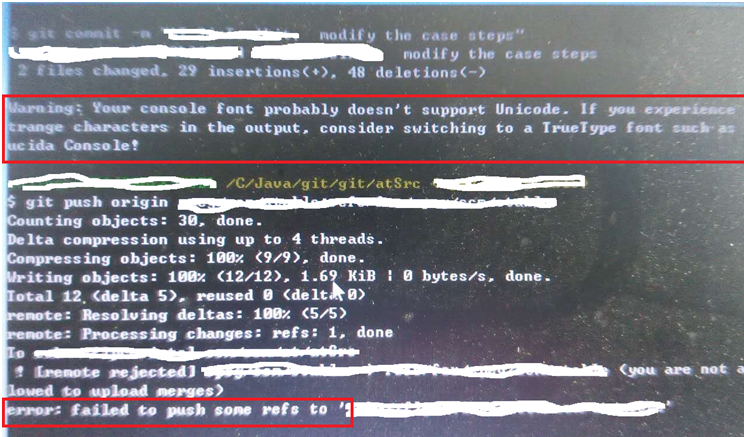
git commit 代码时提示: Warning: Your console font probably doesn't support Unicode. If you experience trange characters in the output, consider switching to a TrueType font such as ucida Console!
这是代码中含有中文导致的,且把代码改为utf-8也是解决不了的,查询了很多资料,最后终于解决啦,现分享给大家:
依次执行以下命令:
git config [--global] core.quotepath off
git config [--global] --unset i18n.logoutputencoding
git config [--global] --unset i18n.commitencoding
再次git commit和git push应该就不会弹出这个note了。
如果还有哪里不清楚的,可以查看github官网上边的解决办法:
https://github.com/msysgit/msysgit/wiki/Git-for-Windows-Unicode-Support
git commit 含有中文的代码,提示Warnning:Your console font probably doesn't support Unicode.......的更多相关文章
- git commit 代码时提示: Warning: Your console font probably doesn‘t support Unicode.
git 提交代码是会遇到以下问题, git commit 代码时提示: Warning: Your console font probably doesn‘t support Unicode. If ...
- git commit -m "XX"报错 pre -commit hook failed (add --no-verify to bypass)问题
在同步本地文件到线上仓库的时候 报错 pre -commit hook failed (add --no-verify to bypass) 当你在终端输入git commit -m "xx ...
- 代码管理工具:使用github和git工具管理自己的代码
一.git工具和账户创建 1.1 安装 Git 是 Linus Torvalds 最近实现的源代码管理软件."Git 是一个快速.可扩展的分布式版本控制系统,它具有极为丰富的命令集,对内部系 ...
- git commit 之后,撤销commit操作
撤销.修改commit 写代码过程中,如果已经git add [files] git -m commit [files],没有push代码到远程仓库,想撤销commit,可以根据实际情况,使用以下参数 ...
- Git利用命令行提交代码步骤
利用命令行提交代码步骤进入你的项目目录1:拉取服务器代码,避免覆盖他人代码git pull2:查看当前项目中有哪些文件被修改过git status具体状态如下:1:Untracked: 未跟踪,一般为 ...
- 项目git commit时卡主不良代码:husky让Git检查代码规范化工作
看完 <前端规范之Git工作流规范(Husky + Commitlint + Lint-staged) https://www.cnblogs.com/Yellow-ice/p/15349873 ...
- git commit进行代码检查
使用Ant Design Pro提交代码的时候进行代码检查报了很多错 git commit --no-verify -m "commit" 就可以跳过代码检查 或者在项目里新建 ...
- git commit报错解决,绕过代码检查
上一个项目用的svn,新项目用了git,很开心,终于学习了git了,本以为把git都学会了,但是还是遇到了一个不在自己学习的知识点范围内的问题,最后是同事帮忙解决的. 问题:第一次代码commit的时 ...
- Git操作: git commit代码后,如何撤回且保留commit的代码
git commit代码后,但是没有push之前,如果发现提交的代码有一个部分是有问题的,或者commit message写的太随便了想改一下,以下命令会帮到你 git reset HEAD^ 敲击该 ...
随机推荐
- PHP 字符 正则表达式 +,*,?
1.“/”是定界符,“/”定界符之间的部分就是将要在目标对象中进行匹配的模式.同时为了正则更加灵活,引入了元字符,即“+”, “*”,以及 “?”. (1)“+”元字符规定其前导字符必须在目标对象中连 ...
- JAVA常用知识总结(十一)——数据库(一)
项目中用到的不常见sql语法 1:空值不在前的排序 select a.* from WZX_SCZY A order by SCZY_START_TIME desc nulls last (不加nul ...
- [android][windows][使用HAXM加速模拟器][不使用SDK manager]
网上找到了来使用HAXM,可惜我在sdk manager上下载不了,也使用过勾上[fetching...]那个选项,依然无效. 所以自己手动下载来安装和使用. 具体的教程可以参考http://blog ...
- TruncateTable数据库清理
原文引用 https://www.cnblogs.com/liangxiaoking/p/5958456.html 本地链接下载 https://files.cnblogs.com/files/she ...
- centos 7下Hadoop 2.7.2 伪分布式安装
centos 7 下Hadoop 2.7.2 伪分布式安装,安装jdk,免密匙登录,配置mapreduce,配置YARN.详细步骤如下: 1.0 安装JDK 1.1 查看是否安装了openjdk [l ...
- PHP识别二维码功能,php-zbarcode 安装
php-zbarcode是PHP识别二维码的扩展. 下面是安装方法,安装前要先安装ImageMagick.zbar. php-zbarcode 下载地址 安装ImageMagick: yum inst ...
- 洛谷 P2347 砝码称重 != codevs 2144
题目描述 设有1g.2g.3g.5g.10g.20g的砝码各若干枚(其总重<=1000), 输入输出格式 输入格式: 输入方式:a1 a2 a3 a4 a5 a6 (表示1g砝码有a1个,2g砝 ...
- (十)mybatis之配置(mybatis-config.xml)
配置 可以从前篇的文章中知道(https://www.cnblogs.com/NYfor2018/p/9093472.html ),要使用mybatis需要以下配置: 1. mybatis-con ...
- block总结我的
1) struct Block_descriptor { unsigned long int reserved; unsigned long int size; void (*copy)(void * ...
- ftpaccess - ftpd的配置档
描述 DESCRIPTION 这个ftpaccess档案是用来配置下述功能的运作 存取功能(AccessCapabilities) autogroup<群组名称><类别>[&l ...