
Grunt学习笔记【8】---- grunt-angular-templates插件详解
本文主要讲如何用Grunt打包AngularJS的模板HTML。
一 说明
AngularJS中使用单独HTML模板文件的地方非常多,例如:自定义指令、ng-include、templateUrl等。通常这些文件都是独立的html文件,AngularJS中使用这些文件都是通过文件路径地址引用的。
当用Grunt打包压缩整个项目时,如何处理这些html模板文件呢?本文讲的grunt-angular-templates插件可以解决该问题。
grunt-angular-templates插件的基本原理:
该插件实际使用的是AngularJS的$templateCache服务,将这些模板文件都缓存起来,当自定义指令、ng-include等需要对应的html文件时,AngularJS首先会去$templateCache中找对应的文件,如果找到了就不在发送XHR请求。
使用$templateCache缓存模板可以减少XHR请求数,并实现html文件打包。
同时,在AngularJS内部,第一次请求到模板HTML后,都会被缓存到 $templateCache 服务中,这样就确保一个文件只被请求一次。
下边是使用$templateCache缓存html模板的方法:
 angular.module('app').run(["$templateCache", function($templateCache) {

   $templateCache.put("home.html",

     // contents for home.html ...

   );

   ...

   $templateCache.put("src/app/templates/button.html",

     // contents for button.html

   );

 }]);
二 安装
$ npm install grunt-angular-templates --save-dev
三 加载任务
grunt.loadNpmTasks('grunt-angular-templates');
四 配置
这里主要讲作者用到的几个常用配置:
4.1 src
要打包的模板文件路径。例如:'src/**/*.html'。
4.2 dest
输出打包好的文件地址。例如:'dist/tmp.js'。
4.3 options
各种设置都在options中,常用的有下边几个:
1)htmlmin
最小化html大小。设置了该项会去掉html的空格和换行等,可以减少压缩后文件大小。
官网推荐的设置如下:
 htmlmin :{

   collapseBooleanAttributes :true ,

   collapseWhitespace :是的,

   removeAttributeQuotes :true ,

   removeComments :true ,//  仅当您不使用comment指令时!

   removeEmptyAttributes :true ,

   removeRedundantAttributes :true ,

   removeScriptTypeAttributes :true ,

   removeStyleLinkTypeAttributes :true

 }
2)standalone
设置是否创建新的AngularJS模块,还是使用一个现有的AngularJS模块。
设置为true时,将创建一个新的AngularJS模块,类似angular.module('app', []);
设置为false时,将使用已有的模块,类似angular.module('app')。
说明:该模块用于提供$templateCache进行模板缓存;模块名来自于下边的module属性。
3)module
设置创建的Angular模块名字,默认值为target,即Grunt配置项中ngtemplates的下一级属性名。
注意:
module和上边的standalone接口配合起来使用,如果是新创建的模块,必须在AngularJS启动模块中将该模块依赖进来,否则会导致找不到模板报错;如果是使用已有模块,就必须确保在加载打包后的html模板js之前已经定义了对应的模块,否则也会报错。
4)prefix
将模块存入到$templateCache时,对key添加的前缀。
注意1:如果设置了该属性,就要确保自定义指令、ng-include等中设置的模板地址也带有该前缀。
注意2:最终存入的存入到$templateCache的key是prefix+src后的结果,这里的src就是上边接口。
5)bootstrap(module, script)
该回调函数用于自定义模板缓存创建。
如果不定义该函数,插件会自己创建或者获取AngularJS模块,并通过run方法将所有html模板缓存到$templateCache中。
如果定义了该函数,则必须自己实现模板缓存到$templateCache,并将对应的js代码返回。最终会将返回的结果合并到输出文件中。
使用场景:将模板注册成AMD或者commonJS模块。例如:在requireJS构建的项目中。
参数说明:
module:AngularJS模块。
script:$templateCache.put()方法调用的js代码,如下:
   $templateCache.put('/aa/src/button.html',

     "<button type=button>{{text}}</button>"

   );
五 实战
下边是一个实例项目:
5.1 整体项目目录如下:
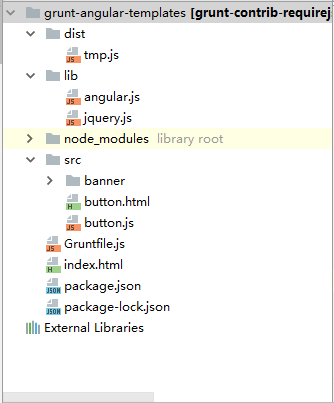
5.2 grunt配置文件如下:
 module.exports = function(grunt) {

     grunt.initConfig({

         // 清理空文件夹

         clean: {

             foo1: {

                 src: ['dist/*']

             }

         },

         ngtemplates: { // 将angular中html模板通过$templateCache进行合并

             'angular-my-directives': {

                 options: {

                     htmlmin: {

                         collapseBooleanAttributes: true,

                         collapseWhitespace: true,

                         removeAttributeQuotes: true,

                         removeComments: true, // Only if you don't use comment directives!

                         removeEmptyAttributes: true,

                         removeRedundantAttributes: true,

                         removeScriptTypeAttributes: true,

                         removeStyleLinkTypeAttributes: true

                     },

                     standalone: true, // 是否创建新的Angular模块

                     module: 'temp', // 设置创建的Angular模块名字,默认值为target,即'angular-my-directives'

                     // bootstrap: function (module, script) {

                     //     console.log(script);

                     //     return script;

                     // },

                     prefix: '/aa/'

                 },

                 src: 'src/**/*.html', // where my view files are

                 dest: 'dist/tmp.js' // single file of $templateCache

             }

         },

     });

     grunt.loadNpmTasks('grunt-angular-templates');

     grunt.loadNpmTasks('grunt-contrib-clean');

     // 默认被执行的任务列表。

     grunt.registerTask('default', [

         'clean',

         'ngtemplates'

     ]);

 };
5.3 button.html和banner.html是两个html模板,其中button.html是button.js中定义的mybutton指令的模板:
button.html代码如下:
<button type="button">{{text}}</button>
button.js代码如下:
 var component = angular.module("component", []);

 component.directive('myButton', myButton);

 myButton.$inject = [];

 function myButton() {

     return {

         restrict: 'E',

         priority: 999,

         scope: {

             text: '=',

         },

         templateUrl: '/aa/src/button.html',

         replace: true,

         link: function (scope, $element) {

         }

     };

 }
banner.html代码如下:
<div style="width: 100%;background-color:blue;height: 70px">This is banner!</div>
5.4 执行grunt命令后,压缩好的tmp.js文件如下:
 angular.module('temp', []).run(['$templateCache', function($templateCache) {

   'use strict';

   $templateCache.put('/aa/src/banner/banner.html',

     "<div style=\"width: 100%;background-color:blue;height: 70px\">This is banner!</div>"

   );

   $templateCache.put('/aa/src/button.html',

     "<button type=button>{{text}}</button>"

   );

 }]);
5.5 测试用例index.html代码如下:
 <!doctype html>

 <html>

 <head>

     <meta charset="utf-8"/>

     <title>测试</title>

 </head>

 <body>

 <div  ng-controller="DemoCtrl">

     <div ng-include="bannerTemplate"></div>

     <my-button text="buttonText"></my-button>

 </div>

 <!-- Load scripts. -->

 <script type="text/javascript" src="./lib/jquery.js"></script>

 <script type="text/javascript" src="./lib/angular.js"></script>

 <script type="text/javascript" src="./dist/tmp.js"></script>

 <script type="text/javascript" src="./src/button.js"></script>

 <script type="text/javascript">

     var app = angular.module("test", ["component", "temp"]);

     app.controller('DemoCtrl', function ($scope) {

         $scope.bannerTemplate = '/aa/src/banner/banner.html';

         $scope.buttonText = '确认';

     });

     angular.bootstrap($("html"), ["test"]);

 </script>

 </body>

 </html>
六 源码下载地址
https://gitee.com/bangbangwa/grunt/blob/master/grunt-angular-templates-test.rar
参考资料&内容来源
grunt官网:https://www.npmjs.com/package/grunt-angular-templates
博客园:https://www.cnblogs.com/ms-grf/p/6874256.html
Grunt学习笔记【8】---- grunt-angular-templates插件详解的更多相关文章
- Grunt学习笔记【6】---- grunt-contrib-requirejs插件详解
本文主要讲如何使用Grunt实现RequireJS文件压缩. 一 说明 ES6出来前,RequireJS是JavaScript模块化最常用的方式之一.对于使用RequireJS构建的项目,要实现打包压 ...
- Grunt学习笔记【7】---- grunt-contrib-less插件详解
本文主要讲如何使用Grunt实现less文件压缩. 一 说明 less是非常常用的样式框架之一,Grunt也提供了可以编译和打包less样式文件的插件:grunt-contrib-less. 实现原理 ...
- Linux防火墙iptables学习笔记(三)iptables命令详解和举例[转载]
Linux防火墙iptables学习笔记(三)iptables命令详解和举例 2008-10-16 23:45:46 转载 网上看到这个配置讲解得还比较易懂,就转过来了,大家一起看下,希望对您工作能 ...
- (转)live555学习笔记10-h264 RTP传输详解(2)
参考: 1,live555学习笔记10-h264 RTP传输详解(2) http://blog.csdn.net/niu_gao/article/details/6936108 2,H264 sps ...
- SNMP学习笔记之SNMP 原理与实战详解
原文地址:http://freeloda.blog.51cto.com/2033581/1306743 原创作品,允许转载,转载时请务必以超链接形式标明文章 原始出处 .作者信息和本声明.否则将追究法 ...
- Django学习笔记之Django Form表单详解
知识预览 构建一个表单 在Django 中构建一个表单 Django Form 类详解 使用表单模板 回到顶部 构建一个表单 假设你想在你的网站上创建一个简单的表单,以获得用户的名字.你需要类似这样的 ...
- JQuery学习笔记系列(一)----选择器详解
笔者好长时间没有更新过博客园的笔记了,一部分原因是去年刚刚开始工作一段时间忙碌的加班,体会了一种每天加班到凌晨的充实感,之后闲暇时间了也因为自己懒惰没有坚持记笔记的习惯,现在重新拾起来. 借用古人的一 ...
- SharpDevelop学习笔记(5)—— AddIns系统详解
在所有的插件被加载到指定的扩展点后,插件树就被创建完毕了, 但是,我们知道,插件树创建后,每个插件在插件树的位置在就固定的,但是,如果某些情况下,我们希望一些插件不可使用或应该隐藏起来, 或者说有的插 ...
- Hibernate学习笔记二:Hibernate缓存策略详解
一:为什么使用Hibernate缓存: Hibernate是一个持久层框架,经常访问物理数据库. 为了降低应用程序访问物理数据库的频次,从而提高应用程序的性能. 缓存内的数据是对物理数据源的复制,应用 ...
随机推荐
- 10.1综合强化刷题 Day1 afternoon
一道图论好题(graph) Time Limit:1000ms Memory Limit:128MB 题目描述 LYK有一张无向图G={V,E},这张无向图有n个点m条边组成.并且这是一张带权图, ...
- 洛谷——P1713 麦当劳叔叔的难题
P1713 麦当劳叔叔的难题 题目描述 话说我们铭铭小朋友成功的回答了爸爸的问题,自然少不了要去索要些奖励,抠门的爸爸一看报纸,嘿,门口的麦当劳在搞活动,还有免费午餐哦,不过前提条件:得正确回答麦当劳 ...
- Light oj 1125 - Divisible Group Sums (dp)
题目链接:http://www.lightoj.com/volume_showproblem.php?problem=1125 题意: 给你n个数,q次询问,每次询问问你取其中m个数是d的整数倍的方案 ...
- Java NIO.2 Files类的常用方法
Files类是一个工具类,提供了大量的静态方法来操作文件.文件夹. Files类常用方法: long size(Path path) //返回文件大小 boolean isDirectory ...
- 【转】浅谈多核CPU、多线程、多进程
浅谈多核CPU.多线程.多进程 1.CPU发展趋势 核心数目依旧会越来越多,依据摩尔定律,由于单个核心性能提升有着严重的瓶颈问题,普通的桌面PC有望在2017年末2018年初达到24核心(或者16核3 ...
- ios与js交互获取webview元素和赋值
使用webview的stringByEvaluatingJavaScriptFromString的方法交互,直接提供实例. 下载:http://download.csdn.net/detail/hey ...
- iOS应用崩溃日志揭秘2
这篇文章还可以在这里找到 英语 场景 4: 吃棒棒糖时闪退! 用户邮件说, “当rage master吃棒棒糖时应用就闪退…” 另一用户说, “我让rage master 吃棒棒糖,没几次应用就闪退了 ...
- 【hash】什么是hash,什么是哈希,什么是hash散列,什么是hash一致性算法【关于hash的详解】
什么是hash,什么是哈希,什么是hash散列,什么是hash一致性算法
- numpy基础语法
np.zeros(5) [ 0. 0. 0. 0. 0.] 所得类型为数组, numpy.zeros_like(a, dtype=None, order='K', subok=True) 生成 ...
- DailyMasalaCMS升级记录
手头上是一个比较老的工程,Jdk1.7 + Tomcat7.0 + Spring 3.x + Hibernate 3.x + Elasticseach 2.x 最近Elasticsearch升级,ja ...