
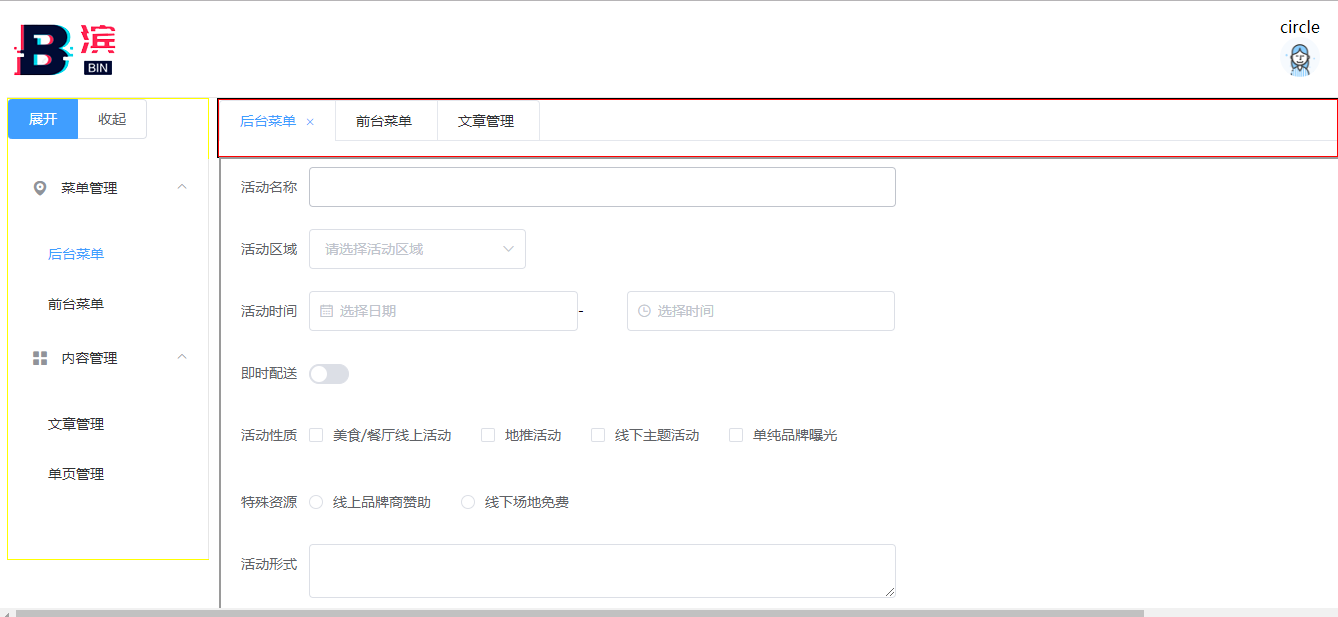
巨丑vue
<template>

 <div>

   <div class="demo-type" align="right" style="height: 78px">

     <div style="float:left;margin-top: 10px">

       <img src="../../static/img/logo.png"></img>

     </div>

     <div style="float:right;margin-right: 20px;margin-top: 7px;">

       <el-col :span="1">

         <div class="sub-title">circle</div>

         <div class="demo-basic--circle">

             <el-avatar  :src="circleUrl"></el-avatar>

         </div>

       </el-col>

     </div>

   </div>

   <el-menu style="height: 10px" mode="horizontal">

   </el-menu>

   <div class="line"></div>

   <div style="width: 200px;float: left;border: 1px solid yellow">

     <el-radio-group v-model="isCollapse" style="margin-bottom: 20px;">

       <el-radio-button :label="false">展开</el-radio-button>

       <el-radio-button :label="true">收起</el-radio-button>

     </el-radio-group>

     <el-menu default-active="1-4-1" class="el-menu-vertical-demo" @open="handleOpen" @close="handleClose" :collapse="isCollapse">

       <el-submenu index="1">

         <template slot="title">

           <i class="el-icon-location"></i>

           <span slot="title">菜单管理</span>

         </template>

         <el-menu-item-group>

           <el-menu-item index="1-1" @click="addTab(editableTabsValue,'后台菜单','http://localhost:8080/#/test',1)">后台菜单</el-menu-item>

           <el-menu-item index="1-2" @click="addTab(editableTabsValue,'前台菜单','http://localhost:8080/#/test2',2)">前台菜单</el-menu-item>

         </el-menu-item-group>

       </el-submenu>

       <el-submenu index="2">

         <template slot="title">

           <i class="el-icon-menu"></i>

           <span slot="title">内容管理</span>

         </template>

         <el-menu-item-group>

           <el-menu-item index="2-1" @click="addTab(editableTabsValue,'文章管理','http://localhost:8080/#/test4',3)">文章管理</el-menu-item>

           <el-menu-item index="2-2" @click="addTab(editableTabsValue,'单页管理','http://localhost:8080/#/test3',4)">单页管理</el-menu-item>

         </el-menu-item-group>

       </el-submenu>

       <!--<el-menu-item index="2">

         <i class="el-icon-menu"></i>

         <span slot="title">内容管理</span>

       </el-menu-item>

       <el-menu-item index="3" disabled>

         <i class="el-icon-document"></i>

         <span slot="title">导航三</span>

       </el-menu-item>

       <el-menu-item index="4">

         <i class="el-icon-setting"></i>

         <span slot="title">导航四</span>

       </el-menu-item>-->

     </el-menu>

   </div>

   <div style="margin-left:210px;width:84%;height: 100%;border: 1px solid black" align="center">

     <div style="border: 1px solid #F00">

       <el-tabs v-model="editableTabsValue" @tab-click="clickTab(editableTabsValue)" type="card" closable @tab-remove="removeTab">

         <el-tab-pane

           v-for="(item, index) in editableTabs"

           :key="item.name"

           :label="item.title"

           :name="item.name"

         >

         </el-tab-pane>

       </el-tabs>

     </div>

     <div style="">

      <iframe  :src="src" id="mobsf"  frameborder="1" style="position:absolute;left: 220px;width: 100%;height: 100%"></iframe>

     </div>

   </div>

 </div>

</template>

<script>

export default {

  data() {

    return {

      activeIndex: '1',

      activeIndex2: '1',

      circleUrl: "https://cube.elemecdn.com/0/88/03b0d39583f48206768a7534e55bcpng.png",

      isCollapse: true,

      editableTabsValue: '0',//标签数量

      editableTabs: [],//标签集合

      tabIndex: 0,

      form: {

        name: '',

        region: '',

        date1: '',

        date2: '',

        delivery: false,

        type: [],

        resource: '',

        desc: ''

      },

      src:''

    };

  },

  mounted:function(){

    },

  methods: {

    //添加标签

    addTab(targetName,title,src,count) {

      for (var i=0;i<this.editableTabs.length;i++){

          if(this.editableTabs[i].title==title){

            this.editableTabsValue=count+"";

            //alert(" tabIndex: "+this.tabIndex);

            this.src=src;

            return;

          }

      }

      let newTabName = count + '';

    //  alert("newTabName: "+newTabName+" tabIndex: "+this.tabIndex);

      //alert(this.tabIndex);

      this.editableTabs.push({

        title: title,

        name: newTabName,

        src:src

      });

      this.src=src;

      this.editableTabsValue = newTabName;

    },

    //删除标签

    removeTab(targetName) {

      //alert(1);

      let tabs = this.editableTabs;

      let activeName = this.editableTabsValue;

      if (activeName === targetName) {

        tabs.forEach((tab, index) => {

          if (tab.name === targetName) {

            let nextTab = tabs[index + 1] || tabs[index - 1];

            if (nextTab) {

              activeName = nextTab.name;

            }

          }

        });

      }

      this.editableTabsValue = activeName;

      this.editableTabs = tabs.filter(tab => tab.name !== targetName);

    },

    clickTab:function (editableTabsValue) {

     // alert(editableTabsValue);

      this.src=this.editableTabs[editableTabsValue-1].src;

    }

  }

}

</script>

<!-- Add "scoped" attribute to limit CSS to this component only -->

<style scoped>

  .el-menu-vertical-demo:not(.el-menu--collapse) {

    width: 200px;

    min-height: 400px;

  }

  body{margin:0; padding:0;height: 100%;width: 100%;}

</style>

巨丑vue的更多相关文章
- 去除IE10+上文本框巨丑无比的删除图标以及显示密码图标
去除IE10+上文本框巨丑无比的删除图标以及显示密码图标 IE浏览器总是让人喜欢让人厌,在最新的IE浏览器(IE10+)上使用表单时,文本框内后面会出现很巨丑无比的“删除图标”以及“显示密码图标”,如 ...
- 牢骚 - 你代码写得丑,又不肯用好一点的IDE,这让我很为难啊。
又有人问我代码错误,发过来就是一篇巨丑无比的代码,先不说左大括号转行还和代码写在同一行的谭浩强风格,你这狗啃的一样的缩进是闹哪样!粘进VS2015里面,自动格式化,瞬间赏心悦目,编译错误出了5行,我直 ...
- vue-router的hash模式与history模式的对比
Vue-router 中hash模式和history模式的关系在vue的路由配置中有mode选项 最直观的区别就是在url中 hash 带了一个很丑的 # 而history是没有#的mode:&quo ...
- Vue-router 中hash模式和history模式的区别
实际上存在三种模式: Hash: 使用URL的hash值来作为路由.支持所有浏览器. History: 以来HTML5 History API 和服务器配置.参考官网中HTML5 History模式 ...
- H5坦克大战之【画出坦克】
今天是个特殊的日子,圣诞节,也是周末,在这里先祝大家圣诞快乐!喜庆的日子,我们可以稍微放松一下,扯一扯昨天雷霆对战凯尔特人的比赛,这场比赛大威少又双叒叕拿下三双,而且是一个45+11+11的超级三双, ...
- 东哥读书小记 之 《MacTalk人生元编程》
一直以来的自我感觉:自己是个记性偏弱的人.反正从小读书就喜欢做笔记(可自己的字写得巨丑无比,尼玛不科学呀),抄书这事儿真的就常发生俺的身上. 因为那时经常要背诵课文之类,反正为了怕自己忘记, ...
- 综合实战--文件上传系统【JDBC&IO&Socket】
本文纯属记录第一次实战遇到的坑和知识,如果后边有时间再做整理. 1,先写了个操作数据库的工具类SqlTool,照着JDBC资料打完之后,测试的时候出错了,java.lang.ClassNotFound ...
- 李洪强iOS经典面试题140-UI
李洪强iOS经典面试题140-UI UI viewcontroller的一些方法的说明viewDidLoad,viewWillDisappear, viewWillAppear方法的 顺序和作用? ...
- second class
nothing no very good. 1.look at shuruo.html,after display:inline-block; li's width as the content; S ...
随机推荐
- C# Extension Methods(C#类方法扩展)
使用Extension methods 可以在已有的类型(types)中添加方法(Methods),而无需通过增加一种新的类型或修改已有的类型. 比如说,想要给string类型增加一个PrintStr ...
- gzip: stdin: not in gzip format 解决办法
# sudo tar zxvf ./jdk-7ull-linux-i586.tar.gz -C /usr/lib/jvm gzip: stdin: not in gzip format tar: Ch ...
- oc和swift对代码的分组,方便代码查找和导航用
OC中对代码的分组: 在OC中对代码分组的命令是#pragma mark 来实现的, 分组用的是: #pragma mark 分组名 添加分割线: #pragma mark - 如果想添加分割线的同时 ...
- script标签所应放的位置
一般放置的位置:<head>标签内,<body>标签内,<body>标签后(建议放在body标签后,利于页面的优化,优化页面结构加载的速度) 1.<head& ...
- java集合之hashMap,初始长度,高并发死锁,java8 hashMap做的性能提升
众所周知,HashMap是一个用于存储Key-Value键值对的集合,每一个键值对也叫做Entry.这些个键值对(Entry)分散存储在一个数组当中,这个数组就是HashMap的主干. HashMap ...
- win10 增加一个新磁盘
1.右键我的电脑,选择管理 可以看到C盘的空间相比较大,拿出来250G的空间做成E盘 2.选择OS(C:),右键,压缩卷,请稍后,点击压缩 3.此刻会看到,有一块黑色区域就是新建的未分配空间,这时我们 ...
- C# TabControl 带删除
using System; using System.Collections.Generic; using System.ComponentModel; using System.Diagnostic ...
- Hadoop_31_MapReduce参数优化
1.资源相关参数 (1) mapreduce.map.memory.mb: 一个Map Task可使用的资源上限(单位:MB),默认为1024.如果Map Task实际使用 的资源量超过该值,则会被强 ...
- Hadoop_29_MapReduce_计数器应用
在实际生产代码中,常常需要将数据处理过程中遇到的不合规数据行进行全局计数,类似这种需求可以借助mapreduce框架中 提供的全局计数器来实现 示例代码如下: public class MultiOu ...
- 13_Redis_持久化
一:概述: Redis的高性能是山于其将所有数据都存储在了内存中,为了使Redis在重启之后仍能保证数据不丢失,需要将数据从内存中同步到硬盘中,这一过程就是持久化. Redis支持两种方式的持久化,一 ...