
java实现二维码的生成与解析
简单介绍下二维码:二维码其实就是一种编码技术,只是这种编码技术是用在图片上了,将给定的一些文字,数字转换为一张经过特定编码的图片,而解析二维码则相反,就是将一张经过编码的图片解析为数字或者文字。
当然了,这种编码的低层实现并不是那么的简单,都是那些顶级研发人员做的事,我们只需要简单了解并知道怎么使用就可以了。
那么肯定是要导入jar包依赖的吧,那不用说,是要导包的,我用的是谷歌提供的一个com.google.zxing.core版本是3.3.0的。
下面我们直接创建一个maven项目,用maven管理jar包很方便,而且我们需要的jar包基本都可以从官网下载进行依赖的添加。
创建好maven项目后,在项目的pom.xml中添加依赖:
<dependency>

    <groupId>com.google.zxing</groupId>

    <artifactId>core</artifactId>

    <version>3.3.</version>

</dependency>
上面这段依赖可以直接到maven的官网进行copy,在maven依赖查询官网直接搜索zxing,我用的是3.3.0的版本。
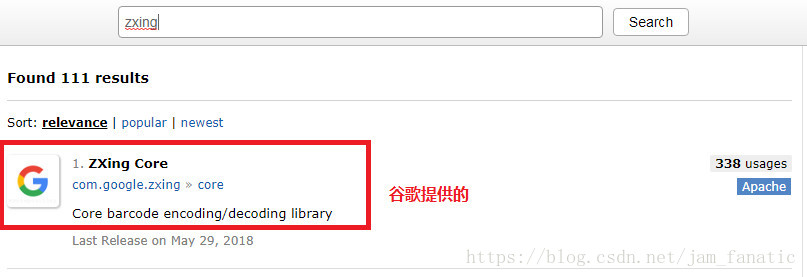
相信大家对maven也已经比较熟悉了,具体大家可参考我的文章里面的《maven入门笔记》
jar包依赖添加完后,我们直接上代码:
第一个类:
package com.yc.qrcode;

import java.awt.Graphics2D;

import java.awt.geom.AffineTransform;

import java.awt.image.BufferedImage;

import com.google.zxing.LuminanceSource;

public class BufferedImageLuminanceSource extends LuminanceSource {

    private final BufferedImage image;

    private final int left;

    private final int top;

    public BufferedImageLuminanceSource(BufferedImage image) {

        this(image, 0, 0, image.getWidth(), image.getHeight());

    }

    public BufferedImageLuminanceSource(BufferedImage image, int left, int top, int width, int height) {

        super(width, height);

        int sourceWidth = image.getWidth();

        int sourceHeight = image.getHeight();

        if (left + width > sourceWidth || top + height > sourceHeight) {

            throw new IllegalArgumentException("Crop rectangle does not fit within image data.");

        }

        for (int y = top; y < top + height; y++) {

            for (int x = left; x < left + width; x++) {

                if ((image.getRGB(x, y) & 0xFF000000) == 0) {

                    image.setRGB(x, y, 0xFFFFFFFF); // = white

                }

            }

        }

        this.image = new BufferedImage(sourceWidth, sourceHeight, BufferedImage.TYPE_BYTE_GRAY);

        this.image.getGraphics().drawImage(image, 0, 0, null);

        this.left = left;

        this.top = top;

    }

    public byte[] getRow(int y, byte[] row) {

        if (y < 0 || y >= getHeight()) {

            throw new IllegalArgumentException("Requested row is outside the image: " + y);

        }

        int width = getWidth();

        if (row == null || row.length < width) {

            row = new byte[width];

        }

        image.getRaster().getDataElements(left, top + y, width, 1, row);

        return row;

    }

    public byte[] getMatrix() {

        int width = getWidth();

        int height = getHeight();

        int area = width * height;

        byte[] matrix = new byte[area];

        image.getRaster().getDataElements(left, top, width, height, matrix);

        return matrix;

    }

    public boolean isCropSupported() {

        return true;

    }

    public LuminanceSource crop(int left, int top, int width, int height) {

        return new BufferedImageLuminanceSource(image, this.left + left, this.top + top, width, height);

    }

    public boolean isRotateSupported() {

        return true;

    }

    public LuminanceSource rotateCounterClockwise() {

        int sourceWidth = image.getWidth();

        int sourceHeight = image.getHeight();

        AffineTransform transform = new AffineTransform(0.0, -1.0, 1.0, 0.0, 0.0, sourceWidth);

        BufferedImage rotatedImage = new BufferedImage(sourceHeight, sourceWidth, BufferedImage.TYPE_BYTE_GRAY);

        Graphics2D g = rotatedImage.createGraphics();

        g.drawImage(image, transform, null);

        g.dispose();

        int width = getWidth();

        return new BufferedImageLuminanceSource(rotatedImage, top, sourceWidth - (left + width), getHeight(), width);

    }

}
上面这个类是谷歌提供的帮助类
第二个类:
package com.zh.quartz_demo.util;

import java.awt.BasicStroke;

import java.awt.Graphics;

import java.awt.Graphics2D;

import java.awt.Image;

import java.awt.Shape;

import java.awt.geom.RoundRectangle2D;

import java.awt.image.BufferedImage;

import java.io.File;

import java.io.IOException;

import java.io.OutputStream;

import java.util.HashMap;

import java.util.Hashtable;

import java.util.Map;

import java.util.Random;

import javax.imageio.ImageIO;

import com.google.zxing.*;

import com.google.zxing.common.BitMatrix;

import com.google.zxing.common.HybridBinarizer;

import com.google.zxing.qrcode.decoder.ErrorCorrectionLevel;

import com.zh.quartz_demo.test.BufferedImageLuminanceSource;

public class QRCodeUtil {

    private static final String CHARSET = "utf-8";

    private static final String FORMAT_NAME = "JPG";

    // 二维码尺寸

    private static final int QRCODE_SIZE = 300;

    // LOGO宽度

    private static final int WIDTH = 60;

    // LOGO高度

    private static final int HEIGHT = 60;

    private static BufferedImage createImage(String content, String imgPath, boolean needCompress) throws Exception {

        Hashtable hints = new Hashtable();

        hints.put(EncodeHintType.ERROR_CORRECTION, ErrorCorrectionLevel.H);

        hints.put(EncodeHintType.CHARACTER_SET, CHARSET);

        hints.put(EncodeHintType.MARGIN, 1);

        BitMatrix bitMatrix = new MultiFormatWriter().encode(content, BarcodeFormat.QR_CODE, QRCODE_SIZE, QRCODE_SIZE,

                hints);

        int width = bitMatrix.getWidth();

        int height = bitMatrix.getHeight();

        BufferedImage image = new BufferedImage(width, height, BufferedImage.TYPE_INT_RGB);

        for (int x = 0; x < width; x++) {

            for (int y = 0; y < height; y++) {

                image.setRGB(x, y, bitMatrix.get(x, y) ? 0xFF000000 : 0xFFFFFFFF);

            }

        }

        if (imgPath == null || "".equals(imgPath)) {

            return image;

        }

        // 插入图片

        QRCodeUtil.insertImage(image, imgPath, needCompress);

        return image;

    }

    private static void insertImage(BufferedImage source, String imgPath, boolean needCompress) throws Exception {

        File file = new File(imgPath);

        if (!file.exists()) {

            System.err.println("" + imgPath + "   该文件不存在!");

            return;

        }

        Image src = ImageIO.read(new File(imgPath));

        int width = src.getWidth(null);

        int height = src.getHeight(null);

        if (needCompress) { // 压缩LOGO

            if (width > WIDTH) {

                width = WIDTH;

            }

            if (height > HEIGHT) {

                height = HEIGHT;

            }

            Image image = src.getScaledInstance(width, height, Image.SCALE_SMOOTH);

            BufferedImage tag = new BufferedImage(width, height, BufferedImage.TYPE_INT_RGB);

            Graphics g = tag.getGraphics();

            g.drawImage(image, 0, 0, null); // 绘制缩小后的图

            g.dispose();

            src = image;

        }

        // 插入LOGO

        Graphics2D graph = source.createGraphics();

        int x = (QRCODE_SIZE - width) / 2;

        int y = (QRCODE_SIZE - height) / 2;

        graph.drawImage(src, x, y, width, height, null);

        Shape shape = new RoundRectangle2D.Float(x, y, width, width, 6, 6);

        graph.setStroke(new BasicStroke(3f));

        graph.draw(shape);

        graph.dispose();

    }

    public static void encode(String content, String imgPath, String destPath, boolean needCompress) throws Exception {

        BufferedImage image = QRCodeUtil.createImage(content, imgPath, needCompress);

        mkdirs(destPath);

        ImageIO.write(image, FORMAT_NAME, new File(destPath));

    }

    public static BufferedImage encode(String content, String imgPath, boolean needCompress) throws Exception {

        BufferedImage image = QRCodeUtil.createImage(content, imgPath, needCompress);

        return image;

    }

    public static void mkdirs(String destPath) {

        File file = new File(destPath);

        // 当文件夹不存在时,mkdirs会自动创建多层目录,区别于mkdir.(mkdir如果父目录不存在则会抛出异常)

        if (!file.exists() && !file.isDirectory()) {

            file.mkdirs();

        }

    }

    public static void encode(String content, String imgPath, String destPath) throws Exception {

        QRCodeUtil.encode(content, imgPath, destPath, false);

    }

    // 被注释的方法

    /*

     * public static void encode(String content, String destPath, boolean

     * needCompress) throws Exception { QRCodeUtil.encode(content, null, destPath,

     * needCompress); }

     */

    public static void encode(String content, String destPath) throws Exception {

        QRCodeUtil.encode(content, null, destPath, false);

    }

    public static void encode(String content, String imgPath, OutputStream output, boolean needCompress)

            throws Exception {

        BufferedImage image = QRCodeUtil.createImage(content, imgPath, needCompress);

        ImageIO.write(image, FORMAT_NAME, output);

    }

    public static void encode(String content, OutputStream output) throws Exception {

        QRCodeUtil.encode(content, null, output, false);

    }

    public static String decode(File file) throws Exception {

        BufferedImage image;

        image = ImageIO.read(file);

        if (image == null) {

            return null;

        }

        BufferedImageLuminanceSource source = new BufferedImageLuminanceSource(image);

        BinaryBitmap bitmap = new BinaryBitmap(new HybridBinarizer(source));

        Result result;

        Hashtable hints = new Hashtable();

        hints.put(DecodeHintType.CHARACTER_SET, CHARSET);

        result = new MultiFormatReader().decode(bitmap, hints);

        String resultStr = result.getText();

        return resultStr;

    }

    public static String decode(String path) throws Exception {

        return QRCodeUtil.decode(new File(path));

    }

 /*

     *  生成二维码

     * @param content 二维码的内容

     * @return BitMatrix对象

     */

    public static BitMatrix createCode(String content) throws IOException {

        //二维码的宽高

        int width = 200;

        int height = 200;

        //其他参数,如字符集编码

        Map<EncodeHintType, Object> hints = new HashMap<EncodeHintType, Object>();

        hints.put(EncodeHintType.CHARACTER_SET, "UTF-8");

        //容错级别为H

        hints.put(EncodeHintType.ERROR_CORRECTION , ErrorCorrectionLevel.H);

        //白边的宽度,可取0~4

        hints.put(EncodeHintType.MARGIN , 0);

        BitMatrix bitMatrix = null;

        try {

            //生成矩阵,因为我的业务场景传来的是编码之后的URL,所以先解码

            bitMatrix = new MultiFormatWriter().encode(content, BarcodeFormat.QR_CODE, width, height, hints);

            //bitMatrix = deleteWhite(bitMatrix);

        } catch (WriterException e) {

            e.printStackTrace();

        }

        return bitMatrix;

    }

}
上面这个是工具类,里面的方法我都写了注释,编码和解码方法都有多个重载方法,根据参数列表的不同,选择不同的方法执行。其中生成的二维码的图片的名字可以随机命名,也可以自己给定。我把随机命名的方法注释了,用的是给定图片名称。
主类:
 public static void main(String[] args) {

        try {

            // 存放在二维码中的内容

            String text = "我是小铭";

            // 嵌入二维码的图片路径

            String imgPath = "C:\\Users\\zipzia02\\Desktop\\微信图片_20191204154102.jpg";//"D:/img/59fc0ffb3ecf2.jpg";

            // 生成的二维码的路径及名称

            String destPath = "D:/img/jam.jpg";

            //生成二维码

            QRCodeUtil.encode(text, imgPath, destPath, true);

            // 解析二维码

            String str = QRCodeUtil.decode(destPath);

            // 打印出解析出的内容

            System.out.println(str);

        } catch (Exception e) {

            e.printStackTrace();

        }

    }
请求api:
@GetMapping("getCode")
public void getCode(HttpServletResponse response) {
    try {
        // 设置响应流信息
        response.setContentType("image/jpg");
        response.setHeader("Pragma", "no-cache");
        response.setHeader("Cache-Control", "no-cache");
        response.setDateHeader("Expires", 0);

        OutputStream stream = response.getOutputStream();

        //获取一个二维码图片
        BitMatrix bitMatrix = new QRCodeService().GetQRCode();//调用层

        //以流的形式输出到前端
        MatrixToImageWriter.writeToStream(bitMatrix, "jpg", stream);

    } catch (Exception e) {
        e.printStackTrace();
    }

}
QRCodeService类:
public class QRCodeService {

public BitMatrix GetQRCode() {

        BitMatrix bitMatrix = null;

        try{

            String content = "包含的信息";

            //调用接口生成二维码

            QRCodeUtils.createCode(content);

            //获取一个二维码图片

            bitMatrix = QRCodeUtils.createCode(content);

        } catch (IOException e) {

            log.error("获取二维码异常", e);

        }

        return bitMatrix;

    }

}
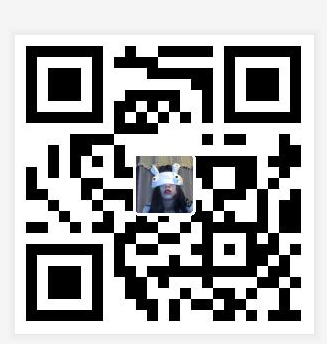
这里面的代码注释我都写得很清楚了,相信大家都可以看明白,其中:
生成二维码方法:
QRCodeUtil.encode(text, imgPath, destPath, true);
text:编码到二维码中的内容,这里是“我是小铭”
imgPath:要嵌入二维码的图片路径,如果不写或者为null则生成一个没有嵌入图片的纯净的二维码
destPath:生成的二维码的存放路径
true:表示将嵌入二维码的图片进行压缩,如果为“false”则表示不压缩。
解析二维码方法:
QRCodeUtil.decode(destPath);
destPath:将要解析的二维码的存放路径
该方法返回值为String类型,即返回解析出的文字或者数字等。
转载:https://blog.csdn.net/jam_fanatic/article/details/82818857
java实现二维码的生成与解析的更多相关文章
- 关于java的二维码的生成与解析
本文说的是通过zxing实现二维码的生成与解析,看着很简单,直接上代码 import java.io.File; import java.io.IOException; import java.nio ...
- Java 条形码 二维码 的生成与解析
Barcode简介 Barcode是由一组按一定编码规则排列的条,空符号,用以表示一定的字符,数字及符号组成的,一种机器可读的数据表示方式. Barcode的形式多种多样,按照它们的外观分类: Lin ...
- 【Java】Java实现二维码的生成与解析
pom依赖 <dependency> <groupId>com.google.zxing</groupId> <artifactId>core</ ...
- java实现二维码的生成和解析:QRCode、zxing 两种方式
第一种:QRCode.jar,使用QRCode生成和解析二维码 1.导入jar包 2.代码 (1)QRCodeUtil .java import com.swetake.util.Qrcode; i ...
- ZXing二维码的生成和解析
Zxing是Google提供的关于条码(一维码.二维码)的解析工具,提供了二维码的生成与解析的方法, 现在我简单介绍一下使用Java利用Zxing生成与解析二维码 注意: 二维码的生成需要借助辅助类( ...
- .net core 的图片处理及二维码的生成及解析
写代码这事,掐指算来已经十有余年. 从html到css到javascript到vbscript到c#,从兴趣到职业,生活总是失落与惊喜并存. 绝大部分时候,出发并不是因为知道该到哪里去,只是知道不能再 ...
- 关于用Java实现二维码的生成
昨天晚上看了一个视频讲的是web端把名片搞成二维码的形式,觉得挺有意思的,不过我还是初学,所以就没在网页端实现,写了命令行程序. 虽然看着程序很短,不过写的过程中还是出了问题, 最致命的就是 Grap ...
- java实现二维码的生成.
目录 1.二维码概念 2.二维码发展历史 3.二维码分类 4.二维码优缺点 5.QR Code 1.二维码又称 二维条码 (2-dimensional bar code)是用某种特定的几何 ...
- java二维码的生成与解析代码
二维码,是一种采用黑白相间的平面几何图形通过相应的编码算法来记录文字.图片.网址等信息的条码图片.如下图 二维码的特点: 1. 高密度编码,信息容量大 可容纳多达1850个大写字母或2710个数字或 ...
随机推荐
- 出现 HTTP 错误 500.19 错误代码 0x800700b7
这个内容出现主要问题是在IIS上,我们一般程序开发 iis中默认的路径只是http://localhost/,相当于环境变量中已定义好了,如果自己创建的项目直接将路径定义到这,就会替换图二中的路径,然 ...
- Struts2自定义标签重写(转)
TagSupport的学习 1 TagSupport与BodyTagSupport的区别 TagSupport与BodyTagSupport的区别主要是标签处理类是否需要与标签体交互,如果不需要交互的 ...
- Derby 数据库 客户端 ij使用
Derby是开源的.嵌入式的Java数据库程序,ij是Derby提供的客户端工具,相当于其他数据库提供的sqlplus工具. ij是纯Java的程序,不用安装,使用起来就像运行普通的Java应用程序一 ...
- eclipse设置打开java文件目录
1. 第一步: 2. 第二步: 3. 第三步: Location:C:/WINDOWS/explorer.exe Arguments:${container_loc}
- Jmeter - 命令行参数
同步更新至个人博客:https://njlife.top/2019/07/12/Jmeter-%E5%91%BD%E4%BB%A4%E8%A1%8C%E5%8F%82%E6%95%B0/ Jmeter ...
- udp广播,单播,多播
一.单播 (1)简介 两个节点之间的通信,一个发送者一个接收者 (2)特点 1.服务器及时响应客户机的请求. 2.服务器针对每个客户不通的请求发送不通的数据,容易实现个性化服务. 3.允许在Inter ...
- 从Excel中读取数据并批量写入MySQL数据库(基于MySQLdb)
一.Excel内容如下,现在需要将Excel中的数据全部写入的MySQL数据库中: 二.连接MySQL的第三方库使用的是“MySQLdb”,代码如下: # -*- coding:utf-8 -*-im ...
- vue2 练习
table标签的frame和rules属性,可以控制边框的显示.frame属性控制着表格最外围的四条边框的可见性,而 rules 则控制着表格内部边框的可见性. frame属性可取的值及含义如下: * ...
- python镜像
国内镜像列表豆瓣: http://pypi.doubanio.com/simple清华: https://pypi.tuna.tsinghua.edu.cn/simple科大: https://mir ...
- Codeforces Round #346 (Div. 2) E题 并查集找环
E. New Reform Berland has n cities connected by m bidirectional roads. No road connects a city to it ...